Skip to content

ESET Mobile Security榮獲AV-Test“最佳Android防病毒軟件”的最高分

Bratislava – ESET, a global leader in cybersecurity, has been commended with a top score in the latest AV-Test for best antivirus software for Android. AV-TEST, a leading independent testing organization, uses one of the largest collections of digital malware samples in the world to create a real-world environment for highly accurate in-house testing.

In July 2020, AV-Test evaluated 17 mobile security products for Android, using their default settings and the most current versions of all products. The testing focused on malware detection and (product) usability, including performance and false positives. ESET Mobile Security (EMS) achieved top scores across the full battery of tests with full 6.0/6.0 marks for Protection Score, Performance Score and Usability.

The ESET Mobile Security app for Android was also highlighted for not impacting battery life or slowing down the device. Key features of the solution referenced in the testing include:

Application Control: A feature that allows, rejects or limits access to certain apps
Call Blocker: Blocks calls from specific or unknown numbers
Safe Browsing: Protection against malicious websites and/or phishing
Commenting on the results, Branislav Orlík, Product Manager at ESET, said: “ESET’s recognition from AV-Test is testament to our dedication to our customers and our promise to always deliver the best in IT security solutions. Our phones are at the center of our digital lives, and it is vital that users and their personal and professional data are protected. We are honored to be recognized for our cutting-edge solutions and for our commitment to always innovating and updating our product offerings.”

Click here to find out more information about ESET Mobile Security.

About Version 2 Digital

Version 2 Digital is one of the most dynamic IT companies in Asia. The company distributes a wide range of IT products across various areas including cyber security, cloud, data protection, end points, infrastructures, system monitoring, storage, networking, business productivity and communication products.

Through an extensive network of channels, point of sales, resellers, and partnership companies, Version 2 offers quality products and services which are highly acclaimed in the market. Its customers cover a wide spectrum which include Global 1000 enterprises, regional listed companies, different vertical industries, public utilities, Government, a vast number of successful SMEs, and consumers in various Asian cities.

About ESET
For 30 years, ESET® has been developing industry-leading IT security software and services for businesses and consumers worldwide. With solutions ranging from endpoint security to encryption and two-factor authentication, ESET’s high-performing, easy-to-use products give individuals and businesses the peace of mind to enjoy the full potential of their technology. ESET unobtrusively protects and monitors 24/7, updating defenses in real time to keep users safe and businesses running without interruption. Evolving threats require an evolving IT security company. Backed by R&D facilities worldwide, ESET became the first IT security company to earn 100 Virus Bulletin VB100 awards, identifying every single “in-the-wild” malware without interruption since 2003.

ESET重點關注KrØØk和Stantinko在Black Hat USA 2020上的領先研究

BRATISLAVA – ESET, a global leader in IT security, will highlight its latest research during Black Hat USA 2020. ESET researchers Robert Lipovský, Štefan Svorenčík and Vladislav Hrčka will present this Thursday, August 6, on “KrØØk: Serious Vulnerability Affected Encryption of Billion+ Wi-Fi Devices” and “Stantinko Deobfuscation Arsenal.” Black Hat is the world’s leading information security event, which is being held completely virtually this year due to the COVID-19 crisis. After the conclusion of the event, ESET will make the findings available to the research community, media and the general public.

The presentation about KrØØk by Robert Lipovský and Štefan Svorenčík will take place on Thursday, August 6, at 12:30 – 1:10 PDT (21:30 – 22:10 CEST). The talk will disclose the most recent discoveries that more Wi-Fi chip manufacturers, specifically Qualcomm and Mediatek, have also been affected by variants of the KrØØk vulnerability.

KrØØk is a vulnerability originally discovered in Broadcom and Cypress Wi-Fi chips that allows unauthorized decryption of some WPA2-encrypted traffic. Exploiting KrØØk allows adversaries to intercept and decrypt (potentially sensitive) data, but with a significant advantage for the attackers: While they need to be in range of the Wi-Fi signal, they do not need to be authenticated and associated to the WLAN. In other words, the attackers do not need to know the Wi-Fi password.  
The KrØØk findings were first presented at the RSA Conference 2020 in February. After publication, the vulnerability was brought to the attention of many more chipset and device manufacturers. Some manufacturers have since discovered their products to be vulnerable and have deployed patches. 

The second talk will aid malware researchers and reverse engineers to analyze Stantinko, a botnet performing click fraud, ad injection, social network fraud, password stealing attacks and cryptomining. The Black Hat Arsenal format will predominantly focus on Stadeo, a set of tools we developed primarily to facilitate the analysis of Stantinko but that can also be helpful when analyzing other malware strains utilizing similar techniques, including the infamous Emotet crimeware. Stadeo will be demonstrated for the first time at Black Hat USA 2020 and subsequently published for free use. 

The demo will be provided by ESET researcher Vladislav Hrčka on Thursday, August 6, at 11:00 – 12:00 PDT (20:00 – 21:00 CEST).

For more information, visit Black Hat USA and WeLiveSecurity, where the research will be subsequently published. Make sure to follow ESET research on Twitter for the latest news from ESET Research.

About Version 2 Digital

Version 2 Digital is one of the most dynamic IT companies in Asia. The company distributes a wide range of IT products across various areas including cyber security, cloud, data protection, end points, infrastructures, system monitoring, storage, networking, business productivity and communication products.

Through an extensive network of channels, point of sales, resellers, and partnership companies, Version 2 offers quality products and services which are highly acclaimed in the market. Its customers cover a wide spectrum which include Global 1000 enterprises, regional listed companies, different vertical industries, public utilities, Government, a vast number of successful SMEs, and consumers in various Asian cities.

About ESET
For 30 years, ESET® has been developing industry-leading IT security software and services for businesses and consumers worldwide. With solutions ranging from endpoint security to encryption and two-factor authentication, ESET’s high-performing, easy-to-use products give individuals and businesses the peace of mind to enjoy the full potential of their technology. ESET unobtrusively protects and monitors 24/7, updating defenses in real time to keep users safe and businesses running without interruption. Evolving threats require an evolving IT security company. Backed by R&D facilities worldwide, ESET became the first IT security company to earn 100 Virus Bulletin VB100 awards, identifying every single “in-the-wild” malware without interruption since 2003.

據研究指稱:約100億筆資料被曝露於不安全的資料庫中

這些皆為個人資料,且有可能做為網路釣魚攻擊之用和被盜用身份

研究人員發現,將近105億筆消費者資料分佈在20個國家(地區)約10,000個不安全的網路資料庫中,資料內容包括電子郵件信箱、密碼和電話號碼等。

這項研究是由NordPass(知名VPN服務 NordVPN 所推出的密碼管理器)在2019年6月至2020年6月與一位不願透露姓名的白帽駭客合作進行的,此名白帽駭客使用Elasticsearch(分散式搜尋引擎,簡稱 ES)和MongoDB在網路上查找錯誤配置的資料庫;值得注意的是,資料被曝露最多的三個國家,分別為法國(檢測到51億筆),中國以26億筆位居第二,美國則以23億筆排名第三;而錯誤配置的資料庫數量最多的國家,中國為第一(4,000),其次是美國(3,000),第三則是印度(500)。

由於資料被存儲在不受保護(不安全)的資料庫中,故網路駭客就可輕易取得資料,而有了這些資料,他們就可以為所欲為,例如,被盜用的資料則有可能被用於社交工程(social engineering )攻擊,讓受害者掉入陷阱,來套取用戶如密碼或其他帳戶的訊息;另也有可能被用於進行(魚叉式)網路釣魚攻擊,而導致金額可觀的財務損失;或藉由在暗網上販售其個人資料,來勒索受害者等等。

而這些都在在證明,密碼管理是保護資料庫安全的基本要求,最後ESET資安專家提供維護資料庫安全的小技巧,如使用字母加數字的高強度密碼,或使用密碼管理器做為輔助,另外也強烈建議使用雙重身份驗證機制,來確保重要資料的安全性。

原文出處:https://www.welivesecurity.com/2020/07/30/10-billion-records-exposed-unsecured-databases/

#ESET資安產品家用及企業版均配備「網路釣魚防護」功能,有效阻止您的重要資料被竊取及遭到網路釣魚攻擊
企業用戶:https://www.eset.tw/estore/zh/page/enterprise
個人用戶:https://www.eset.tw/estore/zh/

# ESET雙重認證安全:https://www.eset.tw/business/two-factor-authentication/

ESET發布了用於在Thunderbolt界面中導航來自漏洞的風險的指南

BRATISLAVA – ESET has published a comprehensive overview of risks stemming from Thunderspy, a series of vulnerabilities in Thunderbolt technology, and possible protections. Via Thunderspy, an attacker can change – possibly even remove – the security measures of the Thunderbolt interface on a computer. As a result, an attacker with physical access to the target computer can steal data from it, even if full disk encryption is used and the machine is locked with a password or sleeping in low-power mode.

Thunderspy was discovered by Björn Ruytenberg, a computer security researcher, in May 2020. “While Ruytenberg’s research has received publicity because of its novel attack vector, not much has been said about how to protect against Thunderspy, or even determine whether you have been a victim,” points out Aryeh Goretsky, ESET Distinguished Researcher.

In his article “Thunderspy attacks: What they are, who’s at greatest risk and how to stay safe,” Goretsky briefly explains the technical background for Thunderspy but focuses primarily on practical methods to defend against it.

Thunderbolt-based attacks are very rare because they are, by their nature, highly targeted. “The fact a typical user will not get into an attacker’s crosshairs doesn’t mean everyone is safe. For many, following some of the admittedly draconian recommendations we describe in our article really makes sense,” comments Goretsky.

There are two types of attacks against the security that Thunderbolt relies on to maintain the integrity of a computer. The first is cloning the identities of Thunderbolt devices that are already trusted and allowed by the computer. The second is to permanently disable Thunderbolt security so that it cannot be re-enabled.

“The cloning attack is like thieves who steal a key and copy it. Afterwards, they can use the copied key repeatedly to open that lock. The second attack is a form of bricking a chip. In this case, permanently disabling Thunderbolt’s security levels and write-protecting the changes so they cannot be undone,” explains Goretsky.

Neither type of attack is done simply, since actual in-person access to the target computer is required, along with the tools to disassemble the computer, attach a logic programmer, read the firmware from the SPI flash ROM chip, disassemble and modify its instructions, and write it back to the chip. Such attacks are a type of “evil maid attack,” implying the scenario of the attacker entering a hotel room while the victim is not present to conduct the attack.

The necessity to physically tamper with the computer limits the range of potential victims to high-value targets. Some may be pursued by nation-state intelligence or law enforcement agencies, but also business executives, engineers, administrative personnel or even frontline employees may be targets of opportunity if the attacker has some commercial motive, such as industrial espionage. Under oppressive regimes, politicians, NGOs and journalists are also possible targets for advanced threats like Thunderspy.To defend against Thunderspy, just like any other hardware attacks requiring physical access to the system, it’s important to decide whether the goal of the defense is to make it evident that a physical attack occurred, or to protect against it.

Protection methods against Thunderspy attacks may be divided into separate categories. “First, prevent any unauthorized access to your computer. Second, secure all your computer’s relevant interfaces and ports, such as USB-C. Besides that, look beyond physical measures and also take steps to make your computer’s firmware and software more secure,” summarizes Goretsky.

The article “Thunderspy attacks: What they are, who’s at greatest risk and how to stay safe” contains many practical pieces of advice on improving the security against the theft of data by Thunderspy, including one that stands out as simple yet relatively powerful.

“Disable hibernation, sleep or other hybrid shutdown modes. Make the computer turn completely off when not in use – doing this can prevent attacks on the computer’s memory via Thunderspy,” recommends Goretsky.

Aside from all other security measures, users employ security software from a reputable provider that can scan the computer’s UEFI firmware, one of the locations where Thunderbolt security information is stored.

For more information, please read “Thunderspy attacks: What they are, who’s at greatest risk and how to stay safe” at WeLiveSecurity.com.

About Version 2 Digital

Version 2 Digital is one of the most dynamic IT companies in Asia. The company distributes a wide range of IT products across various areas including cyber security, cloud, data protection, end points, infrastructures, system monitoring, storage, networking, business productivity and communication products.

Through an extensive network of channels, point of sales, resellers, and partnership companies, Version 2 offers quality products and services which are highly acclaimed in the market. Its customers cover a wide spectrum which include Global 1000 enterprises, regional listed companies, different vertical industries, public utilities, Government, a vast number of successful SMEs, and consumers in various Asian cities.

About ESET
For 30 years, ESET® has been developing industry-leading IT security software and services for businesses and consumers worldwide. With solutions ranging from endpoint security to encryption and two-factor authentication, ESET’s high-performing, easy-to-use products give individuals and businesses the peace of mind to enjoy the full potential of their technology. ESET unobtrusively protects and monitors 24/7, updating defenses in real time to keep users safe and businesses running without interruption. Evolving threats require an evolving IT security company. Backed by R&D facilities worldwide, ESET became the first IT security company to earn 100 Virus Bulletin VB100 awards, identifying every single “in-the-wild” malware without interruption since 2003.

【重要訊息公告】Windows 10 2004版ESET兼容性問題

ESET部分產品版本在Windows 10 2004版會出現BSOD錯誤或兼容性問題。

ESET原文說明:KB7511(連結)

  • ESET受影響之版本:
    ESET Endpoint 系列產品 versions 7.2 (up to 7.2.2055.0)
    ESET Windows 家用產品 versions 13.1 (up to 13.1.17.0)

  • 問題&解決方式:
    您的Windows 10已更新至2004版,更新後Windows跳出警示”此應用程式可能無法正常運作”,應用程式列表為ESET軟體;
    建議您先將ESET舊版軟體利用ESET Uninstaller Tool(參考連結)移除後重新安裝您的ESET軟體。

  • 預防:
    您的Windows 10尚未更新至2004版,強烈建議先將您的ESET軟體更新至最新版本,便可避免遇到上述狀況。


※ ESET 新版軟體載點

企業產品
ESET Endpoint Antivirus
Windows 7以上 新版載點
ESET Endpoint Security
Windows 7以上 新版載點
 
家用產品
ESET Smart Security Premium
Windows 7以上 新版載點
ESET Internet Security
Windows 7以上 新版載點
ESET NOD32 Antivirus
Windows 7以上 新版載點

關於NAC (Network Access Control) 網路存取控管解決方案:什麼是802.1X EAP

First Thing’s First

As we’ve written about previously, the standard authentication protocol used on encrypted networks is Extensible Authentication Protocol (EAP), which provides a secure method to send identifying information for network authentication. 802.1x is the standard that is used for passing EAP over wired and wireless Local Area Networks (LAN), as it provides an encrypted EAP tunnel that prevents outside users from intercepting information. The EAP protocol can be configured for credential (EAP-TTLS/PAP and PEAP-MSCHAPv2) and digital certificate (EAP-TLS) authentication and is a highly secure method for protecting the authentication process.

Throughout this article, we will look at how to monitor 802.1X EAP and why doing so is important from a network security perspective.


MAC Authentication Bypass (MAB)

MAB enables port-based access control using the MAC address of the endpoint. A MAB-enabled port can be dynamically enabled or disabled based on the MAC address of the device that connects to it. The below diagram illustrates the default behavior of a MAB-enabled port.


EAP MAC authentication bypass

Session Initiation

From the switch’s perspective, the authentication session begins when the switch detects link-up on a port. The switch will initiate authentication by sending an EAP Request-Identity message to the endpoint. If the switch does not receive a response, the switch will retransmit the request at periodic intervals. If no response is received after the maximum number of retries, the switch will let IEEE 802.1X time out and proceed to MAB.


MAC Address Learning

During the MAC address learning stage, the switch begins MAB by opening the port to accept a single packet from which it will learn the source MAC address of the endpoint. Packets sent before the port has fallen back to MAB (that is, during the IEEE 802.1X timeout phase) are discarded immediately and cannot be used to learn the MAC address.

The switch can use almost any Layer 2 and 3 packets to learn MAC addresses, with the exception of bridging frames such as Link Layer Discovery Protocol (LLDP), Spanning Tree Protocol, and Dynamic Trunking Protocol (DTP). 1

After the switch learns the source MAC address, it discards the packet. Then the switch crafts a RADIUS Access-Request packet. A sample MAB RADIUS Access-Request packet is shown in the snapshot below.


RADIUS Access-Request Packet for MAB

By default, the Access-Request message is a Password Authentication Protocol (PAP) authentication request, The request includes the source MAC address in three attributes: Attribute 1 (Username), Attribute 2 (Password), and Attribute 31 (Calling-Station-Id). Although the MAC address is the same in each attribute, the format of the address differs. This feature is important because different RADIUS servers may use different attributes to validate the MAC address. Some RADIUS servers may look at only Attribute 31 (Calling-Station-Id), while others will actually verify the username and password in Attributes 1 and 2.

Because MAB uses the MAC address as a username and password, you should make sure that the RADIUS server can differentiate MAB requests from other types of requests for network access. This precaution will prevent other clients from attempting to use a MAC address as a valid credential. Cisco switches uniquely identify MAB requests by setting Attribute 6 (Service-Type) to 10 (Call-Check) in a MAB Access-Request message. Therefore, you can use Attribute 6 to filter MAB requests at the RADIUS server.


Session Authorization

If the MAC address is valid, the RADIUS server will return a RADIUS Access-Accept message. This message indicates to the switch that the endpoint should be allowed access to the port. Optionally, the RADIUS server may include dynamic network access policy instructions (for example, a dynamic VLAN or access control list [ACL]) in the Access-Accept message. In the absence of dynamic policy instructions, the switch will simply open the port. No further authentication methods will be tried if MAB succeeds.

If the MAC address is not valid or is not allowed to access the network for policy reasons, the RADIUS server will return a RADIUS Access-Reject message. This message indicates to the switch that the endpoint should not be allowed access to the port based on the MAC address.

If no fallback authentication or authorization methods are configured, the switch will stop the authentication process and the port will remain unauthorized.


Session Accounting

If the switch can successfully apply the authorization policy, the switch can send a RADIUS Accounting-Request message to the RADIUS server with details about the authorized session.
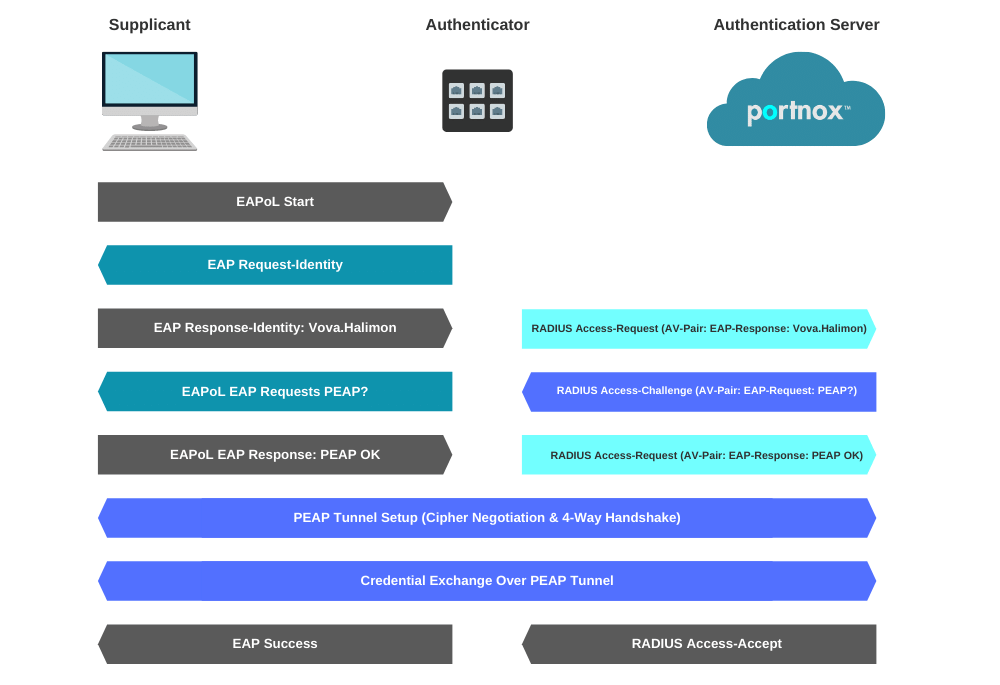

EAP Request Frame

In the diagram above, the first frame sent is an EAPOL-Start frame. This frame is not critical, and the process can be started by the authenticator sending the EAP-Request Frame.

Next, the supplicant responds with an EAP-Response. Messages from the Authenticator to the Radius server use the radius protocol (UDP 1812 for Authentication)When the authenticator receives an Access-Accept packet from the radius server it will authorize the port and allow access to the supplicant. If access is denied by the Radius server an Access-Reject message will be sent to the authenticator and the port will stay unauthorized.

The supplicant can terminate the authentication of the port by sending an EAPOL-logoff frame to the authenticator.


Supplicant to Authenticator (EAPoL)

This is the communication method utilized that provides the Authenticator and the Client a line of communication prior to network access. This is what the capture will look like:


EAPoL communication

The EAPoL portion of communication will vary depending on the authentication type. In my examples, we are using EAP-PEAP w/EAP-MsCHAPv2. This is a fairly standard form of authentication.

The useful portions that can usually be derived from a pcap are:


EAP-Identity Response

In this frame, you can see the Client’s (Supplicant) Identity being used of “Vova.Halimon“. This can be extremely useful when trying to determine if the supplicant is going to authenticate as the user or the machine account as well as what the user could be typing into the username prompt.

For more information on EAP types, visit the IANA EAP registry.

EAP-TLS (Certificate Example)


EAP Auth Method Negotiation and Credential Exchange:


EAP Auth Method

The first message in the above screenshot is the server’s proposal of EAP-PEAP (EAP-TLS, EAP-TTLS EAP-FAST, EAP-LEAP, EAP-MD5) then the client’s response with, “EAP-PEAP good for me” In some situations, depending on the RADIUS server configuration, the client may try to propose a method that is not permitted or supported by the server. This is where you would see that negotiation fail, and ultimately an Access-Reject / EAP-Failure.

EAP Success (Wired & Wireless) & 4-Way Handshake (Wireless):


EAP Success


EAP Code Type
1 Request
2 Response
3 Success
4 Failure

Once the client has been successfully authenticated and authorized, there is an EAP Success message sent back to signify the end of the process. If this is a wired client, the process is over, and the client is able to start transmitting and receiving data frames. If this is a wireless client, the station will utilize a few EAP attributes and the AP will utilize two MPPE (Microsoft Point-to-Point Encryption – key attributes in the RADIUS Access-Accept response to perform the 4-way handshake and create the encryption keys for secure communication.


Extensible Authentication Protocol (EAP) Authentication Types

  • MD5 isn’t typically used as it only does a one-way authentication, and perhaps even more importantly doesn’t support automatic distribution and rotation of WEP keys so does nothing to relieve the administrative burden of manual WEP key maintenance.
  • TLS, while very secure, requires client certificates to be installed on each Wi-Fi workstation. Maintenance of a PKI infrastructure requires additional administrative expertise and time in addition to that of maintaining the WLAN itself.
  • TTLS addresses the certificate issue by tunneling TLS, and thus eliminating the need for a certificate on the client side. Making this an often preferred option. Funk Software* is the primary promoter of TTLS, and there’s a charge for supplicant and authentication server software.
  • LEAP has the longest history, and while previously Cisco proprietary (works with Cisco Wi-Fi adapters only), Cisco has licensed LEAP to a variety of other manufacturers through their Cisco Compatible Extensions program. A strong password policy should be enforced when LEAP is used for authentication.
  • EAP-FAST is now available for enterprises that can’t enforce a strong password policy and don’t want to deploy certificates for authentication.

The more recent PEAP works similarly to EAP-TTLS in that it doesn’t require a certificate on the client side. PEAP is backed by Cisco and Microsoft and is available at no additional cost from Microsoft. If desired to transition from LEAP to PEAP, Cisco’s ACS authentication server will run both.


EAP-TLS Example


EAP-TLS example

However, in this graphic, you can see the client and server negotiate EAP-PEAP. Once that is completed, the server will present the client with its certificate. If the client does not trust the certificate from the server, and the user does not accept the certificate(The end-user might be presented with a dialog to trust this certificate), the exchange will fail after the first frame or two of the handshake.

In this situation, however, the client trusts the server certificate, and the two endpoints secure the medium with a TLS tunnel. Once secured you should notice that the protocol becomes purely TLS and since the traffic is encrypted, we can only see that the frames are “Application Data”. This is the point at which the client and server are exchanging inner authentication data such as EAP-MsCHAPv2 or EAP-TLS.

About Version 2 Digital

Version 2 Digital is one of the most dynamic IT companies in Asia. The company distributes a wide range of IT products across various areas including cyber security, cloud, data protection, end points, infrastructures, system monitoring, storage, networking, business productivity and communication products.

Through an extensive network of channels, point of sales, resellers, and partnership companies, Version 2 offers quality products and services which are highly acclaimed in the market. Its customers cover a wide spectrum which include Global 1000 enterprises, regional listed companies, different vertical industries, public utilities, Government, a vast number of successful SMEs, and consumers in various Asian cities.

About Portnox
Portnox provides simple-to-deploy, operate and maintain network access control, security and visibility solutions. Portnox software can be deployed on-premises, as a cloud-delivered service, or in hybrid mode. It is agentless and vendor-agnostic, allowing organizations to maximize their existing network and cybersecurity investments. Hundreds of enterprises around the world rely on Portnox for network visibility, cybersecurity policy enforcement and regulatory compliance. The company has been recognized for its innovations by Info Security Products Guide, Cyber Security Excellence Awards, IoT Innovator Awards, Computing Security Awards, Best of Interop ITX and Cyber Defense Magazine. Portnox has offices in the U.S., Europe and Asia. For information visit http://www.portnox.com, and follow us on Twitter and LinkedIn.。

監控802.1X EAP:您需要了解的內容

First Thing’s First

As we’ve written about previously, the standard authentication protocol used on encrypted networks is Extensible Authentication Protocol (EAP), which provides a secure method to send identifying information for network authentication. 802.1x is the standard that is used for passing EAP over wired and wireless Local Area Networks (LAN), as it provides an encrypted EAP tunnel that prevents outside users from intercepting information. The EAP protocol can be configured for credential (EAP-TTLS/PAP and PEAP-MSCHAPv2) and digital certificate (EAP-TLS) authentication and is a highly secure method for protecting the authentication process.

Throughout this article, we will look at how to monitor 802.1X EAP and why doing so is important from a network security perspective.

MAC Authentication Bypass (MAB)

MAB enables port-based access control using the MAC address of the endpoint. A MAB-enabled port can be dynamically enabled or disabled based on the MAC address of the device that connects to it. The below diagram illustrates the default behavior of a MAB-enabled port.

EAP MAC authentication bypass

Session Initiation

From the switch’s perspective, the authentication session begins when the switch detects link-up on a port. The switch will initiate authentication by sending an EAP Request-Identity message to the endpoint. If the switch does not receive a response, the switch will retransmit the request at periodic intervals. If no response is received after the maximum number of retries, the switch will let IEEE 802.1X time out and proceed to MAB.

MAC Address Learning

During the MAC address learning stage, the switch begins MAB by opening the port to accept a single packet from which it will learn the source MAC address of the endpoint. Packets sent before the port has fallen back to MAB (that is, during the IEEE 802.1X timeout phase) are discarded immediately and cannot be used to learn the MAC address.

The switch can use almost any Layer 2 and 3 packets to learn MAC addresses, with the exception of bridging frames such as Link Layer Discovery Protocol (LLDP), Spanning Tree Protocol, and Dynamic Trunking Protocol (DTP). 1

After the switch learns the source MAC address, it discards the packet. Then the switch crafts a RADIUS Access-Request packet. A sample MAB RADIUS Access-Request packet is shown in the snapshot below.

RADIUS Access-Request Packet for MAB

By default, the Access-Request message is a Password Authentication Protocol (PAP) authentication request, The request includes the source MAC address in three attributes: Attribute 1 (Username), Attribute 2 (Password), and Attribute 31 (Calling-Station-Id). Although the MAC address is the same in each attribute, the format of the address differs. This feature is important because different RADIUS servers may use different attributes to validate the MAC address. Some RADIUS servers may look at only Attribute 31 (Calling-Station-Id), while others will actually verify the username and password in Attributes 1 and 2.

Because MAB uses the MAC address as a username and password, you should make sure that the RADIUS server can differentiate MAB requests from other types of requests for network access. This precaution will prevent other clients from attempting to use a MAC address as a valid credential. Cisco switches uniquely identify MAB requests by setting Attribute 6 (Service-Type) to 10 (Call-Check) in a MAB Access-Request message. Therefore, you can use Attribute 6 to filter MAB requests at the RADIUS server.

Session Authorization

If the MAC address is valid, the RADIUS server will return a RADIUS Access-Accept message. This message indicates to the switch that the endpoint should be allowed access to the port. Optionally, the RADIUS server may include dynamic network access policy instructions (for example, a dynamic VLAN or access control list [ACL]) in the Access-Accept message. In the absence of dynamic policy instructions, the switch will simply open the port. No further authentication methods will be tried if MAB succeeds.

If the MAC address is not valid or is not allowed to access the network for policy reasons, the RADIUS server will return a RADIUS Access-Reject message. This message indicates to the switch that the endpoint should not be allowed access to the port based on the MAC address.

If no fallback authentication or authorization methods are configured, the switch will stop the authentication process and the port will remain unauthorized.

Session Accounting

If the switch can successfully apply the authorization policy, the switch can send a RADIUS Accounting-Request message to the RADIUS server with details about the authorized session.

EAP Request Frame

In the diagram above, the first frame sent is an EAPOL-Start frame. This frame is not critical, and the process can be started by the authenticator sending the EAP-Request Frame.

Next, the supplicant responds with an EAP-Response. Messages from the Authenticator to the Radius server use the radius protocol (UDP 1812 for Authentication)When the authenticator receives an Access-Accept packet from the radius server it will authorize the port and allow access to the supplicant. If access is denied by the Radius server an Access-Reject message will be sent to the authenticator and the port will stay unauthorized.

The supplicant can terminate the authentication of the port by sending an EAPOL-logoff frame to the authenticator.

Supplicant to Authenticator (EAPoL)

This is the communication method utilized that provides the Authenticator and the Client a line of communication prior to network access. This is what the capture will look like:

EAPoL communication

The EAPoL portion of communication will vary depending on the authentication type. In my examples, we are using EAP-PEAP w/EAP-MsCHAPv2. This is a fairly standard form of authentication.

The useful portions that can usually be derived from a pcap are:

EAP-Identity Response

In this frame, you can see the Client’s (Supplicant) Identity being used of “Vova.Halimon“. This can be extremely useful when trying to determine if the supplicant is going to authenticate as the user or the machine account as well as what the user could be typing into the username prompt.

For more information on EAP types, visit the IANA EAP registry.

EAP-TLS (Certificate Example)

EAP Auth Method Negotiation and Credential Exchange:

EAP Auth Method

The first message in the above screenshot is the server’s proposal of EAP-PEAP (EAP-TLS, EAP-TTLS EAP-FAST, EAP-LEAP, EAP-MD5) then the client’s response with, “EAP-PEAP good for me” In some situations, depending on the RADIUS server configuration, the client may try to propose a method that is not permitted or supported by the server. This is where you would see that negotiation fail, and ultimately an Access-Reject / EAP-Failure.

EAP Success (Wired & Wireless) & 4-Way Handshake (Wireless):

EAP Success

EAP CodeType
1Request
2Response
3Success
4Failure

Once the client has been successfully authenticated and authorized, there is an EAP Success message sent back to signify the end of the process. If this is a wired client, the process is over, and the client is able to start transmitting and receiving data frames. If this is a wireless client, the station will utilize a few EAP attributes and the AP will utilize two MPPE (Microsoft Point-to-Point Encryption – key attributes in the RADIUS Access-Accept response to perform the 4-way handshake and create the encryption keys for secure communication.

Extensible Authentication Protocol (EAP) Authentication Types

  • MD5 isn’t typically used as it only does a one-way authentication, and perhaps even more importantly doesn’t support automatic distribution and rotation of WEP keys so does nothing to relieve the administrative burden of manual WEP key maintenance.
  • TLS, while very secure, requires client certificates to be installed on each Wi-Fi workstation. Maintenance of a PKI infrastructure requires additional administrative expertise and time in addition to that of maintaining the WLAN itself.
  • TTLS addresses the certificate issue by tunneling TLS, and thus eliminating the need for a certificate on the client side. Making this an often preferred option. Funk Software* is the primary promoter of TTLS, and there’s a charge for supplicant and authentication server software.
  • LEAP has the longest history, and while previously Cisco proprietary (works with Cisco Wi-Fi adapters only), Cisco has licensed LEAP to a variety of other manufacturers through their Cisco Compatible Extensions program. A strong password policy should be enforced when LEAP is used for authentication.
  • EAP-FAST is now available for enterprises that can’t enforce a strong password policy and don’t want to deploy certificates for authentication.

The more recent PEAP works similarly to EAP-TTLS in that it doesn’t require a certificate on the client side. PEAP is backed by Cisco and Microsoft and is available at no additional cost from Microsoft. If desired to transition from LEAP to PEAP, Cisco’s ACS authentication server will run both.

EAP-TLS Example

EAP-TLS example

However, in this graphic, you can see the client and server negotiate EAP-PEAP. Once that is completed, the server will present the client with its certificate. If the client does not trust the certificate from the server, and the user does not accept the certificate(The end-user might be presented with a dialog to trust this certificate), the exchange will fail after the first frame or two of the handshake.

In this situation, however, the client trusts the server certificate, and the two endpoints secure the medium with a TLS tunnel. Once secured you should notice that the protocol becomes purely TLS and since the traffic is encrypted, we can only see that the frames are “Application Data”. This is the point at which the client and server are exchanging inner authentication data such as EAP-MsCHAPv2 or EAP-TLS.

About Version 2 Digital

Version 2 Digital is one of the most dynamic IT companies in Asia. The company distributes a wide range of IT products across various areas including cyber security, cloud, data protection, end points, infrastructures, system monitoring, storage, networking, business productivity and communication products.

Through an extensive network of channels, point of sales, resellers, and partnership companies, Version 2 offers quality products and services which are highly acclaimed in the market. Its customers cover a wide spectrum which include Global 1000 enterprises, regional listed companies, different vertical industries, public utilities, Government, a vast number of successful SMEs, and consumers in various Asian cities.

About Portnox
Portnox provides simple-to-deploy, operate and maintain network access control, security and visibility solutions. Portnox software can be deployed on-premises, as a cloud-delivered service, or in hybrid mode. It is agentless and vendor-agnostic, allowing organizations to maximize their existing network and cybersecurity investments. Hundreds of enterprises around the world rely on Portnox for network visibility, cybersecurity policy enforcement and regulatory compliance. The company has been recognized for its innovations by Info Security Products Guide, Cyber Security Excellence Awards, IoT Innovator Awards, Computing Security Awards, Best of Interop ITX and Cyber Defense Magazine. Portnox has offices in the U.S., Europe and Asia. For information visit http://www.portnox.com, and follow us on Twitter and LinkedIn.。

Stuxnet(為ICS量身定製的惡意軟體)與施耐德電氣的Triconex安全儀表系統(SIS)控制器中發現的最新漏洞的相似處


Overview

As the NSA urges companies to secure their industrial networks, two vulnerabilities were found in Schneider Electric Triconex SIS devices. Both of the vulnerabilities reside within the Tricon Communication Module (TCM) which connects the Triconex SIS to Ethernet networks. The first vulnerability (CVE-2020-7486) is a Denial of Service attack that causes the TCM to enter a fault state, and the latter (CVE-2020-7491), a more serious one, is a legacy debug port exposed to the network, that allows attackers to get root style privileges on the TCM, and upload malicious firmware to it.

While the vulnerabilities themselves are severe, exploiting them will not directly impact the SIS operation. In case of a failure in a plant, SIS operations will work normally. 

Most SIS devices use the key switch methodology, where a physical switch controls the state of the SIS. When the SIS is operating normally, this switch should be in the ‘Run’ state. In order to harm the SIS from the TCM by uploading malicious code to it, the SIS key switch must first be physically changed to ‘Program’ or ‘Remote’.


Hiding Malicious Activity, As Seen In Stuxnet

Leveraging CVE-2020-7491, an attacker can write its own firmware to the TCM. Because the TCM resides between the SIS and the OT Ethernet network, malicious code installed on it TCM can be used to hide or modify activity sent or received by the SIS.

SIS HMIs are usually connected to the Ethernet network. These HMIs can be fed incorrect information from the TCM module, causing fake SIS data to be displayed in the HMI. 

Moreover, the TCM could hide the malicious code blocks from the programming software, rendering it undetected from engineers. 

Similar practices have been seen in the past in the Stuxnet campaign, hooking network code to hide malicious activity. A rootkit was installed on PCs with engineering software and a part of its operation was to hide the infected PLC code blocks from being seen in the programming software.
Moreover, Stuxnet prevented operators from noticing its set of instructions sent to peripheral devices (centrifuges, etc) by hiding those instructions from the process image output. These monitoring and HMIs devices were fed incorrect information showing that the PLCs are functioning normally, and no out of the ordinary instructions were sent to them.


Mitigation Recommendations

  1. There are countless vulnerabilities in industrial equipment, and more vulnerabilities are discovered every day. A safety net in the form of a passive, industrial network traffic monitoring system (such as the SCADAfence Platform), will be able to slow down all attacks, enabling you to respond, and will detect most attack vectors. Such products increase the cost of an attack, in a way that makes the attack irrelevant for most attackers. See our webinar on Efficient Industrial Cyber Security Programs for more information.
  2. Update the TCM modules using the latest firmware from Schneider Electric. Updates can be found in the official advisory – Legacy Triconex  Product Vulnerabilities
  3. Make sure SIS devices are behind a firewall and only communicating in ports they should communicate in. Both vulnerabilities were found in undocumented services communicating on non standard ports.

About Version 2 Digital

Version 2 Digital is one of the most dynamic IT companies in Asia. The company distributes a wide range of IT products across various areas including cyber security, cloud, data protection, end points, infrastructures, system monitoring, storage, networking, business productivity and communication products.

Through an extensive network of channels, point of sales, resellers, and partnership companies, Version 2 offers quality products and services which are highly acclaimed in the market. Its customers cover a wide spectrum which include Global 1000 enterprises, regional listed companies, different vertical industries, public utilities, Government, a vast number of successful SMEs, and consumers in various Asian cities.

About SCADAfence
SCADAfence helps companies with large-scale operational technology (OT) networks embrace the benefits of industrial IoT by reducing cyber risks and mitigating operational threats. Our non-intrusive platform provides full coverage of large-scale networks, offering best-in-class detection accuracy, asset discovery and user experience. The platform seamlessly integrates OT security within existing security operations, bridging the IT/OT convergence gap. SCADAfence secures OT networks in manufacturing, building management and critical infrastructure industries. We deliver security and visibility for some of world’s most complex OT networks, including Europe’s largest manufacturing facility. With SCADAfence, companies can operate securely, reliably and efficiently as they go through the digital transformation journey.