Hostinger is a hosting service provider for developers and their customers. With 1.2 million users worldwide and growing, the company works hard on improving customer support and continues updating its server technology for an even better customer experience. On the side, teams are fine-tuning home-designed hPanel, so the work there runs in a high pace environment.
To support business projects and a large customer base, Hostinger has several departments to maintain all the projects and services up and running. Therefore, originally based in Kaunas, Lithuania, the company now has an extensive team of over 1000 employees in 51 countries across the globe. Yet a large team brings its challenges in times of change. Egidijus Navardauskas, Head of Cybersecurity at Hostinger, gives his insider experience on their journey of implementing remote work in extreme situations.
The Challenge
Rapid organization onboarding to remote work during lockdown
Hostinger as most of the companies in the pre-pandemic time, lived a daily office-based life. However, it changed during Covid as all teams started working remotely and adjusting to the new way of living.
“Before the pandemic, we used to work from the office full time — there was no need for most of the teams to use an internal VPN solution except for a part of the IT staff.”
Once the lockdown period came into effect and workforce borders started expanding, the existing VPN solution limitations were revealed. It wasn’t initially built to scale sufficiently and provide a reliable VPN connection to handle the fast growth of remote employees in different countries.
The employee distribution and work from personal networks required the company to grant them a swift connection to internal resources. However, operational continuity was at high risk, and the current setup lacked role-based network access controls for maintaining security levels.
The Solution
Replace the existing VPN with a more agile solution
The employees used to work from the office all the time, and only a part of the IT staff was using an internal VPN solution as there was no need for most of the teams to access internal resources after working hours.
“As Hostinger had to move to a remote working model due to the pandemic and fast growth of remote employees in different counties, the existing VPN solution was not scalable enough to handle many users.”
Transitioning from an on-site environment to remote work quickly can be challenging for any business. Especially in the case of Hostinger, which experienced a sudden necessity to change its work and infrastructure approach.
Ad-hoc tasks are difficult to squeeze into tight schedules even in extreme circumstances, so time management and efficient distribution of resources are crucial — choosing the right solution from the first shoot is critical.
“Time shortage and lack of human resources, as all IT teams were very busy with their quarterly goals, were the additional factors that impacted the remote work situation.”
Therefore, the journey from identifying the issue, selecting a solution, and making the delivery had to be well-organized and smooth.
Why choose NordLayer?
NordLayer provided an optimal solution to change the existing company VPN and seamlessly integrate it into the current infrastructure.
Even though the requirements for a new VPN were extended to establish remote connections of the worldwide-distributed high number of employees to organizational resources and provide secure identity management measures to the IT administrators.
“NordLayer topped the shortlisted solutions by Hostinger by being the most cost-effective and easiest-to-manage option — this is how we chose the solution.”
When selecting a cybersecurity solution, Hostinger usually uses a risk-driven approach, and of course, the solution has to fulfill requirements that are suitable for our company’s needs. Following the practice ensures the organization’s main security goals, which are confidentiality, integrity, and availability of resources and data.
5 steps to onboard a global remote team overnight: decision-making process and proceeding with NordLayer
Clear steps and objectives helped Hostinger to optimize and streamline its process of problem-solving from understanding the current solution limitations — cannot scale with a growing team, what are the desired results — provide network access controls, meet compliance and security requirements, and provide backup servers, to overviewing the plan and implementing to the whole organization.
The Outcome
Fast adaptation to a crisis with extended security outcome
The company achieved a remote work setup on time, so business and team productivity weren’t affected. It all happened while facing a global lockdown with time and human resources limitations.
Today, all Hostinger employees use the solution daily as the team works in a hybrid model. We utilize ten private virtual gateways for our company needs — all this just having NordLayer and a 5-people cybersecurity team.
Most importantly, Hostinger employees can connect securely to internal resources no matter where they are. Moreover, the IT staff can focus more on other projects rather than maintaining internal VPN infrastructure — the service provider is responsible for the maintenance of the servers, so it saves a lot of valuable time.
Pro cybersecurity tips
The pandemic may start feeling like old news at some point the more time passes by, yet it was an unusual situation that had effects on businesses that reflect up to this day and will stay relevant in the future, like teaching to react to extreme situations to keep businesses running. Even though not everything can be foreseen, thus it’s beneficial to have a strategy and a sound plan in place to be well-prepared.
It’s good to start even from small things — Head of Cybersecurity of Hostinger Egidijus Navardauskas shares his tips for business security:
Have you considered how your organization would hold if stress-tested? What would be the main impediments to securing business continuity? Even expected challenges can bring to light lacking security and adoption of implemented infrastructure. Therefore, it’s always worth exploring the possibilities and performing crisis drills even on paper — be ready to ensure teams and organization perforation despite the work setup, and reach out to learn more about a remote access network solution for modern companies.
About Version 2 Digital
Version 2 Digital is one of the most dynamic IT companies in Asia. The company distributes a wide range of IT products across various areas including cyber security, cloud, data protection, end points, infrastructures, system monitoring, storage, networking, business productivity and communication products.
Through an extensive network of channels, point of sales, resellers, and partnership companies, Version 2 offers quality products and services which are highly acclaimed in the market. Its customers cover a wide spectrum which include Global 1000 enterprises, regional listed companies, different vertical industries, public utilities, Government, a vast number of successful SMEs, and consumers in various Asian cities.
Office 365 is a popular business platform worldwide. Its blend of collaboration tools, office apps, and cloud storage components makes Office 365 a go-to option for many companies. But the popularity of Office also makes it a popular target for cyber-attackers.
Securing data and protecting assets is critically important when using Office 365. This blog will discuss the major threats faced by users and we will suggest some security best practices. Office 365 is a safe place to run business operations. But you need awareness and policies to make that safety a reality.
How secure is Office 365?
Office 365 is a suite of cloud-based business tools. Like all cloud applications and platforms, Office is vulnerable to external attackers. Cyber-attackers can breach user defenses. They can access sensitive data, disrupt operations, and cause plenty of damage before they are stopped.
Security concerns are real. Up to 85% of organizations using Office 365 suffered an email data loss in 2021. 15% of organizations using the platform suffered more than 500 breaches in the same year. Just 4% of organizations not using Office 365 reported the same data breach frequency.
Microsoft has toughened Office security features in the past few years. However, Office 365 users still need to control their security posture. If you can find a secure configuration that meets your needs, you can use the platform safely. The first step in doing so is mastering the security features supplied by Microsoft.
Security features in Office 365
Users can access most Office 365 security features via the Security and Compliance Center on Microsoft Accounts. This cloud-based portal allows users to choose several critical security functions. These functions include:
1. Identity and Access Management (IAM)
Microsoft’s IAM solution lets you set up digital identities for all Office users.
Every user has a digital identity containing their authentication details and authorization information. This lets administrators add adaptive multi-factor authentication for all log-ins. Admins can manage passwords efficiently, onboard and remove users as needed.
IAM also allows you to manage authorization options for all users. Admins can set privileges based on roles or individual requirements. This limits app access to users with appropriate permissions. Unauthorized outsiders won’t be able to intrude.
2. Information security
With Microsoft Information Protection (MIP), users can manage data as it travels across Office cloud resources and even on remote work devices.
Users can classify data to ensure it only reaches authorized devices. Set different sensitivity levels to make data available or defend it as required.
Classification works alongside Data Loss Prevention (DLP) and Microsoft Information Governance (MIG) tools. Create robust security controls for confidential data, and set lifecycle controls to delete data when it is not needed.
3. Threat defenses
Microsoft offers Office-native Security Information and Event Management (SIEM) and Extended Detection and Response (XDR) features. Together, they neutralize cyber threats and track traffic to assess security weaknesses.
Azure Sentinel is a SIEM system that uses Artificial Intelligence to monitor the Office environment. Sentinel can track every active Office application and device. Security teams benefit from real-time visibility across the threat surface.
Azure Defender and Office 365 Defender are XDR tools. They extend threat detection to all endpoints, including email accounts and cloud applications.
4. Risk management
Office 365 includes a suite of tools to manage risks and ensure compliance. These tools identify and classify risks, focusing on data protection across an Office 365 environment.
Risk management tools allow security teams to assess insider threats, manage the risk of insecure communications, and fine-tune privileges for admin accounts. Audit tools let you drill down into compliance issues until every data security weakness is covered.
What are the most important Office 365 security concerns?
The security tools above are comprehensive and flexible. But they are generally voluntary. Users need to create their own security setup and choose measures that fit their Office implementation.
Office 365 leaves plenty of room for misconfigurations. And these gaps are the ideal space for attackers to work. Here are some critical threats for security managers to assess:
1. Credential theft and unauthorized access
Cyber attackers may gain access to your entire Office 365 environment if they steal user credentials. Users can leak credentials in many ways. For instance, employees could:
Share information insecurely via Office collaboration apps
Click on attachments that extract personal data
Follow unsafe links in social engineering email messages
Install malware onto a connected device
Credential theft is a constant security concern for Office 365 managers. Office does include multi-factor authentication, but MFA is not enabled as a default. Many companies forget to apply extra authentication and suffer as a result.
2. Unsafe privileges
According to Zero Trust principles, Office 365 users should have access to the resources they need and nothing more. Limiting access to sensitive data makes data extraction and loss less likely. Hackers cannot freely access data. Employees won’t be able to leak data during their tasks accidentally.
However, privileges creep can lead to too many people having access to too much data. By default, every Global Administrator Account has extensive privileges. Security teams need to restrict admin accounts manually. This potentially leaves scope to abuse access and steal data.
3. Data loss
Data breaches are a nightmare scenario for Office 365 managers, but they are possible without adequate security controls.
The major problem here is sharing. Office is built to enable information exchange. Workers share documents, conversations, databases, and much more. This is great at an operational level. But the flow of data is a security problem.
Data can leak via many storage locations or sharing tools. Employees may not know about data sharing risks or how to store data securely. And data can pass to unauthorized third parties without the knowledge of security teams.
4. Complacency
Many companies move from on-premises Office implementations to cloud-based 365 environments. While the applications are familiar, the security context of these two setups is very different.
Security managers may lack visibility of all cloud endpoints and in-use applications. They may lose sight of data containers or fail to turn on necessary security features. Sharing tools like SharePoint present new risks, such as allowing access for third-party guests. But these new risks aren’t always detected during cloud transitions.
Office 365 security best practices for business
What can businesses do about the security threats listed above? The answer lies in applying Office 365 security best practices. By following these security practices, you can enjoy the benefits of information sharing and keeping data safe.
1. Enable IAM
Access management is the top priority when securing Office 365 environments. Companies must create a secure perimeter and restrict access for unauthenticated users. Users should have the privileges they need to carry out work, but no more access than they require.
Office 365 has built-in IAM tools to control authentication and authorization centrally. Set conditional access policies for every role and back up password access with MFA technologies. Bring all Office 365 apps together via Single Sign On (SSO). This makes it easier for employees to manage passwords. It also simplifies access management for security professionals.
It is advisable to create separate user accounts for admins with elevated privileges. Every admin account requires maximum protection. Users should only use administrative accounts for specialist tasks, and rely on other accounts for everyday work.
2. Educate users to understand Office 365 security
Employees must know how to avoid phishing attacks. Build anti-phishing training into all onboarding processes and refresh this knowledge regularly. Workers should always be aware of dangerous email attachments and how to spot malicious links.
Users also require training in how to share information securely. Educate staff on how to use SharePoint and Teams without compromising security.
3. Collaborate securely
Education combines with robust collaboration app security to protect data in-transit. Install DLP systems to track sensitive files and ensure they stay within the network perimeter. DLP will alert managers if employees share critical data, and block any illegitimate transfers.
Set up Message Encryption on Teams and other communication tools. This protects the content of messages. Only authorized users will be able to read messages or open files.
Use Safe Attachments to scan all email attachments and shared files. Extend attachment protection to Teams, SharePoint and OneDrive so that all potential endpoints enjoy security coverage.
4. Put in place anti-phishing protections
Office 365 includes specialist tools to handle phishing attacks. These advanced threat protection tools go beyond trusting employees not to open malicious links. They actively inspect emails to detect malicious content.
For example, users can sandbox attachments automatically with Application Guard. This creates a protected environment to open pdfs or spreadsheets. Application Guard scans files to detect unsafe sources. This matters because Office files are common attack vectors. Sandboxing makes it much less likely that an innocent document will spark a security alert.
Safe Links is another useful anti-phishing tool that scans URLs to detect security concerns. And you can set “external” email tagging for inbound messages. This alerts users to be careful when opening external communications.
These measures do not remove all phishing risks. Zero-day threats are still an issue. But together, Application Guard, email tagging and Safe Links provide plenty of defense against social engineering attacks.
5. Use anti-malware solutions
When anti-phishing measures fail, malware protection tools enter the picture. Office 365 users should take advantage of Microsoft’s anti-malware tools wherever possible.
Implement SIEM protection via Azure Sentinel, and use XDR to scan all endpoints. These two tools work together to detect malware infections and quarantine affected files. This should neutralize ransomware attacks before they take down network infrastructure.
6. Strengthen your password policies
User access is the major Office 365 security weak point. And credential theft is the most common attack vector. Make it harder to mount credential stuffing attacks by enforcing strong password policies across all users.
Make sure Office users avoid real names and familiar words. Include multiple symbols and numbers, in combinations that are impossible to anticipate. Use password manager tools to store and update passwords. This reduces the risk of human error.
Generally, make sure users do not reuse passwords from other network assets. Every Office 365 user requires unique credentials, with no exceptions.
7. Strengthen data security controls
Employ MIP to lock down sensitive information and allow access to less important data. Office 365 lets you label sensitive information such as personally identifiable information (PII) and financial records. These labels enforce tools to keep sensitive data secure, such as encryption or watermarking.
DLP also allows you to track data movements and prevent data leaving organizational boundaries. This makes it easier to work remotely without creating additional data loss risks.
8. Check compliance and security scores
Data security measures aim to meet strict compliance goals. For instance, you may need to protect financial records to comply with PCI-DSS, or meet HIPAA rules when handling patient details. Microsoft has created tools to make the compliance task easier, so use them when available.
The Office 365 compliance portal provides guidance for meeting important regulations. It also includes a compliance score that charts your progress. Updated in real-time, the compliance score suggests required actions. It provides a useful road map to compliance across all Office 365 services.
Office also provides an overall Secure Score. This can be found in the Security Center, which records a percentage based on an organization’s security posture. Adding extra security measures boosts the score, and the system delivers recommendations based on your Office 365 setup.
9. Optimize mobile device security
Employees may use mobile devices to access Microsoft’s SaaS applications. This particularly applies to companies with large communities of remote workers or BYOD setups. In any case, it is advisable to implement Mobile Device Management (MDM) security solutions,
Office 365’s MDM tools encrypt confidential data on mobile devices. They can wipe data from devices in the event of theft. And they prevent network access for stolen or compromised devices.
10. Put in place rock-solid Office auditing
Be sure to enable the Unified Audit Log via the Office 365 Security Center. The UAL lets you track user activity across all accounts. You can see who is sharing information and how that information spreads across your cloud environment.
By default, audit logs provide 90 days of historical information, which isn’t that much. However, you can extend the scope of audit logging to as long as ten years if desired. Longer periods provide a better evidence base for compliance management, but you will need measures to efficiently store and search audit data.
Ensure secure access to Office 365 with NordLayer
Collaborate, strategize, and store data safely with our office 365 security best practices. On-board security tools and solid staff education let you use Microsoft’s business environment without creating unnecessary risks.
However, just relying on Office 365 controls is a risky move. That’s especially true for companies with hybrid cloud environments who manage multiple platforms and require secure access to SaaS apps. In those cases, it makes sense to apply enterprise-wide security solutions like NordLayer.
NordLayer’s IP allowlisting tools supplement Office 365 security controls. Admins can define a list of authorized addresses. These IP addresses are then permitted access to Office resources. Unlisted devices are excluded or require additional verification.
NordLayer encrypts traffic passing between employee devices and Office 365, countering man-in-the-middle style attacks. Threatblock also blocks malicious websites, reducing the risks posed by phishing attacks. Use Microsoft’s internal features to secure Office 365. But go further, integrating Office into your wider cybersecurity setup. To find out more, contact the NordLayer team today.
About Version 2 Digital
Version 2 Digital is one of the most dynamic IT companies in Asia. The company distributes a wide range of IT products across various areas including cyber security, cloud, data protection, end points, infrastructures, system monitoring, storage, networking, business productivity and communication products.
Through an extensive network of channels, point of sales, resellers, and partnership companies, Version 2 offers quality products and services which are highly acclaimed in the market. Its customers cover a wide spectrum which include Global 1000 enterprises, regional listed companies, different vertical industries, public utilities, Government, a vast number of successful SMEs, and consumers in various Asian cities.
At runZero, a physical office isn’t what unites us–it’s our mission that brings us together.
We are proud of the fact we are a 100% remote team,distributed across 10 states. From software engineers to product developers, we aim to help organizations keep their networks secure–all from the comfort of our own homes.
People often ask me why we chose to be a fully remote company from the beginning. As we look to grow, I wanted to take time to elaborate on why we made this choice, the benefits to our company and employees, and how we cultivate our culture without a shared office space.
Why remote-only was the right choice
I joined runZero in late 2020, two years after our founder, HD Moore, started the company. We were in the middle of a pandemic, and our conversations quickly turned to the practicalities of running a startup remotely. Because the whole world was still working remotely due to the pandemic, opening an office just didn’t make sense at the time.
HD felt that he could run the engineering side of things remotely from Austin, TX, and he asked if I needed a sales office in Boston. With all the tools at our fingertips today, I knew I could accomplish most tasks remotely.
My perspective was that working in an office is only important for certain meetings and social interactions. It’s not required for individual, focused-work (unless you have a lot of people in your apartment and need a quiet place to work,but even then, there are other options to meet that need such as coworking spaces).
All that to say: my immediate instinct was runZero could run very well remotely.
Hybrid work is the worst of both worlds
Hybrid usually means employees are in the office around 3 days a week. Employers usually allow people to have some level of freedom over the days they choose to be in the office, so they still get the flexibility from remote work. As a result, it’s difficult to get everyone at the office at the same time.
These hybrid models work in theory, but to me, they seem to bring out the worst parts of each working environment. You still feel isolated (a challenge of remote work), even though you are technically back in the office. You’re able to meet with your colleagues in-person, but never at the same time. So what’s the point?
Hybrid models are also not conducive to productive meetings. Trying to optimize an audio and video setup for in-person and remote meetings is an exercise in futility. One person is drawing on a whiteboard you can barely see, and another is struggling to hear what’s going on through the dreaded Polycom.
Meanwhile, if everyone is on a Zoom call, we can all hear and see each other simultaneously and clearly. Video-conferencing software has improved drastically over the last few years and video and audio quality is heads and tails above typical conferencing options, which allows for efficient and productive meetings.
On a personal level, this is how I prefer to work. I don’t have to sit in a car for two hours a day to get to an office and to run between different meeting rooms at different times. I can prepare healthy meals and pop in a load of laundry in between writing up strategic reports.
Beyond that, however, there are tangible benefits to the company itself that made our decision to become 100% remote an easy one.
Remote work attracts the best talent and gives us an edge over the competition
As things slowly returned to normal in 2021, more companies began to ask employees to come back to the office. However, not all of them wanted to return.
We saw this as a competitive advantage for us. We offered a workplace that allowed for talented individuals to continue working independently, while also being part of a team that shared their values. The certainty that we were never going to ask people to come to an office was a big plus for a lot of people.
In turn, the talent pool we could choose from actually broadened. Now we could pick up people from companies that wanted employees to return when they didn’t want to. We weren’t restricted to a single city either. We could attract quality candidates nationwide and hire, onboard, and train them quickly and efficiently. That’s a cost advantage that we can reinvest in the company.
As a result, our employees have also shared feedback that they are able to maintain a better work-life balance, while also feeling connected to the company mission.
Staying Connected While Apart: How We Cultivate a Company Culture
Admittedly, a formidable challenge to not having a physical workplace is missing out on what I would call ‘water cooler chatter’: those impromptu conversations. Sometimes they were about work, other times about our personal lives. These moments are crucial to helping teams feel connected to a shared experience.
However, company culture is so much more than incidental conversations around the office. It’s about people feeling like they are truly a part of something, and that kind of culture is cultivated thoughtfully and holistically.
First and foremost, understanding our cultural values was key to helping us build a remote culture – or any company culture. Then, our focus shifted to understanding how we help connect people to those values, help people develop 1-on-1 relationships, and foster interpersonal communication that builds the fabric of the company.
Let’s talk about some practical ways we foster and maintain company culture across time zones and locations.
Practical Ways we Manage Culture (and the tools we use!)
We still see the value of in-person interactions. We choose differently.
Our approach to communication is if it involves simply transferring knowledge or information, it can be accomplished virtually (through Slack, Zoom, or recorded video).
For example, we host monthly virtual town halls, which all employees and executives attend. Town halls are an important way to keep information flowing. We are open about our standing as a company, where we are going, and what’s coming next. Transparency is an even higher priority when you operate as a 100% remote company, and that’s why it’s one of our core values.
To set the tone for our time together, we usually kick off each meeting with a soundtrack. One time, after we closed a big customer in the telecommunications space, we played Lady Gaga’s “Telephone”. We take our work seriously, but we also like to have a little fun.
Since our town halls focus mainly on sharing information, they can be virtual. Meanwhile, we reserve in-person events for culture-building activities and interactions.
For example, we had our first ever company-wide meeting in-person in October 2022 in San Diego, an event we plan to host yearly. We had two to three hours of scheduled time during the day that involved sitting in a room pouring over information. The rest of each day was dedicated to team building exercises and common activities to foster lots of unstructured interactions. We also plan to meet up a second time each year for a go-to-market kickoff.
We use communication tools effectively and creatively
As you can expect, we use Slack for work-related communications, including weekly one-on-ones and asynchronous communications on important work matters.
We also use it as a way for everyone to connect. Lots of people check in with each other in the morning on the #casual-random Slack channel. We have a channel for f oodies, movies, books, pets, kids,and many other channels to help employees connect who live in the same geographical area and sometimes get together in-person.
When you work remotely, almost every interaction is scheduled, and it can start to feel too structured. To help with this, we use Donut.com; it picks two random people within the company’s Slack that haven’t chatted in a while and pairs them up that month for a 30 minute one-on-one meeting. This meeting has no specific business purpose; it is simply there to mimic–to some degree–those casual water cooler conversations. This tool is a great way to make those types of conversations happen, and we have received positive feedback from employees who have built relationships this way.
Another tool we have used is called Gather.Town. You walk around a room that looks like an 8-bit game. As you wander, you can hear and see people standing near you (virtually), similar to a cocktail party. It’s a fun, gamified way to have a sort of happy hour with colleagues.
Our Head of People, Madison Smiser, has also been organizing company coffees (some virtual, some in-person where possible), show and tells, and breakout groups. We certainly don’t have it all figured out, but we are always listening to feedback and trying out new things. We know that socializing is an important part of building culture inside a company (remote or not).
Is going remote the right choice for you?
Truthfully, remote work is not for everyone, and that’s okay. Some people don’t have the physical workspace or environment to work remotely, while others work in service-based industries or manufacturing where it’s not a feasible option.
There are certainly challenges to running a remote company, but at the end of the day it can contribute positively to employee satisfaction and culture. There is something fascinating about the level of trust that binds a team together when everyone works remotely. It’s a benefit that comes from being in completely different places and, yet, still feeling connected.
If you’re interested in joining a fully remote workplace that’s building culture in creative ways, check out our Careers page.
About runZero runZero, a network discovery and asset inventory solution, was founded in 2018 by HD Moore, the creator of Metasploit. HD envisioned a modern active discovery solution that could find and identify everything on a network–without credentials. As a security researcher and penetration tester, he often employed benign ways to get information leaks and piece them together to build device profiles. Eventually, this work led him to leverage applied research and the discovery techniques developed for security and penetration testing to create runZero.
About Version 2 Digital
Version 2 Digital is one of the most dynamic IT companies in Asia. The company distributes a wide range of IT products across various areas including cyber security, cloud, data protection, end points, infrastructures, system monitoring, storage, networking, business productivity and communication products.
Through an extensive network of channels, point of sales, resellers, and partnership companies, Version 2 offers quality products and services which are highly acclaimed in the market. Its customers cover a wide spectrum which include Global 1000 enterprises, regional listed companies, different vertical industries, public utilities, Government, a vast number of successful SMEs, and consumers in various Asian cities.
Most people understand that routers can be hacked, but not everybody realizes just how damaging this kind of cyberattack can be. In this article, I will explain exactly how a hacker can target your router, what the consequences could be, and what you can do to protect yourself.
Most users underestimate the risk
No one wants to be hacked, but it’s easy to come up with excuses for not addressing router security issues — excuses like:
Hackers don’t want to hack me (aka: “I have nothing to hide” or “My data isn’t valuable to anyone”).
It’s too complicated to secure my router and configure it properly.
I assume that it’s secure by design (aka: “I trust my ISP to secure it”).
Do these excuses look reasonable to you? Maybe, but the truth is that most hackers would be happy to attack your router if it’s not properly protected, especially if they can do so quickly.
Securing your router is not technically complicated – you don’t need an IT specialist to keep your router safe anymore than you need an automobile engineer to drive your car. Making sure your router is protected should be a standard part of internet use.
Finally, you should not trust your internet service provider (ISP) to keep you safe. More often than not, its security measures are inadequate.
Types of vulnerabilities
Routers are commonly attacked using five main methods. In all the cases, an attacker gets root access (also known as administrative access) and gains full control of the device. The following list begins with the most unlikely and challenging hacks and ends with most common methods, which are also the easiest for the hacker. Each method also comes with an example of the tools and exploits a hacker could use to carry them out.
Physical (Hacking level: extremely difficult)
A physical attack requires the hacker to get physical access to your router. If they manage this, they can bypass security measures and get full administrator access. This process usually involves connecting the router to special hardware (in most cases, a serial console or JTAG).
While it may be a challenge for them to get close to your home router, hackers can use other ways to gain physical access to these devices. For example, they could target an outdoor wireless extender placed in the yard or a wireless router in a hotel that is used by guests.
Example: Almost any device with easy access to TTL or JTAG (for example, D-Link DIR-825AC) could be used to launch this hack. JTAG can also be used legitimately to unlock and customize a router.
Local authenticated (Hacking level: moderately difficult)
To perform a local authenticated attack, a hacker must connect to your LAN (local area network) or Wi-Fi. Usually this involves connecting a tiny device to a free network socket or cracking a weak wireless password.
The hacker must also know the default administrator’s password (or be able to brute force it). Collections of default router passwords are available to hackers online as well as tools that allow them to brute force weak passwords. Infecting a local connected device, like a laptop or smartphone, could give the hacker the same level of access to your local network.
Local unauthenticated (Hacking level: challenging)
Like the local authenticated method, a local unauthenticated attack requires the hacker to connect to the LAN or Wi-Fi or to infect a local device. This time, however, the hacker does not need to know the administrator’s password.
Usually, local unauthenticated attacks involve exploiting some software vulnerability in your router’s firmware (for example, the buffer overflow in its web management function) or accessing misconfigured components (like a default telnet left without password protection).
Remote authenticated attacks are possible against certain routers via the internet, so the hacker doesn’t need to be close to you or join your LAN. They still need to know some default credentials to bypass the service password, but they can also brute force it if necessary.
Example: The Huawei LANSwitch model with a default Web UI open to the internet. This exploit was resolved in January 2023 but still acts as a good example of a remote authenticated threat — albeit one that is no longer active.
Remote unauthenticated (Hacking level: very easy)
Remote unauthenticated attacks are the worst-case scenario. Remote unauthenticated attacks can occur if anyone can access the router from the internet, without needing an administrator’s credentials.
Usually, if a router can be accessed in this way, it is the result of the device coming with bad default configuration, a hidden backdoor, or a vulnerability in the software. In some nightmare scenarios, a router may end up with all three of these issues.
A router with these problems can be quickly scanned and exploited by thousands of automated bots or commercial providers (Shodan, for example). It takes between a few minutes and a few hours for the first bot to reach the device once it’s been connected to the internet. After scanning the router, a bot will be able identify the model and use the appropriate script to gain the access.
Example: Security flaws in multiple cheap routers sold on Amazon and Walmart. While these two examples are particularly egregious, many other routers may have the same issues.
What happens once you’ve been hacked?
Your router has been hacked. What happens now? After gaining root access, the attacker’s power over the device is unlimited. Here are some of the steps a hacker might take next:
Add a persistent backdoor to allow for remote device use or botnet inclusion.
View your unencrypted traffic in plain text (using tcpdump, for example).
Carry out deep packet inspection (DPI) on any encrypted traffic.
Redirect your traffic (for example, through DNS spoofing or by using iptables).
Launch social engineering attacks against you (for example, a hacker could redirect you to a fake website, pretending to be your online banking platform, where you might expose sensitive information).
Disconnect you from the internet and demand a ransom to restore access.
Make your router a proxy for other criminals to perform criminal activities from your IP address (potentially leaving you to convince the police that you weren’t the source of the criminal activity).
Hack your other devices (moving laterally) which were not accessible from the internet. If successful, this could allow the hacker to install ransomware or cryptominer malware on your other computers at home.
Still think it’s not worth your time to secure your router?
How to protect your router
If you think it’s time to start protecting your router and the devices connected to it, take the following steps.
Understand that your data is valuable. Even if you are not a celebrity or a high-profile politician, it’s still worth a hacker’s time to attack your router. Always see yourself as a potential target. You don’t have to be paranoid, but don’t ignore the risks.
Buy a user-friendly router that has good documentation and a clear user interface and that provides technical support and firmware updates. These routers may cost more, but security is a worthwhile investment.
Do not trust your ISP. ISPs tend to lower maintenance costs by saving on security. If possible, avoid using the router provided by your ISP, or at least unlock and take full control of it (change the default password, disable remote management, remove backdoors, and enable a firewall).
If possible, use WPA3, and protect yourself with a non-dictionary-based password containing at least ten characters. Never use WEP or unencrypted Wi-FI.
Use a VPN on your local devices (laptops, phones, TVs) to encrypt traffic.
You should now understand both the risks of an unsecured router and the actions you can take today to protect it. Stay safe!
About Version 2 Digital
Version 2 Digital is one of the most dynamic IT companies in Asia. The company distributes a wide range of IT products across various areas including cyber security, cloud, data protection, end points, infrastructures, system monitoring, storage, networking, business productivity and communication products.
Through an extensive network of channels, point of sales, resellers, and partnership companies, Version 2 offers quality products and services which are highly acclaimed in the market. Its customers cover a wide spectrum which include Global 1000 enterprises, regional listed companies, different vertical industries, public utilities, Government, a vast number of successful SMEs, and consumers in various Asian cities.
About Nord Security The web has become a chaotic space where safety and trust have been compromised by cybercrime and data protection issues. Therefore, our team has a global mission to shape a more trusted and peaceful online future for people everywhere.
Data Protection Day – also known as Data Privacy Day – is an annual event observed on January 28 to raise awareness about the importance of protecting data and data privacy (think NIS Directive, NIS2 Directive, and GDPR).
It’s here to make data protection, such as SaaS data backup and recovery, top of mind—and for good reason.
Businesses must take the necessary measures to not only ensure the continuity of their operations and to protect themselves from the potentially catastrophic outcomes of a data loss event like ransomware, but to also comply with the increasingly strict demands from legislation such as the NIS2 Directive and the GDPR.
Why Is Data Protection Relevant?
As businesses increasingly move operations to software-as-a-service (SaaS) applications to streamline their operations, add flexibility (such as enabling remote work), and reduce operational costs, huge amounts of business-critical cloud data are produced every day, and it becomes ever more important to assess and ensure a robust backup and recovery plan is in place.
There is a widely shared assumption that data stored in a SaaS cloud is automatically backed up and secure since it’s in the cloud. However, that is not always the case as what is offered may not provide the protection necessary for business continuity, data restoration, or compliance: Read more about the M365 shared responsibility model.
Cloud Data Concerns
It should come as no surprise that working with cloud services can come with risks. Ransomware and disaster recovery are more and more frequently in the headlines and serve as cautionary tales. (Read our post about the disruptive power of ransomware attacks here.)
The rapid adoption of SaaS applications has also come with new and increased instances of data loss and breaches—especially in cases where there is a lag between adoption of SaaS apps and adoption of the necessary data protection. Companies may be left vulnerable to costly disruptions, downtime, and devastating fines without an adequate data security plan in place to safeguard mission-critical cloud data.
What Needs to Be Backed Up?
Data protection not only involves “just” backing up cloud SaaS data, but it should also focus on ensuring control of and continuous access to it (and the right access for the correct users at that). As with Microsoft 365 and Azure AD (Active Directory), there is a data plane and a control plane – and both need to be protected.
One way to achieve this is to adopt a solution that can not only protect the data plane but can also preserve and protect the control plane, e.g., the admin center. Coverage of identity and application objects businesses rely on to remain operational is vital. For those using Microsoft 365, it’s important to learn about why you also need Azure AD data protection: Find out why in our AAD blog here.
How Do Businesses Protect Their Data?
The best way to mitigate the risks of SaaS is to implement a data protection and management plan. This can involve using cloud-based data backup and recovery solutions which allow businesses to store their data in an independent cloud and access it from anywhere, at any time.
Data protection is especially important for businesses that rely on SaaS data for their operations, which is many, many businesses (Microsoft 365 alone has over 345 million users), as it can help ensure that data is always available, even if there is a disruption with the SaaS provider.
While cloud services can (and do) provide many benefits for businesses, they also present their own set of risks. For example, there is a very real risk that data stored in the cloud could be accessed by unauthorized parties (read our blog about the Zero Trust Principle here), or that data could be lost due to any number of issues, from technical glitches and issues to human error. Therefore, it’s important for companies to follow cloud data protection best practices. Read about backup strategy here.
Data Risks and Responsibility
But why is backing up SaaS data so important? Because it allows companies to mitigate the effects of ransomware and other data loss events. Many SaaS providers (e.g., Google, Microsoft, Salesforce) have shared responsibility models that state you, the customer, are responsible for the data created and processed.
Here are a few reasons why backup is vital:
Data breaches can happen to anyone.
While no company is immune to data breaches, having a backup solution in place can help minimize (or even nullify) the impact of a breach, helping businesses get up and running again quickly.
Data loss can be costly.
Losing data can lead to lost productivity and lost revenue within the company, and it can even result in substantial legal penalties. (Read our NIS2 post here.) According to the World Economic Forum, “historically severe fines for data loss are also helping change the cost-benefit assessment around investment in cybersecurity measures.” By implementing a backup solution, businesses can minimize the impact of data loss, avoid fines, and get back to business as usual faster, and more comprehensively, than without.
The future is uncertain.
A bit cliché, but it’s impossible to predict the future and that includes the risks to your data. According to the ESG (Enterprise Strategy Group) ransomware e-Book, “79% of respondent organizations report having experienced a ransomware attack within the last year.” By implementing a backup solution now, businesses can protect themselves against potential risks down the road – which stand to only increase.
Where to Go from Here?
Data Protection Day reminds us that SaaS data (and the protection of it) is essential to many daily operations. Not only that, with the scope and penalties of NIS2 and GDPR, enterprises are obligated to ensure a dedicated data protection solution is in place.
Researching a third-party backup solution like Keepit can simplify the complexity of the current SaaS data protection environment. Businesses can maintain control of their data always and protect themselves against data loss events and mitigate the impacts of breaches and ransomware – all while remaining compliant.
About Keepit At Keepit, we believe in a digital future where all software is delivered as a service. Keepit’s mission is to protect data in the cloud Keepit is a software company specializing in Cloud-to-Cloud data backup and recovery. Deriving from +20 year experience in building best-in-class data protection and hosting services, Keepit is pioneering the way to secure and protect cloud data at scale.
About Version 2 Digital
Version 2 Digital is one of the most dynamic IT companies in Asia. The company distributes a wide range of IT products across various areas including cyber security, cloud, data protection, end points, infrastructures, system monitoring, storage, networking, business productivity and communication products.
Through an extensive network of channels, point of sales, resellers, and partnership companies, Version 2 offers quality products and services which are highly acclaimed in the market. Its customers cover a wide spectrum which include Global 1000 enterprises, regional listed companies, different vertical industries, public utilities, Government, a vast number of successful SMEs, and consumers in various Asian cities.
The more we advance and become smarter and more efficient through new technology, the greater the opportunity for IT to inadvertently fall out of alignment with business goals. By this I mean, technology simplifies things, so users have the opportunity to bypass IT involvement and set up new processes which start driving part of the business. The downside is if you don’t have systems in place to protect these new processes, they become adopted without the benefit of protection around it.
Contributed Article: Time for a New Conversation On Cloud Data Backup
Niels Van Ingen, Keepit’s Chief Customer Officer, has contributed a blog post on how cloud backup is essential for protecting business data and ensuring continuity.
This conversation revolves around how cloud data protection is a must-have for any organization: protection that is secure, reliable, and accessible from anywhere. Van Ingen, a veteran of the data protection and management space, provides insight on this imperative.
What he refers to as a “wild west” mentality, he sees there is a lack of holistic data security planning which can lead to profound consequences for enterprises. Van Ingen shares how businesses should frame the discourse around cloud applications to safely manage the ever-growing dependence on them and the data they produce to minimize (or in some cases eliminate) business disruption.
Read the full article “The Business Case for Data Backup and Recovery” from Disaster Recovery Journal here.
About Keepit At Keepit, we believe in a digital future where all software is delivered as a service. Keepit’s mission is to protect data in the cloud Keepit is a software company specializing in Cloud-to-Cloud data backup and recovery. Deriving from +20 year experience in building best-in-class data protection and hosting services, Keepit is pioneering the way to secure and protect cloud data at scale.
About Version 2 Digital
Version 2 Digital is one of the most dynamic IT companies in Asia. The company distributes a wide range of IT products across various areas including cyber security, cloud, data protection, end points, infrastructures, system monitoring, storage, networking, business productivity and communication products.
Through an extensive network of channels, point of sales, resellers, and partnership companies, Version 2 offers quality products and services which are highly acclaimed in the market. Its customers cover a wide spectrum which include Global 1000 enterprises, regional listed companies, different vertical industries, public utilities, Government, a vast number of successful SMEs, and consumers in various Asian cities.
On November 10, 2022 (published on 27 December 2022), the EU Parliament adopted new legislation (the NIS2 Directive) to strengthen EU-wide cybersecurity resilience which includes, among other requirements, a crystal-clear requirement for backup and disaster recovery.
The Network and Information Security Directive (NIS2) is a response to the increased exposure of Europe to cyberthreats and the fact that the more interconnected we are, the more we are vulnerable to malicious cyber activity. The regulators hereby set consistent rules for companies and ensure that law enforcement and judicial authorities can work effectively and raise the awareness of EU citizens on cybersecurity.
Keepit supports the EU initiative on protecting our digital infrastructure, our sensitive business data, as well as our personal data.
What Is the Purpose of the NIS Directive?
In comparison to the first NIS directive, the purpose of the NIS2 Directive is to expand the requirements and sanctioning of cybersecurity to harmonize and streamline the level of security across member states—and with tougher requirements for several sectors.
The European Parliamentary Research Service (EPRS), in a briefing on the NIS2 Directive, tells that due to the fact that cyberattacks are quickly growing in number worldwide, as well as increasing in scale, cost and sophistication, “the Commission has submitted this proposal to replace the original NIS Directive and thereby strengthen the security requirements, address the security of supply chains, streamline reporting obligations, and introduce more stringent supervisory measures and stricter enforcement requirements.”
So what has lead to the need for more requirements? According to the WEF Global Risks Report 2023, it is because:
The ever-increasing intertwining of technologies with the critical functioning of societies is exposing populations to direct domestic threats, including those that seek to shatter societal functioning.
Who Does NIS2 Apply To? Which Sectors and entities?
The directive applies particularly to two categories, with those two being “essential” entities and “important” entities.
The following are classified as essential sectors:
Energy (electricity, district heating, oil, gas, and hydrogen)
Transport (air, rail, water, and road)
Banking (credit institutions)
Financial market infrastructures (marketplaces)
The health sector (healthcare providers and manufacturers of pharmaceuticals, etc.)
Drinking and wastewater
Digital infrastructure (including providers of cloud services, data centers, domain name systems (DNS), top-level domain registries (TLD) and public communication networks)
Information and communication service providers (ICT services)
Providers of managed services and managed security services
Public administration
Space
The ‘important entities’ includes public and private entities within:
Postal and courier services
Waste management
Manufacture, production, and distribution of chemicals
Manufacture, processing, and distribution of food
Production of i.a., electronics, machinery, and motor vehicles
Providers of certain digital services (online marketplaces and search engines and social networking services)
Research (higher education institutions and research institutions).
If you are an entity that provides a service that is essential for the maintenance of critical societal and/or economic activities—for example, a transport company—you are, in the eyes of the law, classified as an “operator of essential services.”
This classification will entail a lot of pressure on your technical and organizational structure and capabilities due to the extensive risk management security you are required by law to implement and maintain.
NIS2 Requirements, Risk Management, and Security Measures
The current NIS Directive requires the covered entities to take appropriate and proportionate technical and organizational measures to manage security risks and limit the damage in the event of a security incident.
The NIS2 Directive continues this requirement and sets out additional requirements for appropriate security measures, which must now include as a minimum:
Policies for risk analysis and information security
Incident handling
Business continuity, such as backup management and disaster recovery and crisis management
Supply chain security, including supplier management/security
Security in connection with the acquisition, development, and maintenance of network and information systems
Policies and procedures for assessing the effectiveness of measures to manage cyber security risks
Guidelines for basic ‘computer hygiene’ and cyber security training
Policies for Use of Cryptography and Encryption
Employee security, access control, and asset management
Securing internal communication systems.
Negotiating and Navigating the NIS2 Directive
A dedicated backup and data management solution can help your organization implement resilient data protection and management services for your SaaS workloads, such as Microsoft 365 and Salesforce.
Keepit offers a suite of services for your SaaS data which can help you comply with the legal requirements of the NIS2 Directive with the overall goal of protecting your business continuity.
However, you need to decide which functions are essential and determine how ready you are to maintain those critical functions after an emergency or a disruption—and finally allocate the available budget accordingly. Read our article: Data Compliance Makes Third-Party Security a Must.
Governance
With the NIS2 Directive, the governance provisions are tightened as the responsibility for violation of the NIS2 Directive is not only imposed on the legal entity but on the management itself.
Thus, management must approve the risk management measures taken by the entity regarding cybersecurity and oversee implementation and maintenance. What’s key to a backup strategy? Read our blog post on the 3-2-1 backup rule here.
To ensure sufficient competencies, management members must regularly follow specific courses to obtain the necessary knowledge, insight, and skills to understand and assess cybersecurity risks and management practices and their impact on the entity’s operations.
Supervision, Enforcement, and Sanctions
According to the NIS2 Directive, the competent national authorities must oversee compliance with the directive’s security and notification requirements based on specific incidents—and the competent authorities are empowered to issue certain orders.
What Are the Costs of Non-compliance?
The competent authority can, among other things, issue warnings and orders and (particularly materially) temporarily suspend or request that a person with management responsibility (CEO or another senior member of management) be temporarily suspended from exercising management functions in the entity.
The NIS2 Directive also tightens the sanction options. In addition to having to ensure t hat violations are punished with sanctions that are effective, proportionate to the violation, and have a dissuasive effect, the competent authority in the Member States now has the concrete possibility to impose administrative fines if the entity does not comply with the directive’s requirements for risk management measures or reporting obligations.
The administrative fines are as follow:
Essential entities – as a minimum – can be fined up to a maximum of 10 million EUR or 2% of the company’s total global annual revenue.
Important entities – as a minimum – can be fined up to a maximum of 7 million EUR or 1.4% of the company’s total global annual revenue.
When Does It Begin? Timeline and Important Dates
The EU member states will now have 20 months to transpose the new directive into national law. Want to know more about the important dates and the timeline surrounding NIS2 entering into force? Go to https://www.nis-2-directive.com/ to learn more about the important dates.
What Are the Next Steps? Educate with Further Reading
We recommend starting to educate yourself and your organization on the legal requirements and to start mapping for compliance gaps with the requirement for risk management and risk measures. You can read the EU Parliament briefing of the legislation here.
For those wanting an in-depth look into the matter, the European Parliament has shared the full texts adopted regarding this proposal, which can be read in PDF format here.
Beyond the NIS2 Directive, Keepit delivers a solid return on investment beyond the critical compliance requirements. Check out our post entitled “What’s the Return on Investment (ROI) of a cloud backup solution” here.
About Keepit At Keepit, we believe in a digital future where all software is delivered as a service. Keepit’s mission is to protect data in the cloud Keepit is a software company specializing in Cloud-to-Cloud data backup and recovery. Deriving from +20 year experience in building best-in-class data protection and hosting services, Keepit is pioneering the way to secure and protect cloud data at scale.
About Version 2 Digital
Version 2 Digital is one of the most dynamic IT companies in Asia. The company distributes a wide range of IT products across various areas including cyber security, cloud, data protection, end points, infrastructures, system monitoring, storage, networking, business productivity and communication products.
Through an extensive network of channels, point of sales, resellers, and partnership companies, Version 2 offers quality products and services which are highly acclaimed in the market. Its customers cover a wide spectrum which include Global 1000 enterprises, regional listed companies, different vertical industries, public utilities, Government, a vast number of successful SMEs, and consumers in various Asian cities.
In the modern economy, around 75% of workloads have migrated to the cloud. Millions of workers use the cloud daily to send messages, develop code, and manage customer relationships. Cloud computing is convenient, flexible, and cost-effective. But relying on the cloud brings security risks.
Unsecured apps are vulnerable to external attacks, data loss, and infrastructure damage. One unprotected app can cause an enterprise-wide data breach. Fortunately, there are many ways to strengthen cloud security and make application usage safe.
This blog will explore cloud app security and the threats users face. You should find everything you need to know when securing critical cloud assets.
What Is cloud application security?
Cloud application security is a set of tools, policies, and procedures that protect information passing across a cloud environment. The aim is to:
Create a secure environment and protect data on all cloud apps
Manage cyber threats
Prevent unauthorized access to cloud resources
Ensure the availability of critical assets
Cloud application security covers popular platforms like Amazon AWS, Google, and Microsoft Azure. It also extends to individual SaaS apps hosted on cloud platforms. Collaboration tools like Slack or Zoom require specific security solutions. The same applies to cloud-hosted business tools like Salesforce or data storage services.
Do you need cloud application security?
Yes. Legacy network security tools cannot properly protect cloud assets. VPNs and firewalls can protect locally-hosted data and applications. But cloud apps are hosted by third parties. Users can access them from virtually anywhere via a huge range of devices.
Attack surfaces have become more complex as cloud apps have proliferated. Cloud endpoints cannot be secured by locally-managed hardware or encrypted network connections. Older tech plays a role, but new application security approaches are essential.
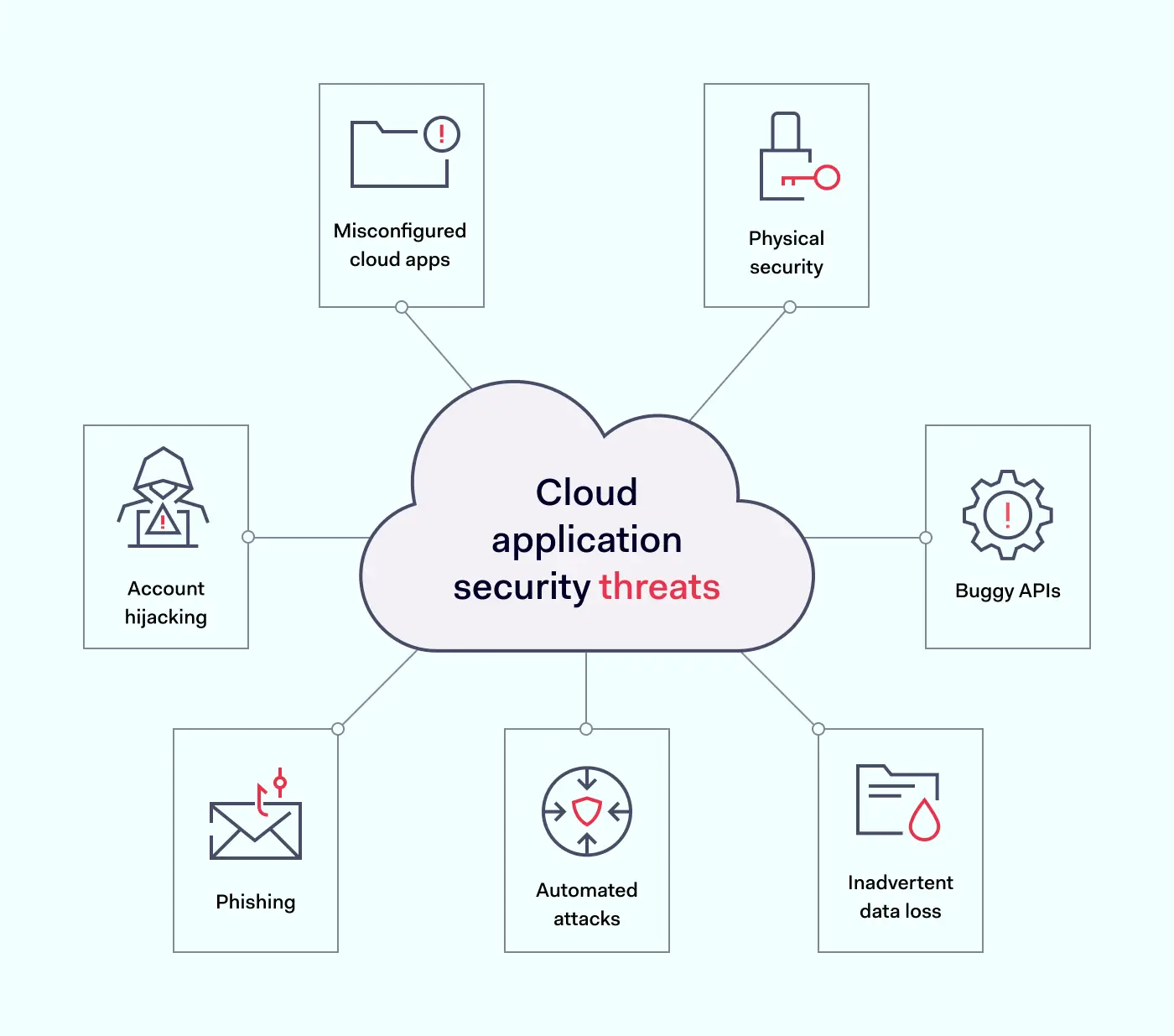
Cloud application security threats
The first step in securing a cloud environment is understanding critical security threats. Here are some of the most important cloud application security risks to factor into security planning.
Misconfigured cloud apps – Gartner reports that as many as 99% of cloud security issues are due to client error. Cloud deployments are complex, and teams must manage a range of application configurations. Every SaaS app requires access controls and processes to guard against shadow IT. Getting app configurations right is essential.
Account hijacking – Malicious attackers can hijack user accounts and infiltrate cloud-hosted apps. Account hijacking tends to result from poor password hygiene and credential exposure. Security teams must enforce strong password policies. Password managers make life easier for workers. Encryption keeps credentials private and secure.
Phishing – Phishers persuade employees to provide access credentials. They may also entice users to click links that harvest private data. Security teams must train all staff and enforce responsible behavior.
Automated attacks – Attackers may find vulnerabilities via scanning agents. Botnets target poorly secured cloud apps, taking down cloud resources via denial-of-service attacks.
Buggy APIs – APIs connect cloud applications and users. They need to be secure at all times. The problem with APIs is that they are both feature and data-rich. One compromised feature could expose data inside the app for outsiders to harvest.
Physical security – Cloud applications rest on physical hardware somewhere in the world. Cloud providers must protect hardware against theft and take measures to handle fire, extreme weather, and other sources of damage.
Inadvertent data loss – Staff can accidentally delete data, change it irreversibly, or lose encryption keys. This places intact data out of reach. A comprehensive data backup strategy is essential.
Cloud application security best practices
Failure to deal with cloud security vulnerabilities can have serious consequences. Let’s explore some app security best practices to lock down critical assets.
1. Understand the threat surface
Robust cloud application security rests upon strong visibility. Total awareness of cloud workloads and device connections puts you in a good position to apply controls.
Create and maintain inventories of connected cloud apps. This inventory will form the basis for security measures later on. Trim the inventory regularly to remove any unneeded cloud apps. Try to keep the threat surface as small as possible.
2. Deploy identity and access management (IAM)
Every cloud application is vulnerable to credential theft. Enterprises must establish complete control over who accesses cloud apps. They must also define and manage user privileges.
Cloud-native IAM tools manage access by authenticating log-in requests. They compare login credentials with secure directories and ensure that only authentic users gain access. Multi-Factor Authentication (MFA) adds another set of time-limited and unique credentials.
After admitting users, IAM systems authorize their privileges. Privileges allow users to carry out core workloads and restrict access to other applications.
Developers can access the tools they need. Sales teams can access CRM databases and marketing assets. Every role is limited, but workers are free to carry out their duties.
Additionally, IAM applies Single Sign On. SSO creates a single point of entry to cloud resources. One cloud-based application provides access to all apps. There is no need to secure multiple cloud endpoints.
More advanced IAM tools actively check for unsafe credential storage. They alert security teams if staff store credentials digitally or share information insecurely. All these features enhance the safety of cloud applications.
3. Create a cloud application security strategy
Companies need cloud application security. This strategy should specify how to access cloud apps safely and how user identities are verified. Users should know what they need to do and what threat mitigation controls are in place.
Looking beyond security policies, security teams should have a clear plan to secure data on all cloud applications. This can be visualized on three levels to cover vulnerabilities:
Platforms. Cloud infrastructure underlying can include exposed data files. If companies develop cloud infrastructure in-house, security staff must focus on correctly configuring platforms. Encrypting all data is advisable.
Databases. Secure cloud databases with appropriate encryption and access controls. Assess the right authorization levels for every role. Workers should only have access to relevant data. All other information should be out of reach.
Applications. Secure the attack surface by extending IAM to all applications. Check API configurations, and use any threat detection systems provided by app developers. Set up automated notifications about unusual access requests or network traffic patterns.
4. Use automated security testing
Testing is a critical aspect of cloud app security. It may be too late to detect and mitigate vulnerabilities when cloud apps go live. Instead, companies should switch from standard DevOps to DevSecOps (Development Security Operations).
DevSecOps includes automated testing systems that assess code during the development phase. Testing during the CI/CD process uncovers weaknesses before hackers have a chance to exploit them.
Testing should extend to open-source code libraries used to build cloud applications. It should also cover data containers and user-provisioned cloud deployments. Every part of the cloud environment is vulnerable.
Testing does not end after app provisioning. Enterprises must continuously test IAM systems to ensure the integrity of IAM processes. They should also test encryption tools. Keys may be exposed or out of date, creating inherent weaknesses.
Automation is vital. You can automate development and post-deployment testing to reduce security workloads and ensure regular results.
5. Focus on password hygiene
Companies need to drive home the importance of password hygiene. Access controls and encryption mean little if employees expose passwords to outsiders.
Stolen or hacked credentials are a major security weakness. Staff must use strong passwords and change them regularly.
SSO helps make this task more manageable as workers handle fewer credentials. Cloud-native password managers also automate password strengthening and password replacement.
6. Employ comprehensive encryption strategies
Exposed data is an easy target for hackers inside cloud perimeters. That’s why encryption is a critical component of cloud app security.
Encryption scrambles data, making it unreadable to anyone without specific encryption keys. There are three main ways to encrypt data on the cloud:
Encrypting data at rest secures information stored by enterprises. This could include HR information or financial records. Companies can encrypt files, databases, and even cloud platforms. With more layers covered, hackers will struggle to access confidential data.
Encrypting data in transit makes collaboration safer. Data constantly moves throughout cloud environments. Information passes from on-premises networks and remote devices to the cloud. Encrypting data as it moves protects against interception attacks.
Encrypting data in use makes using applications safer. Employees may retain workloads in an open state for long periods. This leaves data vulnerable to interception and extraction. The use of encryption and tools like DRM makes in-use data less accessible.
7. Active threat detection
Monitor cloud applications in real-time to detect threats and protect data. User behavior patterns can provide clues about ongoing attacks. Access requests for sensitive files can generate automated alerts.
Security teams can use activity monitoring data to fine-tune privileges management. Monitoring data is also a valuable compliance tool, providing evidence of continuous security management.
8. Regularly patch software and apply system updates
Cloud applications require timely and frequent updates to keep pace with evolving threats. Codebase changes and new services constantly present new vulnerabilities and exploits for hackers to target. Automated scheduled updates neutralize weak spots as they emerge.
9. Proactive privacy and compliance policies
Data privacy is a central part of compliance strategies. Enterprises operating in the cloud face major regulatory challenges, including GDPR, PCI-DSS, or HIPAA compliance. Secure cloud apps to meet relevant compliance standards.
Security teams should build app security audits into their schedule. Check that apps and security controls meet regulatory guidelines. Include the development environment used to provision cloud applications and open-source libraries used by DevOps teams.
Use regulatory requirements as a framework to build effective controls. For instance, PCI-DSS compliance demands data encryption for financial records. HIPAA demands tight identity management and encryption of sensitive information.
Compliance strategies aren’t static. Enterprises should take a proactive approach when securing sensitive data, using regulatory frameworks as guides.
How businesses could secure their cloud applications
Legacy tools like VPNs have security limitations when guarding the cloud. Instead, using security tools that function alongside cloud application APIs is advisable.
IAM and SSO systems are essential components of cloud security strategies alongside data encryption and threat monitoring. Fortunately, you can source solutions that bring together core app security functions.
The two major options here are proxy or API-integrated Cloud Access Security Brokers (CASBs):
Proxy CASBs route traffic through a separate proxy between user devices and cloud apps. Proxies usually employ HTTP and can intervene with traffic passing through cloud endpoints. The CASB applies encryption and tracks anomalies such as suspicious login requests.
API-based CASBs do not require an extra layer of routing. These CASBs are built into cloud apps instead. This has many potential benefits, as well as some drawbacks.
Benefits of API-based CASBs include:
Improved speed – There is no need to route traffic via a proxy. This boosts speeds and improves the user experience. Routing large amounts of traffic through a proxy may lead to performance issues as demands grow.
Firewall interaction – API CASBs supplement existing network firewalls. They add cloud security features that protect data and monitor activity. Proxy CASBs damage performance by adding another security barrier alongside firewalls.
Easy upgrades – Users must update CASBs as applications evolve. App developers often add or exchange protocols and authentication systems. But developers do not routinely alert CASB developers about needed upgrades. API-based tools are easier to patch as apps change. Over time, cloud apps will leave proxy CASBs behind.
Better security – Proxy-based CASBs break TLS sessions to access the HTTP stream. They then reconstruct TLS protection to complete cloud access. Users trust their CASB to restore TLS sessions safely and reliably. This weak point can compromise the security of cloud deployments.
Major cloud computing providers like Google and Amazon recommend API-embedded CASBs where possible. This makes perfect sense in a fast-changing cloud application environment.
However, API-based CASBs may not work with all SaaS deployments. CASBs are often compatible with most but not all APIs. This can add complexity to cloud security architecture. Proxy CASBs can operate across different APIs, resulting in simple solutions.
Enterprises also need to be aware of problems surrounding CASBs. For instance, cloud infrastructure providers rarely inform CASB developers about platform alterations that cause security issues. Cloud platforms can change quickly. CASB vendors need to keep up with changes and plug any security holes.
This issue affects proxy CASBs more than API-based versions. API-based brokers integrate closely with apps. App developers tend to flag any API changes for CASB developers. As a result, patches appear in a more timely manner. Users can expect stronger security.
The shared security responsibility model
Before implementing cloud application security best practices, bring the shared responsibility model into the picture.
In cloud environments, cloud providers and users share responsibility for security. Responsibility levels depend upon your cloud computing setup and your choice of a cloud service provider.
Generally speaking, cloud providers like AWS or Microsoft Azure assume responsibility for protecting:
The infrastructure stack (including hosts and data centers)
Software required to host cloud applications and data
Networking infrastructure connecting cloud apps
Clients must handle everything else. Responsibilities vary according to whether you choose IaaaS, PaaS, or SaaS deployments.
IaaS – Infrastructure-as-a-service users have the widest responsibilities. Users must protect apps and data, as well as infrastructure. This includes middleware and can include the cloud operating system.
PaaS – Platform-as-a-service users must protect any infrastructure they maintain, including apps and data hosted by their service provider. Any proprietary apps hosted by third parties remain your responsibility.
SaaS – Software-as-a-service users are responsible for data stored or processed by cloud applications. The main security risks relating to SaaS applications are access management and encrypting sensitive data.
Shared responsibility model in practice
Getting the balance right when applying the shared responsibility model is all-important. A good starting point is assessing every cloud application.
It is critical to define the responsibilities of users and providers for each application. Be clear about internal security controls and what your provider offers. Write a clear description of who is responsible for securing each asset and how to ensure data security.
Regardless of the cloud model in use, users are always responsible for:
Securing on-premises and remote access endpoints
Protecting data flowing through cloud resources
Managing access to cloud applications.
Bring operations and security teams together. Developers need to provision cloud services flexibly and quickly. Security teams must advise about how to calibrate those services safely.
However, cloud users aren’t alone. Cloud service providers realize the complexity involved in managing cloud application security threats.
Providers usually offer user controls within APIs to secure their apps. They may also offer monitoring and threat management functions. Always investigate and use available cloud-native security tools.
Enterprises can also request audit information from providers. This should include details about their security strategy. Compare the material provided with your service terms to ensure providers meet their obligations.
Cloud application security assessment checklist
Before we finish, here is a quick checklist of critical cloud application security measures:
1. Create robust security policies covering all cloud apps. Take into account private, public and multi-cloud environments. Consider how to secure remote workers. Include processes to onboard and off-board employees. And put plans in place to detect and mitigate data breaches.
2. Implement IAM for the cloud. Ensure users have the correct privileges. Keep in mind Zero Trust concepts and the principle of least privilege. Combine cloud apps with SSO and add an extra protective screen with MFA.
3. Train staff in cloud security awareness. Make sure staff is aware of data storage and password policies. Train workers in secure cloud application usage and ways to share data safely. Focus on the threat posed by phishing attacks.
4. Deploy cloud security controls. Protect endpoints with encryption and CASBs. For instance, cloud-specific controls like disabling SSH and SQL Server access guard against brute force attacks.
5. Check application configurations. Poorly configured cloud apps are a critical security threat. Enforce API protection policies to configure apps properly. Focus on potential malware injection sites to neutralize common external attacks.
6. Put backups in place. Store sensitive data and workloads on separate cloud servers. Backup server files to ensure smooth disaster recovery. Carry out regular restoration tests to make sure data is recoverable.
7. Update software when needed. Use automated patch management to update cloud applications and deliver patches to all worker devices. Test updates when possible before deployment.
8. Track threats and log incidents. Use automated threat scanning and activity logging. Cloud logging tools can organize and analyze complex data. Use this data to improve your security posture and provide evidence of compliance.
9. Apply data security policies. Put in place policies to encrypt data at rest, in transit, and in use. Check encryption keys are used safely, preventing exposure to external attackers.
How can NordLayer help?
Follow our cloud application security checklist and best practices to secure cloud environments. With the correct controls, enterprises can take advantage of cloud computing. Sound app security measures reduce costs and cut data loss risks.
NordLayer offers cloud security solutions for all digital businesses. Install IAM, MFA, and SSO to control cloud access and reduce the attack surface. Create encrypted connections between remote workers and cloud portals. And integrate client-side security controls with tools provided by CSPs.
Version 2 Digital is one of the most dynamic IT companies in Asia. The company distributes a wide range of IT products across various areas including cyber security, cloud, data protection, end points, infrastructures, system monitoring, storage, networking, business productivity and communication products.
Through an extensive network of channels, point of sales, resellers, and partnership companies, Version 2 offers quality products and services which are highly acclaimed in the market. Its customers cover a wide spectrum which include Global 1000 enterprises, regional listed companies, different vertical industries, public utilities, Government, a vast number of successful SMEs, and consumers in various Asian cities.
I once managed a product line when I didn’t even have access to revenue figures. Looking back now, that seems unthinkable. How was I supposed to manage a business when I didn’t even know how it was doing? I’m going to bet many others have a story like that too: where a culture of secrecy kept them from effectively doing their job.
In contrast, at runZero, we work at creating a culture of transparency: an environment where information flows between different levels of the organization and employees feel comfortable asking questions and sharing feedback.
When the executive team openly communicates with their employees, it builds trust and respect. In turn, employees are more likely to be productive and act in the best interest of the company. At tech companies, employees especially need access to accurate, up-to-date information to do their jobs well.
Ultimately, a culture of transparency leads to success because everyone is on the same page and working towards the same goals. Let’s dive into the specific values we’ve developed to promote and nurture transparency within our company.
Decentralize decision-making
Cultural value: “We provide transparency about decisions and the state of the business so everyone can make the right decisions autonomously.”
At runZero, transparency is a fundamental part of the way we do business. We focus on openness, so everyone knows the expectations, trusts each other, and feels confident in their role.
This level of transparency plays out in a variety of ways. At our monthly virtual town halls, for example, we are open about our standing as a company, where we are going, and what’s coming next. Our town halls deliver detailed information on financials, business performance, and even our cash position. We intend to be as honest if our cash position ever changes for the worse (though it hasn’t happened yet at the moment). By building trust and being transparent, everyone at runZero will feel like they are part of our successes and solutions.
When it comes to strategic planning, leaders provide context on the business to the team ahead of time, even if final decisions aren’t made yet. Leadership needs to be vulnerable in order to do this. They need to be able to admit that they don’t have all the answers yet, but are willing to share where they are in the process. This approach fosters collaboration and invites feedback. These are key elements to solving complex problems. We also take this approach in our one-on-one meetings.
We don’t pretend to have all the answers and understand that our employees may feel some degree of ambiguity in the face of such openness. This mindset allows for a free exchange of ideas between leadership and staff and promotes an environment where key players can work together to come to a consensus. The openness and directness of our leadership encourages employees to participate in the brainstorming process, ensuring that we make decisions based on collective wisdom instead of individual opinion.
When employees are confident in the knowledge they have, they can make the informed decisions independently, instead of expending time and resources asking for approvals internally. Transparency is essential for creating an environment where autonomous decision-making is not only accepted but encouraged.
The line between confidentiality and transparency
While transparency helps keep everyone in the loop, there are certain aspects of any business that must remain confidential, such as employee data and other human resources type information. In these cases, full transparency is not always the best solution.
In fact, during times of rebranding or restructuring, it’s better to wait until the new direction is clear before sharing any information widely, so it doesn’t create confusion. Information shared in confidence, for example about performance or health issues, should also not be shared widely.
However, our internal communication will always strive to be as honest and transparent as reasonably possible. We trust our employees to handle sensitive matters with utmost discretion and integrity.
Foster transparency through sharing
Cultural value: “We reward people who share information rather than hoard it.”
Information hoarding and siloed decision-making leads to inefficient processes and mistrust inside an organization.
Employees often hoard information to protect themselves from negative perceptions or to make themselves more valuable in the organization. However, when employees feel secure and comfortable in their environment, information hoarding becomes unnecessary.
That’s why we model and reward information sharing and transparency. For example, runZero’s Google Drive is fairly open—almost any employee has access to the files, except for those pertaining to sensitive information like human resources or finance. Generally speaking, however, employees can dig around for all kinds of data: company stats, dashboards, Hubspot data, and more. If employees can investigate, they can find solutions. In turn, we give them recognition for finding those solutions.
By providing tools like these and encouraging employees to use them openly and confidently, we avoid the issue of information hoarding altogether.
Help candidates grow through transparency
Cultural value: “If we turn a candidate down and we have helpful feedback, we offer to provide it.”
Sharing feedback with a candidate during the hiring process can be one of the most challenging tasks for any leader. Not only do we have to choose our words carefully, so that the message is constructive, but we also have to pick information that is truly valuable for the candidate’s growth. We also give the candidate the option to decline feedback, as we know sometimes that it can be a hard pill to swallow, depending on their circumstances.
The most difficult type of feedback is about someone’s potential. Oftentimes, this feedback may not consist of more than general comments about their capabilities or capacity for growth. It can be hard to deliver this type of feedback without it being demoralizing. So, we try to encourage candidates, while giving clear guidance on what specific improvements to help them understand what we are looking for at runZero. You never know what could happen: a few years down the line, the candidate could improve with feedback, timing shifts, and they end up being just the right fit for runZero.
We want the best fit for everyone involved. Anyone interviewing a candidate for runZero will be open and transparent, and we look for that to be reciprocated. We really listen for people with a growth mindset and who value transparency as much as we do.
Be honest with customers
Cultural value: We only take deals that are mutually beneficial partnerships. We take an honest, consultative approach to selling. We don’t pressure customers into sales if runZero is the wrong solution.
At runZero, we pride ourselves on our commitment to fair and transparent pricing. We are honest with our customers about what our product can do and if their requests exceed its capabilities, it’s best that everyone knows sooner rather than later. It saves everyone time in the long run. The sales team can disqualify the deal earlier and spend more time on deals with a higher likelihood to close. Disqualifying a deal builds trust and helps the customer understand the problems we can solve for them – and some return later when they are looking for a solution to those problems. The company experiences a higher renewal rate because customers weren’t oversold.
This approach benefits both parties in different ways: by being upfr
ont about what our product can do, buyers benefit from a service that actually gives them what they need, while sellers don’t waste time trying to convince someone of a product that ultimately won’t work for them.
By committing to this type of customer service, we hope to help create an environment where buyers and sellers form trusting relationships.
The foundations of a great team and company
Open and honest dialogue is the cornerstone of any healthy team. Carrying out transparency in everything we do creates deeper connections between employees, leaders, and customers. We understand that fostering a supportive environment means that everyone should have access to information needed to be successful in their roles.
Creating a culture of transparency guides us at runZero every day. So if you’re looking for a role where transparency is in our DNA, we’d love for you to join us.
About Version 2 Digital
Version 2 Digital is one of the most dynamic IT companies in Asia. The company distributes a wide range of IT products across various areas including cyber security, cloud, data protection, end points, infrastructures, system monitoring, storage, networking, business productivity and communication products.
Through an extensive network of channels, point of sales, resellers, and partnership companies, Version 2 offers quality products and services which are highly acclaimed in the market. Its customers cover a wide spectrum which include Global 1000 enterprises, regional listed companies, different vertical industries, public utilities, Government, a vast number of successful SMEs, and consumers in various Asian cities.
About runZero runZero, a network discovery and asset inventory solution, was founded in 2018 by HD Moore, the creator of Metasploit. HD envisioned a modern active discovery solution that could find and identify everything on a network–without credentials. As a security researcher and penetration tester, he often employed benign ways to get information leaks and piece them together to build device profiles. Eventually, this work led him to leverage applied research and the discovery techniques developed for security and penetration testing to create runZero.
As described by Gartner, Secure Access Service Edge (SASE) is a combination of networking and security services. Unifying both provides businesses with a streamlined and future-thinking approach to orchestrate their IT infrastructure. However, as a solution, it has its fair share of challenges in terms of deployment, administration, and management.
There are several routes that a business can take to transition to SASE: doing everything themselves or going to a vendor are just some of the options. For this reason, Managed Service Providers (MSPs) can be incredibly useful when making the leap more streamlined and convenient.
How do MSPs help enterprises migrate to SASE?
MSPs can reach out a helping hand to businesses that don’t want or can’t implement SASE by themselves. Enterprise as a client just picks what they need from MSPs, and everything is done for them. Though, it’s not unheard of to have a MSP provider choose the needed components for the organization. This converged approach is more effective and saves client organizations time.
The external experts help businesses that may not have on-site specialists that could help them navigate various specific challenges associated with SASE. Choosing a SASE vendor is one of the most important IT decisions a business can make, so it’s very helpful to have someone to deal with product analysis, narrowing down the needed technologies, and planning network security schemes. It’s one of the most hassle-free methods to ensure optimal user experience when the transition to SASE is completed.
MSP benefits for SASE implementation
Here is the list of principal benefits that MSPs bring to businesses moving to the SASE framework.
1. Experience
As MSPs provide their security and networking services in a very niche field, they have amassed considerable expertise in helping clients overcome various challenges associated with SASE. Dealing with various vendor platforms is something that MSPs deal with daily, so they already have all the necessary knowledge for in-depth consultations.
2. Scalability
One of the most important benefits that MSPs can provide is scale. Simultaneously they can support thousands of clients as their multi-tenant architectures are equipped to do just that. Most MSPs also invest resources to have multiple points of presence across the globe to provide service without interruptions for globally distributed workforces. A broad reach is paramount in ensuring stable connectivity when setting up SD-WAN elements of SASE infrastructure.
3. Time-saving
MSPs are often regarded as the quickest route to implement SASE. Going from the drawing board to operating infrastructure takes little time. As MSP has all bases covered, this means very rapid implementation of SASE services. In turn, this also cuts the time and creates a quick route to instant value.
4. Prioritization
As SASE is a complex service with many critical components, it can be difficult to wrap your head around what should be done first. MSPs can guide organizations through this minefield by clearly defining priorities that should be achieved. Not to mention that some SASE service components can be implemented only after completing some prerequisites. MSPs, therefore, streamline the whole rollout procedure by keeping it on track.
5. Execution
A typical business could be stuck at the proof of concept level when planning its SASE service approach, which can be costly and time-consuming. MSPs have an in-depth understanding of their client’s pain points, which makes them more equipped to tackle various practical issues. This saves the trouble of going the trial-and-error route when implementing SASE without external help.
How to choose the right MSP for SASE implementation
While MSPs help you to create SASE that works for you, you still need to pick an MSP provider that would be the right fit for you.
1. Know which MSP type is right for you
The first decision you’ll have to make is to pick one of the main MSP types.
Build and operate — this type handles full SASE deployment, including software and hardware configurations, monitoring performance, and integrated response to incidents. This involves not only the setup but ongoing maintenance.
Build and transfer — MSP designs, configures, and deploys all needed equipment and transfers it to the client. From the handover, the customer is responsible for its maintenance.
Takeover — after the organization creates and deploys its SASE solution, MSP makes strategic decisions for operations outsourcing.
Note that there still can be varieties and hybrids of these models. The agreements could be time-based, as the provider will maintain everything for a set duration, after which the organization agrees to take over.
2. Do background research on MSP capabilities
The second part of the equation is that MSP should match the organization’s requirements:
Can MSP match the enterprise’s scale?
Are necessary network security services provided?
Does MSP have the required expertise within the customer’s industry?
Are connectivity services provided along with security?
Is MSP providing an integrated product or combining different tools from separate providers?
A good match should align across the board with your setup requirements.
3. Check the price/value ratio
It’s essential to calculate whether relying on MSP makes sense financially. The return on investment can vary greatly depending on the used services, company size, and other agreements. This is a helpful exercise to rethink priorities and get the best solution that makes sense not only securely but money-wise.
4. Look into the SLA agreement
Finally, there is a question about legally binding contracts. MSPs heavily rely on Service Level Agreements to establish expectations with their clients. The document outlines the services that will be provided, the objectives, and any other relevant prerequisites. SLA metrics can vary greatly from one MSP to another, and it’s a client’s responsibility to ensure that their needs are addressed.
How can NordLayer help?
SASE and its network security component, Secure Service Edge, is an essential cornerstone of most enterprises’ digital transition. SSE combines cybersecurity technologies and concepts like ZTNA to deliver internet access security and network access management. This allows the development of a future-focused approach to an organization’s cybersecurity for growing modern businesses.
NordLayer helps to reduce risks associated with hybrid work or globally distributed workforces. As a complimentary addition to your IT infrastructure, it enhances network access control by segmenting the user base through Virtual Private Gateways and filtering out malicious websites from the employees’ browsing.
Get in touch with our experts today, and learn how NordLayer could improve your network security with a click of a button.
About Version 2 Digital
Version 2 Digital is one of the most dynamic IT companies in Asia. The company distributes a wide range of IT products across various areas including cyber security, cloud, data protection, end points, infrastructures, system monitoring, storage, networking, business productivity and communication products.
Through an extensive network of channels, point of sales, resellers, and partnership companies, Version 2 offers quality products and services which are highly acclaimed in the market. Its customers cover a wide spectrum which include Global 1000 enterprises, regional listed companies, different vertical industries, public utilities, Government, a vast number of successful SMEs, and consumers in various Asian cities.