了解業務連續性計劃及其重要性

These days, cybercrime is rampant. It’s no longer a matter of “if” you’re going to suffer an attack but “when” it will happen. All companies want to be ready for any crisis. And this is where a business continuity plan comes into play.

But what is a business continuity plan exactly? Why is it important? What should one include? Today, we’re exploring all these questions in-depth.

What is a business continuity plan?

A business continuity plan (BCP) is a document that sets guidelines for how an organization will continue its operations in the event of a disruption, whether it’s a fire, flood, other natural disaster or a cybersecurity incident. A BCP aims to help organizations resume operations without significant downtime.

Unfortunately, according to a 2020 Mercer survey, 51% of businesses across the globe don’t have a business continuity plan in place.

What’s the difference between business continuity and disaster recovery plans?

We often confuse the terms business continuity plan and disaster recovery plan. The two overlap and often work together, but the disaster recovery plan focuses on containing, examining, and restoring operations after a cyber incident. On the other hand, BCP is a broader concept that considers the whole organization. A business continuity plan helps organizations stay prepared for dealing with a potential crisis and usually encompasses a disaster recovery plan.

Importance of business continuity planning

The number of news headlines announcing data breaches has numbed us to the fact that cybercrime is very real and frequent and poses an existential risk to companies of all sizes and industries.

Consider that in 2021, approximately 37% of global organizations fell victim to a ransomware attack. Then consider that business interruption and restoration costs account for 50% of cyberattack-related losses. Finally, take into account that most cyberattacks are financially motivated and the global cost of cybercrime topped $6 trillion last year. The picture is quite clear — cybercrime is a lucrative venture for bad actors and potentially disastrous for those on the receiving end.

To thrive in these unpredictable times, organizations go beyond conventional security measures. Many companies develop a business continuity plan parallel to secure infrastructure and consider the plan a critical part of the security ecosystem. The Purpose of a business continuity plan is to significantly reduce the downtime in an emergency and, in turn, reduce the potential reputational damage and — of course — revenue losses.

Business continuity plan template

Password security for your business

Store, manage and share passwords.

Get NordPass Business

30-day money-back guarantee

Business Continuity Plan Example

[Company Name]

[Date]

I. Introduction

  • Purpose of the Plan

  • Scope of the Plan

  • Budget

  • Timeline

The initial stage of developing a business continuity plan starts with a statement of the plan’s purpose, which explains the main objective of the plan, such as ensuring the organization’s ability to continue its operations during and after a disruptive event.

The Scope of the Plan outlines the areas or functions that the plan will cover, including business processes, personnel, equipment, and technology.

The Budget specifies the estimated financial resources required to implement and maintain the BCP. It includes costs related to technology, personnel, equipment, training, and other necessary expenses.

The Timeline provides a detailed schedule for developing, implementing, testing, and updating the BCP.

II. Risk Assessment

  • Identification of Risks

  • Prioritization of Risks

  • Mitigation Strategies

The Risk Assessment section of a Business Continuity Plan (BCP) is an essential part of the plan that identifies potential risks that could disrupt an organization’s critical functions.

The Identification of Risks involves identifying potential threats to the organization, such cybersecurity breaches, supply chain disruptions, power outages, and other potential risks. This step is critical to understand the risks and their potential impact on the organization.

Once the risks have been identified, the Prioritization of Risks follows, which helps determine which risks require the most attention and resources.

The final step in the Risk Assessment section is developing Mitigation Strategies to minimize the impact of identified risks. Mitigation strategies may include preventative measures, such as system redundancies, data backups, cybersecurity measures, as well as response and recovery measures, such as emergency protocols and employee training.

III. Emergency Response

  • Emergency Response Team

  • Communication Plan

  • Emergency Procedures

This section of the plan focuses on immediate actions that should be taken to ensure the safety and well-being of employees and minimize the impact of the event on the organization’s operations.

The Emergency Response Team is responsible for managing the response to an emergency or disaster situation. This team should be composed of individuals who are trained in emergency response procedures and can act quickly and decisively during an emergency. The team should also include a designated leader who is responsible for coordinating the emergency response efforts.

The Communication Plan outlines how information will be disseminated during an emergency situation. It includes contact information for employees, stakeholders, and emergency response personnel, as well as protocols for communicating with these individuals.

The Emergency Procedures detail the steps that should be taken during an emergency or disaster situation. The emergency procedures should be developed based on the potential risks identified in the Risk Assessment section and should be tested regularly to ensure that they are effective.

IV. Business Impact Analysis

The Business Impact Analysis (BIA) section of a Business Continuity Plan (BCP) is a critical step in identifying the potential impact of a disruption to an organization’s critical operations.

The Business Impact Analysis is typically conducted by a team of individuals who understand the organization’s critical functions and can assess the potential impact of a disruption to those functions. The team may include representatives from various departments, including finance, operations, IT, and human resources.

V. Recovery and Restoration

  • Procedures for recovery and restoration of critical processes

  • Prioritization of recovery efforts

  • Establishment of recovery time objectives

The Recovery and Restoration section of a Business Continuity Plan (BCP) outlines the procedures for recovering and restoring critical processes and functions following a disruption.

The Procedures for recovery and restoration of critical processes describe the steps required to restore critical processes and functions following a disruption. This may include steps such as relocating to alternate facilities, restoring data and systems, and re-establishing key business relationships.

The Prioritization section of the plan identifies the order in which critical processes will be restored, based on their importance to the organization’s operations and overall mission.

Recovery time objectives (RTOs) define the maximum amount of time that critical processes and functions can be unavailable following a disruption. Establishing RTOs ensures that recovery efforts are focused on restoring critical functions within a specific timeframe.

VI. Plan Activation

  • Plan Activation Procedures

The Plan Activation section is critical in ensuring that an organization can quickly and effectively activate the plan and respond to a potential emergency.

The Plan Activation Procedures describe the steps required to activate the BCP in response to a disruption. The procedures should be clear and concise, with specific instructions for each step to ensure a prompt and effective response.

VII. Testing and Maintenance

  • Testing Procedures

  • Maintenance Procedures

  • Review and Update Procedures

This section of the plan is critical to ensure that an organization can effectively respond to disruptions and quickly resume its essential functions.

Testing procedures may include scenarios such as natural disasters, cyber-attacks, and other potential risks. The testing procedures should include clear objectives, testing scenarios, roles and responsibilities, and evaluation criteria to assess the effectiveness of the plan.

The Maintenance Procedures detail the steps necessary to keep the BCP up-to-date and relevant.

The Review and Update Procedures describe how the BCP will be reviewed and updated regularly to ensure its continued effectiveness. This may involve conducting a review of the plan on a regular basis or after significant changes to the organization’s operations or threats.

What should a business continuity plan checklist include?

Organizations looking to develop a BCP have more than a few things to think through and consider. Variables such as the size of the organization, its IT infrastructure, personnel, and resources all play a significant role in developing a continuity plan. Remember, each crisis is different, and each organization will have a view on handling it according to all the variables in play. However, all business continuity plans will include a few elements in one way or another.

  • Clearly defined areas of responsibility

    A BCP should define specific roles and responsibilities for cases of emergency. Detail who is responsible for what tasks and clarify what course of action a person in a specific position should take. Clearly defined roles and responsibilities in an emergency event allow you to act quickly and decisively and minimize potential damage.

  • Crisis communication plan

    In an emergency, communication is vital. It is the determining factor when it comes to crisis handling. For communication to be effective, it is critical to establish clear communication pipelines. Furthermore, it is crucial to understand that alternative communication channels should not be overlooked and outlined in a business continuity plan.

  • Recovery teams

    A recovery team is a collective of different professionals who ensure that business operations are restored as soon as possible after the organization confronts a crisis.

  • Alternative site of operations

    Today, when we think of an incident in a business environment, we usually think of something related to cybersecurity. However, as discussed earlier, a BCP covers many possible disasters. In a natural disaster, determine potential alternate sites where the company could continue to operate.

  • Backup power and data backups

    Whether a cyber event or a real-life physical event, ensuring that you have access to power is crucial if you wish to continue operations. In a BCP, you can often come across lists of alternative power sources such as generators, where such tools are located, and who should oversee them. The same applies to data. Regularly scheduled data backups can significantly reduce potential losses incurred by a crisis event.

  • Recovery guidelines

    If a crisis is significant, a comprehensive business continuity plan usually includes detailed guidelines on how the recovery process will be carried out.

Business continuity planning steps
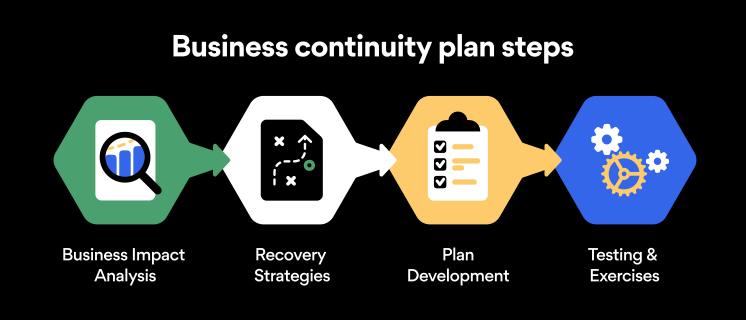
Here are some general guidelines that an organization looking to develop a BCP should consider:

Analysis

A business continuity plan should include an in-depth analysis of everything that could negatively affect the overall organizational infrastructure and operations. Assessing different levels of risk should also be a part of the analysis phase.

Design and development

Once you have a clear overview of potential risks your company could face, start developing a plan. Create a draft and reassess it to see if it takes into account even the smallest of details.

Implementation

Implement BCP within the organization by providing training sessions for the staff to get familiar with the plan. Getting everyone on the same page regarding crisis management is critical.

Testing

Rigorously test the plan. Play out a variety of scenarios in training sessions to learn the overall effectiveness of the continuity plan. By doing so, everyone on the team will be closely familiar with the business continuity plan’s guidelines.

Maintenance and updating

Because the threat landscape constantly changes and evolves, you should regularly reassess your BCP and take steps to update it. By making your continuity plan in tune with the times, you will be able to stay a step ahead of a crisis.

Level up your company’s security with NordPass Business

A comprehensive business continuity plan is vital for the entire organization’s security posture. However, in a perfect world, you wouldn’t have to use it. This is where NordPass Business can help.

Remember, weak, reused, or compromised passwords are often cited as one of the top contributing factors in data breaches. It’s not surprising, considering that an average user has around 100 passwords. Password fatigue is real and significantly affects how people treat their credentials. NordPass Business counters these issues.

With NordPass Business, your team will have a single secure place to store all work-related passwords, credit cards, and other sensitive information. Accessing all the data stored in NordPass is quick and easy, which allows your employees not to be distracted by the task of finding the correct passwords for the correct account.

In cyber incidents, NordPass Business ensures that company credentials remain secure at all times. Everything stored in the NordPass vault is secured with advanced encryption algorithms, which would take hundreds of years to brute force.

If you are interested in learning more about NordPass Business and how it can fortify corporate security, do not hesitate to book a demo with our representative.

 

About NordPass
NordPass is developed by Nord Security, a company leading the global market of cybersecurity products.

The web has become a chaotic space where safety and trust have been compromised by cybercrime and data protection issues. Therefore, our team has a global mission to shape a more trusted and peaceful online future for people everywhere.

About Nord Security
The web has become a chaotic space where safety and trust have been compromised by cybercrime and data protection issues. Therefore, our team has a global mission to shape a more trusted and peaceful online future for people everywhere.

About Version 2 Digital

Version 2 Digital is one of the most dynamic IT companies in Asia. The company distributes a wide range of IT products across various areas including cyber security, cloud, data protection, end points, infrastructures, system monitoring, storage, networking, business productivity and communication products.

Through an extensive network of channels, point of sales, resellers, and partnership companies, Version 2 offers quality products and services which are highly acclaimed in the market. Its customers cover a wide spectrum which include Global 1000 enterprises, regional listed companies, different vertical industries, public utilities, Government, a vast number of successful SMEs, and consumers in various Asian cities.

保護您企業的 10 項電子郵件安全最佳實踐

With the rise of remote working came a surge in cybercrime. Business Email Compromise (BEC) attacks have seen a 150% year-over-year increase, so the odds are not in any business’s favor. However, staying vigilant and educated can protect your company and avoid such attacks. Keep reading to find out the main dangers business email accounts face and get 10 business email security tips.

What is Business Email Compromise (BEC)?

BEC is a type of cybercrime that involves impersonating a trusted business contact, such as a CEO or supplier, in order to trick employees into transferring money or sensitive information to the criminal’s account. These schemes often involve careful research and social engineering to create a convincing ruse.

According to the FBI, BEC fraud has cost companies over $26 billion globally since 2016, and the threat continues to grow. Small businesses are particularly vulnerable, as they may not have the resources or expertise to detect and prevent these attacks.

One example of a BEC scam involved the director of Puerto Rico’s Industrial Development Company, Ruben Rivera, who mistakenly made the transaction of $2.6 million to a fake bank account. In another case, Ubiquiti Networks Inc., the San Jose-based manufacturer of high-performance networking technologies, fell victim to a BEC attack that resulted in a loss of $46.7 million.

As the use of email continues to be an essential aspect of business communication, it is crucial for companies to remain vigilant and take proactive measures to defend against the threat of BEC.

Phishing is the number one email security threat

Phishing is a type of digital scam that is especially common in emails. It’s a form of social engineering where a hacker tries to deceive an employee into believing the email is coming from a credible source. Phishing emails usually have some sort of CTA: it’s like a form of marketing, if you will. Except that phishing CTAs usually involve clicking on a malicious link or revealing sensitive company data to outsiders.

Well, just like any other marketer, hackers employ creative techniques to improve the conversion rates of their scams. The more deceitful the email, the higher the conversion rate. That’s why phishing emails can be difficult to spot at times. Examples of phishing emails include:

  • Account verification scam. You may receive a phishing email that looks something like this: “Due to a recent security threat, we would like to ask you to verify your account by signing in through the link below. Failing to do so will result in the permanent deactivation of your account.”

  • Fake invoice scam. Hackers may send out emails saying, “We still haven’t received your payment for our services. Please use the link below to complete the transaction.”

  • Spear phishing. This is a more advanced and tailored form of phishing that requires hackers to do some research on your company. For instance, an employee may receive an email that looks like it’s coming from a specific coworker, instructing them to visit a website or disclose information.

Password security for your business

Store, manage and share passwords.

Get NordPass Business

30-day money-back guarantee

Best practices for business email security

Falling for phishing scams can expose your company to data breaches and malware. Taking steps to appropriately ensure the security of your email will help protect your business from phishing and other forms of cybercrime:

1. Conduct phishing awareness training

Emails usually get breached through employee negligence and lack of knowledge. So the first way to increase email cybersecurity is to raise awareness about the main threat: phishing. All employees should receive in-depth training on recognizing and avoiding attempted phishing schemes. The main points to cover here are:

  • Becoming familiar with the main phishing schemes

  • Being suspicious about unusual requests

  • Never clicking on random links received through email

Once employees are familiar with these precautions, your company’s susceptibility to phishing emails will significantly decrease and your business email security will improve in general.

Email attachments and suspicious links are the most common methods cybercrooks use to spread malicious software. Ensure that your employees are well aware of these devious practices and are trained to spot them in real-life situations. With time and a lot of practice, your team will develop a sense for suspicious email links and attachments, which should considerably lower the potential attack vector and significantly improve your overall security posture.

3. Enable multi-factor authentication

You can make your account safer from hackers by connecting your smartphone to your email. Even if the passwords to your email accounts are leaked, no outsiders will be able to access them without having access to the device it’s connected to. All vital business accounts, not just email accounts, should have multi-factor authentication enabled.

4. Avoid using email when on public Wi-Fi

Public Wi-Fi poses massive risks to email security. If it’s unencrypted (which it often is), anybody can connect to the same network. You never know when a hacker will be that someone.

If a hacker intercepts your connection with unencrypted public Wi-Fi and catches you logging into your email, they can steal your email password. It’s best to steer clear of public Wi-Fi altogether, but if connecting to it is necessary, never transmit important data while on it.

5. Avoid using business emails for private purposes and vice versa

Most office jobs these days come with an email address. Some people get the temptation to use the new email address for all sign-ins. Need to sign up for a new streaming service? Well, why not use your brand new business email for that? Everybody else does it, anyway, right?

At first, it might sound like a great idea. Yet using your enterprise email for private purposes and vice versa could cause significant security concerns for you as an individual and the company.

First, using a company email for your personal online activities allows for easier and simpler profiling. Consequently, that could lead to spear-phishing — a targeted phishing campaign or other targeted cyberattacks.

6. Encrypt company email

Encrypting company email using special email security software is a great way to steer hackers away. Encryption ensures that the only people able to view the emails are th
e sender and recipient. If a hacker intercepts an employee’s Wi-Fi connection or email account, they will not see any sensitive data.

7. Set up email security protocols

Email security protocols are immensely important because they provide an extra layer of security to your digital communications. The protocols are designed to ensure the safety of your communications as they pass through webmail services over the internet. Without the aid of email security protocols, bad actors can intercept communication in a relatively easy manner. Please familiarize yourself with different email security protocols and enable them to ensure secure communications.

8. Improve endpoint security

To further fortify your security stance, take action to improve your endpoint security. Often the easiest and most effective way to boost endpoint security is by implementing security tools for company-wide use.

Consider deploying a VPN like NordLayer — a tool that encrypts the internet connection and data transferred over your business network. Antivirus software is another tool that should be used on all business workstations to ensure a proactive defense.

9. Don’t change passwords too often

Password fatigue is a fact of life — today, the average user has about 100 passwords on their hands. Keeping track of all the passwords is a challenge.

The conventional wisdom regarding password security is that you should change your passwords every 90 days. While that might sound like a reasonable security practice, it could lead to simpler and easy-to-crack passwords being used.

If you know that your employees take password hygiene seriously and craft hard-to-guess passwords and that none of their passwords were ever leaked, then they should stick to the passwords they already use. If any password (no matter how strong it is) is leaked or breached — the change should be immediate.

10. Use strong passwords for email accounts

Strong passwords are the backbone of account safety. Yet businesses often fail to secure their emails with strong passwords. If your business is like this, you should know that the easier the password, the easier it is to hack, especially through brute-force attacks. Brute-force attacks are when hackers try to guess a password by flooding your account with thousands of attempts.

To protect your business email from such attacks, ensure everyone in your organization secures their passwords. Secure email passwords are:

  • Long

  • Complicated

  • Contain different types of characters

  • Unique (never reused from other accounts)

These points are crucial if you want to ensure the safety of your business. However, passwords that are difficult to hack are also difficult to remember. The last thing anyone would want is to secure their account so well that they couldn’t even access it themselves.

Luckily, the business password manager by NordPass can come to the rescue. If all members of your company use it for their accounts, their emails will be safe, and they won’t need to scratch their heads trying to remember their passwords.

Bottom line

Business email security is never a given. Even though platforms like Gmail or Outlook do their best to ensure the safety of their users, you can easily fall victim to hackers if you don’t actively protect your account. By following these five email security best practices, the chances of getting your business emails hacked will be much slimmer because hackers will likely prefer more vulnerable prey.


About NordPass
NordPass is developed by Nord Security, a company leading the global market of cybersecurity products.

The web has become a chaotic space where safety and trust have been compromised by cybercrime and data protection issues. Therefore, our team has a global mission to shape a more trusted and peaceful online future for people everywhere.

About Nord Security
The web has become a chaotic space where safety and trust have been compromised by cybercrime and data protection issues. Therefore, our team has a global mission to shape a more trusted and peaceful online future for people everywhere.

About Version 2 Digital

Version 2 Digital is one of the most dynamic IT companies in Asia. The company distributes a wide range of IT products across various areas including cyber security, cloud, data protection, end points, infrastructures, system monitoring, storage, networking, business productivity and communication products.

Through an extensive network of channels, point of sales, resellers, and partnership companies, Version 2 offers quality products and services which are highly acclaimed in the market. Its customers cover a wide spectrum which include Global 1000 enterprises, regional listed companies, different vertical industries, public utilities, Government, a vast number of successful SMEs, and consumers in various Asian cities.

為什麼 Azure Active Directory 的本地備份是不夠的

And 5 reasons why you should back up Azure AD in the cloud 

Imagine a busy city with multiple roads leading to various destinations, such as a hospital, a shopping mall, and a stadium. Just like a traffic light controlling the flow of vehicles to and from these destinations, Active Directory (AD) and Azure Active Directory (AAD) control the flow of and access to information from apps and services such as Microsoft 365, Salesforce, Google Workspace, and others. Organizations rely heavily on AD and AAD to ensure a smooth flow of and access to their data. 

However, just like how a city can experience traffic jams, frustrations, accidents, and general chaos when the traffic light is out, when AD or AAD are not accessible, the flow of and access to control-plane information can cause severe business disruption. This post will explore the importance of data protection for Azure AD.

The evolution of identity management: From Active Directory to Azure AD and the need for different backup solutions

But first, how did we come to rely so heavily on AD and AAD? Active Directory was introduced in 1999 as a solution for on-premises identity management, providing a centralized repository for user and device information and allowing administrators to manage these resources effectively and efficiently.

As the use of cloud-based services grew, the need for an identity management solution that could integrate with cloud-based resources became more important. 

This led to the creation of Azure Active Directory, which was designed to serve as the bridge between on-premises and cloud resources, not only creating a seamless and secure identity management solution for cloud computing, but also offering a range of features and capabilities (including single sign on, multi-factor authentication, and conditional access) to help organizations meet their security and compliance requirements. 

Microsoft Azure Active Directory and Active Directory seem to be a bit shrouded in mystery. For many, the distinction between them is not always clear, and this distinction becomes even more blurred when it comes to the topic of backing up and protecting the data within each. 

Instead of covering all the differences between AD and Azure AD, this post will mainly focus on backup for Azure AD, and it will explore five ways in which AAD requires a different backup solution from the traditional backups used for on-premises AD. Before we can do that though, we need to quickly establish — roughly — what the difference is. 

What’s the difference between AD and AAD?

As Stephen Covey put it, “the main thing is to keep the main thing the main thing.” That quote might make more sense if you consider the key difference between cloud and on-prem AD to be the main thing… and in this case, the main difference between the two is that Active Directory is designed for managing user access and application infrastructure for an on-premises world; Azure Active Directory is for managing user access to cloud applications in a cloud-based environment.

Even more simply? Sure: AD is on prem, AAD is cloud based. 

If you’re interested in exploring the differences further, here’s what Microsoft has to say: Compare Active Directory to Azure Active Directory.

Every object in either AD or Azure AD has one permanent home. That’s the primary copy of the object, and the copy to which changes are applied. If you are on-prem-only, or cloud-only, then there’s only one copy of each object.

In hybrid mode, though, no matter where the object is homed, there will be two copies of it: the primary copy and a synchronized copy on the “other side.”

For organizations using both Active Directory and Azure AD in a hybrid environment, you can think of the cloud copy of an on-prem object as being like a shadow. When you look at a shadow on the pavement, you’re only getting a partial set of information about the real object.

In the same vein, Azure AD only has a partial set of attributes from on-premises AD objects because not every object attribute is replicated to the cloud. However, all the attributes of cloud-based Azure AD objects are stored in full in the cloud. This allows organizations to use Azure AD as an identity provider for on-premises resources and allows for SSO for cloud-based resources.

How does this distinction change backup strategy? 

The distinction of where (which environment) your identity objects are homed is paramount. Active Directory backup via on-premises solutions is exactly that: making a backup of on-prem data by copying it to/from an on-premises solution. Azure Active Directory, as a cloud-based application utilizing cloud-based data (and metadata), creates and manages cloud data in the cloud. 

Why it matters: Comprehensive data coverage requires the ‘right’ backup

“Some” Azure AD data and metadata only exist in the cloud environment. You could copy these objects to an on-prem storage location (which is roughly as useful as putting backup tapes on top of the server they’re made from), but these objects must be restored to the cloud.

Therefore, with clear gaps in coverage, the data and metadata are not covered holistically. This means your data may not be fully protected when you back up your cloud data with an on-premises Active Directory-oriented tool as your Azure AD backup solution. 

In other words: what’s homed on premises and what’s homed in the cloud are physically separate. You introduce new problems for yourself when you cross the streams, including speed of access, data fidelity and quality, and security. 

Let’s dive into five reasons why on-prem AD backup is not a viable option for comprehensive backup of Azure AD. 

5 things you should consider if you’re backing up AAD on premises

1. Some attributes in Azure Active Directory are not available on premises

If you take an on-prem AD account and sync it to the cloud, the sync process (and Azure AD) adds some attributes to it. Some of these may be synced back to on prem (a process called writeback) but some will not. Backing up Azure AD captures these; backing up the on-prem AD won’t. 

2. Azure AD may have user objects or attributes that do not exist on premises  

You can define your own users, groups, roles, et cetera, that exist only in the cloud. If you do not back these up independently, they will not be preserved nor well protected, and your only recourse is to recreate and define these custom entries every time. 

And yet not everyone sees the value in protecting these objects when their identity management (IdM) anchor is on prem. Even if an organization’s IdM anchor is on premises, objects and attributes like Intune and conditional access policie
s are important for several reasons, often forming a key part of organizations’ zero trust security, and, as such, need to be protected against loss or damage. (Read our article on the zero trust principle here.)

Still not convinced of the value of protecting control-plane objects? Here are five reasons highlighting the case for securing data protection: 

  • Cloud-based management: Intune and Azure AD conditional access are both cloud-based services that can be accessed and managed from anywhere. They cannot be accessed from on-prem systems, so if you lose the copy in the cloud, it’s gone. 
  • Security: Azure AD provides additional layers of security, such as multi-factor authentication and identity protection, that can help to protect against potential security threats such as compromised credentials or unauthorized access. 
  • Compliance: Intune and conditional access can help organizations meet compliance requirements, such as HIPAA by providing features such as device compliance and role-based access control. 
  • Scalability: Azure AD allows organizations to scale their IdM infrastructure as needed, without the need for additional hardware or software. 
  • Remote work: Intune and conditional access can help organizations to secure and manage remote workers’ devices, even if they are not connected to the on-premises network. 

Now are these objects and attributes vital to operations? You can decide for yourself. But, considering the impact that could result from losing these in one data loss scenario or another (and the resource investment required to manually recreate and administer them, not to mention the security concerns of not ensuring the right users have the permissions to access company data), adequate data protection of these should be a business imperative. 

3. Azure AD will have configuration/state objects that don’t exist on prem

Enterprise apps, app registrations, Conditional Access (CA) policies, and many other policy- and security-related objects exist only in the cloud. Microsoft’s native protection for these objects is mostly non-existent — delete a conditional access policy, for example, and it’s just gone. Let’s drill down into two important-to-protect Azure AD features: 

  • Conditional Access: Azure AD Conditional Access is a feature that allows you to set policies that determine how users are granted access to resources based on conditions such as device compliance, location, and user identity. It allows you to control who can access your resources and under which conditions. This feature can be used to protect against security threats, such as compromised credentials, by requiring multi-factor authentication or other forms of authentication. 
  • Intune: Intune is a mobile device management (MDM) and mobile application management (MAM) service that is integrated with Azure AD. This feature allows you to manage and secure mobile devices, desktops, and apps, including those used by remote workers. It allows you to set policies for devices and apps, such as requiring a passcode or encrypting data, and to remotely wipe a device if it is lost or stolen.

What about the Active Directory Recycle Bin? As these AAD-only configurations/state objects only exist in the cloud, there’s no available recycle bin for these policy objects, so there’s no undo. It’s akin to an immediate hard delete, meaning there is no 30-day or 90-day grace period as there is with soft deletions. 

How to recover from hard deletion? Microsoft shares that “hard-deleted items must be re-created and reconfigured. It’s best to avoid unwanted hard deletions.” 

Let that sink in for a moment: “It’s best to avoid unwanted hard deletions.” This advice is nigh impossible to follow as common data loss scenarios, like accidental deletions), are a question of when, not if. It highlights how the Recycle Bin was never intended to be a replacement for dedicated backup. Read our post on why backup is a risk-management imperative here. 

4. Record preservation  

How long does Azure AD store reporting data? That’s a very good question: According to Microsoft, activity reports are stored as follows:

As you can see, there is no point-in-time record preservation. With a backup, you can preserve and review cloud-only Azure AD data at a specific point in time and examine which permissions, users, groups, and role assignments existed in your directory, as well as whether an object has changed within a specified time period and preserve these records for as long as required or needed to comply with company or governmental policies.

Clearly, these benefits are useful for forensic purposes but also for governance and compliance reasons. Learn more in our eDiscovery post (with a customer Office 365 use case). 

5. Microsoft doesn’t provide native protection for many cloud-only objects  

Microsoft doesn’t provide the same recovery tools in Azure AD as they do for Active Directory itself. According to Microsoft recoverability best practices, it’s clearly important to understand the object types that are protected by Microsoft under soft-deletion and hard-deletion scenarios, visualized here: 

The recovery features for soft deletions are typically limited to 30 days retention, so if you want to recover on day 31, it’s too late! The data is gone, as Microsoft shares here in its Azure Active Directory fundamentals:

Soft-deleted objects are hard deleted after a deletion time of 30 days. The only object types that support a soft delete are Users, Microsoft 365 Groups, Application registration, Service principal, administrative unit.

So, the question is this: Are these objects that are automatically hard deleted important to your business operations? And a natural follow-up question is this: Is the 30-day restore period for soft-deleted objects enough protection for your data? (Often, mandatory minimum data retention periods are determined by governments.)

Note: It’s important to mention that changes are not covered by the recycling bin, such as editing or overwriting, even to objects that would normally be soft deleted . Any change, intentional or otherwise, replaces the previous version with no option of reverting or recovering. When these changes are done accidentally, we euphemistically refer to them as an “oops,” but they are quite serious and actually one of the
leading causes of data loss, so this gap in coverage should concern those tasked with ensuring data protection.

The writing on the wall is that native coverage is insufficient for recoverable, comprehensive coverage and that the solution to this coverage gap is having your own third-party backup. This extends your ability to recover these objects for as long as your backup exists. 

Explore this in more depth here: Azure Active Directory recoverability best practices from Microsoft.

What’s next? Choosing a backup solution for Azure Active Directory

Now that we’ve highlighted the need for dedicated cloud data backup for Azure AD, let’s explore what Keepit provides with its Azure AD service offerings (one of which — Azure AD Standard — is offered completely free of charge). 

Leading AAD data protection for your cloud security strategy

Keepit helps you recover business-critical identity and application objects that Microsoft doesn’t protect. Extend your retention period and strengthen security with protection of policies as well as full auditing and traceability of changes. Protect against day-to-day data loss and improve IT efficiencies with the ability to roll back changes and speed up troubleshooting.

Azure Active Directory backup coverage 

The Azure AD connector protects the following Microsoft 365 Azure Active Directory objects: Users, Groups, Administrative Units, and Roles. It also protects Audit logs (and Sign-in logs with audit logs enabled). 

For an exhaustive coverage list, visit our AAD support site here

Interested in backing up (and restoring) AAD with Keepit for Azure AD? 

To learn more about how you can protect your business-critical data and ensure disaster recovery resolve with Keepit for Azure AD – the leading protection for your cloud security strategy – click here


About Keepit
At Keepit, we believe in a digital future where all software is delivered as a service. Keepit’s mission is to protect data in the cloud Keepit is a software company specializing in Cloud-to-Cloud data backup and recovery. Deriving from +20 year experience in building best-in-class data protection and hosting services, Keepit is pioneering the way to secure and protect cloud data at scale.

About Version 2 Digital

Version 2 Digital is one of the most dynamic IT companies in Asia. The company distributes a wide range of IT products across various areas including cyber security, cloud, data protection, end points, infrastructures, system monitoring, storage, networking, business productivity and communication products.

Through an extensive network of channels, point of sales, resellers, and partnership companies, Version 2 offers quality products and services which are highly acclaimed in the market. Its customers cover a wide spectrum which include Global 1000 enterprises, regional listed companies, different vertical industries, public utilities, Government, a vast number of successful SMEs, and consumers in various Asian cities.