Skip to content

How to Remotely Wipe a Mac Device with Scalefusion UEM

Ever had an employee leave unexpectedly, and you needed to secure their device immediately? Or maybe a MacBook went missing, and you’re left worrying about the sensitive data it holds? 

Situations like these are not just headaches—they’re security risks. For IT teams managing a fleet of macOS devices, ensuring that lost, stolen, or repurposed devices are wiped clean is essential to safeguard company information.

Remote wiping is a vital tool for maintaining control over your business assets. With the right solution, like Scalefusion UEM, you can remotely wipe Mac devices instantly, ensuring that sensitive data is erased without the need for physical access to the device. 

erase MacBook remotely
Remotely Wipe Mac Devices

In this blog, we’ll dive into the importance of remote wiping, walk you through the steps to remotely wipe a macOS device using Scalefusion Mac MDM, and explore common use cases where this feature proves invaluable for businesses.

Understanding Remote Wiping on Mac: Why Is It Important?

It’s possible for an employee to leave their MacBook in a rideshare, or an ex-employee to hold onto their device a little too long. What happens to the sensitive company data on that machine? That’s where remote wiping steps in, offering an instant, secure solution.

Data security is a top priority. Losing control of a device means risking exposure to confidential information. Remote wiping allows businesses to instantly erase data from any device, no matter where it is, preventing security breaches and data leaks. It’s all about staying in control of your assets.

Whether it’s preparing a device for the next employee, protecting data on lost or stolen equipment, or managing devices at the end of their lifecycle, remote wiping ensures that your data doesn’t fall into the wrong hands. With Scalefusion UEM, you can erase MacBook remotely with ease, allowing for a seamless transition between users while maintaining security. 

Read more: Troubleshooting a Mac Device

How to Remotely Wipe a macOS Device Using Scalefusion UEM

Step 1. Access the dashboardLog in to the Scalefusion Dashboard and navigate to the Devices section.
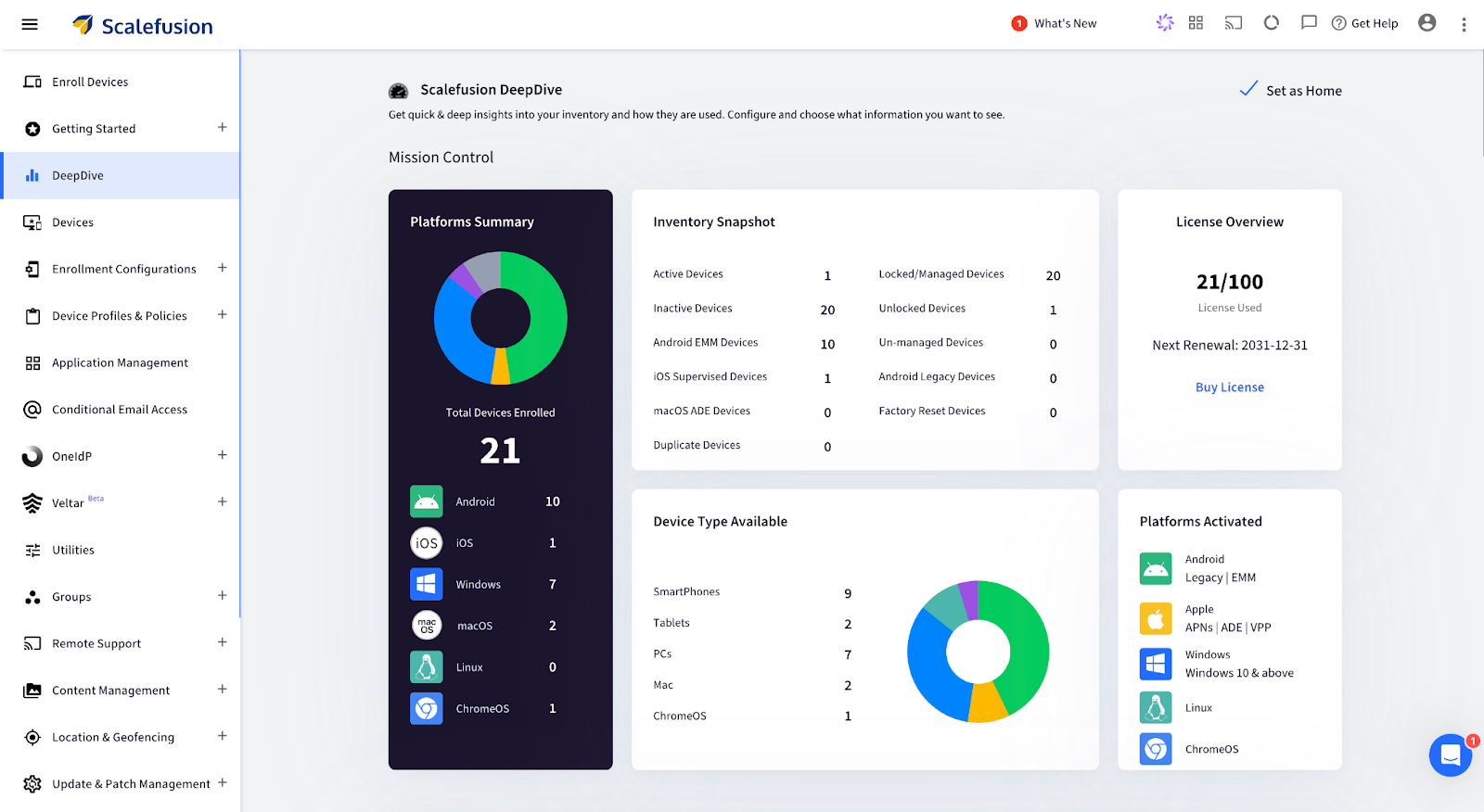
Scalefusion - erase MacBook remotely

Step 2. Select the device: Click on the specific macOS device to view its details.
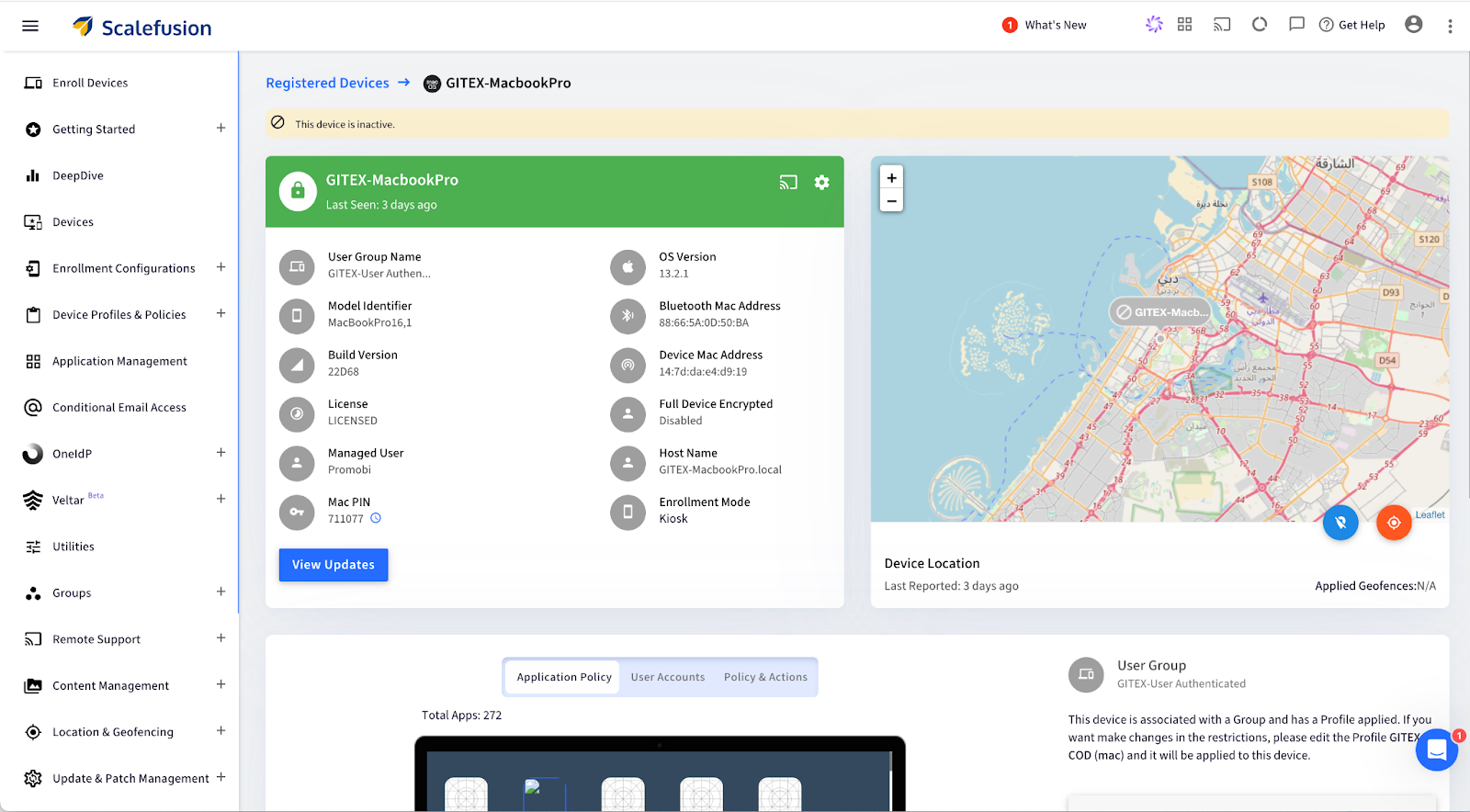
Scalefusion - Remotely wipe mac

Step 3. Open Factory Reset Option: Click on the Settings icon, scroll down, and select Factory Reset from the menu options.
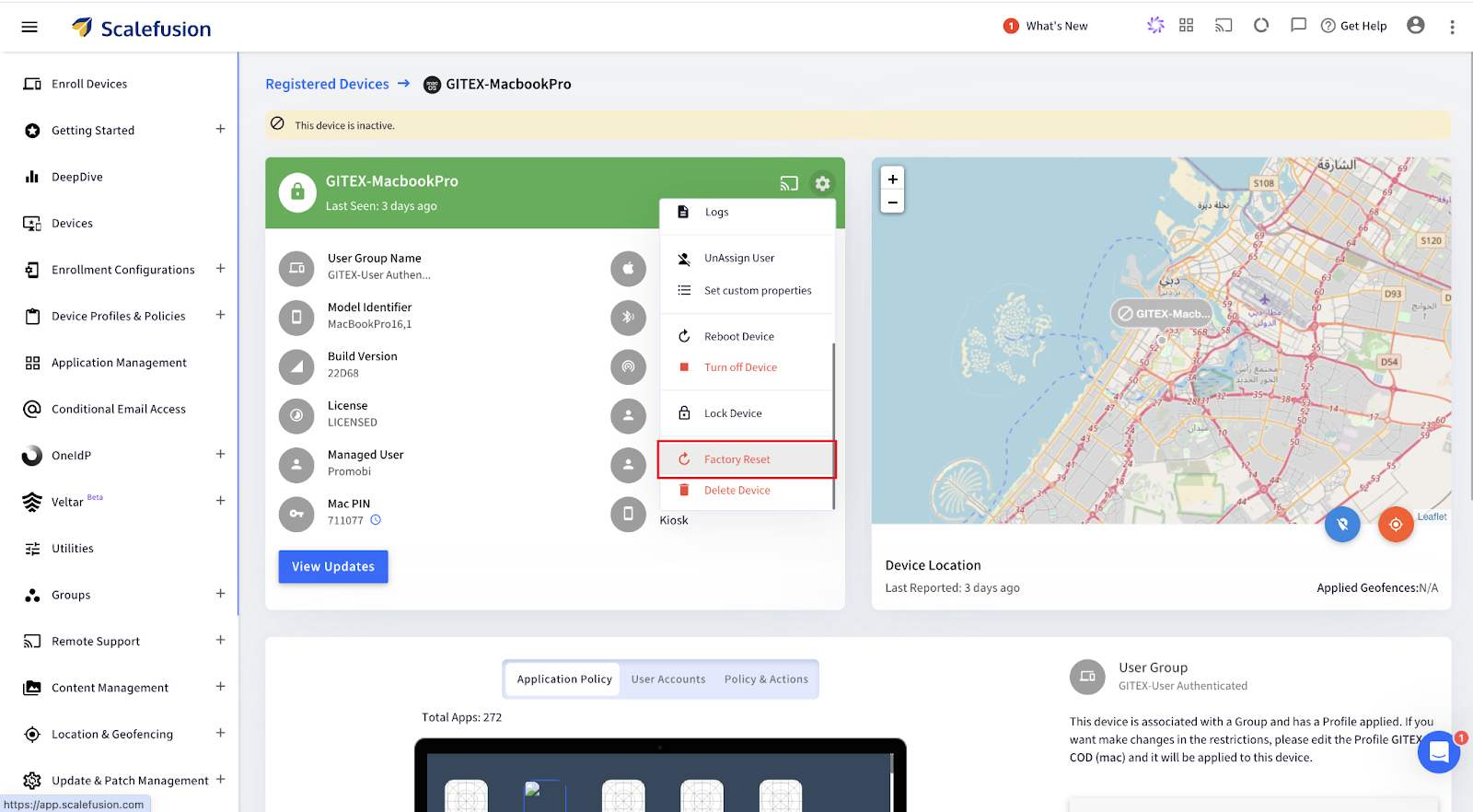
Scalefusion - wipe Mac remotely

Step 4. For Apple Silicon/Intel (with T2 Security Chip):

  • Choose Obliteration Behavior: Select whether to erase all content, settings, and apps while retaining the operating system.
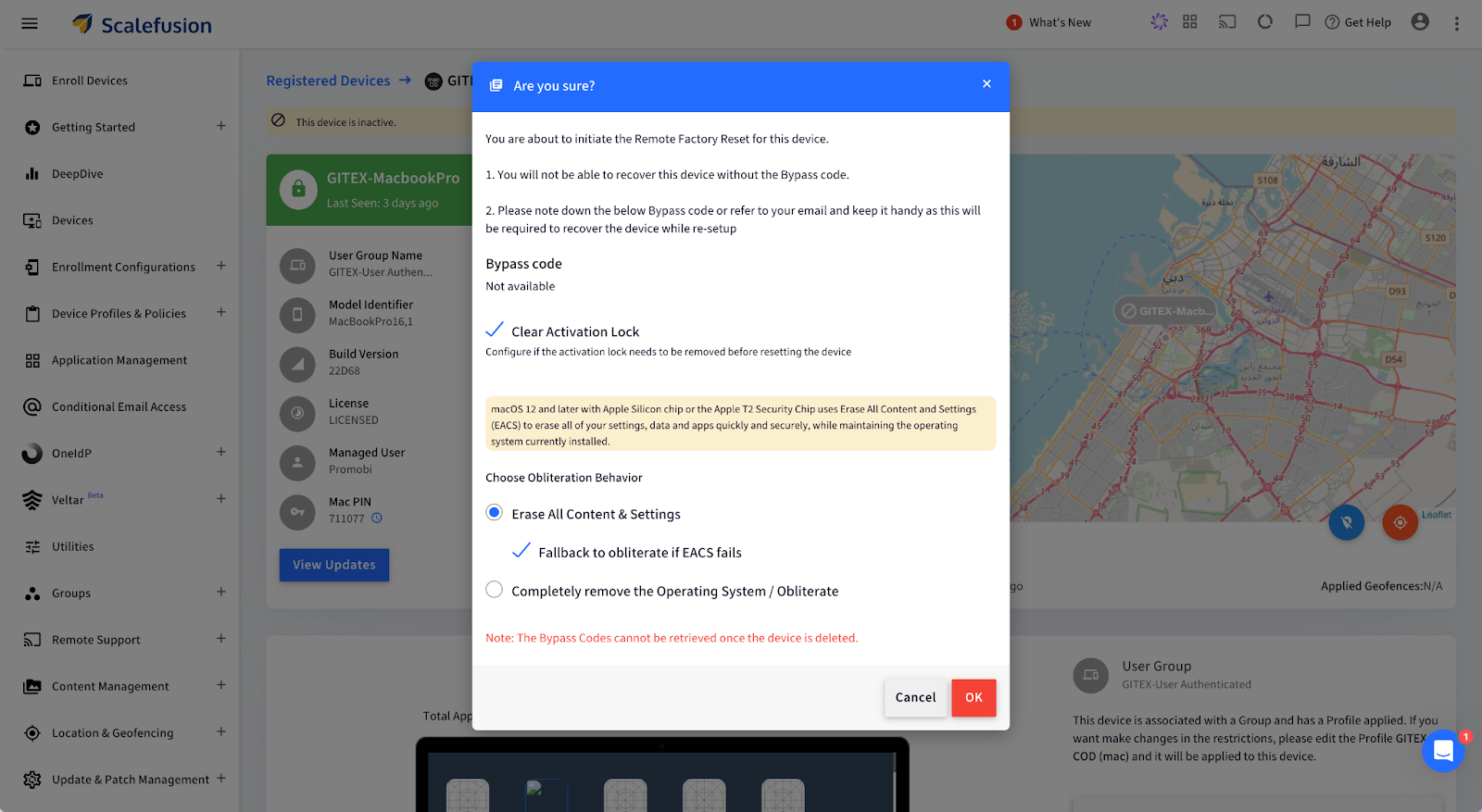
Scalefusion - Remotely wipe mac

Alternatively, for Intel Mac (without T2 Security Chip):

  • Configure a new Mac PIN: Enter a 6-digit PIN, then confirm by clicking OK. The PIN is also emailed to the admin.

Step 5. Confirm and Submit: Enter your password and click Submit. A push notification will be sent to the device, confirming the factory reset.
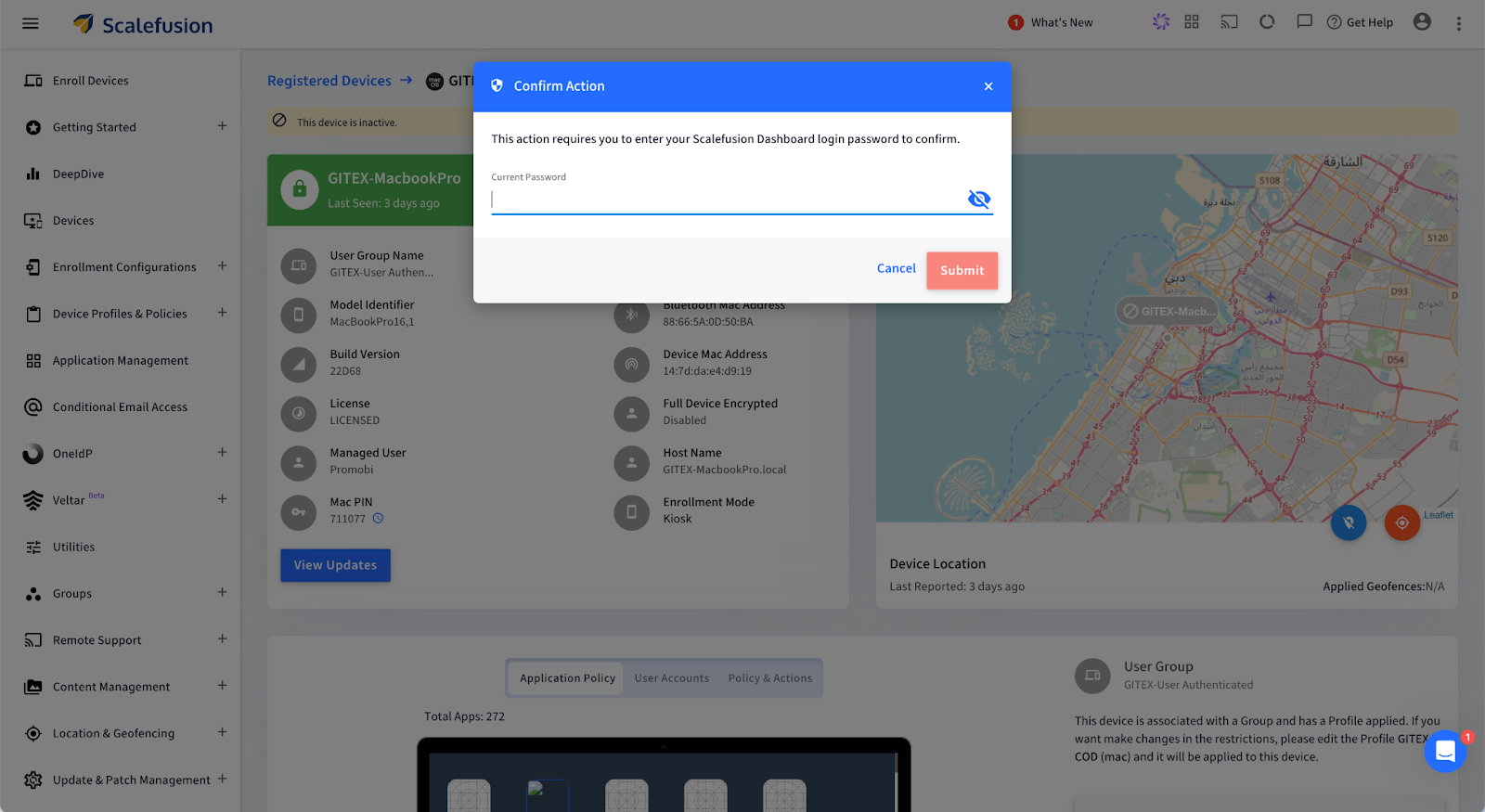
Scalefusion - erase MacBook remotely

Your macOS device will now be wiped remotely and restored to factory settings.

What Happens After You Remote Wipe a Mac?

Once the remote wipe is complete, the Mac device is reset to its factory state, making it fully secure and ready for its next phase. But what does that look like at an enterprise level?

  1. Complete Data Erasure: Every piece of data, including user profiles, business applications, and sensitive information, is permanently deleted. This ensures that no traces of your company’s data remain, protecting you from potential data breaches or unauthorized access.
  2. Operating System Reset: The macOS is restored to its original, unconfigured state, essentially taking the device back to square one. This provides a clean slate, removing all previous settings, and ensuring no configurations are left that could pose a security risk.
  3. Ready for New User Setup: The device will display the macOS Setup Assistant, making it ready to be deployed for a new employee. This streamlines IT operations, enabling quick reassignment of devices without the hassle of manual resets.

Use Cases for Remote Wiping on Mac

Remote wiping proves invaluable in several business scenarios, helping IT teams maintain security and streamline device management. Here are some key use cases:

1. Employee Offboarding: When employees leave the company, ensuring their assigned Mac is cleared of any sensitive data is necessary. Remote wiping guarantees that no personal or business data remains on the device, allowing it to be securely redeployed to another team member without privacy risks or manual intervention.

2. Lost or Stolen Devices: Losing a company Mac can create a significant security threat, as it may contain confidential files, emails, or proprietary software. With Scalefusion’s remote wipe feature, IT admins can swiftly erase all data on the lost or stolen device, ensuring that sensitive information remains protected from unauthorized access.

3. Device Lifecycle Management: For businesses that frequently upgrade or redistribute devices, remote wiping helps maintain data security and device readiness. It ensures that each device is completely reset before being assigned to a new user, reducing risks associated with leftover data and simplifying the device management process.

Safeguard Your Mac Devices with Scalefusion UEM

Managing Mac devices in your business doesn’t have to be a headache. With Scalefusion UEM, you can handle everything from employee offboarding to lost devices with confidence. With just a few clicks, you can wipe your Mac remotely, ensuring that all sensitive data is securely erased and the device is ready for the next team member—all without breaking a sweat. 

No more fretting about sensitive information lingering on devices after someone leaves or when a Mac goes missing. Scalefusion’s remote wipe feature ensures that all data is gone in an instant.

About Scalefusion
Scalefusion’s company DNA is built on the foundation of providing world-class customer service and making endpoint management simple and effortless for businesses globally. We prioritize the needs and feedback of our customers, making sure that they are at the forefront of all decision-making processes. We are dedicated to providing comprehensive customer support services, and place emphasis on customer-centric thinking throughout the organization.

About Version 2 Digital

Version 2 Digital is one of the most dynamic IT companies in Asia. The company distributes a wide range of IT products across various areas including cyber security, cloud, data protection, end points, infrastructures, system monitoring, storage, networking, business productivity and communication products.

Through an extensive network of channels, point of sales, resellers, and partnership companies, Version 2 offers quality products and services which are highly acclaimed in the market. Its customers cover a wide spectrum which include Global 1000 enterprises, regional listed companies, different vertical industries, public utilities, Government, a vast number of successful SMEs, and consumers in various Asian cities.

How To Improve Industrial Equipment Lifecycle Management with MDM

Managing the lifecycle of industrial equipment is exhausting. Be it paperwork or keeping a log of maintenance schedules. Thankfully, with digitization, mobile devices have been replacing a lot of conventional devices on industrial floors. Rugged devices, custom devices, and modern lightweight tablets and laptops are quickly becoming popular choices to replace bulky computers or pen-paper-based operations. 

Industrial Equipment Lifecycle Management with MDM

If your mobile devices are connected to your machines and sensors and if your machine overheats and is about to break down, the mobile device will quickly issue an alert and or even automatically schedule a repair!

That’s where Mobile Device Management (MDM) comes in. It’s a software that gives you complete control to manage and monitor all your critical mobile assets, remotely.

MDM provides real-time insights into all your mobile equipment for proactive monitoring. 

Sounds amazing, right?

Let’s find out how you can use MDM to improve industrial equipment lifecycle management at every phase. 

Phase 1: Equipment Acquisition and Integration with MDM

Acquisition is a crucial phase in the lifecycle of the equipment. Manual setup, integration hiccups, or even poor documentation can cost you big in the long run.

Mobile device management provides a streamlined and automated approach to mobile equipment onboarding. Let’s understand how:

Centralized Equipment Configuration

Let’s say you have hundreds of devices in your factory. Now, can you imagine configuring each of them manually? 

No, right?

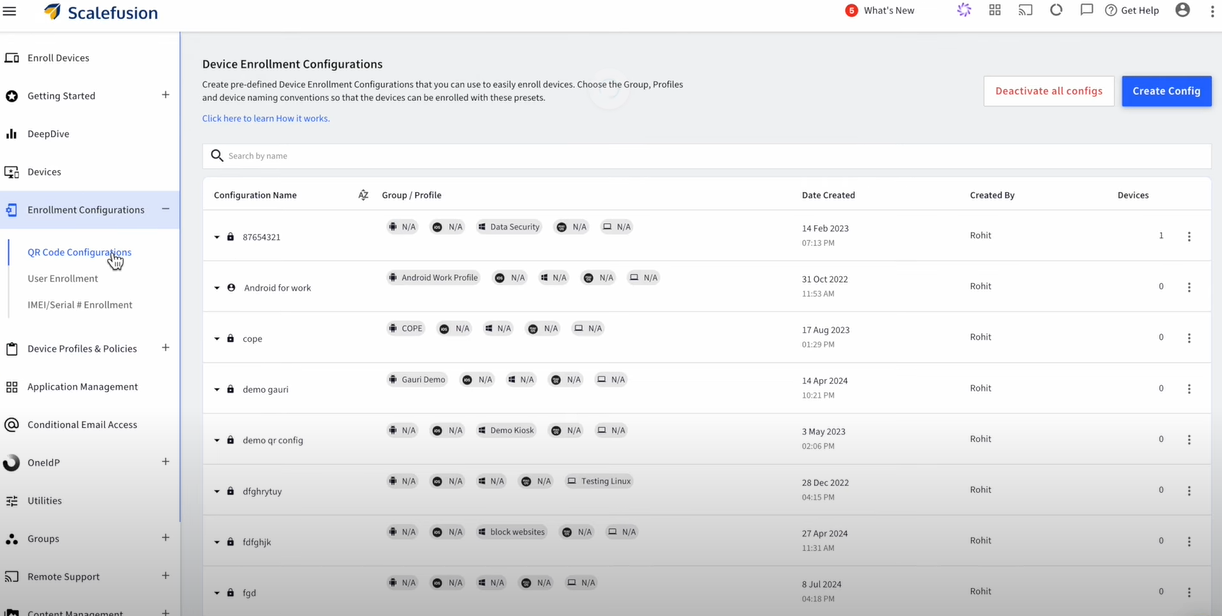
Thankfully, with MDM software, you can quickly adjust the settings of the newly acquired devices and configure them remotely from a single dashboard. Thus, you can instantly apply uniform protocols to each device.

In fact, some MDM vendors also allow you to enroll your devices using QR codes. All you have to do is scan the code and your preferred settings will be applied to them.

Centralized Equipment Configuration

Source

Seamless Integration with Existing Systems

At the same time, you can integrate new and old devices under a unified management system so that they can communicate efficiently without any disruption in the operations.

So, if you’re adding new mobile devices to the production line, you can use MDM to ensure smooth interaction between the old and new mobile equipment.

Automated Asset Registration

MDM also automates asset registration by tagging every new device with important data like serial numbers, model types, warranty details, installation dates, etc. This eliminates inaccuracies and missed entries.

Phase 2: Equipment Usage and Operational Efficiency

Once you’ve set up your system and integrated it with MDM, it’s time to optimize it for day-to-day operations. 

Here’s how MDM can help:

Streamlined Workflow Management

The biggest advantage of using MDM to manage equipment lifecycle is that it gives you centralized control over all the devices connected to your machines. 

That means you can monitor how different devices interact (with machines and each other) and contribute to the overall performance, all from a single place.

Remote Access and Control

Streamlined Workflow Management

Source

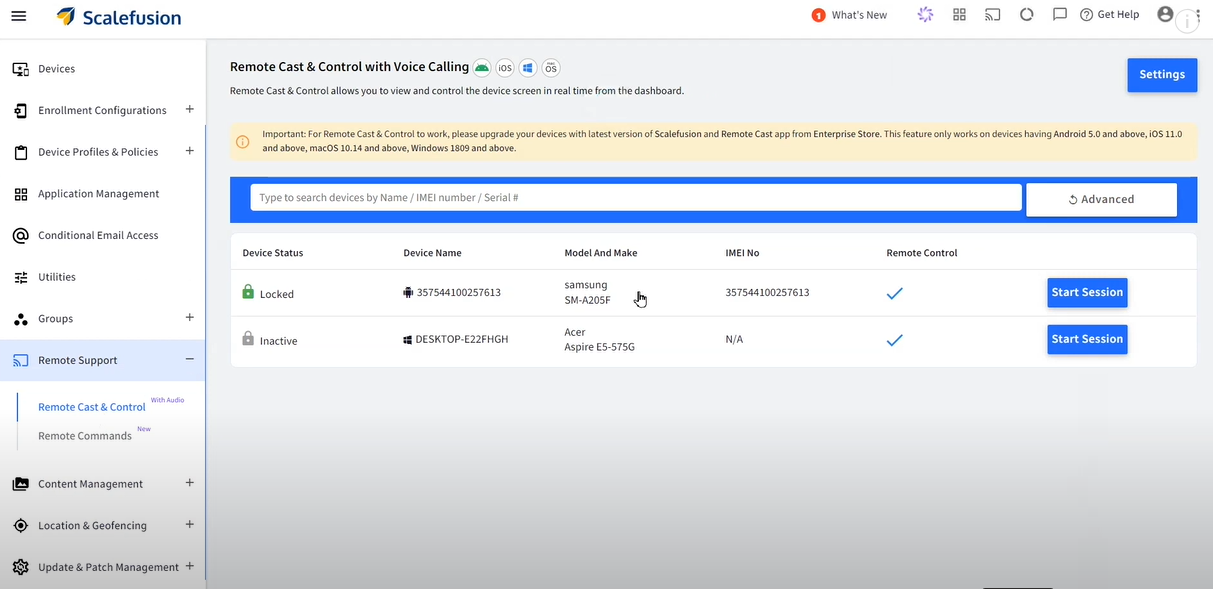
Say, you run a chain of restaurants. Each outlet has order printers, inventory trackers, etc, that run on Windows, Android, iOS, macOS, ChromeOS or Linux.  Now, you can’t be everywhere at once to make sure things run smoothly. But with an MDM, you get full access to monitor and adjust these devices remotely.

Be it lowering the threshold level across all devices or troubleshooting them. You can do all of that from anywhere in the world, thanks to MDM.

Workforce Productivity

Did you know that at least 74% of employees feel burned out at work? That’s almost every 4 out of 5 employees!

MDM can reduce this burden by automating monotonous and time-consuming operational tasks.

For example, instead of manually inspecting each device for faults, employees can receive instant, real-time alerts from the MDM system. As a result, they can resolve issues quickly and stay ahead of time.

Phase 3: Maintenance Management and Predictive Analytics

There’s no doubt that mobile device management helps extend the lifespan of your machines. You can it to track device performance and even stay on top of maintenance updates. 

Below are three ways mobile device management helps you achieve this:

Real-time Equipment Monitoring

Monitoring the performance of your devices in real time is super important.

But we’re not just talking about whether a device is active or inactive. But if it’s giving accurate insights, communicating with other devices correctly, and so on.

With an MDM platform, you can get a 360° view of such performance metrics. As a result, you can take swift action when something goes off the track, like if there’s a battery issue or if the device’s been hacked.

Automated Maintenance Scheduling

Let’s say you have a large factory that houses at least 15 ELSCO Transformers to run everything smoothly, each connected to a mobile device. And this is besides other machines and their OS-based equipment.

So, how do you carry out routine maintenance for all such devices while staying on top of other operational tasks?

Answer: MDM software.

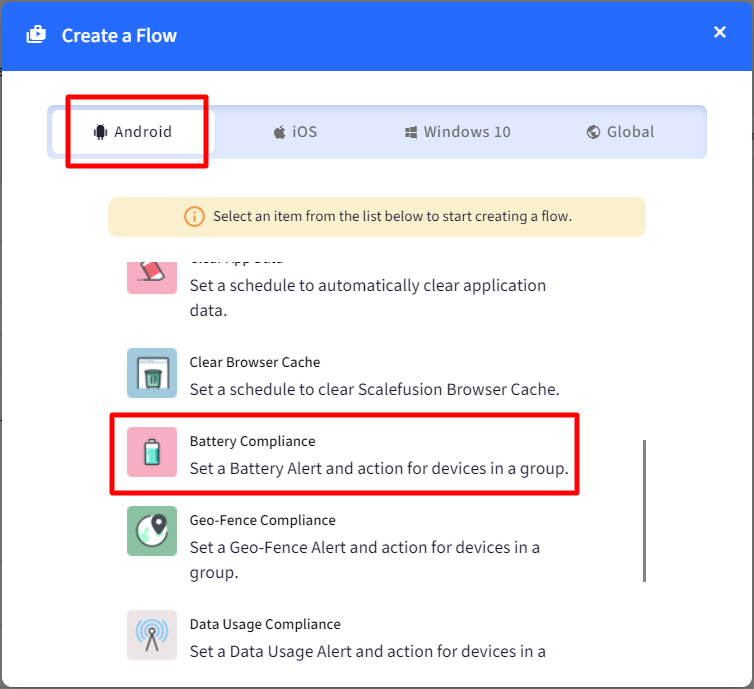
With MDM, you can automatically track operational hours and performance metrics for each device to decide when it needs servicing. The software also automatically schedules maintenance checks when set thresholds are crossed.

To make it easier, MDM also lets you manage and maintain different types of supported devices from a single platform. So, it doesn’t matter if you have 10 laptops, 25 mobiles, and 10+ PCs in your factory for your machines. With MDM, you can monitor each device without any hassle.

create a flow

Source

Predictive Analytics for Preventive Maintenance

“Think of predictive analytics like your mobile device’s personal trainer. It recognizes the signs of fatigue and overexertion so that you can maintain peak performance without overworking your mobile equipment.”

[ — Vineet Gupta, Founder of 2xSaS ]

MDM runs on built-in algorithms that can predict potential issues in your equipment by considering factors like usage patterns, environmental conditions, etc. 

Thus, you shift from a reactive maintenance strategy to a proactive one with enhanced safety and minimum unplanned downtimes.

Phase 4: Equipment Renewal or Disposal

As your mobile equipment reaches the end of its lifecycle, it’s time to make a tough call: Should you upgrade or replace it?

This decision can have a huge impact on the operations, costs, and sustainability of your business.

MDM equips you with all the necessary data to make the right choice. Here’s how:

Evaluating Equipment Longevity

MDM allows you to track how the mobile equipment is used, how often it needs repairs, and how well it’s performing. This information helps decide if it’s worth fixing or replacing.

For example, if a device consistently shows signs of declining precision, it’s time you replace it with a new piece.

Sustainability Considerations

If you decide to dispose of the equipment, MDM can help you find the best way to do it without costing the planet.

It can assist you in evaluating the environmental impact of the disposal and ensuring compliance with the necessary standards.

Implementation of Replacement Strategies

Additionally, you can also use MDM to make the switch to new equipment—whether that’s upgrading old devices or purchasing brand-new ones.

For example, say you wish to replace your rugged laptops with those that have a higher processing capacity.  Using MDM software, you can not only start from the first phase (equipment acquisition) but also train employees regarding the change (new features).

MDM Best Practices for Improving Equipment Lifecycle Management

Besides the above four phases, you must keep the following ten tips in mind to get the most out of your mobile equipment lifecycle management with MDM:

  1. Choose an MDM software that aligns with your industry’s needs and business objectives. Remember, customization is key. So, select a solution that offers flexibility and automation.
  1. Customize alerts for predictive maintenance based on historical data. For example, if a mobile device tends to wear out after 30,000 hours, set an alert for 28,000 hours to stay ahead of issues.
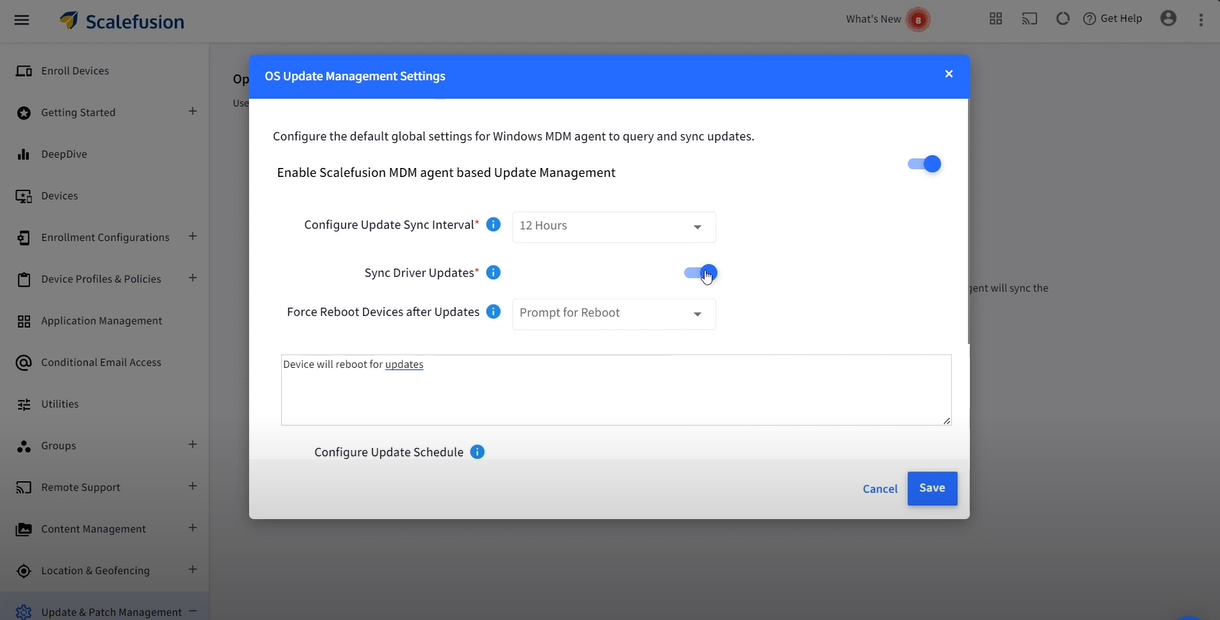
  1. Schedule automatic firmware and OS updates to ensure optimal device performance.
automatic os updates

Source

  1. Establish feedback loops to gather suggestions from employees to interact directly with the mobile devices. This will help you configure MDM software the right way.
  1. Regularly train your employees on how to use MDM software to reduce errors, improve workflow, and maximize benefits.
  1. Monitor and analyze lifecycle trends consistently to make informed decisions about mobile equipment renewal, upgrades, etc.
  1. Set up Role-Based Access Control (RBAC) so only authorized employees can access sensitive data and critical system controls.
  1. Use digital twins to simulate various operational scenarios (like cyberattacks) and predict outcomes without putting your actual devices at risk.
  1. Integrate MDM with your Enterprise Asset Management (EAM) system for seamless data flow between device monitoring and broader asset management activities.
  1. Restrict device usage if it doesn’t meet the compliance criteria by setting up conditional access via the MDM software.

Conclusion

Managing industrial equipment might seem like a tough nut to crack, but it really isn’t if you have the right tools.

MDM can do wonders by automatically updating mobile equipment software, granting remote access, and even predicting repairs in mobile devices before they occur.

However, not all MDM software are equal. 

Scalefusion brings the simplest yet most advanced MDM solution that can transform your industrial equipment lifecycle management.

With features like real-time location tracking, encrypted data transfer, 24/7 remote access, bulk device enrollment, etc., you can manage your mobile devices smartly.

Start a free trial today to explore our features and keep your mobile equipment safe.

About Scalefusion
Scalefusion’s company DNA is built on the foundation of providing world-class customer service and making endpoint management simple and effortless for businesses globally. We prioritize the needs and feedback of our customers, making sure that they are at the forefront of all decision-making processes. We are dedicated to providing comprehensive customer support services, and place emphasis on customer-centric thinking throughout the organization.

About Version 2 Digital

Version 2 Digital is one of the most dynamic IT companies in Asia. The company distributes a wide range of IT products across various areas including cyber security, cloud, data protection, end points, infrastructures, system monitoring, storage, networking, business productivity and communication products.

Through an extensive network of channels, point of sales, resellers, and partnership companies, Version 2 offers quality products and services which are highly acclaimed in the market. Its customers cover a wide spectrum which include Global 1000 enterprises, regional listed companies, different vertical industries, public utilities, Government, a vast number of successful SMEs, and consumers in various Asian cities.

Storware Backup and Recovery 7.0 Released

We’re excited to unveil Storware Backup and Recovery 7.0, loaded with cutting-edge features and improvements tailored to address the growing demands of today’s enterprises. Let’s get started!

Storware 7.0 – what’s new?

→ Let’s start with expanded platform support, including Debian and Ubuntu. This addition expands user options by providing greater backup and recovery flexibility. Furthermore, the integration with Canonical OpenStack and Canonical KVM ensures seamless operations within this cloud infrastructure, catering to the growing demand for robust cloud solutions. → Support for backup sources has also been expanded to include VergeOS, providing the ultimate protection for the ultra-converged infrastructure of this VMware alternative. → What’s more, now you can backup Proxmox environments with CEPH storage, similar to functionality offered in OpenStack. → Virtualization support sees a significant boost with the inclusion of generic volume groups for OpenStack and Virtuozzo. This improvement enables users to perform consistent backups for multi-disk VMs. → In the upcoming release, we have also added support for a new backup location: Impossible Cloud Storage. → Deployment has never been easier, thanks to the introduction of an ISO-based installation. Users can now deploy their backup and recovery solutions with unprecedented simplicity, ensuring quick and hassle-free operations. → User experience takes a leap forward with the redesigned configuration wizard. Users can now navigate through configuration with ease, reducing the time and effort required to get the system up and running. → In addition to these key features, Storware Backup and Recovery 7.0 also includes a server framework update from Payara Micro to Quarkus, enhancing performance, scalability and advanced security. The system now automatically detects if the proper network storage is mounted in the backup destination path, adding an extra layer of convenience and security. → Additionally, the OS Agent now detects the type of operating system (Desktop/Server) for Windows and Linux, and includes an option to re-register the agent for better management. → As Storware evolves, certain features will be deprecated, including the “Keep last backup” flag, support for CentOS 7, SSH Transfer backup strategy for RHV, support for Xen and Oracle Virtualization Manager, and the old CLI version from the node

Storware 7.0 high level architecture:


Backup → Recover → Thrive

Storware Backup and Recovery ability to manage and protect vast amounts of data provides uninterrupted development and security against ransomware and other threats, leverages data resilience, and offers stability to businesses in today’s data-driven landscape.

About Storware
Storware is a backup software producer with over 10 years of experience in the backup world. Storware Backup and Recovery is an enterprise-grade, agent-less solution that caters to various data environments. It supports virtual machines, containers, storage providers, Microsoft 365, and applications running on-premises or in the cloud. Thanks to its small footprint, seamless integration into your existing IT infrastructure, storage, or enterprise backup providers is effortless.

About Version 2 Digital

Version 2 Digital is one of the most dynamic IT companies in Asia. The company distributes a wide range of IT products across various areas including cyber security, cloud, data protection, end points, infrastructures, system monitoring, storage, networking, business productivity and communication products.

Through an extensive network of channels, point of sales, resellers, and partnership companies, Version 2 offers quality products and services which are highly acclaimed in the market. Its customers cover a wide spectrum which include Global 1000 enterprises, regional listed companies, different vertical industries, public utilities, Government, a vast number of successful SMEs, and consumers in various Asian cities.