Skip to content

HIPAA 最低必要標準的基本指南

The HIPAA Minimum Necessary Rule applies to all Protected Health Information (PHI). And includes physical documents, spreadsheets, films, and printed images, patient data stored or processed electronically, and information communicated verbally.

Every covered entity and business associate must make reasonable efforts to ensure minimal access to Protected Health Information for a particular use. But how does it work in practice? And how can you interpret “reasonable effort” or “minimum necessary disclosure“? Read our complete guide on the HIPAA Minimum Necessary Standard.

The ABC of HIPAA compliance

Let’s start with what HIPAA is. Passed in 1996 by the US government, the Health Insurance Portability and Accountability Act (HIPAA) obligates every covered entity to protect sensitive health information. Five HIPAA rules define how healthcare professionals should proceed when they handle sensitive data. One of them, the HIPAA Privacy Rule, outlines patients’ rights regarding their health information and regulates who can access it.


HIPAA compliance ensures healthcare providers meet the regulatory requirements for Protected Health Information (PHI). For example, an insurance company can only get the reasonably necessary information on a patient’s clinical history. Or if a journalist requests a plastic surgeon to disclose their celebrity patient data, they can’t do that. In short, every covered entity must follow HIPAA regulations. And restrict access to their PHI. 

Why is it critical to be HIPAA-compliant?

HIPAA compliance is essential for healthcare organizations and patients. Here is why: 

  • It ensures healthcare organizations securely handle sensitive information according to the same rules.

  • It gives patients peace of mind about their sensitive data by keeping strict security checks on who can access it and why. 

So, is complying with the HIPAA Privacy Rule important only because of the law? Violating HIPAA rules indeed results in high penalties. Also, HIPAA compliance builds patients’ trust and your organization’s reputation. And boosts your staff morale. 

What is the HIPAA Minimum Necessary Standard?

The HIPAA Minimum Necessary Standard is a component of the HIPAA Privacy Rule. It states that covered entities must make reasonable efforts to ensure minimum access to physical or electronically protected health information.

But since both terms, “minimum necessary information” and “reasonable efforts,” are not defined in HIPAA, what do they mean? They mean that a covered entity can only share necessary information upon request. And decide about the disclosure or restriction of specific parts of information.

Also, the HIPAA Minimum Necessary Standard states that a rational justification for the decision should always follow.

Sounds complex? Let’s examine some examples to clarify how the HIPAA Minimum Necessary Standard works. 

  • A doctor can only access patient records except for their social security number, billing information, and other sensitive information unrelated to treatment. 

  • A billing specialist can obtain the name of the test that a patient did but not the results.

  • An insurance company can only get information about a patient’s records relevant to the request related to the insured event, not the whole medical history.

  • A physician can’t disclose a patient’s medical diagnosis to unauthorized personnel or third parties. 

Every covered entity must limit unnecessary or inappropriate access and disclosure of their patients’ sensitive data.

When does the HIPAA Minimum Necessary Standard apply?

As we said before, the HIPAA Minimum Necessary Standard applies to all HIPAA-covered entities and healthcare providers, such as:

  • Hospitals.

  • Insurance companies.

  • Healthcare clearing houses.

  • Business associates who provide services to healthcare services providers.

 It compels these organizations to take reasonable actions to limit oversharing of PHI. 

Exceptions to the HIPAA Minimum Necessary Standard 

There is an exception for every rule. And the HIPAA Minimum Necessary Standard is no different. Here we have six exceptions to the uses and disclosures of PHI. 

1. Patient’s access to their medical history

A patient of a covered entity has the right to access their own Protected Health Information. To do so, they need to make a written request.

2. Treatment of a patient

A healthcare provider may access a patient’s PHI for the purpose of treatment. It also applies to consultations between providers regarding a patient.

3. The HIPAA rules enforcement

The Department of Health and Human Services asks for a disclosure of PHI based on the HIPAA Enforcement Rule

4. Consent of the person whose PHI is in question

A patient may allow a covered entity to disclose or use their PHI, but he or she must sign an authorization. 

5. Requests required by law

HIPAA-covered entities may disclose PHI without authorization for judicial or administrative proceedings, for example, in adult abuse, neglect, or domestic violence. 

6. Requests required for compliance with HIPAA

It concerns uses or disclosures needed for compliance with the HIPAA Administrative Simplification Rule that ensures consistent electronic communication and data exchange across the U.S. healthcare system.

How to carry out the HIPAA Minimum Necessary Rule in your company

Before implementing the HIPAA Minimum Necessary Standard, check if your organization has adequate policies and procedures. Here is our guide to HIPAA compliance.

Establish your organization’s policy

The policy and procedures should identify the following:

  • Who within your organization can access sensitive data to perform their duties

  • The categories or types of PHI 

  • The conditions appropriate to access.  

It’s also crucial to consider the exceptions you must make, to whom they apply, and under what circumstances. 

Control access to PHI and monitor complia
nce

Develop role-based permissions and determine what information various employees or third parties need. Instal monitoring software solutions to ensure your staff can access only the necessary PHI.

Define your business associate’s access to PHI 

Before you sign an agreement with a new business associate, agree on what data they can access. 

Keep documentation

Demonstrate compliance with the HIPAA Minimum Necessary Standard by keeping all the relevant documents, such as policy changes and employee training,

Train employees on HIPAA compliance

Make sure they know how to follow the HIPAA Minimum Necessary Standard and what sensitive data can be transferred, to whom, and in what circumstances. It will help you avoid HIPAA violations.

Who determines the HIPAA Minimum Necessary Standard?

For routine or recurring requests, a covered entity must have a protocol to limit the disclosure of Protected Health Information to the minimum. For non-routine disclosures, covered entities must develop reasonable criteria for determining and limiting the disclosure. Each such request must be reviewed individually.

Here are a few cases when a reasonable judgment is permitted:

  • A researcher asks for information and suitable documentation from an Institutional Review Board or Privacy Board.

  • A workforce member or a covered entity’s business associate requests minimum necessary information for a stated purpose.

  • A covered entity asks another entity for minimum necessary information.

  • A public official or an agency needs minimum necessary information for public health purposes. 

How often is the HIPAA Minimum Necessary Standard violated?

Although the exact number of violations is not specified, HHS Enforcement Highlights claims the HIPAA Minimum Necessary Standard violations are the fifth most common non-compliance events. There is also no data on who reports these violations, whether self-reported or submitted by covered entities, patients, or health plan customers.

So, what kind of situations violate the HIPAA Minimum Necessary Rule?

  • A doctor requires access to a patient’s medical records to treat them and simultaneously accidentally accesses sensitive data, such as their Social Security number or payment details.

  • A gynecologist gossips with their colleague over lunch about a celebrity patient being pregnant. A cafeteria waitress overhears it, and the Minimum Necessary Rule is violated.

  • An IT professional performs maintenance work on a hospital’s database and clicks on a few files with patients’ medical records. Since they didn’t have permission, they violated the Minimum Necessary Rule.

  • A nurse reveals information about a patient having hepatitis C in a hallway. If other patients can hear it, they can file a complaint that his PHI was disclosed without permission.

The effects of sharing more than the minimum necessary PHI

The consequences of HIPAA violations are significant. Apart from financial penalties, organizations lose their reputation, patient trust, and their ability to operate a business. Filefax, a medical storage company, agreed to pay$100,000 to settle potential HIPAA violations of the HIPAA Privacy Rule. And although Filefax shut its doors during the Office for Civil Rights investigation, it still didn’t escape additional fines and penalties.

However, the Privacy Rule allows incidental or accidental disclosures.

Let’s explain it with examples. Suppose an authorized individual, such as a physician, provides a patient’s PHI to another authorized person, also a physician, and by mistake, they share records of another patient. In that case, we are talking about accidental disclosure breaking HIPAA rules. What about incidental exposure? A person visiting their relative at the hospital may see another patient’s x-ray or can overhear nurses talking about a patient. And in this way, they incidentally access Protected Health Information. 

How can NordLayer help?

Storing patient data in a cloud has become the primary archiving method in the healthcare industry. And healthcare organizations need modern security solutions that help them follow HIPAA regulations.

NordLayer’s policies, standards, and procedures were reviewed by independent assessors who concluded we meet the security objectives outlined in the HIPAA Security Rule. And we have the appropriate measures for securing access to Protected Health Information according to HIPAA requirements.

NordLayer’s HIPAA-compliant solutions can protect endpoints with your organization’s sensitive information, adding an extra security layer to access your network, cloud tools, or databases. Contact us if you want to learn more about how we can help.

Disclaimer: This article has been prepared for general informational purposes and is not legal advice. We hope that you will find the information informative and helpful. However, you should use the information in this article at your own risk and consider seeking advice from a professional counsel licensed in your state or country. The materials presented on this site may not reflect the most current legal developments or the law of the jurisdiction in which you reside. This article may be changed, improved, or updated without notice.


企業網絡安全:保護企業的基本指南

Enterprise cybersecurity protects company applications, data, and infrastructure from online threats. It protects local networks, cloud assets, and remote devices and aims to bolster enterprise security by countering hackers. By doing so, it minimizes the risk of data breaches.

This article will explain the scope and role of enterprise cybersecurity. We will look at some of the most recent cyber threats, as well as best practices to neutralize those dangers. And we will finish with a quick cybersecurity checklist to make implementing changes easier.

Why is enterprise security important?

Enterprise cybersecurity matters because companies must focus on data and network protection. Aside from that overarching need, there are several reasons to make cybersecurity a corporate priority:

  • Data breaches. Recent years have seen a rapid acceleration in the frequency and scope of data leaks. Countless small businesses have suffered, and many have gone out of business. Enterprise security excludes malicious actors and reduces financial and reputational damage.

  • Multi-layered protection. Enterprise cybersecurity creates a series of connected enterprise network defenses. This makes life far harder for would-be attackers. The more time it takes to access critical data, the lower the chances of hackers succeeding.

  • Risk management. Cybersecurity strategies systematically consider every aspect of data protection. Planners gain maximum awareness of network architecture. This includes connected devices, user behavior, identity management, threat detection, and data integrity.

  • Secure business growth. Enterprise cybersecurity helps businesses scale safely. Adding new branches, employees, and applications can compromise cybersecurity. Robust security measures accompany every network expansion, allowing stress-free long-term growth.

  • Third-party management. Enterprise cybersecurity assesses and manages third-party risks. Companies can choose secure partners and work safely to achieve their business goals.

  • Company-wide learning. A solid strategy for cyber security companies educates employees and strengthens the overall security posture. Without an enterprise-wide security plan, employees may miss phishing or authentication training.

Overview of common cyber threats for large organizations

The first step in solving enterprise cybersecurity worries is understanding critical threats.

An effective cybersecurity strategy assesses the risks from critical threats and implements controls to neutralize them.

Social engineering (Phishing)

Most data breaches start with a social engineering attack. Attackers persuade their targets to click malicious attachments. Or they entice users to visit websites infected with malware. They might send emails purporting to come from trusted co-workers or trusted partners. In some cases, phishing attacks involve phone or video conversations to build trust and plan attacks.

Phishing attackers work hard to create believable personas and stories. Only well-trained employees can spot their activities, which are hard for automated tools to detect. So building phishing awareness is an enterprise cybersecurity priority.

Malware

Malware is malicious software that disrupts networks and extracts valuable data. There are many different forms.

Ransomware locks applications until targets pay attackers. Spyware infects networks and sends information to malware operators. Trojans look legitimate but actually implant hazardous code. And worms replicate automatically throughout your network, causing havoc as they spread.

Advanced persistent threats (APTs)

APTs are a specific form of malware with special relevance for enterprise cybersecurity. These threats remain resident on network infrastructure for long periods. For instance, the APT in the 2018 Marriott data breach was present for four years. In that time, it extracted vast amounts of sensitive information, with catastrophic results.

APTs are harder to detect than most malware agents. Companies need advanced detection systems to block, discover, and neutralize persistent threats.

Distributed denial of service (DDoS) attacks

DDoS attacks use bots to direct huge floods of traffic at network devices. Sudden traffic bursts can override network defenses and take down hardware. This results in downtime and lost activity. But the effects can be even worse.

In some cases, these attacks cover malware attacks. Attackers use the traffic flood to enter networks undetected. Enterprises need ways to cut the risk and consequences of botnet attacks.

Insider threats

Company insiders also pose an enterprise cybersecurity risk. Employees can assist phishers by providing information such as personal data or contact details. Many “whaling” attacks on executive-level targets start this way.

Disgruntled workers can extract data and sell it on the dark web. They could send project files to competitors or disrupt workflows via sabotage.

Third-party risk management

Most companies work with third parties to run their infrastructure and deliver services. But any third party could become an enterprise cybersecurity problem.

Third parties could use excessive privileges to extract sensitive data. They could accidentally provide login credentials for malicious outsiders. Both are potential security disasters.

Risk management is essential. Assess third parties and make them follow company security policies. Be careful when acquiring overseas assets. Acquired divisions or smaller companies could pose a security risk.

Best practices for enterprise cybersecurity

Protecting enterprise networks can seem overwhelming. But managing security is much easier with an enterprise cybersecurity strategy. Follow the enterprise security best practices below to develop a strategy that works.

Use MFA for all users

The first critical enterprise security measure is robust authentication. Ask for more than one authentication factor when users log in. You could use biometric scanners, one-time password tokens, or smartphone authentication. Find a style that fits your workforce needs.

Prioritize administrative accounts with the greatest privileges. When attackers access them, they can roam freely and inflict the greatest damage. Make high-privilege accounts as hard to access as possible.

Extend MFA to mobile apps and remote access APIs. Enforce strong passwords for every user. Deliver password policies to all devices when they come online. Automate offboarding procedures to delete accounts when employees leave.

Use IDS/IPS to detect threats

Add another enterprise cybersecurity layer by installing Intrusion Detectio
n Systems (IDS) or Intrusion Prevention Systems (IPS). IDS and IPS perform roughly the same role. They operate continuously and track traffic flowing through the network. They detect threats rapidly by comparing traffic to global threat databases.

IDS/IPS tools also alert managers about unauthorized file transfers. They flag unusual changes in administrative privileges. And they determine whether sudden network slow-downs are connected to cyber attacks.

Prevention systems powered by machine learning let you automate threat detection. They are not a replacement for firewalls and antivirus tools. Instead, IDS/IPS tools are valuable to the enterprise security arsenal.

Carry out regular security assessments and penetration testing

Enterprise security requires testing to make sure security systems are effective. Regularly monitor and test your security systems to uncover network vulnerabilities.

  • Check endpoint security. Are remote devices covered by VPNs and authentication systems? Do you have full awareness of all connected endpoint devices?

  • Check web assets for code flaws. Any minor mistakes could enable SQL injection attacks.

  • Assess updating policies. Are critical apps and devices updated in a timely fashion? If not, you could face a higher risk from Zero Day Exploits.

  • Assess partner organizations carefully and vet their security processes. Put in place systems to detect suspicious activity, such as “impossible logins” from many locations.

  • Audit privileges management systems. Role Based Access Controls (RBAC) segment networks and limit access to critical data. Regularly assess user permissions to avoid privileges creep.

  • Penetration testing also helps you understand how attacks occur. They simulate intrusions, providing insights about weaknesses and areas to improve.

Implement data encryption

Encrypt confidential data at rest on your network and in motion between network endpoints. Use a Virtual Private Network to protect remote access devices and encrypt data flows. Leverage encryption tools provided by cloud service providers.

For watertight data security, consider using end-to-end data protection software. Data security tools encrypt files wherever they move. Systems track the location of data and who is accessing it. And they block unauthorized removal from network settings. This level of protection makes it far easier to comply with data security standards like CCPA or GDPR.

Prioritize crisis management

Planning for emergencies is a core part of enterprise cybersecurity. Assume that data breaches will happen. Put procedures in place to respond and restore network operations as quickly as possible.

A good approach to crisis management is to identify, react, and rebuild:

  • Identify threats immediately with cutting-edge threat detection software

  • React straight away. Inform clients if their data is at risk. Quarantine malicious agents and assess the scope of any data breaches.

  • Rebuild business operations safely. Use data backups to restore web portals and SaaS apps to their previous state. Audit security weaknesses and check for APTs. Communicate clearly with customers. Be transparent about the measures you are taking.

Data backup and post-incident reviews

Data backups restore operations and safeguard customer data. Choose a secure cloud or off-site backup provider to store critical data. If possible, store more than two copies of high-priority files, and make daily backups of the most valuable data.

Enterprise cybersecurity does not need complete backups of other company data. That would become hard to manage at scale. But it’s a good idea to incrementally back up critical application workloads. Store enough data to restore systems following a security incident.

It’s also important to review disaster recovery processes after cyberattacks. Assess whether data backups were effective and secure. Track the speed of system restoration and any data corruption following restart.

Solutions for enterprise cyber security

What are the best solutions to the enterprise cybersecurity dilemma? It makes life easier if we break down enterprise security into three core areas.

Network security

Companies need to ensure secure access to network resources. Network security solutions include:

  • End-to-end encryption of all critical data

  • Endpoint protection via remote access VPNs

  • Single Sign On and MFA systems to exclude unauthorized users

  • Antivirus and antimalware tools

  • Password management to strengthen credentials

  • Employee training to detect phishing

  • Security policies are distributed to every endpoint

Cloud security and data protection

Enterprise cybersecurity must lock down cloud assets and the data held in cloud environments. Solutions here include:

  • Privileges management to limit access to resources employees need

  • Cloud VPN systems anonymize users and encrypt data in motion

  • Cloud-native firewalls regulate access and block threats

  • Use of encryption provided by CSP

  • SD-WAN architecture covering all network assets

Use of security information and event management (SIEM) systems

SIEM tools proactively track threats across enterprise networks. This extends beyond basic network security. SIEM solutions include:

  • IDP/IPS systems to actively detect threats

  • Use of global threat intelligence to combat the latest vulnerabilities

  • Machine learning to achieve granular threat detection

  • Forensic dashboards for full security visibility

  • In-depth reporting for security development and compliance audits

Cybersecurity checklist for enterprises

A comprehensive enterprise security plan includes best practices and the latest technological solutions. Consult this checklist to cover every critical area:

  1. Use MFA to regulate network access

  2. Add extra authentication factors for admin accounts

  3. Assign minimal user privileges in line with Zero Trust ideas

  4. Secure remote devices with VPNs

  5. Require strong, regularly-changed passwords

  6. Encrypt all high-value data

  7. Use DLP tools to track valuable data

  8. Use IDS/IPS tools to track threats in depth

  9. Back up data regularly

  10. Audit backups and threat responses to ensure quick disaster recovery

  11. Regularly test your security systems

  12. Risk assess core threats and create response plans

  13. Train all staff to detect phishing attacks

How can NordLayer help with enterprise security?

Enterprises face a complex range of cybersecurity threats. They need trusted cybersecurity partners to protect data and manage access. Nordlayer will help you put in place the correct security tools to protect business networks.

Our Cloud VPN service enables secure access to SaaS apps anywhere. Secure remote access manag
ement tools make segmenting network resources and assigning privileges easy. And threat detection systems at the network edge block potential threats before they breach network perimeters.

Strengthen your enterprise security today to avoid financial damage. Contact NordLayer and build an enterprise cybersecurity strategy that suits your business needs.


超越 1Gbps:我們如何使用 vanilla WireGuard 實現 NAT 穿越

Nord Security engineers have been hard at work developing Meshnet, a mesh networking solution that employs the WireGuard tunneling protocol. Here are the technical details on how we tackled the challenge of optimizing Meshnet’s speed.

Blog thumbnail photo

Meshnet is powered by NordLynx, a protocol based on Wireguard. WireGuard is an excellent tunneling protocol. It is open, secure, lightweight, lean, and – thanks to the in-kernel implementations like in the Linux kernel or the Windows NT kernel – really, really fast.

natblog1

An iperf3 speed test between NordVPN’s staging VPN servers with a single TCP connection tunneled over WireGuard.

At the heart of it is “cryptokey routing,” which makes creating a tunnel almost as easy as tracking a few hundred bytes of state. So having hundreds or even thousands of tunnels from a single machine is feasible.

These properties make WireGuard a very appealing building block for peer-to-peer mesh networks. But before getting there, a challenge or two must still be overcome. So let’s dig into them!

Ground rules

Here are ground rules to help us to better weigh tradeoffs. First, privacy and security is a priority, so any tradeoff compromising end-to-end encryption or exposing too much information is automatically off the table. Second, speed and stability is one of the most important qualities of Meshnet. Finally, to cover all major operating systems (Windows, Android, iOS, macOS, and Linux), any ideas or solutions must be implementable on those platforms.

So here are the ground rules:

Rule #1

Everything will be end-to-end encrypted. Any user data passing between devices must be inaccessible to anyone else – even to Nord Security itself.

Rule #2

No mixing of the data plane (i.e., the code that processes packets) and control plane (i.e., the code that configures the network), if possible. That’s because any additional logic (e.g., NAT traversal, packet filtering/processing) added to the WireGuard will slow it down.

Rule #3

No solutions that target a single WireGuard implementation. Remember those fast in-kernel implementations? In order to reach high throughput everywhere, we must be able to adapt to the intricacies of every platform.

Great! Now let’s get cracking!

NAT traversal 101

Every peer-to-peer application (including Meshnet) has a NAT traversal implementation at its heart. While this is a rather wide topic (just look at the amount of related RFCs: RFC3261, RFC4787, RFC5128, RFC8489, RFC8445, RFC8656…), the core principle is quite simple: NATs are generally designed to support outgoing connections really well.

They achieve this by forwarding any outgoing packets while remembering just enough information to be able to discern where and how to forward incoming response packets whenever they arrive. The exact nature of this information and how it is used will determine the type of the NAT and its specific behavior. For example, Linux NATs are based on the conntrack kernel module and one can easily check the state of this information at any moment using the conntrack -L command.

1

$ sudo conntrack -L

2

tcp 6 382155 ESTABLISHED src=192.168.3.140 dst=172.217.18.3 sport=60278 dport=443 src=172.217.18.3 dst=192.168.3.140 sport=443 dport=60278 [ASSURED] mark=0 use=1

3

tcp 6 348377 ESTABLISHED src=192.168.228.204 dst=35.85.173.255 sport=38758 dport=443 src=35.85.173.255 dst=192.168.228.204 sport=443 dport=38758 [ASSURED] mark=0 use=1

4

……


This great RFC4787 goes into a lot of detail about NAT behavior in general.

While outgoing connections are handled transparently, incoming connections can be trouble. Without outgoing packets forwarded first (and consequently without the conntrack information), NATs simply do not have any clue where to forward packets of incoming connections and the only choice left is to drop them. At this moment, we finally arrive at the core part of any peer-to-peer connection establishment:

Suppose you shoot a packet from both sides of the peer-to-peer connection at each other roughly at the same time. In this case, the connection will appear to be “outgoing” from the perspective of both NATs, allowing hosts to communicate.

Let’s unpack it a bit:

  • “Shoot a packet” – send a UDP packet. While there are techniques regarding other protocols, only UDP packets matter in this case, as WireGuard is UDP-based. The packet’s payload contents do not matter (it can even be empty), but it’s important to get the headers right.

  • “at each other” – the packet’s source and destination addresses and ports, transm
    itted from different sides of the connection, must mirror each other just after the first translation has been performed but before any translations by the second NAT occur. No matter what source address and port are being used by the NAT on the side for outgoing packets, the other side must send its packets to this exact address and port and vice versa. Unfortunately, some NATs make it very difficult to figure out the translations they are making, which is why NAT traversal is never 100% reliable.

  • “roughly at the same time” – the data about outgoing connections within a NAT isn’t stored forever, so the packet from the other side must reach the NAT before this data disappears. The storage time greatly depends on the NAT – it varies from half a minute to a few minutes.

blog how we achieved nat traversal with vanilla wireguard 2

An example NAT traversal scenario.

This technique is surprisingly general. Only small bits and pieces differ within the different cases a typical peer-to-peer application needs to support.

A few things need to be done right, but all of this is possible with vanilla WireGuard and the established ground rules. Take two packets and send them from the right source to the right destination at roughly the same time, without even worrying about what’s inside of the packets. How hard can it be? #FamousLastWords.

WG-STUN

The key part of any NAT traversal implementation is figuring out what translations will be performed by the NAT. In some cases, there is no NAT (e.g., host on the open internet), or it is possible to simply request a NAT to perform specific translations instead (e.g., by using UPnP RFC6970, PMP RFC6886). Sometimes, the translation has to be observed in action. Luckily, a standardized protocol STUN (RFC8489) does just that.

While there are some intricacies with the STUN protocol itself, the so-called STUN binding request is at its core. This binding request usually is formatted by the client behind NAT and processed by the server hosted on the open internet. Upon receiving this request, the server will look at the source IP address and port of the request packet and add it to the payload of the response packet.

A STUN binding request captured with Wireshark.

A few of the NATs will use the same translations of the source IP address regardless of the destination (let’s call them “friendly NATs”). The same source IP address and the source port will be used for the packets going to the STUN server and any Meshnet peer. But there is a catch! The same NAT translations will be performed only as long as the packets are using the same source IP and port for all destinations on the originating host.

Here’s the first challenge. Vanilla WireGuard is not capable of performing STUN requests on its own. Moreover, once WireGuard reserves a source port for communications with its peers, other programs cannot, generally, use it anymore.

While it is technically possible to add STUN functionality to WireGuard, it would be in violation of our ground rule #2 and would seriously complicate the relationship with the rule #3. The search continues.

The WireGuard protocol is designed to create IP tunnels. Maybe it’s possible to transmit STUN requests inside of the tunnel? That way, the STUN request would get encapsulated, resulting in two IP packets: inner (STUN) and outer (WireGuard). Luckily, according to the WireGuard whitepaper, all outer packets destined to any peer should reuse the same source IP and port:

Note that the listen port of peers and the source port of packets sent are always the same.

It’s been the behavior of all WireGuard implementations tested for this blog post.

Using this property, we can assume that packets destined for distinct WireGuard peers will get the same translations when going through friendly NATs. That’s precisely what we need when using an external service (like STUN) to determine which translations NAT will use when communicating with Meshnet peers.

But no standard STUN server can communicate with WireGuard directly. Even if we hosted a STUN server at the other end of the tunnel, after decapsulation, the server would respond with the inner packet’s source IP and port – but we the need outer packet’s source IP and port.

Say hello to WG-STUN, a small service that maintains WireGuard tunnels with clients and waits for STUN requests inside the tunnels. When a binding request arrives, instead of looking into the binding request packet, the STUN server takes the address from the WireGuard peer itself and writes it into the STUN binding response. Later, it encapsulates the packet according to WireGuard protocol and sends it back to the client. On the client side, to figure out what translations will be performed by the NAT for the WireGuard connections, we just need to add WG-STUN peer and transmit a standard STUN request inside the tunnel.

A Wireshark capture of a WG-STUN binding request.

In the picture above, you can see a standard WG-STUN request. In this case, a STUN request was sent to 100.64.0.4, which is a reserved IP for an in-tunnel STUN service. The request got encapsulated and transmitted by WireGuard to one of the WG-STUN servers hosted by Nord Security. This WG-STUN server is just a standard WireGuard peer with the allowed IP set to 100.64.0.4/32, and the endpoint pointed to the server itself.


A WG-STUN peer configured on Meshnet interface.

Note that the WG-STUN service is, by design, a small service that is functionally incapable of doing anything other than responding to STUN requests (and ICMP for reachability testing). This way, we are bounding this service to control-plane only and adhering to rule #2. Because the WG-STUN service is just a standard peer, WireGuard’s cross-platform interface is more than enough to control the WG-STUN peer in any of the WireGuard implementations (rule #3), Most importantly, due to WireGuard’s encryption, we get privacy and security by default (rule #1).

Path selection

Now we can perform STUN with vanilla WireGuard and figure out some translations which NAT will perform, provided that our NAT is friendly NAT. Unfortunately, that’s not enough to ensure good connectivity with Meshnet peers. What if there is no NAT at all? What if two NATs are in a chain, and our Meshnet peer is between them? What if a Meshnet peer is running in the VM of a local machine? What if a Meshnet peer managed to “ask” its NAT for specific translations via UPnP? There are quite a few possible configurations here. Sometimes we call these configurations “paths,” describing how one Meshnet peer can reach another. In the real world, the list of potential paths is a lot longer than the list of paths that can sustain the peer-to-peer connection.


For example, one Meshnet peer may access the other directly if both are within the same local area network. What’s more, if NAT supports hair-pinning, the same peer may be accessed via the WAN IP address of the router too. Additionally, it is common for a single host to participate in multiple networks at the same time (e.g., by virtualized networks, using multiple physical interfaces, DNATing, etc.). But it is impossible to know in advance which paths are valid and which are not.

For this reason, peer-to-peer applications usually implement connectivity checks to determine which paths allow peers to reach one another (e.g., checks standardized in ICE (RFC8445), and when multiple paths pass the checks, they select the best one. These checks are usually performed in the background, separate from a data channel, to avoid interfering with the currently in-use path. For example, if two peers are connected via some relay service (e.g., TURN RFC8656), an attempt to upgrade to a better path (e.g., direct LAN), which is not validated, may cause path interruption until timeout passes and that would be deeply undesirable.

While WireGuard implementations indicate the reachability of currently configured peers used for the data plane, the lightweight nature of the WireGuard protocol makes alternative path evaluation out of scope. The question is: how can we separate the data plane from connectivity checks?

Considering the affordable nature of WireGuard tunnels, the most straightforward solution would be to configure two pairs of peers on each Meshnet node – one for the data plane, the other for connectivity checks. But this solution is not feasible in practice. WireGuard peers are identified by their identity (public key), and each interface has only one identity. Otherwise, cryptokey routing and roaming functionality, in its current form, would break. Moreover, mobile platforms can have at most one interface open at any moment, restricting Meshnet nodes to a single identity at a given time.

So let’s look for solutions elsewhere. Here’s how we came to the observation which is now the core principle for performing connectivity checks out of the data plane:

Given that a connection can be established using a pair of endpoints – it is highly likely that performing the same steps with a different source endpoint will succeed.

It is possible to force this observation not to be true, but it wouldn’t be a natural occurrence. NATs will have the same mapping and filtering behavior for any pair of distinct outgoing connections. RFC4787 considers NAT determinicity as a desirable property. UPnP RFC6970, PMP RFC6886, and similar protocols will behave similarly for distinct requests. LAN is almost never filtered on a per-source-port basis for outgoing connections.

On the other hand, making such an assumption allows us to completely separate connectivity checks and the data plane. After performing a connectivity check out-of-band, a path upgrade can be done with a high degree of certainty of success.

Therefore, in our Meshnet implementation, Meshnet nodes gather endpoints (as per ICE (RFC8445) standard) for two distinct purposes. First, to perform connectivity checks, and second, to upgrade the WireGuard connection in case connectivity checks succeed. Once the list of endpoints is known, the endpoints are exchanged between participating Meshnet nodes using relay servers. For privacy and security, the endpoint exchange messages are encrypted and authenticated using the X25519 ECDH algorithm and ChaCha20Poly1305 for AEAD. Afterward, the connectivity checks are performed separately from WireGuard using plain old UDP sockets. If multiple endpoint candidates succeed in the connectivity check, the candidate with the lowest round-trip time is preferred.

We have validated a path using some pair of endpoints, so the corresponding data plane endpoints are selected, and a path upgrade is attempted. If the upgrade fails to establish a connection, it is banned for a period of time, but if it succeeds → we have successfully established a peer-to-peer connection using vanilla WireGuard.

And now we can fire up iperf3 and measure what it means. As you may have realized, we are now measuring vanilla WireGuard itself. For example, running two Meshnet nodes in docker containers on a single, rather average laptop equipped with Intel i5-8265U without any additional tweaking or tuning, we can easily surpass the 2Gbps mark for single TCP connection iperf3 test.

natblog9

iperf3 single TCP connection test between two Meshnet nodes.

At the time of writing, the default WireGuard implementation used by Meshnet for Linux is the Linux kernel, Windows – WireGuard-NT or WireGuard-go, and for other platforms – boringtun.

Conclusion

By solving a few challenges, Nord Security’s Meshnet implementation managed to build a Meshnet based on WireGuard with peer-to-peer capabilities using only an xplatform interface and the benefits of in-kernel WireGuard implementations. It surpassed the 1Gbps throughput mark. Currently, the implementation is in the process of being released, so stay tuned for a big speed upgrade!

Note: WireGuard and the “WireGuard” logo are registered trademarks of Jason A. Donenfeld.

About Version 2 Digital

Version 2 Digital is one of the most dynamic IT companies in Asia. The company distributes a wide range of IT products across various areas including cyber security, cloud, data protection, end points, infrastructures, system monitoring, storage, networking, business productivity and communication products.

Through an extensive network of channels, point of sales, resellers, and partnership companies, Version 2 offers quality products and services which are highly acclaimed in the market. Its customers cover a wide spectrum which include Global 1000 enterprises, regional listed companies, different vertical industries, public utilities, Government, a vast number of successful SMEs, and consumers in various Asian cities.


檔案類型檔案名稱下載分享
產品資料Atera for MSPs Features List (PDF)
產品資料Atera for IT Departments Features List (PDF)

NordLayer 功能發布:Always On VPN

Small businesses are on the front line of cybersecurity. At any moment, cyberattacks could extract confidential data, damage network infrastructure, or even cause total business failure.

The risks are real. According to Verizon, 60% of small businesses that suffer cyber attacks go out of business within 6 months. Healthcare company Wood Ranch Medical is a great example. The small operator was bankrupted by a 2019 ransomware attack that prevented access to sensitive patient records.

Despite cases like Wood Ranch Medical, most small businesses fail to allocate enough time and resources to counter cyber-threats.

Don’t fall into that trap. Instead, follow this guide to implement robust cybersecurity measures. With our help, you can counter the most dangerous cyber threats faced by SMBs. Let’s find out more.

Understanding the threat landscape for SMBs

The first thing to understand is that small businesses face a diverse range of cyber threats. Any one of them could ruin your reputation and lead to regulatory fines.

Attackers can lurk for months and monitor traffic. They can steal sensitive client data or lock it away until victims pay a ransom. Or they could cause technical damage, ruining network infrastructure.

SMBs can’t afford these consequences. But how do you handle critical cybersecurity threats?

Prevention starts from awareness of the most common threats and how they fit into cybersecurity for small businesses.

Types of cyber attacks

Here’s a list of the most common types of online threats.

All of them threaten small businesses.

1. Phishing

Phishers use social engineering techniques to fool small business employees. With a few pieces of information, attackers can easily convince time-poor workers to make dangerous decisions. This might involve emails pretending to come from colleagues or trusted third parties. The links in these emails lead to malicious sites or initiate malware downloads.

2. Ransomware

Ransomware locks down high-value data and demands a ransom from targets. If attackers control these targets, they can demand a high price to restore access. And small businesses are not always able to pay.

3. Spyware

Spyware tracks data flowing through network assets and sends this information to controllers outside the targeted organization. Some spyware is legitimate. For instance, advertisers sometimes use it to deliver targeted ads. But the majority of spyware is malicious and linked to data extraction.

4. Viruses

Viruses spread between devices and their effects range from relatively light disruption to complete system failure. Some viruses remain dormant for long periods. Others set to work immediately. In all cases, small businesses need updated and effective antivirus software to defend their perimeter.

5. Malware

Malware extends beyond ransomware and spyware. For example, businesses might encounter trojans or worms that stay below the radar until activated. Bots are also common. These agents latch onto devices and create “swarms” to launch wide-scale attacks.

6. Man-in-the-middle attacks

Man-in-the-middle attacks target insecure wifi connections. Attackers can intervene between remote access workers and the corporate network. If the connection is unencrypted, hackers can harvest information from corporate network traffic and steal confidential data.

7. SQL injection

SQL injection uses SQL code to request access to valuable databases. This generally occurs via web forms connected to SQL databases. For small businesses, this could include employee gateways or payment forms. Securing web assets is absolutely essential.

8. DDoS attacks

Distributed denial-of-service attacks involve botnets featuring hundreds or thousands of agents. Botnets direct massive amounts of traffic at their target with the aim of overwhelming networks. Larger organizations may have the resources to absorb DDoS floods. But with attacks averaging 5.17 Gbps, small business websites can easily fold under the pressure.

9. Zero-day exploits

Zero-day exploits target recently documented software vulnerabilities. In these situations, vendors probably haven’t developed patches, exposing users to opportunist attackers. Small businesses rely on anti-virus, communications, and data management tools in everyday work. But any of these tools can become vulnerable overnight.

10. DNS tunneling

DNS tunneling injects malicious code into networks via DNS queries. This allows hackers to seize control of local DNS servers. When that happens, a small business can lose control of its website and network assets. DNS tunneling exploits insecure firewalls, but SMBs often retain legacy firewall products. That’s a bad idea when successful attacks can ruin reputations in seconds.

11. XSS attacks

XSS (or Cross Site Scripting) injects malicious code via web applications and browser-side scripts. XSS attacks allow attackers to change website designs, adding undesirable content. They can launch malicious software, infecting business networks and customer devices. It allows hackers to spoof legitimate identities by hijacking cookies. All of that is bad news for SMBs.

Cybersecurity best practices for small businesses

Small businesses need cybersecurity strategies that deal with critical threats. But how can you implement an effective strategy with a small business budget?

SMBs lack the resources of corporations. But cybersecurity for small businesses must still protect sensitive data and network resources. Here are some best practices to follow that balance cost and efficiency.

1. Implement a strong password policy

Employees should only use strong passwords to log into your company network. Weak passwords are easy to guess or brute force. This makes mounting attacks much simpler.

Require employees to use 10-15 character passwords. Demand a mixture of upper and lower case letters, numbers, and symbols. Enterprise-wide password management tools can help. They make storing and changing passwords easier, eliminating much of the risk of human error.

Combining password hygiene with anti-virus software and firewall protection is also good practice. That way, you can filter potential threats and authenticate users effectively.

2. Schedule regular backups

Cyber-attacks can lead to the deletion of data or system failures that compromise important workflows. This makes it vital to back up high-priority data regularly. Use secure cloud services or external locations away from your core network.

3. Train employees in cybersecurity basics

Digital cybersecurity controls rely upon human knowledge and behavior. The way employees act when encountering cyber threats is a crucial part of a small business security setup. That’s why it’s vital to focus on what is known as the human firewall.

Strengthen the human firewall by training employees to spot phishing emails and malicious links. They must know the company password and access management policies. Remote workers should also understand how to connect securely, as well as the risks of using an insecure public wi-fi network.

4. Use threat prevention measures to reduce cyber attack risks

Minimize cyber security risks by adding antivirus software and malware scanning tools to your network traffic. Use VPNs to encrypt data and anonymize user IP addresses. Create allowlists to screen user identities, admitting only authorized addresses.

Take action to secure your local network as well. You may need to upgrade your wifi network from WEP to WPA2. Check that your router SSID is anonymized and consider upgrading your firewall to add features like Deep Packet Inspection.

5. Implement protection for sensitive information

Encrypt high-value data like personnel records and customer financial information. If you rely on SaaS or PaaS tools, use any cloud data protection tools provided by your Cloud Service Provider.

Use privileges management to limit freedom within network boundaries. Confidential data should only be available to users who need it in their working tasks. That way, when a data breach occurs, attackers will struggle to access and extract data.

Minimize the number of users with administrative privileges. Avoid giving single users the power to make fundamental network changes.

Consider using Data Loss Prevention tools as well. These tools track the location and state of important data. They block data transfers to unauthorized devices and log potentially dangerous access requests. If you handle high-risk, high-value data, DLP could be a sound investment.

6. Create an Incident Response Plan

Small businesses must prepare for cybersecurity incidents. Aim to restore normal working conditions as soon as possible while protecting data and neutralizing active threats.

Carry out a risk assessment for the threats detailed above. Include an assessment of where critical data resides. Assign an individual with the responsibility to protect important data. And connect every resource with risk-reduction strategies.

Create a recovery plan for all critical assets. This should include security scans to identify any malware or virus infections. Document access requests during the security alerts and determine whether data loss has occurred.

SMBs need to be ready to act as soon as possible when cybersecurity issues arise. Be proactive and make sure everyone is aware of incident response procedures.

7. Focus on secure remote access

Many small businesses allow employees to work from home. Sales representatives may also travel widely but require access to central resources. In both cases, remote access creates cybersecurity risks.

Require strong passwords and MFA for remote connections. Consider requiring employees to use an approved VPN service when working from home. Staff may store confidential information on smartphones, creating additional risk. Enforce strict data protection policies for mobile devices.

Make sure your cyber security tools cover both on-premises and cloud resources. Remote workers can bypass central network routers if they connect to SaaS apps. This can create security gaps and compromise visibility.

8. Manage third parties securely

Small businesses rely on third-party vendors, but partners can act as vectors for cyber attackers. For example, CRM providers may not encrypt data securely, putting client data at risk. Virus checkers or low-quality VPNs may transmit spyware.

Check all third parties and ensure they have rock-solid security policies. Trust nobody, and always ask for security assurances if you aren’t sure.

9. Enable 2FA or MFA

Small companies need to secure the network edge with robust authentication procedures. 2-factor authentication or multi-factor authentication are the best options here. These tools request multiple identification factors whenever users connect to network assets. This makes it far harder to obtain access illegitimately.

If MFA is too burdensome for employees, consider using it only for administrator accounts. Or try user-friendly 2FA procedures such as fingerprint scanning. Balance user experience and security. But always go beyond simple password protection.

Ensure your company’s sensitive information is protected

Data protection is the most important cybersecurity goal for small businesses. Data losses lead to huge reputational damage and regulatory penalties. It’s critically important to secure data and show evidence that confidential information is protected. Basic data protection measures include:

  • Encrypting important databases
  • Filtering access with privileges management
  • Strengthening malware and firewall protection.
  • Using Data Loss Prevention tools
  • Educating employees about data security policies.

Beyond those actions, it’s also a good idea to check your data security posture. The Cybersecurity & Infrastructure Security Agency (CISA) provides a free “cyber hygiene” check. This is a good starting point. It should help you find vulnerabilities and identify areas of improvement.

Penetration testing also mimics the activities of hackers, providing a good measure of your data security setup. Robust testing will dramatically reduce the risk of data breaches in the future.

Cybersecurity checklist for small businesses

Small businesses should have a comprehensive cybersecurity plan that guides their efforts.

Follow this checklist to make sure you include the right security measures:

  1. Data protection – Apply encryption, DLP, and privileges management. Prioritize high-value data.
  2. Threat reduction – Put in place virus and malware scanning, and firewall protection.
  3. Incident response – Ensure rapid restoration of critical assets with full security checks.
  4. Backups – Regularly back up important data. Use secure cloud or external storage solutions.
  5. 2FA or Multi-Factor Authentication – Apply robust authentication to ensure legitimate access.
  6. Education – Provide full security training for all employees with a focus on phishing risks.
  7. Remote access – Ensure safe, user-friendly remote access. Enforce strong mobile device security.
  8. Strong passwords – Use strong, regularly changed passwords. Install password management tools to automate procedures.

How can NordLayer help?

Nordlayer is the ideal partner to help small businesses secure their data. We offer a variety of solutions to strengthen network defenses and manage employee identities.

Device Posture Checks make working from home safer. Nordlayer’s systems assess every device connection. If devices fail to meet security rules, posture checks deny access. Users will instantly know about access requests from unknown or compromised devices.

IP allowlisting lets you exclude unauthorized addresses at the network edge. IAM solutions use multifactor authentication and Single Sign On to admit verified identities. Virtual Private Gateways anonymize and encrypt data, adding more remote access protection. And our Cloud VPN services lock down hard-to-secure cloud assets that small businesses rely on.

Nordlayer makes achieving compliance goals easier and provides a safer customer experience. To find out more, get in touch with our sales team today.

About Version 2 Digital

Version 2 Digital is one of the most dynamic IT companies in Asia. The company distributes a wide range of IT products across various areas including cyber security, cloud, data protection, end points, infrastructures, system monitoring, storage, networking, business productivity and communication products.

Through an extensive network of channels, point of sales, resellers, and partnership companies, Version 2 offers quality products and services which are highly acclaimed in the market. Its customers cover a wide spectrum which include Global 1000 enterprises, regional listed companies, different vertical industries, public utilities, Government, a vast number of successful SMEs, and consumers in various Asian cities.


檔案類型檔案名稱下載分享
產品資料Atera for MSPs Features List (PDF)
產品資料Atera for IT Departments Features List (PDF)

啟用所有使用 BYOD 的方式

Companies have the most varying takes on protecting their assets and teams. Some businesses have strict internal policies like allowing wire-only peripherals, and others force computer shutdown at the end of the working day.

However, rigid restrictions are challenging to keep up with and follow if not monitored closely, especially in hybrid environments. Remote workers, freelancers, teams on different sites, and mobile employees like consultants and salespeople extend a single-location office’s borders.

The fast pace of businesses and information flow often requires being present and removing any obstacles that disconnect employees from being out of reach. It brings us to people using their own devices in the workplace and its extended modern version.

Should organizations encourage using other than corporate-issued endpoints? And how can you manage the risks that come with them? This article will look closely into securing flexible setups of all ways of working.

Focus definitions

  • Bring Your Own Device (BYOD) is an organizational policy allowing employees to work or access corporate data and applications using or linking personal devices like computers and/or smartphones.
  • Deep Packet Inspection (DPI) is a packet filtering feature that examines data pieces against admin-defined security policies and forbidden keywords to block the information from entering the network.

BYOD in the workplace

In the modern world, incorporating employee-owned devices into the company’s technological ecosystem often rolls out with the daily operations flow. The growing tech literacy and availability influence the use of personal devices at work.

Some organizations have an unwritten rule that employees must be within reach after working hours, even though it’s not included in their job description. Or how can you quickly solve a situation when you must join a work meeting, but a corporate-issued PC just started a mandatory OS update?

Real-life situations normalize personal phones or laptops for daily or occasional use. Yet, it allows companies to save expenses for supplying extra cell phones to the staff. And the workforce is already familiar with personal phones and laptops, which allows for skipping training and adjustment periods without affecting productivity.

The BYOD strategy relieves employees from owning +1 or more devices that aren’t necessary and turns into gadget pollution. Besides, employee-owned devices are more likely to be in use and thus up to date. 

Data insights: BYOD policy adoption

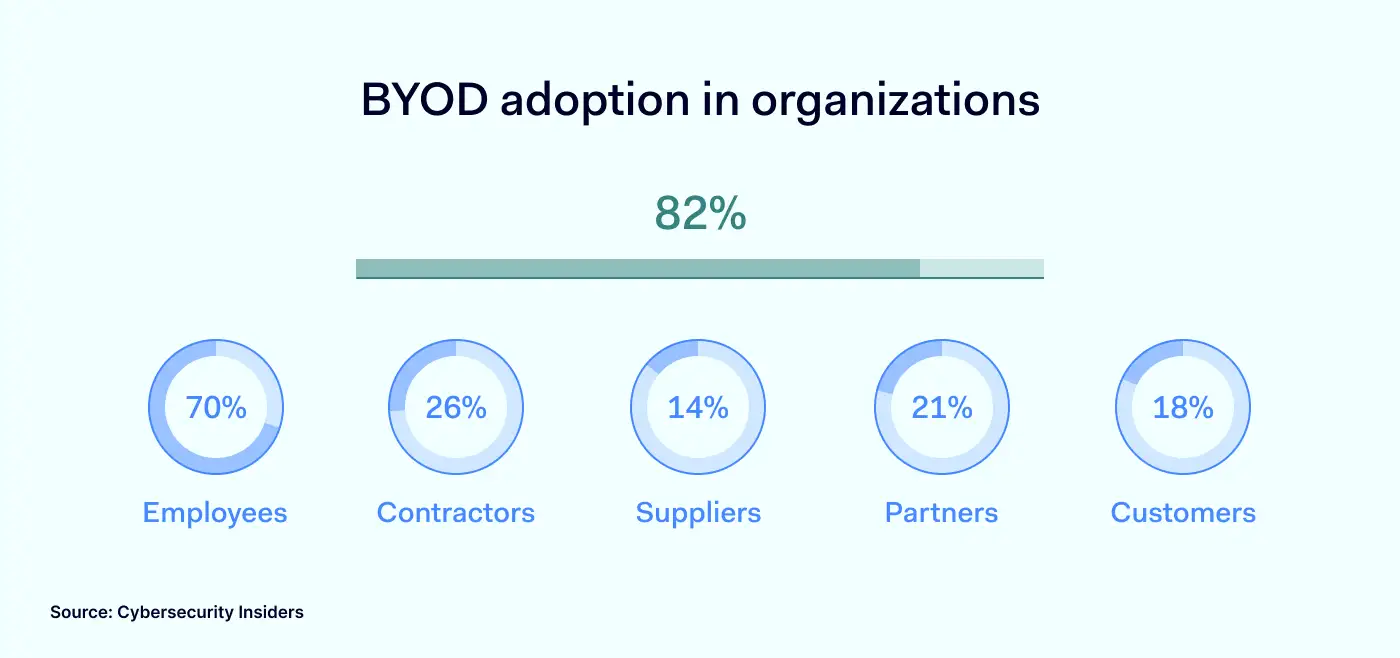
According to BYOD Security Report 2022, the vast majority — 82% of organizations have a policy that allows staff to use their own devices, at least to some extent. Although BYOD is mainly considered an employee-related topic, contractors, partners, customers, and suppliers also can become unmanaged-device sources to the organization.

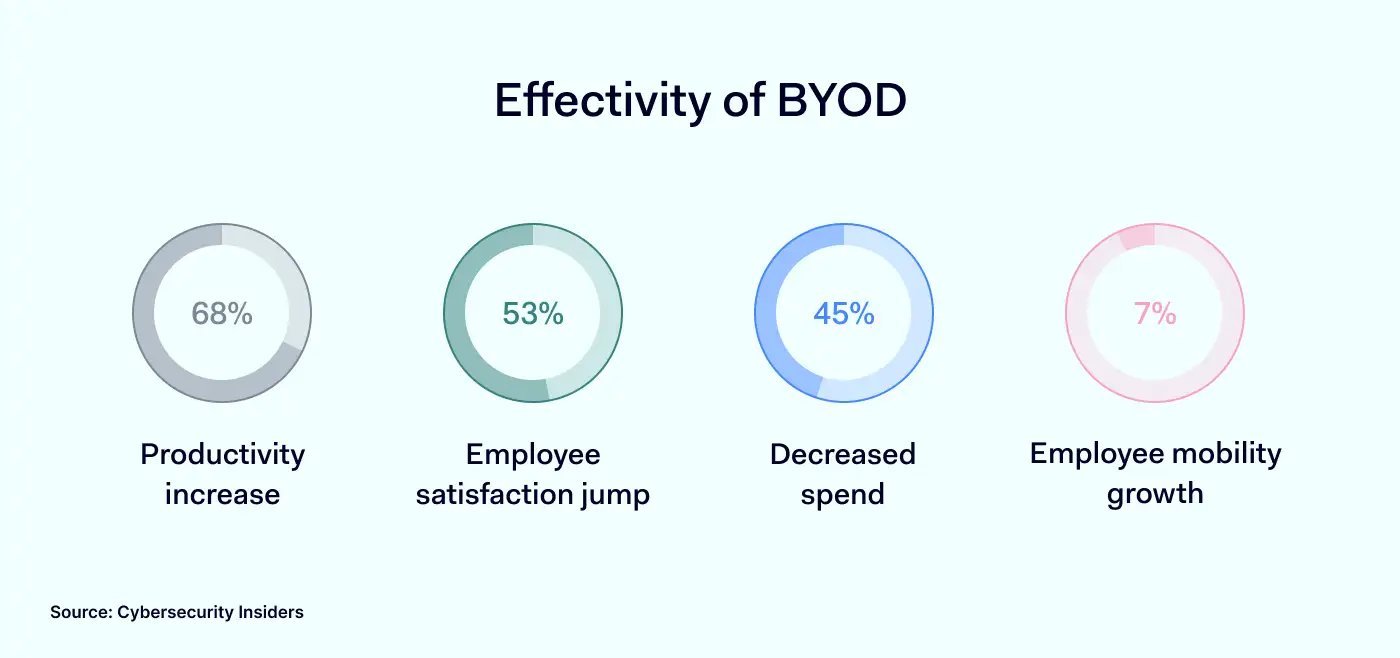
BYOD adoption in organizations 1400x658Companies with a BYOD strategy record major benefits for organizations and the workforce. Employees using their own devices at work are more satisfied as they aren’t attached to an additional piece of technology that needs to be mastered. It boosts productivity and flexibility with a cost-saving approach. Effectivity of BYOD 1400x658However, convenience has its price. BYOD policy in an organization exposes it to a broader spectrum of risks. An employee manages non-company-issued devices, thus, contents and activity are much more challenging to supervise. 

Risks of BYOD

The idea behind the bring your own device is to incorporate unmanaged user devices into the company network as supportive work tools. Technically, it becomes a security gap as such endpoints aren’t supervised if no security measures are enforced. To what risks do pre-owned user devices expose the organization?

Unknown end-user

A personal device doesn’t mean it is completely accessed only by its owner. If no lock pattern exists, family members, friends, or anyone can use the endpoint, which easily can lead to a data breach or leak. 

Device loss

Taking your laptop or phone outside the office increases the risk of lost or stolen devices. Any hardware containing business-sensitive information compromises data security as it can be extracted or accessed with little effort.

Non-trusted apps and networks

Individual devices mean personal activities. Work-related apps, communication channels, and email accounts mix with entertainment software (at times consisting of surveillance or malicious elements), streaming services, free-roam browsing, and potential for phishing attacks. 

Security features to support BYOD

Preventive measures like single sign-on or multi-factor authentication, network segmentation, and rooted-device detection help manage various risks of BYOD.

Integration of a solution to block external threats makes internet browsing safer for users with pre-owned endpoints. NordLayer’s ThreatBlock feature enriches DNS filtering by screening connection inquiries against libraries of malicious sites and blocklisting them from visiting.

Besides only focusing on protecting the device, encryption of communication channels is a strong addition to BYOD strategy enforcement. Modern AES 256-bit encryption used in internet protocols like NordLynx encodes traveling data. It ensures the confidentiality of sensitive business information when connected to untrusted networks.

Another way to ensure device compliance with organizational security policies is to enable auto-connection to the company’s Virtual Private Network (VPN) once an internet connection is detected and use always-on VPN features. Automatization minimizes the human error vulnerability so users can’t ‘forget’ to switch their devices to the required gateway when accessing company resources.

Let’s shift from the n+1 possible strategies of enabling BYOD policy and, this time, dig deeper into one of the most prominent security functionalities – Deep Packet Inspection (DPI) – that controls what’s entering the company network despite the source of the endpoint.

What is DPI?

Deep Packet Inspection helps protect the company network by filtering out harmful or unwanted sites and applications. It scans data packets of traveling information against flagged keywords and website categories. Unlike DNS filtering, which filters only website data, DPI goes above browser-level restrictions and inspects data on the applications and device levels.

DPI processes packet filtering that may contain malicious elements leading to intrusions and viruses. Alternatively, it allows blocking out sources incompatible with work productivity, like gaming or streaming sites.

In short, the feature serves network management by controlling what ports and protocols employees can access while connected to the company gateways, effectively securing the devices as DPI inspects not only the headers but also the contents of data packets.

How does DPI enable the flexibility of BYOD policy?

In the post-pandemic era, companies are calibrating which approach – remote or on-site – works best for their organizational culture. Ultimately it shows a clear tendency for the application of hybrid work variations. Meaning the BYOD policy is implicit in such companies.

Securing remote workforces

Physical distance is the main attribute of remote work. Traveling and remote employees and freelancers are the driving force for implementing the BYOD policy since acquiring hands-on staff is easier and cheaper.

Removing the office-based restrictions of a controlled network prevents IT administrators from actively monitoring the company infrastructure within a contained perimeter. In this case, the security focus can shift from the actor to the conditions of the environment they operate in.

DPI is based on a set of rules that admins impose collectively for the whole organization or teams and selected users. They can define restrictions on what content can’t enter the company network while connected to the organization gateway.

Blocking specific ports and protocols aid security strategy by stopping:

  • Downloading file-sharing applications 
  • Accessing malicious websites that may inject malware
  • Falling victim to a man-in-a-middle attack while connected to public wifi
  • Entering links with phishing attempts
  • Installing shadow add-ons and software
  • (Un)voluntary data leaking

Office security enhancement

It is easier to manage on-premise work until it turns to online browsing. Dozens of open tabs, links, and distractions on the internet require additional precautions to improve productivity within the office borders.

DPI solution enables IT administrators to manage access to online resources that tend to impact employee effectiveness daily.

First, an organization can simply deny access to streaming, gaming, and secondary websites unrelated to performing job tasks. Less Youtube, Twitch, or Netflix streaming in the background, more focus on performance quality.

Secondly, unnecessary internet traffic slows down the bandwidth within the office. Slow connections disrupt the intended workflow, put pressure on infrastructure, and result in poor user experience. DPI feature allows IT admins to eliminate traffic overload on the company network. 

Enabling secure BYOD with NordLayer

NordLayer introduced Deep Packet Inspection (Lite) security feature focusing on the most tangible organization pain points with hybrid setups. Security and productivity are the priorities of a business; thus, DPI Lite seals the security vulnerabilities, whether you try managing globally spread teams and freelancers or unlocking workforce performance. 

NordLayer’s DPI Lite is one of the many security layers that, combined with other network management features like DNS filtering and IAM integrations, solidify any cybersecurity approach — and help you find the most straightforward way to improve your organizational security.

About Version 2 Digital

Version 2 Digital is one of the most dynamic IT companies in Asia. The company distributes a wide range of IT products across various areas including cyber security, cloud, data protection, end points, infrastructures, system monitoring, storage, networking, business productivity and communication products.

Through an extensive network of channels, point of sales, resellers, and partnership companies, Version 2 offers quality products and services which are highly acclaimed in the market. Its customers cover a wide spectrum which include Global 1000 enterprises, regional listed companies, different vertical industries, public utilities, Government, a vast number of successful SMEs, and consumers in various Asian cities.


檔案類型檔案名稱下載分享
產品資料Atera for MSPs Features List (PDF)
產品資料Atera for IT Departments Features List (PDF)

小型企業網絡安全:主動安全措施的重要性

Small businesses are on the front line of cybersecurity. At any moment, cyberattacks could extract confidential data, damage network infrastructure, or even cause total business failure.

The risks are real. According to Verizon, 60% of small businesses that suffer cyber attacks go out of business within 6 months. Healthcare company Wood Ranch Medical is a great example. The small operator was bankrupted by a 2019 ransomware attack that prevented access to sensitive patient records.

Despite cases like Wood Ranch Medical, most small businesses fail to allocate enough time and resources to counter cyber-threats.

Don’t fall into that trap. Instead, follow this guide to implement robust cybersecurity measures. With our help, you can counter the most dangerous cyber threats faced by SMBs. Let’s find out more.

Understanding the threat landscape for SMBs

The first thing to understand is that small businesses face a diverse range of cyber threats. Any one of them could ruin your reputation and lead to regulatory fines.

Attackers can lurk for months and monitor traffic. They can steal sensitive client data or lock it away until victims pay a ransom. Or they could cause technical damage, ruining network infrastructure.

SMBs can’t afford these consequences. But how do you handle critical cybersecurity threats?

Prevention starts from awareness of the most common threats and how they fit into cybersecurity for small businesses.

Types of cyber attacks

Here’s a list of the most common types of online threats.

All of them threaten small businesses.

1. Phishing

Phishers use social engineering techniques to fool small business employees. With a few pieces of information, attackers can easily convince time-poor workers to make dangerous decisions. This might involve emails pretending to come from colleagues or trusted third parties. The links in these emails lead to malicious sites or initiate malware downloads.

2. Ransomware

Ransomware locks down high-value data and demands a ransom from targets. If attackers control these targets, they can demand a high price to restore access. And small businesses are not always able to pay.

3. Spyware

Spyware tracks data flowing through network assets and sends this information to controllers outside the targeted organization. Some spyware is legitimate. For instance, advertisers sometimes use it to deliver targeted ads. But the majority of spyware is malicious and linked to data extraction.

4. Viruses

Viruses spread between devices and their effects range from relatively light disruption to complete system failure. Some viruses remain dormant for long periods. Others set to work immediately. In all cases, small businesses need updated and effective antivirus software to defend their perimeter.

5. Malware

Malware extends beyond ransomware and spyware. For example, businesses might encounter trojans or worms that stay below the radar until activated. Bots are also common. These agents latch onto devices and create “swarms” to launch wide-scale attacks.

6. Man-in-the-middle attacks

Man-in-the-middle attacks target insecure wifi connections. Attackers can intervene between remote access workers and the corporate network. If the connection is unencrypted, hackers can harvest information from corporate network traffic and steal confidential data.

7. SQL injection

SQL injection uses SQL code to request access to valuable databases. This generally occurs via web forms connected to SQL databases. For small businesses, this could include employee gateways or payment forms. Securing web assets is absolutely essential.

8. DDoS attacks

Distributed denial-of-service attacks involve botnets featuring hundreds or thousands of agents. Botnets direct massive amounts of traffic at their target with the aim of overwhelming networks. Larger organizations may have the resources to absorb DDoS floods. But with attacks averaging 5.17 Gbps, small business websites can easily fold under the pressure.

9. Zero-day exploits

Zero-day exploits target recently documented software vulnerabilities. In these situations, vendors probably haven’t developed patches, exposing users to opportunist attackers. Small businesses rely on anti-virus, communications, and data management tools in everyday work. But any of these tools can become vulnerable overnight.

10. DNS tunneling

DNS tunneling injects malicious code into networks via DNS queries. This allows hackers to seize control of local DNS servers. When that happens, a small business can lose control of its website and network assets. DNS tunneling exploits insecure firewalls, but SMBs often retain legacy firewall products. That’s a bad idea when successful attacks can ruin reputations in seconds.

11. XSS attacks

XSS (or Cross Site Scripting) injects malicious code via web applications and browser-side scripts. XSS attacks allow attackers to change website designs, adding undesirable content. They can launch malicious software, infecting business networks and customer devices. It allows hackers to spoof legitimate identities by hijacking cookies. All of that is bad news for SMBs.

Cybersecurity best practices for small businesses

Small businesses need cybersecurity strategies that deal with critical threats. But how can you implement an effective strategy with a small business budget?

SMBs lack the resources of corporations. But cybersecurity for small businesses must still protect sensitive data and network resources. Here are some best practices to follow that balance cost and efficiency.

1. Implement a strong password policy

Employees should only use strong passwords to log into your company network. Weak passwords are easy to guess or brute force. This makes mounting attacks much simpler.

Require employees to use 10-15 character passwords. Demand a mixture of upper and lower case letters, numbers, and symbols. Enterprise-wide password management tools can help. They make storing and changing passwords easier, eliminating much of the risk of human error.

Combining password hygiene with anti-virus software and firewall protection is also good practice. That way, you can filter potential threats and authenticate users effectively.

2. Schedule regular backups

Cyber-attacks can lead to the deletion of data or system failures that compromise important workflows. This makes it vital to back up high-priority data regularly. Use secure cloud services or external locations away from your core network.

3. Train employees in cybersecurity basics

Digital cybersecurity controls rely upon human knowledge and behavior. The way employees act when encountering cyber threats is a crucial part of a small business security setup. That’s why it’s vital to focus on what is known as the human firewall.

Strengthen the human firewall by training employees to spot phishing emails and malicious links. They must know the company password and access management policies. Remote workers should also understand how to connect securely, as well as the risks of using an insecure public wi-fi network.

4. Use threat prevention measures to reduce cyber attack risks

Minimize cyber security risks by adding antivirus software and malware scanning tools to your network traffic. Use VPNs to encrypt data and anonymize user IP addresses. Create allowlists to screen user identities, admitting only authorized addresses.

Take action to secure your local network as well. You may need to upgrade your wifi network from WEP to WPA2. Check that your router SSID is anonymized and consider upgrading your firewall to add features like Deep Packet Inspection.

5. Implement protection for sensitive information

Encrypt high-value data like personnel records and customer financial information. If you rely on SaaS or PaaS tools, use any cloud data protection tools provided by your Cloud Service Provider.

Use privileges management to limit freedom within network boundaries. Confidential data should only be available to users who need it in their working tasks. That way, when a data breach occurs, attackers will struggle to access and extract data.

Minimize the number of users with administrative privileges. Avoid giving single users the power to make fundamental network changes.

Consider using Data Loss Prevention tools as well. These tools track the location and state of important data. They block data transfers to unauthorized devices and log potentially dangerous access requests. If you handle high-risk, high-value data, DLP could be a sound investment.

6. Create an Incident Response Plan

Small businesses must prepare for cybersecurity incidents. Aim to restore normal working conditions as soon as possible while protecting data and neutralizing active threats.

Carry out a risk assessment for the threats detailed above. Include an assessment of where critical data resides. Assign an individual with the responsibility to protect important data. And connect every resource with risk-reduction strategies.

Create a recovery plan for all critical assets. This should include security scans to identify any malware or virus infections. Document access requests during the security alerts and determine whether data loss has occurred.

SMBs need to be ready to act as soon as possible when cybersecurity issues arise. Be proactive and make sure everyone is aware of incident response procedures.

7. Focus on secure remote access

Many small businesses allow employees to work from home. Sales representatives may also travel widely but require access to central resources. In both cases, remote access creates cybersecurity risks.

Require strong passwords and MFA for remote connections. Consider requiring employees to use an approved VPN service when working from home. Staff may store confidential information on smartphones, creating additional risk. Enforce strict data protection policies for mobile devices.

Make sure your cyber security tools cover both on-premises and cloud resources. Remote workers can bypass central network routers if they connect to SaaS apps. This can create security gaps and compromise visibility.

8. Manage third parties securely

Small businesses rely on third-party vendors, but partners can act as vectors for cyber attackers. For example, CRM providers may not encrypt data securely, putting client data at risk. Virus checkers or low-quality VPNs may transmit spyware.

Check all third parties and ensure they have rock-solid security policies. Trust nobody, and always ask for security assurances if you aren’t sure.

9. Enable 2FA or MFA

Small companies need to secure the network edge with robust authentication procedures. 2-factor authentication or multi-factor authentication are the best options here. These tools request multiple identification factors whenever users connect to network assets. This makes it far harder to obtain access illegitimately.

If MFA is too burdensome for employees, consider using it only for administrator accounts. Or try user-friendly 2FA procedures such as fingerprint scanning. Balance user experience and security. But always go beyond simple password protection.

Ensure your company’s sensitive information is protected

Data protection is the most important cybersecurity goal for small businesses. Data losses lead to huge reputational damage and regulatory penalties. It’s critically important to secure data and show evidence that confidential information is protected. Basic data protection measures include:

  • Encrypting important databases

  • Filtering access with privileges management

  • Strengthening malware and firewall protection.

  • Using Data Loss Prevention tools

  • Educating employees about data security policies.

Beyond those actions, it’s also a good idea to check your data security posture. The Cybersecurity & Infrastructure Security Agency (CISA) provides a free “cyber hygiene” check. This is a good starting point. It should help you find vulnerabilities and identify areas of improvement.

Penetration testing also mimics the activities of hackers, providing a good measure of your data security setup. Robust testing will dramatically reduce the risk of data breaches in the future.

Cybersecurity checklist for small businesses

Small businesses should have a comprehensive cybersecurity plan that guides their efforts.

Follow this checklist to make sure you include the right security measures:

  1. Data protection – Apply encryption, DLP, and privileges management. Prioritize high-value data.

  2. Threat reduction – Put in place virus and malware scanning, and firewall protection.

  3. Incident response – Ensure rapid restoration of critical assets with full security checks.

  4. Backups – Regularly back up important data. Use secure cloud or external storage solutions.

  5. 2FA or Multi-Factor Authentication – Apply robust authentication to ensure legitimate access.

  6. Education – Provide full security training for all employees with a focus on phishing risks.

  7. Remote access – Ensure safe, user-friendly remote access. Enforce strong mobile device security.

  8. Strong passwords – Use strong, regularly changed passwords. Install password management tools to automate procedures.

How can NordLayer help?

Nordlayer is the ideal partner to help small businesses secure their data. We offer a variety of solutions to strengthen network defenses and manage employee identities.

Device Posture Checks make working from home safer. Nordlayer’s systems assess every device connection. If devices fail to meet security rules, posture checks deny access. Users will instantly know about access requests from unknown or compromised devices.

IP allowlisting lets you exclude unauthorized addresses at the network edge. IAM solutions use multifactor authentication and Single Sign On to admit verified identities. Virtual Private Gateways anonymize and encrypt data, adding more remote access protection. And our Cloud VPN services lock down hard-to-secure cloud assets that small businesses rely on.

Nordlayer makes achieving compliance goals easier and provides a safer customer experience. To find out more, get in touch with our sales team today.

About Version 2 Digital

Version 2 Digital is one of the most dynamic IT companies in Asia. The company distributes a wide range of IT products across various areas including cyber security, cloud, data protection, end points, infrastructures, system monitoring, storage, networking, business productivity and communication products.

Through an extensive network of channels, point of sales, resellers, and partnership companies, Version 2 offers quality products and services which are highly acclaimed in the market. Its customers cover a wide spectrum which include Global 1000 enterprises, regional listed companies, different vertical industries, public utilities, Government, a vast number of successful SMEs, and consumers in various Asian cities.


檔案類型檔案名稱下載分享
產品資料Atera for MSPs Features List (PDF)
產品資料Atera for IT Departments Features List (PDF)

CMHA 如何在動態團隊環境中保護敏感的客戶數據

Canadian Mental Health Association (CMHA), Alberta South Region (CMHA, ASR), is a mental health non-profit, charitable organization in Canada. CMHA, ASR serves the Southwestern Alberta Region. As part of a nationwide mental health organization, it delivers a wide range of services that contribute to all people’s well-being. Dedicated teams support people in need through housing, crisis services, case management, peer support, Wellness Recovery, information and referral, service navigation, education, and advocacy. From a rapid response operation to providing information to an emergency helpline, CMHA, ASR is here to help people walk through the most challenging moments of their lives.

The CMHA Alberta South Region operates in an area of approximately 200,000 people. It is located next door to two large indigenous communities with over 16,000 people living on and off the reserve. The organization’s nature and a team of 50 specialists working on several projects mean a dynamic and fast-paced workplace. Managing employee attrition and onboarding, working between program sites or at the regional hospital emergency department, and protecting sensitive client data require watertight and responsive security measures to support the daily CMHA operations. Wesley Chenery, the IT Specialist at the CMHA Alberta South Region, reveals the technological backstage of handling these challenges. 

The challenge

One-man army to initiate and contain sensitive data controls

CMHA’s case is unique to the nature of the service model and its place in the health care system in Alberta. Although the organization does not fall under all the regulatory conditions within the public health care system, it is contractually mandated to follow compliance standards like HIPAA and other general data protection regulatory requirements. Yet, most of the security measures are applied by a proactive approach to avoid any potential negative outcomes of client data loss.

Our work culture requires a specific set of skills to be on board with what we do and offer to people. Unlike many more complex government organizations with layers of staff to support departmental needs, I am alone responsible for IT, statistics, and centrally administrating the CMHA’s client-data registry.

Click to tweet

CMHA uses a client management system called ‘Efforts and Outcomes (ETO),’ where all client data is stored. The organization must follow government standards to keep data solely in Canada — it cannot bounce between servers in different countries.

“The information has to be stored in the local data centers, and transfers must find a route that stays within Canada — other restrictions and policies regarding data are designed and implemented at our own discretion.”

Click to tweet

Contractual requirements and government regulations clearly outline data collection security standards. The organization is committed to maintaining high standards of compliance.

Another challenge CMHA faces is ongoing staff change. In a relatively short time, five employees tend to leave the organization, and another five join. A high rate of employee attrition and onboarding creates underlying security issues. Thus, access controls must be carefully managed to disconnect former employees and add new joiners in order to mitigate security risks.

So how does a company with limited resources can streamline its security policies and get ahead of security risks in one of the most cyber-targeted sectors?

The solution

A helping hand for defending data from cyberattacks

A service provider that provides an extensive range of services from hospital presentation aftercare to housing vulnerable individuals, from completing taxes to the monitoring of prescribed medication or guidance on reintegration into society – must represent and maintain trust. Strict internal policies and different tools help to achieve this goal.

Every computer and phone had to run security software that was controlled centrally by the network administrator. Every endpoint had its cookies and internet data wiped out every half-hour or when a browser was closed. Moreover, the browser was running an internet protection tool, and for a VPN, CMHA used an in-house server which was getting old and expensive to maintain. It is also worth mentioning that the internet in Canada is not that fast.

“There were many issues with in-house maintenance as hardware downgrades over time. You have to renew your licenses non-stop and buy accounts for new users — it’s just ridiculously expensive.”

Click to tweet

Besides, there was no option for backup with the on-site server — you lose power, and everyone loses connection. Upgrading the legacy infrastructure for better efficiency and getting more features demonstrated a need for a new solution that is well-developed and affordable.

The solution had to support the IT manager’s daily operations, not burden them. It also had to be simple and intuitive for fast user onboarding, turning money and time to value.

“We used a really old and non-automated system to connect people from the VPN. I’d have to log into the server manually, unplug employees, change over their IP addresses, and afterward get them all set up again. It was extremely time-consuming.”

Click to tweet

Employees are not allowed to connect to public networks. However, they must be mobile as the staff’s workplace might transform into hospitals or encampments. Thus, the tool must be running on their devices.

To eliminate as many risks as possible, CMHA performs cybersecurity awareness training for its employees. There’s a strict work-only device usage policy not to mix business and personal activities on provided laptops and cellphones. Company policies allow user activity monitoring to ensure top-level compliance and client data security.

Why choose NordLayer

NordLayer provides Control Panel with visibility on user activity and controls, with features like Always On VPN, KillSwitch, or ThreatBlock managed centrally. Automation and simple controls allow for saving IT manager’s time and monitoring network safety on a unified scale.

“The biggest feature that I’m really liking is the KillSwitch — it has saved us a couple of times.”

Click to tweet

Once somebody got into CMHA’s network and started changing their setting static IP address. The threat actor was overriding the computer and trying to re-direct our outgoing traffic. But when they hit Implement, all organization computers lost internet, stopping them from getting onto the company’s computers.

“The malware virus was designed to sit underneath our programs and slowly transfer data. I’m guessing it would have probably taken about a month to realize there was an attack before anything started acting funny.”

Click to tweet

Because of the feature, computers went down instead of connecting to the router, where the attacker left a malicious program to transfer all organization information to them. Instead, it hinted to the IT manager that someone was on the network — therefore, data was secured, and the router went into the garbage.

Malicious activity and software can stay undetected on the network for months until the damage is done irreversibly. Threat actors collect or lock away sensitive data for ransomware – one of the most destructive types of cyberattacks – exposing client personal information and making businesses face risks and losses.

The outcome

Effectively-used time to take care of organization security

Sensitive client data in the mental health sector, dynamic teamwork arrangements, and only one person to make it work technically and securely poses a major challenge to anyone.

Therefore, even support-oriented organizations need assistance to make their work easy and effective. A solution like NordLayer is focused on eliminating the complexity and inconvenience outdated hardware brings to security administrators.

“With NordLayer, I receive so few calls about network issues. Unless you are connecting to the right network, you won’t be able to use our systems — an immediate reminder to employees that they need to change the network instead of contacting me to troubleshoot via phone.”

Click to tweet

The right tools give more time, flexibility, and visibility to complicated and sometimes even destructive events in the organizational cybersecurity ecosystem. Besides security features, NordLayer enables to extract user activity data, useful for reporting and auditing, ensuring the security approach is compliant.

Pro cybersecurity tips

Despite the background and certificates in cybersecurity, real-life experiences bring the best insights into what methods and processes work best. Therefore, every story matters, it’s just important to hear it and apply it to your own case.

Wesley Chenery, IT Specialist of CMHA, Alberta South Region, shares the points of importance every security manager should consider and share with their organizations:

Using the right tools, you have better chances to be ahead of unfortunate events that threaten your organization’s network security. A proactive and safety-first mindset in evaluating risks and possible attack scenarios can become a vital element in business continuity. Make sure to upgrade to effective and efficient solutions — contact us to discover your options to improve the way the security of your company.

About Version 2 Digital

Version 2 Digital is one of the most dynamic IT companies in Asia. The company distributes a wide range of IT products across various areas including cyber security, cloud, data protection, end points, infrastructures, system monitoring, storage, networking, business productivity and communication products.

Through an extensive network of channels, point of sales, resellers, and partnership companies, Version 2 offers quality products and services which are highly acclaimed in the market. Its customers cover a wide spectrum which include Global 1000 enterprises, regional listed companies, different vertical industries, public utilities, Government, a vast number of successful SMEs, and consumers in various Asian cities.


檔案類型檔案名稱下載分享
產品資料Atera for MSPs Features List (PDF)
產品資料Atera for IT Departments Features List (PDF)

網絡安全中的 UX/UI 設計師:一個更安全的數字世界的重要角色

While most people associate cybersecurity solutions with complex code, it also involves a significant amount of design work. That’s where UX/UI specialists come in. But exactly what role do these designers play in the cybersecurity field, and where can we see their impact?

To answer these questions, we talked to two UX/UI designers working at Nord Security, Teodora Žvilaitytė and Irma Škuratovaitė. They shared their experiences and some insights on their work in this challenging industry and how it feels to shape a quality user experience for the world’s fastest VPN. So, without further ado, let’s dive in.

Meaningful work

What makes working in the cybersecurity field exciting and fulfilling for you as a UX/UI designer?

Irma: It is really gratifying to know that I’m helping make the online world safer for millions of people across the globe. And it’s even more rewarding to see that our hard work has been recognized by TIME magazine, which listed NordVPN as one of the best innovations of 2022.

While UX/UI design may not be the most crucial part of the product (the tech side is), it still plays an essential role in ensuring that the security features of NordVPN are accessible and user-friendly. This involves designing intuitive interfaces, clear instructions, and helpful features that guide users in managing their security settings.

Teodora: It’s crazy how cyber threats are everywhere and can affect not just companies but also ordinary people, who often think they are too small to become a target of cybercriminals – but they’re not. Knowing this, I’m glad to work for NordVPN, securing people’s digital lives.

The fact that I’m playing an active role by creating a seamless, enjoyable experience, allowing NordVPN users to take control of their online security, is what makes my job so fulfilling. Seeing how much they appreciate and trust our product is incredibly inspiring, and it gives me a great sense of purpose that is hard to come by.

Skills needed to succeed

UX design is a broad field that covers many areas of expertise. What skills do you need to succeed as a UX pro?

Irma: To work at Nord Security, you need to have open-mindedness, communication, and presentation skills, along with problem-solving abilities. Being open to discussion, feedback, and different viewpoints will help you collaborate more effectively with stakeholders and cross-functional teams and create better design solutions.

Communication and presentation skills are essential for conveying ideas, preparing presentations, and ensuring that the design process runs smoothly. Problem-solving skills are crucial for empathizing with users and finding solutions to their pain points.

Teodora: Besides having strong communication skills, as Irma mentioned, you also need to have a keen attention to detail and a willingness to tackle problems creatively. As a UX/UI designer, you’ll need to balance aesthetics with functionality and security, and sometimes combining these factors can be challenging.

Finally, since the cybersecurity field is constantly changing, you have to be prepared to work in a fast-paced and high-pressure environment, as designers often work on multiple projects and must meet tight deadlines.

Irma: In terms of hard skills, proficiency in Figma is a must, while familiarity with Adobe AI, PS, HTML, CSS, and JavaScript is also important. Creating wireframes and prototypes, knowing user research methodologies, and following accessibility standards are all key. Knowledge of A/B testing and Google Analytics is also beneficial for deeper insights.

Teodora: Figma will definitely be your major tool in this role, along with the web technologies that Irma mentioned. Besides that, knowledge of user experience (UX) design principles, including user research, information architecture, prototyping, and testing, is a must if you want to work in this role. If you’d like to learn more about what UX/UI designer’s job looks like in the cybersecurity field, feel free to reach out to me on LinkedIn.

Irma: Once you join Nord Security, your professional growth will only accelerate. You’ll have access to a supportive community of experts who are always willing to share their knowledge and wisdom. And our learning and development team is absolutely amazing! They provide us with a wide range of learning opportunities, from internal and external training to mentorship programs, workshops, and knowledge-sharing events.

All these resources help us stay up-to-date with the latest trends and technologies in the field and continuously improve our skills. It’s inspiring to work for a company that truly invests in the growth and development of its team members.

Blog inside image girl 2

Exciting challenges

What are the challenges of working as a UX/UI designer at Nord Security?

Irma: As a UX/UI designer on the conversion rate optimization (CRO) team, my main focus is on creating designs that convert. The team helps me to identify pain points, problems, and opportunities for improvement on our website. Based on that, I create wireframes and prototypes and design A/B test variations for our landing pages.

The biggest challenge in this role is to visually communicate and translate complex security concepts and product features into clear, intuitive, and user-friendly designs.

Teodora: Another challenge is ensuring that our products are accessible and easy to use for all users, including those with disabilities. This involves designing interfaces and user experiences in a way that meets accessibility standards and considers their special needs. By doing so, we can provide a secure digital environment that is inclusive and accessible to all.

One more challenge in this
role is finding common ground and ensuring that every stakeholder, from product managers to engineers who have different perspectives and priorities, is working towards the same goal. This challenge can be overcome through effective communication, collaboration, and finding a shared understanding of the project goals.

The impact of work

What is the impact of your work on the world’s fastest VPN?

Teodora: Well, my work has a direct impact on the experience of millions of users. One recent project I worked on was introducing a new navigation menu on our global website, which has already improved the user experience for many NordVPN users. Another was optimizing and raising interest for specific audiences in our Amazon (Indirect Sales) store, which has led to increased engagement and sales.

In addition, I am involved in daily suggestions and problem-solving decisions, such as optimizing our landing pages, localizing web content and adapting it to specific countries, etc. It’s amazing to think that my work is visible to millions of people across the globe and that every design decision I make has the potential to impact someone’s online security and privacy. This is a huge responsibility, but it’s also incredibly rewarding to know that I’m making a difference in the world.

Irma: My team and I have a direct impact on the world’s fastest VPN, NordVPN, by creating design solutions that significantly improve landing page conversions. Through data analysis, we were able to redesign sections with better UI and brand compatibility, improve storytelling for clearer communication, and enhance mobile UX on specific components.

Our work is crucial in making NordVPN more accessible to people worldwide, providing them with a secure and easy-to-use digital environment. By constantly improving the user experience, we are helping NordVPN to continue to grow and maintain its position as the leader in the VPN industry, serving millions of users worldwide.

Work in cybersecurity

Want to catch a glimpse of what working with other Nord Security products as a UX/UI designer looks like? Watch the Meet Nord People video. And if you’re ready to take the next step and join our team, explore our UX/UI designer opportunities here!

About Version 2 Digital

Version 2 Digital is one of the most dynamic IT companies in Asia. The company distributes a wide range of IT products across various areas including cyber security, cloud, data protection, end points, infrastructures, system monitoring, storage, networking, business productivity and communication products.

Through an extensive network of channels, point of sales, resellers, and partnership companies, Version 2 offers quality products and services which are highly acclaimed in the market. Its customers cover a wide spectrum which include Global 1000 enterprises, regional listed companies, different vertical industries, public utilities, Government, a vast number of successful SMEs, and consumers in various Asian cities.


檔案類型檔案名稱下載分享
產品資料Atera for MSPs Features List (PDF)
產品資料Atera for IT Departments Features List (PDF)

無名惡意軟件如何竊取您的數據(並逍遙法外)

Imagine if malware got into your computer. In fact, how do you know it isn’t there already? With some help from third-party researchers, we uncovered and analyzed a database of stolen data. It’s big — and the victims likely never knew their files had been stolen.

The discovery of a stolen database

We want to make it clear: we did not purchase this database nor would we condone other parties doing it. A hacker group revealed the database location accidentally. The analysis of the database was conducted in partnership with a third-party company specializing in data breach research. The cloud provider hosting the data was notified so it can be taken down.

1.2 TB database of stolen data

The stolen database contained 1.2 TB of files, cookies, and credentials that came from 3.2 million Windows-based computers. The data was stolen between 2018 and 2020. The database included 2 billion cookies. The analysis revealed that over 400 million, or 22%, of those cookies were still valid at the time when the database was discovered.

We now know that the virus escaped with 6 million files it grabbed from Desktop and Downloads folders. 3 million text files, 900,00 image files, and 600,000+ Word files made up the bulk of the stolen database, but it also contained over 1,000 types of different files.

Screenshots made by the malware reveal that it spread via illegal software (Adobe Photoshop), Windows cracking tools, and pirated games. Moreover, the malware also photographed the user if the device had a webcam.

The dangers of custom malware

Just like with hurricanes, experts love naming dangerous malware. But computer viruses don’t have to have names to be capable of stealing lots of data. The truth is, anyone can get their hands on custom malware. It’s cheap, customizable, and can be found all over the web.

Dark web ads for these viruses uncover even more truth about this market. For instance, anyone can get their own custom malware and even lessons on how to use the stolen data for as little as $100. And custom does mean custom – advertisers promise that they can build a virus to attack virtually any app the buyer needs.

How to stay safe

Based on the feedback from the researchers, it may be impossible to tell whether a file is infected. If the malware is new, no antivirus can recognize it. The only way to stay safe is to follow good cyber hygiene rules:

  • Web browsers are not good at protecting sensitive data. Use password managers to protect your credentials and auto-fill information.
  • Malware can’t access encrypted files. Services like NordLocker protect your files both on your computer and the cloud, so malware can’t just grab them.
  • Some cookies are valid for 90 days, and some don’t expire for an entire year. Make deleting cookies a monthly habit.
  • Peer-to-peer networks are often used for spreading malware. Only download software from the developer’s website and other well-known sources.
  • All malware gets recognized eventually. Make sure that your antivirus is always updated to prevent old viruses from slipping through the cracks.

About Version 2 Digital

Version 2 Digital is one of the most dynamic IT companies in Asia. The company distributes a wide range of IT products across various areas including cyber security, cloud, data protection, end points, infrastructures, system monitoring, storage, networking, business productivity and communication products.

Through an extensive network of channels, point of sales, resellers, and partnership companies, Version 2 offers quality products and services which are highly acclaimed in the market. Its customers cover a wide spectrum which include Global 1000 enterprises, regional listed companies, different vertical industries, public utilities, Government, a vast number of successful SMEs, and consumers in various Asian cities.

檔案類型檔案名稱下載分享
產品資料Atera for MSPs Features List (PDF)
產品資料Atera for IT Departments Features List (PDF)

ScottMadden 如何推出與 Azure AD 的安全集成

ScottMaden is a management consulting group that supports Fortune 500 companies. The service provider focuses on two primary business areas: the energy sector and corporate & shared services. With 40-year experience in the industry, ScottMadden provides its clients with strategic planning through implementation across different business fields and functions.

Addressing numerous global clientele challenges represents ScottMadden’s expertise in sophisticated planning. Therefore, how does a company with up to 250 full-time employees throughout the United States and three local East Coast offices face internal security issues? Clinton Miller, IT Director of ScottMadden, shares their story on filling in the missing links in the organization’s cybersecurity strategy.

The Challenge

Securing employees on the go the right way

The company consults domestic and international clients — employees travel quite a bit to client sites and work hands-on on their projects. Hence, a hybrid work model wasn’t the new normal for the organization once the pandemic hit.

ScottMadden consultants spend a lot of time in airports and other public spaces where they would connect to the airport or mobile hotspots and hotel wifi. Yet, the company’s solution wasn’t as good for protecting and running smoothly while traveling.

“The concern was to improve the existing security model and ensure our employees had an encrypted connection regardless of which network they were on.”

Click to tweet

Having better performance, following industry best practices, and fulfilling client requirements to protect data outside the office were the driving factors in looking for a change. But is there a solution that can solve the problem effectively and efficiently onboard?

The Solution

Streamlined client drive-out to different environments

The traveling ScottMadden consultants and employees working from home used to rely on browser-based encryption. Using built-in data encoding in Office365 applications allowed them to perform job tasks and communicate with teams with some security levels.

However, the issue was the poor connection flow while video conferencing — latency is a deal breaker for online business meetings in a remote setup.

“Everyone during the pandemic did a lot of video conferencing via Google Meet, Microsoft Teams, or Zoom. We aimed to ensure there was a minimal impact on video calls.”

Click to tweet

One thing is handling latency to elevate employees’ and clients’ experience. But can the transition process administratively have a minimal impact on existing company infrastructure and cybersecurity strategy?

“One of the things we wanted to do was to push out the client fairly easily, operating on an SSO solution already in use.”

Click to tweet

ScottMadden uses solution Azure AD single sign-on solution for user identification within the organization. The company operates in macOS and Windows environments, so the chosen solution had to fit into the criteria for integration and simplicity.

Why choose NordLayer?

NordLayer solution is compatible with major service providers on the market. Thus, the company could integrate with AzureAD IAM solution and roll out organization-wide onboarding to a new solution using existing SSO.

The endpoint management solution allowed remote access in macOS and Windows environments.

“The implementation of NordLayer went a lot easier when we connected clients to Azure AD. It relieved us from setting up new individual accounts for every 250+ people in the organization.”

Click to tweet

The IT Director handled the process — it didn’t require a lot of resources and time to deploy the solution in the organization.

Organization onboarding using Azure AD by ScottMadden

According to Clinton Miller, the IT Director of the company, the longest step was to create an Azure group and add NordLayer. Once it was solved, the complete rollout to NordLayer solution took only a few hours.

The Outcome

Onboarding to a chosen solution enabled the company to secure team connections and extensive access to functionalities that comply with ScottMadden set benchmarks. Achieving data security didn’t have to compromise connection speed and video conferencing quality.

“Anytime employees are outside the office – at home or coffee shop – wherever they might be, we validated that they can reach all the services they needed, and speed wasn’t an issue.”

Click to tweet

The t
ransition to the new tool was heavily based on the company’s SSO. The documentation, knowledge base, and support team are highly responsive with communication to walk IT leaders through the process.

“For other potential decision-makers: onboarding NordLayer isn’t a heavy lift — you have the support and knowledge base ready, so it’s pretty straightforward.”

Click to tweet

Moreover, NordLayer’s Control Panel provides a good cross-reference point for those using the tool while working outside the office by filtering ongoing active connections.

It also delivers another step in the reporting process for the IT admin and the whole organization. For instance, it verifies that the organization follows internal policies by exporting connection data to verify and justify to a third-party audit.

Pro cybersecurity tips

Different sectors, industries, and services, but the same goal unites every organization’s IT leaders — securing their company assets. Following best practices and professional knowledge helps achieve security targets easier. Clinton Miller, the IT Director at ScottMadden, shares his top-on-the-list tips:

Do you need to upgrade existing tools used in your organization to align with best practices in the industry, improve processes and performance for the team, or expand your capabilities of tracking and reviewing the implemented security strategy?

Using NordLayer, you can integrate more features and functionalities with the organization’s preferred tools, service providers, and IAM solutions. It is possible without committing to massive changes and re-organizing current policies and infrastructure. Reach out to find out about your options on how to secure connections for the off-office employees and improve their experience while working online.

About Version 2 Digital

Version 2 Digital is one of the most dynamic IT companies in Asia. The company distributes a wide range of IT products across various areas including cyber security, cloud, data protection, end points, infrastructures, system monitoring, storage, networking, business productivity and communication products.

Through an extensive network of channels, point of sales, resellers, and partnership companies, Version 2 offers quality products and services which are highly acclaimed in the market. Its customers cover a wide spectrum which include Global 1000 enterprises, regional listed companies, different vertical industries, public utilities, Government, a vast number of successful SMEs, and consumers in various Asian cities.


檔案類型檔案名稱下載分享
產品資料Atera for MSPs Features List (PDF)
產品資料Atera for IT Departments Features List (PDF)