NordLayer 功能回顧:DPI Lite

The lines are blurred in the modern business lifestyle. There’re no boundaries between employees working from the office or anywhere in the world. And technological privilege enables linking personal devices to work applications for user and organization convenience.

This flexibility and ability to be mobile also mean that business matters simultaneously mix with personal activities online. And mobility is not alone to blame — the internet is often a necessary tool to perform job tasks and operate in different organization layers. Uncontrolled access to the internet provides vast resources incompatible with the work environment. How to manage what employees can do online without imposing risks on the company?

Deep Packet Inspection (DPI) is one of the most straightforward tools that limit free roaming online while connected to the company network. Establishing a set of restrictions helps create a secure perimeter for online activities within the company network.

It’s an important feature that supports performance and security efforts. Non-work-related activities can distract and reduce productivity. Moreover, entering various websites and apps can lure employees into malicious activities, so DPI is a choice for IT administrators to get a grip on the company’s traffic flow.

DPI solution using NordLayer

NordLayer solution offers a DPI Lite feature that allows IT administrators to control what user-requested data goes through or gets blocked from entering the company’s network.

The DPI Lite technology at NordLayer works on nDPI open-source protocol classification engine. It offers the most popular and acknowledged services  (ports and protocols) that are used by websites and network apps to operate on the internet.

With NordLayer, admins choose specific ports and protocols they want to include in the custom-defined block list. The policy applies only when a user is connected to the organization’s virtual private gateway. Thus, employees who work on job-related projects can’t simultaneously use blocklisted online resources and network applications with restricted access.

How does NordLayer’s DPI Lite feature work?

The cloud-based feature is available only with a virtual private gateway configuration. It’s set to active within 24 hours upon request. IT admins can add or remove specific ports and protocols open to access through the company’s network. They can do it by submitting an inquiry via NordLayer’s Control Panel.

The IT administrators can navigate and choose from a wide range of alphabetically arranged services (no slot restriction) that cover dual-use online resources, potentially harmful to business operations:

  1. Apple services

  2. Domain Name System

  3. E-commerce

  4. Email client protocol/Email services

  5. File sharing

  6. Gaming

  7. Google services

  8. Hypertext Transfer Protocol

  9. Identity

  10. Infrastructure/Networking

  11. IP tunneling protocol

  12. Messaging protocol/services

  13. Microsoft services

  14. Monitoring/SCIM

  15. Music streaming services

  16. News services

  17. Peer-to-peer file sharing

  18. Remote Access

  19. Social media

  20. Software Development

  21. Streaming services

  22. VoIP protocol

  23. VPN services

  24. Other (miscellaneous)

Our internal data shows the tendency to stop services primarily related to unapproved Peer-to-peer file sharing, Social media, and Gaming categories. It comes as no surprise that customers are particularly interested in limiting access to non-work-related services that impose the biggest risks to company assets and staff performance.
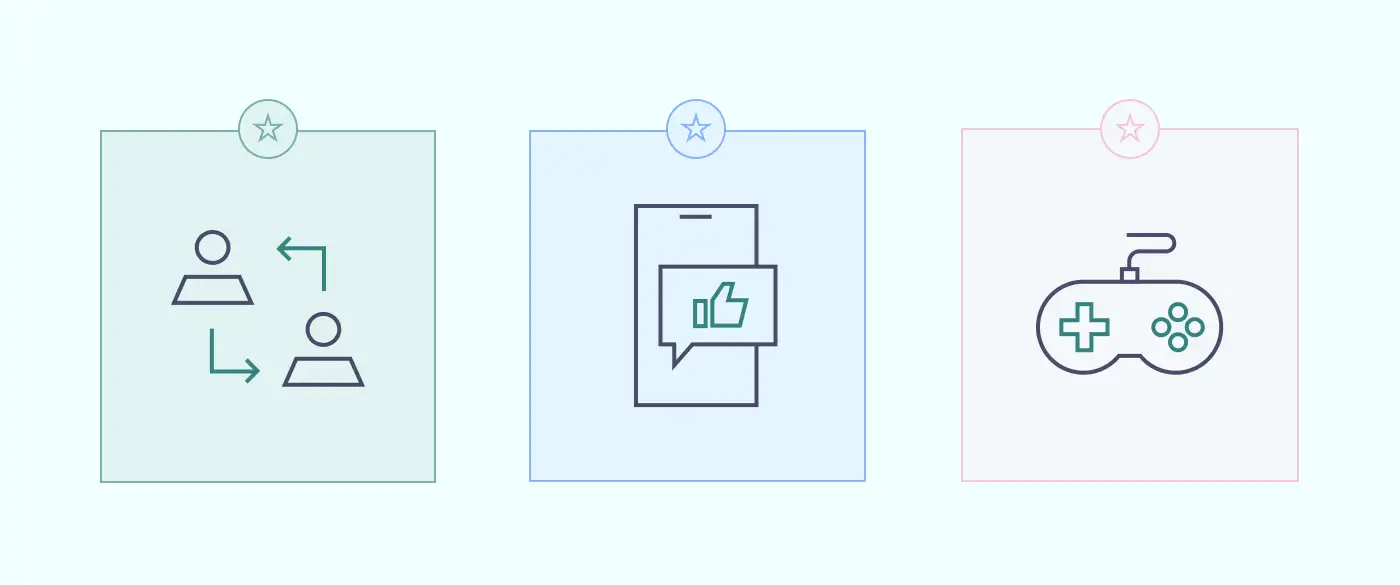
Infographic for employee accessHowever, if an employee needs access to company-level blocked sources, for example, a Social Media Manager working on Facebook and LinkedIn, IT administrators can purchase a separate dedicated Virtual Private Gateway for such employees and configure it with fewer restrictions.

The categories expand to a complete list of 250 available ports and protocols. You can choose only certain types of services, like blocking all messaging services except Slack, used for organizational communication.

NordLayer’s DPI Lite feature is managed only by the IT administrator and doesn’t have an ON/OFF function on the user side. The feature operates on the Application layer (OSI model Level 7) and Browser layer (OSI model Level 3). It means DPI inspects incoming data on the web and within network apps.

Enabled DPI Lite runs when the user, connected to the company’s virtual private network (or VPN), sends a request to access online resources or uses network-dependent applications. Once disconnected from the organizational network, the DPI policy isn’t active. Thus, it’s crucial to permit access to internal resources and applications only when they are connected to the network.
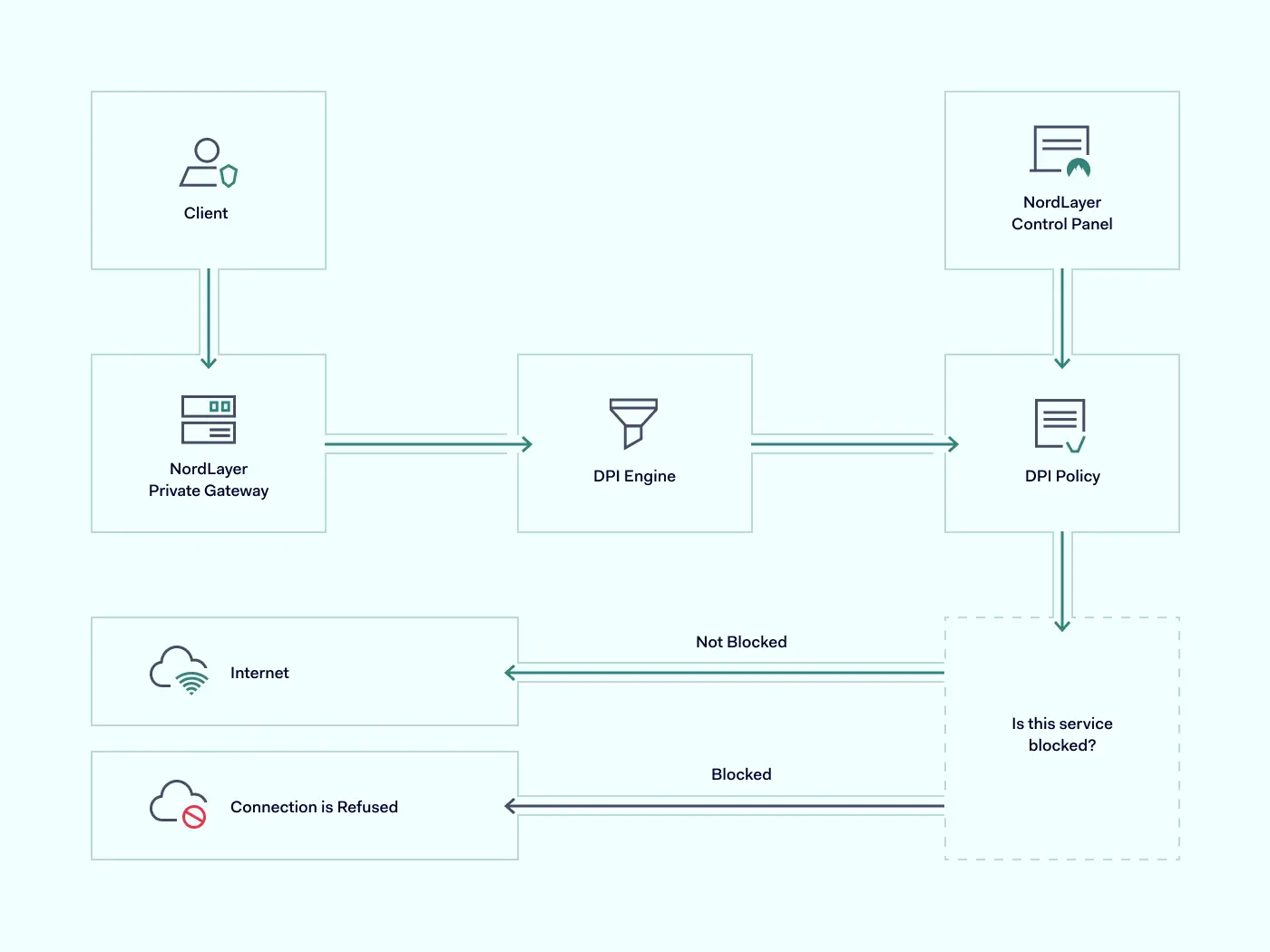
deep packet inspection scheme

The incoming data is screened and filtered using the nDPI engine against the DPI Policy defined by the company’s IT administrator. The user is connected to a requested website if traveling data packets don’t include blocked services.

However, the connection to the requested online resource is restricted if there is a match between the data packet and the DPI block list policy.

How NordLayer’s DPI Lite is different?

Some solutions allow DPI to incorporate extensive categories and be customizable for every client’s preferences to restrict content online. However, a more complex approach may lead to excessive expenses. It may also require challenging configuration and become limiting to the company’s disadvantage.

Extensive data processing defined with all types of possible keywords can disrupt the connection flow and block access to online resources that initially weren’t intended to be restricted. On the other hand, if the company is set for hardware infrastructure and decides to continue with the same type of DPI technology, it will need to know how to configure and perform in-house maintenance. All these additional steps create an unnecessary workload for IT administrators.

To streamline the DPI implementation to the company infrastructure, NordLayer incorporates an easy-to-launch and control DPI Lite feature. It is cloud-native and easy to add or remove without investing in excessive resources. Its activation takes short notice and can be managed centrally, enabling flexibility and focus to the teams and operations:

  • Keep productivity on point. NordLayer’s DPI Lite feature encloses the company network with work-only online resources within employees’ reach. Leave no space for distractions, so teams are less likely to spend time on their personal activities and decrease the chances of human error.

  • Establish security levels. Entering unsecured websites or downloading data to work-linked endpoints can become a freeway for malicious actors accessing internal data and resources. DPI Lite can help filter out hidden remote computer access and control software planted by cybercriminals.

  • Quick implementation and adoption. DPI Lite, like all the other NordLayer features, is entirely cloud-based and thus simple to integrate into existing infrastructure. Besides short enablement time, it is compatible with other data processing features like DNS filtering by category, constructing a more robust organization security posture.

  • Easy to adhere to business needs. The categories or services of DPI Lite are simple to manage. A complete list or a few exceptions can be added or removed from the DPI Policy as required to suit the company’s service scope.

NordLayer offers a packet inspection solution that doesn’t overwhelm network security strategy and focuses on the most common business pain points. A well-sifted service list doesn’t leave space to overthink data to block or spend time researching what online resources to consider, so no openings are left. Overall, DPI Lite helps organizations handle their teams’ efficiency and activity while at work.

Benefits of DPI Lite

Establishing limits for online activity while working is like a reminder to focus on your tasks. But it’s not just about preventing employees from distractions using company gateways.

Adding DPI Lite as an additional security measure fortifies network security and advances business performance in different ways.

Prevent data leaking

Whether intentional or accidental, data leaks are damaging to businesses. DPI Lite adds to security measures by restricting the download of data-leaking apps or the usage of data-sharing and emailing services. Suppose employees try to send files from the company network via Dropbox or Google Drive. In that case, DPI Lite will recognize data packets containing related ports, protocols, and headers and will stop the action from completing the request.

Eliminate traffic overload

Online activities create traffic on network gateways: the more requests, the more overloaded infrastructure, ultimately resulting in performance issues. DPI Lite implementation to the virtual private gateways helps limit created traffic as users cannot access online resources. Online streaming and seeding services or visual-heavy social media increase network usage a few folds. Hence, with DPI blocking, fewer data packets must be inspected and unclog the network. Out of user sight, out of admin mind.

Protect static IP addresses

Unrestricted internet usage could create convenient conditions for employees to hide behind company IP addresses to perform illegal activities. For exampl
e, using torrents on a work network can result in copyright holders initiating blocked IP addresses or even legal prosecution for piracy on the organizational level.

With open internet access, scam attempts have a free pass. If law enforcement authorities identify IP during their investigation of a crime done by your employee from the company’s IP address, it might lead to the company’s liability and even hardware confiscation. Hence, whether the network is managed internally or via a vendor like Internet Service Provider (ISP), deep packet inspection as an additional security measure can help establish internal online activity limits to prevent any illicit acts from happening under the company name.

Entering NordLayer’s DPI Lite

Organization-first mindset while at work or dealing with company-related content can be seen as restricting user activity. Although it’s a strong push toward cybersecurity strategy implementation, preventing possible gaps and openings.

Deep packet inspection is part of the bigger picture when combined with other NordLayer security features like DNS filtering by category, ThreatBlock, and Jailbroken/rooted device detection. Enforcing our remote network access solution into your company infrastructure and activating the DPI Lite feature is a matter of a couple of days or less. Organization administrators need to access NordLayer Control Panel, navigate to Servers or Gateways under the Network tab, and configure it by selecting Deep Packet Inspection (Lite) categories as required.

Utilizing simple and affordable tools like NordLayer’s DPI Lite doesn’t overcomplicate the existing cybersecurity strategy and upgrades team productivity, network performance, and company security for better business performance.

About Version 2 Digital

Version 2 Digital is one of the most dynamic IT companies in Asia. The company distributes a wide range of IT products across various areas including cyber security, cloud, data protection, end points, infrastructures, system monitoring, storage, networking, business productivity and communication products.

Through an extensive network of channels, point of sales, resellers, and partnership companies, Version 2 offers quality products and services which are highly acclaimed in the market. Its customers cover a wide spectrum which include Global 1000 enterprises, regional listed companies, different vertical industries, public utilities, Government, a vast number of successful SMEs, and consumers in various Asian cities.


檔案類型檔案名稱下載分享
產品資料Atera for MSPs Features List (PDF)
產品資料Atera for IT Departments Features List (PDF)

Azure 安全最佳實踐

Microsoft Azure is a dominant cloud hosting platform, serving around 70 percent of organizations worldwide. A popular hosting environment for SQL databases, Azure also provides a flexible way to run up to 200 cloud applications.

This flexibility is a game-changer for many businesses. But there’s a catch. To function properly, it’s essential to create a secure Azure environment. Otherwise, cloud apps and databases can leak sensitive data. Credentials may be at risk, and companies can suffer huge compliance penalties.

Fortunately, solutions exist. This blog will explain how to secure your cloud environment with Azure security best practices. And we will look at how to create a layered security strategy that goes beyond Microsoft’s controls.

Why is securing access to Azure so important?

Azure security matters because Microsoft’s cloud platform hosts a range of critical assets. Companies use Azure to host .Net apps for web applications or gaming DevOps. Azure storage accounts host SQL databases containing client data, while Kubernetes clusters support private cloud infrastructure.

Whatever Azure services companies rely on, security is a priority. Insecure Azure apps can leak data and provide an entry point for cyber attackers. And you cannot rely on Microsoft to cover every security challenge.

Azure clients have wide areas of responsibility to secure their cloud configuration. Clients need to restrict access to sensitive data. Users must manage access and exclude malicious actors. They also have to manage how data flows between cloud apps. The need for an Azure security policy is obvious when you put these tasks together.

Microsoft Azure security best practices

Any companies that rely on Microsoft’s cloud services should get to know Azure security best practices.

The best approach is adopting a layered strategy. Users should exploit security tools provided by Microsoft. But they should add additional security controls where necessary. These Azure security best practices will explain how the layered security approach works.

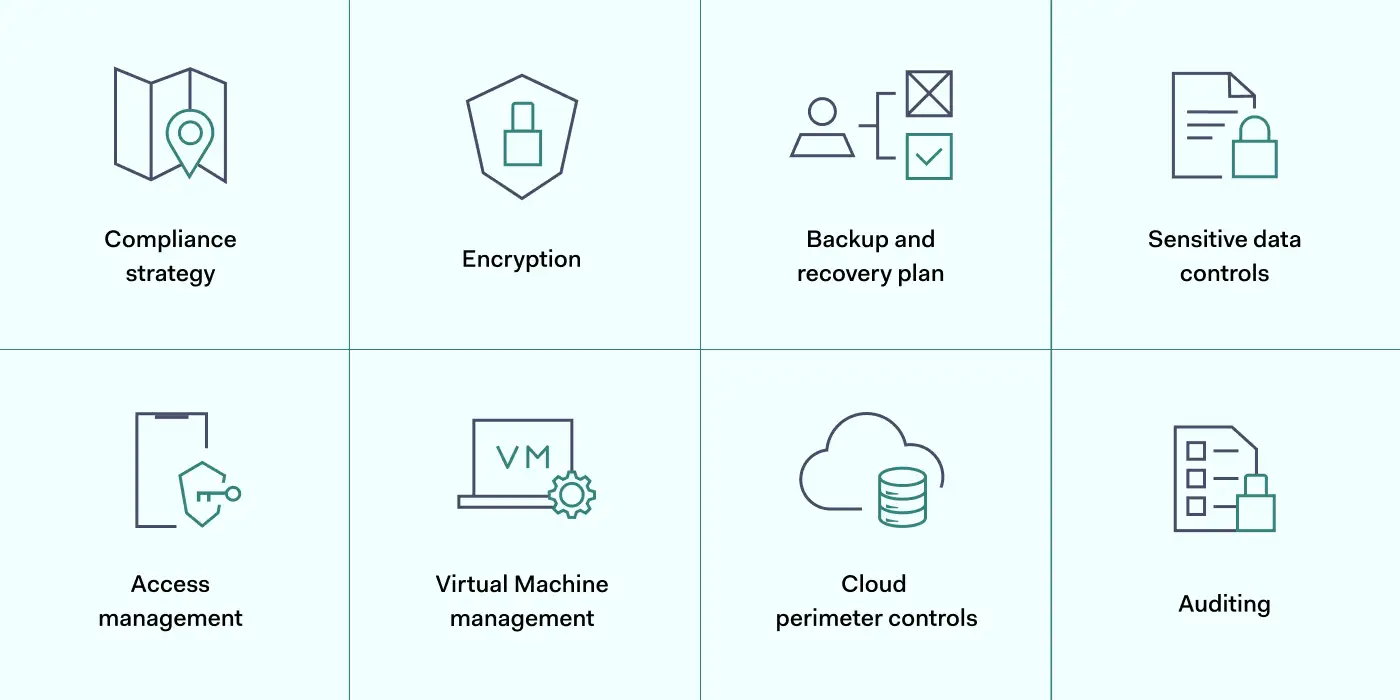
1. Map Azure assets and create a compliance strategy

The first step in layering Azure security is understanding the cloud environment. Before applying any of the best practices below, you must understand what assets need to be protected.

Map the cloud assets on your Azure platform. Include all apps and data stores, and classify data according to importance. You should know exactly where client data is stored and who has access to that data.

It is also advisable to create a clear compliance strategy for Azure environments. Define your core goals, including HIPAA, DCI-PSS, or GDPR compliance. Use these data security frameworks as a baseline to improve Azure security and meet regulatory requirements.

Track your compliance progress with the scoring tools in the Azure Security Center. The compliance dashboard provides detailed information about security levels and required actions.

2. Encrypt critical data

Data security on Azure apps is the responsibility of clients, not Microsoft. So take action to encrypt data and hide it from malicious actors.

Encrypt sensitive data at rest using Microsoft’s server-side symmetric key encryption tools. You can use these tools to segment data by importance. This ensures that operational data is available to employees. But financial or personal information is only accessible to users with specific encryption keys.

Azure Disk Encryption works alongside Microsoft’s SSE. It creates another layer of data security for virtual machines and data containers. This reduces the risk of attackers exploiting Virtual Hard Disk (VHD) files. Attackers will find it much harder to create virtual machines within Azure environments.

When you apply Azure encryption, key storage is your responsibility. Secure encryption keys in IAM controls in place to prevent unauthorized access. The Azure Key Vault is a good key management solution and integrates well with Azure app environments.

Users should also encrypt sensitive data in transit. Data constantly flows between Azure apps, remote devices, and on-premises workstations. VPN encryption provides a solution, adding another layer of protection above Azure security controls.

3. Create a backup and disaster recovery plan

A strong Azure security posture features a fall-back plan when systems fail, or attackers succeed. Microsoft offers an end-to-end DR service via Azure Site Recovery (ASR). Combine this with Azure Backup to create tailored data backup plans.

With an ASR failover plan, you can recover application states with minimal information loss. You might also add Azure Storage Replication, which regularly generates multiple copies of important files.

4. Secure sensitive data with robust controls

Encryption is not the only data security control for Azure users. Consider a range of additional tools and find a mix that secures sensitive data without compromising user experience. Options to think about include:

  • Activate auditing tools. Users can instruct Azure to audit databases. This creates a data stream that tracks database changes. Data visibility makes it easier for security teams to detect anomalies and unsafe user activity.
  • Add Azure SQL threat detection. Many Azure apps rely on SQL, but SQL presents critical security threats. Using SQL databases, turn on SQL threat detection to isolate security weaknesses and secure the threat surface.
  • Use Azure Firewall. Azure Firewall adds another layer of data security protection for Azure-hosted apps. You can manage firewall settings centrally, and coverage can increase as new apps come online. Cloud-native TLS inspection provides valuable protection against malware attacks.
  • Enable Azure Monitor alerts. Gain additional awareness by engaging Azure Monitor alerts. Users can target alerts at single resources and use many metrics to identify vulnerabilities. Azure Monitor Action Groups make it easy to automate alerts and deliver precise information when threats arise.
  • Implement Azure Defender. Defender is a subscription-based security service that leverages extended threat detection and response (XDR) and contextual security. It covers hybrid and multi-cloud environments, delivering threat protection and remediation advice. Azure Defender may well be a sensible addition when securing complex cloud environments,
  • Use Shared Access Signatures. Created via Active Directory, Shared Access Signatures let you manage access to Azure resources to third parties and employees for limited periods. Best practices include creating a SAS for all short-term network users, as it allows admins to set granular controls.

5. Manage access with IAM

Preventing illegitimate access to cloud infrastructure is one of the most important Azure security best practices. The best way to manage user access is by adding Identity and Access Management (IAM) to your security arsenal.

Microsoft provides a cloud-native IAM system called Azure Active Directory (AAD). AAD authenticates logins and compares user credentials to a secure Active Directory database.

IAM best practices for Azure include using AAD to set role-based access controls (RBAC). With RBAC, admins can put the Zero Trust ‘principle of least privilege’ into action. Every user has very limited privileges. Privileges only apply after users supply multiple credentials.

Role-based privileges have big practical benefits. Developers will not retain access to resources when their project involvement ends. Attackers obtaining their credentials will be relatively powerless. They will struggle to achieve Virtual Machine access. Breaching Azure SQL databases will be much harder.

Add another layer to your security posture by combining AAD with Single-Sign-On (SSO). SSO combines all cloud and on-premises assets. Remote workers can log in to the apps they need via a single sign-on portal.

Users can apply Multi-Factor Authentication (MFA) at this stage. This requests an extra authentication factor for each login, such as biometric data or one-time codes delivered to smartphones.

IP allowlisting also features in recommended Azure security best practices. Allowlisting lets you specify trusted IP addresses. You can add remote work devices or employee smartphones and exclude every other device until it passes MFA and IAM controls.

6. Add workload and VM protection

Azure security best practices include securing virtual machines via specialist controls. For instance, Azure includes the option of applying just-in-time controls for VMs. These Azure security controls allow users to access VMs for limited periods, removing the possibility of accessing assets after sessions expire.

VM controls also allow administrators to lock vulnerable ports and limit access to authorized users. Restrict access to RDP, WinRM, and SSH ports commonly used by VMs. Access should only be available when absolutely required.

You can apply controls easily by assigning workloads and VMs to Network Security Groups (NSGs). These groups define security procedures for each asset and add another protective layer via the Azure Firewall.

Additionally, remember to keep workload patches up to date. Unpatched Azure apps can be vulnerable to exploits. Automate software updates where possible and audit unpatched tools to minimize your exploit vulnerability.

7. Control the cloud perimeter with network security

Internal Azure cloud security works alongside general network security. Attackers can steal credentials from devices outside the cloud or launch attacks via internet-facing endpoints. This is why Azure’s best practices include measures to harden on-premises security. These measures can protect the whole network perimeter:

  • Track internet-facing cloud endpoints and minimize the contact between the wider web and company resources.
  • Use a Security Information and Event Management solution. SIEM tracks network traffic and identifies potential threats. Integrate it with Azure Defender to cover external and cloud-based vulnerabilities.
  • Apply network segmentation. Separate cloud endpoints from data centers and workstations with internet access.
  • Install a VPN or similar security tool to encrypt data and conceal user identities.

8. Audit user identities and access policies

Your Azure cloud security posture can weaken over time. What works now may degrade and create new vulnerabilities.

Azure security teams must audit every cloud security control and ensure continuing app and data protection. Audit app ownership regularly to ensure only active users have administrative privileges. Clean up Azure platforms by removing obsolete services, groups, and users.

Use the Azure Security Center to improve auditing procedures. The ASC includes machine learning analysis tools that provide feedback and suggest security posture improvements. Real-time monitoring and audit logs provide evidence to fine-tune your security setup.

How can NordLayer secure your access to Microsoft Azure?

Microsoft Azure cloud security requires a layered mix of internal cloud-based controls and solid external security. Users must protect data at the app level, followed by workgroups, platforms, and the entire company network.

The best practices listed above provide a roadmap to achieve security at the cloud level. Encrypt data and manage Active Directory identities. Leverage the Security Center to track user activity and run regular audits. And target virtual machines and apps with specific protection.

But that’s not enough. Add an extra security layer for rock-solid SaaS access control by safeguarding the network edge and protecting credentials outside the cloud.

NordLayer will help you achieve this. Encrypt in-transit data, apply for SSO, and screen access with IP allowlisting. Limit access to trusted IP addresses and exclude everything else – an important step towards a Zero Trust security posture.

Prevent data leaks by blending NordLayer’s network security tools with Microsoft Azure’s internal controls. To find out more, get in touch with our team today.

About Version 2 Digital

Version 2 Digital is one of the most dynamic IT companies in Asia. The company distributes a wide range of IT products across various areas including cyber security, cloud, data protection, end points, infrastructures, system monitoring, storage, networking, business productivity and communication products.

Through an extensive network of channels, point of sales, resellers, and partnership companies, Version 2 offers quality products and services which are highly acclaimed in the market. Its customers cover a wide spectrum which include Global 1000 enterprises, regional listed companies, different vertical industries, public utilities, Government, a vast number of successful SMEs, and consumers in various Asian cities.


Salesforce 數據安全:本機安全就足夠了嗎?

Salesforce is a dominant player in the Customer Relationship Management sector. Around 150,000 companies use Salesforce to manage customer data and launch marketing campaigns, and the company enjoys a 33% market share.

It’s easy to see why. Salesforce’s cloud-based tools save costs and time, simplify customer analysis, and integrate smoothly with other SaaS services. But is Salesforce a secure environment to run your business?

While Salesforce is generally safe to use, data security in Salesforce is still something users need to consider. Data breaches have exposed potential vulnerabilities. And users need to know how to use the Salesforce data security model when making their implementation more secure.

Data security in Salesforce

Data security is the protection of sensitive data handled by an organization. In the context of Salesforce, this refers to customer records, including financial information and private personal details such as names and contact details.

The consequences can be severe if an organization loses control of data privacy protection. According to IBM, the average cost of a data breach is approximately $4.35 million. Companies that lose large volumes of sensitive customer data can expect to pay hefty compensation.

Salesforce is no exception. In 2019, Salesforce client Hanna Andersson suffered a major data breach. A malware infection on the clothing retailer’s Salesforce platform exposed over 200,000 customer accounts. Neither Hanna Andersson nor Salesforce knew anything about it.

Three months after the Salesforce breach began, law enforcement officers discovered confidential data for sale on the Dark Web. Customers immediately sued under the California Consumer Privacy Act (CCPA).

Salesforce and Hanna Andersson eventually settled the claim in 2021. Both companies accepted shortcomings in protecting user data, detecting malware, and informing customers. And they had to pay as much as $5,000 to affected customers.

Related articles

Network Access Control best practices web 1400x800

In Depth

6 Network Access Control best practices

29 Dec 2022•13 min read

SaaS Security Best Practices

In Depth

SaaS Security 101: The Definitive Guide

10 May 2022•9 min read

The Hanna Andersson settlement shows that data security is a critical vulnerability and could happen to any Salesforce user. So let’s dig deeper into the Salesforce data security model to explain how secure the platform is and what companies can do to protect their data.

The Salesforce data security model

Since the 2019 Salesforce data breach, the platform has tightened up its native security features.

Data at rest on Salesforce is encrypted, concealing it from outsiders. Logging systems allow users to track weaknesses and handle alerts. MFA adds strength to authentication processes. And users can even create bespoke protection for data analysis with the Data Mask feature.

However, one set of controls in the data security field is all-important. Permission sets enable Salesforce users to manage data access. Users can use permission sets to ensure that only authorized users can access data. Everyone else is blocked by default – until they are granted necessary privileges.

There are four Salesforce permission sets. Each one plays a role in locking down confidential customer information:

  • Organization level – At the organization level, users can manage access for all users in their enterprise. Multi-factor authentication factors make Salesforce portals more secure. Connection limits, location tracking, and IP range screening exclude malicious actors.
  • Object level – Organizations can limit access to Salesforce databases and apps. Object level controls allow administrators to set aside portions of the Salesforce environment and create restricted zones with limited access.
  • Record level – Security teams can create permission sets for specific records. Marketing teams may need access to information about customer purchases. But financial data can be locked away. Admins can set objects to read-only or allocate editing privileges for certain users.
  • Field level – At the field level, users can restrict how users interact with database fields. This provides tight control over how data is used. Many employees may have object access to CRM data. Only a tiny number will have field level access to edit and export the most sensitive data.

Salesforce security issues

Applying access controls is critical, but users must also be aware of Salesforce security vulnerabilities. Be sure to factor in these issues when planning your security strategy.

1. Inadequate data classification

Before you can protect confidential data, you need to understand the data you hold. Companies need to classify every record according to its value and vulnerability. When you have that information, you can start creating field level controls and setting permissions.

Review your databases and assign risk levels to the information they contain. Use regulations as a framework. For instance, the CCPA mandates robust protection of customer financial records. HIPAA requires tight control of any patient data.

Classification matters because it isn’t always practical to secure all customer data. Unclassified data generates noise and confusion. Security teams are presented with false positives and waste time on securing low-value data.

2. Confusing data ownership

Who is responsible for securing your Salesforce CRM system? Many companies cannot answer this question and rely on multiple stakeholders to secure customer data.

Data ownership should be clear and communicated to all Salesforce users. Assign an individual or team to manage data security. They should ensure compliance with relevant regulations, apply native Salesforce controls, and integrate enterprise-wide security systems with the CRM system.

Take advantage of Salesforce’s training materials. The platform offers courses in identity and access management (IAM). With this information, your security manager can master Salesforce permission sets and protect critical databases.

3. Poor Salesforce security awareness

Knowledge about Salesforce security should extend beyond the data security lead. Every CRM user must know security policies and the importance of protecting against phishing attacks.

Remember the Hanna Andersson case. A single Salesforce cyber attack can compromise huge data sets. Poor training and a shallow security culture can have huge implications.

Extended awareness matters because Salesforce is highly customizable. Employees can easily misconfigure communities in the Experience Cloud. And teams can add Salesforce services without IT teams knowing.

Both actions expand the threat surface, potentially compromising a Salesforce environment. Avoid them by educating Salesforce users and creating policies that explain how to use the platform safely.

4. Not understanding how shared responsibility works

As with all cloud-based products, security responsibility is shared between Salesforce and service users. Unfortunately, this is something that users easily forget.

Users may assume that Salesforce protects data, but this is partially correct. Salesforce does encrypt data and guards against malware infection. Clients are responsible for ensuring secure access and object configurations.

Companies using Salesforce can over-provision employees, giving them too much access to sensitive data. They might allow wide third-party access to databases, even down to field level. Marketing teams could create vulnerabilities as they customize their Salesforce solution.

Be aware of your responsibilities under the shared responsibility model. If not, data breaches will probably be due to your own negligence.

Why do you need additional security in SalesForce?

Native security features provided by Salesforce are powerful but insufficient to achieve data security. Companies need to combine internal controls like Salesforce data encryption with external security solutions.

The 2019 data breach demonstrates why external security is so important. Salesforce and Hanna Andersson did not know about the malware infection. Security teams had no idea that gigabytes of user data had been stolen.

While the single data breach cost both companies plenty of money, the cost could have been higher without the actions of law enforcement professionals.

The initial malware infection involved a ‘magecart’ attack that skimmed customer data from the retailer’s payment portal. This agent probably arrived via a phishing attack on a Hanna Andersson employee. None of Salesforce’s internal controls could prevent it, but external security solutions could help.

SIEM tools to scan attachments and quarantine suspicious links can stop phishers in their tracks. IP allowlisting screens devices and permits access for approved IP addresses. VPNs encrypt company networks and conceal credentials from external observers.

Salesforce allows in-depth access management and security logging. But when fine-tuning their CRM security, companies should supplement native features with additional measures.

How can NordLayer help with Salesforce security?

Salesforce makes CRM simple, allowing eCommerce businesses to thrive. But recent data breaches have shown that the cloud-based platform has some critical cybersecurity vulnerabilities.

NordLayer’s tools supplement native Salesforce security and make it easier to achieve regulatory compliance.

Our cloud security solutions include access management tools and Single Sign On that bridge company networks and cloud portals. 

IP allowlisting is another core NordLayer feature. Allowlisting lets you set approved IP addresses and block everything else. This makes it safer to admit remote workers to your Salesforce environment. It also means that credential theft does not automatically provide access to your data. Attackers without approved IP addresses will still remain outside the perimeter, unable to steal customer information. 

Discover how to create a rock-solid Salesforce security posture. Get in touch with our team and discuss your options today.

About Version 2 Digital

Version 2 Digital is one of the most dynamic IT companies in Asia. The company distributes a wide range of IT products across various areas including cyber security, cloud, data protection, end points, infrastructures, system monitoring, storage, networking, business productivity and communication products.

Through an extensive network of channels, point of sales, resellers, and partnership companies, Version 2 offers quality products and services which are highly acclaimed in the market. Its customers cover a wide spectrum which include Global 1000 enterprises, regional listed companies, different vertical industries, public utilities, Government, a vast number of successful SMEs, and consumers in various Asian cities.


谷歌云安全最佳實踐

Cloud adoption continues at a rapid pace. Security is becoming a critical priority as companies move assets and data to locations like Google Cloud Platform (GCP).

Cloud platforms host customer databases, powering worldwide eCommerce empires. They allow workers in different countries to communicate, share files, and collaborate on complex projects. And they reduce hardware overheads, driving down costs.

Whatever role they play, cloud services need robust protection. This blog will look at how to secure assets on GCP. While Google’s tools offer some protection, there are plenty of things companies can do to supplement those tools. Let’s look in more detail and offer some best practices to boost your Google Cloud security.

What is GCP?

Google Cloud Platform is a collection of cloud-based services based on the powerful Google Compute Engine. GCP allows users to host apps, store data, implement machine learning processes, and manage app development. It also integrates with other Google services, including Gmail and Docs.

GCP can host a few SaaS apps or scale up to IaaS and PaaS implementations. It is a go-to platform for hosting Kubernetes cubes and cloud storage containers, with a strong record for resource availability. However, clients must implement their own security controls to protect resources hosted by GCP.

GCP security seeks to protect assets hosted on the Google Cloud Platform. The scope of security policies varies depending on each user’s cloud architecture. For example, if you use a single SaaS service, security mainly relates to access control to that individual app. But if you use a PaaS solution, security must apply across the infrastructure stack.

What challenges does Google Cloud Platform face?

GCP users face a range of security challenges. Here are some critical issues you will likely face when following GCP security best practices.

1. Ensuring visibility

The flexibility of GCP makes it popular with cloud architects. But flexibility comes with a price: confused and complex visibility. Cloud assets can come online and disappear within hours. Security teams may not know when app configurations change. Keeping track of cloud-based assets can become extremely difficult.

Tracking threats and applying security controls is impossible without strong visibility. You cannot secure apps that change constantly. Environments with poorly controlled user privileges can spiral out of control, creating huge surfaces for data thieves to exploit.

2. Managing privileges

Over-provisioned users pose a critical threat to cloud environments. If attackers gain the credentials of over-provisioned users, they can access confidential data, change app settings, and compromise cloud performance. Watertight access control is essential.

Security teams must create logical privileges for roles and individuals. Every GCP-hosted app requires a separate privileges policy. And admins must classify data, keeping sensitive information locked away from most users.

3. Application sprawl

Without clear policies on provisioning apps, GCP environments easily fall victim to application sprawl. It is extremely easy to spin up virtual machines or add new apps on the Google platform. The resource hierarchy can change in an instant.

Balancing flexibility and security is a central challenge. Companies need clear hierarchies that reflect their organizational needs. But users need the freedom to reshape cloud environments to fit different circumstances.

4. Identity management at the cloud edge

Managing access to on-premises networks is simple. Authentication occurs at a well-defined edge. But this isn’t the case with GCP. Users can access a cloud resource anywhere. They can use multiple devices and log on via insecure public networks. This makes robust IAM essential.

Security teams require ways to authenticate every connection request. This is particularly difficult in multi-cloud settings. As a result, companies often implement Single Sign On (SSO) to bring all cloud assets together.

5. Cloud misconfigurations

Poorly configured GCP apps present an open door for attackers. For instance, researchers have expressed concerns about attacks originating from misconfigured virtual machines.

Users can also misconfigure the internal IAM tools that Google provides. Administrators may fail to apply domain restricted sharing to GCP containers. Or they might fail to engage logging services to detect threats and weaknesses.

Another common issue is misconfigured VPC firewalls. These firewalls surround cloud data with additional protection. But admins can set overly broad IP address ranges, permitting too much access to sensitive data.

6. Uncontrolled outbound access

Users must secure access to networks. But they also need to manage data flows from cloud assets. Data Loss Prevention (DLP) tools can track files and data and block unauthorized exfiltration. But restrictions on outbound access are not always applied properly.

7. Unpatched GCP assets

Unpatched VMs present a constant security risk. Attackers can exploit privileged access to connected resources or launch horizontal attacks if cloud environments are improperly segmented.

GCP users are responsible for patch management. However, they are not always aware of their duties under the shared responsibility model. Legacy threat scanning tools can also miss unpatched cloud assets. Cloud-native, automated update management tools can fill the gap if security teams choose to use them.

Why is GCP security Important?

There are three core reasons to follow GCP security best practices:

  • The GCP hosts vast amounts of confidential information. Data encryption, robust authorization and authentication processes are critical to prevent malicious access to this data.
  • Assets on GCP are available 24/7 for companies to access. This maximizes uptime and availability. But it broadens the threat surface, requiring robust security counter-measures.
  • Data security regulations apply to critical assets. Users of GCP must protect information covered by GDPR, HIPAA, or PCI-DSS.

These three issues demand a comprehensive security response. Companies must classify and secure data. They must manage access and apply encryption. And they need to apply regulatory frameworks through auditing and security planning.

Cloud-based security features in GCP

Google has included a wide range of security features in GCP. Best practices include leveraging these features where possible while supplementing them with external tools. Important internal security features include:

  • Virtual Private Cloud (VPC) – Allows users to create segmented VMs or VM groups, with stateful firewalls and network security controls.
  • Data encryption – All data in transit through the GCP is encrypted. Data at rest is also encrypted and unreadable to outsiders.
  • Cloud Key Management – Centralized customer-managed keys tools allow administrators to distribute and change keys. This can integrate with hardware keys for secure remote access.
  • Logging – Google provides access to continuous activity logs. Users can visualize security easily with real-time data.
  • Data Loss Prevention (DLP) – Targets sensitive data and prevents outward transmission to unauthorized actors.
  • Binary Authorization – Secures Kubernetes clusters by creating trusted workloads.
  • Web App and API Protection (WAAP) – Monitors API activity for common cyberattacks. Allows users to assess integrations with GCP environments, making new app implementations safer.
  • Identity and Access Management (IAM) – Enable users to control access to GCP environments. Provides a way to authorize actions within apps and groups. Unifies GCP workloads into one pane of glass.
  • Cloud Asset Inventory – Allows admins to quickly inventory connected apps and track any changes as they occur.

External security systems work alongside these internal tools. For example, network penetration testing by third-party software can verify the effectiveness of GCP security. SSO and external IAM cover hybrid networks with multiple cloud deployments. VPNs encrypt data outside GCP, guarding user credentials.

Google Cloud Platform (GCP) security best practices

Companies need to create and implement a data security strategy for their GCP deployments.

This strategy should leverage the internal tools listed above while taking into account specific business needs. Best practices for GCP security include:

1. Implement Google Cloud IAM

Identity is the new battleground in cloud security. Attackers constantly seek high-value user credentials and access to confidential customer or corporate data. That’s why implementing Google’s native IAM systems should be a core priority.

Google IAM allows you to:

  • Set privileges for GCP resources – The most important role of IAM. Admins can set permissions for roles or individuals and determine which apps or workloads are available to each cloud identity. Privileges can be extremely detailed to protect sensitive data. Or they can be more general for low-value assets.
  • Enforce safe email policies. Only allow access to cloud platform services from corporate email accounts. Prevent access by personal accounts.
  • Strengthen admin accounts with security key enforcement. Security keys are even more robust than MFA factors. They apply to high-privilege users such as senior developers or administrators.
  • Prevent user access to service accounts used by VMs and automated processes. Reduce the number of user-managed service account keys to an absolute minimum.

A strong IAM system locks down user and service accounts. Insecure connections will be denied or limited. Access to resources will only be possible to authorized users based on need.

However, don’t stop with Google’s internal IAM. Some critical IAM cloud functions require outside assistance.

For example, when you use the GCP, you can allowlist IP addresses to block dangerous devices or networks. There is no realistic native way on Google Cloud to allowlist IP addresses. But you can use external allowlisting solutions like NordLayer to harden your overall cloud security setup.

2. Visualize your cloud environment

Google allows companies a lot of control over how they segment cloud environments. But to create a secure architecture, assets and data must be visible and well-understood.

Use GCP’s internal tools to discover connected apps and create a map of the assets you need to protect. Try to trace the connections between resources. If you understand data flows and user requirements, you can create efficient groups to apply security controls.

Connect roles to cloud assets and target privileges to guard resources. For example, accountants or sales teams may require access to cloud SQL instances, but other employees do not. Always map roles to assets to avoid over-privileging users.

3. Protect assets via Virtual Private Clouds (VPCs)

VPCs are guarded by internal firewalls but can communicate securely via VPC peering. IAM tools enable precise controls over VPC access, and you can create private clouds for projects or departments.

This segments the cloud environment, preventing horizontal movement for malicious actors. For instance, you can set robust barriers around cloud storage containers handling financial information – a valuable aspect of compliance strategies.

4. Use Customer Supplied Encryption Keys (CSEK)

Google Cloud Platform users can rely on keys supplied by Google. But they can also provide their own encryption keys. This is potentially a more secure option.

With CSEK, keys are only known to your employees. Nobody within Google can access them. You have total responsibility to manage and change them when needed.

By default, data handled by the Compute Engine is protected by 256-bit AES encryption. Customer-supplied keys supplement this protection. They also give you more control over assigning keys and managing access.

5. Enable MFA for Google Cloud resources

Multi-factor authentication adds an extra layer of identity protection when logging onto cloud assets.

MFA is not a default setting, so admins will need to remember to engage it via the IAM console. Google Cloud users can add third-party identity providers if required. This allows users to connect via external apps, making remote access more secure.

MFA options on GCP include various cloud identity factors. This includes one-time passwords, email codes, or secure links sent to user devices. You can use separate authentication hardware for high-security connections or rely on less secure SMS-based authentication for a smoother but less secure access process.

6. Centralize logging processes

Google Cloud’s best practices include achieving total awareness of user activity and app configurations. Google provides a suite of logging tools that collect and present information for security teams to monitor.

Users can implement Cloud Logging to collect data from Google Cloud projects. Each project has its own log bucket to contain data, and users can analyze this information via the Logs Explorer tool. You can also enable flow logs to gather information from Kubernetes clusters or VM groups.

If possible, integrate Cloud Logging with your enterprise-wide SIEM systems. Google lets you export log data to many popular SIEM solutions. This makes it easier to track network security via a single pane of glass. Specialist SIEM solutions also tend to provide more functionality than Google’s internal monitoring tools.

7. Use security foundations blueprints

Security managers do not need to work in the dark when implementing GCP best practices. Securing novel cloud settings such as GCP can be challenging without prior experience. That’s why Google offers a series of security foundation blueprints.

Blueprints provide guidance and recommended security practices. Subjects covered include critical tasks like key management, network segmentation, logging, and authentication. The information is presented in a general format but includes plenty of suggestions that will apply to most GCP implementations.

8. Automate security to boost efficiency

Administrators can automate many security functions on Google Cloud. Automation reduces the risk of human error and liberates time to spend on critical security tasks.

The Security Command Center collects threat intelligence and can automatically transfer alerts to third-party SIEM systems. Users can also create automated compliance policies to check that GCP assets are properly configured.

Admins can automate password security, demanding regular resets and enforcing strong passwords. And automated app updates help stay on top of virtual machine patches. Most tasks on Google Cloud have automation settings. Leverage them where possible as part of Cloud Security Posture Management (CSPM).

How NordLayer secures access to Google Cloud

Google Cloud Platform is an easy-to-use, flexible, and feature-rich cloud hosting platform. And many companies use Google Cloud as a location to store or exchange confidential data. This is efficient and cost-effective, but relying on GCP comes with security risks.

Following the GCP security best practices outlined above will help achieve data security. Users can encrypt information, set internal IAM policies for apps and containers, and create firewalls around virtual machines.

However, a robust GCP security posture requires a mix of Google’s internal security functions and external solutions. NordLayer provides the ideal solution when securing Google cloud deployments.

NordLayer allows admins to integrate GCP security into their general IAM setup. Users can ensure secure access to apps via MFA and use Single Sign On to access all cloud assets quickly. They can strengthen access control with IP address allowlisting, which admits authenticated users and blocks unknown or insecure IP addresses. NordLayer applies network segmentation to separate GCP assets and encrypts data in transit to hide it from outsiders.

Add another layer to your GCP security posture with NordLayer. Our tools allow you to combine external and internal security controls. The result will be a GCP security setup that covers every vulnerability. Contact the NordLayer team today to find out more.

About Version 2 Digital

Version 2 Digital is one of the most dynamic IT companies in Asia. The company distributes a wide range of IT products across various areas including cyber security, cloud, data protection, end points, infrastructures, system monitoring, storage, networking, business productivity and communication products.

Through an extensive network of channels, point of sales, resellers, and partnership companies, Version 2 offers quality products and services which are highly acclaimed in the market. Its customers cover a wide spectrum which include Global 1000 enterprises, regional listed companies, different vertical industries, public utilities, Government, a vast number of successful SMEs, and consumers in various Asian cities.


NordLayer 功能回顧:站點到站點

Can any employee access company resources from anywhere and at any time? It depends on the company’s infrastructure. Recently established businesses have more chances to provide access wherever their teams are. However, companies with legacy architectures need to readapt to have the same time and place flexibility.

Every company infrastructure setup is unique. Therefore, it may require a different approach to solving the same challenges — like how users can access office-based data, applications, or devices while not being present on that particular site.

The most common solution is to choose VPN for security purposes and enablement of distributed teams. However, the VPN selection depends on its type and existing company network arrangement.

If your target is to enable employees to securely connect to different offices and branches of the organization despite being elsewhere, Site-to-Site VPN is the option to explore.

Site-to-Site solution using NordLayer 

Site-to-Site allows users to reach office-bind resources on HQ, your assigned office, or another company branch while not actually being on-site. It is a type of VPN that establishes an encrypted connection to a requested resource on the company network.

NordLayer’s cloud-based feature elevates typical industry Site-to-Site capabilities by connecting not just different corporate sites and resources but by enabling both on-site present and remote users to connect to any company resource on the network.

Click to tweet

Therefore, connection to a single physical location via a virtual private gateway using VPN translates into user connection to all devices and resources assigned to a company router or firewall.

How does NordLayer’s Site-to-Site feature work?

The cloud-based feature can be enabled by connecting NordLayer’s virtual private gateway to the company’s router or firewall.

Moreover, cloud-based Site-to-Site makes it possible to configure a dedicated VPN server to connect to cloud service providers like Amazon AWS, Google Cloud, or Azure.

Users with VPN access – whether present in the branch office, HQ, or remote – can connect to the company network and access the added internal resources and the on-site devices connected to the router/firewall, even though they don’t support a VPN connection.

  • Remote user connection:

  • Connection from a company branch:
  • Connection from HQ:

NordLayer’s Site-to-Site feature requires virtual private gateways and physical location configuration. Once it’s ready, a VPN connects users to the local company network and allows them to access company resources like applications, data, computers, or printers.

The same logic applies to users accessing the company’s cloud service provider resources. VPN established connection and router/firewall configuration to support IKEv2 Site-to-Site functionality with a static public IP address can provide access to resources for employees despite their location.

Shortly, suppose an employee for a job needs to access your organization’s customer information stored in a database located in HQ, the email server that stands in an office branch on another continent and needs to print it out while working from home. In that case, it’s all available via NordLayer’s Site-to-Site VPN functionality.

How NordLayer’s Site-to-Site is different?

Traditional WAN companies have an architecture based on an all-to-one setup when business units – remote locations and resources of the corporate – are connected to one main point.

Such organizations exploit extensive legacy Site-to-Site architectures that employees use to connect to the network’s main point, allowing them to access company-enclosed resources from different locations. This type of network architecture delivers interconnectivity yet lacks remote flexibility and has downsides affecting network performance, efficiency, and scalability.

As a solution to legacy Site-to-Site, NordLayer is developed to provide flexible and simple problem-solving to the general downsides of using legacy networking. When focusing on the feature functionality, the distinction between legacy setup and cloud-based remote network access solution comes from overcoming the limitations of traditional Site-to-Site solutions.

Cloud-based NordLayer solution handles legacy infrastructure challenges of increasing remote connections with quick integration to the existing architecture. It reverts performance–efficiency–scalability limitations to company advantage:

  • Decreased deployment time and expenses. NordLayer solution is fully hardware-free and compatible with hardware-based or hybrid existing infrastructures. Functionalities can be deployed within minutes and don’t require complex costs and long delivery times, focusing on time-to-value for the organization.
  • Maintained security and productivity levels. NordLayer Site-to-Site distributes encrypted user traffic to company resources based on the request nature without affecting connection quality instead of bulk processing all users to a primary point of connection and allocating to requested resources afterward. 
  • User traffic distribution. The feature decreases the heavy traffic load directing users to the internet resources, internal data centers, servers, or applications in a more streamlined manner. Therefore, the increased remote user traffic peaks don’t impact performance quality as with a traditional Site-to-Site setup. 
  • Efficiency and scalability. Naturally, user traffic distribution significantly reduces on-site equipment use managing the ad-hoc demand to upgrade. On the contrary, cloud-based Site-to-Site functionality enables the company to scale on demand without resource-intensive planning.  

The feature brings another level to team performance in business operations using Site-to-Site. NordLayer’s cloud-based feature ‘helps cut hardware-ing and distance corners’, bringing efficiency to secure data sharing and authorized access of on-site devices within the organizations, even if physically impossible.

Benefits of Site-to-Site VPN 

Primarily, Site-to-Site VPN allows for establishing non-office-only based connections. The VPN enables secure data transfers and trusted user activity between the on-premise network and the public network established over the internet.

Implementing NordLayer on top of your existing infrastructure, Site-to-Site unlocks effective and robust cybersecurity measures for various organizational aspects.

Increased network security

Sensitive data and confidential information is the target of most cyber attacks. Thus, encrypted data transfers between organization members utilizing Site-to-Site, whether in the office or remote, help safeguard against data breaches.

Streamlined business operations

Team performance is heavily related to the availability and capacity of the company network. Therefore, Site-to-Site feature maintains a good speed and stable data traffic flow to provide users with quality connectivity and constant access to resources that influence business continuity.

Flexible and scalable protection

Hardware-free Site-to-Site configuration is a beneficial add-on to the existing company network, even the largely hardware-based ones. Thus, the reaction-to-action time to solve ad-hoc challenges is multiple times shorter and easier. It requires minimal resources and provides a solution based on business needs within minutes. 

Entering NordLayer’s Site-to-Site

NordLayer solution provides a modern approach-based Site-to-Site VPN. The feature allows present and remote employees to access data and devices in multiple corporate environments.

Using our remote network access solution to enable Site-to-Site VPN for the organization, IT admins have to follow simple actions to configure the feature. First, they need to create VPN gateways via the Control Panel as entry points into the network and assign teams or role-based employees to access the gateway so they can enter the company network. Site-to-Site has to be configured for every company unit for the seamless cooperation of teams.

With fewer systems to manage, unlimited scalability, flexibility, and easy setup, companies can ensure smooth and productive connections for their users and maintain high-security levels of the business.

About Version 2 Digital

Version 2 Digital is one of the most dynamic IT companies in Asia. The company distributes a wide range of IT products across various areas including cyber security, cloud, data protection, end points, infrastructures, system monitoring, storage, networking, business productivity and communication products.

Through an extensive network of channels, point of sales, resellers, and partnership companies, Version 2 offers quality products and services which are highly acclaimed in the market. Its customers cover a wide spectrum which include Global 1000 enterprises, regional listed companies, different vertical industries, public utilities, Government, a vast number of successful SMEs, and consumers in various Asian cities.


家就是新辦公室:遠程工作趨勢

The year was 2023 — three years after the pandemic started (and came close to an end), yet 75% of global workers were fully convinced remote work was the new normal. But what’s the actual status of remote work, and what perspectives does it have?

The pandemic became a massive sandbox that proved people don’t necessarily need to be nurtured by the office culture to be productive.

Workers argue that flexibility is their right whether they prefer to work in the best countries for remote work, like Germany, Denmark, the US, or any other location of their choice if the job is completed as requested. Management counters with the importance of organizational environment and team bond effectiveness created only by the presence in the office.

Both sides have their points, so what’s next — will we return to an on-site-only setup or transition to fully remote? Will more companies compromise on hybrid work after all? Let’s see where the remote work projections are guiding us.

How new is the ‘new normal’ of remote work?

It would be incorrect to say that remote work didn’t exist before 2020. Freelancers were the pioneers of working online — an adventurous and free-spirited career path. Before the pandemic, 2,9% of ‘teleworkers’ globally were exclusively working remotely. For instance, in the US market, only 6% had never worked in any kind of remote work setup.

The scope of work from home mainly spiked because of a safety measure to prevent virus spread. Even though the alertness settled and life started returning to normal, in 2022, at least occasional remote workers reached 62% globally.

According to Gallup research results, only 2 out of 10 people returned to the old routine — entirely on-site jobs. Meanwhile, the rest of 8 out of 10 employees are split between remote and hybrid work arrangements in the US.

Working type models distribution chart

The discussion mainly circles whether employees want to work exclusively remotely (49%) or want to share their time between home and the office (46%). Yet the same research reveals that only 6% of employees see the ideal work environment exclusively on-site.

Remote work tendency: to increase or decrease?

The swing in the longevity of time spent at home before and after the pandemic compares drastically. Let’s fact-check.

According to Statista, remote work in the US before the 2020s was a relatively rare yet existing event, occurring 1-2 times per week. However, 3-4 and 5+ days of work from home per week in the post-pandemic period replaced the then-popular 1-2 days/week work from home.

Talking numbers, the remote workforce reached 53%, and the pool of employees that never worked from home decreased by 13% after COVID-19.

The data of the US-based respondents reflects the increasing trend of staying at home rather than working from the office.

2020 was the rush-hour year, so comparing the difference jump from 2019 to 2021, the number remains increasing as the amount of remote workers has tripled. If we take data from 2018-2021, the fully remote workforce grew four times bigger.

How has remote work escalated in Europe? The growing tendency of remote work in European countries is also significant.

Eurostat data from 2019-2021 illustrates the increasing number of employed people spending more and more time working from home. The average of EU Member States climbed from

  • 14,6% WFH sometimes or usually* in 2019, 
  • 20,9% WFH sometimes or usually in 2020 to
  • 24,4% WFH sometimes or usually in 2021. 

In 2021, the usually only working individuals made just a little less than sometimes or usually in 2019 — 13% in contrast to 14,6%. Note that ’usually’ refers to at least half of the work days spent working from home in a reference period of 4 weeks.

REMOTE WORK TRENDS CHANGE in the EU

The shift is evident in both the US and Europe — remotes were quick to adapt to the circumstances and increasingly function between the office and home, identifying as remote workers.

Let’s not forget that the covid-era introduced a new work-life cultural concept, ‘workation,’ that combines working and vacationing simultaneously. Therefore, it’s challenging to believe that trend swing will take the working world back to the close-to-none remote setup.

Remote work perspective

It’s worth defining the happy medium for understanding remote work. There are different opinions — for some, it’s home-only; for others — home-never. A hybrid work setup seems acceptable for most organizations and employees that can apply non-site work arrangements.

The perspective of hybrid model growth should double from 42% in 2021 to 81% in 2024, according to AT&T findings. The forecast predicts almost one in four Americans will work remotely by 2025.

The prediction is supported by the forecast of conferencing software (like Teams, Zoom, or Google Meet) market growth — in 2021, it reached $14.6 billion worth, and in 2026 is expected to reach as high as $27.3 billion worth. The growing demand shows the need to communicate remotely in the future.

Hybrid work influencing factors

What are the influencing factors for hybrid work escalations — is it just the peer pressure of employees? 83% of professionals say they would decline a job offer without offering flexible work options, according to International Working Group.

Expectations are high as almost everyone (97%) expects organizations to be flexible regarding the work environment. FlexJob indicates that more than half (57%) of organization members would change jobs if they weren’t allowed to work hybrid. After all, 77% of employees see flexibility as the second most important factor after salary in their employment.

The reasoning behind it can be based on preference to save time on commuting, make Mondays less anxious without knowing you must show up in the office at 8 AM, or work from a different city or country.  

Productivity and engagement in remote work

Hybrid or remote work help achieve a better work-life balance that resolves into a positive chain reaction. Employees and organizations notice that staff is exposed to less stress, leading to workers being more present and engaged despite online environments.

It proves that hybrid work isn’t entirely a one-way road. At first, being unavailable to observe employees’ activity on-site might have needed convincing the management of the hybrid work benefits.

According to Zippia’s Remote Work Statistics report, 32.2% of managers agree that productivity has increased after the 2020 remote work shift. Generally, 68% of organizations say there’s been an improvement in employee productivity since the remote work arrangements. 

Return or not to return?

The determination to work remotely is clear for most of the employees. Besides the long list of benefits the workers learned by heart, 20% of the workforce who vouch for flexibility would agree to give up vacation time over office-defined work.

The worth of remote work can be calculated more precisely — a typical organization saves an average of $11,000 per employee yearly if the employee spends half of the working time outside the office.

Saving funds and time open more personal, team, and company opportunities. Organizations have a better chance to scale globally. It brings us to a solution to a raging issue of limited talent pool companies struggle with significantly.

Talent and remote work

Knowledge workers are in high demand to cover the growing need for professionals in all industries. According to Uplers’ research, 69% of companies face a shortage of skilled talent, and geographic limitations are one of the leading factors reserving the reach of the potential talent pool.

According to the Upwork study, companies with remote or hybrid work policies appear to be less negatively impacted by talent shortage — only every third of such organizations see a limited talent pool as a challenge. Half of the knowledge workers who provide computer programing, IT, marketing, and business consulting services to companies are freelancers.

Regarding company size, large companies tend to have a higher demand for talent that turns over with more noticeable talent shortages compared to small or medium-sized companies.

According to Manpower data, 64% of small companies (10-49 employees) struggle to find the right profile workers, while 72% of medium-sized companies (50-249 employees) and 74% of large enterprises (250+ employees) are impacted by a deficiency of skilled professionals.

Remote work by industry

Technological advancements and flexibility allow companies of various industries to adopt hybrid work for its benefit. It’s noticeable that consulting-type services are quicker to move to telecommute. The trend can be justified by the opportunities to unlock markets worldwide, streamline the workload, and better prepare for modern technological setups.

Taking hybrid work through the industry axis, IT is the leading industry to adopt remote work. Finance, customer service, healthcare, marketing, education, and sales industries are primary areas to explore and utilize the benefits of the remote workforce.

Remote work and security

The massive migration to remote work during the pandemic was kick-started for safety reasons. However, home offices opened gaps for cybersecurity vulnerabilities that many companies weren’t exposed to before.

According to Statista, cyberattacks are one of the major risks concerning organizations. Cyber threats increased exponentially with the growing number of unprotected home networks and distributed teams.

REMOTE WORK CONCERNS IN ORGANIZATIONS

The other top risks on the list include human error, cloud computing vulnerabilities, mobile device security, and loss of corporate data and information, as the concerns of organizations in Europe and the US.

Securing hybrid environments

Many organizations proved flexible in times of change — growing cyberattacks and risks were repulsed with security and hybrid work-adapted business solutions. Transitioning to cloud environments allow companies not only to enable remote workers but implement hybrid infrastructure models to support new ways of working.

Circumstances determined businesses’ push to improve network security even though upgrading existing legacy architectures wasn’t in the strategy.

During the later years, evolved Zero Trust security models now define modern remote access and cybersecurity standard. A combination of cloud application security, endpoint protection, and identity management solutions helps protect company assets and users effectively from potential vulnerabilities imposed by remote and hybrid work.

About Version 2 Digital

Version 2 Digital is one of the most dynamic IT companies in Asia. The company distributes a wide range of IT products across various areas including cyber security, cloud, data protection, end points, infrastructures, system monitoring, storage, networking, business productivity and communication products.

Through an extensive network of channels, point of sales, resellers, and partnership companies, Version 2 offers quality products and services which are highly acclaimed in the market. Its customers cover a wide spectrum which include Global 1000 enterprises, regional listed companies, different vertical industries, public utilities, Government, a vast number of successful SMEs, and consumers in various Asian cities.


Hostinger 如何通過 5 步計劃在一夜之間組建全球遠程團隊

Hostinger is a hosting service provider for developers and their customers. With 1.2 million users worldwide and growing, the company works hard on improving customer support and continues updating its server technology for an even better customer experience. On the side, teams are fine-tuning home-designed hPanel, so the work there runs in a high pace environment.

various informating relating to the profile of hostinger

To support business projects and a large customer base, Hostinger has several departments to maintain all the projects and services up and running. Therefore, originally based in Kaunas, Lithuania, the company now has an extensive team of over 1000 employees in 51 countries across the globe. Yet a large team brings its challenges in times of change. Egidijus Navardauskas, Head of Cybersecurity at Hostinger, gives his insider experience on their journey of implementing remote work in extreme situations.

The Challenge

Rapid organization onboarding to remote work during lockdown

Hostinger as most of the companies in the pre-pandemic time, lived a daily office-based life. However, it changed during Covid as all teams started working remotely and adjusting to the new way of living.

“Before the pandemic, we used to work from the office full time —  there was no need for most of the teams to use an internal VPN solution except for a part of the IT staff.”

Click to tweet

Once the lockdown period came into effect and workforce borders started expanding, the existing VPN solution limitations were revealed. It wasn’t initially built to scale sufficiently and provide a reliable VPN connection to handle the fast growth of remote employees in different countries.

The employee distribution and work from personal networks required the company to grant them a swift connection to internal resources. However, operational continuity was at high risk, and the current setup lacked role-based network access controls for maintaining security levels. 

The Solution

Replace the existing VPN with a more agile solution

The employees used to work from the office all the time, and only a part of the IT staff was using an internal VPN solution as there was no need for most of the teams to access internal resources after working hours. 

“As Hostinger had to move to a remote working model due to the pandemic and fast growth of remote employees in different counties, the existing VPN solution was not scalable enough to handle many users.”

Click to tweet

Transitioning from an on-site environment to remote work quickly can be challenging for any business. Especially in the case of Hostinger, which experienced a sudden necessity to change its work and infrastructure approach.

Ad-hoc tasks are difficult to squeeze into tight schedules even in extreme circumstances, so time management and efficient distribution of resources are crucial — choosing the right solution from the first shoot is critical.

“Time shortage and lack of human resources, as all IT teams were very busy with their quarterly goals, were the additional factors that impacted the remote work situation.”

Click to tweet

Therefore, the journey from identifying the issue, selecting a solution, and making the delivery had to be well-organized and smooth.

Why choose NordLayer?

NordLayer provided an optimal solution to change the existing company VPN and seamlessly integrate it into the current infrastructure.

Even though the requirements for a new VPN were extended to establish remote connections of the worldwide-distributed high number of employees to organizational resources and provide secure identity management measures to the IT administrators. 

“NordLayer topped the shortlisted solutions by Hostinger by being the most cost-effective and easiest-to-manage option — this is how we chose the solution.”

Click to tweet

When selecting a cybersecurity solution, Hostinger usually uses a risk-driven approach, and of course, the solution has to fulfill requirements that are suitable for our company’s needs. Following the practice ensures the organization’s main security goals, which are confidentiality, integrity, and availability of resources and data. 

5 steps to onboard a global remote team overnight: decision-making process and proceeding with NordLayer

Clear steps and objectives helped Hostinger to optimize and streamline its process of problem-solving from understanding the current solution limitations — cannot scale with a growing team,  what are the desired results — provide network access controls, meet compliance and security requirements, and provide backup servers, to overviewing the plan and implementing to the whole organization.

The Outcome

Fast adaptation to a crisis with extended security outcome

The company achieved a remote work setup on time, so business and team productivity weren’t affected. It all happened while facing a global lockdown with time and human resources limitations.

Today, all Hostinger employees use the solution daily as the team works in a hybrid model. We utilize ten private virtual gateways for our company needs — all this just having NordLayer and a 5-people cybersecurity team.

Most importantly, Hostinger employees can connect securely to internal resources no matter where they are. Moreover, the IT staff can focus more on other projects rather than maintaining internal VPN infrastructure — the service provider is responsible for the maintenance of the servers, so it saves a lot of valuable time. 

Pro cybersecurity tips 

The pandemic may start feeling like old news at some point the more time passes by, yet it was an unusual situation that had effects on businesses that reflect up to this day and will stay relevant in the future, like teaching to react to extreme situations to keep businesses running. Even though not everything can be foreseen, thus it’s beneficial to have a strategy and a sound plan in place to be well-prepared.

It’s good to start even from small things — Head of Cybersecurity of Hostinger Egidijus Navardauskas shares his tips for business security:

Have you considered how your organization would hold if stress-tested? What would be the main impediments to securing business continuity? Even expected challenges can bring to light lacking security and adoption of implemented infrastructure. Therefore, it’s always worth exploring the possibilities and performing crisis drills even on paper — be ready to ensure teams and organization perforation despite the work setup, and reach out to learn more about a remote access network solution for modern companies.

About Version 2 Digital

Version 2 Digital is one of the most dynamic IT companies in Asia. The company distributes a wide range of IT products across various areas including cyber security, cloud, data protection, end points, infrastructures, system monitoring, storage, networking, business productivity and communication products.

Through an extensive network of channels, point of sales, resellers, and partnership companies, Version 2 offers quality products and services which are highly acclaimed in the market. Its customers cover a wide spectrum which include Global 1000 enterprises, regional listed companies, different vertical industries, public utilities, Government, a vast number of successful SMEs, and consumers in various Asian cities.


Microsoft Office 365 企業安全最佳實踐

Office 365 is a popular business platform worldwide. Its blend of collaboration tools, office apps, and cloud storage components makes Office 365 a go-to option for many companies. But the popularity of Office also makes it a popular target for cyber-attackers.

Securing data and protecting assets is critically important when using Office 365. This blog will discuss the major threats faced by users and we will suggest some security best practices. Office 365 is a safe place to run business operations. But you need awareness and policies to make that safety a reality.

How secure is Office 365?

Office 365 is a suite of cloud-based business tools. Like all cloud applications and platforms, Office is vulnerable to external attackers. Cyber-attackers can breach user defenses. They can access sensitive data, disrupt operations, and cause plenty of damage before they are stopped.

Security concerns are real. Up to 85% of organizations using Office 365 suffered an email data loss in 2021. 15% of organizations using the platform suffered more than 500 breaches in the same year. Just 4% of organizations not using Office 365 reported the same data breach frequency.

Microsoft has toughened Office security features in the past few years. However, Office 365 users still need to control their security posture. If you can find a secure configuration that meets your needs, you can use the platform safely. The first step in doing so is mastering the security features supplied by Microsoft.

Security features in Office 365

Users can access most Office 365 security features via the Security and Compliance Center on Microsoft Accounts. This cloud-based portal allows users to choose several critical security functions. These functions include:

1. Identity and Access Management (IAM)

Microsoft’s IAM solution lets you set up digital identities for all Office users.

Every user has a digital identity containing their authentication details and authorization information. This lets administrators add adaptive multi-factor authentication for all log-ins. Admins can manage passwords efficiently, onboard and remove users as needed.

IAM also allows you to manage authorization options for all users. Admins can set privileges based on roles or individual requirements. This limits app access to users with appropriate permissions. Unauthorized outsiders won’t be able to intrude.

2. Information security

With Microsoft Information Protection (MIP), users can manage data as it travels across Office cloud resources and even on remote work devices.

Users can classify data to ensure it only reaches authorized devices. Set different sensitivity levels to make data available or defend it as required.

Classification works alongside Data Loss Prevention (DLP) and Microsoft Information Governance (MIG) tools. Create robust security controls for confidential data, and set lifecycle controls to delete data when it is not needed.

3. Threat defenses

Microsoft offers Office-native Security Information and Event Management (SIEM) and Extended Detection and Response (XDR) features. Together, they neutralize cyber threats and track traffic to assess security weaknesses.

Azure Sentinel is a SIEM system that uses Artificial Intelligence to monitor the Office environment. Sentinel can track every active Office application and device. Security teams benefit from real-time visibility across the threat surface.

Azure Defender and Office 365 Defender are XDR tools. They extend threat detection to all endpoints, including email accounts and cloud applications.

4. Risk management

Office 365 includes a suite of tools to manage risks and ensure compliance. These tools identify and classify risks, focusing on data protection across an Office 365 environment.

Risk management tools allow security teams to assess insider threats, manage the risk of insecure communications, and fine-tune privileges for admin accounts. Audit tools let you drill down into compliance issues until every data security weakness is covered.

What are the most important Office 365 security concerns?

The security tools above are comprehensive and flexible. But they are generally voluntary. Users need to create their own security setup and choose measures that fit their Office implementation.

Office 365 leaves plenty of room for misconfigurations. And these gaps are the ideal space for attackers to work. Here are some critical threats for security managers to assess:

1. Credential theft and unauthorized access

Cyber attackers may gain access to your entire Office 365 environment if they steal user credentials. Users can leak credentials in many ways. For instance, employees could:

  • Share information insecurely via Office collaboration apps
  • Click on attachments that extract personal data
  • Follow unsafe links in social engineering email messages
  • Install malware onto a connected device

Credential theft is a constant security concern for Office 365 managers. Office does include multi-factor authentication, but MFA is not enabled as a default. Many companies forget to apply extra authentication and suffer as a result.

2. Unsafe privileges

According to Zero Trust principles, Office 365 users should have access to the resources they need and nothing more. Limiting access to sensitive data makes data extraction and loss less likely. Hackers cannot freely access data. Employees won’t be able to leak data during their tasks accidentally.

However, privileges creep can lead to too many people having access to too much data. By default, every Global Administrator Account has extensive privileges. Security teams need to restrict admin accounts manually. This potentially leaves scope to abuse access and steal data.

3. Data loss

Data breaches are a nightmare scenario for Office 365 managers, but they are possible without adequate security controls.

The major problem here is sharing. Office is built to enable information exchange. Workers share documents, conversations, databases, and much more. This is great at an operational level. But the flow of data is a security problem.

Data can leak via many storage locations or sharing tools. Employees may not know about data sharing risks or how to store data securely. And data can pass to unauthorized third parties without the knowledge of security teams.

4. Complacency

Many companies move from on-premises Office implementations to cloud-based 365 environments. While the applications are familiar, the security context of these two setups is very different.

Security managers may lack visibility of all cloud endpoints and in-use applications. They may lose sight of data containers or fail to turn on necessary security features. Sharing tools like SharePoint present new risks, such as allowing access for third-party guests. But these new risks aren’t always detected during cloud transitions.

Office 365 security best practices for business

the best practices for using microsoft office 365 for business

What can businesses do about the security threats listed above? The answer lies in applying Office 365 security best practices. By following these security practices, you can enjoy the benefits of information sharing and keeping data safe.

1. Enable IAM

Access management is the top priority when securing Office 365 environments. Companies must create a secure perimeter and restrict access for unauthenticated users. Users should have the privileges they need to carry out work, but no more access than they require.

Office 365 has built-in IAM tools to control authentication and authorization centrally. Set conditional access policies for every role and back up password access with MFA technologies. Bring all Office 365 apps together via Single Sign On (SSO). This makes it easier for employees to manage passwords. It also simplifies access management for security professionals.

It is advisable to create separate user accounts for admins with elevated privileges. Every admin account requires maximum protection. Users should only use administrative accounts for specialist tasks, and rely on other accounts for everyday work.

2. Educate users to understand Office 365 security

Employees must know how to avoid phishing attacks. Build anti-phishing training into all onboarding processes and refresh this knowledge regularly. Workers should always be aware of dangerous email attachments and how to spot malicious links.

Users also require training in how to share information securely. Educate staff on how to use SharePoint and Teams without compromising security.

3. Collaborate securely

Education combines with robust collaboration app security to protect data in-transit. Install DLP systems to track sensitive files and ensure they stay within the network perimeter. DLP will alert managers if employees share critical data, and block any illegitimate transfers.

Set up Message Encryption on Teams and other communication tools. This protects the content of messages. Only authorized users will be able to read messages or open files.

Use Safe Attachments to scan all email attachments and shared files. Extend attachment protection to Teams, SharePoint and OneDrive so that all potential endpoints enjoy security coverage.

4. Put in place anti-phishing protections

Office 365 includes specialist tools to handle phishing attacks. These advanced threat protection tools go beyond trusting employees not to open malicious links. They actively inspect emails to detect malicious content.

For example, users can sandbox attachments automatically with Application Guard. This creates a protected environment to open pdfs or spreadsheets. Application Guard scans files to detect unsafe sources. This matters because Office files are common attack vectors. Sandboxing makes it much less likely that an innocent document will spark a security alert.

Safe Links is another useful anti-phishing tool that scans URLs to detect security concerns. And you can set “external” email tagging for inbound messages. This alerts users to be careful when opening external communications.

These measures do not remove all phishing risks. Zero-day threats are still an issue. But together, Application Guard, email tagging and Safe Links provide plenty of defense against social engineering attacks.

5. Use anti-malware solutions

When anti-phishing measures fail, malware protection tools enter the picture. Office 365 users should take advantage of Microsoft’s anti-malware tools wherever possible.

Implement SIEM protection via Azure Sentinel, and use XDR to scan all endpoints. These two tools work together to detect malware infections and quarantine affected files. This should neutralize ransomware attacks before they take down network infrastructure.

6. Strengthen your password policies

User access is the major Office 365 security weak point. And credential theft is the most common attack vector. Make it harder to mount credential stuffing attacks by enforcing strong password policies across all users.

Make sure Office users avoid real names and familiar words. Include multiple symbols and numbers, in combinations that are impossible to anticipate. Use password manager tools to store and update passwords. This reduces the risk of human error.

Generally, make sure users do not reuse passwords from other network assets. Every Office 365 user requires unique credentials, with no exceptions.

7. Strengthen data security controls

Employ MIP to lock down sensitive information and allow access to less important data. Office 365 lets you label sensitive information such as personally identifiable information (PII) and financial records. These labels enforce tools to keep sensitive data secure, such as encryption or watermarking.

DLP also allows you to track data movements and prevent data leaving organizational boundaries. This makes it easier to work remotely without creating additional data loss risks.

8. Check compliance and security scores

Data security measures aim to meet strict compliance goals. For instance, you may need to protect financial records to comply with PCI-DSS, or meet HIPAA rules when handling patient details. Microsoft has created tools to make the compliance task easier, so use them when available.

The Office 365 compliance portal provides guidance for meeting important regulations. It also includes a compliance score that charts your progress. Updated in real-time, the compliance score suggests required actions. It provides a useful road map to compliance across all Office 365 services.

Office also provides an overall Secure Score. This can be found in the Security Center, which records a percentage based on an organization’s security posture. Adding extra security measures boosts the score, and the system delivers recommendations based on your Office 365 setup.

9. Optimize mobile device security

Employees may use mobile devices to access Microsoft’s SaaS applications. This particularly applies to companies with large communities of remote workers or BYOD setups. In any case, it is advisable to implement Mobile Device Management (MDM) security solutions,

Office 365’s MDM tools encrypt confidential data on mobile devices. They can wipe data from devices in the event of theft. And they prevent network access for stolen or compromised devices.

10. Put in place rock-solid Office auditing

Be sure to enable the Unified Audit Log via the Office 365 Security Center. The UAL lets you track user activity across all accounts. You can see who is sharing information and how that information spreads across your cloud environment.

By default, audit logs provide 90 days of historical information, which isn’t that much. However, you can extend the scope of audit logging to as long as ten years if desired. Longer periods provide a better evidence base for compliance management, but you will need measures to efficiently store and search audit data.

Ensure secure access to Office 365 with NordLayer

Collaborate, strategize, and store data safely with our office 365 security best practices. On-board security tools and solid staff education let you use Microsoft’s business environment without creating unnecessary risks.

However, just relying on Office 365 controls is a risky move. That’s especially true for companies with hybrid cloud environments who manage multiple platforms and require secure access to SaaS apps. In those cases, it makes sense to apply enterprise-wide security solutions like NordLayer.

NordLayer’s IP allowlisting tools supplement Office 365 security controls. Admins can define a list of authorized addresses. These IP addresses are then permitted access to Office resources. Unlisted devices are excluded or require additional verification.

NordLayer encrypts traffic passing between employee devices and Office 365, countering man-in-the-middle style attacks. Threatblock also blocks malicious websites, reducing the risks posed by phishing attacks. Use Microsoft’s internal features to secure Office 365. But go further, integrating Office into your wider cybersecurity setup. To find out more, contact the NordLayer team today.

About Version 2 Digital

Version 2 Digital is one of the most dynamic IT companies in Asia. The company distributes a wide range of IT products across various areas including cyber security, cloud, data protection, end points, infrastructures, system monitoring, storage, networking, business productivity and communication products.

Through an extensive network of channels, point of sales, resellers, and partnership companies, Version 2 offers quality products and services which are highly acclaimed in the market. Its customers cover a wide spectrum which include Global 1000 enterprises, regional listed companies, different vertical industries, public utilities, Government, a vast number of successful SMEs, and consumers in various Asian cities.


Cloud application security guide

In the modern economy, around 75% of workloads have migrated to the cloud. Millions of workers use the cloud daily to send messages, develop code, and manage customer relationships. Cloud computing is convenient, flexible, and cost-effective. But relying on the cloud brings security risks.

Unsecured apps are vulnerable to external attacks, data loss, and infrastructure damage. One unprotected app can cause an enterprise-wide data breach. Fortunately, there are many ways to strengthen cloud security and make application usage safe.

This blog will explore cloud app security and the threats users face. You should find everything you need to know when securing critical cloud assets.

What Is cloud application security?

Cloud application security is a set of tools, policies, and procedures that protect information passing across a cloud environment. The aim is to:

  • Create a secure environment and protect data on all cloud apps
  • Manage cyber threats
  • Prevent unauthorized access to cloud resources
  • Ensure the availability of critical assets

Cloud application security covers popular platforms like Amazon AWS, Google, and Microsoft Azure. It also extends to individual SaaS apps hosted on cloud platforms. Collaboration tools like Slack or Zoom require specific security solutions. The same applies to cloud-hosted business tools like Salesforce or data storage services.

Do you need cloud application security?

Yes. Legacy network security tools cannot properly protect cloud assets. VPNs and firewalls can protect locally-hosted data and applications. But cloud apps are hosted by third parties. Users can access them from virtually anywhere via a huge range of devices.

Attack surfaces have become more complex as cloud apps have proliferated. Cloud endpoints cannot be secured by locally-managed hardware or encrypted network connections. Older tech plays a role, but new application security approaches are essential.

Cloud application security threats

The first step in securing a cloud environment is understanding critical security threats. Here are some of the most important cloud application security risks to factor into security planning.

  • Misconfigured cloud apps – Gartner reports that as many as 99% of cloud security issues are due to client error. Cloud deployments are complex, and teams must manage a range of application configurations. Every SaaS app requires access controls and processes to guard against shadow IT. Getting app configurations right is essential.
  • Account hijacking – Malicious attackers can hijack user accounts and infiltrate cloud-hosted apps. Account hijacking tends to result from poor password hygiene and credential exposure. Security teams must enforce strong password policies. Password managers make life easier for workers. Encryption keeps credentials private and secure.
  • Phishing – Phishers persuade employees to provide access credentials. They may also entice users to click links that harvest private data. Security teams must train all staff and enforce responsible behavior.
  • Automated attacks – Attackers may find vulnerabilities via scanning agents. Botnets target poorly secured cloud apps, taking down cloud resources via denial-of-service attacks.
  • Buggy APIs – APIs connect cloud applications and users. They need to be secure at all times. The problem with APIs is that they are both feature and data-rich. One compromised feature could expose data inside the app for outsiders to harvest.
  • Physical security – Cloud applications rest on physical hardware somewhere in the world. Cloud providers must protect hardware against theft and take measures to handle fire, extreme weather, and other sources of damage.
  • Inadvertent data loss – Staff can accidentally delete data, change it irreversibly, or lose encryption keys. This places intact data out of reach. A comprehensive data backup strategy is essential.Cloud application security threats diagram

Cloud application security best practices

Failure to deal with cloud security vulnerabilities can have serious consequences. Let’s explore some app security best practices to lock down critical assets.

1. Understand the threat surface

Robust cloud application security rests upon strong visibility. Total awareness of cloud workloads and device connections puts you in a good position to apply controls.

Create and maintain inventories of connected cloud apps. This inventory will form the basis for security measures later on. Trim the inventory regularly to remove any unneeded cloud apps. Try to keep the threat surface as small as possible.

2. Deploy identity and access management (IAM)

Every cloud application is vulnerable to credential theft. Enterprises must establish complete control over who accesses cloud apps. They must also define and manage user privileges.

Cloud-native IAM tools manage access by authenticating log-in requests. They compare login credentials with secure directories and ensure that only authentic users gain access. Multi-Factor Authentication (MFA) adds another set of time-limited and unique credentials.

After admitting users, IAM systems authorize their privileges. Privileges allow users to carry out core workloads and restrict access to other applications.

Developers can access the tools they need. Sales teams can access CRM databases and marketing assets. Every role is limited, but workers are free to carry out their duties.

Additionally, IAM applies Single Sign On. SSO creates a single point of entry to cloud resources. One cloud-based application provides access to all apps. There is no need to secure multiple cloud endpoints.

More advanced IAM tools actively check for unsafe credential storage. They alert security teams if staff store credentials digitally or share information insecurely. All these features enhance the safety of cloud applications.

3. Create a cloud application security strategy

Companies need cloud application security. This strategy should specify how to access cloud apps safely and how user identities are verified. Users should know what they need to do and what threat mitigation controls are in place.

Looking beyond security policies, security teams should have a clear plan to secure data on all cloud applications. This can be visualized on three levels to cover vulnerabilities:

  • Platforms. Cloud infrastructure underlying can include exposed data files. If companies develop cloud infrastructure in-house, security staff must focus on correctly configuring platforms. Encrypting all data is advisable.
  • Databases. Secure cloud databases with appropriate encryption and access controls. Assess the right authorization levels for every role. Workers should only have access to relevant data. All other information should be out of reach.
  • Applications. Secure the attack surface by extending IAM to all applications. Check API configurations, and use any threat detection systems provided by app developers. Set up automated notifications about unusual access requests or network traffic patterns.

4. Use automated security testing

Testing is a critical aspect of cloud app security. It may be too late to detect and mitigate vulnerabilities when cloud apps go live. Instead, companies should switch from standard DevOps to DevSecOps (Development Security Operations).

DevSecOps includes automated testing systems that assess code during the development phase. Testing during the CI/CD process uncovers weaknesses before hackers have a chance to exploit them.

Testing should extend to open-source code libraries used to build cloud applications. It should also cover data containers and user-provisioned cloud deployments. Every part of the cloud environment is vulnerable.

Testing does not end after app provisioning. Enterprises must continuously test IAM systems to ensure the integrity of IAM processes. They should also test encryption tools. Keys may be exposed or out of date, creating inherent weaknesses.

Automation is vital. You can automate development and post-deployment testing to reduce security workloads and ensure regular results.

5. Focus on password hygiene

Companies need to drive home the importance of password hygiene. Access controls and encryption mean little if employees expose passwords to outsiders.

Stolen or hacked credentials are a major security weakness. Staff must use strong passwords and change them regularly.

SSO helps make this task more manageable as workers handle fewer credentials. Cloud-native password managers also automate password strengthening and password replacement.

6. Employ comprehensive encryption strategies

Exposed data is an easy target for hackers inside cloud perimeters. That’s why encryption is a critical component of cloud app security.

Encryption scrambles data, making it unreadable to anyone without specific encryption keys. There are three main ways to encrypt data on the cloud:

  • Encrypting data at rest secures information stored by enterprises. This could include HR information or financial records. Companies can encrypt files, databases, and even cloud platforms. With more layers covered, hackers will struggle to access confidential data.
  • Encrypting data in transit makes collaboration safer. Data constantly moves throughout cloud environments. Information passes from on-premises networks and remote devices to the cloud. Encrypting data as it moves protects against interception attacks.
  • Encrypting data in use makes using applications safer. Employees may retain workloads in an open state for long periods. This leaves data vulnerable to interception and extraction. The use of encryption and tools like DRM makes in-use data less accessible.

7. Active threat detection

Monitor cloud applications in real-time to detect threats and protect data. User behavior patterns can provide clues about ongoing attacks. Access requests for sensitive files can generate automated alerts.

Security teams can use activity monitoring data to fine-tune privileges management. Monitoring data is also a valuable compliance tool, providing evidence of continuous security management.

8. Regularly patch software and apply system updates

Cloud applications require timely and frequent updates to keep pace with evolving threats. Codebase changes and new services constantly present new vulnerabilities and exploits for hackers to target. Automated scheduled updates neutralize weak spots as they emerge.

9. Proactive privacy and compliance policies

Data privacy is a central part of compliance strategies. Enterprises operating in the cloud face major regulatory challenges, including GDPR, PCI-DSS, or HIPAA compliance. Secure cloud apps to meet relevant compliance standards.

Security teams should build app security audits into their schedule. Check that apps and security controls meet regulatory guidelines. Include the development environment used to provision cloud applications and open-source libraries used by DevOps teams.

Use regulatory requirements as a framework to build effective controls. For instance, PCI-DSS compliance demands data encryption for financial records. HIPAA demands tight identity management and encryption of sensitive information.

Cloud application security best practices full list

Compliance strategies aren’t static. Enterprises should take a proactive approach when securing sensitive data, using regulatory frameworks as guides.

How businesses could secure their cloud applications

Legacy tools like VPNs have security limitations when guarding the cloud. Instead, using security tools that function alongside cloud application APIs is advisable.

IAM and SSO systems are essential components of cloud security strategies alongside data encryption and threat monitoring. Fortunately, you can source solutions that bring together core app security functions.

The two major options here are proxy or API-integrated Cloud Access Security Brokers (CASBs):

  • Proxy CASBs route traffic through a separate proxy between user devices and cloud apps. Proxies usually employ HTTP and can intervene with traffic passing through cloud endpoints. The CASB applies encryption and tracks anomalies such as suspicious login requests.
  • API-based CASBs do not require an extra layer of routing. These CASBs are built into cloud apps instead. This has many potential benefits, as well as some drawbacks.

Benefits of API-based CASBs include:

  • Improved speed – There is no need to route traffic via a proxy. This boosts speeds and improves the user experience. Routing large amounts of traffic through a proxy may lead to performance issues as demands grow.
  • Firewall interaction – API CASBs supplement existing network firewalls. They add cloud security features that protect data and monitor activity. Proxy CASBs damage performance by adding another security barrier alongside firewalls.
  • Easy upgrades – Users must update CASBs as applications evolve. App developers often add or exchange protocols and authentication systems. But developers do not routinely alert CASB developers about needed upgrades. API-based tools are easier to patch as apps change. Over time, cloud apps will leave proxy CASBs behind.
  • Better security – Proxy-based CASBs break TLS sessions to access the HTTP stream. They then reconstruct TLS protection to complete cloud access. Users trust their CASB to restore TLS sessions safely and reliably. This weak point can compromise the security of cloud deployments.

Major cloud computing providers like Google and Amazon recommend API-embedded CASBs where possible. This makes perfect sense in a fast-changing cloud application environment.

However, API-based CASBs may not work with all SaaS deployments. CASBs are often compatible with most but not all APIs. This can add complexity to cloud security architecture. Proxy CASBs can operate across different APIs, resulting in simple solutions.

Enterprises also need to be aware of problems surrounding CASBs. For instance, cloud infrastructure providers rarely inform CASB developers about platform alterations that cause security issues. Cloud platforms can change quickly. CASB vendors need to keep up with changes and plug any security holes.

This issue affects proxy CASBs more than API-based versions. API-based brokers integrate closely with apps. App developers tend to flag any API changes for CASB developers. As a result, patches appear in a more timely manner. Users can expect stronger security.

The shared security responsibility model

Before implementing cloud application security best practices, bring the shared responsibility model into the picture.

In cloud environments, cloud providers and users share responsibility for security. Responsibility levels depend upon your cloud computing setup and your choice of a cloud service provider.

Generally speaking, cloud providers like AWS or Microsoft Azure assume responsibility for protecting:

  • The infrastructure stack (including hosts and data centers)
  • Software required to host cloud applications and data
  • Networking infrastructure connecting cloud apps

Clients must handle everything else. Responsibilities vary according to whether you choose IaaaS, PaaS, or SaaS deployments.

  • IaaS – Infrastructure-as-a-service users have the widest responsibilities. Users must protect apps and data, as well as infrastructure. This includes middleware and can include the cloud operating system.
  • PaaS – Platform-as-a-service users must protect any infrastructure they maintain, including apps and data hosted by their service provider. Any proprietary apps hosted by third parties remain your responsibility.
  • SaaS – Software-as-a-service users are responsible for data stored or processed by cloud applications. The main security risks relating to SaaS applications are access management and encrypting sensitive data.
shared cloud security responsibility model diagram

Shared responsibility model in practice

Getting the balance right when applying the shared responsibility model is all-important. A good starting point is assessing every cloud application.

It is critical to define the responsibilities of users and providers for each application. Be clear about internal security controls and what your provider offers. Write a clear description of who is responsible for securing each asset and how to ensure data security.

Regardless of the cloud model in use, users are always responsible for:

  • Securing on-premises and remote access endpoints
  • Protecting data flowing through cloud resources
  • Managing access to cloud applications.

Bring operations and security teams together. Developers need to provision cloud services flexibly and quickly. Security teams must advise about how to calibrate those services safely.

However, cloud users aren’t alone. Cloud service providers realize the complexity involved in managing cloud application security threats.

Providers usually offer user controls within APIs to secure their apps. They may also offer monitoring and threat management functions. Always investigate and use available cloud-native security tools.

Enterprises can also request audit information from providers. This should include details about their security strategy. Compare the material provided with your service terms to ensure providers meet their obligations.

Cloud application security assessment checklist

Before we finish, here is a quick checklist of critical cloud application security measures:

1. Create robust security policies covering all cloud apps. Take into account private, public and multi-cloud environments. Consider how to secure remote workers. Include processes to onboard and off-board employees. And put plans in place to detect and mitigate data breaches.

2. Implement IAM for the cloud. Ensure users have the correct privileges. Keep in mind Zero Trust concepts and the principle of least privilege. Combine cloud apps with SSO and add an extra protective screen with MFA.

3. Train staff in cloud security awareness. Make sure staff is aware of data storage and password policies. Train workers in secure cloud application usage and ways to share data safely. Focus on the threat posed by phishing attacks.

4. Deploy cloud security controls. Protect endpoints with encryption and CASBs. For instance, cloud-specific controls like disabling SSH and SQL Server access guard against brute force attacks.

5. Check application configurations. Poorly configured cloud apps are a critical security threat. Enforce API protection policies to configure apps properly. Focus on potential malware injection sites to neutralize common external attacks.

6. Put backups in place. Store sensitive data and workloads on separate cloud servers. Backup server files to ensure smooth disaster recovery. Carry out regular restoration tests to make sure data is recoverable.

7. Update software when needed. Use automated patch management to update cloud applications and deliver patches to all worker devices. Test updates when possible before deployment.

8. Track threats and log incidents. Use automated threat scanning and activity logging. Cloud logging tools can organize and analyze complex data. Use this data to improve your security posture and provide evidence of compliance.

9. Apply data security policies. Put in place policies to encrypt data at rest, in transit, and in use. Check encryption keys are used safely, preventing exposure to external attackers.

How can NordLayer help?

Follow our cloud application security checklist and best practices to secure cloud environments. With the correct controls, enterprises can take advantage of cloud computing. Sound app security measures reduce costs and cut data loss risks.

NordLayer offers cloud security solutions for all digital businesses. Install IAM, MFA, and SSO to control cloud access and reduce the attack surface. Create encrypted connections between remote workers and cloud portals. And integrate client-side security controls with tools provided by CSPs.

Find a route to ironclad cloud security. Get in touch and discuss your security options today.

About Version 2 Digital

Version 2 Digital is one of the most dynamic IT companies in Asia. The company distributes a wide range of IT products across various areas including cyber security, cloud, data protection, end points, infrastructures, system monitoring, storage, networking, business productivity and communication products.

Through an extensive network of channels, point of sales, resellers, and partnership companies, Version 2 offers quality products and services which are highly acclaimed in the market. Its customers cover a wide spectrum which include Global 1000 enterprises, regional listed companies, different vertical industries, public utilities, Government, a vast number of successful SMEs, and consumers in various Asian cities.


Why use a managed services provider for your SASE implementation

As described by Gartner, Secure Access Service Edge (SASE) is a combination of networking and security services. Unifying both provides businesses with a streamlined and future-thinking approach to orchestrate their IT infrastructure. However, as a solution, it has its fair share of challenges in terms of deployment, administration, and management.

There are several routes that a business can take to transition to SASE: doing everything themselves or going to a vendor are just some of the options. For this reason, Managed Service Providers (MSPs) can be incredibly useful when making the leap more streamlined and convenient.

How do MSPs help enterprises migrate to SASE?

MSPs can reach out a helping hand to businesses that don’t want or can’t implement SASE by themselves. Enterprise as a client just picks what they need from MSPs, and everything is done for them. Though, it’s not unheard of to have a MSP provider choose the needed components for the organization. This converged approach is more effective and saves client organizations time.

general outline of SASE components

The external experts help businesses that may not have on-site specialists that could help them navigate various specific challenges associated with SASE. Choosing a SASE vendor is one of the most important IT decisions a business can make, so it’s very helpful to have someone to deal with product analysis, narrowing down the needed technologies, and planning network security schemes. It’s one of the most hassle-free methods to ensure optimal user experience when the transition to SASE is completed.

MSP benefits for SASE implementation

illustration of managed service provider benefits

Here is the list of principal benefits that MSPs bring to businesses moving to the SASE framework.

1. Experience

As MSPs provide their security and networking services in a very niche field, they have amassed considerable expertise in helping clients overcome various challenges associated with SASE. Dealing with various vendor platforms is something that MSPs deal with daily, so they already have all the necessary knowledge for in-depth consultations.

2. Scalability

One of the most important benefits that MSPs can provide is scale. Simultaneously they can support thousands of clients as their multi-tenant architectures are equipped to do just that. Most MSPs also invest resources to have multiple points of presence across the globe to provide service without interruptions for globally distributed workforces. A broad reach is paramount in ensuring stable connectivity when setting up SD-WAN elements of SASE infrastructure.

3. Time-saving

MSPs are often regarded as the quickest route to implement SASE. Going from the drawing board to operating infrastructure takes little time. As MSP has all bases covered, this means very rapid implementation of SASE services. In turn, this also cuts the time and creates a quick route to instant value.

4. Prioritization

As SASE is a complex service with many critical components, it can be difficult to wrap your head around what should be done first. MSPs can guide organizations through this minefield by clearly defining priorities that should be achieved. Not to mention that some SASE service components can be implemented only after completing some prerequisites. MSPs, therefore, streamline the whole rollout procedure by keeping it on track.

5. Execution

A typical business could be stuck at the proof of concept level when planning its SASE service approach, which can be costly and time-consuming. MSPs have an in-depth understanding of their client’s pain points, which makes them more equipped to tackle various practical issues. This saves the trouble of going the trial-and-error route when implementing SASE without external help.

How to choose the right MSP for SASE implementation

While MSPs help you to create SASE that works for you, you still need to pick an MSP provider that would be the right fit for you.

1. Know which MSP type is right for you 

The first decision you’ll have to make is to pick one of the main MSP types.

Build and operate — this type handles full SASE deployment, including software and hardware configurations, monitoring performance, and integrated response to incidents. This involves not only the setup but ongoing maintenance.

Build and transfer — MSP designs, configures, and deploys all needed equipment and transfers it to the client. From the handover, the customer is responsible for its maintenance.  

Takeover — after the organization creates and deploys its SASE solution, MSP makes strategic decisions for operations outsourcing.

Note that there still can be varieties and hybrids of these models. The agreements could be time-based, as the provider will maintain everything for a set duration, after which the organization agrees to take over.

2. Do background research on MSP capabilities

The second part of the equation is that MSP should match the organization’s requirements:

  • Can MSP match the enterprise’s scale?
  • Are necessary network security services provided?
  • Does MSP have the required expertise within the customer’s industry?
  • Are connectivity services provided along with security?
  • Is MSP providing an integrated product or combining different tools from separate providers?

A good match should align across the board with your setup requirements.

3. Check the price/value ratio

It’s essential to calculate whether relying on MSP makes sense financially. The return on investment can vary greatly depending on the used services, company size, and other agreements. This is a helpful exercise to rethink priorities and get the best solution that makes sense not only securely but money-wise.

4. Look into the SLA agreement

Finally, there is a question about legally binding contracts. MSPs heavily rely on Service Level Agreements to establish expectations with their clients. The document outlines the services that will be provided, the objectives, and any other relevant prerequisites. SLA metrics can vary greatly from one MSP to another, and it’s a client’s responsibility to ensure that their needs are addressed.

How can NordLayer help?

SASE and its network security component, Secure Service Edge, is an essential cornerstone of most enterprises’ digital transition. SSE combines cybersecurity technologies and concepts like ZTNA to deliver internet access security and network access management. This allows the development of a future-focused approach to an organization’s cybersecurity for growing modern businesses.

NordLayer helps to reduce risks associated with hybrid work or globally distributed workforces. As a complimentary addition to your IT infrastructure, it enhances network access control by segmenting the user base through Virtual Private Gateways and filtering out malicious websites from the employees’ browsing.

Get in touch with our experts today, and learn how NordLayer could improve your network security with a click of a button.

About Version 2 Digital

Version 2 Digital is one of the most dynamic IT companies in Asia. The company distributes a wide range of IT products across various areas including cyber security, cloud, data protection, end points, infrastructures, system monitoring, storage, networking, business productivity and communication products.

Through an extensive network of channels, point of sales, resellers, and partnership companies, Version 2 offers quality products and services which are highly acclaimed in the market. Its customers cover a wide spectrum which include Global 1000 enterprises, regional listed companies, different vertical industries, public utilities, Government, a vast number of successful SMEs, and consumers in various Asian cities.