Skip to content

Google Authenticator 和 Pandora FMS,保護自己免受網絡攻擊

Double authentication with Google Authenticator in Pandora FMS

Introduction – Internet and its issues

For a long time, the Internet has been an easily accessible place for most people around the world, full of information, fun, and in general, it is an almost indispensable tool for most companies, if not all, and very useful in many other areas, such as education, administration, etc. But, since evil is a latent quality in the human being, this useful tool has also become a double-edged sword.

We speak of “cyberattacks”, or computer attacks. These “cyberattacks” are a set of code in a programming language, usually C, prepared to exploit a vulnerability in a system, or to find them. Although the most effective ones are created by people with great computer knowledge, some use already created programs, although yes, less effective than the first. That is why we hear news about cyberattacks on a daily basis. With each year that goes by, these cyberattacks multiply exponentially, being one of the biggest concerns for companies around the world. Because of this, protecting your system must be your highest priority in fighting against this problem.

From firewalls to applications, you must add all the security measures at your reach to your computing devices, both in the work environment and in your personal space, to guarantee the highest security. Although cybercriminals are more focused on attacking companies, obviously because there are more benefits, it never hurts to protect your personal life.

Problem Description – Password Attacks

Among all possible computer attacks, one of the most frequent ones is the brute force attack or password attack. This attack consists of using a series of commands or programs, together with a combination of alphanumeric characters and sets of symbols, simulating a username and password. Later, these data are launched against the entity, application or web page, as can be the case of Pandora FMS. It has that name because it is a constant attack, it does not try to exploit any specific vulnerability, but simply seeks to crack the username and password by constantly launching that code, with all possible user and password combinations. Although there are thousands of other attacks, we will focus on this one in particular, since it is one of the easiest to perform.

Solution – Google Authenticator

One of the simplest and most useful solutions to try to minimize this problem is to use a two-step authentication program (2FA). The most recommended and used one is the Google version, called “Google Authenticator“. It is a mobile application, available for both Android and iOS. This application consists of linking our account with the application itself, by scanning a QR code. Once you scan it, it will show you a 6-digit number that you must enter to verify your identity and link your account with Google’s. After having linked it, the application will provide you with a 6-digit number, with an expiration of thirty seconds, which you must enter each time you log into your account, and thus verify that you are the owner of said account.

Pandora FMS offers the possibility of configuring this application integrating its use with the server. That way, when you want to log in to Pandora FMS console, it will be necessary to enter a “code”, and thus guarantee that only the user who can obtain that code through the application can log in.

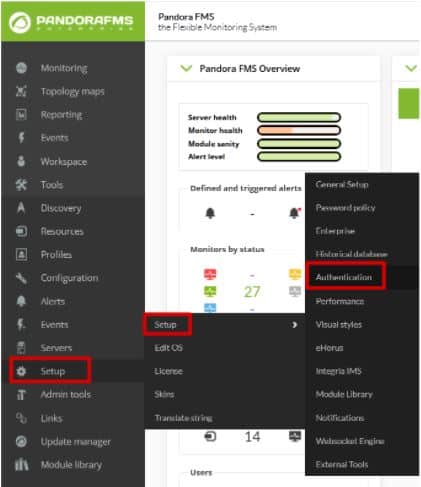
Configuring that tool is as simple as going to the “Authentication” section within the “Setup” tab.

Google-Authenticator

Here the task will be as simple as activating “Double authentication” and, if desired, forcing its use on all users. Once it is done, click on “Update”.

Google-Authenticator

Google-Authenticator

When updating, a window will appear asking you to download the Google authenticator application. Remember it is a mobile application, and, although the link redirects you to the website, you may download it from the Android Play Store or Apple App Store. If you already had it, you would only have to click continue.

Google-Authenticator

Then, open the application and scan the QR code with it. This will add an account to your application’s registry where a 6-digit number will appear. In case this fails, click “Refresh code”. If everything goes well, continue.

Google-Authenticator

The last window that will appear will be to ask you for the code that was generated in the application, to finish linking your Pandora FMS user with the device where the codes are generated. You will only have to enter this code and you will have finished the configuration of your double authenticator.

Google-Authenticator

To do the test, log out of Pandora FMS and re-enter the credentials of your user, and this time instead of showing you the console it will ask you to enter the application code.

Google-Authenticator

Farewell

Once you have correctly configured this tool, your system will be somewhat more secure, although of course, that does not mean that it is impenetrable, since every day, the so-called “hackers” create new codes to violate this type of security. That is why we always recommend changing passwords frequently and keeping all your devices updated to the latest version of their programs and software in general and continue adding new security measures throughout your network.

About Version 2 Digital

Version 2 Digital is one of the most dynamic IT companies in Asia. The company distributes a wide range of IT products across various areas including cyber security, cloud, data protection, end points, infrastructures, system monitoring, storage, networking, business productivity and communication products.

Through an extensive network of channels, point of sales, resellers, and partnership companies, Version 2 offers quality products and services which are highly acclaimed in the market. Its customers cover a wide spectrum which include Global 1000 enterprises, regional listed companies, different vertical industries, public utilities, Government, a vast number of successful SMEs, and consumers in various Asian cities.

About PandoraFMS
Pandora FMS is a flexible monitoring system, capable of monitoring devices, infrastructures, applications, services and business processes.
Of course, one of the things that Pandora FMS can control is the hard disks of your computers.

從監控的角度看 PuTTY

What is PuTTY and some useful tips to use it easily

PuTTY is a free program (MIT license) for x86 and AMD 64 architectures (now in experimental stages for ARM). It was developed in 1997!, by Simon Tatham, a British programmer. In this blog, we have been reviewing this useful program for several years, and even the great Pandora FMS team has confirmed it just now in 2020, in the list of network commands for Microsoft Windows® and GNU/Linux®. What if it deserves its own article? Read and judge for yourselves.

Before GNU/Linux®

For those of you who visit us for the first time (welcome all) I will tell you that, when I started hitting the keyboard keys, Mr. Linus Torvalds had not even begun to study at the University of Helsinki, Finland. Age aside, we didn’t even have a graphical environment on our computers, as we know them today. Each program managed the best it could, making calls directly to the hardware, which was expensive and primal and in turn did not allow for more powerful operating systems.

The command line or terminal window was the one we used for almost everything and when operating systems with a graphical interface arrived, this resource was relegated to communicating network computers, given its low cost in terms of data transmission and its powerful use (for example, with a single command you may shut down or restart a computer, and many other things). The surprising thing is that even today we continue to use this work scheme, and even more so in terms of monitoring.

The world of computers today

Since the birth of GNU/Linux® its natural niche has been the server sector, especially web servers. By 2012, Pandora FMS team, with a keen eye, noticed the irruption of Android® in computing and we surely know that today the number of mobile phones with this operating system far exceeds the rest of devices.

Oh, I almost forgot, Android® is a somewhat weird GNU/Linux®, because manufacturers and phone operators do not let us use our “own” computers as root users. Leaving aside the arrival of 5G technology and new mobile operating systems, Android® has no major problems downloading multiple applications, to connect our beloved and precious servers with GNU/Linux (administration, monitoring).

The Windows® platform still retains a powerful slice on desktop systems (mostly for its use in video games). For administration and/or monitoring tasks just getting your hands on a handful of applications is more than enough. Here is where PuTTY, a free tool written in C language, comes into play. I guess here the name PuTTY is the complement of getty (short for get TTY) a program written in Unix by Wietse Zweitze Venema (co-author of the popular Postfix email server) and ported to GNU/Linux. In both worlds, getty has the function of detecting a connection, requesting user credentials, and authenticating them. PuTTY would then be, I guess, an abbreviation for put TTY. Let us also take into account that TTY is the abbreviation of TeleTYpewriter, the first devices based on a typewriter but electrically connected for sending and receiving written messages by telegraph (Télétype® or teletype).

Of course, PuTTY is not the only one – nor will it be the last – that you can use for teletasks: I recognize that Cmder is also a very useful program that includes more options for Windows®: cmd, Powershell® and SSH. But that, ladies and gentlemen, that is another story.

putty
PuTTY main screen

EU-FOSSA 2

European Union Free and Open Source Software Auditing project included PuTTY, in 2019, in the rewards program for hunting software bugs (bug bounty), which I consider shows its importance for computing.

To date, the European Commission has committed € 320,000 in reward payments (up to € 10,000 for revealing a software bug) in this project, and in the case of PuTTY (January to July 2019) they made 34 reports that were rewarded with an average of 285 euros each (I estimate more than twenty thousand euros in total, the highest prize was 6,772.08 euros). With such incentives it is clear that version 0.71 was born specifically by the initiative of all of Europe, considering PuTTY a common good. In this article I talk about the most recent version 0.74, paying my tribute.

Human resources

While money is important, we human beings are even more important, since we bear symbols and we give meaning to this Universe. PuTTY has, apart from Simon Tatham, a small but very select group of developers:

  • Alexandra Lanes: code reviewer who… responds to development emails. Yes, after the bug bounty program, sponsored by the European Commission, they went back to their previous scheme of receiving all improvements, criticisms, comments, etc., by email. Back to old school!
  • Jacob Nevins: Helps receiving email, and sometimes also encrypts.
  • Ben Harris: With high character encoding studies, he helps in the process of porting to other platforms.

In detail, what does PuTTY do for us?

Don’t ask that, ask what you can do with PuTTY. To sum it up a lot, PuTTY turns your powerful computer with a certain number of cores and huge amounts of RAM (with hard disk space and a monitor that would make film director George Lucas turn pale) into… a dumb terminal window. Yes, sometimes little things do titanic jobs, and the other way around!

Do not take the dumb terminal the wrong way, I call it that because everything we write on this side is sent to a Unix or Linux machine (this is usually abbreviated as *nix) and everything sent from there is reflected on our screen.

At a higher level (and I respect that opinion) there are those who think that personal computers have died… If we see it that way, anyone would say let’s move on this is over, but wait, there are still a few things left.

putty
PuTTY special commands for SSH

PuTTY Features

  • PuTTY, by default, will communicate with you through SSH safely, through certificates (public and private key), although if you want to skip security, you have to explicitly request SSH-1.
  • PuTTY has its own format (PuTTY Private Key or PPK) to store the public key without encryption on your disk but with the guarantee of Message Authentication Code (MAC – yes, yet another repeated acronym). That means you need an extra step if you already had a certificate made for OpenSSH, which is the current standard. Otherwise, PuTTY has its own certificate generator in several different formats. The author indicates that the difficulty for PuTTY to stop using PPK is the number of tweets they send them: the more messages, the easier it is. Their account on Twitter is… they don’t have an account on that social network (humor is also an indication of intelligence).
  • If you wish for higher security, you can use a security sentence to your pair of keys when generating them, but then you have to enter that sentence in each connection, each time. PuTTY has Pageant, who stays in memory and does that work for you.
  • PuTTY can use the connection protocol created by Richard Stallman himself – father of the free software movement – back in 1983: SUPDUP. I in particular did not know about it, so I just learned something new with you… Who uses that protocol currently? You see, geek stuff!
  • The PuTTY code has been used by third parties as the basis for an experimental SSH server (developing free software is spreading). PuTTY is written in C language and it is monolithic, it does not use dynamic link libraries, so if you download the appropriate version already compiled in 32 or 64 bits, it is ready to be executed.

putty
“PuTTY preferences for serial port”

  • Some Cisco® brand network switches use a serial port, conveniently disguised as an RJ-45 terminal, through which you can manage and/or monitor these devices (some other commercial brands do the same). I recommend using the serial port of the motherboard (buy an extension cable for the external slot of the case) which guarantees a better connection than USB to 9-pin serial port adapter cables. Once you have all this, PuTTY will kindly connect you to the serial port, usually COM1
  • In a similar way, you can set a graphical server X on the *xnix machine you will connect to and forward said output through PuTTY to your local machine, in order to use a program like Xming to monitor user experience (in a web browser, for example)./li>

putty
PuTTY preferences X11 forwarding

Tips to save time

When working with PuTTY, these suggestions are very welcomed:

By clicking and dragging directly, it will be copied to the clipboard, without using CTRL + C. If you want to select a rectangular area just press the ALT key before clicking in the session window opened with PuTTY. Remember that clicking with the right button inside the window will paste (CTRL + V) what you have on the clipboard, although you may also use SHIFT + INSERT to paste.

By secondary clicking on the title bar of the window you will have some very interesting options, such as:

  • Work in full screen. This allows you to work without distractions.
  • Duplicate the session, that is, another terminal window with the same server (there is also another option to open a totally new connection or choose between the profiles you have saved).
  • In the configuration option, you can check the option to reuse the connection and then when connecting, right click and choose to duplicate session. From there, all the connections you make will use a single path, even if you use CMD.exe to run other PuTTY executables (psftp,plink, etc.) followed by the profile name you use for the connection and the rest of required parameters.
  • Depending on the type of connection you have established, PuTTY can offer the most used special commands, for example in SSH you will have SIGKILL, SIGTERM, etc
  • Remember that PuTTY stores, by default, the last 200 lines that you worked with (regardless of how keyboard shortcuts are handled in the terminal), because with the configuration option you can increase it to 5,000, just as an example. What use is this to us? Well, if for some reason you lose the connection, then right click again on the title bar of the window and select “Restart connection” and you will still keep everything you have written up to 5,000 lines up!

Remember the lock icon on web pages? Based on that same concept, and to avoid malicious SSH servers (ask them to send you questions of some kind about your passwords) PuTTY has an ingenious method of drawing an icon to differentiate – and legitimize – the warnings and questions that PuTTY asks you in the terminal window. However, this defense cannot be done in Windows CMD windows like for Plink (this executable is used to automate connections and you may never use it directly, but I make an exception).

If you use Powerline to give each of your remote machines a professional look (and to differentiate them as well), you can clone the repository and take the fonts and install them in Windows®. Then upload the necessary profile and set the recently installed font to your liking. In any case, PuTTY also allows customizing colors, styles and behaviors when resizing the terminal window and many other things.

putty
PuTTY configured with Powerline font

PuTTY and Pandora FMS

As you can see, PuTTY is actually an additional tool for monitoring as it helps you test and/or debug applications in general because, although SSH is its strength, it has other protocols such as Telnet and even live TCP! How can you contribute to PuTTY? Apart from receiving donations through Paypal, there is something you can do that will make the authors happier: spread and tell others about this software. For example, you can set up your very own mirror site that syncs monthly with the original. If you want to get more committed you can download its source code and help debugging.

About Version 2 Digital

Version 2 Digital is one of the most dynamic IT companies in Asia. The company distributes a wide range of IT products across various areas including cyber security, cloud, data protection, end points, infrastructures, system monitoring, storage, networking, business productivity and communication products.

Through an extensive network of channels, point of sales, resellers, and partnership companies, Version 2 offers quality products and services which are highly acclaimed in the market. Its customers cover a wide spectrum which include Global 1000 enterprises, regional listed companies, different vertical industries, public utilities, Government, a vast number of successful SMEs, and consumers in various Asian cities.

About PandoraFMS
Pandora FMS is a flexible monitoring system, capable of monitoring devices, infrastructures, applications, services and business processes.
Of course, one of the things that Pandora FMS can control is the hard disks of your computers.

您是否已經知道 Active Directory 是什麼以及如何將它與 Pandora FMS 一起使用?

What is Active Directory and how to use it with Pandora FMS?

As you may already know, in this blog, we’re so into answering the big questions. After answering in previous episodes what the meaning of our existence is or explaining everything you need to know about Office 365 Monitoring, in today’s episode we are going to discuss what Active Directory is. I hope you are very comfortable sitting in your respective gamer chairs or in your two-seater sofas, because here we go!

What is Active Directory?

Active Directory is a tool that provides directory services, which entails many benefits in the business sector. Many companies have a large number of employees, they need a connected device to do their work, and there we have Active Directory, with it we can build a network of devices for users or employees.

How to collect information on user and service monitoring with Active Directory?

We already know that obtaining information is a very important section of monitoring. All these data can be very useful for us to see the status of something, find a possible problem or simply improve a certain system. Active Discovery is a process by which information can be collected while managing everything in a very simple way. We will be able to see what we need from a single computer, which will make the task much easier, since we will not have to act on each of the devices. In this article, we are going to give you the guidelines to configure Active Discovery and be able to use it.

What are the benefits of using Active Directory?

  • It is focused on professional and business use. It allows you to manage everything easily and without having to intervene in the computers of each user, which saves a lot of time.
  • Store data in real time. With data related to users and their authentication.
  • User authentication. If everything’s ok, the user’s information will reach the computer. This means that if one computer breaks down, you will be able to access it from another with authentication.
  • Easily manage all servers and applications, ensuring that everything runs at peak performance.
  • Prevention of replication errors. To verify that all replications are being performed optimally. Active Directory monitoring is essential, since you will obtain accurate information from them.
  • Obtaining information from remote sites and much more…

And here Pandora FMS comes into play

It is our standard: One of the principles of Pandora FMS is its flexibility. It is highly configurable and by using plugins you will be able to do almost anything in terms of monitoring. Making use of Active Directory in Pandora FMS is quite simple. You can use a specific plugin with which to collect different types of data. Like, for example, the number of users connected or inactive to be able to see them from the console. The data you may obtain is easily configurable from a simple txt, which will be the configuration file. The plugin can be found at the following link: https://pandorafms.com/library/active-directory/ Once downloaded, install it on the console. This short and simple process that will offer you great advantages will be explained below.

What is needed for the plugin to work?

  1. Powershell v3.0 or higher.
  2. Active Directory Powershell Module.
  3. Repadmin. The plugin needs a configuration file that will be divided into the following blocks and will be called “adparams.txt” :
  4. In user, you can choose whether to see the full list of all users or one in particular. In unused, a list of users that have not been used for at least two months. 1 to enable it and 0 to disable it.
  5. Spn allows you to see spn suffixes. 1 to enable and 0 to disable, as in the previous point.
  6. Upn allows you to see spn suffixes. 1 to enable and 0 to disable.
  7. You may also add the test block, which retrieves the information from the AD diagnostic tests that the dcdiag tool returns. 1 to enable and 0 to disable. Example: #tests Tests = 0
  8. We can run the plugin manually, calling executable.exe, writing the following output through the powershell terminal: [path_plugin]\active_directory.exe [path_conf]\adparams.txt
  9. It is recommended to save the file in pandora_agent/util.
  10. In the remote configuration of the agent that we have installed, add the following:
  11. When the interval goes by, modules collected by the users of Active Discovery, the connectivity, the status of the service or the suffixes spn and upn will be obtained.

Execution from the web console

To be able to run it from the console, the plugin will be distributed through collections. In configuration -> collections, create a collection, it will be named “Active Directory plugin” and short name “Ad_plugin”, in the following image you can see the process.

Go to files after creating the collection :

Click on “Upload Files”:

And upload the executable of the plugin and the configuration file that we created previously, then return to the previous menu and click “Create a file again” and later “Update”. In the agent where you want to use the plugin, go to the collections section and add it:

Next, go to “Agent plugins” and add the route with the plugin execution. In this case, as it is by means of collections, they will be created in the software agent installation path.

The path by default would be the view in the image (2).

Modules generated by the plugin

These will be the modules returned by a standard run.

Monitoring:

  • AD Users
  • Unused AD User
  • AD Schema Master
  • AD Root Domain
  • AD Forest Domains
  • AD Computer DNS Host Name
  • AD Global Catalogs
  • AD SPN suffixes
  • AD UPN suffixes
  • Connectivity
  • Replication admin
  • Service DNS status
  • Service DFS Replication status
  • Service Kerberos Key Distribution Center status
  • Service Active Directory Domain Services status
  • Test Advertising status
  • Test FrsEvent status
  • Test SysVolCheck status
  • Test KccEvent status
  • Test KnowsOfRoleHolders status
  • Test MachineAccount status
  • Test NCSecDesc status
  • Test Netlogons status
  • Test ObjectsReplicated status
  • Test Replication status
  • Test RidManager status
  • Test Services status
  • Test SystemLog status
  • Test VerifyReferences status

Service NetLogon status

  • Service Intersite Messaging status

And this is how they would look like in the created agent:

And, up to here that would be everything required to be able to make the plugin work. It was easy, huh? I hope many things in this life, but above all I hope this article was useful, especially to help you understand better Active Directory and how to use it in such a simple way in Pandora FMS. I will not take anymore of your time, indeed, I say goodbye, not before, of course, encouraging you to read other articles on the blog that may be to your liking and taste.

About Version 2 Digital

Version 2 Digital is one of the most dynamic IT companies in Asia. The company distributes a wide range of IT products across various areas including cyber security, cloud, data protection, end points, infrastructures, system monitoring, storage, networking, business productivity and communication products.

Through an extensive network of channels, point of sales, resellers, and partnership companies, Version 2 offers quality products and services which are highly acclaimed in the market. Its customers cover a wide spectrum which include Global 1000 enterprises, regional listed companies, different vertical industries, public utilities, Government, a vast number of successful SMEs, and consumers in various Asian cities.

About PandoraFMS
Pandora FMS is a flexible monitoring system, capable of monitoring devices, infrastructures, applications, services and business processes.
Of course, one of the things that Pandora FMS can control is the hard disks of your computers.

我們向您展示 Pandora FMS 路線圖 2021 – 2023

Pandora FMS presents you our Roadmap 2021 – 2023

In this article, we will introduce you to the new Pandora FMS Roadmap for the next 24 months (June 2021 – June 2023). For its creation, we had the participation of our clients and partners, who, through a survey, helped us choose all kinds of features and their priority.

It’s been really satisfying for us to complete this challenge, as it was one of those enthusiastically proposed among our closest goals.

  • Warp update (Q2).
  • Command center (Q2).
  • New agent inventory report (Q2).
  • Graphic agent installer for Mac (Q2).
  • Services report (Q3).
  • Policy auto-implementation (Q3).
  • New visual console elements (Odometer, Simple graph) (Q3).
  • Netflow: Data monitoring of the flows defined in the filter (Q3).
  • Trend modules (Q3).
  • Capacity planning modules (AI) (Q3).
  • Enhanced anomaly detection (AI) (Q3).
  • Authentication with KERBEROS (Q3).
  • New service view widget for Dashboard (Q3).
  • Basic network computer configuration management (Q4).
  • Centralized agent update (Q4).
  • APM (code application monitoring) (Q4).
  • Security Center (Q4).
  • IPv6 monitoring in SNMP with Satellite server (Q4).
  • ITSM integration: SysAid, Zendesk, OTRS, Redmine, Jira, Zammad, TopDesk (Q4).
  • Impact simulation in service view (2022+).
  • Discovery: Google Cloud.
  • AWS Monitoring improvements with Discovery: RDS for postgreSQL, Autoscaling groups, VPCS, Lampdas.
  • Azure Monitoring improvements with Discovery: Databases, Storage, Data Factory, PostgreSQL, Event hubs.
  • GIS Alerts (2022+).
  • IPAM Report (2022+).
  • Data consultation to agents in real time (2022+).
  • Public/private certificate validation system in remote agent configuration (2022+).
  • Load Balancing in API/Console (2022+).
  • Automatic remote inventory with satellite (SNMP, WMI, SSH/Linux) (2022+).
  • New view to show systems currently affected by a scheduled downtime (2022+).
  • SNMP trap reports (top-N by source, type of trap, etc) (2022+).
  • Desktop application to configure Pandora FMS agent and see its status (2022+).
  • IOT on Satellite server (2022+).

Warp Update

A unified system that allows updating console, server and agents. Fully integrated into the console, which does everything with a single click without having to execute commands, copy files or pray for everything to go smoothly. Fast and centralized, in the case of deployment of centralized updates through the Metaconsole.

Command Center

Command Center is the long-awaited evolution of the Metaconsole, which will allow dozens of nodes to be managed in a totally transparent and centralized way simultaneously, without having to manually synchronize any element.

Security Center

An innovative way to manage server and workstation security, fully integrated with system monitoring.

APM in source code

We want to reach the last frontier of monitoring, the code in applications to measure their times and detect bottlenecks and overloads, combining all the information on the same platform where the infrastructure, servers and application metrics are.

Trend modules

Create a new type of predictive module that compares two time ranges and evaluates, in a percentage or an absolute way, their differences. These modules can be used in alerts, graphs or reports.

E.g.: Access router outbound traffic is 25% higher than last month. This month there are 22 new users compared to the previous month.

Centralized agent update

Update agents centrally from the console. A current enhancement to the remote agent distribution system.

Network computer configuration management

Being able to edit “download” and “upload” full configurations of network equipment through several protocols (TFTP, Telnet, SSH) in order to centrally manage network equipment such as switches and routers. Some of its purposes:

  • Schedule configuration backups, restore trusted configuration versions with a single click.
  • Detect changes in real time and know “who”, “what” and “when” about configuration changes.
  • Upgrading device firmware.
  • Save time by automating time-consuming and repetitive tasks using templates and configuration application scripts.
  • Make sure changes made to running configurations are saved.
  • Compare NVRAM (running) configurations with startup ones (saved) to identify changes that need to be saved.
  • Quickly identify and correct unauthorized or failed changes (restoring backup manually).
  • Compare configurations with base configurations to identify and reverse unwanted changes.

Netflow

Be able to integrate simple data from a Netflow filter as a Pandora FMS numerical module, to be able to, for example, set alarms when the traffic of a certain flow exceeds its threshold or to be able to measure SLA in flow traffic.

Capacity planning modules

Modules that operate like Capacity Planning reports and can estimate in a future time threshold, e.g.: 1 month, 3 months, the value of a given module, estimating its growth based on a statistical analysis of its history.

Policy auto-implementation

Add a policy self-enforcement system (optional) that works well. Either based on the detection of new elements (in the added group or directly in agents in the policy itself) or even just the possibility of scheduling policy application at a certain time interval.

Data consultation to agents in real time

Upon manual request: configuration data, status, hardware status, OS items, logs, etc., in real time, all from a library of predefined elements. Without complementary configuration, it would only need the deployment of an additional agent to that of Pandora FMS. These data are only for screen display, not for making alerts or reports. The data range would be very broad and standard. It requires direct connectivity from the console and the agent that must listen on a specific port.

Service report

Reports to show service SLA compliance, numerically (%) and with a histogram.

IPAM reports

New reports to, among other things, show the usage percentage of each network, and some other information of interest that appears on the IPAM screens but that cannot be included in reports.

GIS alerts

Be able to send alerts when an agent leaves a delimited coordinate zone, which is often called “geo-fencing”.

Load balancing in Console and API

Provide a standard system that allows load balancing in the console and the API, in order to scale and distribute the load. Perfect for environments where the use of the API is intensive or the console is used in multi tenant environments.

IoT

Offer support to the Satellite Server to natively support modbus and MQTT protocols.

It’s been hard work, but thanks to Pandora FMS employees and our partners and clients, we achieved this Roadmap 2021 – 2023 that will make our work easier in the future and speed it up.

About Version 2 Digital

Version 2 Digital is one of the most dynamic IT companies in Asia. The company distributes a wide range of IT products across various areas including cyber security, cloud, data protection, end points, infrastructures, system monitoring, storage, networking, business productivity and communication products.

Through an extensive network of channels, point of sales, resellers, and partnership companies, Version 2 offers quality products and services which are highly acclaimed in the market. Its customers cover a wide spectrum which include Global 1000 enterprises, regional listed companies, different vertical industries, public utilities, Government, a vast number of successful SMEs, and consumers in various Asian cities.

About PandoraFMS
Pandora FMS is a flexible monitoring system, capable of monitoring devices, infrastructures, applications, services and business processes.
Of course, one of the things that Pandora FMS can control is the hard disks of your computers.

SaaS 與內部部署:優點、缺點和成本分析

SaaS vs onPremise, do you use the cloud?

Do you use the cloud?

Be aware that we’re not saying that you are in cloud nine, but that you may most likely be using the cloud. That is, if you use Google mail, Microsoft Office 365 office suite or you take a photo with your cell phone and then it gets automatically uploaded to iCloud or something similar, you are using the cloud.

The cloud, as an abstract concept, encompasses a series of technical terminology such as SaaS, IaaS, PaaS, etc. The good thing about the concept of the cloud is that you can guess what it does thanks to the metaphor: we do not know where our data are, or how they get there, nor does it matter much for us, because it is far away and it does not affect us. The great success of the cloud of the 21st century has been to find an especially powerful metaphor that omits the complexity behind that technology and gives us peace of mind.

The concept of using third-party infrastructure for “our stuff” is the oldest thing in computing. In fact, back in the 60s of the last century, most computing worked like this. You connected to a large machine from a computer that was not as such, but a screen and a keyboard. Then the microcomputer craze turned around and every computer was self-sufficient. Now, almost a century later, we have rediscovered that it is more efficient to have everything centralized in one big system.

I have nothing against the cloud. Well, my life is not at stake, unless for example, I entrust the IT infrastructure of my business to the cloud. This is what happened to a number of companies in Asia, such as CITEX or BitMax that used the Amazon cloud (AWS) to host their Bitcoin exchange service (Exchangers), well, them and also the Asian sites from Adobe, Business Insider, Expedia, Expensify, FanDuel, FiftyThree, Flipboard, Lonely Planet, Mailchimp, Medium, Quora, Razer, Signal, Slack, Airbnb, Pinterest, SendGrid and a few hundred more. The cloud is not infallible, the cloud is comfortable.

Today many companies have relied so much on the cloud that it is impossible to take a step back, get out of the cloud, because they would literally have to remake the system with another technology. The cloud is easy but implies total dependence on the provider, especially in technologically optimized systems such as Amazon’s. It’s too good a candy to resist.

Realistically, if you’ve already risen to the sky and are floating with the clouds, and the technology that supports your business is floating above your head, it may not be easy or comfortable to go back, in fact, you may have probably already realized that the cloud is not cheap at all and the costs are increasing over time, and are difficult to predict.

Well, it’s already in, and it’s not going to change, so you should at least be able to keep an eye on what your provider is doing. Monitor the quality of service they offer you and make sure for yourself, because who is watching the watchdog? That’s right, do it yourself, trust no one, do it with your own systems, don’t use a cloud system to monitor another cloud system, put your feet on the ground and buy yourself an umbrella, just in case it rains.

The “lifetime” model: onPremise

On the contrary, we have the classic model of “buying the software” and using it however you want, wherever you want and, whenever you want you change programs without much thought. Oddly enough, this is really the new model, the pay-per-use model that SaaS has copied predates conventional software licenses. The onPremise model gives you the right to use the software on your own computers, in your own facilities and where the manufacturer or software owner does not have any access or rights. The only requirement is to pay for it and use it under the conditions approved by the license you acquired.

Cost analysis: onPremise vs SaaS

The onPremise model has some undeniable advantages, the main one being data security. As it is running on your systems, you own both the information and the processes that use that information. This has legal and business implications, since changing providers can be easier than when you use its SaaS equivalent.

Although it may seem a lie, in the long term the SaaS model is more expensive than the onPremise model, and above all, with the onPremise model it is much easier to estimate the Total Cost of Ownership (TCO) in the medium term. This can be easily demonstrated if we compare the costs in the subscription/pay-per-use model (SaaS) and the license ownership model (onPremise) for one, three and five years.

  • Suppose a SaaS license annual cost is €5,000/year. In this case it is pure OPEX (operating costs).
  • Let’s picture an onPremise license whose annual cost is €10,000 the first year, and whose annual maintenance cost is 20% (which is the standard in the market). That supposes a renewal cost of €2000/year. In this case, it is pure CAPEX (investment in assets, software).
 SaaS onPremise
1 year5,000 €10,000 €
3 years15,000 €14,000 €
5 years25,000 €18,000 €

There are intangible factors, such as input barriers, higher in onPremise models, and output barriers, higher in SaaS models. It is also true that an onPremise installation involves additional costs: those of infrastructure, operation and training.

In certain types of applications with little added value such as office tools, the SaaS model is here to stay. Office 365 or Google Docs are a perfect example.

In other cases, such as Adobe Photoshop, the onPremise model has been combined with a pay-per-use -subscription- model (but without being SaaS) combined with the conventional onPremise licensing model.

Summary of arguments in favor of each model

SaaSonPremise
Security depends on the provider.Security depends on the customer.
The responsibility for the operation lies with the supplier.The data is owned by the customer.
Savings in infrastructure and operating costs.Lower long-term license costs.
Ease of financing (monthly or quarterly payment).Easier-to-plan long-term costs.
OpexCapex
Lower input barriers.Higher input barriers.
Higher output barriers.Lower output barriers.
Faster deployment times.It is easier to integrate with the rest of the business processes.

About Version 2 Digital

Version 2 Digital is one of the most dynamic IT companies in Asia. The company distributes a wide range of IT products across various areas including cyber security, cloud, data protection, end points, infrastructures, system monitoring, storage, networking, business productivity and communication products.

Through an extensive network of channels, point of sales, resellers, and partnership companies, Version 2 offers quality products and services which are highly acclaimed in the market. Its customers cover a wide spectrum which include Global 1000 enterprises, regional listed companies, different vertical industries, public utilities, Government, a vast number of successful SMEs, and consumers in various Asian cities.

About PandoraFMS
Pandora FMS is a flexible monitoring system, capable of monitoring devices, infrastructures, applications, services and business processes.
Of course, one of the things that Pandora FMS can control is the hard disks of your computers.

安居樂業只有一種方式:安全的密碼管理

A few rules for safe password management

In this, our competent blog, we boast of always giving you good advice and providing you with the technological information necessary for your life as a technologist to make sense. Today it is the case again, we will not reveal the hidden secret about the omnipotence of Control/Alt/Delete, but almost. Today in Pandora FMS blog, we give you a few tips for safe password management.

Safe password management

The purpose of this article is for users to be responsible for keeping their coveted passwords or authentication information safe when accessing confidential information. Because think about it, dear reader, how long ago did you come up with your first password? Surely it was to enter your select club in the treehouse. Maybe you even still choose the same for your social networks, Netflix or office pc. Was it as ordinary as your birth date? Your name and the first two acronyms of your surname? “RockyIV”, which was the name of your fourth favorite pet and movie? I don’t blame you, we have all been equally original and carefree when choosing a password.

But that is over! Many things already depend on this password, on this motto or pass that must include more than eight characters and at least one capital letter and one number. Your company security is not a game, damn it! There is a lot of mischief and felon out there that can put you and your businesses in a loophole, because of a vulnerability such as having a poor password! But do not worry, we will help you, we will talk about safe password management. We are Pandora FMS blog, we like potato salad, Kubrick movies and fighting against injustices!

Recommendations for safe password management

*Obvious but vital fact: User IDs and passwords are used to check the identity of a user on systems and devices. I just point that out here as an outline in case someone is so lost that they don’t know this. I repeat that we are talking about strong password management, so knowing what a password is is a must and saves time.

Said passwords are necessary for users to have access to information, normally, even if the merit is not recognized: capital information in your company. User IDs and passwords also help ensure that users are held accountable for their activities on the systems they have access to. Because yes, telereader friend, users are responsible for any activity associated with their user IDs and passwords. For that reason, it is very important for you to protect the password with your life and comply with the following policies related to them:

  1. Users may not, under any circumstances, give their password or a password indication to a third party. *This seems obvious, but trust me, it is not. People sneak passwords like they’re office whispers or reggaeton choruses.
  2.  Users will not use user identifiers or passwords of other users. *As we can see, in this case, sharing is not living.
  3.  Users must change initial passwords or passwords received as temporary “reset” passwords immediately upon receipt. *For me, this is the most exciting and creative part, you never want to set the abstract code they give you, you want to improvise, imagine, CREATE!
  4.  Users should change their passwords if they suspect that their confidentiality may have been compromised, and immediately report the situation as a security incident. *Don’t be ashamed of yourself, admit that someone may have violated your secret and repent before it’s too late.
  5.  Users should not use the “remember password” function of programs. For example, if an application sends users the message of “automatically remember or store” the user’s password for future use, they will have to reject it. *This is a piece of information you did not know, huh? Well, it is as interesting as it is important.
  6.  Users should not store passwords without encryption, for example, in a text file or an office document. In this case, this document must be protected with access control.
  7.  When an administration password must be communicated, never send by the same means, the user and the password. For example, the user should be sent by email and the password by instant messaging. *I know that sometimes you try to save time, but with these things you better take your time and do not risk it.
  8.  Users should not set the password on a post-it on the monitor, nor on the table, nor in the drawer or “hidden” in another place in the office or among your personal belongings. *This is one of the big mistakes everyone makes. Yes, post-its or notebook sheets have always helped us, but this time they are too obvious to keep such a big secret.
  9.  Users should not use the same password for two systems or different applications. *Sorry, but you will have to memorize more than one. But rest assured, if a chimpanzee could recognize the descending sequence of nine numbers, someone who graduated from elementary school can do better.
  10.  Users who find out the password of other users must report it, ensuring it is changed as soon as possible. *Here fellowship first and foremost. It is not only right hugging after company dinners. Camaraderie above all!
  11.  Users must change their passwords at least once a year, or when indicated by the system, and in the case of administration passwords every 180 days, or in the event of changes of personnel in the company that may know them.
  12.  If now you are afraid because you do not have a strong enough password, it’s normal, but I repeat, calm down, follow the following rules for passwords creation (if the system supports them) and nothing will go wrong:
  •  a) Passwords must be at least six characters long.
  •  b) Passwords must not be easily predictable and must not be contained in dictionaries. For example: your username, date of birth, or 1234, we all know that one.
  •  c) Passwords must not contain consecutive repeating characters. For example: “AABBCC”.
  •  d) Passwords must have at least an alphanumeric character, a numeric character, and a special character.

Good, and so far that was the lecture about being responsible that you must assume and internalize if you want things to go smooth at least in terms of passwords and vulnerabilities. Oh, nothing to thank us for! You know: “Life is beautiful. Password yourself”. Look, that could be your new password, right? No, the answer is NO! REMEMBER EVERYTHING WE LEARNED TODAY IN THIS ARTICLE!

About Version 2 Digital

Version 2 Digital is one of the most dynamic IT companies in Asia. The company distributes a wide range of IT products across various areas including cyber security, cloud, data protection, end points, infrastructures, system monitoring, storage, networking, business productivity and communication products.

Through an extensive network of channels, point of sales, resellers, and partnership companies, Version 2 offers quality products and services which are highly acclaimed in the market. Its customers cover a wide spectrum which include Global 1000 enterprises, regional listed companies, different vertical industries, public utilities, Government, a vast number of successful SMEs, and consumers in various Asian cities.

About PandoraFMS
Pandora FMS is a flexible monitoring system, capable of monitoring devices, infrastructures, applications, services and business processes.
Of course, one of the things that Pandora FMS can control is the hard disks of your computers.

監控安全架構

Introduction

Do an exercise, ask five IT technicians -of any profile- what SNMP means.. If you’re close with them the better, so that the first thing they do is not go to Wikipedia to boast. Hopefully, they might tell you what they said to me when I was working in networks.

“Security is Not My Problem”

Taking into account that the SNMP protocol is one of the monitoring bases, and a system that has been in use for more than thirty years, this answer, “Security is Not My Problem”, sums up the current monitoring situation quite well: ignorance, laziness and lack of interest in monitoring security.

By the way, we talked about SNMP in another article on our blog and I will give you a teaser in advance, it means Simple Network Management Protocol and it comes from 1987.

Considering that monitoring is “key to the kingdom”, since it allows access to all systems and even access many times with administration credentials, shouldn’t we take security a little more seriously when we talk about it?

Recent vulnerabilities in well-known monitoring systems such as Solarwinds or Centreon make the need to take security seriously in the implementation of monitoring systems increasingly urgent, since these have a very strong integration with systems.

In many cases, security problems are not so much about one piece of software being much safer than another, but about poor configuration and/or architecture. It must be taken into account that a monitoring system is complex, extensive, and in general, it is highly adapted to each organization. Today it was Solarwinds, tomorrow it could be Pandora FMS or Nagios.

No application is 100% secure, nor is any corporate network secured against intrusion, whatever the type. This is an increasingly evident fact and the only thing that can be done about it is to know the risks and assume which ones you can take, which ones absolutely not, and work on the latter.

Safe monitoring architecture

It is essential to keep in mind at all times that a monitoring system contains key information for a possible intruder. If monitoring falls into the wrong hands, your system will be compromised. That is why it is so important to devote time to the architecture of your monitoring system, whatever it may be.

Carry out a first analysis, collecting the requirements and scope of your monitoring strategy:

  • Identify what systems you are going to monitor and catalogue their security levels.
  • Identify which profiles will have access to the monitoring system.
  • Identify how you will obtain information from those systems, whether through probes/agents or remote data.
  • Identify who is responsible for the systems you are going to monitor.

The architecture of a system will have, whatever the chosen software, the following elements and will have to take into account its network topology, its resources and the way to protect them properly:

  1. Information display interface (web console, heavy application).
  2. Data storage (usually a relational database).
  3. Information collectors (intermediate servers, pollers, collectors, etc.).
  4. Agents (optional).
  5. Notification system (alerts, notices, etc.).

Monitoring system securing

No matter how correct the implementation of a system, its architecture and its design as a whole is, if one of the elements that make it up is violated, the damage it may suffer by a malicious attack compromises the entire structure. For this reason, in security there is a saying, “Security is a chain and your real security always depends on its weakest point.”

This list of security concepts applied to the architecture of a monitoring system can be summarized as the features that a monitoring product must have to ensure maximum security in an implementation:

  • Encrypted traffic between all its components.
  • High availability of all its components.
  • Integrated backup.
  • Double access authentication.
  • Delegated authentication system (LDAP, AD, SAML, Kerberos, etc.).
  • ACL and user profiling.
  • Internal audit.
  • Password policy.
  • Sensitive data encryption.
  • Credential containers.
  • Monitoring of restricted areas/indirect access.
  • Installation without superuser.
  • Safe agent/server architecture (passive).
  • Centralized and distributed update system.
  • 24/7 support.
  • Clear vulnerability management policy by the manufacturer.

Monitoring infrastructure basic securing

The management console, monitoring servers and other elements should never be on an accessible public network. The console should always be protected on an internal network, protected by firewalls and, if possible, on a network independent from other management systems.

The operating systems that host the monitoring infrastructure should not be used for other purposes: for example, to reuse the database for other applications, nor the base operating systems to run other applications.

Safe and encrypted traffic

You should make sure that your system supports SSL/TLS encryption and certificates at both ends at all levels: user operation, communication between components or sending data from the agent to the servers.

If you are going to use agents in unsafe locations, it is highly recommended that you force all external agents to use certificate-based authentication at both ends, to avoid receiving information from unauthorized sources and to prevent information collected by agents to not travel transparently.

On the other hand, it is very important for you to activate encryption on your web server to provide an encrypted administration console and prevent any attacker from seeing access credentials, remote system passwords or confidential information.

Full High Availability

For all elements: database, servers, agents and console.

Integrated backup

The tool itself should make this as easy as possible, as settings and data are often highly distributed and consistent backup is complex.

Clear vulnerability management policy by the manufacturer

Every day, dozens of independent auditors test the strengths and weaknesses of all kinds of business applications. They seek to gain a foothold in the sector by publishing an unknown ruling to increase their reputation. Many clients, as part of their internal security management processes, execute external and internal security audits that target their IT infrastructure.

Be that as it may, all products have security flaws, the question is: how are those flaws handled? Transparency, diligence and communication are essential to prevent customers from having problems derived from vulnerabilities in the software they use. It is essential that there is a clear policy in this regard, so that it is known which public vulnerabilities have been reported, when they have been corrected and if a new one is detected, the steps to follow for notification, mitigation and distribution to the end customer.

Dual authentication system

Pandora FMS has an -optional- system based on google authenticator that allows forcing its use for all users for security policies. This will make user access to the administration console much safer, preventing that due to privilege escalation the system can be accessed as administrator, which is, at best, the highest risk that can be run.

Delegated authentication system

Complementary to the previous one, you can delegate management console authentication to authenticate against LDAP, Active Directory, or SAML. It will enable a centralized access management, and combined with the double authentication system your access will become much safer.

ACL and user profiling

Identify and assign different users to specific people. Do not use generic users, assign only the necessary permissions and do not use “super administrators”. They are good practices not only for monitoring tools but for any business software implementation with access to sensitive information.

Nowadays, any professional tool to define an access profile for each user will do so in such a way that no user has “absolute control”, but only has the minimum required access to their functions.

Internal audit system

You must have a system in place to record all user actions, including information on altered or deleted fields. Said system must be able to be exported abroad so that not even the administrator user can alter said records.

Password policy

A basic element that allows you to enforce a strict password management policy for access to application users: minimum password size, password type, their reuse, forced change once in a while, etc.

Sensitive data encryption

The system must allow the most sensitive data to be stored encrypted and safely, such as access credentials, monitoring element custom fields, etc. Even if the system itself contains the encryption “seed”, it will always be much more difficult for a potential attacker to access this information.

Credential containers

Or an equivalent system for the administrator to delegate credential use to other users who use said credentials to monitor elements without seeing the passwords contained in the container.

Restricted area monitoring

In these systems, information will be collected remotely by a satellite server and will be available to be collected from the central system (in Pandora FMS through a specific component called Sync server). That way, data can be collected from a network without access to the outside, ideal for very restrictive environments where the impact is drastically reduced if an attacker takes over the system.

Agent remote management locking system

For critical security environments, where the agent cannot be remotely managed once it is configured. This is especially critical in monitoring, since if a system is compromised and its administration is accessed, by the way the system is configured itself, it will have access to all systems from where it receives information. In critical systems, the remote management capacity must be deactivated, even if that makes administration more tricky. The same applies to automatic updates on the agent.

Design of safe architecture for communication with agents

Sometimes known as passive communication. That way, agents will not listen to a port nor have remote access from the console. They are the ones who will connect to the central system to ask for instructions.

Installation without root

Pandora FMS can be installed in environments with custom paths without running with root. In some banking environments, it is a requirement that we meet.

Notification and reporting system (alerts, notices, etc.)

A monitoring system is only useful if it shows accurate information when it is needed. Alert or weekly report reception is the culmination of all the previous work and for that you will have to take into account some “obvious” points that are often overlooked. Protect those systems, wherever they may be.

Periodic updates

All manufacturers now distribute regular updates, which include both bug fixes and security problems. In our case, we publish updates approximately every five weeks. It is essential to update systems as soon as possible, because when a vulnerability is reported, product managers ask external security researchers who have reported the bug, not to publish anything about the vulnerability until a patch is published. Once the patch is published, the researcher will publish the information in more detail as wished, a fact that can be used to exploit and attack non-updated software versions.

Pandora FMS has a vulnerability disclosure public policy as well as a public catalog of known and reported vulnerabilities. Our policy has maximum transparency and full communication with security researchers, always to mitigate the impact of any security problem and to be able to protect our clients as a top priority.

24/7 support

In our support, the technician who answers the phone has the whole team backing him up. If there is a security issue and a security patch has to be published within hours. We not only have the technology to spread the patch to all our customers, but also the team to develop it in record time.

Base system securing

Hardening or system securing is a key point in the global security strategy of a company. As manufacturers, we issue a series of recommendations to carry out a safe installation of all Pandora FMS components, based on a standard RHEL7 platform or its equivalent Centos7. These same recommendations are valid for any other monitoring system:

Hardening checklist for monitoring base system:

  • System access credentials.
  • Superuser access management.
  • System access audit.
  • SSH securing.
  • Web server securing.
  • DB server securing.
  • Server minimization.
  • Local monitoring.

Access credentials

To access the system, nominative access users will be created, without privileges and with access restricted to their needs. Ideally, the authentication of each user should be integrated with a double authentication system, based on token. There are free and safe alternatives such as Google Authenticator that can be easily integrated into Linux, although outside the scope of this guide. Seriously consider its use.

If it is necessary to create other users for applications, they must be users without remote access (for this, it is necessary to deactivate their Shell or some equivalent method).

Superuser access through sudo

In the event that certain users must have administrator permissions, SUDO will be used.

Base system access audit

It is necessary to have the security log /var/log/secure active and monitor those logs with monitoring (which we will see later).

By default CentOS has this enabled. If not, just check the /etc/rsyslog.conf or /etc/syslog.conf file.

We recommend you to take the logs from the audit system and collect them with an external log management system. Pandora FMS can do it easily and it will be useful to set alerts or review them centrally in case of need.

SSH server securing

The SSH server allows you to remotely connect to your Linux systems to execute commands, so it is a critical point and must be secured by paying attention to the following points:

  • Modify default port.
  • Disable root login.
  • Disable port forwarding.
  • Disable tunneling.
  • Remove SSH keys for remote root access.
  • Investigate the source of keys for remote access. To do this, look at the content of the file /home/xxxx/.ssh/authorized_keys and see which machines they are from. Delete them if you think there shouldn’t be any.
  • Establish a standard remote access banner that clearly explains that the server is a private access server and that anyone without credentials should log out.

MySQL server securing

Listening port. If MySQL server has to provide service to the outside, just check that the root credentials are safe. If MySQL only gives service to an internal element, make sure that it only listens on localhost.

Web server securing

We will modify the configuration to hide the Apache and OS version in the server information headers.

If you use SSL, disable unsafe methods. We recommend the use of TLS 1.3 only.

System service minimizing

This technique can be very exhaustive. It consists simply of eliminating everything that is not necessary in the system. Thus we avoid possible problems in the future with poorly configured applications that we really did not need and that can be vulnerable in the future.

Local monitoring

All the internal monitoring systems would have to be monitored to the highest level, specially information registries. In our case the following active controls in addition to the standard controls are always recommended:

  • Active security Plugin.
  • Complete system inventory (specially users and installed packages).
  • System logs and server security.

About Version 2 Digital

Version 2 Digital is one of the most dynamic IT companies in Asia. The company distributes a wide range of IT products across various areas including cyber security, cloud, data protection, end points, infrastructures, system monitoring, storage, networking, business productivity and communication products.

Through an extensive network of channels, point of sales, resellers, and partnership companies, Version 2 offers quality products and services which are highly acclaimed in the market. Its customers cover a wide spectrum which include Global 1000 enterprises, regional listed companies, different vertical industries, public utilities, Government, a vast number of successful SMEs, and consumers in various Asian cities.

About PandoraFMS
Pandora FMS is a flexible monitoring system, capable of monitoring devices, infrastructures, applications, services and business processes.
Of course, one of the things that Pandora FMS can control is the hard disks of your computers.

Pandora FMS 中的工程和開發

Pandora FMS started as a totally personal open source project back in 2004. I wasn’t even a professional programmer, I was doing Unix security consulting. In fact, I chose PHP but Pandora FMS was my first application with PHP, I knew some things about ASP and my favorite programming language had been C.

A project with a single programmer and no professional users of his software yet is very different from a project with several dozen programmers and hundreds of clients using the software in critical environments. The evolution that Pandora FMS has undergone from 2004 to 2021 is a real case of steady improvement in software engineering.

Fortunately, I did not pay much attention to that subject of the degree, because most of the things that work and that I have learned with practice do not come in a book, nor are they explained at the university, because each software project and each team of people is very different. It may sound cliché, but it is the truth, and it is better to accept it and avoid formulas, because building a solid software product that can grow over time is not trivial at all.

In this article, I am going to talk about our experience, our evolution over time, but above all, about how our engineering processes work today. I have always believed that the most important part of open source is transparency, and that this should apply to everything, not only to software but also to processes and knowledge in general.

Version control system

It is an essential part of any software project. Today the ubiquitous GIT is everywhere (by the way, not everyone knows that Git is the work of Linus Torvalds, original author of the Linux kernel). A version control system helps, in short, a group of developers work without overlapping their jobs.

When the Pandora FMS project started, I was working without version control, because there were no other people. When some people began to collaborate on it, we realized that a simple shared directory was not worth it, because we were overlapping the code and, yes, making backups to save old versions was not a very efficient method.

The first version control system we used was CVS, which we have been using for eight years or more. Around 2008, we started using SVN (Subversion) another slightly more efficient system and it wasn’t until 2013 when we started using GIT and opened our official repository on Github.

Ingeniería-y-desarrollo-en-Pandora-FMS

Pandora FMS public repository on Github

Since Pandora FMS has an open source version and an Enterprise version -with proprietary code and commercial licenses- we have two GIT projects, one public on GitHub and the other private, which we manage with GitLab. The GitHub version is in sync with our private copy on GitLab at our offices. Some partners who collaborate with us in developing have access to this private repository, and through an extension of our support application (Integria IMS) we share all development planning tickets by releases with some of our partners, so that they can see in real time, the development planning based on “releases” and all the details of each ticket.

Ingeniería-y-desarrollo-en-Pandora-FMS

GitLab ticket view in Integria IMS/em>

Ingeniería-y-desarrollo-en-Pandora-FMS

Release ticket view

Development methodology used in Pandora FMS

At Pandora FMS, we have been using our own methodology from the beginning, although we have borrowed many ideas from agile methodologies, especially from SCRUM. From a life cycle point of view, we use an adaptation of the Rolling Release methodology

These are some important definitions when defining how we work, some of them come from Scrum, others from other methodologies.

Objectives of Pandora FMS work methodology

The objectives involve not only the development members, but also QA, the documentation team and part of the marketing team:

    • Maximum visualization: The entire team must see the same information, and it must flow from bottom to top and from top to bottom. By sharing objectives we will be able to do a more effective job.
    • What is not seen does not exist, which implies that all information relevant to the project must be reflected in the management, implemented with Gitlab. What is not seen does not exist, and what does not exist will not be taken into account for any purpose. Strictly following this methodology will allow everyone to be very aware of the planning:

-Strict deadline compliance.

-Advance planning without last minute modifications.

-Clearer information and in due time.

-Elimination of work peaks and etc.

  • Integrity,, with an increasingly large and complex project, it is imperative to keep integrity during development. All code must follow standards..


Ticket

The ticket is the minimum work unit. There is a single person responsible for its completion and it is planned to be carried out in a milestone (version release).

A ticket is the way in which the development work is broken down, so a big feature will be made up by different tickets, on which ideally several people can work.

The ticket must contain a functional or description of the requirements, which can include diagrams, specifications, interface diagrams (mockup), test sets, examples, etc. In some cases it may even contain the analysis and design of the whole solution.

A completed ticket must perform as specified in the functional document (ticket) and the changes that have been made to these specifications must be reflected in the ticket.

The functional is key so that QA can validate a ticket or not. QA will have to reopen a ticket if it does not meet any of the functional aspects.

Members and working groups

Product Owner (PO)

The PO defines where Pandora FMS has to go, in contact with customers, support and
the “real” market situation, providing technical and functional guidelines but without getting involved in development as such.

Product Committee

Group of people who will meet permanently with the PO to agree where the product is going to, trying to ensure that all PO decisions are collegiate. It is made up of the leader of each Development, QA, Support, Projects and Documentation team.

Development Manager (DM)

The DM will manage the entire development cycle: define milestones, priorities, manage
individually all members and make operational decisions. The DM reports exclusively to PO and is the leader of the development team.

Development Team

They are in charge of the development of large features and product improvements, complete code refactoring, change development (small features), bug fixes and product maintenance improvements.

QA Team

They verify that each development atomic unit works as defined in the
specifications. They will also create and maintain an ecosystem of automated testing for both backend and user experience.

Support Team

They are the ones who deal directly with the client solving issues. Their experience with the product’s day-to-day means that their opinions must be taken into account, that is why they are part of the product committee.

Project team

They implement it on the end customer and are the ones closest to the customer, since they are often there before the project exists, and they usually offer ideas and all kinds of features in hand, for all purposes they are the “speaker” of the commercial department, therefore they are part of the product committee.

Training and Documentation Team

Responsible for training and the product’s documentation. They coordinate with the marketing team and the translation team.

Remote working

All team members (development, QA, documentation) telework freely. In fact, developers from Europe, Asia and America participate in Pandora FMS, and within Spain they are distributed throughout the national territory. We are a 100% distributed and decentralized company, although with traditional hierarchies.

In order to telework, we need each member to take responsibility for their work, be autonomous and commit to planning. Teleworking entails minimizing the need for oral communication and physical personal meeting, replacing them not with teleconferences, but with a precise use of the tools of the development process.

Development watch-keeping

A developer on the team is especially devoted to solving incidences involving code, in permanent connection with the support team (from 8 am to 8 pm, CEST). This allows not only to have maximum agility when solving a problem on a client, but also code changes are integrated into the code repository in an organized way.

Ticket creation and classification process

Any member of the company (including salespeople) can create a ticket in GitLab. This includes customers and partners, although in their case there is a prior filter by the support team and the sales team respectively.

The more detailed the ticket, the more unequivocal the development will be. Add images, gifs, animations and all the necessary clarifications. As well as the way to access the environment where the problem has been found or the contact persons. A developer will never contact a customer directly. If there is the need to interact with them, it will be done through the support or project team.

Nobody, except for the DM or PO, can change a ticket milestone. On creation, the ticket will not have an assigned milestone or assigned user. The task of defining which release a ticket belongs to is the responsibility of PO and DM exclusively.

When a ticket is finished and the developer thinks it should be reviewed by a colleague, they mention it in the merge request through @xxxxx. The review must be nominal. This review is independent of the code review carried out by the department manager.

General ticket workflow

  • The ticket is assigned to a programmer by the DM. If it does not have a ticket assigned, the ticket will be auto-assigned. (See below the terms that regulate this system).
  • The developer must understand/solve any questions that may arise after reading the functional document, if necessary, check with the DM or the author of the ticket. This must be done before starting to develop. Once read, you must, in order:
  1. Evaluate (by assigning labels) its complexity and size, reaching a prior consensus with the DM.
  2. Develop the feature following the ticket specifications
  3. Document everything developed in the same ticket or, if required, in a new documentation ticket. This ticket must relate to the “parent” ticket by ticket #ID.
  4. The developer must test its functionality at least in:
    -standard docker development environment
    -docker development environment with data.
  • When it is deemed complete, it will be tagged ~ QA Pending and placed in the hands of QA.
  • For each FEATURE ticket, there will be a reference person, generally from projects, support or even the PO itself. This person will be the one who will define part of the functional (together with the DM and PO), but above all, this person will be the reference person for the developer to ask any details during development, and most importantly, should see the development progress, step by step, so that it is validated.
  • Any change to the functional will be reflected by the reference person in the ticket as comments, without altering the original functional.
  • If there is a child documentation ticket, QA will validate the ticket using the documentation generated by the reference person, NOT by the functional of the ticket, validating the documentation and the feature at the same time.

Release planning

When creating a ticket, the milestone must be empty (not assigned) like the user. The only ones that can classify a ticket are: DM and PO.

A series of milestones have been defined to support the ticket classification process, some of them, those dated (releases), can be seen as milestones, while the rest should be seen as simple ticket containers.

  • (Not allocated): It is the absence of milestones in a ticket. For all intents and purposes, this ticket “does not exist yet.” The DM and PO will validate each and every one of these tickets to see if they make sense in the product roadmap. No developer should take any of these tickets.
  • Feature backlog: Tickets that will be made at some indeterminate time in the future that sooner or later will have to be addressed. No developer should take any of these tickets.
  • Low priority bugs: Reported bugs with no priority assigned yet by PO/DM. No developer should take any of these tickets.
  • STAGE: Tickets proposed by each department for planning in a product release. At each planning meeting, these tickets will be discussed, and moved to other milestones. At the end of the cycle start meeting, this milestone should be empty. The DM is the one who has the final decision as to which STAGE tickets are assigned to a certain release and which are not, relying on the product committee if necessary. No developer should take any of these tickets.
  • XXX: Release XXX. Milestone that groups a series of tickets that will be released on a certain date. A milestone has a deadline associated with it. In the case of RRR releases, this date could change, in the case of LTS not.
  1. The development of the tickets associated with a release must be finished 5 days before the scheduled day for the release. Tickets not completed before that date will be delayed to the next release and the delay will have to be justified to the DM.
  2. There are two types of release milestones:
    -LTS: in April and November. They are 6 months apart.
    -Regular Releases (RRR): There will be 2 to 4 regular releases between LTS releases.
  • A developer with no assigned tasks for a release, as long as there are no pending assignment tickets in the release milestones for the developer’s team, can take one of the unassigned tickets from:
    -The closest release, based on date.
    -Second closest release, based on date.

CICD

Pandora FMS developers integrate the code of their branches in a central repository several times a day, causing a series of automatic tests to be executed whose objective is to detect faults as soon as possible and improve the quality of the product.

These tests run dynamically in a series of executors or “runners”, some of them specific, for certain architectures (e.g., ARM), that execute static code analyzers, unit tests, and activate containers to carry out integration tests in a real installation of the application.

The generation of Pandora FMS packages is completely automated. Packages are generated every night from the development branch for manual testing. They can also be generated on demand by any developer or member of the QA or support teams, from any branch through the GitLab web interface.

When a release is made from the stable branch, in addition to package generation, a series of steps are executed that deploy them to Ártica’s internal package server, to SourceForge, to Ártica’s customer support environment, and that, likewise, update the Debian, SUSE and CentOS repositories along with the official Docker images.

About Version 2 Digital

Version 2 Digital is one of the most dynamic IT companies in Asia. The company distributes a wide range of IT products across various areas including cyber security, cloud, data protection, end points, infrastructures, system monitoring, storage, networking, business productivity and communication products.

Through an extensive network of channels, point of sales, resellers, and partnership companies, Version 2 offers quality products and services which are highly acclaimed in the market. Its customers cover a wide spectrum which include Global 1000 enterprises, regional listed companies, different vertical industries, public utilities, Government, a vast number of successful SMEs, and consumers in various Asian cities.

About PandoraFMS
Pandora FMS is a flexible monitoring system, capable of monitoring devices, infrastructures, applications, services and business processes.
Of course, one of the things that Pandora FMS can control is the hard disks of your computers.

數字化轉型時期的主動監控

Pandora FMS is a proactive, advanced, flexible and easy-to-configure monitoring tool according to each business. Pandora FMS integrates with the needs of the business, being able to monitor servers, network equipment, terminals and whatever is necessary.

In this article we will focus on monitoring using Pandora FMS, bearing in mind the new reality, which has arrived to stay, known as “Digital Transformation”.

Digital Transformation

First of all, let’s start by understanding what Digital Transformation is all about, a widely used term, but at the same time somewhat confusing for many people, due to its broad definition.

Digital transformation is a concept that encompasses the integration of the different technologies, used in the different areas of a company, fundamentally changing the way it works and delivers value to its customers. It is also a cultural shift that requires organizations to constantly challenge the status quo, experiment, and feel comfortable with the change.

It is not new that technology advances faster and faster generating a constant challenge, that is why we must be on the watch for these advances, to be able to adopt new technologies and achieve the cycle of “Continuous Improvement”, taking advantage of the tools that allow us to be more and more efficient.

As part of this change, there are key technologies that allow us to digitize our information and adapt to this new reality that is here to stay.

  • Cloud Computing (Amazon AWS, Microsoft Azure, Google Cloud): It gives your organization faster access to the software it needs, new features and updates, as well as data storage. Cloud computing allows you to be agile enough to transform quickly.
  • Information technology: It allows an organization to focus its investment on talent, research and development, and customized solutions that support the requirements and processes that differentiate it in the market.
  • Machine learning and artificial intelligence technologies: They provide organizations with more accurate information for decision-making on sales, marketing, product development and other strategic areas.
  • Other technologies that drive business transformation are: blockchain, blockchain, augmented reality and virtual reality, social networks, and the Internet of Things (IoT).

Since the beginning of computing, companies had at least one server/computer as part of their daily tasks. This implied additional tasks such as: technical support, and infrastructure maintenance.

Some years ago, it was common to find email servers, installed in the company, generating the great challenge to keep a critical service, like this one, running 24/7. Today there are private cloud solutions such as: Microsoft 365 or Google Apps, that allow you to have email with a very high SLA, without the need for your own infrastructure, using the service as SAAS (Software as a Service).

To understand where we are at and where to start, with the digital transformation process, we are going to explain the four most common infrastructure scenarios:

On-Premise (Local Infrastructure): Servers that work in the company and require a great effort to maintain them.

IaS Cloud (Infrastructure as a Service): In this scenario, virtual machines can be run in the cloud, such as, for example, a Windows Server, some Linux distribution where you install the essential tools to use the corporate application that you need to use. The provider ensures the availability of the virtual machine and the company is responsible for the software that is installed. In this case, Amazon AWS, Microsoft Azure, Google Cloud, etc. can be used.

PaaS Cloud (Platform as a Service): Services that work in the cloud and that have a platform such as: SQL Server, Oracle, SAP, Docker, Etc.

SaaS Cloud (Software as a Service):
 Services that work in the cloud and have a management tool, such as Exchange Online, Google Apps (Corporate Gmail), OneDrive, Google Docs, Etc.

After this introduction, we are going to understand the value of Pandora FMS for any of the previous scenarios, at the time of Digital Transformation.

Some time ago, we already published an article on this blog with the installation script for IaS Cloud. As a requirement you need to have a Virtual Machine with CentOS 7, which has 2 GB of RAM and 20 GB of Disk.

Executing the following command: curl -Ls https://pfms.me/deploy-pandora | sh on a computer that has an Internet connection, you will obtain an installation of Pandora FMS Community in an On-Premise scenario or in the cloud that you use:

https://pandorafms.com/community/get-started/

For the Enterprise version, we have a Free 30-day Trial. 

Now that you know that you can install Pandora FMS in the scenario that is most convenient for you, we are going to see which are the required ports to be able to use the tool from a public cloud:

PortDescription
443 TCP (https)WEB console
41121 TCP (Tentacle)Software Agent Connection/td>

With this configuration you can use Pandora FMS key features. We are going to see just a few of them. Very useful for this reality of continuous changes.

Remote Configuration, Policies and Collections: With this configuration you can make all the changes on the monitoring agents, using Pandora FMS web console, being able to build the Agent Plugins and distributing them in a centralized and simple way.

Agents with Remote Configuration

Satellite Server: A very interesting possibility is to set up an agent with advanced features. It allows you to discover the different remote networks, servers, and network computers, using ICMP, SNMP and WMI protocols. It is not necessary to open any ports on the firewall, where the Satellite Server is installed. You have the possibility of reaching Pandora FMS server with port 41121 TCP Tentacle and, for example, remotely monitor the devices from the different locations and/or branches.

 Several Satellite Servers, reporting to a console in Azure


Ubiquiti AP UC-AC-LR (Satellite through SNMP)

Pandora FMS Ubiquiti AP UC-AC-LR Web Console

https://pandorafms.com/docs/index.php?title=Pandora:Documentation_es:Arquitectura#Servidor_Sat.C3.A9lite

Finally, and as a complementary tool, you can count on the possibility of having usage and consumption metrics in the cloud, from the “Discovery” option, or with add-ons from the Enterprise library.

Discovery Cloud View

At the time I wrote this article, the clouds supported by Pandora FMS were:

*It is possible that new cloud technologies will be added over time.

In the next tree view you can see some of the metrics that we have available for AWS and Azure. In this view, you can see the status of the virtual machines, the consumption of Network, Memory, etc.
All these parameters are configured according to the specific needs of each client.

https://pandorafms.com/docs/index.php?title=Pandora:Documentation_en:Discovery#Discovery_Cloud (Discovery Cloud Documentation)

Finally, Microsoft 365 cloud has an API to be able to monitor the health status of its services. Pandora FMS has a plugin in the Enterprise library that allows you to collect data from the Microsoft 365 API.

https://pandorafms.com/library/pandora-office-365-monitoring/

Partial View of Microsoft 365 Services

I hope this article was useful for you to understand what the best monitoring scenario for your company is.

About Version 2 Digital

Version 2 Digital is one of the most dynamic IT companies in Asia. The company distributes a wide range of IT products across various areas including cyber security, cloud, data protection, end points, infrastructures, system monitoring, storage, networking, business productivity and communication products.

Through an extensive network of channels, point of sales, resellers, and partnership companies, Version 2 offers quality products and services which are highly acclaimed in the market. Its customers cover a wide spectrum which include Global 1000 enterprises, regional listed companies, different vertical industries, public utilities, Government, a vast number of successful SMEs, and consumers in various Asian cities.

About PandoraFMS
Pandora FMS is a flexible monitoring system, capable of monitoring devices, infrastructures, applications, services and business processes.
Of course, one of the things that Pandora FMS can control is the hard disks of your computers.

什麼是新的 Pandora FMS 754

What’s new in Pandora FMS latest release, Pandora FMS 754

Let’s take a look together at the features and improvements included in this new Pandora FMS release: Pandora FMS 754.

NEW FEATURES AND IMPROVEMENTS

Metaconsole Dashboards

Dashboards can now be used within the Metaconsole, to be able to centrally manage all the information more visually.

New AWS monitoring. Amazon S3

The possibility of monitoring Amazon S3 cubes has been added to be able to monitor the files they include, the size of each file, the number of items in each cube, permissions, etc.

New installers for Cloud

In previous versions, we prepared a remote script to install Pandora FMS in any environment: virtual, cloud or physical, by just having access to the internet. In this version, we have done the same to install Pandora FMS agents, in a customized way with just one click.

Check out the documentation or try it yourself:

curl -Ls https://pfms.me/agent-deploy | bash

Improved event widget in Dashboard

It now allows you to incorporate saved filters, so that the widget will show events using those custom filters.

Release-754

Visual enhancements to console settings

Pandora FMS console setup display has been improved to not show anymore all the options in a single column and thus be able to see it more easily and quickly.

Release-754

About Version 2 Digital

Version 2 Digital is one of the most dynamic IT companies in Asia. The company distributes a wide range of IT products across various areas including cyber security, cloud, data protection, end points, infrastructures, system monitoring, storage, networking, business productivity and communication products.

Through an extensive network of channels, point of sales, resellers, and partnership companies, Version 2 offers quality products and services which are highly acclaimed in the market. Its customers cover a wide spectrum which include Global 1000 enterprises, regional listed companies, different vertical industries, public utilities, Government, a vast number of successful SMEs, and consumers in various Asian cities.

About PandoraFMS
Pandora FMS is a flexible monitoring system, capable of monitoring devices, infrastructures, applications, services and business processes.
Of course, one of the things that Pandora FMS can control is the hard disks of your computers.