
Scalefusion Veltar 將 Windows 與 macOS 端點弱點偵測、風險排序及 UEM 修補流程串接,本文整理台灣企業的導入邊界、PoC 測試與維運評估重點。
Continue reading



Scalefusion Veltar 將 Windows 與 macOS 端點弱點偵測、風險排序及 UEM 修補流程串接,本文整理台灣企業的導入邊界、PoC 測試與維運評估重點。
Continue reading


蘋果一年一度的更新週期已經到來。隨著 iOS 27、iPadOS 27、macOS 27 和 tvOS 27 的推出,蘋果在裝置配置、安全協定、身分驗證及合規性方面進行了全面性的變革。最重要的是,這個發布週期突顯了蘋果正加速轉向宣告式裝置管理 (Declarative Device Management, DDM),從根本上改變了 IT 管理員監督企業設備機隊的方式。
在 Scalefusion,我們保證零日 (Day Zero) 就緒。我們已主動在最新的作業系統上測試了我們的應用程式,並整合了基於 DDM 的新配置、設定檔設定以及自動裝置註冊 (ADE) 增強功能。這確保您的 IT 團隊能夠無縫過渡到新的作業系統版本,而不會在日常管理工作流程中出現任何障礙。
從 iOS 26.4 和 macOS 26.4 開始,蘋果正式棄用了用於控制 Apple Intelligence 的傳統 MDM 限制金鑰,將這些配置直接移轉到 DDM 宣告中。Scalefusion 現在會在支援的版本上,原生透過 DDM 通道傳送 Apple Intelligence 限制,同時為舊版作業系統保留傳統的 MDM 金鑰支援。
對於 iOS 26.4 及更新版本,以下項目現在由 DDM 控制:
Scalefusion 還引入了全新的 DDM 專屬控制項:
macOS 注意事項:相同的 DDM 移轉適用於 macOS 26.4+,但不包含 Image Wand 和個人化手寫結果等行動裝置專屬功能。行事曆自然語言編輯需要 macOS 27.0。
外部智慧整合 (External Intelligence Integrations) 和 外部智慧整合登入 (External Intelligence Integrations Sign-in) 的控制項,現在在 iOS 26.4+ 和 macOS 26.4+ 上獨家透過 DDM 傳送。管理員還可以在這兩個平台上配置全新的 允許的外部智慧工作區 ID (Allowed External Intelligence Workspace ID)。
同樣地,核心 Siri 限制——包括 允許 Siri (Allow Siri)、強制 Siri 不雅用語過濾器 (Force Siri Profanity Filter) 和 鎖定時允許輔助 (Allow Assistant while Locked)——也已移轉至 DDM。現在為受監督裝置提供了一項新限制:允許 Siri 使用者產生的網頁內容 (Allow Siri User-Generated Web Content)。
iOS 作業系統更新模組已進行全面翻新,以提供卓越、精細的修補程式控制:
AUE iOS 設定檔:允許 Siri 和 鎖定時允許輔助 設定現在會顯示棄用警告。無需立即採取行動;現有配置將繼續正常運作。
macOS PPPC 棄用:蘋果已在 macOS 27 中棄用了相機、麥克風和語音辨識的隱私權偏好設定政策控制 (PPPC)。Scalefusion 將顯示棄用指示器;無論您的儀表板配置為何,這些權限將不再被推送至執行 macOS 27+ 的裝置。
macOS 27 針對平台 SSO (Platform SSO) 引入了 OpenID 身分驗證。Scalefusion 將在現有方法之外支援 OpenID,允許您配置 FileVault、登入和解鎖政策(包含寬限期和 Apple Watch 備用方案)。此外,我們正在推出對 同步網頁登入密碼 (Sync Password from Web Login) 和 允許的網頁登入 URL (Allowed Web Login URLs)(使用 OpenID 時為必填)的支援。
管理員現在可以跳過新的設定畫面。iOS 略過選項現在包含 Liquid Glass、多工處理 (multitasking) 和 OS 產品展示 (OS showcase)。macOS 設定可略過 Apple Watch 解鎖、輔助使用、Liquid Glass、OS 產品展示和軟體更新。
在 macOS 和 tvOS 上自動快速通過設定輔助程式。在 macOS 上,當自動推進啟用時,Scalefusion 會自動觸發 不建立主要帳戶 (Do not create Primary Account) 設定,實現真正的零接觸部署。
在 9 月 15 日當週推出,將提供新的 在設定輔助程式期間強制啟用 (Force Enable During Setup Assistant) 選項。啟用後,ADE 會透過 等待裝置配置 (Await Device Configured) 指令暫停設定輔助程式,安裝 FileVault 設定檔,然後無縫恢復設定程序。
macOS 安全合規專案 (macOS Security Compliance Project, mSCP) 已推出 2.0 版,採用了重新設計的架構 (schema)。Scalefusion 的後端已經升級以支援這個新的 mSCP 2.0 架構,為 iOS 27、iPadOS 27 和 macOS 27 提供 CIS Level 1 和 Level 2 合規基準。
蘋果的 2026 年 OS 更新在配置控制、身分驗證和 DDM 框架方面代表了巨大的飛躍。透過運用 Scalefusion 的零日支援,您的企業可以充滿信心地部署 iOS 27、iPadOS 27、macOS 27 和 tvOS 27,並讓尖端的管理功能全面投入運作。

在 Scalefusion 中從「裝置級執行」轉型為「結構化作業系統更新維運」
產品架構簡報: 在分散式企業硬體間維持修補程式合規性(Patch Compliance),是現代端點安全治理不可或缺的核心環節。Scalefusion 全面重構了其 macOS 作業系統更新管理範式。這款全新的「基於維運(Operations-based)」引擎跨越了過去碎片化的裝置級排程,將作業系統更新視為結構化的生命週期工作流——在全網範圍內交付深度的部署可視性、細粒度的時間軸控制以及雙協定強制執行能力。
對於管理龐大或持續擴張之硬體集群的系統管理員而言,部署作業系統更新鮮少是一項簡單的執行任務。它需要在多元且分散的環境中協調持續性的監管。在缺乏集中式可視性的情況下,追蹤使用者延遲的操作、識別停滯的安裝程序以及排除失敗的更新套件,往往會演變成一場被動應付合規要求的抓漏遊戲。
為了安全地擴大裝置治理規模,IT 架構師需要一個圍繞「可追溯性與結構化」設計的環境。軟體部署必須在單一控制中心進行分組、排序、監控與審計。重塑後的 Scalefusion 生態系統直接解決了這些挑戰,將更新工作流封裝在稱為「作業系統更新維運(OS Update Operations)」的集中式執行區塊中。
「現代修補程式治理需要轉變管理員與端點的互動方式。我們必須告別過去推播單次、斷聯指令的模式,轉而實施持續、可審計的部署管線。」
管理員現在不再將原始更新直接廣播給個別裝置,而是可以在特定維運中打包軟體分發套件。這些維運在發布時會直接對映至特定的機器輪廓或使用者群組,從而在整個企業內將追蹤流程標準化。
隔離全網範圍內的修補合規問題,不應需要跳轉於各個不同畫面之間,或費力拼湊扁平的試算表匯出檔。全新、集中式的「作業系統更新概述儀表板(OS Update Overview Dashboard)」將多租戶端點數據聚合到單一的維運工作空間中。
此分析引擎每 24 小時重新計算一次環境遙測數據,即時呈現關鍵的部署層級:
| 遙測向量 | 分析範疇 | 防禦性效益 |
|---|---|---|
| 全域成功率分布 | 橫跨「已完全更新」、「擱置中」與「失敗」端點儲存桶的即時分配劃分。 | 允許立即識別系統性套件錯誤或停滯的用戶端硬體池。 |
| SaaS 生命周期到期 | 快速識別可用套件以及即將達到軟體到期閾值的舊版作業系統。 | 在系統脫離作用中修補支援前,確保主動性的活動編排。 |
| 作用中維運遙測 | 對目前在設備集群中執行的作用中部署管線進行即時監控。 | 對進行中的維運足跡提供完整的監督能力。 |
| 觸發來源分析 | 區分使用者觸發的軟體迴圈與強制性、系統驅動的強制執行套件。 | 協助架構師在組織合規要求與終端使用者生產力摩擦之間取得平衡。 |
為了進一步增強故障排除能力,按時間順序排列的「事件檢視(Events View)」補充了標準的「更新」與「裝置」檢視,針對每個端點生命週期中與更新相關的動作,提供完整且可過濾的歷史紀錄。
規模化執行安全參數,需要將使用者環境中的摩擦降至最低。相互衝突的政策很容易引發意料之外的用戶端錯誤。為防止政策重疊,新框架強制執行一條嚴格的規則:一台獨立裝置在同一時間只能屬於一個作用中的作業系統更新維運。將端點分配給新的更新維運時,系統會自動切斷其與舊維運的關聯,從原生層面消除了重複執行動作的可能。
此外,Scalefusion 已採用非阻斷式的內嵌通知迴圈,取代了過去具干擾性的全螢幕提示注入。管理員可以根據其特定的維運文化配置客製化的提醒時程:
帳戶擁有者(Account Owners)、共同帳戶擁有者(Co-Account Owners)以及擁有高階更新權限的管理員,皆可透過內置的引導式上線體驗遷移至此更新後的維運框架。運行舊版代理程式的裝置將繼續安全地攝取基礎作業系統部署指令,並自動顯示在新的「維運(Operations)」標籤下進行結構化追蹤。
技術先決條件: 雖然舊版用戶端代理程式仍可維持基礎的維運軌跡追蹤,但若要存取進階功能——包括自助式更新工作流、裝置端提醒時程以及完整的遙測記錄——必須將目標系統升級至 Scalefusion Agent 版本 5.14.8 (585) 或更高版本。
將您的端點修補合規方法,從被動的抓漏 scramble 轉化為有組織、自動化的維運。重新設計的 macOS 更新管理引擎提供了明確的可視性、維運結構以及細粒度的強制執行控制,以安全地監管現代分散式環境。
加固您的設備集群始於全面的可視性。歡迎立即在您的 Scalefusion 實例中探索全新設計的更新管理引擎,或與我們的架構團隊協調一場深度的技術藍圖會議。

Scalefusion 的遠端終端彌合了 IT 營運與資安之間的鴻溝。透過提供對 Windows 設備即時且「引擎蓋下」的存取,管理員可以在完全不干擾終端使用者體驗的情況下解決問題。
Doesn’t switching systems feel like moving into a new house? Exciting but stressful. It’s a delicate balancing act of packing up, ensuring nothing is lost and setting up the new place just right.
That’s how it feels for IT admins and businesses when migrating from one device management solution to another. To state the obvious, migration isn’t easy. IT teams face hours of troubleshooting, while employees endure workflow disruptions.

To solve this problem, Scalefusion UEM steps in to transform the migration experience, offering a seamless, secure, and efficient way to manage devices without the usual complexities.
JumpCloud has been a reliable choice for many businesses, but as organizations scale, they often realize they need something more—a solution that’s not just functional but designed to simplify device management without compromising on flexibility, security, or productivity.
Keep reading to explore how Scalefusion makes the migration process easier and more efficient.
JumpCloud has served many organizations well, but as the demand for more robust features and flexibility grows, Scalefusion takes things up and elevates the experience.
Here’s why switching to Scalefusion makes perfect sense.
Scalefusion brings together Unified Endpoint Management (UEM), Identity and Access Management (IAM), and Endpoint Security under one unified platform. This integration means no more hustling between multiple systems, offering a streamlined solution that covers everything from security to productivity.
With Scalefusion, you gain granular control over device configurations. Set up policies tailored to specific user groups, departments, or even individual devices, ensuring the right level of control at every level.
Scalefusion delivers more than just powerful features—it’s designed to enhance your bottom line. With flexible pricing models and clear ROI, businesses can reduce operational costs while getting more out of their device management solution.
Scalefusion is built to handle complex multi-OS environments. Scalefusion offers support for Windows, Android, macOS, iOS, ChromeOS and Linux. It ensures seamless integration and scalability across all platforms, allowing your organization to operate smoothly, no matter the mix of devices in use.
Whether you’re integrating with Active Directory, legacy systems, or managing a variety of devices, Scalefusion offers smooth interoperability and a single interface to oversee everything.
For Scalefusion, security is on its priority list. With its zero-trust security framework, Scalefusion ensures that devices, data, and applications remain secure, no matter where employees are working.
| Key Features | JumpCloud | Scalefusion |
| Multi-Platform Support | No | Yes |
| Android Enterprise Recommended | No | Yes |
| Advanced Platform Security | No | Yes |
| Advanced Diagnostics | Yes | Yes |
| Device Trust with Conditional Access (Location, IP Address, Day/Time) | No | Yes |
| Remote Cast & Control with VoIP Calling | No | Yes |
| Login with any IdP* on PC & Mac*: GWS/Entra/Okta/PingOne/Microsoft AD | No | Yes |
| PIM with Just-In-Time Admin for PC & Mac | No | Yes |
| Automated SSO configuration assignment: For supported providers | No | Yes |
| Location Tracking & Geofencing | Yes | Yes |
| Dynamics Groups | No | Yes |
| Automatic user account provisioning, domain & password sync for PC & Mac | No | Yes |
| Custom Login screen for PC & Mac | No | Yes |
| App Management | Yes | Yes |
| ROM Based Enrollment | No | Yes |
| In-Built Browser | No | Yes |
| Learning Curve | 9-10 Hours + | 4 Hours |
| Website Control on Edge | No | Yes |
| Single-app Kiosk Mode | No | Yes |
| Custom Branding | No | Yes |
| Conditional Email Access | Yes | Yes |
| Windows Autopilot Enrollment | No | Yes |
| Windows Entra/Azure Enrollment | No | Yes |
| Free Trial | Yes (With limited features) | Yes (With all the features included) |
| Windows Multi-App and Single App Kiosk mode | No | Yes |
| Windows Custom Payload option | No | Yes |
| Execute Shell script | No | Yes |
The first step in any successful migration is preparation. Before migrating from JumpCloud to Scalefusion, take the time to assess your organization’s current setup and define your migration goals.
Now it’s time to execute the migration.
After completing the migration, it’s crucial to confirm that everything is running smoothly and that your devices are properly managed by Scalefusion.
Problem: Migration often requires IT teams to manually configure devices, set up user groups, and apply policies, leading to increased workload and potential errors.
Solution: Scalefusion automates these tasks, simplifying workflows and allowing IT admins to focus on higher-priority responsibilities.
Problem: Traditional migrations can be costly, requiring additional resources, consultants, and extended timelines.
Solution: Scalefusion reduces costs by providing an all-in-one platform with clear, affordable pricing and eliminating the need for extra resources during migration.
Problem: Migrations can drag on for weeks, resulting in unnecessary delays and extended disruptions.
Solution: Scalefusion offers an automated, step-by-step process that speeds up migration, ensuring minimal delays and a faster transition.
Problem: Employees may face downtime or workflow disruptions while devices are being migrated and reconfigured.
Solution: Scalefusion minimizes disruption by allowing employees to continue working during the migration process, with devices configured in the background.
Problem: Managing and configuring devices for remote workers can be difficult, especially if they’re scattered across locations.
Solution: Scalefusion supports remote device management, enabling IT to configure and support devices for remote workers without the need for physical access.
Problem: Data transfers and system integrations can fail, leading to delays and incomplete migrations.
Solution: Scalefusion ensures secure and validated data transfer, reducing the risk of errors and preventing delays with continuous migration monitoring.
Problem: Migrations often result in compatibility issues or data loss during the transition between platforms.
Solution: Scalefusion guarantees smooth integration with existing systems and ensures that all data is securely transferred without any loss.
Scalefusion combines expert support with practical tools to make migrations smooth, efficient, and stress-free.
1. Expert assistance – Receive step-by-step guidance through every stage of the migration process, ensuring a smooth transition with minimal disruptions.
2. Comprehensive knowledge base – Access a library of resources, including detailed guides and platform tutorials, to simplify both migration and device management.
3. 24/6 support – Beyond migration, Scalefusion offers continuous assistance via chat, email, and calls, ensuring ongoing device management is effortless and issues are resolved promptly.
Switching from JumpCloud to Scalefusion doesn’t have to be a complicated process. Scalefusion streamlines migrations with automation, robust compatibility, and features tailored for businesses of all sizes. By reducing IT workload, minimizing downtime, and ensuring data integrity, Scalefusion makes device management seamless and efficient.
Scalefusion’s unified platform, advanced policies, and remote-friendly tools make it a seamless, secure, and cost-effective alternative to JumpCloud for scaling businesses.
Ready to make the switch? Contact our support team today to get started and experience the ease of migrating to Scalefusion.
How many Apple devices are in your workplace, school, or home right now?
Do you rely on an iPhone to manage your day, or perhaps a MacBook for work?
Ever wonder how many other people in the world are doing the same?
With 2.2 billion active Apple devices globally, the answer is: a lot.[1]

From students browsing away on iPads to businesses running on Macs, Apple’s devices have seamlessly infiltrated our daily lives, becoming indispensable tools for productivity, creativity, and communication. But here’s the catch—as Apple’s influence grows, so does the complexity of managing these devices.
So, who’s in charge of keeping all these devices secure? How do you ensure compliance, prevent data breaches, and keep devices running smoothly—without a team of IT experts working overtime?
The answer lies in Apple Unified Endpoint Management (UEM). It’s the solution that simplifies the complexity of managing Apple devices, ensuring they remain secure, updated, and aligned with organizational policies. Whether it’s a CEO’s iPhone or a classroom full of iPads or you need to manage 10 devices or 10,000, UEM offers the structure needed to oversee a growing ecosystem.
So, how UEM for Apple can transform your device management? Let’s find out.
Managing a bunch of Apple devices without the right tools is a tricky balancing act. Basic controls aren’t enough. Unified Endpoint Management helps by offering a centralized platform that brings order to the complexity of managing Apple devices (along with other OSs), empowering IT teams to configure, secure, and monitor them all with ease.
Apple mobile device management makes sure every iPhone, iPad, and MacBook operates in sync with organizational needs. From ensuring software is up to date, to secure data, to control what users can and can’t do on their devices, UEM does it all. The better you manage your devices, the smoother your operations will run.
What makes Apple such a great choice across all these industries, and how does UEM play a role in managing them effectively?
According to a 2024 KLAS report, 64% of healthcare organizations use Apple devices, making them the most used commercial devices in healthcare.[2] Doctors and nurses rely on iPads and iPhones for accessing patient records, prescribing medications, and communicating within the hospital. UEM ensures that these devices remain HIPAA-compliant and secure, with features like device encryption and secure app management. UEM also allows healthcare organizations to monitor and restrict access to patient data, ensuring that only authorized personnel can view sensitive information.
Schools and universities have embraced Apple devices for education, using iPads, Macs, and even Apple TVs to enhance learning. With Apple UEM, institutions can easily manage a large number of devices, controlling what apps and content are accessible to students. UEM allows schools to roll out software updates, enforce security policies, and ensure that devices are used for educational purposes —preventing distractions like unauthorized browsing or gaming during class.
Financial institutions need to ensure that their Apple devices are secure and compliant with industry standards. UEM allows financial firms to manage apps, control data access, and track devices, all while ensuring that they meet compliance requirements like GDPR. By controlling the entire Apple ecosystem, UEM protects sensitive financial data and reduces the risk of costly breaches. Leveraging Apple for BFSI, UEM ensures a secure and compliant environment tailored for the financial sector.
In retail, Apple devices are used for everything from managing inventory to running point-of-sale (POS) systems. UEM simplifies the management of these devices, enabling retail businesses to deploy, update, and secure their devices without disrupting operations. With UEM, retailers can ensure that all devices are always up to date with the latest software, providing a seamless experience for both employees and customers.
Before we explore the specific benefits of UEM for Apple devices, it’s important to understand some of the foundational concepts that drive effective device management. These concepts set the stage for why UEM is essential for organizations looking to manage and secure Apple devices at scale.
Device supervision is a critical mode for managing Apple devices in business, education, and institutional settings. When Apple devices are in supervision mode, IT teams gain access to a broader set of controls, features, and configurations, far beyond what is available on unsupervised devices.
For organizations, this level of control means better security, consistent device configurations, and the ability to customize devices according to their specific use cases—whether it’s an employee’s iPhone, a classroom of iPads, or interactive kiosks in retail or hospitality settings. Supervision is achieved through the Device Enrollment Program (DEP) as the primary method, or using tools like Apple Configurator 2 (AC2).
For large-scale deployments, Apple Configurator 2 is an indispensable tool. This macOS application enables organizations to configure, deploy, and manage multiple Apple devices simultaneously, ensuring that they are ready for use across various environments. Whether you need to supervise a batch of devices or enforce a particular configuration, Apple Configurator 2 is designed for efficiency.
In a UEM context, Apple Configurator 2 enables unsupervised devices to be enrolled into a management system by preparing them for deployment via DEP. It integrates with UEM solutions to configure settings, install profiles, and enforce business-specific requirements, making it ideal for organizations managing high device volumes or frequent turnover.
An Apple ID is typically associated with personal use, allowing users to access a variety of Apple services, including iCloud, app purchases, and data synchronization across devices. In an organizational setting, however, an Apple ID can quickly blur the line between personal and work-related use, potentially creating security risks and management complexities.
Managed Apple IDs provide businesses, schools, and government agencies with centralized control and enforced security settings on BYO devices. They maintain data privacy, streamline app distribution, and simplify device management, making them essential for organizations prioritizing secure Apple device usage.
Apple Push Notification Service (APNs) acts as a bridge for delivering push notifications to devices. APNs ensures that any important updates, alerts, or information are securely delivered to iOS, iPadOS, macOS, and watchOS devices in real-time.
For organizations utilizing UEM for Apple, APNs is an essential feature. Not only does it facilitate secure communication between apps and users, but it also allows UEM solutions like Scalefusion to push updates, enforce policies, and notify users about device status, security alerts, or compliance requirements.
In a business context, APNs can be leveraged to ensure that the right messages reach the right devices, whether it’s a security alert, a device configuration change, or a software update.
Apple Declarative Device Management (DDM) takes device management to the next level by introducing a more proactive and streamlined approach. Apple DDM operates on a declarative model where devices are configured to know their desired state in advance.
This innovative method reduces back-and-forth communication with servers, making updates faster and more efficient. It also ensures devices can proactively adapt to new configurations, even in high-turnover environments.
For organizations using UEM, DDM offers a significant advantage by improving scalability and responsiveness. IT teams can push policies and settings more effectively, ensuring Apple devices remain compliant, secure, and aligned with business objectives.
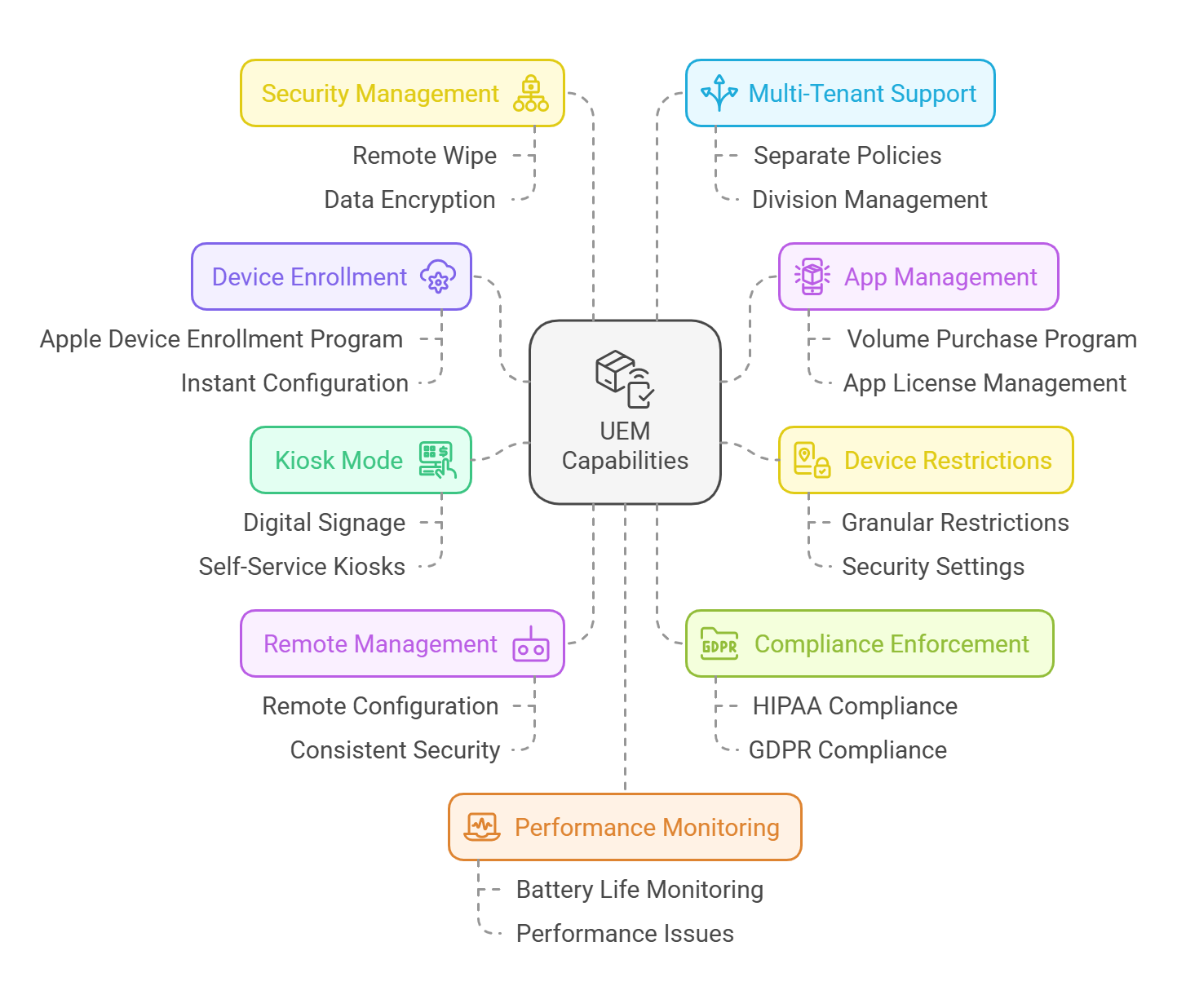
Now that we’ve gone over the basics, let’s see how UEM makes managing Apple devices easier. Apple Business Manager (ABM) helps with setup and provisioning, but it’s UEM that steps in to handle the day-to-day management, secure the devices, and keep everything running smoothly.
With Apple UEM, this job gets a lot easier.
There’s no end to data breaches, malware attacks, and insider threats but we can definitely prevent them with the help of a UEM solution. Endpoint security is the first line of defense when it comes to securing Apple devices within an organization.
UEM solutions enhance security through several key features:
Apple devices, while known for their robust security features, still face potential threats—whether it’s a lost iPhone with sensitive business data or a compromised app on an iPad. UEM solutions like Scalefusion, when paired with endpoint security solutions like Veltar, create an unbreakable defense against these risks.
Scalefusion goes beyond basic UEM features like supervision, app control, and compliance enforcement. It offers robust tools to simplify and enhance the management of macOS and iOS devices, making it a comprehensive solution for businesses.
With Apple devices becoming more prevalent across businesses, schools and industries, managing them efficiently is essential. Scalefusion UEM ensures your device management solution evolves alongside your organization, seamlessly adapting to the latest Apple updates.
Scalefusion UEM provides a seamless experience for managing Apple devices, with continuous updates that ensure compatibility with the latest Apple advancements. Its scalability allows organizations to easily manage growing numbers of Apple devices, while its interoperability ensures smooth integration with not just new Apple technologies and updates but also any other OS or device type that your business or employees love and use.
Get in touch with our experts for more details and book a free demo call. Start your 14-day free trial today, with full access to all features, and discover how easy device management can be!
References: