Skip to content

Automation, Orchestration and Data Protection Efficiency

Growth and development never stop, and this also rings true when it comes to data management technologies. In recent years, automation tools and orchestration platforms have significantly improved, and these advancements help frame and optimize data backup and recovery, enhancing efficiency, speed, and reliability. With advancements in automation tools and orchestration platforms, their benefits have more than doubled, giving organizations a better edge over cyber threats and other potential data disasters. This article explores five advancements in recent years and the benefits of automation and orchestration in the backup and recovery process.

Benefits of Automation and Orchestration in Backup and Recovery Processes

1. Consistency and Reliability Automated backup procedures ensure backups are done consistently and reliably at proper intervals, preventing human errors or missed backups. This gives you confidence that your data is consistently protected. 2. Economical Use of Time and Resources Automating backup tasks gives the IT staff free time to concentrate on other, more significant issues than merely routine activities associated with backups. In one turn, these automated solutions will execute the backup and recovery workflows quickly and very effectively. 3. Improved Data Management Choosing to automate backup and recovery employs tools like data deduplication and compression to optimize space usage and minimize costs. A centralized management interface also gives better visibility and control of the status of the backups and storage utilization, ensuring that organizations can monitor and manage the process. 4. Shortened Recovery Times Automated recovery processes will help restore data quickly and reduce business operation downtime if data is lost or there is a system failure. Automated recovery tools can promptly trace and retrieve the necessary data quickly, thus reducing the recovery process to a few minutes from what would have taken hours or even days. This ensures that your organization bounces back and returns to the usual business operation on time. 5. Data Protection An automated backup system, developed using encryption, access controls, and compliance enforcement, will ensure the protection of backup data and guarantee the satisfaction of regulatory requirements. Thus, when using an automated system, you can rest assured that your data is appropriately secured. Incremental backups and continuous data protection also ensure that data doesn’t get lost during disasters. 6. Eliminating Human Related Errors Another risk it eliminates is human-related mistakes. Mistakes such as selecting the incorrect backup files and overwriting vital information could occur during manual recovery processes. Automated tools eliminate these errors by following predefined protocols and procedures, ensuring consistent and proper implementation of the recovery process each time. 7. Scalability With advanced backup tools, companies don’t have to worry about growing data sizes. They can easily back up data and handle storage demands, ensuring all data is sufficiently covered. As the organization grows, accommodating increasing data needs, these advanced solutions scale along with the data size.

Five Advancements in Automation Tools and Orchestration Platforms

1. Continuous Data Protection (CDP) A groundbreaking technology called continuous data protection captures every change that happens with data and tracks changes in real-time. Unlike traditional backup, which depends on periodic snapshots, CDP creates an unbroken data stream that organizations can use instantly in recovery. It guarantees restored data up to any point and minimizes data loss and downtime. 2. AI-powered Backup Optimization Now, backup processes are optimized using artificial intelligence and machine learning algorithms. By analyzing historical data and patterns, these technologies can single out redundant or unnecessary backups, reuse them, optimize storage usage, and even automate data retention and deletion. This doesn’t just help drive greater efficiency; it also reduces overall storage costs. 3. Cloud-Native Backup Solutions With the advent of cloud computing, cloud-native backup solutions can leverage their scalability, flexibility, and cost-effectiveness. Most of these solutions are directly tied to leading cloud platforms and typically feature automated scheduling for backups, off-site replication, and instant recovery. Unlike the on-premises hardware necessary for many cloud services, a cloud-native backup solution streamlines infrastructure management while taking some of the responsibility off the IT team. 4. Orchestrated Disaster Recovery These days, disaster recovery processes are much easier and more automated because of orchestration platforms. This allows organizations to redefine the DR (disaster recovery) workflows they must configure during a disaster. It orchestrates task execution, such as failover, failback, and testing, to ensure consistent and reliable recovery procedures. Orchestration of DR reduces complex management in the DR infrastructure, improving overall resilience. 5. Self-healing Data Protection Some modern backup and recovery solutions can now self-heal. These systems can detect and automatically correct data corruption, missing backups, or configuration errors. With constant monitoring of the backup infrastructure, self-healing technology ensures robust data protection continuously, even after unexpected failures or human errors.

Implementation Challenges of Automation and Orchestration

Although the benefits of automation and orchestration on data management are huge, there might still be a few challenges while trying to implement these technologies. Common problems include the following:

Compatibility Problem:

If compatibility issues exist, automation and orchestration tools may not easily integrate with a company’s systems and infrastructures. This can incur extra expenses, as you may have to replace their infrastructure.

Skill Gaps:

Organizations may lack the in-house expertise to operate these infrastructures. Hence, you must employ an extra hand with the appropriate technical know-how. Leverage their expertise in implementation techniques to help assist in the implementation process. Also, you need to educate and develop IT staff to be competent in managing and supporting new technologies, ensuring the smooth running of the organization’s backup and recovery system.

Change Management: 

Migrating from manual to automated data management processes instills an entirely new culture within a company. Therefore, organizations must develop robust strategies to effectively manage this change and allow staff to transition seamlessly from the former system to the advanced one.

Conclusion

Advancements in data automation tools and orchestration platforms bring data backup and recovery to a whole new level of efficiency, reliability, and affordability. An organization can protect vital data and assure business continuity through continuous data protection, AI-powered optimization, cloud-native solutions, orchestrated disaster recovery, and self-healing functionalities. These technologies empower the organization to manage data effectively and efficiently, mitigate potential human errors, and ensure the quick restoration of critical data in the case of a disaster or system failure.

About Storware
Storware is a backup software producer with over 10 years of experience in the backup world. Storware Backup and Recovery is an enterprise-grade, agent-less solution that caters to various data environments. It supports virtual machines, containers, storage providers, Microsoft 365, and applications running on-premises or in the cloud. Thanks to its small footprint, seamless integration into your existing IT infrastructure, storage, or enterprise backup providers is effortless.

About Version 2 Digital

Version 2 Digital is one of the most dynamic IT companies in Asia. The company distributes a wide range of IT products across various areas including cyber security, cloud, data protection, end points, infrastructures, system monitoring, storage, networking, business productivity and communication products.

Through an extensive network of channels, point of sales, resellers, and partnership companies, Version 2 offers quality products and services which are highly acclaimed in the market. Its customers cover a wide spectrum which include Global 1000 enterprises, regional listed companies, different vertical industries, public utilities, Government, a vast number of successful SMEs, and consumers in various Asian cities.

The Future Of Virtualization Infrastructure

When the Broadcom company announced its acquisition of VMware on the 26th of May 2022, the virtualization industry was brazing for another great evolution. And this time, we might witness a greater blast in the evolution of virtualization infrastructures. So, at the back of this announcement and the introduction of many virtualization-enhancing features, are we getting into the fourth-age evolution of virtualization infrastructures?

The inception of data virtualization infrastructures focused on relieving the huge task accompanying big data issues of physical machines by granting end-users the opportunity to access and modify data stored across various systems through a single view. Using the ESX hypervisor machine, VMware gained huge momentum in the data management sector. However, while this infrastructure was widely accepted, it contains a series of challenges that made users desire significant improvement.

At the back of this development, the second age of virtualization infrastructures comes into play. This time, a cloud-based data virtualization infrastructure was announced, taking virtualization to a new level where users can access data on popular platforms like Azure, Amazon web, and more. Again, this transition gave users timely access to the database with minimum stress. Then, big companies and the public sector with a data center utilized OpenStack for data positioning. Thus, increasing their accessibility to end users.

The Third virtualization infrastructure age introduced the use of containers in database management on Kubernetes. This transformation aims to allow developers to present their database in independent containerized microservices. Thus, they can promote their services to test, stage, and promotion environments and become readily available to users.

Utilizing ETCD, Kubernetes stores the containerized services, which are only accessible with the help of an API. This development was a big upgrade on the seemingly cumbersome traditional VMs and Hypervisors as it provides users with the needed database at the minimum interval. While data virtualization keeps enjoying a series of upgrades, we might as well say that we are already witnessing the fourth age of evolution. This development makes users curious about what the fourth evolution has in stock and about what the future holds for data virtualization.

So, before moving on to the future of virtualization infrastructures, let’s look at what the buzzing fourth-age evolution is all about and why this development is all for the customer’s good.

The fourth age virtualization infrastructures

Like every other evolution mentioned earlier, the fourth age virtualization comes with another view on virtualization. It is also called the age of evolution and convergence on cloud-native platforms. It aimed at running virtual machines alongside Kubernetes through the help of KubeVirt. The KubeVert project allows KVM-enabled machines to be managed as pods on Kubernetes.

Despite the fame of Kubernetes in recent years, it’s surprising that many projects are still run on virtual machines. With the prolonged coexistence between these two virtualization tools, the new evolution is about having both works as a single system without a requirement for the actual application.

This innovation combines the features of both Virtual machines and Kubernetes to provide a good user experience. In addition to this benefit, KubeVirt grants Virtual machines the opportunity to utilize Kubernetes abilities, as seen with projects like Tetkton, Knative, and the like. These projects work as both Virtual machines and container-based applications.

Features of the fourth age evolution Virtualization Infrastructures

Combining virtual machines and containers into a single system, the fourth-age virtualization tools possess several amazing features that provide a great user experience. Here are the features:

  • Virtualization Monitoring
  • Pipelines Incorporations
  • Utilization of GitOps
  • Serverless Architecture
  • Service Mesh

Virtualization Monitoring

This is an automated and manual technique that ensures appropriate analysis and monitoring of virtual machines and other virtualization infrastructures. The virtualization monitoring technique has three main processes that enhance its efficacy. This process includes monitoring, troubleshooting, and reporting. This feature guides against untoward occurrences, performance-related issues, unexplainable or architectural changes, and risks.

Also, it allows you to plan capacity better and manage resources adequately. Another benefit associated with virtualization monitoring is the absence of server overload, which makes data processing faster and better. Lastly, virtualization monitoring improves the general performance of virtualization infrastructures by quickly detecting impending issues. With total control of virtualization monitoring processes, a feature seen in previous ages, virtualization monitoring is a key feature in the new infrastructures with more efficiency.

Pipelines Incorporations

Pipelines are aggregates of tasks assembled in a defined order of execution through the help of pipeline definitions. With this feature, a continuous flow integration and delivery of your applications’ CI/CD workflow become organized.

OpenShift Pipeline, based on Kubernetes resources, is an example of how this feature works. In addition, it utilizes Teckton for optimum accuracy. With CI/CD pipeline automation, you can easily escape human errors and maintain a consistent process for releasing software.

Utilization of GitOps

GitOps aims at automated processing, ensuring secure collaboration among teams across repositories. This feature utilizes Git for applications and infrastructure management. GitOps allows for maximum productivity through its ability to offer continuous deployment and delivery. Also, it allows you to create a standardized workflow using a single set of tools.

Furthermore, GitOps provides more reliability through the revert and fork feature. There’s also the provision of additional visibility and fewer attacks on your server. GitOps provides easier compliance and auditing due to the ability of Git to track and log changes. Git also affords users an augmented developer experience while managing Kubernetes updates, even as a newbie to the Kubernetes services.

Serverless Architecture

Serverless computing is an as-used backend service provision method that ensures users face less stress while computing databases. In addition, it allows users to work on a budgeted amount as the user only pays for what they consume. Also, the scalability of this feature makes it possible to process many requests in less time. You can easily update, fix or add a new feature to an application with minimal effort. Moreover, the serverless architecture significantly reduces liabilities as there’s no backend infrastructure to account for.

Lastly, with serverless architecture, efficiency is hundred percent because there’s no idle capacity, as it is usually evoked only on request.

Service Mesh

A feature that uses a sidecar to control service-to-service communication over a network. Service mesh allows different parts of an application to work hand in hand. This feature is commonly seen in microservices, cloud-based applications, and containers. With the service mesh feature, you can effectively separate and manage service-to-service communication in your application. Also, detecting communication errors becomes easier because each exists on an individual infrastructure layer.

Furthermore, the service mesh offers security features such as authorization, encryption, and authentication. As a result, application development, testing, and deployment also become faster. Lastly, having a sidecar beside a cluster of containers is good for managing network services. With this and other amazing features of the fourth-age evolution virtualization, you can incorporate your VMs and containers into a cloud-native platform.

How can you incorporate cloud-native platforms into your business?

While you might be wondering how to get started with a cloud-native platform, the simplest thing to do is research the essence of using Kubernetes and containers and how you can incorporate them into your business. Furthermore, you can also look into organizations running a similar business as you and how they use the cloud-native platform. Then, after understanding how this platform works and how you can transition into the platforms, proceed to download the Red Hat OpenShift.

Install the application, and after the installation, you can download the OpenShift Migration Toolkit for Virtualization. This Toolkit is a guide for efficiently transitioning into the OpenShift Virtualization from the current virtual machines. With this development, you can incorporate your virtual machines into the current Kubernetes. Also, virtual machines will be able to offer OpenShift capabilities such as cluster management, cloud storage, cloud-native platform services, and other amazing features.

Just as the transition from the big old data to the growing virtualization era, virtual machines are fast becoming a thing of the past and should be replaced by more efficient cloud-native platforms. Moreover, with the growing demand for data sharing in the digital world, sticking with an old-time virtualization system might impact your business negatively. Therefore, you need to embrace this latest trend for maximum output.

What does the future hold for virtualization infrastructures?

Looking at how far virtualization infrastructures have changed over the years, it’s safe to say that more exciting features await the evolution of virtualization infrastructures. The digital world keeps expanding with jaw-dropping developments in all sectors. Moreover, cryptocurrency has come to challenge the legal notes for making digital transactions, with robots gradually replacing human efforts, among other innovations.

So, the wave in the evolution of virtualization infrastructures is expected to become stronger over the years. Soon enough, we might expect the innovation of the fifth-age virtualization infrastructures.

About Storware
Storware is a backup software producer with over 10 years of experience in the backup world. Storware Backup and Recovery is an enterprise-grade, agent-less solution that caters to various data environments. It supports virtual machines, containers, storage providers, Microsoft 365, and applications running on-premises or in the cloud. Thanks to its small footprint, seamless integration into your existing IT infrastructure, storage, or enterprise backup providers is effortless.

About Version 2 Digital

Version 2 Digital is one of the most dynamic IT companies in Asia. The company distributes a wide range of IT products across various areas including cyber security, cloud, data protection, end points, infrastructures, system monitoring, storage, networking, business productivity and communication products.

Through an extensive network of channels, point of sales, resellers, and partnership companies, Version 2 offers quality products and services which are highly acclaimed in the market. Its customers cover a wide spectrum which include Global 1000 enterprises, regional listed companies, different vertical industries, public utilities, Government, a vast number of successful SMEs, and consumers in various Asian cities.

Backup and Restore OpenStack Volumes and Snapshots with Storware

Storware Backup and Recovery offers a comprehensive solution for protecting your OpenStack environment.

Here’s a step-by-step guide to get you started with backups and recovery:

Prerequisites:

  • OpenStack environment using KVM hypervisor and VMs with QCOW2 or RAW files.
  • Storware Backup and Recovery software.

Deployment:

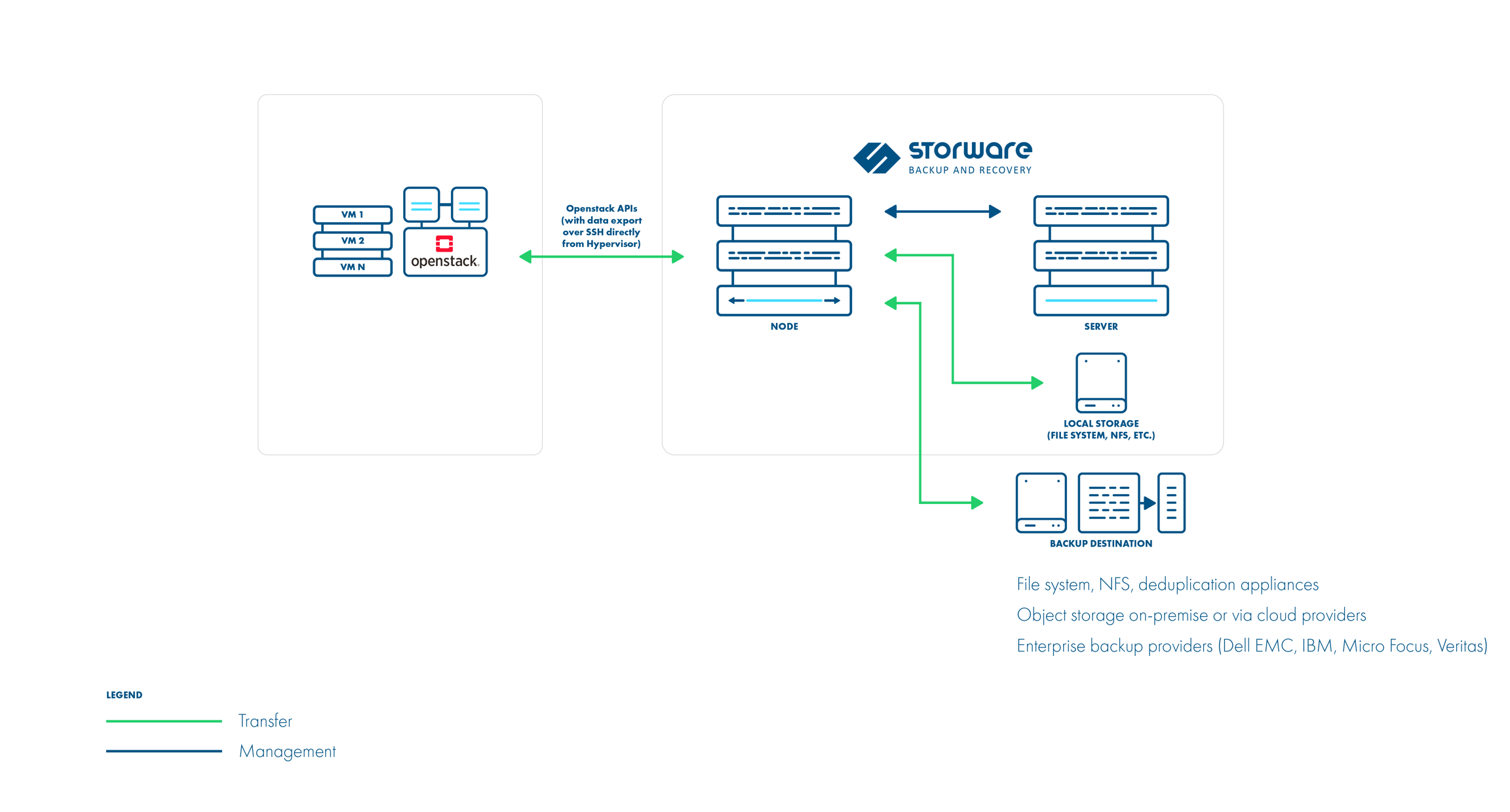
1. Install Storware Backup and Recovery Node: The Storware node can be installed on a separate machine. Ensure it has access to OpenStack APIs and hypervisor SSH.
2. OpenStack API Integration: Configure Storware to communicate with OpenStack APIs like Nova and Glance for metadata collection and VM restore processes.

Backup Configuration:

1. OpenStack UI Plugin (Optional): Install the Storware OpenStack UI plugin to manage backups directly from the OpenStack dashboard. This simplifies backup creation, scheduling, and restores.

2. Backup Schedules: Define backup schedules for your VMs. Storware supports both full and incremental backups.

3. Backup Options:

  • Libvirt strategy
  • Disk attachment strategy
  • Ceph RBD storage backend

All three strategies support full and incremental backups.

Libvirt strategy works with KVM hypervisors and VMs using QCOW2 or RAW files. It directly accesses the hypervisor over SSH to take crash-consistent snapshots. Optionally, application consistency can be achieved through pre/post snapshot command execution. Data is then exported over SSH.

Disk attachment strategy is used for OpenStack environments that use Cinder with changed block tracking. It uses a proxy VM to attach disks to the OpenStack instances. Snapshots are captured using the Cinder API. Incremental backups are supported. Data is read from the attached disks on the proxy VM.

Ceph RBD storage backend

Storware Backup & Recovery also supports deployments with Ceph RBD as a storage backend. Storware Backup & Recovery communicates directly with Ceph monitors using RBD export/RBD-NBD when used with the Libvirt strategy or – when used with the Disk-attachment method – only during incremental backups (snapshot difference).

Libvirt strategy

Disk attachment strategy

Retention Policies: Set retention policies to manage how long backups are stored.

Backup Process:

1. Storware interacts with OpenStack APIs to gather VM metadata.
2. Crash-consistent snapshots are taken directly on the hypervisor using tools like virsh or RBD snapshots.
3. (Optional) Pre-snapshot scripts run for application consistency.
4. VM data is exported using the chosen method (SSH or RBD).
5. Metadata is exported from OpenStack APIs.
6. Incremental backups leverage the previous snapshot for faster backups.

Recovery Process:

1. Select the desired VM backup from the Storware interface.
2. Choose the recovery point (specific backup version).
3. Storware recreates VM files and volumes based on the backup data.
4. The VM is defined on the hypervisor.
5. Disks are attached (either directly or using Cinder).
6. (Optional) Post-restore scripts can be run for application-specific recovery steps.

Additional Notes:

  • Storware supports both full VM restores and individual file/folder recovery.
  • The OpenStack UI plugin provides a user-friendly interface for managing backups within the OpenStack environment.
  • Refer to Storware documentation for detailed configuration steps and advanced options -> https://storware.gitbook.io/backup-and-recovery

By following these steps and consulting the Storware documentation, you can leverage Storware Backup and Recovery to safeguard your OpenStack VMs and ensure a quick recovery process in case of data loss or system failures.

About Storware
Storware is a backup software producer with over 10 years of experience in the backup world. Storware Backup and Recovery is an enterprise-grade, agent-less solution that caters to various data environments. It supports virtual machines, containers, storage providers, Microsoft 365, and applications running on-premises or in the cloud. Thanks to its small footprint, seamless integration into your existing IT infrastructure, storage, or enterprise backup providers is effortless.

About Version 2 Digital

Version 2 Digital is one of the most dynamic IT companies in Asia. The company distributes a wide range of IT products across various areas including cyber security, cloud, data protection, end points, infrastructures, system monitoring, storage, networking, business productivity and communication products.

Through an extensive network of channels, point of sales, resellers, and partnership companies, Version 2 offers quality products and services which are highly acclaimed in the market. Its customers cover a wide spectrum which include Global 1000 enterprises, regional listed companies, different vertical industries, public utilities, Government, a vast number of successful SMEs, and consumers in various Asian cities.

Step-by-Step Guide to Backup OpenStack Using Storware

Learn how to safeguard your OpenStack environment with Storware. This step-by-step guide provides a comprehensive overview of backup processes, ensuring data integrity and disaster recovery.

Prerequisites:

  • OpenStack environment setup and running.
  • Storware Backup and Recovery software installed and configured.
  • Administrative access to both OpenStack and Storware systems.
  • Backup storage configured in Storware.

Step 1: Configure Storware to Connect with OpenStack

1. Login to Storware Backup and Recovery Console:
  • Open a web browser and navigate to the Storware Backup and Recovery console URL.
  • Log in with administrative credentials.
2. Add OpenStack Environment:
  • Go to the Environments section.
  • Click on Add Environment.
  • Select OpenStack from the list of supported environments.
3. Enter OpenStack Credentials:
  • Provide the OpenStack API endpoint.
  • Enter the necessary credentials (username, password, tenant/project name).
  • Specify the domain name if using Keystone v3.
4. Test Connection:
  • After entering the details, click on Test Connection to ensure Storware can communicate with your OpenStack environment.
  • Once the connection is successful, save the configuration.

Step 2: Define Backup Policies

1. Create Backup SLA:
  • Navigate to the SLA Policies section.
  • Click on Create SLA Policy.
  • Define the backup schedule (e.g., daily, weekly), retention period, and any other relevant parameters.
  • Save the policy.
2. Assign SLA Policy to OpenStack Instances:
  • Go to the Virtual Machines or Instances section under your OpenStack environment in Storware.
  • Select the instances you want to back up.
  • Assign the previously created SLA policy to these instances.

Step 3: Perform Backup

1. Initiate Manual Backup (Optional):
  • Although backups will be performed according to the SLA policy, you can initiate a manual backup.
  • Select the instance you want to back up.
  • Click on Backup Now.
  • Monitor the backup progress in the Job Monitor section.
2. Monitor Backup Jobs:
  • Check the status of backup jobs in the Job Monitor section.
  • Ensure that backups are completed successfully.

Step 4: Recovery of OpenStack Instances

1. Identify the Backup to Restore:
  • Navigate to the Backup section.
  • Select the OpenStack environment.
  • Choose the instance you want to restore.
  • Browse through the available backup points.
2. Initiate Restore Process:
  • Select the backup point you wish to restore.
  • Click on Restore.
  • Choose the restore options (e.g., restore to the original instance or create a new instance).
3. Specify Restore Details:
  • If restoring to a new instance, provide the necessary details (e.g., instance name, flavor, network).
  • Confirm the restore operation.
4. Monitor Restore Jobs:
  • Go to the Job Monitor section to track the progress of the restore job.
  • Once the job completes, verify that the instance is restored correctly.

Step 5: Verify and Validate Backup and Restore

1. Verify Backups:
  • Periodically check the backups to ensure they are performed as per the defined schedule.
  • Conduct test restores to validate that backups are not corrupted and are usable.
2. Automate Monitoring:
  • Configure alerts and notifications in Storware to be informed of backup and restore job statuses.
  • Regularly review logs and reports for any anomalies or issues.

Step 6: Maintenance and Best Practices

1. Regular Updates:
  • Keep both OpenStack and Storware Backup and Recovery software updated to the latest versions to ensure compatibility and security.
2. Audit and Compliance:
  • Maintain logs of backup and restore activities for auditing purposes.
  • Ensure compliance with organizational data protection policies and regulatory requirements.
3. Disaster Recovery Planning:
  • Develop a comprehensive disaster recovery plan that includes detailed procedures for backup and restore.
  • Regularly test the disaster recovery plan to ensure readiness in case of an actual disaster.
By following these steps, you can effectively manage the backup and recovery of your OpenStack environment using Storware Backup and Recovery, ensuring data protection and minimizing downtime.

About Storware
Storware is a backup software producer with over 10 years of experience in the backup world. Storware Backup and Recovery is an enterprise-grade, agent-less solution that caters to various data environments. It supports virtual machines, containers, storage providers, Microsoft 365, and applications running on-premises or in the cloud. Thanks to its small footprint, seamless integration into your existing IT infrastructure, storage, or enterprise backup providers is effortless.

About Version 2 Digital

Version 2 Digital is one of the most dynamic IT companies in Asia. The company distributes a wide range of IT products across various areas including cyber security, cloud, data protection, end points, infrastructures, system monitoring, storage, networking, business productivity and communication products.

Through an extensive network of channels, point of sales, resellers, and partnership companies, Version 2 offers quality products and services which are highly acclaimed in the market. Its customers cover a wide spectrum which include Global 1000 enterprises, regional listed companies, different vertical industries, public utilities, Government, a vast number of successful SMEs, and consumers in various Asian cities.

Autonomous Data Protection

Will robots take over data management? In recent years, backup and disaster recovery system vendors have introduced several significant innovations. But the best is yet to come. 

Modern data protection solutions, encompassing backup, disaster recovery, replication, and deduplication, are constantly evolving. Manufacturers have moved from a stage of manual configuration to automation. However, this is not the end of the road. There is increasing talk about the era of autonomous backup and even autonomous data management. Is this a near future reality, or just a fantasy?

Opinions on this matter are divided. Skeptics cite the example of autonomous cars. Although prototypes have appeared on the streets of San Francisco, the road to their widespread adoption seems to be a long way off. On the other hand, proponents point to robotic vacuum cleaners that are displacing traditional vacuum cleaners from homes. If humans can be eliminated from processes that require high precision, why not do the same in areas closely related to IT?

Automation and autonomy are very similar concepts, sometimes incorrectly used interchangeably. Nevertheless, there are some subtle differences between them. Automation means that the tasks performed are based on pre-defined parameters that must be updated as the situation changes. This is how elevators, office software, washing machines, robotic assembly lines, and most backup and DR systems work.

On the other hand, autonomous processes differ from automated ones in that they are constantly learning and adapting to the environment. In such cases, human intervention is not needed or is minimal. A great example is the aforementioned robotic vacuum cleaners or driverless cars.

The authors of the concept of autonomous data management assume that processes should take place invisibly, although under human control. Autonomy somehow combines automation with artificial intelligence (AI) and machine learning (ML), so that the data protection system intuitively adapts to the situation.

AI and ML technologies enable the automation of data management processes and minimize human intervention and supervision. Proponents of such a solution argue that it increases operational efficiency, extends uptime, improves security, and the level of services offered.

Clouds Force Change

If companies only stored data in on-premises environments, it would be possible to do without autonomous tools, but in the last two years, things have become much more complicated. Enterprises have moved some of their assets to the public cloud, which has contributed to the growing importance of hybrid and multi-cloud environments. It was supposed to be easier and cheaper, but the ongoing adoption of cloud services is causing sleepless nights for many IT managers.

The main problem lies in the excessive dispersion of data, which is located both in the local data center and in external service providers such as Amazon, Google, Microsoft, or smaller local providers. Managing, and especially protecting, digital assets scattered across various locations is a challenge. The situation is worsened by the relatively narrow range of vendors’ tools optimized for managing corporate data for hybrid and multi-cloud environments.

Part of the products provide support for multiple clouds through centralized control, although they consume many expensive resources. There are also efficient solutions, but only within a single cloud environment. Their main drawback is scalability in the clouds of different providers. In any case, in both of the aforementioned cases, operating costs are higher than desired.

Another problem is the excessive haste in implementing cloud technologies, leading to an increase in the number of point solutions. Cloud environment architects, application developers, and analysts implement independent data management solutions, which deepens the chaos and limits the possibilities of central management.

The data protection strategy in the cloud environment also leaves much to be desired. Security specialists emphasize that in today’s world, the most effective way to stop attackers is through preventive measures. Unfortunately, most modern technologies take a passive approach to resources stored in the cloud. In practice, this means that they create backups and restore backups after an attack, which results in unplanned downtime.

In summary, autonomous backup supports operations in multiple clouds, eliminates functional silos, automates all processes with minimal human intervention, and increases cyber resilience through active methods of detecting and preventing ransomware attacks.

It has long been known that people are the weakest link in the data protection system. This is particularly evident in environments that require fast and data-driven decision-making. It is also undeniable that people are prone to errors and slower than AI-based solutions, especially when it comes to mundane, repetitive tasks.

So will robots send IT department employees to the pasture in the near future? So far, no one is talking about it loudly. According to the authors of the concept of autonomous data management, the best solution in a complex, hybrid and multi-cloud environment is autonomous work. This means that data will self-optimize and repair itself, as well as move between different environments. Self-optimization uses artificial intelligence and machine learning to adapt to the principles and services related to data protection and management. Self-healing is the ability to predict, identify, and correct service errors or performance issues.

On the other hand, self-service assigns appropriate protection policies and manages and deploys applications and services without human intervention. What does this mean?

In the traditional model, a programmer deploying a new application relies on manual processes, which lengthens it. Autonomous data management eliminates all manual tasks, while protecting the application throughout the process, without the need for additional actions on the part of the application developer or IT staff.

Autonomous Data Management – Is It Worth It?

The concept of autonomous data management looks very promising. Importantly, some backup and DR system vendors are announcing the launch of such solutions in the near future, not in the coming years. On the market, you can already find products that use Machine Learning to early detect anomalies that signal an attempt to attack the backup system. Some companies also use partially AI-based solutions combined with DLP systems, which helps classify and tag information, and thus copy and protect the most important data.

However, only the widespread adoption of systems that provide autonomous data management will allow us to answer the fundamental question – is it worth the effort?

Some data protection specialists warn against excessive optimism. In their opinion, the biggest obstacle to the adaptation of autonomy in backup and DR processes may be the collection of a sufficiently wide range of data to be able to analyze various scenarios. It is difficult to imagine that vendors of solutions would share such information with each other.

It is also difficult to count on the openness of IT department employees, as they may fear that new products will deprive them of their jobs. It can also be safely assumed that the term “autonomy” will be overused by marketers, which on the one hand encourages customer investment, and on the other hand, threatens that low ratings of disappointed users will deter potential customers. It is possible that there will be limitations related to computing power, as well as the costs of such a solution. Nevertheless, it is worth closely following such initiatives, especially as it concerns large companies and institutions storing data in different environments.

Storware develops towards autonomous

While full autonomy might still be a distant goal, Storware’s focus on AI and automation is a significant step in that direction. These features have the potential to significantly improve efficiency, reduce human error, and enhance overall data protection.

In the near future, Storware will implement a number of improvements that will allow for:

  • Automation: The Backup Assistant and conversational layer aim to automate routine tasks and provide intelligent responses, reducing human intervention.
  • Intelligence: Storebrain’s ability to learn from collective data and provide optimal configurations demonstrates a move towards intelligent decision-making.
  • Proactive Protection: The integration of AI into Isolayer for threat prevention showcases a proactive approach to data management, essential for autonomous systems.

However, key to achieving full autonomy would be further development in areas like:

  • Self-healing capabilities: The system should be able to identify and resolve issues independently.
  • Predictive analytics: Accurate forecasting of system behavior and potential problems.
  • Continuous learning: The system should constantly improve its performance based on new data and insights.

About Storware
Storware is a backup software producer with over 10 years of experience in the backup world. Storware Backup and Recovery is an enterprise-grade, agent-less solution that caters to various data environments. It supports virtual machines, containers, storage providers, Microsoft 365, and applications running on-premises or in the cloud. Thanks to its small footprint, seamless integration into your existing IT infrastructure, storage, or enterprise backup providers is effortless.

About Version 2 Digital

Version 2 Digital is one of the most dynamic IT companies in Asia. The company distributes a wide range of IT products across various areas including cyber security, cloud, data protection, end points, infrastructures, system monitoring, storage, networking, business productivity and communication products.

Through an extensive network of channels, point of sales, resellers, and partnership companies, Version 2 offers quality products and services which are highly acclaimed in the market. Its customers cover a wide spectrum which include Global 1000 enterprises, regional listed companies, different vertical industries, public utilities, Government, a vast number of successful SMEs, and consumers in various Asian cities.

Snapshots and Backups: A Nearly Perfect Duo

Snapshots and backups are both crucial for data protection. However, to maximize their benefits, it’s essential to understand their capabilities.

As data volumes and value continue to grow, data has become an invaluable asset for businesses, governments, consumers, and cyber-criminals alike. Cyber-criminals will stop at nothing to steal information or block legitimate users from accessing it. Fortunately, organizations have various tools and methods to protect their data, including backups and snapshots. While these methods share some similarities, they are often mistakenly seen as interchangeable. This article will delve into the fundamental differences between backups and snapshots and how they can complement each other.

The Indispensability of Backups

Until recently, it was common to say that people were either backing up their data or were planning to do so. However, this saying is no longer accurate. It’s increasingly difficult to find individuals or businesses that don’t perform backups. Backups are typically created on a regular schedule (e.g., nightly or multiple times a day) and can include all files on a server, emails, or databases. By archiving data in backups, users are protected against accidental data loss caused by errors, accidental deletions, or other failures. This is why backups are often referred to as “security copies.”

There are several types of backups. The simplest is a full backup, which creates a complete copy of the data to a destination storage device. Other methods include differential and incremental backups. A differential backup only backs up data that has been added or changed since the last full backup. An incremental backup, on the other hand, uses the previous backup as a reference point rather than the initial full backup.

A full backup is a complete copy of the data. If each backup is 10TB, for example, it will consume an additional 10TB of storage. Creating a backup every hour would consume 100TB of storage in just 10 hours. For this reason, storing multiple versions of backups is not a common practice.

The Role of RPO

A challenge with backups is achieving a suitable Recovery Point Objective (RPO), which defines the maximum amount of data loss that can be tolerated and the maximum acceptable time between a failure and the restoration of a system to normal operation. Businesses have varying requirements—some may be satisfied with a 24-hour RPO, while others strive for an RPO as close to zero as possible. For example, losing even a small amount of data in manufacturing companies can lead to production line downtime, lost product batches, and significant financial losses.

Some businesses determine their RPO based on the cost of storage compared to the cost of data recovery. These calculations help determine the frequency of backups. Another approach is to assess risk levels. In this case, a company evaluates which data can be lost without significantly impacting the quality and continuity of its business.

Backups are not optimal for creating short recovery points. Snapshots are much better suited for this purpose, which is why the two technologies should be used together. Snapshots are the preferred solution when high RPO requirements must be met, such as in 24/7 environments like internet service providers.

Snapshots for Specialized Tasks

A snapshot is a point-in-time capture of stored data. Its main advantage is its creation time, which is typically measured in minutes or even seconds. Snapshots are usually created every 30 or 60 minutes and have minimal impact on production processes. They allow for quick recovery to previous file versions at multiple points in time. For example, if a system is infected with a virus, files, folders, or entire volumes can be restored to a state before the attack.

However, snapshots are often a feature of NAS or SAN storage and are stored on that storage. This means they occupy relatively expensive storage capacity, and if the storage fails, users lose access to recent snapshot copies. While individual snapshots do not consume much space, their combined size can increase, leading to additional processing costs during recovery. Therefore, it’s good practice to limit the number of stored copies. Experts recommend not storing snapshots for longer than the last full backup.

Furthermore, migrating a snapshot from one physical location to another does not allow for environment restoration, which is possible with backups. Since a snapshot is not a complete copy of the data, it should not be considered the sole backup and should be combined with backups. In summary, backups provide the ability to restore data over long RPOs, often quickly and in detail, down to the file level.

Types of Snapshots

While snapshot creation processes vary by vendor, there are several common techniques and integration methods.

  • Copy-on-write: This method copies any blocks before they are overwritten with new information.
  • Redirect-on-write: Similar to copy-on-write, but it eliminates the need for a double write operation.
  • Continuous Data Protection (CDP): CDP snapshots are created in real-time, capturing every change.
  • Clone/mirror: This is an identical copy of an entire volume.

Summary

Snapshots and backups have their strengths and weaknesses. Generally, backups are recommended for long-term protection, while snapshots are intended for short-term use and storage. Snapshots are typically useful for restoring the latest version of a server within the same infrastructure.

Both snapshots and file backups can be used together to achieve different levels of data protection, and this is actually the most recommended configuration for backup strategies.

About Storware
Storware is a backup software producer with over 10 years of experience in the backup world. Storware Backup and Recovery is an enterprise-grade, agent-less solution that caters to various data environments. It supports virtual machines, containers, storage providers, Microsoft 365, and applications running on-premises or in the cloud. Thanks to its small footprint, seamless integration into your existing IT infrastructure, storage, or enterprise backup providers is effortless.

About Version 2 Digital

Version 2 Digital is one of the most dynamic IT companies in Asia. The company distributes a wide range of IT products across various areas including cyber security, cloud, data protection, end points, infrastructures, system monitoring, storage, networking, business productivity and communication products.

Through an extensive network of channels, point of sales, resellers, and partnership companies, Version 2 offers quality products and services which are highly acclaimed in the market. Its customers cover a wide spectrum which include Global 1000 enterprises, regional listed companies, different vertical industries, public utilities, Government, a vast number of successful SMEs, and consumers in various Asian cities.

Canonical OpenStack vs Red Hat OpenStack

OpenStack is a prominent platform used to build and manage cloud infrastructure through open-source. Today, there are several OpenStack distributions available. However, Red Hat OpenStack and Canonical OpenStack are the two most popular ones. Although both offer robust cloud solutions, their approaches, features, and support models differ significantly.

This article explores these variations in great detail, therefore guiding companies in choosing their cloud infrastructure.

Overview of Canonical OpenStack

Canonical OpenStack, also called Charmed OpenStack, is built on Ubuntu. Its goal is to make the OpenStack deployment and administration process more efficient.

It uses Canonical’s products, such as Juju for orchestration and MAAS, Metal as a Service for hardware provisioning to enable users to automate the whole lifecycle of their cloud infrastructure.

Key Features of Canonical OpenStack

  • Model-Driven Operations

Using a model-driven approach, Canonical OpenStack makes the management of cloud resources simpler and scaling them possible.

  • Automation

The heavily automated deployment procedure helps to save time and complexity in building an OpenStack cloud.

  • Flexible Deployment Options

Depending on organizational requirements for flexibility, they can choose between self-managed or Canonical-managed deployments pick depending on.

  • Integration with Kubernetes

Canonical lets one run virtual machines and containers on the same platform, therefore enabling a consistent method of workload management.

Overview of Red Hat OpenStack

Red Hat OpenStack Platform or RHOSP is deployed on top of Red Hat Enterprise Linux. This enables it to integrate tightly with other Red Hat products. Red Hat stresses stability, security, and enterprise-grade support. As a result, it has become a popular choice for companies seeking a robust cloud solution.

Key Features of Red Hat OpenStack

  • Enterprise Support

Red Hat offers extensive support options, including managed services that cover deployment, upgrades, and ongoing maintenance.

  • Integration with Red Hat Ecosystem

It integrates seamlessly with other Red Hat solutions like Ansible for automation and Satellite for systems management.

  • Comprehensive Monitoring Tools

RHOSP includes centralized logging, performance monitoring, and availability monitoring tools to ensure optimal cloud operation.

Simple Comparison Table

FeatureCanonical OpenStack (Charmed OpenStack)Red Hat OpenStack Platform
DistributionUbuntuRed Hat Enterprise Linux
Deployment MethodologyCharm-based, declarativeAnsible-based, procedural
Management ToolsJujuRed Hat CloudForms
Support ModelCanonical’s commercial supportRed Hat’s commercial support
Integration with Other ProductsTightly integrated with other Canonical products (e.g., Kubernetes, Ceph)Tightly integrated with other Red Hat products (e.g., Red Hat Enterprise Virtualization, Red Hat CloudForms)
PricingSubscription-based, per-node pricingSubscription-based, per-node pricing
FocusSimplicity, automation, scalabilityEnterprise-grade, stability, security
Target AudienceDevelopers, DevOps teams, cloud service providersLarge enterprises, IT departments
Community InvolvementStrong contributor to the OpenStack communityActive contributor to the OpenStack community


Comparing Canonical OpenStack vs Red Hat OpenStack

  • Release Cadence

Canonical OpenStack release cycle occurs every six months. However , its Long-Term Support (LTS) releases occur every 18 months. As a result,  customers can get new features and improvements more frequently. Red Hat release cycle is also every six-month release cycle, but while Canonical LTS is every 18 months Red Hat’s own is every two years. This provides stability, but it may cause delays in accessing new features when compared to Canonical’s approach.

  • Bare-Metal Provisioning Tool

For bare-metal provisioning, Canonical OpenStack uses MAAS, enabling customers to control physical servers inside their cloud environment effectively. Red Hat OpenStack uses Ironic as its bare-metal provisioning tool, which is also efficient but could require operating skills different from MAAS.

  • Maximum Support Timeline

Canonical OpenStack offers a maximum support timeline of five years for its releases. This shorter support period may require organizations to plan upgrades more frequently. However, Red Hat OpenStack has a longer maximum support timeline of ten years, which can appeal to enterprises looking for long-term stability and support without frequent upgrades.

  • Managed Services

Canonical offers managed services for OpenStack through its solution called BootStack. This fully managed service allows Canonical to use their expertise to build, monitor, and maintain your private cloud. They handle everything from initial deployment to operations management, including software updates, backups, and monitoring. However, there is also an option to self-manage your infrastructure with the help of Canonical.

Similarly, Red Hat OpenStack offers managed services. This gives organizations the option to outsource the management of their cloud infrastructure to Red Hat. This capability is especially useful for firms that lack in-house knowledge of the system. Red Hat also works with managed service providers (MSPs) to offer OpenStack as a managed private cloud solution. As a result, companies can experience minimized disruptions while maintaining operational control​.

  • Support Options

Selecting an OpenStack distribution requires much consideration including support. Canonical provides flexible support choices allowing users to select between fully managed services or self-managed configurations. This adaptability serves companies with different degrees of expertise in cloud infrastructure management. Red Hat, on the other hand, offers robust business support including thorough maintenance programs tailored for large-scale deployments.

  • Upgrade Process

Canonical’s method supports automated upgrades that can be scheduled, ensuring it is free from significant downtime. On the other hand, the Red Hat upgrading process is manual and could be complex. This could cause problems for companies during the maintenance window, therefore slowing down or stopping the workflow over that period.

  • Ecosystem Integration

Canonical OpenStack is designed to fit quite well with a variety of third-party components. It also leverages MAAS, Metal as a Service, for hardware provisioning and Juju for service orchestration. By means of OpenStack Interoperability Lab (OIL), Canonical examines hundreds of setups to guarantee interoperability with several hardware and software solutions.

Red Hat, on the other hand, is closely linked with its ecosystem. For companies now using Red Hat products, this connection offers a cohesive experience. Such integration could, however, restrict flexibility and perhaps lock customers into the Red Hat environment.

  • Cost Structure

For companies running several instances across different hardware configurations, Canonical offers a per-host pricing model, which can be more predictable and economical. Red Hat’s per-socket-pair price, on the other hand, can result in more expenses in settings with few sockets but many physical servers.

  • Monitoring Tools

Though both systems have monitoring features, their scope and complexity vary. Through its Landscape tool, Canonical offers basic monitoring. For sophisticated monitoring requirements, you may need other setups. Red Hat, on the other hand, offers a whole suite of monitoring tools so that companies may have a better understanding of their cloud operations without resorting to third-party solutions.

  • Subscription Model

Canonical OpenStack does require a subscription for its basic services. Users could thus utilize and control their cloud infrastructure totally free from ongoing licensing costs. However, Red Hat OpenStack depends on a per socket-pair model subscription, so it can be rather expensive (around USD 6,300 per socket-pair). This approach may result in greater costs for businesses with plenty of physical servers.

Data Protection for OpenStack

Storware backup and recovery provides comprehensive data protection for OpenStack environments, including both Red Hat and Canonical distributions. Its agentless architecture ensures seamless integration without impacting performance. Storware can protect a wide range of OpenStack components, including instances, volumes, and metadata. Additionally, it offers granular restore options, allowing you to recover specific files or entire instances as needed. With Storware, you can safeguard your critical OpenStack data and ensure business continuity in case of unexpected events.


Conclusion

Choosing between Canonical OpenStack and Red Hat OpenStack finally comes down to an organization’s particular needs. So you must consider that when looking at their differences. With customizable support choices appropriate for many contexts, Canonical’s Charmed OpenStack excels in automation and ease of use. Red Hat’s product, on the other hand, distinguishes itself for its enterprise-grade dependability and all-encompassing support system designed for big companies looking for robust cloud solutions.

Understanding these variations fully will help you choose the appropriate distribution that fits your operational needs and strategic objectives in creating a sustainable cloud infrastructure.

About Storware
Storware is a backup software producer with over 10 years of experience in the backup world. Storware Backup and Recovery is an enterprise-grade, agent-less solution that caters to various data environments. It supports virtual machines, containers, storage providers, Microsoft 365, and applications running on-premises or in the cloud. Thanks to its small footprint, seamless integration into your existing IT infrastructure, storage, or enterprise backup providers is effortless.

About Version 2 Digital

Version 2 Digital is one of the most dynamic IT companies in Asia. The company distributes a wide range of IT products across various areas including cyber security, cloud, data protection, end points, infrastructures, system monitoring, storage, networking, business productivity and communication products.

Through an extensive network of channels, point of sales, resellers, and partnership companies, Version 2 offers quality products and services which are highly acclaimed in the market. Its customers cover a wide spectrum which include Global 1000 enterprises, regional listed companies, different vertical industries, public utilities, Government, a vast number of successful SMEs, and consumers in various Asian cities.

Storware Backup and Recovery 7.0 Released

We’re excited to unveil Storware Backup and Recovery 7.0, loaded with cutting-edge features and improvements tailored to address the growing demands of today’s enterprises. Let’s get started!

Storware 7.0 – what’s new?

→ Let’s start with expanded platform support, including Debian and Ubuntu. This addition expands user options by providing greater backup and recovery flexibility. Furthermore, the integration with Canonical OpenStack and Canonical KVM ensures seamless operations within this cloud infrastructure, catering to the growing demand for robust cloud solutions. → Support for backup sources has also been expanded to include VergeOS, providing the ultimate protection for the ultra-converged infrastructure of this VMware alternative. → What’s more, now you can backup Proxmox environments with CEPH storage, similar to functionality offered in OpenStack. → Virtualization support sees a significant boost with the inclusion of generic volume groups for OpenStack and Virtuozzo. This improvement enables users to perform consistent backups for multi-disk VMs. → In the upcoming release, we have also added support for a new backup location: Impossible Cloud Storage. → Deployment has never been easier, thanks to the introduction of an ISO-based installation. Users can now deploy their backup and recovery solutions with unprecedented simplicity, ensuring quick and hassle-free operations. → User experience takes a leap forward with the redesigned configuration wizard. Users can now navigate through configuration with ease, reducing the time and effort required to get the system up and running. → In addition to these key features, Storware Backup and Recovery 7.0 also includes a server framework update from Payara Micro to Quarkus, enhancing performance, scalability and advanced security. The system now automatically detects if the proper network storage is mounted in the backup destination path, adding an extra layer of convenience and security. → Additionally, the OS Agent now detects the type of operating system (Desktop/Server) for Windows and Linux, and includes an option to re-register the agent for better management. → As Storware evolves, certain features will be deprecated, including the “Keep last backup” flag, support for CentOS 7, SSH Transfer backup strategy for RHV, support for Xen and Oracle Virtualization Manager, and the old CLI version from the node

Storware 7.0 high level architecture:


Backup → Recover → Thrive

Storware Backup and Recovery ability to manage and protect vast amounts of data provides uninterrupted development and security against ransomware and other threats, leverages data resilience, and offers stability to businesses in today’s data-driven landscape.

About Storware
Storware is a backup software producer with over 10 years of experience in the backup world. Storware Backup and Recovery is an enterprise-grade, agent-less solution that caters to various data environments. It supports virtual machines, containers, storage providers, Microsoft 365, and applications running on-premises or in the cloud. Thanks to its small footprint, seamless integration into your existing IT infrastructure, storage, or enterprise backup providers is effortless.

About Version 2 Digital

Version 2 Digital is one of the most dynamic IT companies in Asia. The company distributes a wide range of IT products across various areas including cyber security, cloud, data protection, end points, infrastructures, system monitoring, storage, networking, business productivity and communication products.

Through an extensive network of channels, point of sales, resellers, and partnership companies, Version 2 offers quality products and services which are highly acclaimed in the market. Its customers cover a wide spectrum which include Global 1000 enterprises, regional listed companies, different vertical industries, public utilities, Government, a vast number of successful SMEs, and consumers in various Asian cities.

oVirt Backup and Recovery

Data security and recovery are critical when dealing with virtualization tools. In the event of an outage or disaster, businesses must be able to rapidly restore virtual machines (VMs) and critical data. Being a virtualization management tool, oVirt not only shines in virtual environment administration but also provides virtual machine full backup and recovery capability.

This article will explore what oVirt is and how its backup and recovery system works.

What is oVirt?

Red Hat created oVirt, a robust open-source virtualization tool that uses the Kernel-based Virtual Machine (KVM) hypervisor.

With a web-based interface, this platform provides a centralized administration solution allowing consumers to manage compute, storage, and networking resources. oVirt facilitates companies’ design, management, and implementation of virtual machines.

oVirt is suitable for small and large companies since it is flexible and scalable. One important characteristic of oVirt is its ability to work with other open-source community projects such as Ansible for automation, Gluster for storage management, and PatternFly for user interface design. This integration helps customers to use existing tools in the opensource community and at the same time take advantage of oVirt’s advanced capabilities.

Components of oVirt

The oVirt Engine, hosts (nodes), and storage nodes make up the fundamental architecture of oVirt. These components form a comprehensive solution for managing virtualized environments.

  • oVirt Engine

oVirt engine is a Wildfly-based Java application that functions as a web service. The engine talks to VDSM (Virtual Desktop and Server Manager) to deploy, start, migrate, and monitor VMs.

  • Nodes

oVirt Nodes is a streamlined operating system built on CentOS. It operates on RHEL, CentOS, and Scientific Linux, utilizing the KVM hypervisor and the VDSM service, coded in Python. These nodes are Linux-based distributions with VDSM and libvirt installed. They also feature additional packages that simplify the virtualization of networking and system services.

  • Storage Nodes

Storage nodes use either block or file storage which can be locally or remotely accessed through NFS (Network File System). These nodes are arranged into storage pools, offering options for high availability and redundancy.

The Latest oVirt Release Features

oVirt announced the release of a new update which became available on December 1, 2023. The new release named oVirt 4.5.5 is available on x86_64 architecture for:

  • oVirt Node NG (based on CentOS Stream 8)
  • oVirt Node NG (based on CentOS Stream 9)
  • CentOS Stream 8
  • CentOS Stream 9
  • RHEL 8 and derivatives
  • RHEL 9 and derivatives
  • Experimental builds are available for ppc64le and aarch64.

The new oVirt version has several updates that improve the functionality and user experience of this open-source virtualization solution.

The contributions made to the new release were made by 46 developers within the community. This emphasizes the collaborative efforts made towards enhancing oVirt’s capabilities and addressing user feedback.

Key Features of oVirt 4.5.5

– Component Updates: The release features updates to several core components including:

  • OTOPI: Now at version 1.10.4
  • oVirt Ansible Collection: Updated to 3.2.0-1
  • oVirt Engine Data Warehouse: Upgraded to 4.5.8
  • oVirt Engine API Model: Version 4.6.0 is now available.

– High Availability Improvements: The Hosted Engine HA was updated to version 2.5.1, enhancing the resilience of hosted environments.

– API Enhancements: The release improves on the oVirt Engine API Metamodel (version 1.3.10) and the SDK (Python version 4.6.2), providing better tools for developers.

– Performance Monitoring Enhancements: Metrics collection has been upgraded to version 1.6.2, facilitating more effective virtual machine performance monitoring.

– Log Management Updates: The Log Collector is now at version 4.5.0, improving log data management across virtualized environments.

– Networking Enhancements with Open vSwitch: Updated integration with Open vSwitch versions 2.15-4 (el8) and 2.17-1 (el9) enhances networking capabilities within oVirt.

– Bug Fixes and Security Patches: This release addresses various bugs and security vulnerabilities, including:

  • Fixes for issues related to VM import processes and disk configuration error handling.
  • Security updates addressing vulnerabilities like CVE-2024-0822 involved disabling specific execution capabilities in GWT code.

oVirt as a Basis for Red Hat Virtualization and Oracle Linux Virtualization Manager

oVirt serves as the upstream open-source project for both Red Hat Virtualization (RHV) and Oracle Linux Virtualization Manager (OLVM). Its key role in these virtualization tools highlights its significance in the broader ecosystem of virtualization solutions. Both RHV and OLVM gets to benefit from the continuous development of oVirt. With the new release, both platforms can seamlessly  integrate these new features rapidly while maintaining stability and performance standards expected by enterprise users.

Red Hat Virtualization (RHV)

Red Hat Virtualisation (RHV) Red Hat Virtualisation, which is based on oVirt, delivers an enterprise-grade virtualization solution with additional Red Hat support services. It uses oVirt’s robust management capabilities and also provides features like enhanced security protocols, advanced monitoring tools, and dedicated support options tailored to enterprise customers. Thus, RHV is a suitable option for organizations seeking a reliable virtualization platform backed by professional support.

Oracle Linux Virtualization Manager (OLVM)

Similarly, OLVM is also based on oVirt technology but is tailored specifically for Oracle environments. It integrates seamlessly with Oracle’s suite of products, offering specialized features that cater to Oracle database workloads and applications. This allows OLVM to provide users with a familiar interface while simultaneously ensuring compatibility with Oracle’s ecosystem.

oVirt Backup and Recovery

Backup and recovery are critical components of any virtualization strategy. In an enterprise setting where data integrity and availability are crucial, robust backup solutions ensure organizations can recover quickly from data disasters and loss incidents. Let’s break down the different methods available in a way that’s easy to understand.

Understanding Backup Modes

When using Storware Backup and Recovery with oVirt 4 or later, you can choose from four different backup modes:

  1. Disk Attachment:

    • Think of this as creating a digital copy of your VM. The VM’s metadata and disk files are stored separately.
    • Pros: Simple to understand.
    • Cons: Requires a proxy VM in each cluster, and incremental backups aren’t supported.
  2. Disk Image Transfer:

    • This method creates a snapshot of your VM’s disks, including any changes made.
    • Pros: Supports incremental backups, and no proxy VM is needed.
    • Cons: Requires oVirt 4.2 or later.
  3. SSH Transfer:

    • Data is transferred directly from the hypervisor using SSH.
    • Pros: Can be efficient, especially for smaller environments.
    • Cons: May require additional network configuration.
  4. Change Block Tracking:

    • Only the parts of your disks that have changed are backed up, saving time and storage space.
    • Pros: Highly efficient for incremental backups.
    • Cons: Requires oVirt 4.4 or later with specific versions of Libvirt, qemu-kvm, and vdsm.

Learn more about available backup strategies for oVirt VMs

A Note on Best Practices

For the best possible backup experience, Red Hat recommends updating your oVirt environment to the latest version. This will ensure you have access to the most recent features and security updates.

Need more help?

If you have any questions or need further assistance, don’t hesitate to reach out to our team.

Conclusion

oVirt offers a versatile platform for virtualization management, and its backup and recovery capabilities play a crucial role in maintaining system integrity and availability. With features like full and incremental backups, application-consistent snapshots, Changed Block Tracking (CBT), and agentless backup, oVirt is a robust and scalable backup solution for organizations and businesses seeking reliable disaster recovery solutions.

About Storware
Storware is a backup software producer with over 10 years of experience in the backup world. Storware Backup and Recovery is an enterprise-grade, agent-less solution that caters to various data environments. It supports virtual machines, containers, storage providers, Microsoft 365, and applications running on-premises or in the cloud. Thanks to its small footprint, seamless integration into your existing IT infrastructure, storage, or enterprise backup providers is effortless.

About Version 2 Digital

Version 2 Digital is one of the most dynamic IT companies in Asia. The company distributes a wide range of IT products across various areas including cyber security, cloud, data protection, end points, infrastructures, system monitoring, storage, networking, business productivity and communication products.

Through an extensive network of channels, point of sales, resellers, and partnership companies, Version 2 offers quality products and services which are highly acclaimed in the market. Its customers cover a wide spectrum which include Global 1000 enterprises, regional listed companies, different vertical industries, public utilities, Government, a vast number of successful SMEs, and consumers in various Asian cities.

Optimizing Data Storage Performance in Hybrid Cloud Environments

As organizations try to strike a balance between the benefits of public and private clouds, hybrid cloud systems have become very popular. Combining these two IT environments allows companies to maximize flexibility, scalability, and cost control. However, data storage performance is one of the key factors deciding how well hybrid cloud systems work. Considering the increasing amount of data produced by businesses, it is essential to provide quick access to well-kept data.

Optimizing data storage performance in hybrid cloud settings comes with both technical and strategic advantages. It helps companies to improve data accessibility across many platforms, lower latency, and simplify processes on many systems.

This article will work you through the common challenges associated with frequent hybrid cloud data storage, best practices for optimization, and the solutions accessible to solving these issues.

What are the Common Challenges in Hybrid Cloud Data Storage?

Although the hybrid cloud setup has several advantages, data storage in this model faces many challenges. These difficulties might affect the general operation of the system and compromise the data retrieval and storage efficiency.

Data Silos and Fragmentation

Data silos are one of the most common challenges. Data may get scattered across many storage systems in a hybrid cloud environment, causing inefficiencies. This fragmentation might make it challenging to rapidly access comprehensive data sets, lowering the speed of analytics systems and applications.

Inconsistent Performance Across Environments

Often linking many vendors and technologies, hybrid cloud setups might cause inconsistent data storage performance. Particularly when data is moved across environments, the performance variations between on-site storage and cloud storage might cause bottlenecks.

Security and Compliance Concerns

In a hybrid cloud setup, maintaining data security and regulatory compliance becomes increasingly difficult. The decentralized character of data storage raises the possibility of breaches. Hence, strong security measures must be followed without sacrificing efficiency.

How can Organizations Optimize their Data Storage Performance?

Organizations that wish to overcome these challenges have to implement best practices that improve data storage performance while preserving the scalability and flexibility of their hybrid cloud infrastructure.

Data Tiering and Categorization

Data tiering is the arrangement of data according to frequency of use and relative value. While less important, “cold” data may be kept in reasonably priced, lower-performance tiers. Frequently accessed or “hot” data should be kept in high-performance storage tiers. This method constantly guarantees easy access to important data, enhancing general performance.

Storage Resource Management and Monitoring

Rapidly detecting and fixing performance issues depends on ongoing observation of storage resources. Organizations should use automated technologies that provide real-time analysis of storage use, latency, and throughput. This will enable companies to aggressively improve their storage system.

Caching and Buffering Techniques

Caching, a technique for storing frequently accessed data in a temporary, high-speed storage layer, enhances cloud data optimization. Similarly, buffering helps control data flow across systems, lowering the delay effect. Improving data storage performance in hybrid clouds depends critically on both methods.

Choosing a Hybrid Cloud Storage Solution

Optimizing performance in hybrid cloud systems also depends critically on choosing appropriate storage options. Commonly used storage options include:

Object Storage vs. Block Storage

Large volumes of unstructured data are best managed using object storage solutions like IBM Cloud Object Storage, Amazon S3, and Microsoft Azure Blob Storage, as they allow for scalable storage with metadata tagging. Conversely, block storage solutions like VMware vSAN, Amazon EBS, and IBM Cloud Block Storage offer great performance for transactional data and applications needing quick read-through operations. Knowing the particular requirements of your data will enable you to choose the best kind of storage.

File Storage vs. Cloud-Native Storage

File storage is suitable for collaboration tools and file-sharing services as applications requiring shared access to data will find it most suited. Designed to fit well with cloud services, cloud-native storage provides scalability and adaptability for applications housed in the cloud. Performance may be much improved by choosing the correct storage solution depending on workload demands.

Hyperconverged Infrastructure (HCI) and Its Benefits

Integrating computation, storage, and networking into a single system, hyperconverged infrastructure (HCI) offers a streamlined and effective architecture. HCI can streamline data storage and administration in a hybrid cloud environment, lowering the complexity of integrating many systems and enhancing performance.

Performance Optimization Techniques in a Hybrid Cloud System

Beyond choosing the right storage solutions, implementing specific performance optimization techniques can further enhance data storage efficiency in hybrid cloud environments.

Data Compression and Deduplication

By reducing data size, data compression lowers transmission times. It allows more data to be kept in the same volume of space. Compressing vast amounts of data before moving it to the cloud, for example, may speed up uploads and downloads, minimizing the effect on network resources and data storage expenses.

Deduplication increases storage capacity by removing extra copies of data, complementing compression. This method works especially well in backups or disaster recovery sites where data might be stored in multiple locations. Organizations may reduce the amount of storage needed, increase access speeds, and save maintenance costs by adopting deduplication.

Storage Virtualization and Abstraction

Abstracting physical storage resources into a logical representation, storage virtualization helps to manage and maximize storage across mutiple settings. It facilitates faster access times and more effective data management. The abstraction provided by storage virtualization also facilitates seamless integration between on-premises and cloud storage systems. Supporting automatic load balancing, this abstraction layer guarantees the best use of storage resources and consistent performance throughout the whole hybrid cloud architecture.

Quality of Service (QoS) and Latency Optimization

By allowing managers to give certain categories of data or workloads top priority, QoS settings help to provide greater bandwidth and storage capacity to highly important activities. This prioritization avoids performance bottlenecks, and mission-critical programs run faultlessly even during moments of maximum demand.

In cases of data storage across geographically dispersed locations, latency—the delay between a data demand and its delivery—can be a major problem. Techniques such as edge computing—where data processing occurs closer to the data source—can help reduce latency by minimizing the distance data needs to travel.

Furthermore, latency-sensitive caching allows frequently requested material to be kept in places with the fastest access times, hence reducing user delays. Latency-aware routing systems send data searches to the closest or fastest-performing storage site and also find use cases in a hybrid setting.

The Role of Storware in Optimizing Data Storage Performance

Storware Backup and Recovery can significantly optimize data storage performance in hybrid cloud environments by offering several key features and benefits:

  • Reduced Storage Footprint: Storware’s deduplication technology identifies and eliminates redundant data, significantly reducing the amount of storage required. This can result in substantial cost savings and improved performance.
  • Faster Backups and Restores: Compression techniques further optimize data storage by reducing file sizes. This leads to faster backups and restores, improving overall data accessibility.
  • Efficient Data Movement: Storware leverages efficient data transfer mechanisms to minimize latency and optimize the movement of data between on-premises and cloud environments. This ensures that data is transferred quickly and reliably, enhancing performance and reducing downtime.
  • Adaptable to Growing Needs: Storware can scale to accommodate increasing data volumes and changing business requirements. This ensures that organizations can effectively protect their data as their workloads grow.
  • Seamless Integration: Storware integrates seamlessly with major cloud providers like AWS, Azure, and Google Cloud, enabling organizations to leverage the benefits of cloud-based storage while maintaining a centralized data protection strategy.
  • Optimized Cloud Utilization: By effectively managing data storage and backup in the cloud, Storware helps organizations optimize their cloud resource usage and reduce costs.

By leveraging these features, Storware Backup and Recovery can significantly optimize data storage performance in hybrid cloud environments, helping organizations achieve improved efficiency, cost savings, and enhanced data protection.

To Sum Up

Organizations trying to exploit the advantages of their hybrid cloud installations must first optimize their data storage performance. Businesses may improve the dependability and efficiency of their data storage by tackling issues of data silos, uneven performance, security concerns, and best practices, including data tiering, resource management, and cache.

Ultimately, organizations that focus on data optimization in their hybrid cloud systems remain agile, safe, and able to satisfy the data needs in today’s marketplace.

About Storware
Storware is a backup software producer with over 10 years of experience in the backup world. Storware Backup and Recovery is an enterprise-grade, agent-less solution that caters to various data environments. It supports virtual machines, containers, storage providers, Microsoft 365, and applications running on-premises or in the cloud. Thanks to its small footprint, seamless integration into your existing IT infrastructure, storage, or enterprise backup providers is effortless.

About Version 2 Digital

Version 2 Digital is one of the most dynamic IT companies in Asia. The company distributes a wide range of IT products across various areas including cyber security, cloud, data protection, end points, infrastructures, system monitoring, storage, networking, business productivity and communication products.

Through an extensive network of channels, point of sales, resellers, and partnership companies, Version 2 offers quality products and services which are highly acclaimed in the market. Its customers cover a wide spectrum which include Global 1000 enterprises, regional listed companies, different vertical industries, public utilities, Government, a vast number of successful SMEs, and consumers in various Asian cities.