Microsoft Azure is a dominant cloud hosting platform, serving around 70 percent of organizations worldwide. A popular hosting environment for SQL databases, Azure also provides a flexible way to run up to 200 cloud applications.
This flexibility is a game-changer for many businesses. But there’s a catch. To function properly, it’s essential to create a secure Azure environment. Otherwise, cloud apps and databases can leak sensitive data. Credentials may be at risk, and companies can suffer huge compliance penalties.
Fortunately, solutions exist. This blog will explain how to secure your cloud environment with Azure security best practices. And we will look at how to create a layered security strategy that goes beyond Microsoft’s controls.
Why is securing access to Azure so important?
Azure security matters because Microsoft’s cloud platform hosts a range of critical assets. Companies use Azure to host .Net apps for web applications or gaming DevOps. Azure storage accounts host SQL databases containing client data, while Kubernetes clusters support private cloud infrastructure.
Whatever Azure services companies rely on, security is a priority. Insecure Azure apps can leak data and provide an entry point for cyber attackers. And you cannot rely on Microsoft to cover every security challenge.
Azure clients have wide areas of responsibility to secure their cloud configuration. Clients need to restrict access to sensitive data. Users must manage access and exclude malicious actors. They also have to manage how data flows between cloud apps. The need for an Azure security policy is obvious when you put these tasks together.
Microsoft Azure security best practices
Any companies that rely on Microsoft’s cloud services should get to know Azure security best practices.
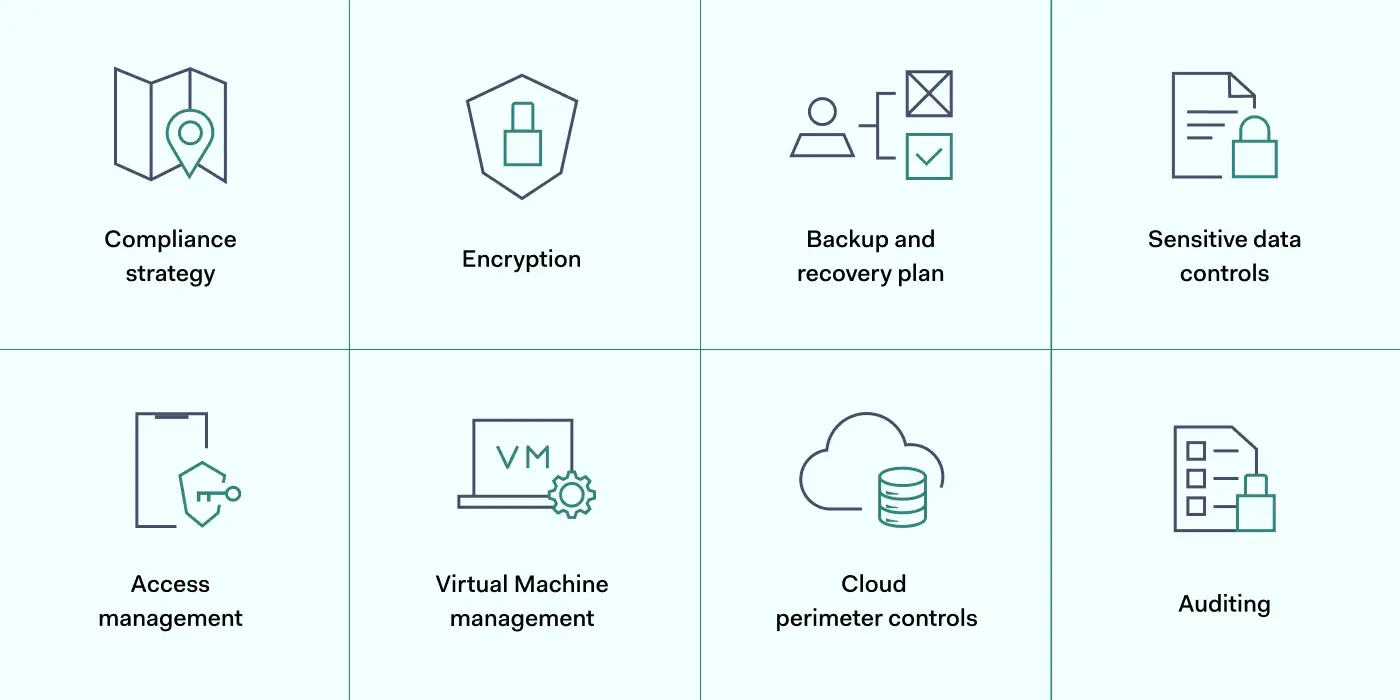
The best approach is adopting a layered strategy. Users should exploit security tools provided by Microsoft. But they should add additional security controls where necessary. These Azure security best practices will explain how the layered security approach works.
1. Map Azure assets and create a compliance strategy
The first step in layering Azure security is understanding the cloud environment. Before applying any of the best practices below, you must understand what assets need to be protected.
Map the cloud assets on your Azure platform. Include all apps and data stores, and classify data according to importance. You should know exactly where client data is stored and who has access to that data.
It is also advisable to create a clear compliance strategy for Azure environments. Define your core goals, including HIPAA, DCI-PSS, or GDPR compliance. Use these data security frameworks as a baseline to improve Azure security and meet regulatory requirements.
Track your compliance progress with the scoring tools in the Azure Security Center. The compliance dashboard provides detailed information about security levels and required actions.
2. Encrypt critical data
Data security on Azure apps is the responsibility of clients, not Microsoft. So take action to encrypt data and hide it from malicious actors.
Encrypt sensitive data at rest using Microsoft’s server-side symmetric key encryption tools. You can use these tools to segment data by importance. This ensures that operational data is available to employees. But financial or personal information is only accessible to users with specific encryption keys.
Azure Disk Encryption works alongside Microsoft’s SSE. It creates another layer of data security for virtual machines and data containers. This reduces the risk of attackers exploiting Virtual Hard Disk (VHD) files. Attackers will find it much harder to create virtual machines within Azure environments.
When you apply Azure encryption, key storage is your responsibility. Secure encryption keys in IAM controls in place to prevent unauthorized access. The Azure Key Vault is a good key management solution and integrates well with Azure app environments.
Users should also encrypt sensitive data in transit. Data constantly flows between Azure apps, remote devices, and on-premises workstations. VPN encryption provides a solution, adding another layer of protection above Azure security controls.
3. Create a backup and disaster recovery plan
A strong Azure security posture features a fall-back plan when systems fail, or attackers succeed. Microsoft offers an end-to-end DR service via Azure Site Recovery (ASR). Combine this with Azure Backup to create tailored data backup plans.
With an ASR failover plan, you can recover application states with minimal information loss. You might also add Azure Storage Replication, which regularly generates multiple copies of important files.
4. Secure sensitive data with robust controls
Encryption is not the only data security control for Azure users. Consider a range of additional tools and find a mix that secures sensitive data without compromising user experience. Options to think about include:
Activate auditing tools. Users can instruct Azure to audit databases. This creates a data stream that tracks database changes. Data visibility makes it easier for security teams to detect anomalies and unsafe user activity.
Add Azure SQL threat detection. Many Azure apps rely on SQL, but SQL presents critical security threats. Using SQL databases, turn on SQL threat detection to isolate security weaknesses and secure the threat surface.
Use Azure Firewall. Azure Firewall adds another layer of data security protection for Azure-hosted apps. You can manage firewall settings centrally, and coverage can increase as new apps come online. Cloud-native TLS inspection provides valuable protection against malware attacks.
Enable Azure Monitor alerts. Gain additional awareness by engaging Azure Monitor alerts. Users can target alerts at single resources and use many metrics to identify vulnerabilities. Azure Monitor Action Groups make it easy to automate alerts and deliver precise information when threats arise.
Implement Azure Defender. Defender is a subscription-based security service that leverages extended threat detection and response (XDR) and contextual security. It covers hybrid and multi-cloud environments, delivering threat protection and remediation advice. Azure Defender may well be a sensible addition when securing complex cloud environments,
Use Shared Access Signatures. Created via Active Directory, Shared Access Signatures let you manage access to Azure resources to third parties and employees for limited periods. Best practices include creating a SAS for all short-term network users, as it allows admins to set granular controls.
5. Manage access with IAM
Preventing illegitimate access to cloud infrastructure is one of the most important Azure security best practices. The best way to manage user access is by adding Identity and Access Management (IAM) to your security arsenal.
Microsoft provides a cloud-native IAM system called Azure Active Directory (AAD). AAD authenticates logins and compares user credentials to a secure Active Directory database.
IAM best practices for Azure include using AAD to set role-based access controls (RBAC). With RBAC, admins can put the Zero Trust ‘principle of least privilege’ into action. Every user has very limited privileges. Privileges only apply after users supply multiple credentials.
Role-based privileges have big practical benefits. Developers will not retain access to resources when their project involvement ends. Attackers obtaining their credentials will be relatively powerless. They will struggle to achieve Virtual Machine access. Breaching Azure SQL databases will be much harder.
Add another layer to your security posture by combining AAD with Single-Sign-On (SSO). SSO combines all cloud and on-premises assets. Remote workers can log in to the apps they need via a single sign-on portal.
Users can apply Multi-Factor Authentication (MFA) at this stage. This requests an extra authentication factor for each login, such as biometric data or one-time codes delivered to smartphones.
IP allowlisting also features in recommended Azure security best practices. Allowlisting lets you specify trusted IP addresses. You can add remote work devices or employee smartphones and exclude every other device until it passes MFA and IAM controls.
6. Add workload and VM protection
Azure security best practices include securing virtual machines via specialist controls. For instance, Azure includes the option of applying just-in-time controls for VMs. These Azure security controls allow users to access VMs for limited periods, removing the possibility of accessing assets after sessions expire.
VM controls also allow administrators to lock vulnerable ports and limit access to authorized users. Restrict access to RDP, WinRM, and SSH ports commonly used by VMs. Access should only be available when absolutely required.
You can apply controls easily by assigning workloads and VMs to Network Security Groups (NSGs). These groups define security procedures for each asset and add another protective layer via the Azure Firewall.
Additionally, remember to keep workload patches up to date. Unpatched Azure apps can be vulnerable to exploits. Automate software updates where possible and audit unpatched tools to minimize your exploit vulnerability.
7. Control the cloud perimeter with network security
Internal Azure cloud security works alongside general network security. Attackers can steal credentials from devices outside the cloud or launch attacks via internet-facing endpoints. This is why Azure’s best practices include measures to harden on-premises security. These measures can protect the whole network perimeter:
Track internet-facing cloud endpoints and minimize the contact between the wider web and company resources.
Use a Security Information and Event Management solution. SIEM tracks network traffic and identifies potential threats. Integrate it with Azure Defender to cover external and cloud-based vulnerabilities.
Apply network segmentation. Separate cloud endpoints from data centers and workstations with internet access.
Install a VPN or similar security tool to encrypt data and conceal user identities.
8. Audit user identities and access policies
Your Azure cloud security posture can weaken over time. What works now may degrade and create new vulnerabilities.
Azure security teams must audit every cloud security control and ensure continuing app and data protection. Audit app ownership regularly to ensure only active users have administrative privileges. Clean up Azure platforms by removing obsolete services, groups, and users.
Use the Azure Security Center to improve auditing procedures. The ASC includes machine learning analysis tools that provide feedback and suggest security posture improvements. Real-time monitoring and audit logs provide evidence to fine-tune your security setup.
How can NordLayer secure your access to Microsoft Azure?
Microsoft Azure cloud security requires a layered mix of internal cloud-based controls and solid external security. Users must protect data at the app level, followed by workgroups, platforms, and the entire company network.
The best practices listed above provide a roadmap to achieve security at the cloud level. Encrypt data and manage Active Directory identities. Leverage the Security Center to track user activity and run regular audits. And target virtual machines and apps with specific protection.
But that’s not enough. Add an extra security layer for rock-solid SaaS access control by safeguarding the network edge and protecting credentials outside the cloud.
NordLayer will help you achieve this. Encrypt in-transit data, apply for SSO, and screen access with IP allowlisting. Limit access to trusted IP addresses and exclude everything else – an important step towards a Zero Trust security posture.
Prevent data leaks by blending NordLayer’s network security tools with Microsoft Azure’s internal controls. To find out more, get in touch with our team today.
About Version 2 Digital
Version 2 Digital is one of the most dynamic IT companies in Asia. The company distributes a wide range of IT products across various areas including cyber security, cloud, data protection, end points, infrastructures, system monitoring, storage, networking, business productivity and communication products.
Through an extensive network of channels, point of sales, resellers, and partnership companies, Version 2 offers quality products and services which are highly acclaimed in the market. Its customers cover a wide spectrum which include Global 1000 enterprises, regional listed companies, different vertical industries, public utilities, Government, a vast number of successful SMEs, and consumers in various Asian cities.
The IBM Cost of a Data Breach 2022 report brought a lot of information that shows the importance of choosing a good cybersecurity project for your organization.
According to information extracted from this document which included interviews with more than 3,600 people working in companies that had their data violated, it was possible to find alarming conclusions.
First, 83% of the organizations surveyed suffered some kind of breach between March 2021 and March 2022. Also, 60% of these attacks increased prices for customers.
It has also been identified that 79% of critical infrastructure organizations have not implemented a zero-trust plan to prevent cyber threats, and 19% of violations occur due to a compromised business partner.
Faced with so many digital security gaps, it can be difficult to know where to start deploying a cybersecurity project. Therefore, we address this issue here. To facilitate your reading, we divided our text into topics. These are:
About Cybersecurity
Importance of Cybersecurity
Cybersecurity Project: What Is It, and What Is Its Importance?
What Are the Five Types of Cybersecurity?
People, Processes, and Technologies: Crucial Elements for the Success of Every Cybersecurity Project
Guidelines for Prioritizing Cybersecurity Projects within a Company
Key Cyber Threats Faced by Companies
About senhasegura
Conclusion
Enjoy the read!
About Cybersecurity
When we talk about cybersecurity, we refer to a set of technologies, procedures, and methods used to prevent attacks on devices, programs, data, and networks, avoiding the activity of hackers and ensuring the privacy of a company’s data, which must be protected from insider and external threats and natural disasters.
However, accelerated by the Covid-19 pandemic, digital transformation has brought several vulnerabilities, such as those related to remote work. As a result, there was a significant increase in data leaks, phishing emails, and account invasions.
Importance of Cybersecurity
Currently, processes in companies are migrating to the online world due to digital transformation, which can “facilitate” the loss of information of great importance to a business.
Thus, organizations need to invest in cybersecurity in order to ensure their operations and prevent threats, such as malware, viruses, and phishing.
One should also be aware that malicious attackers have been improving their techniques over time, so it is increasingly challenging to maintain data security and avoid compromised business.
Another novelty is data protection laws, which have been holding organizations accountable for the exposure of sensitive information from their customers, employees, and business partners, generating million-dollar sanctions.
In practice, these legislations have several requirements to be respected in order to avoid accidental or intentional data loss.
That is, investing in a good cybersecurity project is the recommended measure to avoid inconvenience, financial losses, loss of credibility, and closure of companies.
Cybersecurity Project: What Is It, and What Is Its Importance?
Cybersecurity projects are aimed at promoting digital security within any company. Its importance lies in the possibility of avoiding cyber threats, such as hacker invasions. It also contributes to the fact that errors -whether deliberate or not, of employees or third parties – have fewer impacts on the organization and reduce the possibility of losses, such as: loss of data, credibility, millionaire sanctions imposed by data protection laws, which can even cause the end of a business. And in small companies, this is even more crucial: according to a Cisco study, 60% of organizations affected by a cyberattack shut down operations within 6 months of the incident.
What Are the Five Types of Cybersecurity?
There are five types of cybersecurity. These are:
Critical Infrastructure Security;
Application Security;
Network Security;
Cloud Security; and
Internet of Things (IoT) Security.
Check out each of them in detail below:
Critical Infrastructure Security
What Is It? When talking about critical infrastructure security, we refer to the area that contemplates the security of systems, networks, and assets in industries that are essential to ensure the security of a country’s economy, health, and public services. These sectors include the chemical, communications, utilities, energy, and financial industries.
What Are the Challenges? A major challenge for critical infrastructure is the security issues its systems present versus the limited protection features.
Application Security
What Is It? Application security is essential as these programs have increasingly become targets for hackers. It consists of practices adopted to make them more secure, which occurs during their development and then after their implementation.
What Are the Challenges? Ensuring application security requires tracking all the tools developed for these applications. It is also important to be aware of the future needs of a company, which may require software aimed at a more complex infrastructure.
Network Security
What Is It? Network security is a term that refers to hardware and software solutions, as well as procedures aimed at protecting the network and data against cyberattacks. In practice, this concept includes network analysis, application security, access control, and antivirus software, among other factors.
What Are the Challenges? The main challenge of network security is to maintain protection in increasingly complex structures, with a large volume of cyber threats and several functionalities used in corporations, which also represent new problems.
Cloud Security
What Is It? As companies suffer the impact of digital transformation, they become more dependent on cloud solutions and need to adopt measures that ensure digital security in this context.
This is because outsourced providers may even be responsible for infrastructure management, but the accountability for any exposed data remains with the organization as well.
What Are the Challenges? The challenges of companies adopting cloud solutions are related to the ability to meet security criteria in a dynamic environment, which can generate a lack of visibility in accessing and using data.
Internet of Things (IoT) Security
What Is It? Internet of things security is associated with protecting devices connected directly to the cloud in gadgets, such as surveillance cameras. Its function is to protect designed devices, without taking into account aspects of cybersecurity and data protection.
What Are the Challenges? The greatest challenge associated with the internet of things security refers to human activity. In practice, with the increased connectivity of these devices, it is necessary to instruct users on the change of default passwords and the need for updates, for example.
On the other hand, many users do not see these devices as targets of attacks and end up ignoring best security practices during their development and use.
People, Processes, and Technologies: Crucial Elements for the Success of Every Cybersecurity Project
An efficient cybersecurity project does not only involve the five types of digital security covered in the previous topic. It is also important to take other essential elements into account. They are: people, processes, and technology.
Here’s what you need to know about these aspects:
People
When it comes to cybersecurity projects, investing in cutting-edge technology is not enough. It is essential to train users to respect security protocols and ensur
e the protection of company data.
In practice, your employees increase security risks in a variety of ways. Among them, we can highlight:
Clicking on URLs and Opening Suspicious Emails
It is necessary to make your employees aware of the risks involved in this practice and encourage the exclusion of emails from fake addresses to protect sensitive data.
Keeping the Same Password for a Long Period
To ensure the security of your company, employees’ passwords must be changed regularly. In addition, strong combinations should be used, and it is not recommended to reuse the same password in different services.
Due to the difficulty in memorizing so many passwords, we also recommend the use of a password vault, which will only require the memorization of a single code.
Personal Browsing
Many people use the devices of their companies for personal purposes, such as accessing social media, shopping, or paying bills. The big problem is that this behavior facilitates the work of malicious agents who want to collect information. Therefore, ask your employees to use their own devices, not corporate ones, for personal browsing.
Lack of Backups
Many people still fail to perform backups when finishing their tasks. Nevertheless, it is of paramount importance to back up the system files. So, employees should understand they need the help of the IT team with these functions.
Unattended Devices
Leaving devices on desks unattended and without blocking them is a fairly common practice, which can also cause damage to the security of a company. For this reason, it is essential to make employees aware of the importance of preserving data contained in these devices and maintaining their control.
Processes
Information security professionals use numerous processes to protect sensitive data. In practice, they need to identify and combat cyber threats, protecting information and responding to incidents. Besides being implemented, these processes must be documented to save time and financial resources, and preserve customer confidence in cases of cyberattacks.
To counter cybersecurity-related risks, we recommend using the Cybersecurity Framework, developed by the National Institute of Standards and Technology (NIST) of the U.S. Department of Commerce, after former U.S. President Barack Obama signed an executive order in 2014.
Technology
After the deployment of security processes, it is indispensable to assess the tools available to avoid cyber threats.
For this, you must consider two types of technology: those that will help you prevent and combat attacks, such as antivirus, DNS filtering, and malware protection; and those that need protection, including computers, routers, and the cloud.
Previously, we could rely on security perimeters. Now, migration to cloud environments, remote work, and policies like Bring Your Own Device (BYOD) have made it easier for hackers to work.
Guidelines for Prioritizing Cybersecurity Projects within a Company
A cybersecurity project is essential to not overwhelm IT staff with unnecessary work and to ensure the company’s ability to deal with a cyberattack.
However, to create and run your cybersecurity project, you must take some action. They are as follows:
Understanding Your Company’s Goals
Each organization has its strategic goals, which should guide the creation of the cybersecurity project. Therefore, it is important to evaluate the company’s vision and its business and cybersecurity strategies.
This information will provide a basis for the development of the project and will be a guide to gradually know if it is, in fact, efficient.
To understand the strategic goals of the company, read documents related to the subject and talk to top management to know their priorities.
Discovering the Reason Behind the Project
Cybersecurity projects can be motivated by several reasons, although all of them need to prevent and combat cyber incidents in common.
In practice, the project can be an awareness and training campaign on cybersecurity, the implementation or updating of a security system, compliance with new laws and regulations, etc.
Understanding what the project’s motivation is will certainly contribute to establishing priorities, directly impacting the company’s operations.
Determining the Value of the Project
Here, when we talk about value, we are referring to the importance of a cybersecurity project for an organization. That is, it is convenient to analyze how it will impact stakeholders and what its real importance is to the business. A project that adds great value must necessarily be prioritized.
Analyzing the Urgency
It is important to assess the urgency of the cybersecurity project to determine whether it should be prioritized or can wait. But remember that priorities can and should be modified as changes occur.
Detailing the Aspects that Affect the Project’s Success
A successful cybersecurity project depends on a number of factors, including budgets, deadlines, and return on investment (ROI), among other things.
On the other hand, it is often impossible to execute a project due to unfavorable circumstances. Therefore, it is advisable to know what can affect the project’s success in advance.
Ranking the Cybersecurity Project According to the Priority
With the information on goals, objectives, and possibilities of success in hand, it is time to establish an order of priorities through an overall classification, which can be score-based.
Defining How Many Projects Can Be Executed at a Time
Probably, the organization will not be able to assume all priority projects at once. Thus, the solution is to work on them in a phased manner, creating a queue of plans to execute.
Another recommendation is to run the fastest ones first and then the ones that require more time and effort.
Sharing Findings with Top Management
Before starting the cybersecurity project, it is essential to meet with leaders and share the information gathered. This is because the findings can serve as insights to change the order of priorities of the projects, requiring top management to be on board.
Working Flexibly
Working with cybersecurity projects requires flexibility, after all, priorities can be modified according to context. By the way, this occurred in most companies after the beginning of Covid-19, which accelerated the mass adoption of remote work and brought new demands to security teams.
Key Cyber Threats Faced by Companies
The following are the main cyber threats that should be considered by a cybersecurity project:
Ransomware;
Phishing;
Attacks on Mobile Devices;
Attacks Using QR Codes;
Denial-of-Service (DDoS) Attacks; and
LotL and AVT Attacks.
See the detailed explanation of each of them below:
Ransomware
This type of cybercrime works like this: the attacker blocks a network or system and asks for millionaire amounts in exchange for the release of information, which may not be returned, but sold to other criminals. Due to the lack of efficient cybersecurity mechanisms in companies, this tactic is very common.
Phishing
Another common crime in the virtual environment is phishing, which consists of sending counterfeit emails, and pretending to be a legitimate organization. With this, malicious agents convince their victims to share personal information or take action to their benefit.
There are also some types of very sophisticated phishing attacks, such as very realistic audio recordings produced through artificial intelligence.
Attacks on Mobile Devices
With many people working remotely, the use of personal devices for corporate purposes and the use of corporate devices for personal purposes tend to occur more frequently. This increases security vulnerabilities, especially in the face of malware
attacks on devices.
Attacks Using QR Codes
Currently, cybercriminals use QR Codes to deploy malware applications, infecting their victims’ phones and stealing their bank details. For this reason, it is advisable to check the code provided by the company before accessing it.
Denial-of-Service (DDoS) Attacks
This type of attack occurs when the hacker overloads a machine with traffic, disrupting its normal operation and making a service unavailable to users. In practice, the attack is performed through a single computer.
LotL and AVT Attacks
Less known, Living off the Land (LotL) attacks do not need to create malicious files to access a company’s systems because they use gateways that already exist. Advanced Volatile Threat (AVT) attacks allow access to an organization’s data as quickly as possible.
About senhasegura
We, from senhasegura, are part of MT4 Tecnologia, a group of companies specializing in digital security, founded in 2001 and operating in more than 50 countries.
Our main objective is to ensure digital sovereignty and security for our clients, granting control over privileged actions and data and avoiding theft and leaks of information.
For this, we follow the lifecycle of privileged access management through machine automation, before, during, and after accesses.
These are also our commitments:
Avoid interruptions in the activities of companies, which may impair their performance;
Automatically audit the use of privileges;
Automatically audit privileged changes to identify privilege abuses;
Provide advanced PAM solutions;
Reduce cyber risks;
Bring organizations into compliance with audit criteria and standards such as HIPAA, PCI DSS,
ISO 27001, and Sarbanes-Oxley.
Conclusion
In this article, you saw that:
Cybersecurity is a set of technologies, procedures, and methods used to prevent cyberattacks;
Digital transformation has brought new vulnerabilities to IT structures;
Companies should invest in cybersecurity to prevent threats, such as malware, viruses, and phishing;
Data protection laws hold organizations accountable for the exposure of sensitive information of their customers, employees, and business partners;
Cybersecurity projects are aimed at promoting digital security within any company;
There are five types of cybersecurity: critical infrastructure security, application security, network security, cloud security, and Internet of Things (IoT) security;
People, processes, and technology stand out among the crucial elements for the success of a cybersecurity project;
To define the priorities of cybersecurity projects within a company, one needs to understand the organization’s objectives, find out the reason for each project, determine its value, assess its urgency, detail aspects that interfere with its success, rank projects in order of priority, define how many projects it is possible to execute at a time, share the findings with top management, and work flexibly;
The main threats faced by companies are ransomware, phishing, mobile device attacks, attacks using QR Codes, denial-of-service (DDoS) attacks, and LotL and AVT attacks.
About Version 2 Digital
Version 2 Digital is one of the most dynamic IT companies in Asia. The company distributes a wide range of IT products across various areas including cyber security, cloud, data protection, end points, infrastructures, system monitoring, storage, networking, business productivity and communication products.
Through an extensive network of channels, point of sales, resellers, and partnership companies, Version 2 offers quality products and services which are highly acclaimed in the market. Its customers cover a wide spectrum which include Global 1000 enterprises, regional listed companies, different vertical industries, public utilities, Government, a vast number of successful SMEs, and consumers in various Asian cities.
About Segura® Segura® strive to ensure the sovereignty of companies over actions and privileged information. To this end, we work against data theft through traceability of administrator actions on networks, servers, databases and a multitude of devices. In addition, we pursue compliance with auditing requirements and the most demanding standards, including PCI DSS, Sarbanes-Oxley, ISO 27001 and HIPAA.
You lightly place your thumb at the bottom of your phone screen and, lo and behold, it’s unlocked instantly. So why can’t we do the same at the bank or when logging in to Twitter or YouTube? Well, soon we’ll be able to do it all. The passwordless future is inevitable and it’s almost here.
At NordPass, we’re thrilled to be creating a passwordless future. But what is passwordless authentication? How does it work? Let’s answer these questions.
Why should we consider going passwordless?
Year after year, we see either “123456” or “password” top our Most Common Passwords List. Millions of people reuse absurdly simple passwords across multiple platforms, even though they are very easy to crack by using a dictionary or brute force attacks. It makes passwords (and the people using them) one of the weakest links security-wise in any company or service.
Weak passwords are just part of the problem. The way we treat passwords is an issue as well. One of the worst password sins that all of us can attest to is reusing passwords. Having a single password to secure multiple accounts is a huge security risk, to put it mildly. In such instances, a single compromised account indicates that all of user’s accounts are essentially compromised as well.
The solution lies in biometric authentication and passkeys, which combined become one of the safest and smoothest passwordless authentication options available.
Passkeys: The key to passwordless authentication
In an age where technology usage continues to rise, the need for secure and efficient authentication methods becomes all the more pressing. Passwords, which have long reigned supreme as a solution for securing online accounts, have over time proven to be unreliable and susceptible to hacking. In turn, many organizations and companies have been looking for new, more efficient, and robust ways to authenticate users.
One organization at the forefront of the effort to go passwordless is the FIDO Alliance. The alliance works with various companies, including NordPass, to develop and promote open standards for passwordless authentication.
According to the FIDO Alliance, the technology set to replace passwords is passkeys. Passkeys are digital credentials that are generated by the user’s device. Usually used in combination with biometric data, such as a fingerprint or facial recognition, to offer an extra layer of security, passkeys provide access to websites and other online services.
What passkeys bring to the table
One of the major advantages of passkeys is that the private key, which is used to generate the passkey, never leaves the user’s device. This makes it almost impossible for attackers to gain access to the key through phishing or other forms of cyberattack. Furthermore, passkeys are almost impossible to hack, making them more secure overall.
Unlike traditional passwords, passkeys are invisible to the user and are never revealed or entered manually.
Going passwordless will also improve user experience. A fingerprint scanner, for example, is a fast and reliable authentication method. It would also mean that there would be no more password reset procedures — IT departments throughout the world will be very grateful. Also, when it comes to biometric authentication, you don’t need to remember anything. You won’t have any Post-its on the computer screen or notes in your planner. You can’t lose, steal, or forget your fingerprint.
Room for improvement for current passkey-based authentication
Right now, passwordless authentication is gaining major traction among such tech giants as Microsoft, Apple, and Google. All of these companies have been introducing passwordless authentication solutions, and in most instances the solutions include the use of passkeys.
However, current passkey-based solutions have a long way to go. At the moment, these solutions limit users to a single ecosystem, which makes it difficult to share them between, say, an Android user and an iOS user. In addition, the current solutions do not offer any kind of sync with password managers.
But this is where NordPass comes into play. We are currently working on integrating passkeys into your favorite password manager.
Introducing passwordless authentication to NordPass
At NordPass, we’re excited to be at the forefront of the passwordless revolution. And by early 2023, NordPass is set to introduce passwordless authentication both for individuals and businesses.
Passwordless access to NordPass
We are currently working on enabling a passwordless sign-in to NordPass. It will be a faster and simpler process than the one now, since it will require a single biometric confirmation. In simple language, this means that you will be able to access your Nord Account and NordPass with a single tap of a finger. You read it right. No more manually entering your Nord Account and Master Password each time you need to log in. Passwordless access to NordPass is set to significantly improve user experience and overall security.
NordPass passkey storage
All NordPass users will have the ability to save passkeys for any website or app in the encrypted vault and use them to access those online services later. With NordPass, you’ll be able to use, share, and sync passkeys between multiple devices and platforms, whereas many passwordless authentication solutions tend to lack such functionalities. This will make NordPass a single place for all of your digital valuables, including passwords, passkeys, credit cards, and other sensitive information.
Passwordless multi-factor authentication (MFA) for businesses
Password-based authentication is still the industry standard. However, due to the inherent vulnerabilities that come with password-based authentication, most businesses face a variety of cybersecurity risks. To significantly reduce the risk of suffering a phishing or an account takeover attack, businesses need to rethink their security approach with regard to access to endpoint devices such as laptops, desktops, workstations, and mobile devices as well as applications that leverage regular passwords or even single sign-on solutions.
With the introduction of passwordless MFA, we’re looking to help businesses improve their overall security stance by eliminating the need for passwords and introducing an authentication method based solely on biometrics.
Passkey integration for online service providers
The world is already moving rapidly towards a passwordless future. Unfortunately, not everyone can adapt smoothly and efficiently. Many small to medium-sized businesses (SMBs) lack the resources and know-how to implement passkey authentication for their users. However, at NordPass we’re ready to leverage our security expertise to make the transition from passwords to passkeys as smooth as possible. We believe that the frictionless user experience offered by passkeys across multiple platforms and devices, combined with superior security, will help your business increase conversion rates, user engagement, and user satisfaction.
You can expect big things as early as 2023. So stay tuned, and be prepared for the inevitable passwordless future – it’s just around the corner.
About NordPass NordPass is developed by Nord Security, a company leading the global market of cybersecurity products.
The web has become a chaotic space where safety and trust have been compromised by cybercrime and data protection issues. Therefore, our team has a global mission to shape a more trusted and peaceful online future for people everywhere.
About Nord Security The web has become a chaotic space where safety and trust have been compromised by cybercrime and data protection issues. Therefore, our team has a global mission to shape a more trusted and peaceful online future for people everywhere.
About Version 2 Digital
Version 2 Digital is one of the most dynamic IT companies in Asia. The company distributes a wide range of IT products across various areas including cyber security, cloud, data protection, end points, infrastructures, system monitoring, storage, networking, business productivity and communication products.
Through an extensive network of channels, point of sales, resellers, and partnership companies, Version 2 offers quality products and services which are highly acclaimed in the market. Its customers cover a wide spectrum which include Global 1000 enterprises, regional listed companies, different vertical industries, public utilities, Government, a vast number of successful SMEs, and consumers in various Asian cities.
You’re dozing off to one of your favorite shows on Netflix, and suddenly a notification flashes on your phone. You look down and see a weird message: “Someone signed into your Netflix account at 03:23 in Nigeria.” Odd, because you were asleep at that time – and certainly haven’t been to Nigeria before. Looks like it’s time to change your Netflix password.
Whether you have forgotten your password, want to wrangle Netflix away from your ex-spouse, or just want to update your passwords, this guide will tell you how to easily change your Netflix password.
How to change your Netflix password on desktop
Fortunately, Netflix foresaw the need for expediency when it comes to changing your password – the process is quick and straightforward.
Open up your browser and go to the Netflix login page. Once you’ve logged in, bring your mouse to hover over your profile picture in the top right corner. Click on “Account.”
The first thing you’ll see is a section marked “Membership and billing.” On the right-hand side of this section are a few hyperlinked options. Click on the “Change password” link.
You’re now on the page where you can reset your password. Before you do, check out our password generator to craft the perfect password that will be extremely difficult to crack.
There you have it — your Netflix password is now changed. Remember that you’ll need to re-enter this new password on whatever devices your Netflix account is connected to.
How to change your Netflix password on mobile devices
Open the Netflix app on your mobile device and log in to your account.
Tap the profile icon located in the upper-left corner of the screen and select “Account.” If you are using a tablet, tap “More” at the bottom of the screen and select “Account” there.
Now tap “Change password.”
Now enter your current and new passwords.
Tap “Save” to confirm. The changes should take effect immediately.
How can you reset your Netflix password?
If you have forgotten your Netflix password, the only way to regain access to your account is by resetting your passwords. Here’s a quick guide on how to reset your Netflix password:
Visit the “Sign in” page and select “Need help?” which is located below the “Sign in” button.
Choose “Email” and enter your email address. Click “Email me.”
You will receive an email from Netflix with instructions on how to reset your password and create a new one.
You can also choose the “Text message” (SMS) option. Simply enter your phone number and select “Text me.”
You will receive a text message from Netflix with instructions on how to reset your password and create a new one.
If it’s been years since you last had to reset your password, don’t worry: all hope is not lost yet! In the above image, you can see the option at the bottom that says “I don’t remember my email or phone.” Click on it.
Now, you can enter your personal and payment details to reset your password. Netflix’s UI is intuitive enough to make resetting the details of your account effortless. Just follow the on-screen instructions, and you’ll have a new password in no time.
Invest in a password manager
This is the most guaranteed way to never have to worry about your passwords again. NordPass can automatically generate top-tier strength passwords, store them in an encrypted vault, and then autofill them to whichever account it’s associated with. The unnecessary hassle of memorizing and creating passwords will be a thing of the past. With NordPass, online life is smoother and safer.
About NordPass NordPass is developed by Nord Security, a company leading the global market of cybersecurity products.
The web has become a chaotic space where safety and trust have been compromised by cybercrime and data protection issues. Therefore, our team has a global mission to shape a more trusted and peaceful online future for people everywhere.
About Nord Security The web has become a chaotic space where safety and trust have been compromised by cybercrime and data protection issues. Therefore, our team has a global mission to shape a more trusted and peaceful online future for people everywhere.
About Version 2 Digital
Version 2 Digital is one of the most dynamic IT companies in Asia. The company distributes a wide range of IT products across various areas including cyber security, cloud, data protection, end points, infrastructures, system monitoring, storage, networking, business productivity and communication products.
Through an extensive network of channels, point of sales, resellers, and partnership companies, Version 2 offers quality products and services which are highly acclaimed in the market. Its customers cover a wide spectrum which include Global 1000 enterprises, regional listed companies, different vertical industries, public utilities, Government, a vast number of successful SMEs, and consumers in various Asian cities.
So what’s the deal with password sharing? Would you give your partner the password to your banking account but not your phone? Is laying all your codes on the table a sign of trust or a massive security risk? Should couples share passwords at all? While it can help to build trust with a partner, sharing your passwords isn’t always the best idea.
We are asking some basic questions on a very touchy subject just to help keep your security tip top. Don’t worry — we’re not judging your loving relationship. We just believe in safety precautions no matter what, and you will too once you get a dose of reality from these not-so-lovely situations.
It’s all about how you share them
Sometimes the risk isn’t who you share your password with, but how you do it. Sharing your passwords over the internet, whether over unencrypted email or messaging apps, is like sharing them in plain view of the world. The next time you think about doing this, remember that any of the following situations can take hold (without you even knowing).
Your messaging app may not be as honest as you think. A messaging app without end-to-end encryption has full access to everything you send. End-to-end encryption means that the only person who can read your message is the person you send it to. Sounds like a given, right? Not when you consider the genuine possibility that your messaging app could be giving employees access to your private conversations.
Man-in-the-middle attacks. It’s true, attackers lurk in the middle of an exchange waiting to steal vital information, like passwords, credit card numbers, addresses… you name it. Without end-to-end encryption and zero-knowledge architecture, your credentials could be exposed, and a cybercriminal could be in and out of your bank account within seconds.
The easy way to share passwords securely
Looking at the potential risks that one might face when trying to share passwords online, it is quite natural to question whether couples should share passwords at all and is it worth the risk? The good news is that there’s a way to share passwords securely.
Obviously, the best defense is encryption. A messaging service or website using end-to-end encryption makes sure your data is kept safe from attackers. Password managers like NordPass help you store and share your passwords in a completely secure way.
With NordPass, encryption happens on your device, scrambling your data into gibberish before it even reaches the servers. This way everything you send remains locked, even from us – until it reaches your verified recipient.
NordPass Family is a great way for couples, families, or even groups of friends to further improve their online security. The Family plan comes with six Premium accounts and includes all the advanced security features. Best of all — you’ll be able to share passwords with other NordPass users instantly and effortlessly without sacrificing security.
The takeaway
Matters of the heart aside, always think twice before you send a password by text or messaging apps. Even if the service offers encryption, subpar ciphers and weak protocols can be broken by even a mediocre cyberattacker.
Sending a password securely with NordPass is easy. It locks your sensitive credentials in an encrypted vault. You can select them from a simple drop-down list and send in complete confidence.
The internet’s primary concern and priority is functionality. Your security and privacy probably aren’t. Don’t risk all of your accounts over something as small as sending a password.
About NordPass NordPass is developed by Nord Security, a company leading the global market of cybersecurity products.
The web has become a chaotic space where safety and trust have been compromised by cybercrime and data protection issues. Therefore, our team has a global mission to shape a more trusted and peaceful online future for people everywhere.
About Nord Security The web has become a chaotic space where safety and trust have been compromised by cybercrime and data protection issues. Therefore, our team has a global mission to shape a more trusted and peaceful online future for people everywhere.
About Version 2 Digital
Version 2 Digital is one of the most dynamic IT companies in Asia. The company distributes a wide range of IT products across various areas including cyber security, cloud, data protection, end points, infrastructures, system monitoring, storage, networking, business productivity and communication products.
Through an extensive network of channels, point of sales, resellers, and partnership companies, Version 2 offers quality products and services which are highly acclaimed in the market. Its customers cover a wide spectrum which include Global 1000 enterprises, regional listed companies, different vertical industries, public utilities, Government, a vast number of successful SMEs, and consumers in various Asian cities.
Remote work and the adoption of cloud computing surfaced the concept of identity as a perimeter. In this sense, although it is not new, identity security first gained urgency as malicious attackers began to use machine identity management and access to achieve their goals.
Currently, hackers have been successful in targeting Active Directory and identity infrastructure to move laterally on networks with vulnerabilities.
It is worth mentioning that the use of multifactor authentication (MFA) is growing, but it is still necessary to configure, maintain, and monitor the identity infrastructure properly.
In this article, we will explain everything about this subject. To facilitate your reading, we divided our text into topics. These are:
What is Machine Identity?
Importance of Machine Identity Management
Challenges in Machine Identity Management
Seven Best Practices in Machine Identity Management
Other Best Practices
About senhasegura
Conclusion
Enjoy the read!
What is Machine Identity?
Just as people use usernames and passwords to protect their identities, machines have their unique identifications protected by these credentials, as well as keys and certificates.
Without proper machine identity management, it becomes impossible to guarantee the confidentiality of data obtained by authorized devices and to prevent this information from being transferred to unauthorized machines.
In practice, a machine with a compromised identity can damage the company’s digital security. This is because hackers can use them to gain privileged access to data and resources from the organization’s networks.
Moreover, by stealing or forging a machine identity, an attacker is able to impersonate a legitimate machine and obtain sensitive data.
To account for the volume, variety, and speed of changes in machine identity, one needs to strategically manage a complex and rapidly changing data set.
Through appropriate policies and controls, machine identity management contributes to optimizing a corporation’s cybersecurity, reducing risks, and ensuring compliance with security requirements.
Importance of Machine Identity Management
Proper machine identity management is critical to preventing compromised credentials, keys, and certificates from being used to invade infrastructure, giving access to sensitive data, or being used to create fraudulent tunnels and hide malicious actions.
It also allows one to track the exponential growth in the number of machines to keep their identities secure and track the evolution of cloud services, which can expose machine identities to hacker action.
With the correct machine identity management, it is also possible to protect mobile devices, sensors, and robots, which can communicate and store sensitive information using encryption.
In addition, we live in a context where machines have increasingly intelligent functions, replacing people in activities that require logical reasoning and thinking, and machine identity management allows us to interact securely with this type of equipment.
Challenges in Machine Identity Management
In the previous topic, we showed the importance of machine identity management in data protection. However, we know efficient machine identity management can be quite challenging.
One of the reasons is the increase in IT and OT devices, which also increases the number of credentials, certificates, and keys.
Also, traditional practices are insufficient to meet the demands of machine identity management, which can cause cyberattacks and interruption of activities. In this sense, the most common challenges are:
Visibility
With a large number of machine identities, it becomes difficult to keep track of existing credentials and know where they are. With this, hidden certificates can expire without anyone noticing, causing an interruption in activities.
Besides being difficult to locate all certificates on a company’s network, some of them are on devices outside the network perimeter, which can go unnoticed by audit processes.
Compliance
To ensure compliance with security requirements, it is essential to regulate the issuance, validity, security levels, and access. Thus, the lack of proper machine identity management, which contemplates TLS/SSL certificates and SSH keys, opens gaps for the action of malicious agents.
Storage
It is very common for certificates and keys to be stored in spreadsheets and distributed by email, however, as the number of machine identities increases, their control in spreadsheets is susceptible to errors.
Manual Management
Manual machine identity management is also a mistake, as it makes the process slow and error-prone.
In practice, applications and devices do not go online quickly after manually registering and provisioning certificates. In addition, manual renewal, revocation, and auditing may cause interruptions in activities.
Seven Best Practices in Machine Identity Management
Here are some practices you need to adopt in your organization’s machine identity management:
Identify This Type of Identity in the Infrastructure
Two hundred and sixty-seven thousand: this is the average number of internal certificates that an IT organization has, according to the Ponemon Institute. Many of these certificates are old, with the possibility of being encoded or hidden among other identities.
To get a sense of it, in a survey by Vanson Bourne, 61% of companies admitted they do not have full knowledge of their keys and certificates for devices. Of these, 96% claimed to suffer consequences such as violations, interruption of systems, and financial losses.
To ensure proper machine identity management, you need visibility into the devices your company uses. Therefore, it is essential to verify this type of identity in the infrastructure.
The good news is that you can count on the support of senhasegura for this: we were considered by Gartner as best in class for the discovery and integration of privileged credentials.
Periodically Rotate Machine Identities
Another indispensable measure is to rotate machine identities periodically to prevent their misuse by malicious users.
This is because when keys and certificates remain the same for a long time, they can be targeted by hackers, who use known API calls with a real certificate to gain access to critical resources and data.
To avoid this problem, organizations must have authorization from source machines, cloud connections, portable devices, application servers, and API interactions. Moreover, certificates should be updated frequently.
Implement Privileged Access Management solutions
To perform proper machine identity management, we also recommend the use of Privileged Access Management (PAM) tools. This type of solution prevents cyberattacks as it grants each user only the access necessary to perform their tasks.
We, from senhasegura, are leaders in this market and can help you protect the machine identities of your organization.
Implement Automation in the Environment Through RPA and PTA
Robotic Process Automation (RPA) consists of the use of technological tools to automate operational and transactional tasks, such as sending e-mails, checking financial data, preparing receipts, and managing payrolls.
Privileged Task Automation (PTA) automates an organization’s workflow tasks, ensuring they are completed at any time without stopping operations. These two mechanisms contribute to preventing violations motivated by human errors.
Nevertheless, it is necessary to manage the identities of software robots, starting with the definition of the best policies on how to integrate them.
Reduce Risk w
ith Zero Trust Plans
To provide more security to machine identity management, it is advisable to adopt the concept of zero trust in equipment. That is, it is not enough for corporate users to be frequently authenticated, it is necessary to extend this standard to devices.
The problem is that, despite already adopting this people-focused work model, many companies still consider device authentication a challenge.
Include the Cloud in the Machine Identity Management Plan
With the digital transformation accelerated by the Covid-19 pandemic, many companies started operating in the remote work model, using cloud solutions.
Therefore, when we talk about machine identity management, it is necessary to think of solutions that contemplate cloud environments.
Ideally, one should apply an approach that centralizes functions and enables them to manage multiple cloud deployments.
Adopt Machine Identity Management Solutions
Companies need to have teams specifically responsible for machine identity management, preventing certificates and keys from remaining unmanaged.
And to optimize this work, it is advisable to adopt automated machine identity management solutions that manage the entire certificate lifecycle.
Automated solutions are very effective and allow scalability in organizations, following the implementation of new technologies. However, machine identities should not be implied but expressly assigned.
Other Best Practices
Here are some other best practices for you, who need to deal with machine identity management.
Ensure Visibility
For no machine to be left unmanaged, it is indispensable to make a scan of all certificates and keys. This search should include devices that are outside the network perimeter. In addition, it is important to know the location, CA, and expiration date of each certificate.
Count on Centralized Management
Centralizing machine identity management is a way to simplify its implementation across environments, devices, and workloads. It is also possible to group certificates, taking into account their type, level of criticality, and expiration date.
Proper machine identity management protects communication and prevents the action of malicious attackers.
Use Self-Service
It is possible to use self-service for the provision, renewal, and revocation of certificates, making machine identity management more efficient. In this sense, to keep identities well protected and limit the actions of teams, you just need to implement role-based access controls and privileges.
Store Certificates and Keys in Secure Locations
Digital certificates and SSH keys should be stored in centralized and secure locations, preferably on encrypted devices. Moreover, access to these devices should be limited to privileged users with the use of strong passwords and RBAC.
These measures ensure the security of the machine identity, even if the network is compromised.
Key Rotation
Many companies are vulnerable to the action of malicious former employees, who have access to old certificates, keys, and encrypted algorithms. To avoid this problem, we strongly recommend changing old keys to new ones.
Automation
As we have already suggested, automation is the solution to most cybersecurity issues. In the case of machine identity management, automating this process ensures keys and certificates are always up to date and allows you to avoid problems such as interruption of activities.
Perform Audits Frequently
Performing frequent audits on machine identities is important because this process allows one to detect and eliminate issues such as weak passwords, unauthorized or expiring certificates, and old and unused keys.
For this, you can use an audit solution provided by third parties. Thus, it is possible to avoid interruption of activities, prevent violations, and optimize machine identity management.
About senhasegura
We, from senhasegura, are part of the group of information security companies MT4 Tecnologia, founded in 2001, and we aim to provide digital sovereignty to our customers through the control of privileged actions and data.
With this, we prevent data leaks and theft, as we manage privileged permissions before, during, and after access through machine automation. We work to:
Optimizing the performance of companies, avoiding interruption of operations;
Performing automatic audits on the use of permissions;
Auditing privileged changes to detect abuse of privilege automatically;
Providing advanced solutions with the PAM Security Platform;
Reducing cyber threats; and Bringing the organizations that hire us into compliance with audit requirements and standards such as PCI DSS, Sarbanes-Oxley, ISO 27001, and HIPAA.
Conclusion
In this article, you saw that:
Machines have their unique identities protected by keys and certificates;
The increase in IT and OT machines generates a significant growth in the number of certificates and keys;
Without proper machine identity management, it becomes impossible to guarantee the confidentiality of data obtained by authorized machines and to prevent this information from being transferred to unauthorized ones;
Malicious actors can use compromised machine identities to gain privileged access to data and resources from the organization’s networks;
Machine identity management contributes to optimizing the cybersecurity of a corporation;
It also allows one to keep up with the exponential growth in the number of machines and protect mobile devices, sensors, and robots;
The main challenges in machine identity management are: visibility, compliance, storage, and manual management;
Some of the best practices for this management are: recognizing machine identities, rotating these identities periodically, implementing Privileged Access Management solutions, implementing automation in the environment, reducing risks through the Zero Trust concept, including cloud solutions in machine identity management, and adopting automated machine identity management solutions;
It is also essential to ensure the visibility of devices, rely on centralized management, use self-service, store certificates and keys in secure places, and perform audits frequently; senhasegura was considered by Gartner as best in class for discovery and integration of privileged credentials;
In addition, the company provides a PAM solution, which avoids cyberattacks through the Principle of Least Privilege.
Did you like our content on machine identity management? Then share it with someone who may be interested in the topic.
About Version 2 Digital
Version 2 Digital is one of the most dynamic IT companies in Asia. The company distributes a wide range of IT products across various areas including cyber security, cloud, data protection, end points, infrastructures, system monitoring, storage, networking, business productivity and communication products.
Through an extensive network of channels, point of sales, resellers, and partnership companies, Version 2 offers quality products and services which are highly acclaimed in the market. Its customers cover a wide spectrum which include Global 1000 enterprises, regional listed companies, different vertical industries, public utilities, Government, a vast number of successful SMEs, and consumers in various Asian cities.
About Segura® Segura® strive to ensure the sovereignty of companies over actions and privileged information. To this end, we work against data theft through traceability of administrator actions on networks, servers, databases and a multitude of devices. In addition, we pursue compliance with auditing requirements and the most demanding standards, including PCI DSS, Sarbanes-Oxley, ISO 27001 and HIPAA.
We’ve waved bye-bye to some pesky bugs and have also spruced up the place a touch – enjoy!
NordPass 4.36
We’re starting off 2023 on the right foot with a release that’s faster and more reliable. Stay tuned for some bigger announcements!
NordPass 4.35
No major updates this time, just a new and improved app release with some under-the-hood performance upgrades – enjoy!
NordPass 4.34
We’re happy to present you with a new release. Here’s what we’ve got this time:
DESIGN CHANGES TO ITEMS. We updated how your item details are displayed. Hope you’ll like it.
NordPass 4.33
Building good things takes time. So since the last release, we have mainly focused on catching and eliminating pesky bugs.
NordPass 4.32
This time we’ve waved bye-bye to some pesky bugs and have also spruced up the place a touch – enjoy.
NordPass 4.31
We’re happy to present you with a new release. Here’s what we’ve got this time:
AUTOFILL DISABLEMENT ON WEBSITES. You can now disable autofill on any page that you don’t want to fill your details. It won’t reset when you refresh the page but you can turn it back on at any time.
BUG FIXES.
NordPass 4.30
Here’s what you’ll see in the new NordPass release:
ONBOARDING UPDATE. New users will be greeted by a refreshed onboarding experience that will help them familiarize themselves with NordPass.
NordPass 4.29
No major updates this time, just a new and improved app release with some under-the-hood performance upgrades – enjoy!
NordPass 4.28
Building good things takes time. So since the last release, we have mainly focused on catching and eliminating pesky bugs.
NordPass 4.27
This time we’ve waved bye-bye to some pesky bugs and have also spruced up the place a touch – enjoy!
NordPass 4.26
No big announcements from us this time. However, we hope you’ll still enjoy an updated NordPass version with fewer bugs and better autofill.
NordPass 4.25
Our bug busters have been working hard since the last time you heard from us. That’s why today we can proudly present another NordPass release with even fewer bugs. We hope you’ll like it.
NordPass 4.24
Building good things takes time. So since the last release, we have mainly focused on catching and eliminating pesky bugs.
NordPass 4.23
We’re happy to present you with a new NordPass release. Here’s what we’ve got this time:
UPDATED PASSWORD INFO. Now you’ll get more guidance on making your passwords more secure. Open any of your passwords, and you’ll see whether it’s been reused on other accounts or it’s too old and needs changing.
BUG FIXES. Rome wasn’t built in a day. Therefore, we continuously aim to catch pesky bugs and provide you with the best password management experience.
NordPass 4.22
Here’s what you’ll see in the new NordPass release:
SWITCH ACCOUNT. A long-awaited feature is here! If you have a few NordPass accounts, like personal and business, switching between them will now be a breeze. Just click on your profile account and look for a “Switch Account” button.
LITHUANIAN LANGUAGE. For our Lithuanian friends out there, you can now use NordPass in your mother tongue. Simply head to Settings to change the language.
BUG FIXES.
NordPass 4.21
Our bug busters have been working hard since the last time you heard from us. That’s why today we can proudly present another NordPass release with even fewer bugs. We hope you’ll like it.
NordPass 4.20
We’re happy to present you with a new NordPass release. Here’s what we’ve got this week:
CARD PIN. From now on, you can also add your PIN when saving card details. Don’t worry; it won’t be autofilled. It’s for your reference only.
DELETE CLIPBOARD SETTING. When you copy your password or other item data, it’s normally saved in the clipboard. To avoid pasting it somewhere you didn’t intend; you can now choose the clipboard to clear after a set time.
BUG FIXES.
NordPass 4.19
It’s international women’s day! So we want to take this opportunity and say thank you to all the beautiful women who tirelessly work at NordPass. It wouldn’t be the same without you.
P.S. We mainly focused on fixing bugs this time, so we hope you like a better running app.
NordPass 4.18
Here’s what you’ll see in the new NordPass release:
SUBDOMAIN SORTING IMPROVEMENTS. From now on, if you have multiple items saved for one domain, the account with the matching subdomain will be shown first.
BUG FIXES.
NordPass 4.17
Did you know that January has a Blue Monday – the most depressing day of the year? The good news is it’s over. But if you’re still feeling a little bit blue, here’s a few things we’ve updated to hopefully cheer you up.
Safari import. You can now import passwords saved in Safari straight to NordPass.
Data Breach Report update. If your password appears in a Data Breach report and you update it on the website, select “Resolve” and the same details won’t appear next time you run the report.
Bug fixes. Caught many annoying bugs that hinder your experience.
Some write songs, some dedicate sonnets, some built monuments. We create release notes to honor each update of NordPass app for Windows, macOS and Linux. A single click of that magical “Update” button unlocks the newer, faster, better-performing world of stress-free password management.
NordPass 4.16
As Christmas is over, it’s time to make some New Year’s resolutions. But why wait? We want to become a better, smoother-running, and more user-friendly app now. We have strived for perfection since NordPass was launched, and this week is no exception. So we present you a new NordPass version with fewer bugs and more Autofill fixes.
NordPass 4.15
A good beginning makes a good ending, so why not start a week with a new NordPass release? Here’s what we’ve got this week:
BREACH SCANNER UPDATE. If your password was leaked in a data breach and you’ve reused it on other accounts, a new ‘Accounts at risk` tab will appear. There you’ll see a list of accounts that may be vulnerable. Don’t wait for a second and change their passwords to prevent cyber attacks.
AUTOFILL UPDATE. We’ve fixed a ton of autofill bugs so you’d have a smoother autofill experience on even more websites.
NordPass 4.14
We know that sometimes life throws challenges right at you. At those times, the last thing you want to think about is how and where to access your passwords.
That’s why from now on, you can give emergency access to your passwords and other items. Choose a person you really trust and invite them to be your emergency contact. Once they accept it, you can give them access immediately or wait for 7 days to be given automatically. Note: You can only give emergency access to another NordPass user with a Personal or Family plan.
NordPass 4.13
Trick or treat? Who are we kidding? It’s always just treated here at NordPass. So here’s our Halloween treat to you – a brand new NordPass release. Don’t worry, nothing to be scared of—just a smoother running version of your password manager.
NordPass 4.12
Tired of too many emails and banners? We get you, and we want to improve our communication with you. That’s why from now on, a lot of important information will appear as in-app notifications. So if you open the app and see a red dot next to a bell icon, just know that it’s something important from us to you.
P.S. We also solved a number of bugs.
NordPass 4.11
Getting your data stolen isn’t nice. But if that happens to you, it’s important to identify the stolen information and act quickly. That’s why with this release, Data Breach Scanner has gone even better. How?
If your data has ever appeared in any breach, you can now use the Breach Scanner to identify not just what type of data was leaked, but also see it in plain text. This includes passwords, your address, social security number, birth date, and other data types.
In addition to all this, we are continually working to improve one of our core features – Autofill. So expect to see more websites working flawlessly with NordPass.
NordPass 4.10
Can’t find tools to improve your password security? We got you. You’ll find security tools such as Password Generator, Data Breach Scanner, and Password Health in the sidebar from this release. More accessible to access and easier to use.
We also solved some pesky bugs to make your NordPass experience more enjoyable.
NordPass 4.9
What do you have in the box this time NordPass? Well, let me see…
Title and website address suggestion. That’s right, now when creating a new item, you only need to enter a few letters in the Title or Website address fields, and NordPass will suggest filling it with one of the thousand popular websites.
Spanish and Italian languages are now available on the NordPass extension.
Bug fixes, bug fixes, and more bug fixes.
NordPass 4.8
It’s August my friend. And you know what August is good for? Learning new languages.
Hablas español? Parli italiano? If you do, lucky you. Because you can now use NordPass in Spanish and Italian. Enjoy!
NordPass 4.7
Did you know that no one else has the same fingerprint as you? That’s why it’s the most unique password you can have. Dedicated Mac users, this release is for you. Yes, you can now sign in to your NordPass app with a fingerprint. Feeling like James Bond yet? We are!
P.S. We also solved a ton of pesky bugs to make your experience smoother than ever.
NordPass 4.6
Dear bugs, it’s time. Time to say goodbye. It won’t be the same without you. It will be better. The password managing experience will be much greater now.
NordPass 4.5
It’s officially summer, NordPass people! (Or winter, if you live in the southern hemisphere.) Wherever you are, we hope it’s sunny so that you can enjoy the brand new release. Here’s what we’ve got:
MULTIPLE ITEM SHARING. Sharing is caring, right? Well, now you can select multiple items and share them all at once. Easy peasy. Just always make sure you trust the people you share your credentials with.
PASSWORD GENERATOR HISTORY. You know that moment when you create a super-strong password with the NordPass Generator and forget to save it? Yeah, we’ve been there too. That’s why you’ll now see a little clock icon in your Generator where you can check your previously generated passwords.
BUG FIXES. And, of course, we won’t release a new NordPass version without getting rid of as many bugs as possible.
NordPass 4.4
“Speed” was the main keyword at NordPass this week. So what to expect in this release?
Updated designs so you could find your passwords or any other items at the speed of light.
Tons of bug fixes and maintenance work so that your app would work faster than ever and would be as pretty on the inside as it is on the outside.
NordPass 4.3
Don’t worry if you missed the chance to get NordPass Premium for less. The Summer Kick-Off Sale is here! Use this offer to get access to all the amazing Premium features.
Also, we have a little something for our Business users. From now on, all members who are added or removed from groups will be notified by email.
NordPass 4.2.18
Hello, world! We’ve prepared a nice little juicy pack of updates – just for you. Please give a warm welcome to:
Double EXTENSION-upgrade: from now on, not only it speaks German fluently but also is available in Dark Mode. Ready to give some rest for those sore eyes?
A new ge-ne-ra-tion for stronger passwords! Check out the PASSWORD GENERATOR to enjoy shiny new looks and (finally!) PASS-PHRASES for nice-and-strong-memorable-passwords.
NordPass 4.1
We are working hard on bringing Dark Mode to the NordPass extension. In the meantime, we are also doing some good old maintenance work. So expect to see some design changes in the browser extension and forget the existence of annoying bugs.
NordPass 4.0
Today is the day! You know what we are talking about. You asked for it; we delivered it. And oh boy, how good it looks! You’ll believe it once you see it.
OK, we recommend sitting down for this one. Then open your NordPass app, update it to the newest version and enjoy the shiny new DARK MODE.
And if that doesn’t impress you, well, then we have more news. You can now use NordPass in German. Whether it’s your mother tongue or just want to polish your German skills, you can now change your language preference in Settings.
NordPass 3.31
This time we’ve got many design changes to make your life easier. So let’s get to it. Here’s what you’ll see in this release.
TOAST MESSAGES UPDATE. Some of the success messages, such as when you import items or update your app, were outdated, so we made them easier to understand.
MULTISELECT REWORK. We noticed that the sorting option was missing when multiple items were selected. We introduced this option and changed long-winded buttons to visually pleasing icons.
BROWSER EXTENSION UPDATE. You can now access Tools from the NordPass extension, including the Password Health and the Data Breach Scanner.
NordPass 3.30
Are you ready to switch off the lights? Because Dark Mode is coming very very soon. We are working hard to make sure everything looks perfect for the release. A few more things, and we are done. Keep your eyes peeled.
In other news, we fixed some annoying bugs we found in Groups and took care of other bugs.
NordPass 3.29
Sometimes what we do is either too difficult to explain or too difficult to see. Yes, you guessed it. This week we put all our effort into finding and getting rid of bugs. We hope we’ll have something more exciting for you next week.
NordPass 2.34
NordPass has gone through some serious spring cleaning with this release. Why do we say so? Here’s what we did:
B2B GROUPS BUG FIXES. It’s new, fresh, and now with fewer bugs.
APP BUG FIXES. We’ll never give up on perfecting NordPass.
EXTENSION DESIGN REWORK. So much better looking now! You have to see it to believe it.
And something exciting is coming up very soon. So stay tuned. 😉
NordPass 2.33
This time, we’ve got good news for Business users. Let us introduce GROUPS. Admins and Owners can now assign members to groups and share passwords with a number of people instantly. Think, your finance department sharing login details every accountant needs to access.
Anything else? Of course, we got rid of more nasty bugs.
NordPass 2.32
Happy April Fool’s! Stay vigilant, and don’t get tricked by any hackers. Keep your passwords safe with an updated NordPass app. Here’s what we’ve got this time:
CHANGES TO MASTER PASSWORD CREATION. Now it’s easier to understand what that mysterious Master Password is and how it is different from your Nord Account password. BUG FIXES as usual.
NordPass 2.31
It’s spring! Flowers are blooming, birds are chirping, and NordPass is releasing another update. In this release, you’ll find: KEYBOARD SHORTCUTS. You can now use CTRL + F to search your items and CTRL + L to lock your app instantly. BUG FIXES. No bugs allowed here.
NordPass 2.30
NordPass bug hunters strike again. Yes, you guessed it. We got rid of more pesky bugs so you could enjoy an even smoother experience with NordPass. That’s it for now!
NordPass 2.29
“Could NordPass be any better?” asks our team every single week. And the answer never changes. YES, it can!
But it’s not always about new features and crazy advancements. Sometimes it’s all about perfecting those nitty-gritty details. So this week, we say another goodbye to a bunch of bugs. Bye, we won’t miss you.
NordPass 2.28
Another week, another release of a better, faster, and more secure NordPass app. And for this we say a BIG thank you to our bug hunters (aka developers). You guys rock.
NordPass 2.27
If NordPass was a dog, what would he say to a flea?
Stop bugging me.
The good news NordPass doesn’t need to endure nasty bugs. Bye-bye, bugs. We don’t wanna see you no more.
NordPass 2.26
Ready, set, new release! What can you expect to see in the new and shiny NordPass 2.26?
EXTENSION REWORK. Updated, upgraded, and overall better-looking browser extension. But what did we actually do? Well, we just made it even more similar to your desktop app, meaning more functional and easier to use. Voila!
BUG FIXES. Can you tell we don’t like insects? No bugs are allowed in our app. Yuck.
NordPass 2.25
It’s a very special day today. We thought about it over and over again. We were constantly considering, overthinking, and having sleepless nights about it. We even visited a fortune teller to ask if you’ll like it, or not. Yet still, our developers were nervously (but carefully!) coding that code.
And here it comes. A sincere love letter. In PDF format. Containing your Recovery Code. Save it, delete it, save it again, print it – do whatever you want, but please, keep it safe. And don’t show to anyone else! It was created from the bottom of our hearts to express how much we LOVE YOU.
Take care!
And don’t forget to update the app to get those extra bug fixes.
NordPass 2.24
Once upon a time, in a faraway land, a password manager named NordPass lived. His goal was to become the best password manager that there ever was. And he did it one release at a time.
He proudly presents his latest achievements:
AUTOSAVE AND PASSWORD EDIT UPDATES. Now it will be easier to understand when NordPass is prompting to update an old password or when it is offering to save a new one automatically.
HELP SECTION ADDED TO SETTINGS. If you need help using NordPass, head to Settings to be directed to the Help Center.
COPY CHANGES. Salvador Dali might have said not to fear perfection as we’ll never reach it, but we’ll still give it a good go.
BUG FIXES. No need to call the pest control officer; we got it fixed.
NordPass 2.23
AbraCadabra boom! No, it’s not magic. It’s just your passwords and personal information filling in quicker and smoother than ever before. Bye-bye, annoying bugs who tried to stop you. What else can you expect in this release?
ONLINE/OFFLINE INDICATOR appears in the NordPass extension.
COPY CHANGES to make the app easier to navigate.
MORE BUG FIXES.
NordPass 2.22
New Year, new NordPass release. Here’s what you’ll see in the latest version:
EASIER LOG IN WITH NORD ACCOUNT. We tweaked the steps you take logging in to NordPass for a smoother experience.
BUG FIXES, because no one likes bugs.
RECOVERY CODE PDF. You will now be able to download your Recovery Code in PDF. Keep it somewhere safe. 😉
NordPass 2.21
Yeah, Christmas will be different this year. But we’ve still got something to spread a little cheer.
In this release, you will see:
ICONLESS ITEMS STYLING. Your passwords that don’t have dedicated icons will light up in a variety of colors.
BUG FIXES. Well, it cannot be called a release without bug fixes, right?
NordPass 2.20
“You guys give up? Or are you thirsty for more?” – Kevin, Home Alone, 1990
That’s the NordPass spirit, Kevin! We’ve got more:
Design changes. Yes, the sky’s the limit for our designers, sorry.
Password Generator update. Did we mention that it’s important to have long and unique passwords?
Browser extension update. Easier to understand, prettier to look at.
NordPass 2.19
I don’t want a lot for Christmas
There is just one thing I need
I don’t care about the presents
Underneath the Christmas tree
Don’t want NordPass for my own
More than you could ever know
Making this wish come true
Giving a bug-free NordPass for you
P.S. Thanks Mariah Carey for inspiration.
NordPass 2.18
NordPass has turned 1 year old this week. Just on time for Thanksgiving, can you believe it? And we can honestly say this year we are the most grateful for YOU, our dear NordPass user. You, who believed in us and drove us to release one update after another.
So here’s one more. Full of even more design edits, bug fixes, and love:
LOGINS TURN TO PASSWORDS. Now all across the app, you’ll see the term “Password” instead of “Login” because it’s just easier to understand.
CHOOSE FOLDER WHEN AUTOSAVING to organize your passwords there and then.
RENEWED IMPORT. Importing passwords in bulk is now easier than ever.
MINOR DESIGN CHANGES because, let’s be honest, who doesn’t like a good-looking app.
NORD ACCOUNT DEEPLINK FIXES. No more accidental logouts when you use NordVPN and change your IP.
NordPass 2.17
Xmas is in less than 35 days. You’re welcome.
In other news, our designers, developers, and copywriters are presenting you with another brand new update. This time we fixed the annoying-forever-loading spinner, made minor changes to the way you see your items’ details, and updated the copy to make your app even more easier to navigate. Until next time 😉
NordPass 2.16
We know you have better things to do (like keep up with the news on the current presidential election. Yikes, so intense!). So we thought, ‘who are we to bombard you with more messages?’. Poof! Your login and logout messages are gone.
To make your day a little bit brighter, we also made some improvements to your items layout. And we can describe it with just one word – SLEEK. You’ll believe it when you see it 😉
And NordPass update wouldn’t be an update without bug fixes. We did the dirty work and crushed them once again.
NordPass 2.15
Trick or treat? Treat, always. We might be a few days late to any online Halloween party, but, to make up for it, we are bringing new treats to your desktop app:
ADD ITEM IN FOLDER. You can now add items straight from your folders. Easy, breazy, and all your items are organized.
ITEM DETAILS FIXES. “There is no limit to perfection!” screams the NordPass design team. Your items will now look more beautiful than ever.
OTHER LITTLE BUG FIXES. Little bugs and spiders might fit the Halloween theme, but they don’t look good in your NordPass app. We got rid of them to make your experience smoother and safer.
NordPass 2.14
Providing high-quality password-managing experience, routine maintenance and working under-the-hood is just as essential as releasing a new shiny feature. So nothing grand this time — just the usual bug-fixing and design-improving business. We’re packing and sending best wishes along with app improvements your way!
NordPass 2.13
BUG FIXES. Sometimes you couldn’t scroll down to the end of your passwords list. You simply couldn’t. The good news is that we did some magic tricks, so now you can.
BUG FIXES. We’ve also changed the font style, the button style, and the spacing style in the context menu of your passwords list (not exactly a bug, but we wanted to keep the release notes in style).
BUG FIXES for everyone.
BUG FIXES. Sometimes you couldn’t scroll down to the end of your passwords list. You simply couldn’t. The good news is that we did some magic tricks, so now you can.
NordPass 2.12
When life gives you Monday, we release the app update. Let’s see what we’ve got:
IN-APP NOTIFICATIONS sometimes were over-competitive and tried to overlap each other. Someone smart once said that the best way to kill competition is to partner it. So after some inspiring conversations about team spirit, the attitude was fixed – all notifications now act super friendly.
DESIGN BUG FIXES. Yes, sometimes bugs may look stylish. Even pretty. They are still bugs – and they are out now.
PASSWORD HEALTH IMPROVEMENTS. The development department was very excited about changing something with the algorithm. All I know is that the health of your passwords will be calculated even more accurately. I only write release notes – please don’t judge me. And have a nice day!
NordPass 2.11
Hey there! How are you? Ready for the update? Let’s go:
BREACH REPORT. This one feels like a lottery. By clicking a ‘Scan’ button, you can find out if any of your accounts were ever caught in data breaches. However, it probably is the first lottery where it’s better not to ‘win’ anything.
DESIGN IMPROVEMENTS. They see you scrollin’, they hatin’, – because scrolling with that new scroll bar has never felt so good. Just give it a go.
NordPass 2.1
Another week – another update. Let’s roll!
DESIGN IMPROVEMENTS. Yes, we did it again. We’ve played with UI, got lost in perfecting the details. Oh, baby baby. Yes, the item lists now look neat, the font is sent from above. It all looks perfect now!
PERFORMANCE IMPROVEMENTS. Let’s be honest – after entering your Master Password to unlock the vault, the app window was getting overexcited and moved all over the place. Not that it was a bad thing – but those moves really weren’t good. So, we’ve sent the app to some dancing classes. The result – the app learned some solid, stylish but still moves – more like JLo style.
NordPass 2.9
Faster than light.
Supersonic.
Fleet-footed.
Pronto.
Winged.
We’ve spent hours trying to find the right word to describe the improved speed of opening your passwords (and other items) in the vault, but none of them was good enough. They say that action speaks a thousand words, so enjoy viewing your items at full speed.
NordPass 2.8
Passwords are more human-natured than you could possibly think. They need a safe and cozy place to stay. Most of them eat well (cheat days included 😉 ) and constantly work out to become faster and stronger. However, sometimes they also may feel weak and unwell, so regular health check-ups are crucial. Luckily, we’ve found an easy way to maintain their well-being – set up a password health checker in the app. Take a chance to make your precious passwords happier (and accounts safer) without leaving the house.
Stay safe, everyone!
NordPass 2.7
The idea of throwing this party came out of thin air. Why not, we thought – work hard, party harder, right?
So we’ve ordered lots of food and drinks (everyone was curious seeing what new employees look like when they’re drunk), brought in a magical photo booth (making selfies was too mainstream), and prized trivia (to avoid awkward silences), and live music by our beloved DJ “Vibe Manager”.
Time flew, the party’s got in full swing (no one seemed to be running out of things to talk about – phew). Even NordVPN and NordLocker stopped by. After a not-work-related heated discussion about data privacy and online security, they promised to join our “Tools” department. Like, forever.
Autofill department surprised everyone with funky moves – those icons felt like dancin’ till the break of dawn. It was fun until the ‘fun’ went out of control – and out of login fields. Luckily, after taking a chill pill, everything’s got back in order.
By the way, some unwanted URL spaces were trying to crash both the party and the app. That’s kind of rude, so we’ve asked them to leave.
We’ve finished with a small team-building session with cleaning the office – it’s now nice and clean – and so is the app (we hope so).
That’s it – peace out!
NordPass 2.6
Our engineers are all about perfection. They literally were calculating coordinates for pixel-perfect autofill icons placement. However, some “wind of change” has happened, and those icons ended up finding their home OUTSIDE the login fields. Sorry for that – this unforgivable mistake was fixed.
Also, some sneaky, crawly, totally gross bugs were caught and removed. The app is much better without them – enjoy!
NordPass 2.5
This release contains some behind-the-scenes magic, usual tinkering-under-the-hood and minor design tweaks. By hitting the “Update” button, you will get one step closer to top-notch password-managing experience. Stay well!
NordPass 2.4
They say – small changes make a big difference. Behold – the update with a bunch of app upgrades is here. Let’s see what we’ve got here:
VISUAL IMPROVEMENTS. Mirror mirror on the wall, who is prettiest of them all? Well, our designer’s brush made some magic tweaks, so the answer is clear now – it’s those tiny cute little app icons. Lookin’ good!
APP LOADING FASTER. Need for speed? You’re welcome! Fasten your seatbelt and put the pedal to the metal – the project “Make the app faster” was completed successfully.
BUG FIXES. Dear sneaky bugs, thanks for visiting, farewell, let’s never meet again.
About Version 2 Digital
Version 2 Digital is one of the most dynamic IT companies in Asia. The company distributes a wide range of IT products across various areas including cyber security, cloud, data protection, end points, infrastructures, system monitoring, storage, networking, business productivity and communication products.
Through an extensive network of channels, point of sales, resellers, and partnership companies, Version 2 offers quality products and services which are highly acclaimed in the market. Its customers cover a wide spectrum which include Global 1000 enterprises, regional listed companies, different vertical industries, public utilities, Government, a vast number of successful SMEs, and consumers in various Asian cities.
Salesforce is a dominant player in the Customer Relationship Management sector. Around 150,000 companies use Salesforce to manage customer data and launch marketing campaigns, and the company enjoys a 33% market share.
It’s easy to see why. Salesforce’s cloud-based tools save costs and time, simplify customer analysis, and integrate smoothly with other SaaS services. But is Salesforce a secure environment to run your business?
While Salesforce is generally safe to use, data security in Salesforce is still something users need to consider. Data breaches have exposed potential vulnerabilities. And users need to know how to use the Salesforce data security model when making their implementation more secure.
Data security in Salesforce
Data security is the protection of sensitive data handled by an organization. In the context of Salesforce, this refers to customer records, including financial information and private personal details such as names and contact details.
The consequences can be severe if an organization loses control of data privacy protection. According to IBM, the average cost of a data breach is approximately $4.35 million. Companies that lose large volumes of sensitive customer data can expect to pay hefty compensation.
Salesforce is no exception. In 2019, Salesforce client Hanna Andersson suffered a major data breach. A malware infection on the clothing retailer’s Salesforce platform exposed over 200,000 customer accounts. Neither Hanna Andersson nor Salesforce knew anything about it.
Three months after the Salesforce breach began, law enforcement officers discovered confidential data for sale on the Dark Web. Customers immediately sued under the California Consumer Privacy Act (CCPA).
Salesforce and Hanna Andersson eventually settled the claim in 2021. Both companies accepted shortcomings in protecting user data, detecting malware, and informing customers. And they had to pay as much as $5,000 to affected customers.
Related articles
In Depth
6 Network Access Control best practices
29 Dec 2022•13 min read
In Depth
SaaS Security 101: The Definitive Guide
10 May 2022•9 min read
The Hanna Andersson settlement shows that data security is a critical vulnerability and could happen to any Salesforce user. So let’s dig deeper into the Salesforce data security model to explain how secure the platform is and what companies can do to protect their data.
The Salesforce data security model
Since the 2019 Salesforce data breach, the platform has tightened up its native security features.
Data at rest on Salesforce is encrypted, concealing it from outsiders. Logging systems allow users to track weaknesses and handle alerts. MFA adds strength to authentication processes. And users can even create bespoke protection for data analysis with the Data Mask feature.
However, one set of controls in the data security field is all-important. Permission sets enable Salesforce users to manage data access. Users can use permission sets to ensure that only authorized users can access data. Everyone else is blocked by default – until they are granted necessary privileges.
There are four Salesforce permission sets. Each one plays a role in locking down confidential customer information:
Organization level – At the organization level, users can manage access for all users in their enterprise. Multi-factor authentication factors make Salesforce portals more secure. Connection limits, location tracking, and IP range screening exclude malicious actors.
Object level – Organizations can limit access to Salesforce databases and apps. Object level controls allow administrators to set aside portions of the Salesforce environment and create restricted zones with limited access.
Record level – Security teams can create permission sets for specific records. Marketing teams may need access to information about customer purchases. But financial data can be locked away. Admins can set objects to read-only or allocate editing privileges for certain users.
Field level – At the field level, users can restrict how users interact with database fields. This provides tight control over how data is used. Many employees may have object access to CRM data. Only a tiny number will have field level access to edit and export the most sensitive data.
Salesforce security issues
Applying access controls is critical, but users must also be aware of Salesforce security vulnerabilities. Be sure to factor in these issues when planning your security strategy.
1. Inadequate data classification
Before you can protect confidential data, you need to understand the data you hold. Companies need to classify every record according to its value and vulnerability. When you have that information, you can start creating field level controls and setting permissions.
Review your databases and assign risk levels to the information they contain. Use regulations as a framework. For instance, the CCPA mandates robust protection of customer financial records. HIPAA requires tight control of any patient data.
Classification matters because it isn’t always practical to secure all customer data. Unclassified data generates noise and confusion. Security teams are presented with false positives and waste time on securing low-value data.
2. Confusing data ownership
Who is responsible for securing your Salesforce CRM system? Many companies cannot answer this question and rely on multiple stakeholders to secure customer data.
Data ownership should be clear and communicated to all Salesforce users. Assign an individual or team to manage data security. They should ensure compliance with relevant regulations, apply native Salesforce controls, and integrate enterprise-wide security systems with the CRM system.
Take advantage of Salesforce’s training materials. The platform offers courses in identity and access management (IAM). With this information, your security manager can master Salesforce permission sets and protect critical databases.
3. Poor Salesforce security awareness
Knowledge about Salesforce security should extend beyond the data security lead. Every CRM user must know security policies and the importance of protecting against phishing attacks.
Remember the Hanna Andersson case. A single Salesforce cyber attack can compromise huge data sets. Poor training and a shallow security culture can have huge implications.
Extended awareness matters because Salesforce is highly customizable. Employees can easily misconfigure communities in the Experience Cloud. And teams can add Salesforce services without IT teams knowing.
Both actions expand the threat surface, potentially compromising a Salesforce environment. Avoid them by educating Salesforce users and creating policies that explain how to use the platform safely.
4. Not understanding how shared responsibility works
As with all cloud-based products, security responsibility is shared between Salesforce and service users. Unfortunately, this is something that users easily forget.
Users may assume that Salesforce protects data, but this is partially correct. Salesforce does encrypt data and guards against malware infection. Clients are responsible for ensuring secure access and object configurations.
Companies using Salesforce can over-provision employees, giving them too much access to sensitive data. They might allow wide third-party access to databases, even down to field level. Marketing teams could create vulnerabilities as they customize their Salesforce solution.
Be aware of your responsibilities under the shared responsibility model. If not, data breaches will probably be due to your own negligence.
Why do you need additional security in SalesForce?
Native security features provided by Salesforce are powerful but insufficient to achieve data security. Companies need to combine internal controls like Salesforce data encryption with external security solutions.
The 2019 data breach demonstrates why external security is so important. Salesforce and Hanna Andersson did not know about the malware infection. Security teams had no idea that gigabytes of user data had been stolen.
While the single data breach cost both companies plenty of money, the cost could have been higher without the actions of law enforcement professionals.
The initial malware infection involved a ‘magecart’ attack that skimmed customer data from the retailer’s payment portal. This agent probably arrived via a phishing attack on a Hanna Andersson employee. None of Salesforce’s internal controls could prevent it, but external security solutions could help.
SIEM tools to scan attachments and quarantine suspicious links can stop phishers in their tracks. IP allowlisting screens devices and permits access for approved IP addresses. VPNs encrypt company networks and conceal credentials from external observers.
Salesforce allows in-depth access management and security logging. But when fine-tuning their CRM security, companies should supplement native features with additional measures.
How can NordLayer help with Salesforce security?
Salesforce makes CRM simple, allowing eCommerce businesses to thrive. But recent data breaches have shown that the cloud-based platform has some critical cybersecurity vulnerabilities.
NordLayer’s tools supplement native Salesforce security and make it easier to achieve regulatory compliance.
Our cloud security solutions include access management tools and Single Sign On that bridge company networks and cloud portals.
IP allowlisting is another core NordLayer feature. Allowlisting lets you set approved IP addresses and block everything else. This makes it safer to admit remote workers to your Salesforce environment. It also means that credential theft does not automatically provide access to your data. Attackers without approved IP addresses will still remain outside the perimeter, unable to steal customer information.
Discover how to create a rock-solid Salesforce security posture. Get in touch with our team and discuss your options today.
About Version 2 Digital
Version 2 Digital is one of the most dynamic IT companies in Asia. The company distributes a wide range of IT products across various areas including cyber security, cloud, data protection, end points, infrastructures, system monitoring, storage, networking, business productivity and communication products.
Through an extensive network of channels, point of sales, resellers, and partnership companies, Version 2 offers quality products and services which are highly acclaimed in the market. Its customers cover a wide spectrum which include Global 1000 enterprises, regional listed companies, different vertical industries, public utilities, Government, a vast number of successful SMEs, and consumers in various Asian cities.
On December 22, 2022, LastPass announced that a data breach first disclosed in August 2022 was far more extensive than initially thought. The news sent shockwaves through the industry, leaving many password manager users — especially LastPass users — concerned about the security of their sensitive information.
The breach serves as a stark reminder that no online service provider may be completely bulletproof breach-wise. So today, let’s get into the LastPass data breach and what it means for NordPass users.
The LastPass data breach breakdown
Cybercriminal activity has been on a steady rise for the last decade, and it looks that the trend is not about to change. In fact, today, cybercrime is the most lucrative criminal activity and is estimated to cost the world $10.5 trillion annually by 2025.
So as our personal and financial information is increasingly getting stored online, it is critical that companies take all necessary steps to protect their customers’ data. Unfortunately, the recent LastPass data breach shows that even well-known companies can fall short security-wise.
The company’s latest statement explains that an unauthorized party was able to access LastPass’ cloud-based storage environment and copy customer vault data along with information from a backup of customer account information.
The extent of the breach is not yet clear, but it is likely that it included some personally identifiable data such as email addresses, phone numbers, and billing information for some users.
The response from LastPass to the breach has been met with criticism from both industry experts and customers. In fact, it has already led to a class-action lawsuit, with one plaintiff alleging that the data breach resulted in the theft of around $53,000 worth of Bitcoin.
Did the LastPass data breach affect all password manager users?
Let’s be clear — the LastPass data breach does not have any direct effect on NordPass, its users, or users data.
After all, we’re two different companies and products with completely different security approaches and mindsets. However, we admit that seeing a competitor affected by a breach of this magnitude is an acute reminder to stay vigilant and prepared at all times.
Is NordPass a secure place for your digital valuables?
Given the severity of the LastPass data breach, it’s only natural that people are questioning the security of their password manager, including NordPass.
First, one of the key elements of NordPass is that it is a zero-knowledge password manager equipped with an advanced encryption algorithm known as XChaCha20 to ensure protection of everything you store in NordPass.
This means that all data stored in the NordPass vault is first encrypted on your device and only then sent to the cloud-based server. Because of the way NordPass is set up, it is only you — the user — who holds the decryption key and has access to everything stored in their vault.
The NordPass team can’t see or access anything. The same principle applies in situations of breaches. Even if a bad actor were able to get their hands on your vault data, they would still need your device, which holds the decryption key, to access the actual contents of the vault data.
NordPass CTO Tomas Smalakys offers a more detailed explanation:
Each NordPass user has a unique public-key cryptography key pair. The Public Key is always stored in plaintext form. The Private Key, on the other hand, exists in plaintext form only on the user’s end device for a limited period of time and never leaves it.
When we need to store a user’s Private Key, it’s encrypted with secret-key cryptography (XChaCha20-Poly1305-IETF) on the user’s device and only then passed to us. While the app is unlocked, the unencrypted Private Key is stored in the secure memory accessible only to the NordPass application. When the application is locked, either by the user or automatically after a set period of inactivity, the Private Key is deleted from the secure memory.
For the user’s Private Key encryption, the Master Key is used. The Master Key is derived from the Master Password and a 16-byte unique-per-user cryptographic salt using the key derivation function (Argon2id). We ask the user for the Master Password every time we need to decrypt the user’s Private Key.
– Tomas Smalakys
NordPass CTO
Tomas further explains that in addition to the encryption principles above, every item (folder, password, credit card, etc.) has two types of data:
For secret-key (symmetric) cryptography, we use an authenticated encryption algorithm:
XChaCha20 stream cipher encryption.
Poly1305 MAC authentication.
For public-key (asymmetric) cryptography, we use an authenticated encryption algorithm:
X25519 key exchange.
XSalsa20 stream cipher encryption.
Poly1305 MAC authentication.
User data is encrypted on their devices and never leaves the device in plain text. This means that when the data is in transit or at rest, it is fully encrypted. In the database, both metadata and secret data is encrypted. This means that if bad actors are able to get access to the database or any of its backups, no user data can be accessed.
Furthermore, at NordPass, we feel that due to the nature of our product, our security practices should be transparent. Both NordPass and NordPass Business have had their security posture thoroughly audited by Cure53, a renowned German auditing firm.
NordPass Business has also successfully passed the SOC 2 Type 1 Audit, which ensures that NordPass Business provides proper security controls to manage customer data and protect their interests with regard to privacy.
All these measures help to ensure that the sensitive data stored in NordPass vaults is protected at all times. However, these days bad actors are creative and no longer function as a one-person operation. So it’s always important to be vigilant with your own security and use strong, unique passwords for each account as well as enable two-factor authentication whenever possible.
Bottom line
It remains to be seen how the LastPass breach will impact the company and the password management industry as a whole, but one thing is clear: it has shaken user trust and serves as a cautionary tale for the importance of data security.