Have you ever bought a new gadget, only to find it packed with lengthy setup steps? Now suppose the same happening with every device in your company. That’s where zero-touch deployment steps in—removing the bother for IT admins and employees.
Zero-touch deployment for mac What is Zero-touch Deployment for Mac? Zero-touch deployment allows new Mac devices to be shipped directly to employees, fully configured and ready to go right out of the box. IT admins no longer need to spend hours configuring security settings, installing apps, or personalizing devices. Zero-touch deployment is a smarter way for businesses to manage their growing fleets of devices while keeping things simple for everyone involved.
The result? Happy employees, smoother operations, and an easier life for IT.
What is Zero-touch Deployment for Mac? Zero-touch deployment on Mac is a method that enables IT teams to remotely configure and deploy Mac devices without the need for physical handling. When a MacBook is unboxed by an employee, it is already fully set up with the necessary applications, configurations, and security protocols in place.
This approach eliminates the need for IT to manually set up each device, as the entire process is automated. As a result, new hires or remote workers can start using their Mac devices immediately, enhancing productivity from day one. Zero-touch deployment is an efficient solution for businesses looking to streamline Mac device management while ensuring robust security and compliance measures are maintained.
The Key Benefits of Zero-touch: Simplifying Mac Deployments 1. Faster Deployments Zero-touch deployment eliminates manual setup, allowing IT teams to configure and ship devices like Macs directly to users. For large-scale deployments, this drastically reduces time spent on device setup, enabling quick rollouts for new hires or department-wide refreshes.
2. Simplified Mac Enterprise Deployment With Apple zero-touch deployment, devices are pre-configured with apps, settings, and security protocols, making it ideal for Mac enterprise deployment. IT teams can focus on other tasks instead of repetitive configurations.
3. Improved Security Since all devices are set up with predetermined security policies, there’s no risk of users misconfiguring or skipping vital security steps. This ensures company-wide compliance and peace of mind.
4. Cost Efficiency By automating the deployment process, companies can save significantly on labor and resources. IT teams can manage devices remotely, reducing the need for on-site staff, especially in remote work scenarios.
5. Consistency Across Devices For businesses wondering, “How does IT benefit organizations with large-scale deployments?” Zero-touch ensures every device follows the same standard setup, resulting in uniformity across all Macs, regardless of location.
How to Implement Zero-touch Deployment for Mac with Scalefusion UEM Step-by-Step Guide Step 1: Log in to Scalefusion
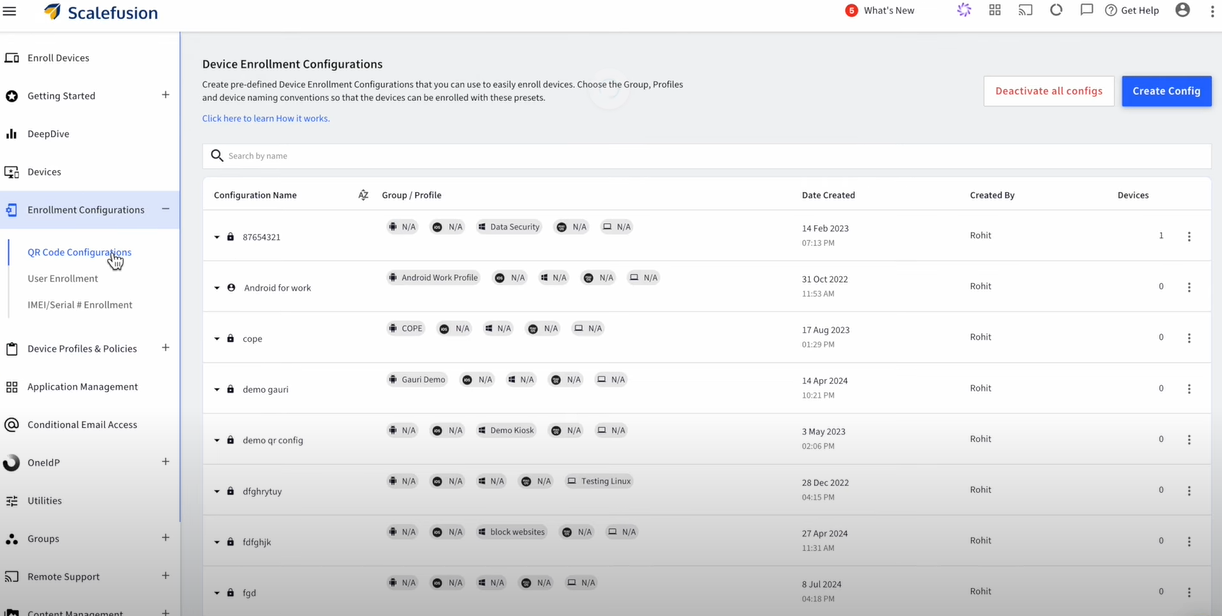
Access your Scalefusion Dashboard. Go to Getting Started > Apple Setup > ADE/DEP. Step 2: Download ADE Public Key
Click the Download Public Key button and save the ADETokenKey.pem file. Step 3: Set Up Scalefusion as an MDM Server
Log in to https://business.apple.com or https://school.apple.com/. Navigate to Preferences (under your profile name) and go to MDM Servers. Click Add to create a new MDM server. Name the MDM server (e.g., “Scalefusion”). Upload the Scalefusion ADETokenKey.pem file you downloaded. Click Save and then download the Server Token. Read more about: What is Apple Business Manager & What is Apple School Manager
Step 4: Upload the Server Token
Return to the Scalefusion Dashboard. In the ADE/DEP section, upload the Server Token file you downloaded from ABM/ASM. Click Next to complete the setup. Step 5: Assign Devices to Scalefusion
In ABM/ASM, go to Device Enrollment and select Manage Devices. Assign devices by their Serial Numbers,Order Numbers, or upload a CSV file with this information. Choose Scalefusion as the MDM server for these devices. Step 6: Sync Devices in Scalefusion
Return to the ADE/DEP section of Scalefusion. Click Sync Now to sync the assigned devices. Automatic syncing may take up to 6 hours. You can now see the synced devices listed under the Total Devices section. Read more about: What is Apple DEP
Step 7: Start Enrollment
Unbox new devices or reset existing devices. For new devices, go through the initial setup (language, Wi-Fi). For existing iOS devices, navigate to Settings > General > Reset > Reset All Content & Settings. For macOS, use CMD + R to reinstall macOS. Step 8: Complete Enrollment
After initial setup, the devices will show a Remote Management screen. Enter the required credentials (email, OTP) for User Authenticated Enrollment, if enabled. Follow the remaining steps to complete the enrollment. Step 9: Check Enrollment Status
Verify the enrollment status of your devices in the Scalefusion Dashboard under Devices. The devices will be managed automatically under the chosen configuration. This setup enables zero-touch deployment, allowing ADE devices to automatically enroll into the Apple MDM as soon as they are set up or reset.
Wrapping Up: The Future of Mac Enterprise Deployment Zero-touch deployment is more than just a convenience—it’s a transformation in how businesses manage their devices. As organizations scale, particularly those deploying a large number of Macs, the simplicity and efficiency of automating the setup process become invaluable.
With Scalefusion UEM, IT teams can streamline operations, ensure security, and maintain consistency across all devices, no matter where they are. Whether you’re deploying 10 or 1,000 Macs, this solution ensures your teams are always ready to work, right out of the box.
About Scalefusion Scalefusion’s company DNA is built on the foundation of providing world-class customer service and making endpoint management simple and effortless for businesses globally. We prioritize the needs and feedback of our customers, making sure that they are at the forefront of all decision-making processes. We are dedicated to providing comprehensive customer support services, and place emphasis on customer-centric thinking throughout the organization.
About Version 2 Digital
Version 2 Digital is one of the most dynamic IT companies in Asia. The company distributes a wide range of IT products across various areas including cyber security, cloud, data protection, end points, infrastructures, system monitoring, storage, networking, business productivity and communication products.
Through an extensive network of channels, point of sales, resellers, and partnership companies, Version 2 offers quality products and services which are highly acclaimed in the market. Its customers cover a wide spectrum which include Global 1000 enterprises, regional listed companies, different vertical industries, public utilities, Government, a vast number of successful SMEs, and consumers in various Asian cities.
“Never trust, always verify.” It’s more than just a catchy phrase, it’s the core principle behind the Zero Trust security model.
But where threats constantly evolve, how can businesses ensure they’re truly following this mandate? Are traditional security methods enough to keep up with the complexities of digital frameworks? How do you ensure that every device, user, and access point in your network is secure?
Unified endpoint management (UEM) in Zero trust security Implementing Zero-Trust with UEM From mobile phones and laptops to IoT devices, each endpoint represents a potential vulnerability. As businesses adopt the Zero Trust model, Unified Endpoint Management (UEM) appears to be a key solution. It’s not just about managing devices, it’s about continuously verifying them, controlling access, and monitoring activity to prevent unauthorized access at every turn.
Let’s find out how UEM enforces the principle of “never trust, always verify” across all endpoints, ensuring that your network remains secure in a world where trust is a luxury no one can afford.
Understanding Zero Trust Architecture Digital threats are rapidly evolving in sophistication, so relying on outdated security models that trust users and devices by default simply won’t cut it. Zero Trust flips this concept on its head, demanding rigorous checks at every level of access and interaction.
So, what exactly does Zero Trust entail? It’s about ensuring that every access request—whether from inside or outside the network—undergoes continuous verification. There’s no inherent trust based on a user’s location or device, instead, every request is treated with suspicion until proven otherwise. This means that even if a device or user is inside the corporate network, they’re not automatically granted access to all resources. Instead, access is tightly controlled and continuously validated.
Key principles of Zero Trust include:
Least Privilege Access: Users and devices are given the minimum level of access necessary to perform their functions. This reduces the risk of unauthorized access and limits the potential damage in case of a breach. Micro-Segmentation: The network is divided into smaller, isolated segments, so even if one segment is compromised, the threat is contained and doesn’t spread across the entire network. Continuous Monitoring: Regularly checking the health and behavior of users and devices helps detect anomalies and real-time potential threats, ensuring that any suspicious activity is addressed immediately. With people accessing corporate resources from different locations and devices, the traditional security perimeter has all but disappeared. This shift requires a new approach to security.
Unified Endpoint Management: Beyond Device Management UEM is an all-in-one toolkit that goes beyond the basic device management we’re used to. It’s about harmonizing and securing every device, application, and data within your business. While traditional device management might have focused solely on deploying and maintaining hardware, UEM takes a broader approach, integrating multiple aspects of IT management into a single platform.
UEM is a comprehensive solution that manages and regulates a diverse range of devices and applications. It unifies the management of mobile devices, desktops, applications, VR devices, wearables, rugged devices, digital screens, and IoT devices, all within a single platform. It’s designed to streamline the oversight of various endpoints, from smartphones and tablets to laptops and IoT devices.
But UEM doesn’t stop there; it also encompasses application management, identity management, and data security, providing a holistic view of your entire IT ecosystem.
The evolution of UEM is a testament to its growing importance. It began as Mobile Device Management (MDM), focusing on mobile devices and their security. As the IT sector evolved, so did MDM, transforming into UEM to address the complexities of managing a wider range of endpoints, ensuring that every endpoint remains secure, compliant, and optimized, regardless of where or how it’s used.
UEM and Zero Trust: The Perfect Synergy When it comes to integrating security and management, UEM and Zero Trust are the duo that complement each other seamlessly. Many CXOs now recognize that pairing UEM with Zero Trust is essential for safeguarding their companies. Here’s how UEM supports and enhances the Zero Trust model, making it a powerful ally:
1. Enforcing the Principle of Least Privilege Zero Trust is all about ensuring that users and devices have only the minimum level of access based on their level of responsibility. UEM plays an important role by meticulously managing and controlling access across all devices. It ensures that permissions are granted based on role, necessity, and context, so users get just enough access to do their job. This granular control minimizes potential risks and enforces the Zero Trust principle of least privilege effectively.
2. Continuous Monitoring and Threat Detection In the Zero Trust model, constant vigilance is key. UEM’s robust monitoring capabilities align perfectly with this need. It continuously tracks user behavior and device health, looking out for any anomalies that could indicate a threat. This real-time oversight ensures that any suspicious activity is detected and addressed promptly, keeping your network secure from emerging threats.
Scalefusion UEM further enhances this approach by enabling overall centralized visibility, allowing organizations to monitor all endpoints from a single platform. This centralization streamlines threat detection and response, making it easier to identify potential vulnerabilities and take swift action to mitigate risks.
3. Identity and Access Management (IAM) Integration Effective security requires tight integration between identity management and access controls. UEM enhances Zero Trust by working seamlessly with IAM solutions. This integration ensures that access permissions are managed consistently and securely across all endpoints, enforcing Zero Trust principles by validating every access request against strict identity and access controls. Solutions like Scalefusion OneIdP play a key role here by focusing on conditional access management, ensuring that users are granted access based on real-time conditions and policies, further strengthening the security framework.
4. Multi-Factor Authentication (MFA) MFA is a critical component of Zero Trust, adding an extra layer of security to user authentication. UEM solutions enable the implementation of MFA, requiring users to provide multiple forms of verification —such as something they know (a password), something they have (a smartphone or security token), and something they are (biometric data like a fingerprint or facial recognition). By integrating MFA with UEM, these solutions streamline the enforcement of MFA policies, ensuring compliance and security across all endpoints.
5. Single Sign-On (SSO) SSO simplifies user access by allowing individuals to log in to multiple applications with a single set of credentials, streamlining the login process and maximizing productivity.
Enterprises increasingly recognize the value of SSO for enhancing multi-application usage and centralizing user activity monitoring, which facilitates tracking resource utilization and identifying behavioral patterns. UEM solutions support SSO capabilities, improving user experience while reducing the risk of password-related vulnerabilities. This approach aligns seamlessly with Zero Trust principles by ensuring that access is managed efficiently and securely.
6. Automated Response and Remediation One of the key challenges in maintaining the Zero Trust environment is quickly responding to potential threats and vulnerabilities. UEM enhances Zero Trust by automating response and remediation processes. For instance, when a device exhibits suspicious behavior or fails to meet compliance standards, UEM can automatically take remediation actions, such as isolating the device, blocking access, or initiating a security scan. This automation supports Zero Trust’s requirement for continuous monitoring and quick responses, ensuring potential threats are managed effectively.
Future Outlook: The Role of Automation in UEM and Zero Trust 1. Automation in Zero Trust Enforcement Enforcing Zero Trust policies manually is increasingly impractical, especially for large-scale enterprises with numerous endpoints. Automation helps streamline and enhance the enforcement of Zero Trust principles. It allows for real-time compliance checks, automatic threat detection, and seamless policy application. By taking over routine tasks and monitoring, automation ensures that security measures are consistently applied, reducing human error and accelerating response times to potential threats.
2. Emerging Trends Several key trends are shaping the future of UEM and Zero Trust. The integration of Internet of Things (IoT) devices is one such trend, as these devices become more prevalent in business environments. UEM solutions are evolving to include advanced capabilities for managing and securing a wide range of connected devices, such as smart thermostats in offices and connected medical devices in healthcare, ensuring only authorized access and continuous monitoring for compliance and anomalies.
Another notable trend is the shift toward edge computing. As data processing moves closer to the source of data generation, securing these edge environments is important. UEM will increasingly focus on extending Zero Trust principles to decentralized endpoints, ensuring comprehensive protection even in the most distributed IT environment.
UEM as the Backbone of the Zero Trust Architecture UEM supports Zero Trust by ensuring continuous verification of every device, enforcing strict access controls, and maintaining constant monitoring. From automating threat responses to integrating identity management, UEM enhances the effectiveness of Zero Trust principles. By managing and securing all endpoints, Scalefusion UEM helps create a strong fortress around your digital environment, making it harder for threats to breach and move within your network.
Now is the time to assess your current security posture. It’s worth exploring how UEM in Zero Trust security can be a critical component of your strategy. With the right approach, you can walk through modern threats and complexities and secure your digital environment.
Scalefusion UEM, integrated with IAM, can help achieve this synergy seamlessly. By combining robust endpoint management with identity and access controls, Scalefusion enables you to implement Zero Trust principles efficiently, ensuring that every endpoint is continuously secured and compliant.
About Scalefusion Scalefusion’s company DNA is built on the foundation of providing world-class customer service and making endpoint management simple and effortless for businesses globally. We prioritize the needs and feedback of our customers, making sure that they are at the forefront of all decision-making processes. We are dedicated to providing comprehensive customer support services, and place emphasis on customer-centric thinking throughout the organization.
About Version 2 Digital
Version 2 Digital is one of the most dynamic IT companies in Asia. The company distributes a wide range of IT products across various areas including cyber security, cloud, data protection, end points, infrastructures, system monitoring, storage, networking, business productivity and communication products.
Through an extensive network of channels, point of sales, resellers, and partnership companies, Version 2 offers quality products and services which are highly acclaimed in the market. Its customers cover a wide spectrum which include Global 1000 enterprises, regional listed companies, different vertical industries, public utilities, Government, a vast number of successful SMEs, and consumers in various Asian cities.
Ever had an employee leave unexpectedly, and you needed to secure their device immediately? Or maybe a MacBook went missing, and you’re left worrying about the sensitive data it holds?
Situations like these are not just headaches—they’re security risks. For IT teams managing a fleet of macOS devices, ensuring that lost, stolen, or repurposed devices are wiped clean is essential to safeguard company information.
Remote wiping is a vital tool for maintaining control over your business assets. With the right solution, like Scalefusion UEM, you can remotely wipe Mac devices instantly, ensuring that sensitive data is erased without the need for physical access to the device.
Remotely Wipe Mac Devices
In this blog, we’ll dive into the importance of remote wiping, walk you through the steps to remotely wipe a macOS device using Scalefusion Mac MDM, and explore common use cases where this feature proves invaluable for businesses.
Understanding Remote Wiping on Mac: Why Is It Important?
It’s possible for an employee to leave their MacBook in a rideshare, or an ex-employee to hold onto their device a little too long. What happens to the sensitive company data on that machine? That’s where remote wiping steps in, offering an instant, secure solution.
Data security is a top priority. Losing control of a device means risking exposure to confidential information. Remote wiping allows businesses to instantly erase data from any device, no matter where it is, preventing security breaches and data leaks. It’s all about staying in control of your assets.
Whether it’s preparing a device for the next employee, protecting data on lost or stolen equipment, or managing devices at the end of their lifecycle, remote wiping ensures that your data doesn’t fall into the wrong hands. With Scalefusion UEM, you can erase MacBook remotely with ease, allowing for a seamless transition between users while maintaining security.
How to Remotely Wipe a macOS Device Using Scalefusion UEM
Step 1. Access the dashboard: Log in to the Scalefusion Dashboard and navigate to the Devices section.
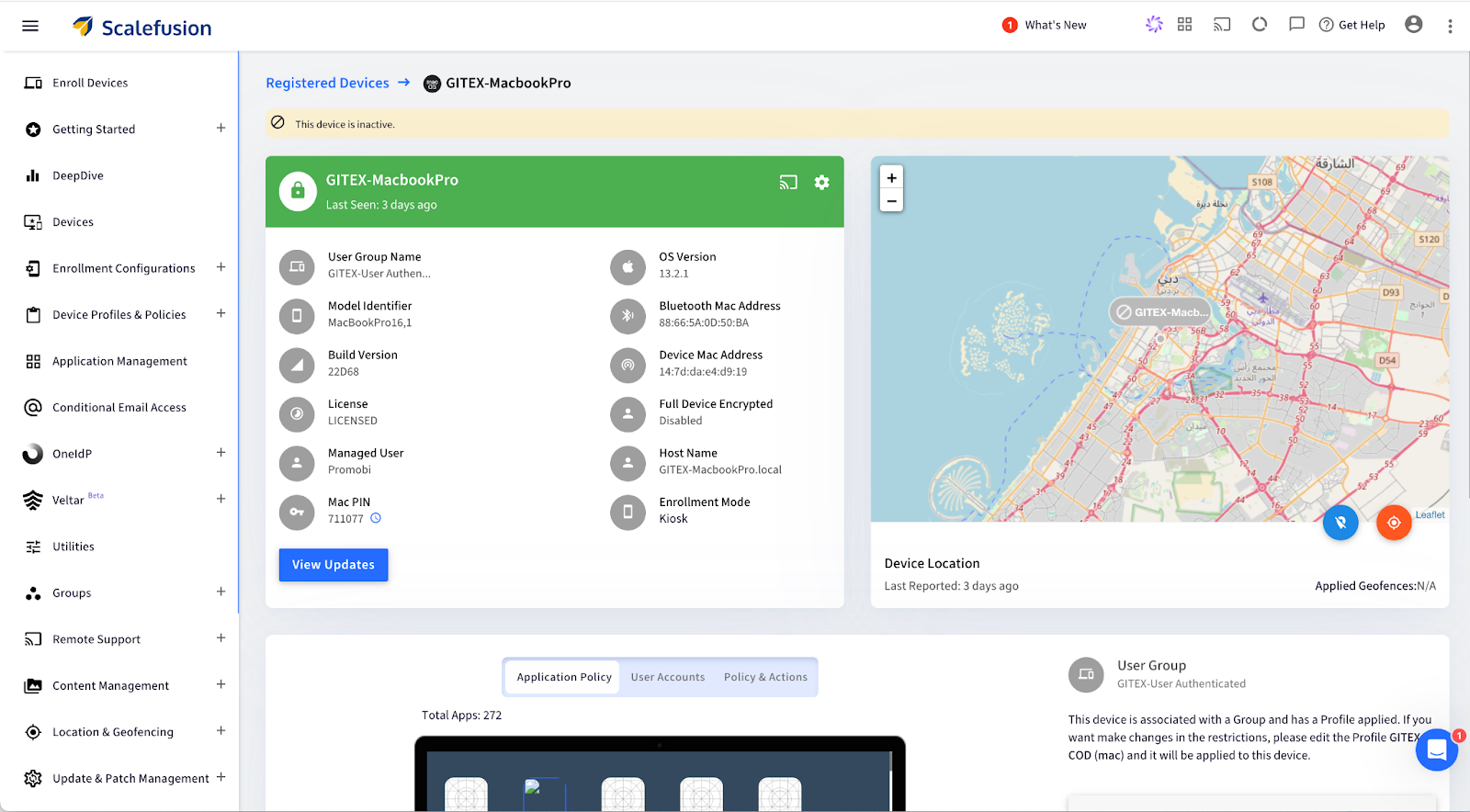
Step 2. Select the device: Click on the specific macOS device to view its details.
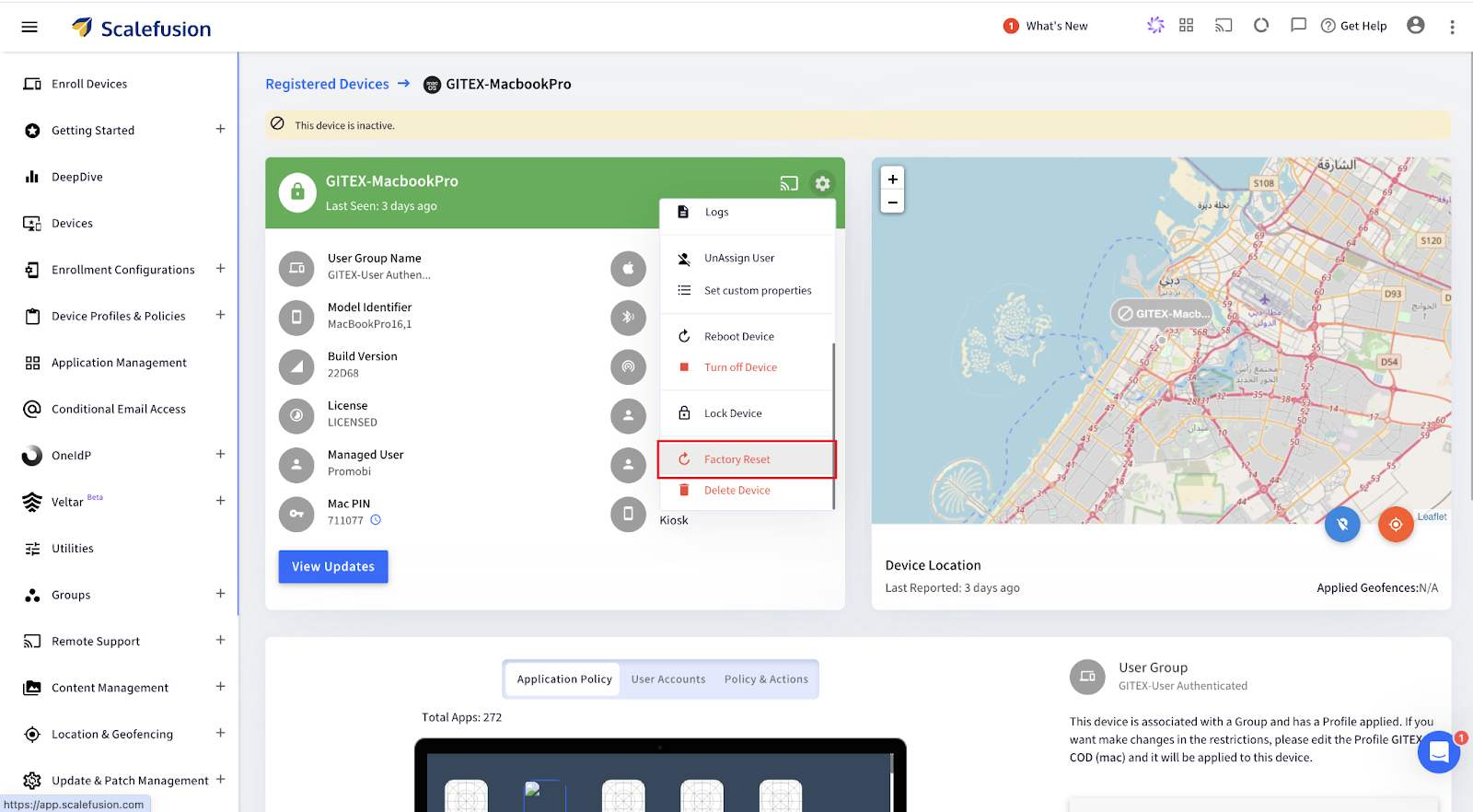
Step 3. Open Factory Reset Option: Click on the Settings icon, scroll down, and select Factory Reset from the menu options.
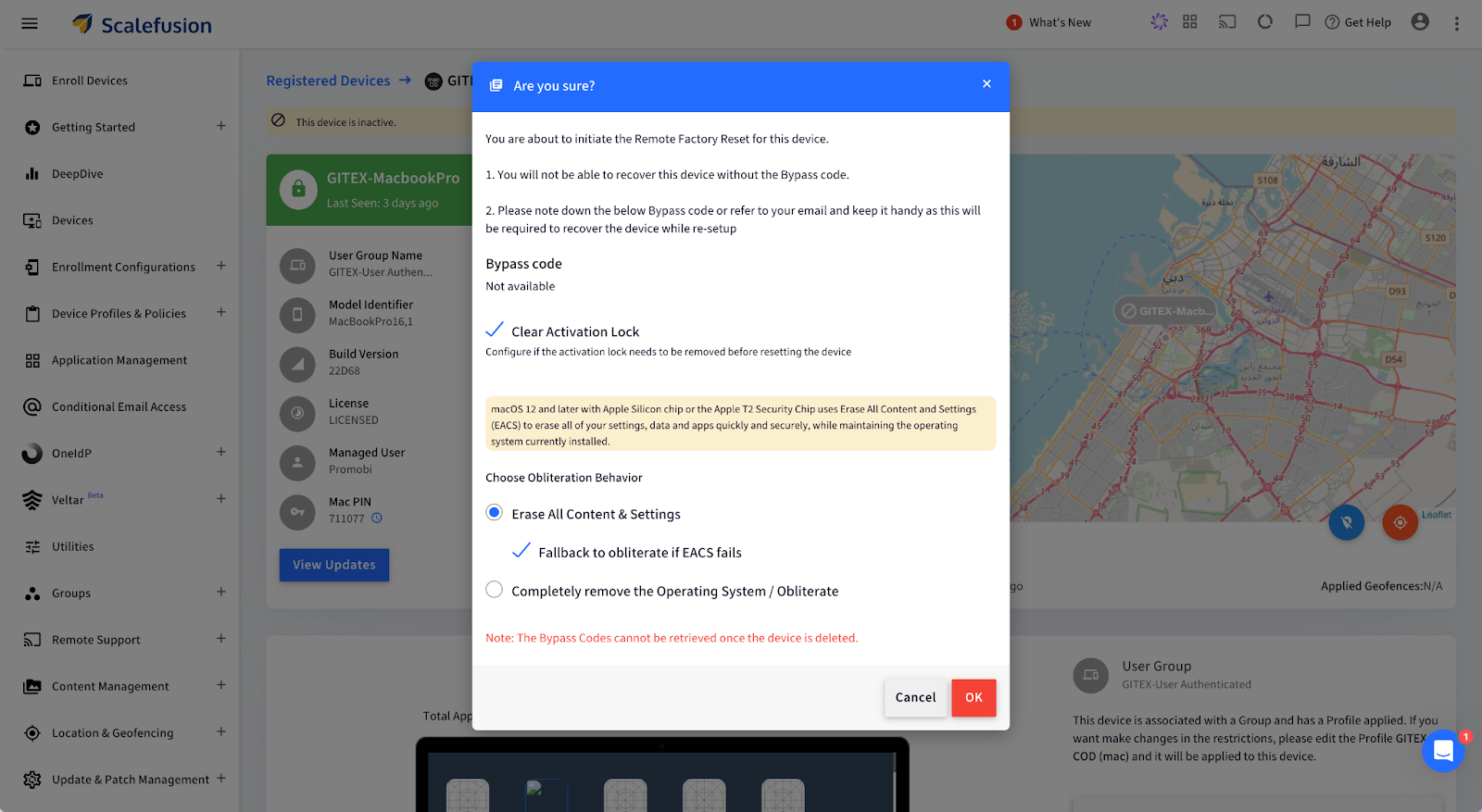
Step 4. For Apple Silicon/Intel (with T2 Security Chip):
Choose Obliteration Behavior: Select whether to erase all content, settings, and apps while retaining the operating system.
Alternatively, for Intel Mac (without T2 Security Chip):
Configure a new Mac PIN: Enter a 6-digit PIN, then confirm by clicking OK. The PIN is also emailed to the admin.
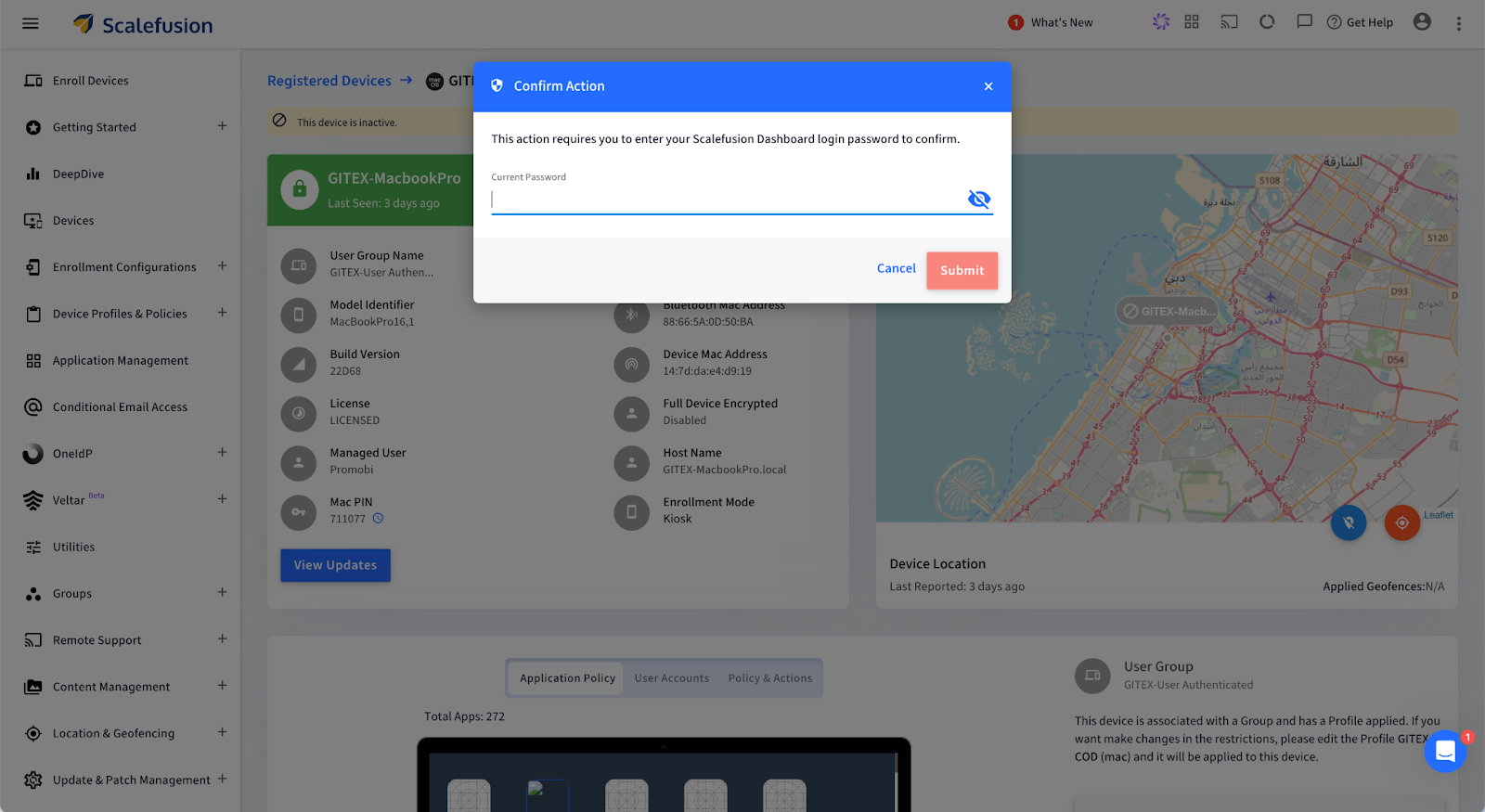
Step 5. Confirm and Submit: Enter your password and click Submit. A push notification will be sent to the device, confirming the factory reset.
Your macOS device will now be wiped remotely and restored to factory settings.
What Happens After You Remote Wipe a Mac?
Once the remote wipe is complete, the Mac device is reset to its factory state, making it fully secure and ready for its next phase. But what does that look like at an enterprise level?
Complete Data Erasure: Every piece of data, including user profiles, business applications, and sensitive information, is permanently deleted. This ensures that no traces of your company’s data remain, protecting you from potential data breaches or unauthorized access.
Operating System Reset: The macOS is restored to its original, unconfigured state, essentially taking the device back to square one. This provides a clean slate, removing all previous settings, and ensuring no configurations are left that could pose a security risk.
Ready for New User Setup: The device will display the macOS Setup Assistant, making it ready to be deployed for a new employee. This streamlines IT operations, enabling quick reassignment of devices without the hassle of manual resets.
Use Cases for Remote Wiping on Mac
Remote wiping proves invaluable in several business scenarios, helping IT teams maintain security and streamline device management. Here are some key use cases:
1. Employee Offboarding: When employees leave the company, ensuring their assigned Mac is cleared of any sensitive data is necessary. Remote wiping guarantees that no personal or business data remains on the device, allowing it to be securely redeployed to another team member without privacy risks or manual intervention.
2. Lost or Stolen Devices: Losing a company Mac can create a significant security threat, as it may contain confidential files, emails, or proprietary software. With Scalefusion’s remote wipe feature, IT admins can swiftly erase all data on the lost or stolen device, ensuring that sensitive information remains protected from unauthorized access.
3. Device Lifecycle Management: For businesses that frequently upgrade or redistribute devices, remote wiping helps maintain data security and device readiness. It ensures that each device is completely reset before being assigned to a new user, reducing risks associated with leftover data and simplifying the device management process.
Safeguard Your Mac Devices with Scalefusion UEM
Managing Mac devices in your business doesn’t have to be a headache. With Scalefusion UEM, you can handle everything from employee offboarding to lost devices with confidence. With just a few clicks, you can wipe your Mac remotely, ensuring that all sensitive data is securely erased and the device is ready for the next team member—all without breaking a sweat.
No more fretting about sensitive information lingering on devices after someone leaves or when a Mac goes missing. Scalefusion’s remote wipe feature ensures that all data is gone in an instant.
About Scalefusion Scalefusion’s company DNA is built on the foundation of providing world-class customer service and making endpoint management simple and effortless for businesses globally. We prioritize the needs and feedback of our customers, making sure that they are at the forefront of all decision-making processes. We are dedicated to providing comprehensive customer support services, and place emphasis on customer-centric thinking throughout the organization.
About Version 2 Digital
Version 2 Digital is one of the most dynamic IT companies in Asia. The company distributes a wide range of IT products across various areas including cyber security, cloud, data protection, end points, infrastructures, system monitoring, storage, networking, business productivity and communication products.
Through an extensive network of channels, point of sales, resellers, and partnership companies, Version 2 offers quality products and services which are highly acclaimed in the market. Its customers cover a wide spectrum which include Global 1000 enterprises, regional listed companies, different vertical industries, public utilities, Government, a vast number of successful SMEs, and consumers in various Asian cities.
Managing the lifecycle of industrial equipment is exhausting. Be it paperwork or keeping a log of maintenance schedules. Thankfully, with digitization, mobile devices have been replacing a lot of conventional devices on industrial floors. Rugged devices, custom devices, and modern lightweight tablets and laptops are quickly becoming popular choices to replace bulky computers or pen-paper-based operations.
Industrial Equipment Lifecycle Management with MDM
If your mobile devices are connected to your machines and sensors and if your machine overheats and is about to break down, the mobile device will quickly issue an alert and or even automatically schedule a repair!
That’s where Mobile Device Management (MDM) comes in. It’s a software that gives you complete control to manage and monitor all your critical mobile assets, remotely.
MDM provides real-time insights into all your mobile equipment for proactive monitoring.
Sounds amazing, right?
Let’s find out how you can use MDM to improve industrial equipment lifecycle management at every phase.
Phase 1: Equipment Acquisition and Integration with MDM
Acquisition is a crucial phase in the lifecycle of the equipment. Manual setup, integration hiccups, or even poor documentation can cost you big in the long run.
Mobile device management provides a streamlined and automated approach to mobile equipment onboarding. Let’s understand how:
Centralized Equipment Configuration
Let’s say you have hundreds of devices in your factory. Now, can you imagine configuring each of them manually?
No, right?
Thankfully, with MDM software, you can quickly adjust the settings of the newly acquired devices and configure them remotely from a single dashboard. Thus, you can instantly apply uniform protocols to each device.
In fact, some MDM vendors also allow you to enroll your devices using QR codes. All you have to do is scan the code and your preferred settings will be applied to them.
At the same time, you can integrate new and old devices under a unified management system so that they can communicate efficiently without any disruption in the operations.
So, if you’re adding new mobile devices to the production line, you can use MDM to ensure smooth interaction between the old and new mobile equipment.
Automated Asset Registration
MDM also automates asset registration by tagging every new device with important data like serial numbers, model types, warranty details, installation dates, etc. This eliminates inaccuracies and missed entries.
Phase 2: Equipment Usage and Operational Efficiency
Once you’ve set up your system and integrated it with MDM, it’s time to optimize it for day-to-day operations.
Here’s how MDM can help:
Streamlined Workflow Management
The biggest advantage of using MDM to manage equipment lifecycle is that it gives you centralized control over all the devices connected to your machines.
That means you can monitor how different devices interact (with machines and each other) and contribute to the overall performance, all from a single place.
Say, you run a chain of restaurants. Each outlet has order printers, inventory trackers, etc, that run on Windows, Android, iOS, macOS, ChromeOS or Linux. Now, you can’t be everywhere at once to make sure things run smoothly. But with an MDM, you get full access to monitor and adjust these devices remotely.
Be it lowering the threshold level across all devices or troubleshooting them. You can do all of that from anywhere in the world, thanks to MDM.
MDM can reduce this burden by automating monotonous and time-consuming operational tasks.
For example, instead of manually inspecting each device for faults, employees can receive instant, real-time alerts from the MDM system. As a result, they can resolve issues quickly and stay ahead of time.
Phase 3: Maintenance Management and Predictive Analytics
There’s no doubt that mobile device management helps extend the lifespan of your machines. You can it to track device performance and even stay on top of maintenance updates.
Below are three ways mobile device management helps you achieve this:
Real-time Equipment Monitoring
Monitoring the performance of your devices in real time is super important.
But we’re not just talking about whether a device is active or inactive. But if it’s giving accurate insights, communicating with other devices correctly, and so on.
With an MDM platform, you can get a 360° view of such performance metrics. As a result, you can take swift action when something goes off the track, like if there’s a battery issue or if the device’s been hacked.
Automated Maintenance Scheduling
Let’s say you have a large factory that houses at least 15 ELSCO Transformers to run everything smoothly, each connected to a mobile device. And this is besides other machines and their OS-based equipment.
So, how do you carry out routine maintenance for all such devices while staying on top of other operational tasks?
Answer: MDM software.
With MDM, you can automatically track operational hours and performance metrics for each device to decide when it needs servicing. The software also automatically schedules maintenance checks when set thresholds are crossed.
To make it easier, MDM also lets you manage and maintain different types of supported devices from a single platform. So, it doesn’t matter if you have 10 laptops, 25 mobiles, and 10+ PCs in your factory for your machines. With MDM, you can monitor each device without any hassle.
“Think of predictive analytics like your mobile device’s personal trainer. It recognizes the signs of fatigue and overexertion so that you can maintain peak performance without overworking your mobile equipment.”
[ — Vineet Gupta, Founder of 2xSaS ]
MDM runs on built-in algorithms that can predict potential issues in your equipment by considering factors like usage patterns, environmental conditions, etc.
Thus, you shift from a reactive maintenance strategy to a proactive one with enhanced safety and minimum unplanned downtimes.
Phase 4: Equipment Renewal or Disposal
As your mobile equipment reaches the end of its lifecycle, it’s time to make a tough call: Should you upgrade or replace it?
This decision can have a huge impact on the operations, costs, and sustainability of your business.
MDM equips you with all the necessary data to make the right choice. Here’s how:
Evaluating Equipment Longevity
MDM allows you to track how the mobile equipment is used, how often it needs repairs, and how well it’s performing. This information helps decide if it’s worth fixing or replacing.
For example, if a device consistently shows signs of declining precision, it’s time you replace it with a new piece.
Sustainability Considerations
If you decide to dispose of the equipment, MDM can help you find the best way to do it without costing the planet.
It can assist you in evaluating the environmental impact of the disposal and ensuring compliance with the necessary standards.
Implementation of Replacement Strategies
Additionally, you can also use MDM to make the switch to new equipment—whether that’s upgrading old devices or purchasing brand-new ones.
For example, say you wish to replace your rugged laptops with those that have a higher processing capacity. Using MDM software, you can not only start from the first phase (equipment acquisition) but also train employees regarding the change (new features).
MDM Best Practices for Improving Equipment Lifecycle Management
Besides the above four phases, you must keep the following ten tips in mind to get the most out of your mobile equipment lifecycle management with MDM:
Choose an MDM software that aligns with your industry’s needs and business objectives. Remember, customization is key. So, select a solution that offers flexibility and automation.
Customize alerts for predictive maintenance based on historical data. For example, if a mobile device tends to wear out after 30,000 hours, set an alert for 28,000 hours to stay ahead of issues.
Schedule automatic firmware and OS updates to ensure optimal device performance.
Establish feedback loops to gather suggestions from employees to interact directly with the mobile devices. This will help you configure MDM software the right way.
Regularly train your employees on how to use MDM software to reduce errors, improve workflow, and maximize benefits.
Monitor and analyze lifecycle trends consistently to make informed decisions about mobile equipment renewal, upgrades, etc.
Use digital twins to simulate various operational scenarios (like cyberattacks) and predict outcomes without putting your actual devices at risk.
Integrate MDM with your Enterprise Asset Management (EAM) system for seamless data flow between device monitoring and broader asset management activities.
Restrict device usage if it doesn’t meet the compliance criteria by setting up conditional access via the MDM software.
Conclusion
Managing industrial equipment might seem like a tough nut to crack, but it really isn’t if you have the right tools.
MDM can do wonders by automatically updating mobile equipment software, granting remote access, and even predicting repairs in mobile devices before they occur.
However, not all MDM software are equal.
Scalefusion brings the simplest yet most advanced MDM solution that can transform your industrial equipment lifecycle management.
With features like real-time location tracking, encrypted data transfer, 24/7 remote access, bulk device enrollment, etc., you can manage your mobile devices smartly.
About Scalefusion Scalefusion’s company DNA is built on the foundation of providing world-class customer service and making endpoint management simple and effortless for businesses globally. We prioritize the needs and feedback of our customers, making sure that they are at the forefront of all decision-making processes. We are dedicated to providing comprehensive customer support services, and place emphasis on customer-centric thinking throughout the organization.
About Version 2 Digital
Version 2 Digital is one of the most dynamic IT companies in Asia. The company distributes a wide range of IT products across various areas including cyber security, cloud, data protection, end points, infrastructures, system monitoring, storage, networking, business productivity and communication products.
Through an extensive network of channels, point of sales, resellers, and partnership companies, Version 2 offers quality products and services which are highly acclaimed in the market. Its customers cover a wide spectrum which include Global 1000 enterprises, regional listed companies, different vertical industries, public utilities, Government, a vast number of successful SMEs, and consumers in various Asian cities.
As businesses grow and remote work becomes the norm, it’s clear that having a variety of devices is essential to keep things running smoothly. The tricky part is ensuring these devices are secure and performing at their best.
According to a recent study[1], more than 68% of businesses have faced successful attacks on their devices that compromised their data. This statistic highlights a real challenge. While we need multiple devices to stay efficient, we can’t afford to skimp on security. It’s a balancing act that many organizations are struggling with today.
Best Practices for Endpoint Performance Monitoring
The right solution is endpoint performance monitoring, which can track and monitor all your business devices and keep them up and running at all times. In this blog post, we will explore the concept of endpoint monitoring and endpoint performance monitoring best practices.
What is Endpoint Performance Monitoring?
Endpoint performance monitoring delivers end-to-end visibility into your device inventory or endpoints. IT teams can access a complete overview of business devices running on operating systems such as Android, Windows, iOS, macOS, and Linux. With continuous tracking, analyzing, and managing of endpoints, IT administrators can:
Ensure the overall security of the business device network
Endpoint devices are vulnerable to various security threats, including malware, phishing attacks, and advanced persistent threats. Traditional monitoring systems don’t detect many of these endpoint threats. However, specialized endpoint management software can monitor your endpoints to detect signs of potential vulnerabilities, malicious activity, and unusual changes in system configurations.
Different types of endpoint devices could leave your organization vulnerable:
Smartphones
PCs
Macs
Tablets
Digital signage
mPOS devices
Wearables such as smart watches, AR/VR sets, etc
Rugged devices like handheld scanners and rugged smartphones
IoT devices
Printers and peripherals
Embedded devices such as medical devices and ATMs
Challenges of Endpoint Performance Monitoring
Monitoring the performance of endpoints, such as mobile devices, is necessary for maintaining optimal functionality and user satisfaction. However, there are several challenges that organizations face when implementing endpoint performance monitoring tools and solutions. Here are five key challenges:
Device Diversity: Modern enterprises use a wide variety of mobile devices, including smartphones, tablets, and rugged devices, running on different operating systems such as iOS, Android, and Windows. This diversity complicates the standardization of performance monitoring protocols. Each OS and device type may require specific endpoint performance monitoring tools and techniques, adding complexity to the management process.
Network Variability: All such endpoints operate across various network environments, including corporate Wi-Fi, public hotspots, and mobile data networks. Network variability can significantly impact device performance and user experience. Endpoint performance monitoring solutions must account for fluctuating network conditions and provide insights into how these variations affect device performance. There should also be a fall-back/security mechanism to manage endpoints when they are offline.
Battery Life Management: One critical aspect of mobile device performance is battery life. Unlike desktop computers, mobile devices rely heavily on battery power, and monitoring battery health and usage patterns is crucial. However, continuously monitoring device performance can be resource-intensive, potentially leading to increased battery drain.
Real-time Data Analysis: Effective performance monitoring requires real-time data analysis to quickly identify and resolve issues. However, collecting and processing telemetry data from numerous devices can strain network and processing resources. Ensuring that endpoint performance monitoring tools can handle this data influx while providing timely and actionable insights is a complex task.
Scalability: As organizations grow, the number of devices under management can increase exponentially. Scaling the performance monitoring capabilities to accommodate this growth without compromising the quality of insights is a significant challenge. The endpoint performance monitoring solution must be strong enough to handle a large fleet of devices and adaptable enough to integrate new devices and technologies seamlessly.
Traditional Performance Monitoring Systems vs. Endpoint Monitoring Security
Traditional performance monitoring systems focus on assessing the operational efficiency and health of IT infrastructure, while endpoint monitoring security emphasizes protecting devices and data from security threats. Understanding the differences between these two approaches helps organizations effectively manage and secure their IT environments.
Aspect
Traditional Performance Monitoring Systems
Endpoint Performance Monitoring
Primary Focus
Operational efficiency and system health
Device and data security
Key Metrics
Network performance
CPU usage, memory usage, threat detection, vulnerability assessment
Data Collection
System logs, performance counters
Security events, behavioral analytics
Response Action
Resource optimization, performance tuning
Incident response, threat mitigation
Integration
IT infrastructure management systems
Security information and regulatory compliance
Traditional Performance Monitoring Systems vs. Endpoint Monitoring Security
Benefits of Endpoint Performance Monitoring
Efficient Cost Savings: The repercussions of cyberattacks are severe and costly. According to a recent study[2], a data breach costs $4.45 million. In 2022, compromised business emails accounted for $2.7 billion in losses. Endpoint performance monitoring helps businesses defend against sophisticated security threats and reduce costs.
Support Remote Work: Remote work has become a top choice for many people, leading businesses to support both remote and hybrid workforces. With remote workers relying heavily on their endpoint devices for daily tasks, IT teams turn to endpoint performance monitoring to ensure a secure and efficient work environment. This approach is also crucial for frontline and field workers who often work from multiple locations, not just a single office.
Strengthen Security: With endpoint performance monitoring tools, businesses can track and monitor endpoint performance and take a proactive approach to endpoint security. This is done by analyzing real-time device analytics and receiving alerts or notifications when an unusual situation occurs.
Gain Actionable Insights: IT teams can gain actionable insights into the overall health and performance of their devices with endpoint performance monitoring solutions, with their telemetry information providing capabilities. To unlock precise information on the endpoint devices, it’s best to choose an endpoint performance monitoring tool that offers real-time data from a single pane of glass.
Enhanced Employee Satisfaction: It’s very difficult to execute your day-to-day tasks from a device that is lagging or not performing as required. For instance, if a device’s battery is draining continuously, then it’s important to make some needed adjustments to the device. Endpoint performance monitoring tools provide these insights to the IT teams so they can detect and respond to any performance issues. This rapid response improves employee productivity and satisfaction.
Improved customer satisfaction: By ensuring that endpoint devices operate efficiently and securely, businesses can provide a seamless experience for their customers, leading to higher satisfaction and loyalty.
Finding the Right Way: Best Practices for Endpoint Performance Monitoring
Endpoint performance monitoring comes with numerous benefits to strengthen IT teams to effectively track and monitor device performance. Here are some of the best practices businesses can use to execute efficient endpoint monitoring:
Get Automated Alerts with Real-Time Device Analytics: The easiest way to get the most precise information from endpoint devices is to receive real-time data. Live information reflects what is happening on the endpoints, like battery usage, CPU usage, data usage, geofence breaches, and security incidents. These insights come in handy for monitoring and analysis purposes.
Monitor All Sorts of Endpoint Devices: Almost all organizations use devices that run on the Windows or Android operating systems, but businesses still need to monitor their endpoints to maintain excellent device performance. If a small number of devices run on iOS or macOS, they are connected to your device networks and can get compromised if not monitored properly. Monitor and manage all types of devices to ensure the health and safety of business devices.
Track and Monitor Every Device on the Business Network: With remote or hybrid workforces and BYOD policies, it can be difficult to manage each device on your business network. However, businesses need to manage every device. All it takes is one unsecured device to invite all sorts of security threats and malicious attacks.
Unlock the Bigger Picture with a Single Dashboard: With a single unified dashboard, IT teams can see all the critical information from the endpoints. This means no more switching between multiple screens or interfaces and attempting to gather and organize data to analyze. This way, business leaders can access the big picture for improved decision-making and business scalability.
Unified Endpoint Management: Information gathering from various tools can become stressful at times. Save time and boost efficiency with a unified endpoint management solution that offers all the endpoint monitoring and management tools you need in a single solution.
How Scalefusion UEM Enhances Endpoint Performance Monitoring for Businesses
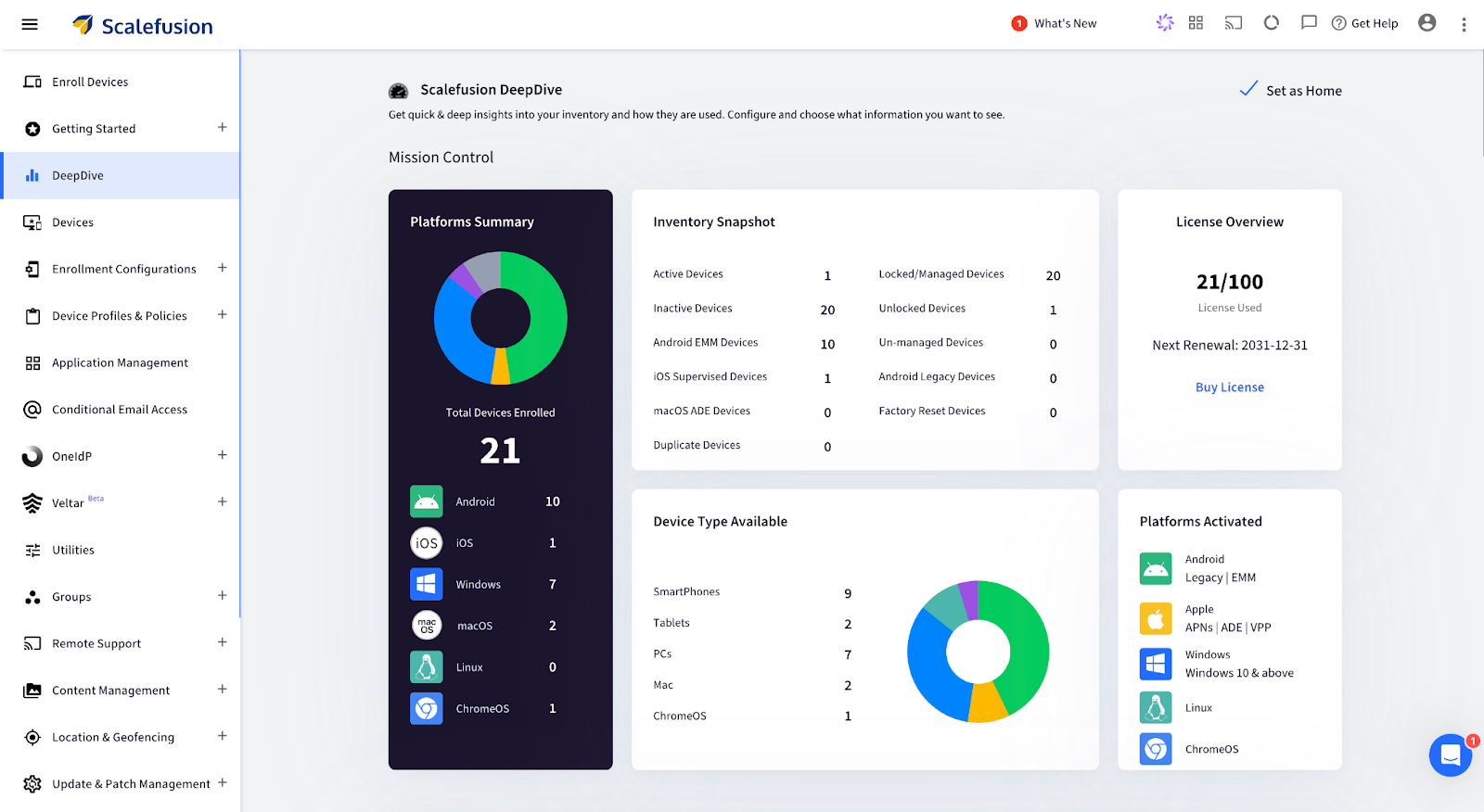
Scalefusion UEM offers businesses far-reaching tools to manage and monitor their diverse fleet of devices effectively. With a clear overview of the total devices enrolled across multiple platforms such as Android, iOS, Windows, macOS, and Linux, businesses can ensure that all endpoints are accounted for and properly managed. The platform’s inventory snapshot provides crucial insights into the status of active, inactive, locked, and managed devices, allowing IT administrators to quickly identify and address performance issues. This real-time visibility is essential for maintaining operational efficiency and ensuring that all devices are performing optimally.
Additionally, Scalefusion UEM’s violation overview, including geofence breaches, security incidents, SIM swaps, and low battery notifications, enhances device security and performance management. By identifying and addressing these issues promptly, businesses can mitigate risks and prevent potential disruptions. Scalefusion also ensures that devices remain secure with features like password policy and file encryption, further contributing to overall performance. These capabilities highlight how Scalefusion UEM helps businesses monitor endpoint performance and enhances security and operational efficiency, ensuring a seamless and productive digital environment.
The Future of Endpoint Management with Scalefusion
As businesses continue to navigate the complexities of managing a diverse array of devices, Scalefusion UEM stands out as a powerful solution that adapts to evolving needs. By providing extensive visibility, security, and performance monitoring, Scalefusion empowers organizations to maintain optimal device functionality and streamline operations. With its intuitive interface and powerful features, Scalefusion is poised to support businesses in their journey towards efficient and secure endpoint management, paving the way for a more connected and productive future.
Get in touch with our experts for a demo. Sign up for a 14-day free trial.
About Scalefusion Scalefusion’s company DNA is built on the foundation of providing world-class customer service and making endpoint management simple and effortless for businesses globally. We prioritize the needs and feedback of our customers, making sure that they are at the forefront of all decision-making processes. We are dedicated to providing comprehensive customer support services, and place emphasis on customer-centric thinking throughout the organization.
About Version 2 Digital
Version 2 Digital is one of the most dynamic IT companies in Asia. The company distributes a wide range of IT products across various areas including cyber security, cloud, data protection, end points, infrastructures, system monitoring, storage, networking, business productivity and communication products.
Through an extensive network of channels, point of sales, resellers, and partnership companies, Version 2 offers quality products and services which are highly acclaimed in the market. Its customers cover a wide spectrum which include Global 1000 enterprises, regional listed companies, different vertical industries, public utilities, Government, a vast number of successful SMEs, and consumers in various Asian cities.
No one likes this situation where you’re handing your phone to a friend to show them a video, but they start scrolling further. What about personal space? To avoid this, you can use Android screen pinning, a feature that locks your device to just one app, ensuring that your friend can only view the specific video and nothing else. It’s a simple and effective solution for personal use, giving you comfort in situations like this.
But now, think about this on a larger scale. Say you’re managing devices for a company. You need those devices to run only specific apps or tools, like a self-service kiosk or point-of-sale system, while keeping everything else out of reach. In this case, Android Screen Pinning might not be enough. With solutions like Scalefusion MDM, you can lock down devices to one or more designated apps with advanced control and security features, making it a perfect solution for business environments.
What is Android Screen Pinning?
In this blog, we’ll explore how Android screen pinning works and its benefits for personal use, but also why it might fall short in a business setting. We’ll look into how Scalefusion MDM’s Kiosk Mode offers a more comprehensive solution for managing and securing devices in a corporate environment.
What is Android Screen Pinning?
Android screen pinning is a handy feature that lets you lock your device to a single app. Think of it like putting your phone in “museum mode” where you can only interact with one app, and everything else is off-limits. It’s perfect for situations where you want to show someone just one thing on your device without them accidentally navigating away or accessing other apps.
When you activate screen pinning, the app you choose stays on the screen, and the user can’t swipe away to other apps or settings. If you want to switch apps or exit screen pinning, you’ll need to use a PIN, pattern, or password. This feature is available on devices running Android 5.0 Lollipop and later, making it a simple way to ensure that a device stays focused on a specific task or app.
Benefits of Screen Pinning on Android Devices
Here are some key benefits of using Screen Pinning on Android devices:
Focused Usage: Screen Pinning allows you to lock your device to a single app, ensuring users stay within the intended application without accidentally navigating away. This is especially useful for presentations or interactive kiosks.
Simple Setup: The use of Screen Pinning on Android devices is straightforward and can be activated easily through the device’s settings, making it accessible for users of all levels.
Enhanced Privacy: By locking the device to one app, Screen Pinning helps prevent unauthorized access to other apps and personal information, enhancing user privacy.
Versatile Application: Ideal for scenarios like public kiosks or dedicated information terminals where restricting device access to a single app is essential.
Cost-Free Solution: Screen Pinning is a built-in feature available at no additional cost on Android devices running version 5.0 Lollipop and later.
How to Set Up Screen Pinning on Android Devices
Turn on Screen Pinning
To enable Screen Pinning on an Android device, follow these steps:
Access Settings: Open the Settings app on your device.
Navigate to Security: Scroll down and tap on Security or Security & Location, depending on your device.
Advanced Settings: Under Advanced, look for Screen Pinning.
Enable Screen Pinning: Toggle the switch to turn on Screen Pinning. If you want added security, ensure that you enable the option to require a PIN, pattern, or password before unpinning.
How to Pin an App on Android Devices
Pinning an app to the screen varies slightly depending on your device’s Android version:
For devices running Android 8.1 and below:
Open the App: Launch the app you want to pin.
Tap Overview: Tap the Overview button (the square button at the bottom of the screen).
Pin the App: Swipe up to reveal the Pin icon at the bottom right corner of the app’s window. Tap it to pin the app.
For devices running Android 9.0 and above:
Open the App Overview: Swipe up from the bottom of the screen to the middle to open the App Overview.
Select the App: Locate the app you want to pin and tap on its icon at the top of the window.
Pin the App: Tap Pin to lock the app to the screen.
How to Unpin Apps on Android Devices
Unpinning the screen depends on your device’s system navigation settings:
Gesture Navigation:
Swipe up and hold from the bottom of the screen until the app is unpinned.
2-Button Navigation:
Touch and hold the Back and Home buttons simultaneously.
3-Button Navigation:
Touch and hold the Back and Overview buttons at the same time.
If a PIN, pattern, or password is set, you will be prompted to enter it before the screen is unpinned, ensuring an additional layer of security.
Why Screen Pinning Falls Short for Business Use
While screen pinning on Android devices is a convenient feature for individual users, it presents several challenges when applied in a business or organizational context. Below are the limitations or disadvantages of using Android screen pinning:
Lack of Centralized Control
Screen Pinning requires manual activation on each device, which becomes impractical when managing multiple devices across an organization. There’s no centralized management or ability to enforce pinning settings remotely, making it difficult for IT admins to maintain consistency.
Security Vulnerabilities
Although Screen Pinning restricts access to a single app, it is not foolproof. Users can potentially bypass the pinning with a few steps, especially if a PIN or password is not set, leading to unauthorized access to other apps and sensitive data.
Limited Customization and Flexibility
Screen Pinning does not offer the customization needed for varied business use cases. For example, it cannot lock devices into multiple apps or allow for the customization of the device interface, which is essential for creating a seamless user experience in environments like retail or customer service.
Scalability Challenges
As organizations grow and their device fleets expand, the manual nature of Screen Pinning becomes a significant bottleneck. Scaling up requires a solution that can handle mass deployment and management, which Screen Pinning alone cannot provide.
No Remote Management
In a business setting, remote management of devices is crucial for troubleshooting, updates, and maintaining security. Screen Pinning lacks the capability for remote control or monitoring, making it less suitable for organizations that need to manage devices across various locations.
Why Choose Scalefusion MDM Over Android Screen Pinning?
Scalefusion MDM offers a more robust solution with its Kiosk Mode, along with several other features that make it the superior choice for businesses.
Scalefusion Kiosk Mode
Scalefusion MDM’s Kiosk Mode is a powerful alternative to Android screen pinning, providing better functionality and control over devices. Unlike basic screen pinning, kiosk mode allows businesses to lock down devices to a single app or a set of apps, preventing unauthorized access to other features or settings. This ensures that devices are used solely for their intended purpose, whether it’s for customer engagement, employee tasks, or digital signage.
Custom Branding
Scalefusion offers branding customization features, allowing businesses to align their device displays with their corporate identity. In addition to screen pinning, enterprises can configure elements such as home screen and lock screen wallpapers, logos, fonts and font sizes, color schemes, and even user interface settings, including notifications. This ensures a seamless and cohesive visual experience across all devices, reflecting the company’s branding.
Bulk Provisioning and Automation
Managing a large number of devices manually can be time-consuming and prone to errors. Scalefusion MDM simplifies this process with its bulk provisioning and automation capabilities. You can provision multiple devices at once, apply consistent configurations, and automate routine tasks, significantly reducing manual effort and ensuring that all devices are set up correctly and efficiently.
Remote Management
Scalefusion MDM offers comprehensive remote management capabilities, allowing IT admins to troubleshoot and manage devices without needing physical access. Whether it’s pushing updates, changing settings, or locking down a device in case of loss or theft, Scalefusion’s remote management tools provide the flexibility and control that businesses need to maintain their device fleet securely and efficiently.
Security Enhancements
Security is a critical concern for businesses, and Scalefusion MDM offers a suite of advanced security features that go beyond what screen pinning can provide. Features such as Lost Mode, remote wipe, and custom settings apps ensure that devices remain secure, even in the event of loss or unauthorized access. These additional layers of security help protect sensitive business data and maintain compliance with industry regulations.
Cross-Platform Support
Scalefusion MDM provides cross-platform support. While Android screen pinning is limited to Android devices, Scalefusion MDM allows you to manage Android, iOS, Windows, macOS, ChromeOS, and Linux devices all from a single dashboard. This unified solution is particularly beneficial for businesses that operate with a diverse range of devices, ensuring consistency and control across the board.
Upgrade from Screen Pinning to Scalable Kiosk Mode with Scalefusion
Scalefusion MDM not only addresses the limitations of Android screen pinning but also offers a comprehensive, scalable solution for managing devices in a business environment.
If you’re looking for a more secure solution than Android Screen Pinning, explore Scalefusion MDM. With advanced features like Kiosk Mode, cross-platform support, and enhanced security, Scalefusion MDM is designed to meet the needs of modern businesses.
Contact our experts for more information and start your 14-day free trial today!
About Scalefusion Scalefusion’s company DNA is built on the foundation of providing world-class customer service and making endpoint management simple and effortless for businesses globally. We prioritize the needs and feedback of our customers, making sure that they are at the forefront of all decision-making processes. We are dedicated to providing comprehensive customer support services, and place emphasis on customer-centric thinking throughout the organization.
About Version 2 Digital
Version 2 Digital is one of the most dynamic IT companies in Asia. The company distributes a wide range of IT products across various areas including cyber security, cloud, data protection, end points, infrastructures, system monitoring, storage, networking, business productivity and communication products.
Through an extensive network of channels, point of sales, resellers, and partnership companies, Version 2 offers quality products and services which are highly acclaimed in the market. Its customers cover a wide spectrum which include Global 1000 enterprises, regional listed companies, different vertical industries, public utilities, Government, a vast number of successful SMEs, and consumers in various Asian cities.
ProMobi Technologies today announced that Scalefusion- its leading unified endpoint management solution (UEM), has now launched support for ChromeOS device management. This addition reinforces Scalefusion’s commitment to offering a versatile multi-OS management platform that caters to the diverse needs of modern businesses.
With the integration of ChromeOS, Scalefusion enables IT administrators to streamline the management of ChromeOS devices alongside Windows, macOS, Android, and Linux, simplifying the complexities of multi-OS environments.
ChromeOS has seen significant adoption across industries, from education to enterprise, thanks to its balance of affordability, speed, and security. Recognizing this growing trend, Scalefusion’s new ChromeOS device management provides organizations with the ability to provision, secure, and monitor ChromeOS devices seamlessly through the same intuitive platform used for their existing device ecosystems.
Scalefusion’s ChromeOS management empowers businesses to streamline device management by integrating ChromeOS into their existing device strategy. With Scalefusion’s unified platform, IT administrators can boost productivity by providing a consistent, unified experience for users across all platforms. Whether organizations are deploying Chromebooks in educational settings or managing ChromeOS devices for remote workforces, Scalefusion makes it simple to provision, secure, and monitor these devices—all from a single dashboard. With the addition of ChromeFlex, businesses can repurpose existing PCs and Macs by converting them to ChromeOS devices, further extending the life of their hardware while maintaining seamless management through Scalefusion’s unified platform.
Sriram Kakarala, Chief Product Officer at Scalefusion, highlighted the importance of this new addition: “With the rise of ChromeOS in diverse sectors, we saw a clear opportunity to enhance the Scalefusion platform. By adding ChromeOS support, we are delivering on our promise to simplify device management for our customers, regardless of which operating systems they choose to deploy.”
Scalefusion’s integration aims to provide organizations with a straightforward approach to managing their multi-OS device ecosystems. Request a free trial of this release by setting up a demo of Scalefusion for ChromeOS here.
About Scalefusion
ProMobi Technologies provides a leading Unified Endpoint Management solution under the brand Scalefusion. Scalefusion UEM allows organizations to secure and manage endpoints, including smartphones, tablets, laptops, rugged devices, POS and digital signage, and apps and content. It supports the management of Android, iOS, macOS, Windows, Linux, and ChromeOS devices and ensures streamlined device management operations with Scalefusion Remote Troubleshooting.
More than 8000 companies worldwide are unlocking their true potential using Scalefusion, which is used across various industries, such as Transportation & Logistics, Retail, Education, Healthcare, Manufacturing, Construction & Real Estate, Hospitality, Software & Telecom, Financial Services, and others.
About Scalefusion Scalefusion’s company DNA is built on the foundation of providing world-class customer service and making endpoint management simple and effortless for businesses globally. We prioritize the needs and feedback of our customers, making sure that they are at the forefront of all decision-making processes. We are dedicated to providing comprehensive customer support services, and place emphasis on customer-centric thinking throughout the organization.
About Version 2 Digital
Version 2 Digital is one of the most dynamic IT companies in Asia. The company distributes a wide range of IT products across various areas including cyber security, cloud, data protection, end points, infrastructures, system monitoring, storage, networking, business productivity and communication products.
Through an extensive network of channels, point of sales, resellers, and partnership companies, Version 2 offers quality products and services which are highly acclaimed in the market. Its customers cover a wide spectrum which include Global 1000 enterprises, regional listed companies, different vertical industries, public utilities, Government, a vast number of successful SMEs, and consumers in various Asian cities.
Businesses across various industries face a common challenge: managing their IT infrastructure effectively while focusing on core operations.
This challenge is particularly pronounced in the healthcare, finance, education, and retail industries, where reliable IT support can be scarce and budget-tight and work environments increasingly dispersed.
Mobile Device Management for MSPs
That’s where Managed Service Providers, or MSPs, come into the picture. They provide various IT and IT management services, with Mobile Device Management (MDM) being a key offering among them. MDM for MSPs isn’t just about keeping devices secure and up-to-date; it’s about empowering businesses to walk through compliance requirements, and data security confidently.
For example, consider a healthcare provider managing patient data across multiple devices, a financial institution safeguarding client information with security measures, or a retail operation maintaining smooth transactions and customer interactions. All of this is possible thanks to MSPs’ strategic approach to managing client devices.
In this blog, we will discuss the pivotal role of MDM service providers for MSPs. We will explore how MSPs leverage MDM solutions to streamline operations, improve security protocols, and support businesses in achieving their goals without the burden of IT complexities.
Common Challenges in Device Management: Need for MSP-driven MDM
1. Device Diversity and Compatibility Issues
MSPs often deal with a wide range of client devices across different operating systems, versions, and configurations. Seamlessly integrating these diverse devices into a unified management framework can be challenging and time-consuming.
2. Security Threats and Data Breaches
With the proliferation of cyber threats, MSPs must safeguard client devices from malware, phishing attacks, and other security vulnerabilities. Data breaches can have severe consequences, including legal liabilities and damage to client trust, making security measures a top priority.
3. Manual Device Management Complexities
Traditional, manual methods of managing devices are inefficient and prone to errors. MSPs struggle with the time and effort required to manually configure, update, and troubleshoot devices across multiple clients and locations.
4. Inefficient Troubleshooting and Support Processes
Resolving device issues remotely or on-site can be challenging due to limited visibility into device performance and user behavior. MSPs need streamlined processes and tools for proactive monitoring, quick diagnostics, and responsive support to minimize downtime and client disruption.
Strategic Approach to Managing Client Devices
1. Needs Assessment and Client Consultation
To effectively support clients, MSPs should begin by conducting thorough assessments of their IT environments and consulting closely with businesses to identify precise needs and pain points. This process involves analyzing existing device setups, evaluating security requirements, and understanding industry-specific compliance mandates.
With the help of a suited MDM solution, MSPs ensure their services align perfectly with client goals, enhancing operational effectiveness and security while addressing the challenges unique to each organization. This personalized approach increases client satisfaction and lays the groundwork for long-term, strategic IT management partnerships.
2. Selection of the Right MDM Solution
When selecting the ideal MDM solution for clients, MSPs should undertake a rigorous evaluation process. This involves comparing various MDM options based on their features, scalability, security protocols, and compatibility with client devices. MSPs should consider whether a cloud-based or on-premise MDM solution best suits the client’s preferences and existing infrastructure.
Also, it is important to emphasize choosing solutions equipped with reporting, analytics tools, and remote management capabilities. This strategic selection ensures the chosen MDM solution meets immediate needs and supports long-term scalability.
3. Customization and Configuration
MSPs must focus on customization and configuration when implementing MDM solutions. This approach helps ensure alignment with client-specific policies, compliance requirements, and security protocols. By meticulously configuring device policies, user roles, and access controls, MSPs can guarantee secure and efficient device management.
Implementing automated workflows for tasks such as device provisioning, updates, and compliance checks is essential to streamlining operations and enhancing overall IT management effectiveness for clients. This strategic approach strengthens security measures and cultivates a digital environment that meets each client’s precise operational needs.
4. Device Enrollment and Provisioning
For effective device management, MSPs should implement streamlined enrollment processes to quickly onboard client devices, including those in BYOD (Bring Your Own Device) scenarios.
Utilizing zero-touch provisioning and automated configuration, which includes OOB (Out-of-the-box) setups, is essential to minimize manual effort and accelerate deployment times. It is important to ensure all devices are properly enrolled and configured before being handed over to end users.
5. Security Management
MSPs need to deploy comprehensive security measures, including encryption, remote wipe capabilities, and secure access controls, to protect client devices. Regular updates to security policies are important to address emerging threats.
Real-time device security monitoring and swift responses to potential breaches or vulnerabilities are vital for continuous protection and client trust. This proactive approach to security management helps safeguard sensitive data and strengthen the overall IT infrastructure.
6. Continuous Monitoring and Support
MSPs need to establish continuous monitoring practices to track device performance, usage patterns, and compliance. Providing proactive support through remote troubleshooting, automated alerts, and quick resolution of issues is essential for maintaining optimal device functionality.
Maintaining open communication channels with clients for ongoing feedback and support ensures their needs are met promptly and effectively, developing a strong, collaborative relationship.
7. Reporting and Analytics
MSPs must utilize the reporting and analytics features of an MDM solution to generate detailed insights into device usage, compliance, and performance. Sharing regular reports with clients demonstrates the value of MDM and highlights areas for improvement.
Leveraging analytics to identify trends helps optimize device management strategies and overall service delivery. This data-driven approach ensures MSPs can continuously improve their services and better meet their clients’ needs.
8. Strategic Partnerships and Collaboration
MSPs need to form strategic partnerships with leading MDM providers to access the latest technologies and support. Collaborating with clients for solutions that align with their long-term goals and objectives ensures the services provided are relevant and effective.
By developing a collaborative relationship, MSPs can position themselves as trusted advisors in device management, enhancing client trust and satisfaction. This approach improves service quality and strengthens the overall client-MSP partnership.
MDM: Essential for MSP Success
Corporate mobile device management is crucial for the security, efficiency, and compliance of client devices. MDM empowers MSPs to address challenges such as device diversity, security threats, and manual management complexities. By adopting a strategic approach to MDM, MSPs can deliver solutions that can improve client operations and satisfaction.
MSPs should explore comprehensive MDM solutions like Scalefusion to stay ahead of evolving IT demands. Scalefusion offers advanced features such as remote troubleshooting, automated updates, and robust security protocols, enabling MSPs to efficiently manage diverse client device environments.
Schedule a demo with our experts and start a 14-day free trial to experience the full benefits firsthand!
About Scalefusion Scalefusion’s company DNA is built on the foundation of providing world-class customer service and making endpoint management simple and effortless for businesses globally. We prioritize the needs and feedback of our customers, making sure that they are at the forefront of all decision-making processes. We are dedicated to providing comprehensive customer support services, and place emphasis on customer-centric thinking throughout the organization.
About Version 2 Digital
Version 2 Digital is one of the most dynamic IT companies in Asia. The company distributes a wide range of IT products across various areas including cyber security, cloud, data protection, end points, infrastructures, system monitoring, storage, networking, business productivity and communication products.
Through an extensive network of channels, point of sales, resellers, and partnership companies, Version 2 offers quality products and services which are highly acclaimed in the market. Its customers cover a wide spectrum which include Global 1000 enterprises, regional listed companies, different vertical industries, public utilities, Government, a vast number of successful SMEs, and consumers in various Asian cities.
ProMobi Technologies today announced that Scalefusion- its leading unified endpoint management solution (UEM), has now launched support for ChromeOS device management. This addition reinforces Scalefusion’s commitment to offering a versatile multi-OS management platform that caters to the diverse needs of modern businesses.
With the integration of ChromeOS, Scalefusion enables IT administrators to streamline the management of ChromeOS devices alongside Windows, macOS, Android, and Linux, simplifying the complexities of multi-OS environments.
ChromeOS has seen significant adoption across industries, from education to enterprise, thanks to its balance of affordability, speed, and security. Recognizing this growing trend, Scalefusion’s new ChromeOS device management provides organizations with the ability to provision, secure, and monitor ChromeOS devices seamlessly through the same intuitive platform used for their existing device ecosystems.
Scalefusion’s ChromeOS management empowers businesses to streamline device management by integrating ChromeOS into their existing device strategy. With Scalefusion’s unified platform, IT administrators can boost productivity by providing a consistent, unified experience for users across all platforms. Whether organizations are deploying Chromebooks in educational settings or managing ChromeOS devices for remote workforces, Scalefusion makes it simple to provision, secure, and monitor these devices—all from a single dashboard. With the addition of ChromeFlex, businesses can repurpose existing PCs and Macs by converting them to ChromeOS devices, further extending the life of their hardware while maintaining seamless management through Scalefusion’s unified platform.
Sriram Kakarala, Chief Product Officer at Scalefusion, highlighted the importance of this new addition: “With the rise of ChromeOS in diverse sectors, we saw a clear opportunity to enhance the Scalefusion platform. By adding ChromeOS support, we are delivering on our promise to simplify device management for our customers, regardless of which operating systems they choose to deploy.”
Scalefusion’s integration aims to provide organizations with a straightforward approach to managing their multi-OS device ecosystems. Request a free trial of this release by setting up a demo of Scalefusion for ChromeOS here.
About Scalefusion
ProMobi Technologies provides a leading Unified Endpoint Management solution under the brand Scalefusion. Scalefusion UEM allows organizations to secure and manage endpoints, including smartphones, tablets, laptops, rugged devices, POS and digital signage, and apps and content. It supports the management of Android, iOS, macOS, Windows, Linux, and ChromeOS devices and ensures streamlined device management operations with Scalefusion Remote Troubleshooting.
More than 8000 companies worldwide are unlocking their true potential using Scalefusion, which is used across various industries, such as Transportation & Logistics, Retail, Education, Healthcare, Manufacturing, Construction & Real Estate, Hospitality, Software & Telecom, Financial Services, and others.
About Scalefusion Scalefusion’s company DNA is built on the foundation of providing world-class customer service and making endpoint management simple and effortless for businesses globally. We prioritize the needs and feedback of our customers, making sure that they are at the forefront of all decision-making processes. We are dedicated to providing comprehensive customer support services, and place emphasis on customer-centric thinking throughout the organization.
About Version 2 Digital
Version 2 Digital is one of the most dynamic IT companies in Asia. The company distributes a wide range of IT products across various areas including cyber security, cloud, data protection, end points, infrastructures, system monitoring, storage, networking, business productivity and communication products.
Through an extensive network of channels, point of sales, resellers, and partnership companies, Version 2 offers quality products and services which are highly acclaimed in the market. Its customers cover a wide spectrum which include Global 1000 enterprises, regional listed companies, different vertical industries, public utilities, Government, a vast number of successful SMEs, and consumers in various Asian cities.
Just-in-time (JIT) paradigm reforms the concept of identity and access management by emphasizing efficiency and security through time-sensitive access control and optimal resource provisioning.
It focuses on providing access and resources exactly when they are needed, rather than pre-allocating them in advance. This approach aligns with modern IT demands, where flexibility and precision are crucial.
Difference between Just-in-Time Provisioning vs Just-in-Time Privilege
JIT ensures that users receive permissions only for the duration necessary to complete their tasks. This minimizes the window of opportunity for unauthorized access and reduces the potential attack surface.
This blog will provide a comparative overview of JIT provisioning and JIT privileged access, highlighting how they work, their key components, benefits, and challenges.
What is Just-in-Time Provisioning?
Just-in-time (JIT) provisioning automates the creation of user accounts for single-sign-on (SSO) powered web applications using the security assertion markup language (SAML) protocol. When a new user attempts to log into an authorized app for the first time, JIT provisioning triggers the transfer of necessary information from the identity provider to the application.
This process of information transfer eliminates the need for manual account setup, significantly reducing administrative tasks and enhancing productivity. JIT provisioning ensures a seamless log-in experience for new users while maintaining high security and efficiency by streamlining account creation
How does it Work?
To establish just-in-time (JIT) provisioning IT admins need to configure an SSO connection between an identity provider and the target service provider (web application) and include the necessary user attributes that the service provider requires.
When a new user logs in, the identity provider sends the required information to the service provider via SAML assertions. This automatically creates the user’s account without manual intervention.
To implement JIT provisioning, administrators can use a centralized cloud identity provider or an SSO provider integrated with their existing directory. Moreover, the target service provider (web application) must also support JIT provisioning to ensure smooth operation.
JIT provisioning centralizes the application of authorization policies, providing log-in access based on user roles or groups. For instance, when a developer logs in, they automatically receive all the permissions associated with the developer role, ensuring they have immediate access to the required tools and resources.
Use Cases
Just-in-time (JIT) provisioning is particularly useful for industries with high turnover rates, a need for rapid onboarding, and significant user access management needs. JIT provisioning is most useful for the following industries:
Knowledge Worker: Just-in-Time (JIT) Provisioning serves knowledge workers by automating account creation enabling them to log into new web applications, tools and data across cross different teams or projects. With SSO integration, JIT Provisioning automatically grants access based on roles, ensuring knowledge workers have immediate access to the tools and resources they need, boosting productivity and security.
Retail: Retail environments often experience high employee turnover and need to quickly onboard new staff. JIT provisioning streamlines the process of user lifecycle management, ensuring that new hires can start working with minimal delays.
Healthcare: Healthcare organizations require strict access controls to ensure compliance with regulations such as HIPAA, and do rapid onboarding of new healthcare staff to provide them with immediate access to patient information. JIT provisioning helps maintain security and efficiency in managing healthcare professionals’ accounts.
Last mile delivery: The delivery sector frequently hires new drivers and needs to quickly integrate them into its systems. JIT provisioning facilitates rapid account creation and access to delivery management tools, improving operational efficiency and service speed.
Cab Aggregators: Ride-sharing companies experience high turnover and need to quickly onboard drivers. JIT provisioning helps manage driver accounts efficiently, ensuring that new drivers can start working as soon as possible.
What is Just-in-Time Privileged Access?
Just-in-time (JIT) privileged access is a security practice within privileged access management (PAM). It grants temporary privileged access to devices, applications, or systems, upon user request for a limited time frame. This method aligns with the principle of least privilege (PoLP), ensuring users receive just enough access to perform specific tasks, minimizing the risk of excessive or standing privileges that malicious actors could exploit.
JIT privileged access helps prevent unauthorized access and privilege creep by providing time-limited access, enhancing the overall security posture of an organization. This approach reduces the risks associated with giving users more than required privileges, creating a more secure and controlled environment.
How does it Work?
Just-in-time (JIT) privileged access is a security approach that optimizes control over user log-in based on three critical aspects: location, time, and actions. Here’s a closer look at how JIT access functions:
Location: Access is granted only to specific instances, network devices, servers, or virtual machines where the user needs to perform their tasks.
Time: Permissions are provided for a short, predefined duration, ensuring access is limited to the necessary timeframe.
Actions: Access is tailored to the user’s specific intent, allowing only the actions required for the task at hand.
In a typical JIT access workflow, a user submits a request to access a particular resource. This request is evaluated against established policies, or an administrator reviews and decides whether to grant or deny access.
Once approved, the user performs their tasks within the designated timeframe. After completion, the privileged access is automatically revoked until it is needed again in the future. This systematic approach enhances security and ensures efficient access management within an organization.
Use Case
Just-in-Time (JIT) Privileged Access is particularly useful for industries where sensitive data and systems need to be tightly controlled, and where temporary or task-specific access is common. JIT-privileged access is most beneficial for the following industries:
Banking, Financial Services, and Insurance (BFSI): JIT privileged access is extremely beneficial in the BFSI sector due to the high sensitivity of financial data and transactions. The principle of least privilege is crucial here to prevent fraud and data breaches. JIT access ensures that investigators, auditors, and IT staff only have access for the exact duration required, minimizing risk.
Healthcare: In healthcare, maintaining the confidentiality of patient data and securing medical devices is critical. JIT privileged access allows healthcare professionals to gain temporary access to sensitive information or systems for emergencies or specific tasks, enhancing security and ensuring compliance with data protection regulations.
Education: While JIT access is beneficial in educational institutions for managing IT system maintenance and administrative tasks, its impact may not be as critical compared to the BFSI and healthcare sectors. However, it still adds value by providing controlled, temporary access.
Hospitality: In the hospitality industry, JIT access helps manage and secure booking systems and guest information during special events or high-demand periods. While important, the need might not be as critical compared to industries with more stringent data protection requirements.
Knowledge Workers: Just-in-Time Privileged Access grants knowledge workers temporary elevated permissions for doing specific tasks, based on their location, time, and required actions. This ensures they only access what’s necessary for their job role within a limited timeframe, reducing the risk of excessive access while maintaining security.
Difference Between Just-in-Time Provisioning and Just-in-Time Privileged Access: Key Components, Benefits and Challenges
Just-in-Time Provisioning
Key components of JIT Provisioning
a. Real-time account creation: JIT provisioning enables the user to send a request to generate a user account in real time for accessing a web application.
b. Contextual user account: User accounts are granted according to the user’s role in the organization and the task that is to be performed.
c. Automated account management: JIT provisioning automates the process of managing account creation and deactivation without the intervention of IT admins.
What are the benefits of JIT Provisioning?
a. Efficient onboarding: JIT provisioning streamlines the onboarding process by automating user account creation. New users receive immediate access to necessary resources when they need them, enhancing overall efficiency.
b. Reduced IT workload: Automated provisioning of user accounts, minimizes the manual workload of IT teams. This allows them to focus on more strategic initiatives, saving time and reducing administrative burdens.
c. Enhanced security: JIT provisioning minimizes the risk of unnecessary or excessive access. Accounts are only created when users log in for the first time, ensuring that access levels are appropriate and creating a more secure environment.
d. Quick login experience: JIT provisioning facilitates a seamless user experience, with reduced friction during login. Users gain access to applications through Single Sign-On (SSO) avoiding unnecessary delays.
Challenges of JIT Provisioning
a. Dependency on SAML: JIT provisioning relies on the security assertion markup language (SAML) protocol. Any issues or complexities with SAML can disrupt the provisioning process and affect overall functionality.
b. Limited user assignment control: In some systems, such as project management tools, users can only be assigned roles after their initial login. This limitation can reduce control over user assignment and management.
c. Challenges with offboarding: JIT provisioning often lacks automated offboarding and account revocation features. This can make it difficult for users who no longer need it to deactivate access immediately.
d. Complexity of XML-based structure: The XML-based nature of SAML introduces complexity, which can impact the readability and ease of integration of provisioning processes.
e. Potential for SSO disruption: JIT provisioning is tied to the SAML protocol, making it vulnerable to disruptions in single sign-on (SSO) systems. Such disruptions can affect the overall authentication experience.
Just-in-Time Privileged Access
Key Components
a. Access policies and rules: Access policies and rules outline the conditions under which users can request access to specific resources, ensuring that access is granted only to authorized individuals for legitimate purposes, and complies with organizational security standards.
b. Identity verification mechanisms: Identity verification mechanisms authenticate the user requesting access to ensure that only legitimate individuals with valid credentials are granted entry, preventing unauthorized access to sensitive resources.
c. Time-limited access tokens: Users receive tokens with a set expiration time, allowing temporary access to perform tasks. Once the token expires, access is automatically revoked, reducing the risk of unauthorized privileges.
What are the benefits of JIT Privileged Access?
a. Reduces the attack surface: JIT privileged access reduces the attack surface by minimizing standing privileges, thereby minimizing the risk of malicious users exploiting privileged accounts. Once a task is completed, privileges expire and accounts are disabled, improving the overall security posture.
b. Streamlines access workflow: JIT privileged access automates the approval process for privileged access requests, streamlining workflows for administrators, operations teams, and end-users without compromising productivity. Access can be granted as needed, ensuring operational efficiency.
C. Simplified auditing: Just-in-time access controls privileged sessions and simplifies audits by keeping a detailed log of user activities carried out during the session.
d. Defines third-party access: JIT privileged access facilitates secure, time-bound access for third-party users such as contractors and vendors. Administrators can grant standard users elevated time-based privilege access for tasks like testing and maintenance. Once the time frame expires, the privileged access is automatically revoked.
e. Eases management of privileged accounts: JIT privileged access simplifies privileged user management by eliminating standing privileges, reducing the need for constant password resets and recoveries. Automated tasks include credential rotation, access expiration, and account deletion, with request approvals handled automatically.
Challenges of Just-in-Time Privileged Access
a. Violates zero-trust policy:Zero-trust security policies operate on the principle of “never trust, always verify.” Once JIT access is granted, there is an implicit trust that the user’s actions are legitimate during the active session. If an attacker gains access during this period, they can exploit the privileges without continuous verification.
b. Compliance breach: Implementing just-in-time privileged access can lead to compliance challenges. For instance, if a healthcare organization adopts JIT privilege access and a healthcare professional with JIT access leaks sensitive patient information, this breaches the Health Insurance Portability and Accountability Act (HIPAA) compliance policy which can result in legal and financial repercussions. Similarly, other compliance regulations such as the General Data Protection Regulation (GDPR) and Payment Card Industry Data Security Standard (PCI DSS) can also be violated.
c. User resistance: Due to the perceived inconvenience of frequently requesting access users might experience resistance using JIT privilege access. This resistance can hinder the effectiveness of the ongoing operations and impact overall productivity if users find the process cumbersome or disruptive to their workflow.
d. Implementation: JIT privileged access is a stand-alone feature. Its standalone nature makes it heavily dependent on a service provider such as an IAM or UEM solution. Organizations will need to adopt an IAM or a UEM solution with IAM capabilities to implement just-in-time privileged access within their organization.
Just-in-Time Provisioning vs Just-in-Time Privileged Access: A Tabular Comparison
Features
Just-in-Time Provisioning
Just-in-Time Privileged Access
Focus
Automated provision of user attributes or credentials.
Providing time-based privileged access.
Purpose
Ensures that necessary information is transferred from the identity provider to the service provider (web application).
Ensures users receive just enough access to perform specific tasks for a predefined time frame.
Best Used For
Managing temporary user profiles and accounts.
Elevating user access privilege.
Just-in-Time Provisioning and Just-in-Time Privileged Access: Leverage the Best of Both
Integrating just-in-time provisioning and just-in-time privileged access offers IT admins a balanced approach to managing users and their access. JIT provisioning optimizes resource allocation by providing them when needed, enhancing efficiency and scalability.
Simultaneously, JIT privileged access offers security by granting temporary, time-based access, minimizing the risk of unauthorized use. Together, these practices offer a comprehensive solution that enhances agility in business operations while safeguarding against potential security threats, making them best suited for modern IT environments.
Get in touch with our experts to book a demo and implement just-in-time privileged access with Scalefusion UEM.
About Scalefusion Scalefusion’s company DNA is built on the foundation of providing world-class customer service and making endpoint management simple and effortless for businesses globally. We prioritize the needs and feedback of our customers, making sure that they are at the forefront of all decision-making processes. We are dedicated to providing comprehensive customer support services, and place emphasis on customer-centric thinking throughout the organization.
About Version 2 Digital
Version 2 Digital is one of the most dynamic IT companies in Asia. The company distributes a wide range of IT products across various areas including cyber security, cloud, data protection, end points, infrastructures, system monitoring, storage, networking, business productivity and communication products.
Through an extensive network of channels, point of sales, resellers, and partnership companies, Version 2 offers quality products and services which are highly acclaimed in the market. Its customers cover a wide spectrum which include Global 1000 enterprises, regional listed companies, different vertical industries, public utilities, Government, a vast number of successful SMEs, and consumers in various Asian cities.