Skip to content

Multi-Region OCI VDI: The Definitive Global Deployment Strategy

Introduction: From Network Theory to Global VDI Reality

In a previous analysis, “Optimizing Multi-Cloud Network Performance,” this series established that latency is the cardinal challenge in any global application deployment. For real-time, interactive workloads like Virtual Desktop Infrastructure (VDI), this challenge becomes an absolute barrier. The analysis quantified the “Optimal Performance Radius,” concluding that for a truly responsive experience—such as video conferencing or high-frequency data exchange—users must be within 100-200 kilometers of the serving gateway, achieving latency of less than 20 milliseconds.

Once latency climbs above 50 milliseconds, which occurs at distances beyond 500 kilometers, noticeable delays begin to “affect processes”. For a global enterprise with teams in New York, London, and Singapore, this data presents an unavoidable conclusion: a single-region VDI deployment is architecturally indefensible. It is a mathematical certainty that users outside the host region will experience significant lag, leading to user frustration, lost productivity, and failed project adoption.

Therefore, a multi-region architecture is not a “nice-to-have” for disaster recovery; it is a foundational, non-negotiable requirement for any global VDI deployment.

This article provides the definitive architectural blueprint for solving this multi-region challenge. It details a strategy that combines a VDI platform built for a decoupled, global model—Thinfinity Workspace—with a cloud platform architected for true regional independence and high-performance networking: Oracle Cloud Infrastructure (OCI).

The Architectural Foundation: Why OCI’s Design Defeats VDI Complexity

Before designing the VDI solution, the choice of the underlying Infrastructure-as-a-Service (IaaS) is critical. While market leaders have dominated the conversation, their architectures contain hidden risks for global VDI. Recent major outages have exposed the “enemies of resilience”: centralized control planes and edge-level configuration risks. A heavy reliance on a single “master” region, such as AWS’s us-east-1, means a localized failure there can create a cascading disruption to global operations.

Oracle Cloud Infrastructure (OCI) was architected from the ground up to prevent this. Its design philosophy aligns perfectly with the needs of a resilient, global VDI:

  • True Regional Autonomy: OCI treats each region as a completely fault-isolated domain. Unlike other providers, there is no hidden dependency on a single master region for core functions. If one OCI region experiences a failure, the others “keep operating—fully, autonomously, and without interruption”. For a global VDI, this means an outage in the Ashburn region will not impact the functionality of the Frankfurt or Singapore regions.
  • High-Performance Fabric: Within each region, OCI is built with a flat, non-blocking network fabric. This design guarantees low-latency, high-throughput, and highly predictable performance. This is critical for the “east-west” traffic of a VDI deployment, such as VDI instances communicating with high-IOPS storage backends for user profiles.
  • Economical Data Transfer: A multi-region architecture is only viable if the cost of data replication is predictable. OCI’s pricing model, which includes lower data egress fees and global flat-rate pricing, directly addresses the high egress costs identified as a major multi-cloud challenge. This makes the high-volume replication of user profiles and golden images—a requirement for any multi-region strategy—economically feasible.

This synergistic match of decoupled, autonomous IaaS regions and a cost model that encourages data replication makes OCI the ideal foundation for a modern, resilient VDI architecture.

Thinfinity + OCI: A Modern, Decoupled VDI Architecture

The next layer is the VDI platform itself. Legacy VDI solutions (often called “traditional VDI”) carry significant “architecture debt”. These monolithic stacks, built for on-premises data centers, are a complex tapestry of brokers, StoreFront servers, load balancers (ADCs), and licensing servers. This model is operationally heavy, requires niche and expensive specialized administrators, and creates a fragile system where “slow change cycles” for updates can take weeks.

Thinfinity Workspace provides a modern alternative built on a lightweight, containerized, microservices-based architecture. This decoupled design is uniquely suited for OCI’s regional model. The key components for a global deployment are:

  • Communication Gateways: These are the user-facing entry points, functioning as highly efficient reverse proxies. In a global deployment, a fleet of these gateways is deployed in every OCI region, as close to the end-users as possible. This is the lynchpin for achieving the sub-20ms latency goal.
  • Broker: This lightweight control plane manages Role-Based Access Control (RBAC), identity brokering (SAML, OIDC), and resource pooling. Its flexible architecture allows it to be deployed in a high-availability (HA) model within a region, completely decoupled from the gateways.
  • Virtualization Agent: A simple agent deployed on the VDI pools (VMs). It establishes a connection to the broker using a unique agent ID, eliminating the complex IP-based network dependencies that plague legacy systems and simplifying network security rules.

All user connections are 100% browser-based (HTML5) or via an optional lightweight client. The entire session is brokered over HTTPS/TLS, requiring no VPNs and integrating natively with any SAML or OIDC identity provider. This provides a built-in Zero Trust Network Access (ZTNA) framework from day one.

For architects evaluating global VDI on OCI, the choice of platform has profound implications for cost, complexity, and resilience.

Table 1: VDI Solution Comparison on OCI

FeatureThinfinity Workspace on OCICitrix DaaS on OCIVMware Horizon on OCVSOCI Secure Desktops
ArchitectureDecoupled Services (Gateways, Broker) Running On OCI Native. Cloud-native.Monolithic “architecture debt” (Cloud Connectors, ADCs). Control plane is external.Requires full VMware SDDC (vSphere, NSX) on OCI Bare Metal (OCVS).OCI-native service, simplified componentry.
Multi-Region ModelSimple and flexible. Deploy regional gateways and VDI pools. Flexible broker placement.Complex. Relies on centralized Citrix Cloud control plane. Regional resources (connectors) link back to it.Highly complex. Requires multi-pod/site architecture (Cloud Pod Architecture) & global load balancers.Regional service. Multi-region requires manual setup of compute, storage, and networking in each region.
ZTNABuilt-in. No VPN, HTTPS brokering, native IdP integration.Requires separate Citrix Gateway / ADC (formerly NetScaler). Adds complexity and cost.Requires separate Unified Access Gateway (UAG) appliances.OCI-native ZTNA, but less flexible than a full VDI solution.
Client Access100% Clientless HTML5 (or optional native client).Requires Citrix Workspace app for full features. HTML5 access is limited.Requires Horizon Client for full features and protocol optimization.HTML5 or thin client access.
OCI IntegrationNative. Deploys on standard OCI Compute (VMs, GPU) & VCNs. Integrates with OCI SDK/API.Deploys on OCI Compute, but control plane is an external SaaS. Integration via Cloud Connectors.Abstracted. Runs on VMware hypervisor (ESXi) on bare metal, not native OCI KVM. Manages its own network (NSX).Native. Fully managed OCI service.
LicensingSimple: Concurrent Users.Complex: Named User / CCU, feature-tiered.Extremely complex: VMware licensing + OCI bare-metal infrastructure costs.OCI-native, consumption-based pricing.

Reference Architecture: The Multi-Region Hub-and-Spoke VDI Topology

This reference architecture implements OCI’s best-practice network pattern—the hub-and-spoke topology—to build a secure, scalable, and globally-replicated VDI environment.

This design is deployed in each OCI region (e.g., Frankfurt and Ashburn). A global networking layer connects them.

Regional Hub VCN (Virtual Cloud Network):

This VCN acts as the central point of connectivity for all shared services and ingress/egress traffic. It contains:

  • Public Subnet: An OCI Load Balancer and OCI Web Application Firewall (WAF) provide a secure, highly-available public entry point.
  • Private Gateway Subnet: A fleet of Thinfinity Communication Gateways, which receive traffic from the load balancer.
  • Private Management Subnet: The Thinfinity Broker (in an HA model), Active Directory domain controllers, and administrator bastion hosts (or the OCI Bastion service).
  • Private Storage Subnet: High-performance file servers (e.g., Windows VMs on OCI Block Volumes) or OCI File Storage (FSS) instances that host the FSLogix user profile shares.

Regional Spoke VCN(s):

These VCNs are peered to the Hub VCN and are used to isolate the VDI workloads. This separation of concerns is a security best practice. They contain:

  • Private VDI Subnet(s): The VDI desktop pools, which can be standard VMs for task workers or NVIDIA A10-based GPU instances (VM.GPU.A10.1) for power users.

The Thinfinity Virtualization Agents are installed on these VMs, which initiate connections outbound to the Broker in the Hub VCN.

The Global “Glue”:

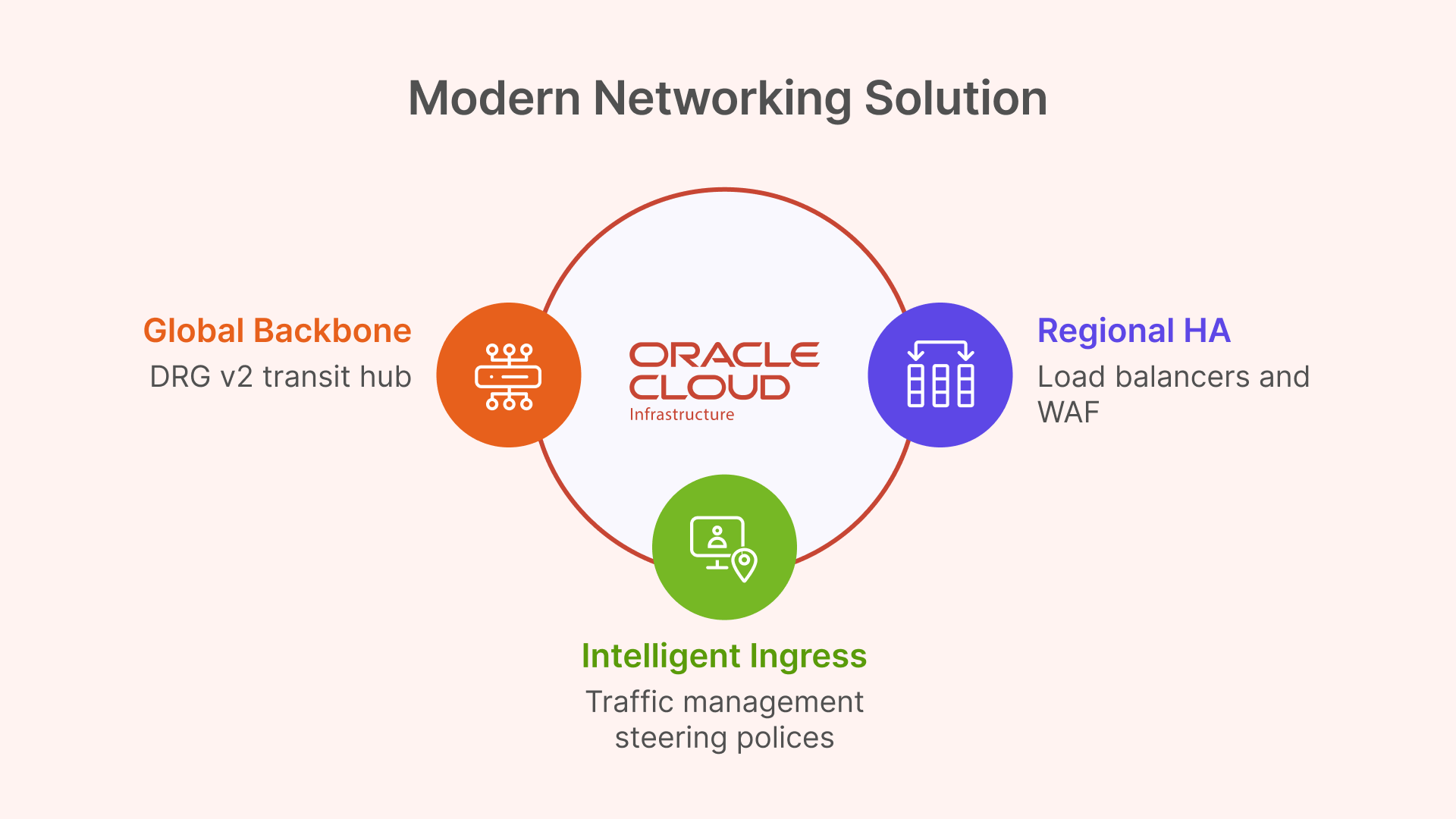
  • OCI Dynamic Routing Gateway (DRG v2): Each regional Hub VCN is attached to its own DRG. The DRGs in each region are then peered together, creating a high-speed, private global backbone over OCI’s network for replication traffic.
  • OCI Traffic Management: This global DNS service sits “above” all regions, intelligently directing users to the nearest regional Hub VCN based on their geographic location.
Technical Deep Dive: Core OCI Networking for Global VDI

Global Backbone with Dynamic Routing Gateway (DRG v2)

For connecting the regional deployments, architects could use older Remote VCN Peering (RPCs). However, this method is point-to-point and becomes unmanageable in a mesh of many regions.

The modern and superior solution is the OCI Dynamic Routing Gateway (DRG v2). A DRG is a powerful virtual router that can attach to VCNs, on-premises FastConnect circuits, and—most importantly—other DRGs via RPCs. It supports up to 300 VCN attachments and has its own internal, programmable route tables.

This enables a clean “DRG Transit Hub” design. Instead of a complex mesh, each regional Hub VCN attaches to its local DRG. The DRGs are then connected to each other. This creates a scalable, high-performance global transit backbone for all “backend” VDI traffic, such as user profile replication, which flows securely over the OCI backbone, not the public internet.

Intelligent Ingress with OCI Traffic Management Steering Policies

The DRG solves the backend network; OCI Traffic Management solves the frontend user latency problem. This service is the practical implementation of the “Geo-IP based routing” discussed in the previous article.

A Traffic Management Steering Policy is configured for the global VDI DNS name (e.g., desktop.mycorp.com). The policy type will be Geolocation Steering.

This policy uses “Answer Pools” and “Steering Rules”:

  • Answer Pool 1 (NA): The public IP of the OCI Load Balancer in the Ashburn region.
  • Answer Pool 2 (EMEA): The public IP of the OCI Load Balancer in the Frankfurt region.
  • Steering Rule 1: If DNS query originates from North America, return Answer Pool 1.
  • Steering Rule 2: If DNS query originates from Europe, return Answer Pool 2.
  • Default Rule: All other queries are sent to a default pool (e.g., the closest or primary).

When a user in London opens their browser, their DNS query is resolved to the Frankfurt endpoint, achieving the sub-20ms latency target.

Regional HA and Security with Load Balancers & WAF

The Geolocation policy must point to a highly-available endpoint. This is the regional OCI Load Balancer. This is a managed OCI service that operates at Layer 7 (HTTP), terminates SSL, and distributes incoming user connections across the fleet of private Thinfinity Gateways.

This is a point of critical architectural simplification. Legacy VDI solutions like VMware Horizon have complex networking requirements, including the need to maintain session persistence between an initial TCP authentication and the subsequent UDP-based protocol traffic. This is “not possible” with the standard OCI Load Balancer, forcing complex workarounds.

Thinfinity, being 100% HTML5-first, brokers the entire user session over a standard HTTPS (TCP) connection. It therefore works perfectly with the standard, managed OCI L7 Load Balancer, requiring no complex UDP persistence, no third-party appliances, and no complex network engineering.

For security, the OCI Web Application Firewall (WAF) is layered in front of the public Load Balancer. It is configured with a “deny-by-default” policy to inspect all incoming traffic and protect the Thinfinity Gateways from web exploits and other L7 attacks.

Table 2: OCI Multi-Region VDI Networking Components

OCI ServiceService TypeRole in Global VDI Architecture
OCI Traffic ManagementGlobal DNSGeo-IP Routing: Directs users to the nearest OCI region based on their location. Solves the <20ms latency goal.
OCI Load Balancer (L7)Regional L7High Availability: Terminates SSL and distributes traffic across the regional fleet of Thinfinity Gateways.
OCI WAFSecurityGateway Protection: Protects the public-facing Load Balancers and Thinfinity Gateways from L7 attacks.
OCI Dynamic Routing Gateway (DRG v2)Global RoutingGlobal Backbone: Acts as a transit hub to mesh all regional Hub VCNs, enabling secure, private replication traffic.

Solving the Global User State: Multi-Region Profile Management

The most complex challenge in any multi-region VDI deployment is managing user state. For modern Windows VDI, this means managing FSLogix Profile Containers. These are VHD or VHDX virtual disk files, typically stored on a central SMB file share, that mount to the VDI at login to provide a persistent user profile.

In a multi-region disaster recovery (DR) scenario, the question is: how do we replicate the user’s VHDX file from the primary region (Frankfurt) to the DR region (Ashburn)?

Solution Pattern 1 (Recommended): OCI File Storage with Cross-Region Replication

The simplest, most robust, and most cost-effective solution leverages OCI’s native storage capabilities.

  • Storage: The FSLogix profile shares are hosted on file servers in the Hub VCN’s private storage subnet. These file servers use high-performance OCI Block Volumes for their data. Alternatively, the managed OCI File Storage (FSS) service can be used for NFS-based shares.
  • Replication: The key OCI feature is that both OCI Block Volumes and OCI File Storage (FSS) support native, asynchronous cross-region replication.
  • Mechanism: This replication is configured at the block level, beneath the file system. It simply replicates changed blocks from the primary region’s volume (Frankfurt) to a read-only destination volume (Ashburn). Because it is not file-aware, it is not affected by the file-locking issues that plague other solutions.

This OCI-native replication is the perfect tool for an Active-Passive DR plan, providing a clear Recovery Point Objective (RPO) with zero performance impact on the active user session.

Solution Pattern 2 (Alternative Geometries)

Other common methods are far more complex and fragile:

  • FSLogix Cloud Cache: This is FSLogix’s built-in feature for active-active replication, where the user’s client writes to multiple SMB shares simultaneously. This is notoriously complex, can be fragile, and generates massive I/O overhead, which can slow user login and logoff times.
  • Windows DFS-N + DFS-R: It is common to use DFS-Namespace (DFS-N) to create a global share path (e.g., \\mycorp.com\profiles). However, DFS-Replication (DFS-R) is explicitly NOT supported for FSLogix profile containers. Its file replication mechanism cannot handle the open file locks of VHDX files and will lead to data corruption.
  • Windows DFS-N + 3rd Party Sync: Viable alternative if OCI-native replication is not an option.

OCI’s native storage replication services fundamentally simplify VDI disaster recovery, making complex and fragile application-level replication tools obsolete for most standard DR patterns.

Table 3: Global User Profile Replication Strategies on OCI

Replication SolutionArchitecturePerformance ImpactComplexityRecommended Use Case
OCI Storage Cross-Region ReplicationActive-Passive (DR)None. Asynchronous, block-level replication. No impact on user session I/O.Low. OCI-native, “set it and forget it” feature.Recommended: Primary DR strategy for 99% of deployments.
FSLogix Cloud CacheActive-ActiveHigh. Duplicates all profile writes to all locations. Can slow login/logoff.Very High. Fragile, difficult to troubleshoot, high I/O cost.Niche: For “follow-the-sun” active-active models where users must have instant R/W access in any region.
Windows DFS-N + DFS-RActive-PassiveN/A (DFS-R is unsupported)High. (DFS-N is fine)NOT SUPPORTED. DFS-R will corrupt FSLogix profiles.

The “Golden Image” Factory: An Automated Multi-Region CI/CD Pipeline

The second major operational challenge of multi-region VDI is managing “golden images.” Manually patching and distributing new images across the globe is a prime example of “golden image gymnastics” or “image sprawl”. This slow, manual process, which can take weeks, is error-prone and a significant security risk.

The solution is to treat image management as a CI/CD pipeline, transforming VDI operations from a slow “ITIL” model to a high-speed “DevOps” workflow.

Step 1: Build (Automated)

In a primary “build” region (e.g., Frankfurt), the image creation is automated. This can be done using the OCI Secure Desktops Image Builder, a new CLI tool from Oracle that automates and simplifies the creation of VDI-optimized Windows images. For more advanced automation, OCI DevOps or tools like Packer with Terraform can be used.

Step 2: Distribute (Automated)

This is the key multi-region step, automated using OCI services:

  1. The build process exports the new “Custom Image” to an OCI Object Storage bucket in the Frankfurt region.
  2. An OCI Object Storage replication policy is configured to automatically copy the image file to “replica” buckets in the Ashburn and Singapore regions.
  3. In each destination region, an OCI Function or scheduled script is triggered by the new object’s arrival. This script imports the image from its local Object Storage bucket, creating a new, regional “Custom Image”.

Step 3: Deploy (Orchestrated)

The new Custom Image OCID is now available locally in all regions. Thinfinity Cloud Manager, which is natively integrated with OCI, takes over. It manages the full “golden image lifecycle”. The administrator simply updates the VDI pool definition to point to the new image OCID. Thinfinity’s orchestrator then performs a safe, rolling update of the VDI pools, automatically decommissioning old VMs and provisioning new ones from the updated image based on policy and user demand.

This “Image Factory” pipeline turns a multi-week, high-risk manual task into a low-friction, auditable, and secure automated workflow, allowing organizations to “change at cloud speed”.

Implementing a Zero Trust Framework for Global VDI

This global architecture is not only performant but inherently secure, built on a modern Zero Trust framework rather than an outdated perimeter-based model.

Pillar 1: Identity as the Perimeter (Thinfinity + OCI IAM)

Traditional VDI often requires a VPN or exposes RDP to the internet, creating a massive attack surface. The Thinfinity + OCI model inverts this.

  • No VPN: Thinfinity has a built-in ZTNA framework. All access is brokered over HTTPS/TLS via the regional Thinfinity Gateway. The VDI virtual machines themselves are in private subnets with no direct ingress from the internet.
  • Federated Identity: Thinfinity (acting as the Service Provider) is federated with OCI IAM Identity Domains (acting as the Identity Provider) using SAML 2.0 or OIDC. Thinfinity has native support for SAML-based IdPs.
  • Centralized Enforcement: This federation allows OCI IAM to be the single, authoritative source for identity. It enforces all access policies—such as Multi-Factor Authentication (MFA), RBAC, and device posture checks—before Thinfinity ever brokers the user’s session to a VM. OCI IAM Domains can also be replicated across regions, providing a globally consistent identity source.

Pillar 2: Micro-segmentation (OCI Network Security Groups)

To implement least-privilege access within the VCN, this architecture uses Network Security Groups (NSGs), not OCI’s older, subnet-based Security Lists.

This is a critical distinction. A Security List is “subnet-centric”—to allow VDI VMs to access a file share, one must open SMB port 445 to the entire VDI subnet, which is poor security.

NSGs are “application-centric.” A resource, like a VM’s network interface (VNIC), is assigned to one or more NSGs. The firewall rules can then use other NSGs as the source or destination, not just a CIDR block.

This enables a true micro-segmentation blueprint:

  • vdi-pool-nsg: Assigned to all VDI virtual machines.
  • file-server-nsg: Assigned to the FSLogix profile file servers.
  • ad-controller-nsg: Assigned to the Active Directory domain controllers.

With these in place, the security rules become application-aware and IP-independent:

  • Rule for file-server-nsg: Ingress: Allow TCP/445 from Source = vdi-pool-nsg.
  • Rule for ad-controller-nsg: Ingress: Allow Kerberos/LDAP from Source = vdi-pool-nsg AND Source = file-server-nsg.

This stateful firewalling between application tiers dramatically limits an attacker’s ability to move laterally, a core principle of Zero Trust.

Pillar 3: High-Performance, Secure Workloads (OCI GPUs)

This Zero Trust model does not compromise on performance. For power users in engineering, design, or data science, VDI pools can be provisioned using OCI’s powerful NVIDIA GPU instances. Specifically, the A10 Tensor Core shapes (e.g., VM.GPU.A10.1, VM.GPU.A10.2) are ideal. The NVIDIA A10 is designed for “graphics-rich virtual desktops” and “NVIDIA RTX Virtual Workstation (vWS)” workloads. These high-performance VMs are simply assigned to their own NSG and are protected by the exact same ZTNA framework, receiving secure, brokered access from Thinfinity.

Disaster Recovery Patterns: Active-Active vs. Active-Passive VDI

This architecture provides the building blocks for two distinct multi-region strategies.

Pattern 1: Active-Passive (Hot Standby) – Recommended for DR

This is the most common, cost-effective, and simplest DR model.

  • Primary Region (e.g., Frankfurt): Fully active. All VDI pools are running. OCI Traffic Management directs 100% of global traffic here. The OCI Block Volume/FSS hosting profiles is in read/write mode.
  • DR Region (e.g., Ashburn): Deployed as a “Warm Standby” or “Pilot Light.”
    • Compute: The VDI host pools are provisioned but scaled to zero (or a minimal admin set) to eliminate compute costs.
    • Storage: The profile storage (Block Volume or FSS) is in a read-only state, receiving asynchronous cross-region replication.
  • Failover Process: When an outage is declared in Frankfurt, an administrator (or automated script) executes three steps:
    1. Storage: Promote the Ashburn OCI storage volume from read-only to read/write.
    2. Compute: Use the Thinfinity Cloud Manager to scale up the VDI pools in Ashburn from 0 to 100% capacity.
    3. Network: Update the OCI Traffic Management Steering Policy to route 100% of traffic to the Ashburn Load Balancer.

This strategy provides a full regional failover with a Recovery Time Objective (RTO) measured in minutes, all at a fraction of the cost of an active-active deployment.

Pattern 2: Active-Active – Recommended for Global Performance

This model is not for disaster recovery, but for solving the core latency problem for a globally distributed workforce.

  • Architecture: Both the Frankfurt and Ashburn regions are fully active, simultaneously serving users.
  • Networking: The OCI Geolocation Steering Policy is critical. It routes EMEA users to the Frankfurt VDI pools and North American users to the Ashburn VDI pools, ensuring everyone gets a low-latency (<20ms) experience.

The Profile Challenge: This model creates a significant user profile challenge. If a user from London (EMEA) logs into Frankfurt, their profile is modified. If they fly to New York (NA) the next week and log into Ashburn, they must receive their updated profile, and any changes made in Ashburn must be replicated back to Frankfurt.

This requirement for bi-directional, multi-master replication invalidates the simple, one-way Active-Passive OCI storage replication. This model forces the use of a more complex and fragile application-level solution, such as FSLogix Cloud Cache, to synchronize the user profile VHDX files.

Architects must therefore weigh the trade-offs: the Active-Active deployment provides the best global user performance but at the cost of significantly higher complexity and fragility at the user profile layer.

Conclusion: A Resilient, Performant Global VDI Blueprint

The hard physical limits of latency, which mandate a <20ms round-trip time for a quality user experience, have rendered single-region VDI obsolete for global enterprises. The path forward is a resilient, multi-region architecture.

Success, however, is not achieved by forcing complex, legacy VDI stacks onto a cloud platform. It is achieved through the synergy of a cloud-native VDI platform and a cloud IaaS built for true resilience.

This definitive blueprint provides that synergy:

  • OCI’s Fault-Isolated Regions provide the resilient foundation, eliminating the risk of centralized control plane failures.
  • Thinfinity’s Decoupled Gateways are deployed regionally, solving the user-facing latency problem.
  • OCI’s Global Networking (Traffic Management for Geo-IP routing and DRG v2 for a backend mesh) provides the global connectivity.
  • OCI’s Native Storage Replication provides a simple, robust, and cost-effective solution for Active-Passive disaster recovery.
  • Thinfinity’s Cloud Manager and OCI’s Image/Storage Automation create an “Image Factory,” transforming VDI operations into a modern DevOps workflow.
  • OCI’s NSGs and Thinfinity’s ZTNA provide an “identity-aware” and “application-aware” security posture that is secure by default.

This combination of Thinfinity Workspace and Oracle Cloud Infrastructure is the definitive strategy for deploying a global VDI solution that is performant, resilient, secure, and—most importantly—operationally simple to manage at scale.

About Cybele Software Inc.
We help organizations extend the life and value of their software. Whether they are looking to improve and empower remote work or turn their business-critical legacy apps into modern SaaS, our software enables customers to focus on what’s most important: expanding and evolving their business.

About Version 2 Digital

Version 2 Digital is one of the most dynamic IT companies in Asia. The company distributes a wide range of IT products across various areas including cyber security, cloud, data protection, end points, infrastructures, system monitoring, storage, networking, business productivity and communication products.

Through an extensive network of channels, point of sales, resellers, and partnership companies, Version 2 offers quality products and services which are highly acclaimed in the market. Its customers cover a wide spectrum which include Global 1000 enterprises, regional listed companies, different vertical industries, public utilities, Government, a vast number of successful SMEs, and consumers in various Asian cities.

FSLogix Deep Dive: The Ultimate VDI Configuration Guide (2025)

As a solution engineer who has been in the trenches with VDI and Terminal Servers since the days of Windows NT 4.0, I’ve seen profile management evolve from a chronic pain point to a solved problem. The solution? FSLogix.

Before Microsoft acquired it, FSLogix was the “secret weapon” that VDI architects used to fix the unfixable. Today, it’s the default, non-negotiable standard for any modern VDI or multi-session Windows deployment, especially Azure Virtual Desktop (AVD).

This deep-dive guide will cover its uses, advanced configurations, and best practices for building a resilient, high-performance deployment, including specific GPO settings for clustered environments.

The FSLogix Toolkit: What It Is and Why You Need It

At its core, FSLogix is a set of tools designed to decouple the user profile from the Windows operating system. In non-persistent VDI, where a user’s virtual machine is destroyed or reset at logoff, this is essential.

Instead of copying a roaming profile (which is slow, fragile, and a primary cause of slow logins), FSLogix mounts a user’s profile, stored in a VHDX (virtual disk) file on a network share, directly into the OS at login. It’s instant, seamless, and transparent to Windows.

The FSLogix suite includes:

  • Profile Container: This is the main component. It captures the entire user profile (C:\Users\<username>) and redirects it to the VHDX. This includes all app settings, registry keys (NTUSER.dat), and user data.
  • Office Container (ODFC): This component only redirects the data for Microsoft 365 apps (Outlook cache .ost, Teams data, OneDrive cache, etc.).
  • Application Masking: A powerful tool that allows you to “hide” applications, drivers, or fonts from specific users, even if they are installed on the base image. This dramatically simplifies “golden image” management.
  • Java Redirection: A niche component to manage multiple versions of Java for specific applications.

The Great Debate: Profile Container vs. ODFC

This is the most common point of confusion. Let’s be clear:

Best Practice: In 99% of new deployments, you should use only the Profile Container.

Do NOT use a separate Profile Container and a separate Office Container. This is a common-sense myth that adds complexity, doubles the VHDX files to manage, and increases points of failure.

The Profile Container already captures all Office data. The only reason ODFC exists as a separate component is for legacy environments that already have another profile solution (like Citrix UPM or VMware DEM) and just want to add FSLogix to fix Office performance.

In your Group Policy (GPO) or registry settings, you simply configure the Profile Container Enabled = 1 and ensure Office data is included.

FSLogix Cluster & GPO Configuration

FSLogix Clusters are fundamental for ensuring user profile persistence. In this model, each “cluster node” is typically a high-availability file server (like a Windows Server 2022 Scale-Out File Server) that provides dedicated, fault-tolerant storage for the dynamic profile VHDX files.

This guarantees session consistency across different VDI hosts. Configuration is applied and managed through GPOs (Group Policy Objects), ensuring standardization and centralized governance throughout the environment. Each VDI instance uses the FSLogix Agent to connect to the cluster share over SMB (port 445).

FSLogix Configuration Parameters (via GPO)

Here is a baseline set of GPO settings for a production environment. These settings are applied via GPO, which writes the corresponding values to the registry.

Find the detailed parameters on The following link: FSLogix Cluster Sizing and Configuration

Here is a copy-ready deep-dive on FSLogix, integrating your specific configuration parameters.

Advanced Optimization & Resilience

Getting the GPOs set is step one. Making it fly and never fail is step two.

1. Optimization: The Redirections.xml File

This is the most powerful optimization tool. The Redirections.xml file allows you to exclude “junk” data from being saved in the user’s profile container. By excluding data, you keep the VHDX small, logins fast, and network traffic low.

A good Redirections.xml file should exclude:

  • Browser caches (Chrome, Edge, Firefox)
  • Temp folders
  • Windows Search and Update logs
  • Teams cache (FSLogix now handles Teams data very well natively, but some still exclude the media-stack folder).

You place this file on your network share and point to it in your GPO using the RedirectionXMLSourceFolder setting.

2. Resilience: Antivirus Exclusions (Non-Negotiable)

This is the #1 cause of profile corruption and performance issues. Your VDI session hosts must exclude the FSLogix processes and file locations from real-time antivirus scanning.

Process Exclusions:

  • frxsvc.exe
  • frxshell.exe
  • frxccd.exe (if using Cloud Cache)

File/Directory Exclusions:

  • %ProgramFiles%\FSLogix
  • %APDATA%\FSLogix
  • The network share(s) where your VHDX files are stored.
  • File Extensions: .vhd, .vhdx

3. High Availability: Cloud Cache vs. Storage-Level HA

You have two main ways to achieve high availability.

Storage-Level HA (Your “Cluster” Model):

This is the easiest and most reliable method. You use a storage solution that is already highly available (like a Windows Server 2022 Scale-Out File Server, a cluster, or Azure Files ZRS). You then set a single path in VHDLocations. If a storage node fails, the storage cluster handles it transparently.

FSLogix Cloud Cache (Recommended for DR):

Cloud Cache is the FSLogix-native HA solution. You configure multiple storage locations (e.g., one on-prem, one in Azure). FSLogix writes to a local cache on the VDI host first, then asynchronously replicates changes to all storage locations. This is more complex but provides true active-active access and disaster recovery.

4. Network Settings: The Unsung Hero

Your VDI session hosts and your file server must be as close as possible.

  • Same Datacenter/Region: Never route core FSLogix traffic over a WAN.
  • Same Subnet (Zero Latency): FSLogix traffic (SMB/445) is highly sensitive to latency. Place your VDI session hosts (clients) and your FSLogix file share on the same subnet. This eliminates any firewall, router, or traffic inspection device from the data path. Even a tiny delay from a firewall policy check can cause login slowdowns and profile hangs.
  • Enable SMB Multichannel: Allows Windows to use multiple network connections to your file share, increasing throughput and resiliency.

Expert Tips: FSLogix with Thinfinity VDI on OCI

This is a great, modern stack. Thinfinity is a VDI broker that is “infrastructure agnostic,” meaning it can manage session hosts anywhere—including OCI. FSLogix is the agent on those OCI session hosts.

Here’s how to make them work together perfectly.

  • Thinfinity and FSLogix are Partners: Thinfinity manages the connection, and FSLogix manages the profile inside the session. They don’t conflict; they complement each other. The Thinfinity non-persistent/multi-session model requires a solution like FSLogix.
  • Authentication is King (Active Directory): FSLogix requires Active Directory. Your OCI-based VDI session hosts must be joined to an Active Directory domain. This means you must have Domain Controllers running on OCI Compute instances or have a line-of-sight connection (via OCI FastConnect or VPN) back to your on-prem AD.
  • Storage on OCI: Your best bet is OCI File Storage. It’s a managed, zonal, high-performance file service that supports the SMB protocol.
    1. Create a File System in OCI.
    2. Create a Mount Target in the same VCN and Availability Domain as your Thinfinity session hosts.
    3. Configure the VCN Security Lists (firewall) to allow SMB (TCP/445) traffic only from your session host subnet to the File Storage subnet.
  • OCI Network Latency: The “same AD” principle is critical in OCI. OCI’s Availability Domains are physically separate datacenters. While cross-AD latency is low, for the absolute best performance, your session host pools and your OCI File Storage mount target should reside in the same Availability Domain.

Conclusion: It Is Not an Add-On

FSLogix is not merely a “feature” or an “add-on” for a VDI deployment; it is the cornerstone of the modern user experience. It has single-handedly solved the decades-old problem of profile management, transforming non-persistent VDI from a compromise into a high-performance, user-centric solution.

However, as this guide has demonstrated, a successful FSLogix deployment is an exercise in precision. The difference between a high-performance environment and a support-ticket nightmare lies not in if you use FSLogix, but how.

Success is built on a foundation of three pillars:

  • Low-Latency, High-Availability Storage: Your profile solution is only as reliable as the file cluster it runs on.
  • An Unobstructed Network Path: Placing VDI hosts and storage on the same subnet, free from inspection, is the single most effective way to guarantee fast logins.
  • Intelligent Configuration: From GPOs to Redirections.xml, optimization is about what you exclude as much as what you include.

When architected correctly—with the same engineering rigor you apply to your VDI hosts and network—FSLogix becomes the silent, invisible hero of your virtual desktop infrastructure. It delivers the one thing that matters most: a user experience that is fast, resilient, and never gets in the way.

About Cybele Software Inc.
We help organizations extend the life and value of their software. Whether they are looking to improve and empower remote work or turn their business-critical legacy apps into modern SaaS, our software enables customers to focus on what’s most important: expanding and evolving their business.

About Version 2 Digital

Version 2 Digital is one of the most dynamic IT companies in Asia. The company distributes a wide range of IT products across various areas including cyber security, cloud, data protection, end points, infrastructures, system monitoring, storage, networking, business productivity and communication products.

Through an extensive network of channels, point of sales, resellers, and partnership companies, Version 2 offers quality products and services which are highly acclaimed in the market. Its customers cover a wide spectrum which include Global 1000 enterprises, regional listed companies, different vertical industries, public utilities, Government, a vast number of successful SMEs, and consumers in various Asian cities.

Enforcing 2FA to Intranet Applications and Internal Web Resources with Thinfinity’s RBAC Capabilities: A Secure SSL VPN Solution

Introduction

If you’ve been following our recent discussions, we’ve explored a variety of critical topics, from Zero Trust models to the importance of modernizing legacy systems. Today, we’re focusing on another pivotal area: secure access to internal web applications. In this article, we’ll dive into how organizations can safely access internal web applications without the need for a VPN. We’ll cover the limitations of traditional VPNs, discuss how Thinfinity’s Web Application Gateway offers a streamlined alternative, and explore the role of key technologies like outbound-only connections and Zero Trust principles. By the end, you’ll understand why Thinfinity is a game-changer for simplifying remote access without compromising security. In many traditional setups, accessing internal web applications from outside the organization required setting up a VPN (Virtual Private Network) or using an ADC (Application Delivery Controller). These tools created secure, encrypted tunnels between the user’s device and the organization’s network, enabling access to sensitive internal applications. However, VPNs often come with challenges such as slow connection speeds, complex setups, and increased attack surfaces if misconfigured. This is where Thinfinity’s Web Application Gateway (WAG) comes in, providing a modern, simplified solution for securely publishing web applications without the need for a VPN or ADC.

Why Are VPNs and ADCs Typically Used for Remote Access?

  1. Security for Remote Employees: Internal web applications, such as HR systems, CRMs, and ERP platforms, contain sensitive information that needs to be securely transmitted between the user and the internal network. VPNs create encrypted tunnels that protect this data when accessed from outside the organization. However, maintaining VPNs can be resource-intensive and introduces latency.
  2. Access to Legacy or On-Premise Applications: Many businesses use legacy or on-premise web applications that aren’t directly exposed to the public internet. These applications, ranging from custom business tools to accounting software, are typically accessible only within the internal network, necessitating the use of a VPN or ADC to grant remote users access.
  3. Multi-Site Connectivity: When businesses have multiple office locations, a site-to-site VPN is often used to link these offices into a unified network. This makes internal resources, including web applications, accessible across all locations. Similarly, ADCs help manage traffic between these locations, improving performance and load balancing across the network.

Thinfinity’s Web Application Gateway: Zero trust Access to Web Applications

Thinfinity Workspace’s Web Application Gateway offers a simpler, more secure alternative to VPNs and ADCs for publishing internal web applications. Here’s how it addresses the typical needs of secure access:
  1. Publishing Web Applications Securely: Thinfinity allows IT administrators to easily publish internal web applications, such as intranet sites, CRMs, or ERP systems, through the Web Application Gateway. This eliminates the need for users to establish a VPN connection, while ensuring the application is securely accessible over SSL/TLS encryption. The WAG ensures that only authenticated users can access the published applications, providing a higher level of security than traditional VPN’s.
  2. No Need for Inbound Ports: Traditional VPN setups often require opening inbound ports on the network firewall, which can expose the organization to external threats. Thinfinity’s WAG, on the other hand, uses outbound connections to securely forward internal applications to remote users, minimizing the network’s exposure and enhancing security.
  3. Cross-Platform Accessibility: Thinfinity’s WAG allows users to access internal web applications from any device or platform via an HTML5 browser. Whether on a desktop, tablet, or smartphone, users can securely access applications without needing to install additional software like a VPN client.
  4. Role-Based Access and Zero Trust: Just as with VPNs, Thinfinity supports role-based access controls. Administrators can define which users or groups have access to specific applications, ensuring that only authorized personnel can view sensitive data. This aligns with the principles of a Zero Trust security model, where every access request is authenticated and authorized individually.
  5. Improved Performance: Unlike VPNs, which can introduce latency due to encryption overhead and routing through the VPN server, Thinfinity’s WAG optimizes the delivery of web applications directly through the browser. This reduces the performance issues often associated with VPNs, providing a faster and more seamless experience for end-users.

The Role of Thinfinity’s Secondary Broker in Secure WAG Connections

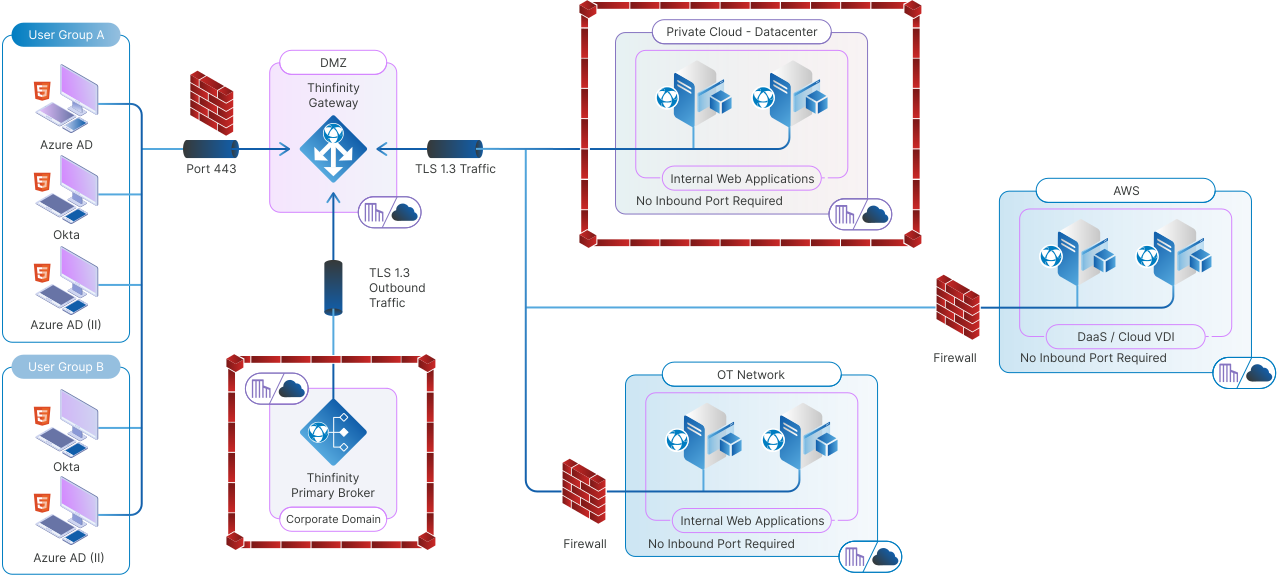
One of Thinfinity’s standout features is its Secondary Broker, which plays a pivotal role in securely connecting remote users to internal resources without the need for inbound ports. The Secondary Broker generates a secure connection between the Web Application Gateway and the target network by initiating outbound connections. Here’s how it works:

  • Outbound-Only Connections: The Secondary Broker establishes connections to the Thinfinity Gateway from within the target network. These reverse connections are initiated as outbound traffic, which is typically allowed by firewalls, removing the need to open risky inbound ports.
  • Seamless Application Access: Once the connection is established, users can access web applications securely through Thinfinity’s WAG, just as they would in a traditional VPN environment, but without the complexity and security risks of inbound connections.
  • Increased Security and Scalability: By decentralizing traffic management, the Secondary Broker supports large-scale deployments and improves performance without compromising security. This feature makes it ideal for distributed environments where different departments or locations require secure access to the same applications.
Graphic How to Securely Access Internal Web Applications Without a VPN

Use Cases for Thinfinity’s Web Application Gateway

Many types of internal web applications benefit from being published via Thinfinity’s WAG:
  • HR Systems and Portals: Remote employees can securely access sensitive HR data without needing a VPN connection, ensuring privacy while streamlining access.
  • Customer Relationship Management (CRM) Tools: CRMs often contain valuable customer data. Thinfinity’s WAG ensures secure access from anywhere while maintaining compliance with security policies.
  • Enterprise Resource Planning (ERP) Systems: Thinfinity’s WAG enables secure, remote access to ERP systems without the need for complex VPN setups.
  • Custom Web-Based Business Applications: Many companies have proprietary web applications that are crucial for daily operations but need to be accessed securely by remote users. Thinfinity’s WAG simplifies this access.

Conclusion

Thinfinity’s Web Application Gateway offers a powerful, modern solution for businesses looking to securely publish internal web applications without the hassle of VPNs or ADCs. By utilizing outbound SSL connections and role-based access, it simplifies access while maintaining the highest levels of security. Whether it’s for HR systems, CRMs, or custom web-based applications, Thinfinity provides an effective way to streamline remote access, ensuring a smooth experience for users across any device. As businesses continue to prioritize security and efficiency, Thinfinity’s approach stands out as a clear path forward—enhancing performance while reducing complexity. If you’re ready to take the next step in securing your internal web applications, setting up a Web Application Gateway is the perfect starting point. Here’s a tutorial to guide you through the process of publishing your first web application in Thinfinity.

About Cybele Software Inc.
We help organizations extend the life and value of their software. Whether they are looking to improve and empower remote work or turn their business-critical legacy apps into modern SaaS, our software enables customers to focus on what’s most important: expanding and evolving their business.

About Version 2 Digital

Version 2 Digital is one of the most dynamic IT companies in Asia. The company distributes a wide range of IT products across various areas including cyber security, cloud, data protection, end points, infrastructures, system monitoring, storage, networking, business productivity and communication products.

Through an extensive network of channels, point of sales, resellers, and partnership companies, Version 2 offers quality products and services which are highly acclaimed in the market. Its customers cover a wide spectrum which include Global 1000 enterprises, regional listed companies, different vertical industries, public utilities, Government, a vast number of successful SMEs, and consumers in various Asian cities.

How to Securely Access Internal Web Applications Without a VPN

Introduction  

As a solution engineer, I’ve seen firsthand how critical it is to secure access to internal resources to protect sensitive data from unauthorized access. Implementing Two-Factor Authentication (2FA) for intranet applications and internal web resources is one of the most effective methods to strengthen security and reduce risk. With Thinfinity’s Role-Based Access Control (RBAC) capabilities and seamless integration with major identity providers, organizations can efficiently enforce 2FA and maintain secure remote access to internal systems using Thinfinity’s Web Application Gateway (WAG) as an SSL VPN.


Why Enforce 2FA for Intranet Applications with SSL VPN?

Implementing SSL for VPN connections, specifically using Thinfinity’s Web Application Gateway (WAG), is crucial for ensuring a secure way to access internal web resources. Here’s why enforcing 2FA with SSL VPN can make a difference for intranet security:

Intranet applications and internal web resources often hold critical information about an organization. Limiting access to only authorized personnel is key to preventing data breaches. Relying on passwords alone is no longer enough, as they are vulnerable to attacks like phishing, brute force, and credential stuffing. Implementing 2FA adds an extra layer of security by requiring users to provide a secondary factor, like a code from an authenticator app or biometric verification, along with their password.

Two-Factor Authentication reduces the risk of compromised credentials, as an attacker would need both the password and the second factor to gain access. Enforcing 2FA for intranet applications and internal resources is a smart strategy for strengthening the security of an organization’s network and reducing the risk of unauthorized access.

Thinfinity’s RBAC and SSL VPN with 2FA: A Comprehensive Security Solution

Thinfinity Workspace strengthens security by integrating Role-Based Access Control (RBAC) with major identity providers like Okta, Microsoft Azure AD, and Google Identity, making it an ideal SSL VPN solution with 2FA support. This integration makes it easy to enforce 2FA for internal applications, ensuring that only authorized users can access specific resources.

Using RBAC, IT administrators can assign specific roles to users, defining which intranet applications or internal resources they can access. This follows the principle of least privilege, meaning users only get access to what they need for their roles, which helps reduce the attack surface. Combining RBAC with 2FA reduces both external and insider threats, providing an extra level of security.


How Thinfinity’s SSL VPN Makes 2FA Enforcement Simple

Thinfinity offers a straightforward process for enforcing 2FA across intranet applications. The key components include:

  1. Integration with Identity Providers: Thinfinity integrates with popular identity providers, including Okta, Azure Active Directory, and Google Identity. These integrations allow Thinfinity to provide SSL VPN functionality with advanced 2FA enforcement, ensuring the highest level of security. This integration allows administrators to enforce 2FA policies that are already set up in these platforms, making management easier and more consistent.
  2. RBAC Configuration: Administrators can use Thinfinity’s RBAC features to configure user roles and permissions, ensuring access is tightly controlled based on user roles. This minimizes the chances of unauthorized access to sensitive resources.
  3. Clientless Access Using SSL VPN: Thinfinity provides a clientless, browser-based way to access internal web resources using its Web Application Gateway (WAG) as an SSL VPN. This SSL for VPN approach ensures secure connectivity without needing any additional software, simplifying the user experience. Users can securely access these resources from any device, and with 2FA enabled, they must verify their identity twice—using a password and a second factor—before they can access the resources.
  4. Enhanced Logging and Monitoring: Thinfinity’s integration with identity providers also supports enhanced logging and monitoring of access attempts. Administrators can see who is accessing internal applications, when, and from where. This information is important for compliance and helps quickly identify suspicious activity.


Benefits of Enforcing 2FA with Thinfinity’s SSL VPN

Secure Remote Access with SSL VPN: Enforcing 2FA through Thinfinity’s SSL VPN ensures that remote access to internal resources is secure, making it difficult for unauthorized users to access intranet applications without proper verification.

Alignment with Zero Trust Security: Thinfinity’s RBAC and 2FA capabilities are consistent with Zero Trust security principles. Users are verified every time they try to access a resource, and only those meeting strict authentication requirements are allowed in.

Simplified User Experience: With Thinfinity’s clientless access through its SSL VPN, users do not need to install extra software to access internal resources. The 2FA process is smooth, which increases security without adding unnecessary complexity.

Compliance and Risk Mitigation: Enforcing 2FA helps organizations meet industry regulations that require multi-factor authentication for accessing sensitive data. Additionally, it reduces the risk of data breaches by ensuring that a password alone is not enough for access.


Thinfinity as an Alternative to Fortinet and Sophos SSL VPN Solutions

When comparing SSL VPN solutions, Thinfinity’s Web Application Gateway (WAG) stands out as a strong alternative to Fortinet and Sophos. One of the primary advantages of Thinfinity WAG is its seamless integration of 2FA through popular identity providers, such as Microsoft Azure AD and Google Authenticator, which allows organizations to enforce 2FA in a straightforward and consistent way.

Fortinet SSL VPN 2FA with Microsoft Authenticator: Fortinet’s SSL VPN solution allows administrators to enforce 2FA, including using Microsoft Authenticator. However, managing users and configuring authentication policies can be cumbersome. Thinfinity, on the other hand, provides an intuitive interface for configuring 2FA, with the flexibility to integrate with any of the major identity providers.

Sophos SSL VPN 2FA: Sophos also supports 2FA in its SSL VPN solution, typically using Google Authenticator. Thinfinity WAG, however, provides a more comprehensive and adaptable solution for secure remote access by leveraging RBAC, clientless access, and full integration with a variety of identity providers.

Fortinet SSL VPN 2FA with Google Authenticator: Similar to Sophos, Fortinet supports 2FA using Google Authenticator. Thinfinity WAG not only offers compatibility with Google Authenticator but also integrates with other identity providers, enhancing flexibility for organizations looking to enforce robust authentication policies across multiple platforms.

How to Implement 2FA with Thinfinity’s SSL VPN

Setting up 2FA for internal web resources with Thinfinity is a straightforward process:

Deploy Thinfinity Gateway and Broker: Install the Thinfinity Gateway and Secondary Broker within your network. This setup allows secure access to intranet applications without opening inbound ports.

Go to the tutorial ➡️

Integrate with Identity Providers: Connect Thinfinity to your identity provider (such as Okta or Azure AD). This integration uses existing user directories and 2FA settings to make the authentication process seamless.

Go to the tutorial ➡️

Set Up RBAC Policies: Define user roles and permissions to ensure that each user has access only to the resources they need. This supports the principle of least privilege.

Go to the tutorial ➡️

Enable 2FA: Enforce 2FA policies from your identity provider to ensure that every user must authenticate using a second factor when accessing internal applications.

Go to the tutorial ➡️

Conclusion: Strengthen Security with 2FA for Internal Resources using SSL VPN

Enforcing 2FA for intranet applications and internal web resources is essential for organizations aiming to improve security and reduce the risk of unauthorized access. Thinfinity’s RBAC capabilities and integration with leading identity providers make it easy to enforce 2FA effectively.

By combining 2FA, RBAC, and clientless access through SSL VPN, Thinfinity offers a powerful solution for secure remote access to internal applications. Organizations can be confident that only authorized users are accessing sensitive data and that these users are properly authenticated each time.

About Cybele Software Inc.
We help organizations extend the life and value of their software. Whether they are looking to improve and empower remote work or turn their business-critical legacy apps into modern SaaS, our software enables customers to focus on what’s most important: expanding and evolving their business.

About Version 2 Digital

Version 2 Digital is one of the most dynamic IT companies in Asia. The company distributes a wide range of IT products across various areas including cyber security, cloud, data protection, end points, infrastructures, system monitoring, storage, networking, business productivity and communication products.

Through an extensive network of channels, point of sales, resellers, and partnership companies, Version 2 offers quality products and services which are highly acclaimed in the market. Its customers cover a wide spectrum which include Global 1000 enterprises, regional listed companies, different vertical industries, public utilities, Government, a vast number of successful SMEs, and consumers in various Asian cities.

VDI vs DaaS: How to Choose and Implement the Right Virtual Desktop solution for your business

I) Introduction 

Virtual Desktop Infrastructure (VDI) and Desktop-as-a-Service (DaaS) are leading innovations in IT resource management, revolutionizing how businesses operate and manage their IT assets. This guide delves into the intricacies of establishing virtual desktop environments, covering the technical groundwork, user management tactics, security measures, and scalability—all vital for accommodating the dynamic requirements of modern businesses.

As organizations strive to boost operational efficiency and fortify their security measures, the roles and benefits of VDI and DaaS become more pronounced. The primary focus here is to unpack the critical components necessary for the successful implementation of virtual desktop solutions. Through an examination of various case studies, this article offers IT professionals and decision-makers a practical framework to navigate the complexities of virtual desktop technologies and to choose the most suitable solution—be it VDI or DaaS—for their needs.

Understanding VDI and DaaS:

  • Virtual Desktop Infrastructure (VDI) is a technology that hosts desktop environments on a centralized server. This setup allows users to access their desktops on any device capable of supporting the VDI’s interface, regardless of the geographic location. The main appeal of VDI is its ability to offer a controlled, customized, and secure desktop experience to multiple users while maintaining the data and applications on a company-managed server.
  • Desktop-as-a-Service (DaaS), on the other hand, is a cloud service model where the entire desktop virtualization is handled by a third-party provider. DaaS solutions deliver similar benefits as VDI, such as accessibility from multiple devices and locations; however, they reduce the organization’s burden of managing the underlying infrastructure, updates, security, and storage, as these responsibilities are managed by the DaaS provider.

II) Key Considerations for Choosing Between VDI and DaaS

Security and Compliance: With VDI, you have direct control over the security and compliance measures, tailoring them to meet specific organizational standards and regulations.

Pros of VDI

  • Endpoint Independence: Users can access their virtual desktop from any device, providing flexibility without compromising the desktop environment or experience.
  • Centralized Management and Control: VDI offers a centralized platform for managing user desktops, streamlining IT operations, and enforcing policies across the organization.
  • Endpoint Choice: Organizations can provide a variety of endpoint options, from high-end workstations for power users to more cost-effective thin clients for standard users.
thumb-down

Cons of VDI

  • Digital Employee Experience Challenges: Implementing VDI requires careful planning to ensure that the digital workspace delivers a responsive and robust user experience.
  • Infrastructure Costs: Initial setup for VDI can be capital intensive, with significant investments needed for servers, storage, and network infrastructure.
  • Solution Complexity: The complexity of a VDI environment can be substantial, requiring a high level of IT expertise to manage the infrastructure, software, and potential issues that arise.

Pros of DaaS

  • Agility and Elasticity: DaaS platforms are highly scalable, allowing businesses to quickly adjust their resources to meet changing demands.
  • Utility Pricing/Pay Per Use: Many DaaS providers offer a pay-as-you-go model, converting a capital expense into an operational one and avoiding the need for large upfront investments.
  • Cloud Service Integration: DaaS often integrates well with other cloud services, allowing for a seamless connection between virtual desktops and cloud-based applications.
  • Disaster Recovery: With DaaS, disaster recovery processes are typically built into the service, offering greater resilience and faster recovery times.
thumb-down

Cons of DaaS

  • Service Insight and Control: While DaaS providers handle much of the infrastructure management, organizations may have less visibility and control over the backend operations.
  • Less Configuration/Customization Choice: There might be limitations on the level of customization available for the virtual desktops compared to a self-hosted VDI solution.
  • Long-Term Cost: Although DaaS can be more affordable upfront, ongoing subscription costs can add up over time, potentially making it more expensive in the long run.

Deciding between VDI and DaaS hinges on balancing these pros and cons against your organization’s strategic objectives, budget constraints, and IT capabilities. Each solution offers distinct benefits and challenges that must be carefully considered to ensure that your chosen virtual desktop infrastructure aligns with your business requirements.

III) VDI Deployment Considerations

Assuming you have the requisite data center capacity, in-house expertise, and cloud management skills, choosing to self-implement a Virtual Desktop Infrastructure (VDI) is a strategic step. This decision sets the stage for a detailed exploration of implementation factors to optimize the deployment within your own facilities or your selected public cloud environment.

A. Choosing the Appropriate Infrastructure

Setting up a virtual desktop infrastructure (VDI) requires a detailed assessment of the necessary hardware, including servers, storage solutions, and networking equipment, to effectively support the virtual desktop environment. This assessment should include not only an evaluation of the current infrastructure to identify any gaps that could hinder implementation but also a consideration of integrating public cloud services. These options offer scalability, flexibility, and potentially lower upfront costs, making them viable alternatives for organizations looking to optimize their VDI strategy.

B. User Management Strategies

Effective user management strategies are crucial for enhancing productivity and ensuring seamless access to virtual desktops. It involves creating user accounts, allocating appropriate resources, and managing access rights to ensure security standards are met and users can efficiently perform their duties.

C. Security Concerns and Protocols

Security is paramount in virtual desktop infrastructures. Implementing stringent security measures, like encryption and multi-factor authentication, protects sensitive information and mitigates potential cyber threats. Regular security audits are also essential to address any vulnerabilities.

D. Scalability and Flexibility

Designing scalable and flexible virtual desktop infrastructures is vital for adapting to business needs. Technologies that allow dynamic resource allocation and access from various devices enhance productivity, especially in remote work scenarios.

E. VDI Deployment Factors to Consider:

  1. End-User Requirements: Understanding how users interact with the infrastructure, including login times and application needs, is crucial to avoiding performance bottlenecks.
  2. Factor in User Location: Different locations may necessitate varied VDI architectures, affecting everything from bandwidth requirements to user experience.
  3. Infrastructure Impact: VDI affects other IT systems; careful planning can prevent issues such as IP address depletion and bandwidth consumption.
  4. Desktop Type (Persistent vs. Nonpersistent): Choose between persistent desktops, which save user settings, and nonpersistent desktops, which reset after each session based on user needs.
  5. High Availability Design: Ensuring that the VDI infrastructure is highly available is crucial to prevent downtime that could affect the entire organization.
  6. Client Device Options: Deciding on client devices, whether repurposing old PCs or employing BYOD (Bring Your Own Device) policies, influences maintenance and operational ease.
  7. BYOD Policy Considerations: Establish clear guidelines on the acceptable devices and operating systems to secure data and reduce support burdens.
  8. Security Strategy: Extend all physical desktop security best practices to virtual desktops, ensuring all systems are secure and compliant.

F. Selecting a Comprehensive Software Solution for Virtual Desktop Infrastructure

To simplify the implementation of the strategies outlined for infrastructure setup, user management, and security, it is crucial to select a comprehensive software solution tailored for virtual desktop infrastructure. A pivotal component of this solution should be a VDI orchestrator, which seamlessly manages VDI deployment and auto scaling across various hypervisors and public clouds. Ideally, the solution would be cloud-agnostic and multi-cloud compatible, reducing dependency on specific cloud vendors and providing flexibility for organizations that may start on-premises but plan to extend their workflows to the cloud in the future.
Additionally, the software should support simple role-based permissions for efficient user management and embody Zero Trust Network Access principles to secure access points. The inclusion of Privileged Access Management (PAM) functionalities is also vital, especially if the workflows are critical, ensuring robust security and compliance. Strong audit and analytics capabilities are essential to monitor and optimize the VDI environment effectively.
Lastly, the solution must guarantee a superior user experience on any device, catering to both internal and external users. This ensures the productivity of the workforce is maintained regardless of their location or the device they use, further enhancing the overall efficiency and effectiveness of the virtual desktop infrastructure.

IV) DaaS Deployment Considerations

Having assessed your organization’s capabilities and workflows, should the balance tip in favor of a third-party Desktop-as-a-Service (DaaS) solution, we transition to a critical phase—DaaS implementation considerations. This phase is dedicated to ensuring that the chosen DaaS offering aligns with your business requirements and operational objectives, reflecting a strategic alignment with your evaluation.

1. Security and Data Protection:

When outsourcing your VDI to a 3rd party DaaS provider, it is crucial to assess their security measures and data protection practices. Ensure that they have robust security protocols in place to protect your sensitive data from unauthorized access or breaches.

2. Reliability and Performance:

Evaluate the reliability and performance of the 3rd party DaaS provider before making a decision. Look for providers that offer high availability, minimal downtime, and guaranteed performance levels to ensure your users have a seamless experience.

3. Scalability and Flexibility:

Consider the scalability and flexibility of the DaaS solution offered by the provider. Your organization’s needs may change over time, so it is essential to choose a provider that can accommodate growth and provide the necessary resources as needed.

4. Compliance and Regulatory Requirements:

If your industry has specific compliance or regulatory requirements, ensure that the 3rd party DaaS provider can meet those standards. They should be able to demonstrate their adherence to relevant regulations and provide the necessary certifications or audits.

5. Cost and Pricing Model:

Evaluate the cost and pricing model offered by the 3rd party DaaS provider. Consider factors such as upfront costs, ongoing maintenance fees, and any additional charges for scaling or customization. It is important to have a clear understanding of the financial implications before committing to a provider.

6. Support and Service Level Agreements:

Assess the level of support provided by the 3rd party DaaS provider. Look for providers that offer proactive monitoring, timely support, and comprehensive service level agreements (SLAs) to ensure a smooth operation of your VDI environment.

By considering these points, you can make an informed decision when choosing a 3rd party DaaS provider and outsourcing your VDI with a DaaS solution.

V) Conclusion: How Thinfinity Can Help with VDI and DaaS

As you approach the culmination of your virtual desktop exploration, choosing between VDI and DaaS, Thinfinity stands ready to empower your decision with versatile solutions. Whether you are at the decision-making stage or ready to implement, Thinfinity offers tools and insights to ensure your choice meets your business’s unique needs.

For VDI, Thinfinity Workspace offers a comprehensive solution that delivers robustsecure, and scalable virtual desktops across your own infrastructure, whether on-premises, hybrid, or entirely cloud-based. It streamlines the complexities of VDI deployment and incorporates zero trust access protocols, allowing secure and efficient access from any device, anywhere with the best user experience. This not only enhances your workforce’s productivity but also fortifies your IT environment against potential security threats.

Thinfinity Virtual Desktops delivers a fully managed DaaS solution that offers an agilecost-effective, and resilient infrastructure. It seamlessly integrates with your existing identity providers and security workflows, ensuring smooth interoperability between DaaS and on-premises workflows. This integration enhances the overall efficiency and security of your IT environment, facilitating a unified management experience.

What’s more, we recognize that one size does not fit all. With the flexibility to mix and match both VDI and DaaS solutions according to specific workflows, your IT team can enjoy the best of both worlds. This hybrid approach allows for a more comprehensive, scalable, and manageable software environment, combined with a secure and reliable DaaS solution.

Our team expertise extends beyond provision to consultation, assisting you in discerning which workflows are best suited to each solution. Leveraging Thinfinity, you can tailor your virtual desktop strategy to provide peak efficiency and reliability, ensuring your IT infrastructure is not just keeping pace with your business growth but driving it forward.

About Cybele Software Inc.
We help organizations extend the life and value of their software. Whether they are looking to improve and empower remote work or turn their business-critical legacy apps into modern SaaS, our software enables customers to focus on what’s most important: expanding and evolving their business.

About Version 2 Digital

Version 2 Digital is one of the most dynamic IT companies in Asia. The company distributes a wide range of IT products across various areas including cyber security, cloud, data protection, end points, infrastructures, system monitoring, storage, networking, business productivity and communication products.

Through an extensive network of channels, point of sales, resellers, and partnership companies, Version 2 offers quality products and services which are highly acclaimed in the market. Its customers cover a wide spectrum which include Global 1000 enterprises, regional listed companies, different vertical industries, public utilities, Government, a vast number of successful SMEs, and consumers in various Asian cities.