


Unsecured apps are vulnerable to external attacks, data loss, and infrastructure damage. One unprotected app can cause an enterprise-wide data breach. Fortunately, there are many ways to strengthen cloud security and make application usage safe.
This blog will explore cloud app security and the threats users face. You should find everything you need to know when securing critical cloud assets.
What Is cloud application security?
Cloud application security is a set of tools, policies, and procedures that protect information passing across a cloud environment. The aim is to:
- Create a secure environment and protect data on all cloud apps
- Manage cyber threats
- Prevent unauthorized access to cloud resources
- Ensure the availability of critical assets
Cloud application security covers popular platforms like Amazon AWS, Google, and Microsoft Azure. It also extends to individual SaaS apps hosted on cloud platforms. Collaboration tools like Slack or Zoom require specific security solutions. The same applies to cloud-hosted business tools like Salesforce or data storage services.
Do you need cloud application security?
Yes. Legacy network security tools cannot properly protect cloud assets. VPNs and firewalls can protect locally-hosted data and applications. But cloud apps are hosted by third parties. Users can access them from virtually anywhere via a huge range of devices.
Attack surfaces have become more complex as cloud apps have proliferated. Cloud endpoints cannot be secured by locally-managed hardware or encrypted network connections. Older tech plays a role, but new application security approaches are essential.
Cloud application security threats
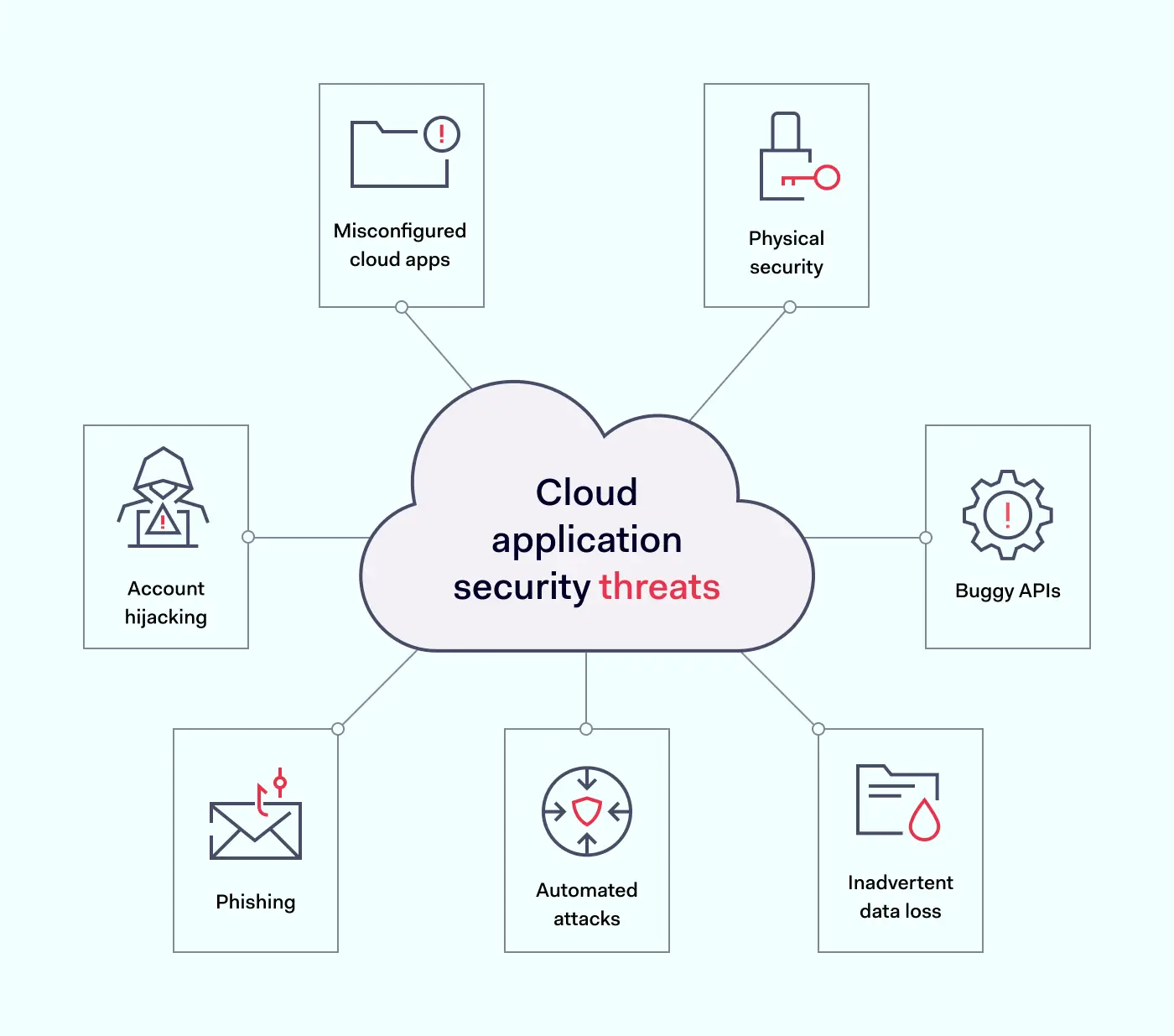
The first step in securing a cloud environment is understanding critical security threats. Here are some of the most important cloud application security risks to factor into security planning.
- Misconfigured cloud apps – Gartner reports that as many as 99% of cloud security issues are due to client error. Cloud deployments are complex, and teams must manage a range of application configurations. Every SaaS app requires access controls and processes to guard against shadow IT. Getting app configurations right is essential.
- Account hijacking – Malicious attackers can hijack user accounts and infiltrate cloud-hosted apps. Account hijacking tends to result from poor password hygiene and credential exposure. Security teams must enforce strong password policies. Password managers make life easier for workers. Encryption keeps credentials private and secure.
- Phishing – Phishers persuade employees to provide access credentials. They may also entice users to click links that harvest private data. Security teams must train all staff and enforce responsible behavior.
- Automated attacks – Attackers may find vulnerabilities via scanning agents. Botnets target poorly secured cloud apps, taking down cloud resources via denial-of-service attacks.
- Buggy APIs – APIs connect cloud applications and users. They need to be secure at all times. The problem with APIs is that they are both feature and data-rich. One compromised feature could expose data inside the app for outsiders to harvest.
- Physical security – Cloud applications rest on physical hardware somewhere in the world. Cloud providers must protect hardware against theft and take measures to handle fire, extreme weather, and other sources of damage.
- Inadvertent data loss – Staff can accidentally delete data, change it irreversibly, or lose encryption keys. This places intact data out of reach. A comprehensive data backup strategy is essential.


Cloud application security best practices
Failure to deal with cloud security vulnerabilities can have serious consequences. Let’s explore some app security best practices to lock down critical assets.
1. Understand the threat surface
Robust cloud application security rests upon strong visibility. Total awareness of cloud workloads and device connections puts you in a good position to apply controls.
Create and maintain inventories of connected cloud apps. This inventory will form the basis for security measures later on. Trim the inventory regularly to remove any unneeded cloud apps. Try to keep the threat surface as small as possible.
2. Deploy identity and access management (IAM)
Every cloud application is vulnerable to credential theft. Enterprises must establish complete control over who accesses cloud apps. They must also define and manage user privileges.
Cloud-native IAM tools manage access by authenticating log-in requests. They compare login credentials with secure directories and ensure that only authentic users gain access. Multi-Factor Authentication (MFA) adds another set of time-limited and unique credentials.
After admitting users, IAM systems authorize their privileges. Privileges allow users to carry out core workloads and restrict access to other applications.
Developers can access the tools they need. Sales teams can access CRM databases and marketing assets. Every role is limited, but workers are free to carry out their duties.
Additionally, IAM applies Single Sign On. SSO creates a single point of entry to cloud resources. One cloud-based application provides access to all apps. There is no need to secure multiple cloud endpoints.
More advanced IAM tools actively check for unsafe credential storage. They alert security teams if staff store credentials digitally or share information insecurely. All these features enhance the safety of cloud applications.
3. Create a cloud application security strategy
Companies need cloud application security. This strategy should specify how to access cloud apps safely and how user identities are verified. Users should know what they need to do and what threat mitigation controls are in place.
Looking beyond security policies, security teams should have a clear plan to secure data on all cloud applications. This can be visualized on three levels to cover vulnerabilities:
- Platforms. Cloud infrastructure underlying can include exposed data files. If companies develop cloud infrastructure in-house, security staff must focus on correctly configuring platforms. Encrypting all data is advisable.
- Databases. Secure cloud databases with appropriate encryption and access controls. Assess the right authorization levels for every role. Workers should only have access to relevant data. All other information should be out of reach.
- Applications. Secure the attack surface by extending IAM to all applications. Check API configurations, and use any threat detection systems provided by app developers. Set up automated notifications about unusual access requests or network traffic patterns.
4. Use automated security testing
Testing is a critical aspect of cloud app security. It may be too late to detect and mitigate vulnerabilities when cloud apps go live. Instead, companies should switch from standard DevOps to DevSecOps (Development Security Operations).
DevSecOps includes automated testing systems that assess code during the development phase. Testing during the CI/CD process uncovers weaknesses before hackers have a chance to exploit them.
Testing should extend to open-source code libraries used to build cloud applications. It should also cover data containers and user-provisioned cloud deployments. Every part of the cloud environment is vulnerable.
Testing does not end after app provisioning. Enterprises must continuously test IAM systems to ensure the integrity of IAM processes. They should also test encryption tools. Keys may be exposed or out of date, creating inherent weaknesses.
Automation is vital. You can automate development and post-deployment testing to reduce security workloads and ensure regular results.
5. Focus on password hygiene
Companies need to drive home the importance of password hygiene. Access controls and encryption mean little if employees expose passwords to outsiders.
Stolen or hacked credentials are a major security weakness. Staff must use strong passwords and change them regularly.
SSO helps make this task more manageable as workers handle fewer credentials. Cloud-native password managers also automate password strengthening and password replacement.
6. Employ comprehensive encryption strategies
Exposed data is an easy target for hackers inside cloud perimeters. That’s why encryption is a critical component of cloud app security.
Encryption scrambles data, making it unreadable to anyone without specific encryption keys. There are three main ways to encrypt data on the cloud:
- Encrypting data at rest secures information stored by enterprises. This could include HR information or financial records. Companies can encrypt files, databases, and even cloud platforms. With more layers covered, hackers will struggle to access confidential data.
- Encrypting data in transit makes collaboration safer. Data constantly moves throughout cloud environments. Information passes from on-premises networks and remote devices to the cloud. Encrypting data as it moves protects against interception attacks.
- Encrypting data in use makes using applications safer. Employees may retain workloads in an open state for long periods. This leaves data vulnerable to interception and extraction. The use of encryption and tools like DRM makes in-use data less accessible.
7. Active threat detection
Monitor cloud applications in real-time to detect threats and protect data. User behavior patterns can provide clues about ongoing attacks. Access requests for sensitive files can generate automated alerts.
Security teams can use activity monitoring data to fine-tune privileges management. Monitoring data is also a valuable compliance tool, providing evidence of continuous security management.
8. Regularly patch software and apply system updates
Cloud applications require timely and frequent updates to keep pace with evolving threats. Codebase changes and new services constantly present new vulnerabilities and exploits for hackers to target. Automated scheduled updates neutralize weak spots as they emerge.
9. Proactive privacy and compliance policies
Data privacy is a central part of compliance strategies. Enterprises operating in the cloud face major regulatory challenges, including GDPR, PCI-DSS, or HIPAA compliance. Secure cloud apps to meet relevant compliance standards.
Security teams should build app security audits into their schedule. Check that apps and security controls meet regulatory guidelines. Include the development environment used to provision cloud applications and open-source libraries used by DevOps teams.
Use regulatory requirements as a framework to build effective controls. For instance, PCI-DSS compliance demands data encryption for financial records. HIPAA demands tight identity management and encryption of sensitive information.


Compliance strategies aren’t static. Enterprises should take a proactive approach when securing sensitive data, using regulatory frameworks as guides.
How businesses could secure their cloud applications
Legacy tools like VPNs have security limitations when guarding the cloud. Instead, using security tools that function alongside cloud application APIs is advisable.
IAM and SSO systems are essential components of cloud security strategies alongside data encryption and threat monitoring. Fortunately, you can source solutions that bring together core app security functions.
The two major options here are proxy or API-integrated Cloud Access Security Brokers (CASBs):
- Proxy CASBs route traffic through a separate proxy between user devices and cloud apps. Proxies usually employ HTTP and can intervene with traffic passing through cloud endpoints. The CASB applies encryption and tracks anomalies such as suspicious login requests.
- API-based CASBs do not require an extra layer of routing. These CASBs are built into cloud apps instead. This has many potential benefits, as well as some drawbacks.
Benefits of API-based CASBs include:
- Improved speed – There is no need to route traffic via a proxy. This boosts speeds and improves the user experience. Routing large amounts of traffic through a proxy may lead to performance issues as demands grow.
- Firewall interaction – API CASBs supplement existing network firewalls. They add cloud security features that protect data and monitor activity. Proxy CASBs damage performance by adding another security barrier alongside firewalls.
- Easy upgrades – Users must update CASBs as applications evolve. App developers often add or exchange protocols and authentication systems. But developers do not routinely alert CASB developers about needed upgrades. API-based tools are easier to patch as apps change. Over time, cloud apps will leave proxy CASBs behind.
- Better security – Proxy-based CASBs break TLS sessions to access the HTTP stream. They then reconstruct TLS protection to complete cloud access. Users trust their CASB to restore TLS sessions safely and reliably. This weak point can compromise the security of cloud deployments.
Major cloud computing providers like Google and Amazon recommend API-embedded CASBs where possible. This makes perfect sense in a fast-changing cloud application environment.
However, API-based CASBs may not work with all SaaS deployments. CASBs are often compatible with most but not all APIs. This can add complexity to cloud security architecture. Proxy CASBs can operate across different APIs, resulting in simple solutions.
Enterprises also need to be aware of problems surrounding CASBs. For instance, cloud infrastructure providers rarely inform CASB developers about platform alterations that cause security issues. Cloud platforms can change quickly. CASB vendors need to keep up with changes and plug any security holes.
This issue affects proxy CASBs more than API-based versions. API-based brokers integrate closely with apps. App developers tend to flag any API changes for CASB developers. As a result, patches appear in a more timely manner. Users can expect stronger security.
The shared security responsibility model
Before implementing cloud application security best practices, bring the shared responsibility model into the picture.
In cloud environments, cloud providers and users share responsibility for security. Responsibility levels depend upon your cloud computing setup and your choice of a cloud service provider.
Generally speaking, cloud providers like AWS or Microsoft Azure assume responsibility for protecting:
- The infrastructure stack (including hosts and data centers)
- Software required to host cloud applications and data
- Networking infrastructure connecting cloud apps
Clients must handle everything else. Responsibilities vary according to whether you choose IaaaS, PaaS, or SaaS deployments.
- IaaS – Infrastructure-as-a-service users have the widest responsibilities. Users must protect apps and data, as well as infrastructure. This includes middleware and can include the cloud operating system.
- PaaS – Platform-as-a-service users must protect any infrastructure they maintain, including apps and data hosted by their service provider. Any proprietary apps hosted by third parties remain your responsibility.
- SaaS – Software-as-a-service users are responsible for data stored or processed by cloud applications. The main security risks relating to SaaS applications are access management and encrypting sensitive data.

Shared responsibility model in practice
Getting the balance right when applying the shared responsibility model is all-important. A good starting point is assessing every cloud application.
It is critical to define the responsibilities of users and providers for each application. Be clear about internal security controls and what your provider offers. Write a clear description of who is responsible for securing each asset and how to ensure data security.
Regardless of the cloud model in use, users are always responsible for:
- Securing on-premises and remote access endpoints
- Protecting data flowing through cloud resources
- Managing access to cloud applications.
Bring operations and security teams together. Developers need to provision cloud services flexibly and quickly. Security teams must advise about how to calibrate those services safely.
However, cloud users aren’t alone. Cloud service providers realize the complexity involved in managing cloud application security threats.
Providers usually offer user controls within APIs to secure their apps. They may also offer monitoring and threat management functions. Always investigate and use available cloud-native security tools.
Enterprises can also request audit information from providers. This should include details about their security strategy. Compare the material provided with your service terms to ensure providers meet their obligations.
Cloud application security assessment checklist
Before we finish, here is a quick checklist of critical cloud application security measures:
1. Create robust security policies covering all cloud apps. Take into account private, public and multi-cloud environments. Consider how to secure remote workers. Include processes to onboard and off-board employees. And put plans in place to detect and mitigate data breaches.
2. Implement IAM for the cloud. Ensure users have the correct privileges. Keep in mind Zero Trust concepts and the principle of least privilege. Combine cloud apps with SSO and add an extra protective screen with MFA.
3. Train staff in cloud security awareness. Make sure staff is aware of data storage and password policies. Train workers in secure cloud application usage and ways to share data safely. Focus on the threat posed by phishing attacks.
4. Deploy cloud security controls. Protect endpoints with encryption and CASBs. For instance, cloud-specific controls like disabling SSH and SQL Server access guard against brute force attacks.
5. Check application configurations. Poorly configured cloud apps are a critical security threat. Enforce API protection policies to configure apps properly. Focus on potential malware injection sites to neutralize common external attacks.
6. Put backups in place. Store sensitive data and workloads on separate cloud servers. Backup server files to ensure smooth disaster recovery. Carry out regular restoration tests to make sure data is recoverable.
7. Update software when needed. Use automated patch management to update cloud applications and deliver patches to all worker devices. Test updates when possible before deployment.
8. Track threats and log incidents. Use automated threat scanning and activity logging. Cloud logging tools can organize and analyze complex data. Use this data to improve your security posture and provide evidence of compliance.
9. Apply data security policies. Put in place policies to encrypt data at rest, in transit, and in use. Check encryption keys are used safely, preventing exposure to external attackers.
How can NordLayer help?
Follow our cloud application security checklist and best practices to secure cloud environments. With the correct controls, enterprises can take advantage of cloud computing. Sound app security measures reduce costs and cut data loss risks.
NordLayer offers cloud security solutions for all digital businesses. Install IAM, MFA, and SSO to control cloud access and reduce the attack surface. Create encrypted connections between remote workers and cloud portals. And integrate client-side security controls with tools provided by CSPs.
Find a route to ironclad cloud security. Get in touch and discuss your security options today.




 Marvin Petzolt, Senior Application Security Engineer at Nord Security


 Tom Okman, Co-founder of Nord Security
Since the establishment of Nord Security and until this year, we have operated without external funding – and we have learned many lessons. Last week, I had the great honor of presenting our main takeaways from this bootstrapping journey on the stage of Web Summit. Here are the four main insights that I shared for founders focused on bootstrapping their business:
#1 Perfect your company’s mission
Your company’s mission is not just a catchy slogan you place on your “About” page and then forget about it. Your mission is the underlying DNA of every meeting and every creative solution, and it works in the background every time your people decline offers from other companies.
When you raise funding, it’s easy to lose sight of why you started your company in the first place. But when you are bootstrapping, your mission and your customers guide your business path. So bootstrapping founders, instead of focusing on raising the next round of funding, look for innovative ways to turn their mission into a reality. They are also more receptive to what customers are saying to them. That feedback naturally helps polish and evolve your mission over time, which in turn helps improve your corporate and product strategies. And it comes with a bonus – the company develops a solid internal culture.
#2 Build local, ship global
Some entrepreneurs are wary of using local talent pools, especially if the business is starting outside established startup hubs like Silicon Valley or Israel. However, that was not the case in our story. In fact, we were fortunate to start our company in Lithuania. While funding was scarce when we started, the local ecosystem, partners, and infrastructure helped us immensely in getting our business off the ground. People in Lithuania are talented and keen to prove themselves to their international peers. So one of our best decisions early in the business was to tap into that talent pool and support from local associations and policymakers.
Today, more than ever, talent and support for entrepreneurs are spread throughout Europe, both in traditional tech hubs and rising startup center’s. As a result, the startup world is getting flatter, so now is the best time to take advantage of building locally while shipping globally.
#3 Focus on the customer
Customers are royalty, especially when entrepreneurs operate without external funding. In such cases, customers become leading investors and the most sustainable source of financing, and startups must focus on them above all else. So to be successful, entrepreneurs have to build a product that their customers will love and want to pay for, meaning that creating a market fit for products becomes central to a startup’s survival. Unfortunately, you don’t have a large treasure chest on your side when you are bootstrapped, so the key is to be efficient in adapting to your customer’s feedback.
#4 Take risks and be nimble
The bootstrapping route empowers entrepreneurs to take charge of the big decisions when it comes to vision, hiring, operations, or finances. That gives self-funded startups an edge because they can be much more flexible, agile, and tenacious than other companies. But at the same time, not taking outside financing pushes entrepreneurs to be hungrier in finding ways to improve their business. Because knowing that customers are critical, you can’t simply spend your way out of problems. In Nord Security’s case, it usually meant taking risks and being the pioneer in educating the market and customers about a new use case, product feature, or upcoming challenges.
While such a situation might sound precarious, in a way, it also means returning to what makes startup culture great – the ability and willingness to be inventive and take risks. But it is essential to be decisive when things need to be fixed and be bold in pivoting because inertia can sometimes be more dangerous than recklessness. This combination can prove extremely potent if entrepreneurs allow themselves to be guided by their leading investors – the customers – and their mission-driven culture. But only if founders are willing to lean into it fully.
Tom Okman, Co-founder of Nord Security
Since the establishment of Nord Security and until this year, we have operated without external funding – and we have learned many lessons. Last week, I had the great honor of presenting our main takeaways from this bootstrapping journey on the stage of Web Summit. Here are the four main insights that I shared for founders focused on bootstrapping their business:
#1 Perfect your company’s mission
Your company’s mission is not just a catchy slogan you place on your “About” page and then forget about it. Your mission is the underlying DNA of every meeting and every creative solution, and it works in the background every time your people decline offers from other companies.
When you raise funding, it’s easy to lose sight of why you started your company in the first place. But when you are bootstrapping, your mission and your customers guide your business path. So bootstrapping founders, instead of focusing on raising the next round of funding, look for innovative ways to turn their mission into a reality. They are also more receptive to what customers are saying to them. That feedback naturally helps polish and evolve your mission over time, which in turn helps improve your corporate and product strategies. And it comes with a bonus – the company develops a solid internal culture.
#2 Build local, ship global
Some entrepreneurs are wary of using local talent pools, especially if the business is starting outside established startup hubs like Silicon Valley or Israel. However, that was not the case in our story. In fact, we were fortunate to start our company in Lithuania. While funding was scarce when we started, the local ecosystem, partners, and infrastructure helped us immensely in getting our business off the ground. People in Lithuania are talented and keen to prove themselves to their international peers. So one of our best decisions early in the business was to tap into that talent pool and support from local associations and policymakers.
Today, more than ever, talent and support for entrepreneurs are spread throughout Europe, both in traditional tech hubs and rising startup center’s. As a result, the startup world is getting flatter, so now is the best time to take advantage of building locally while shipping globally.
#3 Focus on the customer
Customers are royalty, especially when entrepreneurs operate without external funding. In such cases, customers become leading investors and the most sustainable source of financing, and startups must focus on them above all else. So to be successful, entrepreneurs have to build a product that their customers will love and want to pay for, meaning that creating a market fit for products becomes central to a startup’s survival. Unfortunately, you don’t have a large treasure chest on your side when you are bootstrapped, so the key is to be efficient in adapting to your customer’s feedback.
#4 Take risks and be nimble
The bootstrapping route empowers entrepreneurs to take charge of the big decisions when it comes to vision, hiring, operations, or finances. That gives self-funded startups an edge because they can be much more flexible, agile, and tenacious than other companies. But at the same time, not taking outside financing pushes entrepreneurs to be hungrier in finding ways to improve their business. Because knowing that customers are critical, you can’t simply spend your way out of problems. In Nord Security’s case, it usually meant taking risks and being the pioneer in educating the market and customers about a new use case, product feature, or upcoming challenges.
While such a situation might sound precarious, in a way, it also means returning to what makes startup culture great – the ability and willingness to be inventive and take risks. But it is essential to be decisive when things need to be fixed and be bold in pivoting because inertia can sometimes be more dangerous than recklessness. This combination can prove extremely potent if entrepreneurs allow themselves to be guided by their leading investors – the customers – and their mission-driven culture. But only if founders are willing to lean into it fully.