Skip to content

美國運輸安全管理局 (TSA) 的新網絡安全要求

cybersecurity requirements

On the last March 7th, the Transportation Security Administration (TSA) issued a new emergency amendment requiring regulated airlines and airports to increase their capacity to face cyber attacks. The measure was taken less than a week after the United States government announced its national cyber security strategy, following similar requirements directed at freight and passenger rail carriers.

According to the issued statement, TSA’s priority is to protect the United States transportation system, working collaboratively with stakeholders and offering safe, secure, and efficient travel. This was necessary due to hackers who have attacked the aviation industry using different invasion methods.

In July 2022, American Airlines was a victim of a phishing attack, granting unauthorized access to its IT environment. In addition, various airports in the United States were targeted by DDoS attacks in October of the same year.

For this reason, regulated entities affected by the TSA must promote the following actions:

  • Develop network segmentation policies and controls, ensuring that operational technology systems continue to function securely in case of a compromise of IT;
  • Create access control measures, protecting critical systems from unauthorized access;
  • Implement continuous monitoring and detection policies and procedures to identify and respond to cyber security threats and anomalies; and
  • Reduce the risks of exploitation of uncorrected systems by applying security patches and updates on operating systems, applications, drivers, and firmware through a risk-based methodology.

Previously imposed requirements for aircraft operators and airports include establishing a cyber security point of contact, developing and adopting a cyber security incident response plan, conducting a cyber security vulnerability assessment, and reporting significant cyber security incidents to the Cybersecurity and Infrastructure Security Agency (CISA).

Conclusion

In conclusion, the new amendment issued by the TSA is their latest effort to ensure that transportation operators improve their ability to address cyber threats. In this article, we covered its goals and importance.

According to Cybersecurity Ventures, the world ended 2020 with 300 billion passwords to protect. And the trend shows this number will increase dramatically. Email accounts (personal and professional), banking services, corporate systems, devices, and applications are some examples that require authentication through passwords. And with the increase in the number of data leaks, it is easy to find compromised credentials on forums on the dark web being sold for pennies.

And yes, we know that it is not easy to manage so many passwords. Even the most tech-savvy can struggle to manage and protect credentials in so many different environments. In times of personal data protection legislation, such as LGPD and GDPR, ensuring the protection of such data has become more than a security requirement – it is a business must.

Despite all the risks associated with their use, many users and companies use passwords that are easy to guess, such as numbers or sequential letters (123456 or abcdef). SolarWinds itself, the victim of a serious attack on its supply chain, was using the password solarwinds123 in its infrastructure. Certainly, your email password or mine is stronger than the one used by this American technology company.

So, on this World Password Day, here are some tips that should be considered by users to keep their data protected:

  1. Use long and complex passwords. This prevents hackers from using techniques to guess them. However, just using complex passwords may not be enough to protect them from hackers.
  2. Many devices are configured with default passwords. Change them immediately.
  3. Avoid reusing your passwords on different accounts. Also, constantly check if you have already been the victim of a data leak through senhasegura Hunter. If so, change your passwords immediately.
  4. Configure your passwords to be changed frequently. The ideal is at least every 3 months.
  5. Do not write down, store in an easily accessible place, or share your passwords with others, thus avoiding unauthorized access.
  6. Consider password management solutions, or even privileged access management (PAM), to manage the use of systems and devices.
  7. Use Multiple-Factor Authentication (MFA) mechanisms to add a layer of security to your accounts.
  8. Set up means of retrieving access, such as including phone numbers or emails.

Passwords are one of the oldest security mechanisms in the computing world and are also one of the main attackvectors by hackers. And in the “new normal” era, with increasing threats resulting from the covid-19 pandemic, it is vital that users be alert and properly protect their digital identities. In this way, we can avoid cyberattacks that can cause considerable damage not only to people, but also to companies. And on this World Password Day, remember: security starts with you!

About Segura®
Segura® strive to ensure the sovereignty of companies over actions and privileged information. To this end, we work against data theft through traceability of administrator actions on networks, servers, databases and a multitude of devices. In addition, we pursue compliance with auditing requirements and the most demanding standards, including PCI DSS, Sarbanes-Oxley, ISO 27001 and HIPAA.

About Version 2 Digital

Version 2 Digital is one of the most dynamic IT companies in Asia. The company distributes a wide range of IT products across various areas including cyber security, cloud, data protection, end points, infrastructures, system monitoring, storage, networking, business productivity and communication products.

Through an extensive network of channels, point of sales, resellers, and partnership companies, Version 2 offers quality products and services which are highly acclaimed in the market. Its customers cover a wide spectrum which include Global 1000 enterprises, regional listed companies, different vertical industries, public utilities, Government, a vast number of successful SMEs, and consumers in various Asian cities.

February 2023: What’s New?

“What’s New?” is a series of blog posts covering recent changes to Comet in more detail. This article covers the latest changes in Comet Voyager over February 2023.

There were just three Comet software releases during February – two in the 22.12.x Voyager release series, plus the launch of our latest quarterly series 23.3.0 “Leda”.

February is a short month, and it was also a quiet month for new feature development as we focused on quality assurance ahead of the new quarterly software release. Most new feature development this month has been held back as a result, so you will see many more exciting new features land in the 23.3.x “Voyager” series when it reopens shortly next month in March.

Better email reports

The latest 22.12.x versions of Comet included improvements to the email reporting features that launched at the start of the 22.12.x series.

The Recent Activity email report template now includes a table legend in the email footer, helping to distinguish the color series from each other. By way of comparison, when you view Comet Server’s Recent Activity page in a web browser, it’s possible to hover the mouse over each color segment to display more detailed information about the breakdown of different job types. However, email is a more limited technology medium and an equivalent hover feature is not available. The legend is a simple solution that makes the Recent Activity email report more accessible to Comet Server operators who are not yet familiar with the colors.

The email feature has received more attention to detail, leading to us developing additional fixes for email report previews; for filtering the subset of customers; and for partial configuration of time boundaries.

Better granular restore

Another one of our areas of focus this month has been the granular single-file restore system, that now shares some common core functionality across both the Disk Image and Hyper-V Protected Item types. Granular restore now supports more types of NTFS compressed file, including a fix for files that have been compressed with the LZNT1 algorithm. We also fixed an issue with reading single files from within NTFS partitions that have a highly fragmented MFT (Master File Table).

Additionally, we have fixed additional issues with the new Hyper-V single-file restore if a single Protected Item contains multiple virtual machines with multiple VHDX images, as well as fixing cosmetic issues when toggling between Protected Item types in the Comet Backup desktop app.

Better syncing with Gradient MSP

There have been improvements to the process of syncing Comet data with Gradient MSP. As a reminder, this is an external service that can correlate your Comet user accounts and storage usage with RMM invoices in systems such as Autotask, Syncro RMM, Connectwise, and many more.

The latest versions of Comet Server allow more fine-grained control of the connected feature set; the ability to toggle sending backup job failures to the RMM; optimizing the number of alerts that are sent; and providing clearer error messages if there is an error from Gradient’s service.

Comet 23.3.0 “Leda”

All of our focus on bugfixes this month has been building up to one thing – a smooth and seamless release of our latest quarterly milestone software version. This time, it’s named “Leda”, and this rolls up the whole quarter’s worth of 22.12.x enhancements into a new fixed point for you to build your business on.

Like Comet’s previous recent quarterly software releases, “Leda” is named after a moon of Jupiter. Jupiter has a great number of moons and more are continuing to be discovered. When Leda was discovered as recently as 1974, it was one of Jupiter’s 13 known moons. Today, Jupiter has 92 known moons, with the most recent discovered just this month in February 2023!

You can read the full release notes for Comet 23.2.0 “Leda” to see the full details – or if you’d prefer to watch rather than read, I’m hosting a webinar next week to discuss this new quarterly release and all its new features. Please register for a notification before we go live on March 7th (PST) to catch up on all the latest Comet news with me – there will be a free live Q&A session after the presentation.

As well as that, we have many more videos available on our YouTube channel, including guides on getting started with Comet, individual features, demonstrations with our technology partners, and webinars for previous quarterly software releases.

About Version 2 Digital

Version 2 Digital is one of the most dynamic IT companies in Asia. The company distributes a wide range of IT products across various areas including cyber security, cloud, data protection, end points, infrastructures, system monitoring, storage, networking, business productivity and communication products.

Through an extensive network of channels, point of sales, resellers, and partnership companies, Version 2 offers quality products and services which are highly acclaimed in the market. Its customers cover a wide spectrum which include Global 1000 enterprises, regional listed companies, different vertical industries, public utilities, Government, a vast number of successful SMEs, and consumers in various Asian cities.

About Comet
We are a team of dedicated professionals committed to developing reliable and secure backup solutions for MSP’s, Businesses and IT professionals. With over 10 years of experience in the industry, we understand the importance of having a reliable backup solution in place to protect your valuable data. That’s why we’ve developed a comprehensive suite of backup solutions that are easy to use, scalable and highly secure.

名為BlackLotus的惡意UEFI啟動工具,能安全開機及在Windows 11的電腦上運作

自2022年10月,有人在駭客論壇上兜售名為BlackLotus的惡意UEFI啟動工具,並標榜能突破端點電腦的防護機制,國際資安大廠ESET為了確認該惡意軟體是否如賣家宣稱的如此強大,故取得此惡意程式的檔案進行分析,結果發現確實如此,並認為日後很可能會被駭客大肆利用。

此軟體能在啟用UEFI安全開機、執行完整修補的Windows 11的電腦上運作,攻擊者一旦於受害電腦上部署,此啟動工具會植入作業系統核心層級的驅動程式,以及HTTP下載工具(用於與C2通訊、執行惡意酬載),並能夠停用作業系統內建的BitLocker、HVCI、Microsoft Defender等防護機制。為了維持於受害電腦上運作,駭客利用了CVE-2022-21894,研究人員指出,雖然微軟已於2022年1月修補上述漏洞,但遭濫用的可執行檔並未被列入UEFI註銷名單,而使得駭客仍能用於漏洞攻擊。

#若有任何資安需求,歡迎洽詢台灣二版資安專業團隊,服務電話:(02)7722-6899,或上官網查詢:https://version-2.com.tw/

原文出處:https://www.welivesecurity.com/2023/03/01/blacklotus-uefi-bootkit-myth-confirmed/

關於ESET
ESET成立於1992年,是一家面向企業與個人用戶的全球性的電腦安全軟體提供商,其 獲獎產品——NOD32防病毒軟體系統,能夠針對各種已知或未知病毒、間諜軟體 (spyware)、rootkits和其他惡意軟體為電腦系統提供實時保護。ESET NOD32佔用 系統資源最少,偵測速度最快,可以提供最有效的保護,並且比其他任何防病毒產品獲 得了更多的Virus Bulletin 100%獎項。ESET連續五年被評為“德勤高科技快速成長500 強”(Deloitte’s Technology Fast 500)公司,擁有廣泛的合作夥伴網絡,包括佳 能、戴爾、微軟等國際知名公司,在布拉迪斯拉發(斯洛伐克)、布里斯托爾(英國 )、布宜諾斯艾利斯(阿根廷)、布拉格(捷克)、聖地亞哥(美國)等地均設有辦事 處,代理機構覆蓋全球超過100個國家。

關於 Version 2 Digital
資安解決方案 專業代理商與領導者
台灣二版 ( Version 2 ) 是亞洲其中一間最有活力的 IT 公司,多年來深耕資訊科技領域,致力於提供與時俱進的資安解決方案 ( 如EDR、NDR、漏洞管理 ),工具型產品 ( 如遠端控制、網頁過濾 ) 及資安威脅偵測應 變服務服務 ( MDR ) 等,透過龐大銷售點、經銷商及合作伙伴,提供廣被市場讚賞的產品及客製化、在地化的專業服務。

台灣二版 ( Version 2 ) 的銷售範圍包括台灣、香港、中國內地、新加坡、澳門等地區,客戶涵 蓋各產業,包括全球 1000 大跨國企業、上市公司、公用機構、政府部門、無數成功的中小企業及來自亞 洲各城市的消費市場客戶。

了解業務連續性計劃及其重要性

These days, cybercrime is rampant. It’s no longer a matter of “if” you’re going to suffer an attack but “when” it will happen. All companies want to be ready for any crisis. And this is where a business continuity plan comes into play.

But what is a business continuity plan exactly? Why is it important? What should one include? Today, we’re exploring all these questions in-depth.

What is a business continuity plan?

A business continuity plan (BCP) is a document that sets guidelines for how an organization will continue its operations in the event of a disruption, whether it’s a fire, flood, other natural disaster or a cybersecurity incident. A BCP aims to help organizations resume operations without significant downtime.

Unfortunately, according to a 2020 Mercer survey, 51% of businesses across the globe don’t have a business continuity plan in place.

What’s the difference between business continuity and disaster recovery plans?

We often confuse the terms business continuity plan and disaster recovery plan. The two overlap and often work together, but the disaster recovery plan focuses on containing, examining, and restoring operations after a cyber incident. On the other hand, BCP is a broader concept that considers the whole organization. A business continuity plan helps organizations stay prepared for dealing with a potential crisis and usually encompasses a disaster recovery plan.

Importance of business continuity planning

The number of news headlines announcing data breaches has numbed us to the fact that cybercrime is very real and frequent and poses an existential risk to companies of all sizes and industries.

Consider that in 2021, approximately 37% of global organizations fell victim to a ransomware attack. Then consider that business interruption and restoration costs account for 50% of cyberattack-related losses. Finally, take into account that most cyberattacks are financially motivated and the global cost of cybercrime topped $6 trillion last year. The picture is quite clear — cybercrime is a lucrative venture for bad actors and potentially disastrous for those on the receiving end.

To thrive in these unpredictable times, organizations go beyond conventional security measures. Many companies develop a business continuity plan parallel to secure infrastructure and consider the plan a critical part of the security ecosystem. The Purpose of a business continuity plan is to significantly reduce the downtime in an emergency and, in turn, reduce the potential reputational damage and — of course — revenue losses.

Business continuity plan template

Password security for your business

Store, manage and share passwords.

Get NordPass Business

30-day money-back guarantee

Business Continuity Plan Example

[Company Name]

[Date]

I. Introduction

  • Purpose of the Plan

  • Scope of the Plan

  • Budget

  • Timeline

The initial stage of developing a business continuity plan starts with a statement of the plan’s purpose, which explains the main objective of the plan, such as ensuring the organization’s ability to continue its operations during and after a disruptive event.

The Scope of the Plan outlines the areas or functions that the plan will cover, including business processes, personnel, equipment, and technology.

The Budget specifies the estimated financial resources required to implement and maintain the BCP. It includes costs related to technology, personnel, equipment, training, and other necessary expenses.

The Timeline provides a detailed schedule for developing, implementing, testing, and updating the BCP.

II. Risk Assessment

  • Identification of Risks

  • Prioritization of Risks

  • Mitigation Strategies

The Risk Assessment section of a Business Continuity Plan (BCP) is an essential part of the plan that identifies potential risks that could disrupt an organization’s critical functions.

The Identification of Risks involves identifying potential threats to the organization, such cybersecurity breaches, supply chain disruptions, power outages, and other potential risks. This step is critical to understand the risks and their potential impact on the organization.

Once the risks have been identified, the Prioritization of Risks follows, which helps determine which risks require the most attention and resources.

The final step in the Risk Assessment section is developing Mitigation Strategies to minimize the impact of identified risks. Mitigation strategies may include preventative measures, such as system redundancies, data backups, cybersecurity measures, as well as response and recovery measures, such as emergency protocols and employee training.

III. Emergency Response

  • Emergency Response Team

  • Communication Plan

  • Emergency Procedures

This section of the plan focuses on immediate actions that should be taken to ensure the safety and well-being of employees and minimize the impact of the event on the organization’s operations.

The Emergency Response Team is responsible for managing the response to an emergency or disaster situation. This team should be composed of individuals who are trained in emergency response procedures and can act quickly and decisively during an emergency. The team should also include a designated leader who is responsible for coordinating the emergency response efforts.

The Communication Plan outlines how information will be disseminated during an emergency situation. It includes contact information for employees, stakeholders, and emergency response personnel, as well as protocols for communicating with these individuals.

The Emergency Procedures detail the steps that should be taken during an emergency or disaster situation. The emergency procedures should be developed based on the potential risks identified in the Risk Assessment section and should be tested regularly to ensure that they are effective.

IV. Business Impact Analysis

The Business Impact Analysis (BIA) section of a Business Continuity Plan (BCP) is a critical step in identifying the potential impact of a disruption to an organization’s critical operations.

The Business Impact Analysis is typically conducted by a team of individuals who understand the organization’s critical functions and can assess the potential impact of a disruption to those functions. The team may include representatives from various departments, including finance, operations, IT, and human resources.

V. Recovery and Restoration

  • Procedures for recovery and restoration of critical processes

  • Prioritization of recovery efforts

  • Establishment of recovery time objectives

The Recovery and Restoration section of a Business Continuity Plan (BCP) outlines the procedures for recovering and restoring critical processes and functions following a disruption.

The Procedures for recovery and restoration of critical processes describe the steps required to restore critical processes and functions following a disruption. This may include steps such as relocating to alternate facilities, restoring data and systems, and re-establishing key business relationships.

The Prioritization section of the plan identifies the order in which critical processes will be restored, based on their importance to the organization’s operations and overall mission.

Recovery time objectives (RTOs) define the maximum amount of time that critical processes and functions can be unavailable following a disruption. Establishing RTOs ensures that recovery efforts are focused on restoring critical functions within a specific timeframe.

VI. Plan Activation

  • Plan Activation Procedures

The Plan Activation section is critical in ensuring that an organization can quickly and effectively activate the plan and respond to a potential emergency.

The Plan Activation Procedures describe the steps required to activate the BCP in response to a disruption. The procedures should be clear and concise, with specific instructions for each step to ensure a prompt and effective response.

VII. Testing and Maintenance

  • Testing Procedures

  • Maintenance Procedures

  • Review and Update Procedures

This section of the plan is critical to ensure that an organization can effectively respond to disruptions and quickly resume its essential functions.

Testing procedures may include scenarios such as natural disasters, cyber-attacks, and other potential risks. The testing procedures should include clear objectives, testing scenarios, roles and responsibilities, and evaluation criteria to assess the effectiveness of the plan.

The Maintenance Procedures detail the steps necessary to keep the BCP up-to-date and relevant.

The Review and Update Procedures describe how the BCP will be reviewed and updated regularly to ensure its continued effectiveness. This may involve conducting a review of the plan on a regular basis or after significant changes to the organization’s operations or threats.

What should a business continuity plan checklist include?

Organizations looking to develop a BCP have more than a few things to think through and consider. Variables such as the size of the organization, its IT infrastructure, personnel, and resources all play a significant role in developing a continuity plan. Remember, each crisis is different, and each organization will have a view on handling it according to all the variables in play. However, all business continuity plans will include a few elements in one way or another.

  • Clearly defined areas of responsibility

    A BCP should define specific roles and responsibilities for cases of emergency. Detail who is responsible for what tasks and clarify what course of action a person in a specific position should take. Clearly defined roles and responsibilities in an emergency event allow you to act quickly and decisively and minimize potential damage.

  • Crisis communication plan

    In an emergency, communication is vital. It is the determining factor when it comes to crisis handling. For communication to be effective, it is critical to establish clear communication pipelines. Furthermore, it is crucial to understand that alternative communication channels should not be overlooked and outlined in a business continuity plan.

  • Recovery teams

    A recovery team is a collective of different professionals who ensure that business operations are restored as soon as possible after the organization confronts a crisis.

  • Alternative site of operations

    Today, when we think of an incident in a business environment, we usually think of something related to cybersecurity. However, as discussed earlier, a BCP covers many possible disasters. In a natural disaster, determine potential alternate sites where the company could continue to operate.

  • Backup power and data backups

    Whether a cyber event or a real-life physical event, ensuring that you have access to power is crucial if you wish to continue operations. In a BCP, you can often come across lists of alternative power sources such as generators, where such tools are located, and who should oversee them. The same applies to data. Regularly scheduled data backups can significantly reduce potential losses incurred by a crisis event.

  • Recovery guidelines

    If a crisis is significant, a comprehensive business continuity plan usually includes detailed guidelines on how the recovery process will be carried out.

Business continuity planning steps
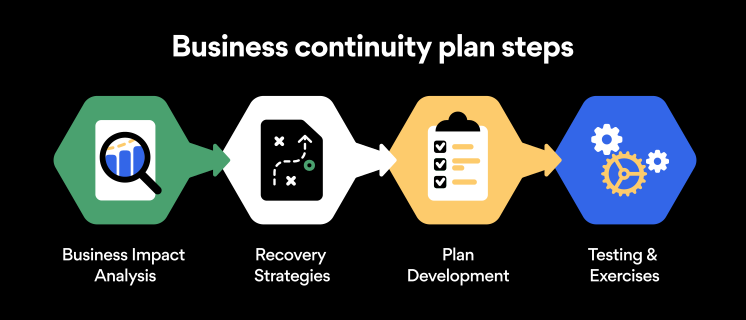
Here are some general guidelines that an organization looking to develop a BCP should consider:

Analysis

A business continuity plan should include an in-depth analysis of everything that could negatively affect the overall organizational infrastructure and operations. Assessing different levels of risk should also be a part of the analysis phase.

Design and development

Once you have a clear overview of potential risks your company could face, start developing a plan. Create a draft and reassess it to see if it takes into account even the smallest of details.

Implementation

Implement BCP within the organization by providing training sessions for the staff to get familiar with the plan. Getting everyone on the same page regarding crisis management is critical.

Testing

Rigorously test the plan. Play out a variety of scenarios in training sessions to learn the overall effectiveness of the continuity plan. By doing so, everyone on the team will be closely familiar with the business continuity plan’s guidelines.

Maintenance and updating

Because the threat landscape constantly changes and evolves, you should regularly reassess your BCP and take steps to update it. By making your continuity plan in tune with the times, you will be able to stay a step ahead of a crisis.

Level up your company’s security with NordPass Business

A comprehensive business continuity plan is vital for the entire organization’s security posture. However, in a perfect world, you wouldn’t have to use it. This is where NordPass Business can help.

Remember, weak, reused, or compromised passwords are often cited as one of the top contributing factors in data breaches. It’s not surprising, considering that an average user has around 100 passwords. Password fatigue is real and significantly affects how people treat their credentials. NordPass Business counters these issues.

With NordPass Business, your team will have a single secure place to store all work-related passwords, credit cards, and other sensitive information. Accessing all the data stored in NordPass is quick and easy, which allows your employees not to be distracted by the task of finding the correct passwords for the correct account.

In cyber incidents, NordPass Business ensures that company credentials remain secure at all times. Everything stored in the NordPass vault is secured with advanced encryption algorithms, which would take hundreds of years to brute force.

If you are interested in learning more about NordPass Business and how it can fortify corporate security, do not hesitate to book a demo with our representative.


About NordPass
NordPass is developed by Nord Security, a company leading the global market of cybersecurity products.

The web has become a chaotic space where safety and trust have been compromised by cybercrime and data protection issues. Therefore, our team has a global mission to shape a more trusted and peaceful online future for people everywhere.

About Nord Security
The web has become a chaotic space where safety and trust have been compromised by cybercrime and data protection issues. Therefore, our team has a global mission to shape a more trusted and peaceful online future for people everywhere.

About Version 2 Digital

Version 2 Digital is one of the most dynamic IT companies in Asia. The company distributes a wide range of IT products across various areas including cyber security, cloud, data protection, end points, infrastructures, system monitoring, storage, networking, business productivity and communication products.

Through an extensive network of channels, point of sales, resellers, and partnership companies, Version 2 offers quality products and services which are highly acclaimed in the market. Its customers cover a wide spectrum which include Global 1000 enterprises, regional listed companies, different vertical industries, public utilities, Government, a vast number of successful SMEs, and consumers in various Asian cities.

保護您企業的 10 項電子郵件安全最佳實踐

With the rise of remote working came a surge in cybercrime. Business Email Compromise (BEC) attacks have seen a 150% year-over-year increase, so the odds are not in any business’s favor. However, staying vigilant and educated can protect your company and avoid such attacks. Keep reading to find out the main dangers business email accounts face and get 10 business email security tips.

What is Business Email Compromise (BEC)?

BEC is a type of cybercrime that involves impersonating a trusted business contact, such as a CEO or supplier, in order to trick employees into transferring money or sensitive information to the criminal’s account. These schemes often involve careful research and social engineering to create a convincing ruse.

According to the FBI, BEC fraud has cost companies over $26 billion globally since 2016, and the threat continues to grow. Small businesses are particularly vulnerable, as they may not have the resources or expertise to detect and prevent these attacks.

One example of a BEC scam involved the director of Puerto Rico’s Industrial Development Company, Ruben Rivera, who mistakenly made the transaction of $2.6 million to a fake bank account. In another case, Ubiquiti Networks Inc., the San Jose-based manufacturer of high-performance networking technologies, fell victim to a BEC attack that resulted in a loss of $46.7 million.

As the use of email continues to be an essential aspect of business communication, it is crucial for companies to remain vigilant and take proactive measures to defend against the threat of BEC.

Phishing is the number one email security threat

Phishing is a type of digital scam that is especially common in emails. It’s a form of social engineering where a hacker tries to deceive an employee into believing the email is coming from a credible source. Phishing emails usually have some sort of CTA: it’s like a form of marketing, if you will. Except that phishing CTAs usually involve clicking on a malicious link or revealing sensitive company data to outsiders.

Well, just like any other marketer, hackers employ creative techniques to improve the conversion rates of their scams. The more deceitful the email, the higher the conversion rate. That’s why phishing emails can be difficult to spot at times. Examples of phishing emails include:

  • Account verification scam. You may receive a phishing email that looks something like this: “Due to a recent security threat, we would like to ask you to verify your account by signing in through the link below. Failing to do so will result in the permanent deactivation of your account.”

  • Fake invoice scam. Hackers may send out emails saying, “We still haven’t received your payment for our services. Please use the link below to complete the transaction.”

  • Spear phishing. This is a more advanced and tailored form of phishing that requires hackers to do some research on your company. For instance, an employee may receive an email that looks like it’s coming from a specific coworker, instructing them to visit a website or disclose information.

Password security for your business

Store, manage and share passwords.

Get NordPass Business

30-day money-back guarantee

Best practices for business email security

Falling for phishing scams can expose your company to data breaches and malware. Taking steps to appropriately ensure the security of your email will help protect your business from phishing and other forms of cybercrime:

1. Conduct phishing awareness training

Emails usually get breached through employee negligence and lack of knowledge. So the first way to increase email cybersecurity is to raise awareness about the main threat: phishing. All employees should receive in-depth training on recognizing and avoiding attempted phishing schemes. The main points to cover here are:

  • Becoming familiar with the main phishing schemes

  • Being suspicious about unusual requests

  • Never clicking on random links received through email

Once employees are familiar with these precautions, your company’s susceptibility to phishing emails will significantly decrease and your business email security will improve in general.

Email attachments and suspicious links are the most common methods cybercrooks use to spread malicious software. Ensure that your employees are well aware of these devious practices and are trained to spot them in real-life situations. With time and a lot of practice, your team will develop a sense for suspicious email links and attachments, which should considerably lower the potential attack vector and significantly improve your overall security posture.

3. Enable multi-factor authentication

You can make your account safer from hackers by connecting your smartphone to your email. Even if the passwords to your email accounts are leaked, no outsiders will be able to access them without having access to the device it’s connected to. All vital business accounts, not just email accounts, should have multi-factor authentication enabled.

4. Avoid using email when on public Wi-Fi

Public Wi-Fi poses massive risks to email security. If it’s unencrypted (which it often is), anybody can connect to the same network. You never know when a hacker will be that someone.

If a hacker intercepts your connection with unencrypted public Wi-Fi and catches you logging into your email, they can steal your email password. It’s best to steer clear of public Wi-Fi altogether, but if connecting to it is necessary, never transmit important data while on it.

5. Avoid using business emails for private purposes and vice versa

Most office jobs these days come with an email address. Some people get the temptation to use the new email address for all sign-ins. Need to sign up for a new streaming service? Well, why not use your brand new business email for that? Everybody else does it, anyway, right?

At first, it might sound like a great idea. Yet using your enterprise email for private purposes and vice versa could cause significant security concerns for you as an individual and the company.

First, using a company email for your personal online activities allows for easier and simpler profiling. Consequently, that could lead to spear-phishing — a targeted phishing campaign or other targeted cyberattacks.

6. Encrypt company email

Encrypting company email using special email security software is a great way to steer hackers away. Encryption ensures that the only people able to view the emails are th
e sender and recipient. If a hacker intercepts an employee’s Wi-Fi connection or email account, they will not see any sensitive data.

7. Set up email security protocols

Email security protocols are immensely important because they provide an extra layer of security to your digital communications. The protocols are designed to ensure the safety of your communications as they pass through webmail services over the internet. Without the aid of email security protocols, bad actors can intercept communication in a relatively easy manner. Please familiarize yourself with different email security protocols and enable them to ensure secure communications.

8. Improve endpoint security

To further fortify your security stance, take action to improve your endpoint security. Often the easiest and most effective way to boost endpoint security is by implementing security tools for company-wide use.

Consider deploying a VPN like NordLayer — a tool that encrypts the internet connection and data transferred over your business network. Antivirus software is another tool that should be used on all business workstations to ensure a proactive defense.

9. Don’t change passwords too often

Password fatigue is a fact of life — today, the average user has about 100 passwords on their hands. Keeping track of all the passwords is a challenge.

The conventional wisdom regarding password security is that you should change your passwords every 90 days. While that might sound like a reasonable security practice, it could lead to simpler and easy-to-crack passwords being used.

If you know that your employees take password hygiene seriously and craft hard-to-guess passwords and that none of their passwords were ever leaked, then they should stick to the passwords they already use. If any password (no matter how strong it is) is leaked or breached — the change should be immediate.

10. Use strong passwords for email accounts

Strong passwords are the backbone of account safety. Yet businesses often fail to secure their emails with strong passwords. If your business is like this, you should know that the easier the password, the easier it is to hack, especially through brute-force attacks. Brute-force attacks are when hackers try to guess a password by flooding your account with thousands of attempts.

To protect your business email from such attacks, ensure everyone in your organization secures their passwords. Secure email passwords are:

  • Long

  • Complicated

  • Contain different types of characters

  • Unique (never reused from other accounts)

These points are crucial if you want to ensure the safety of your business. However, passwords that are difficult to hack are also difficult to remember. The last thing anyone would want is to secure their account so well that they couldn’t even access it themselves.

Luckily, the business password manager by NordPass can come to the rescue. If all members of your company use it for their accounts, their emails will be safe, and they won’t need to scratch their heads trying to remember their passwords.

Bottom line

Business email security is never a given. Even though platforms like Gmail or Outlook do their best to ensure the safety of their users, you can easily fall victim to hackers if you don’t actively protect your account. By following these five email security best practices, the chances of getting your business emails hacked will be much slimmer because hackers will likely prefer more vulnerable prey.


About NordPass
NordPass is developed by Nord Security, a company leading the global market of cybersecurity products.

The web has become a chaotic space where safety and trust have been compromised by cybercrime and data protection issues. Therefore, our team has a global mission to shape a more trusted and peaceful online future for people everywhere.

About Nord Security
The web has become a chaotic space where safety and trust have been compromised by cybercrime and data protection issues. Therefore, our team has a global mission to shape a more trusted and peaceful online future for people everywhere.

About Version 2 Digital

Version 2 Digital is one of the most dynamic IT companies in Asia. The company distributes a wide range of IT products across various areas including cyber security, cloud, data protection, end points, infrastructures, system monitoring, storage, networking, business productivity and communication products.

Through an extensive network of channels, point of sales, resellers, and partnership companies, Version 2 offers quality products and services which are highly acclaimed in the market. Its customers cover a wide spectrum which include Global 1000 enterprises, regional listed companies, different vertical industries, public utilities, Government, a vast number of successful SMEs, and consumers in various Asian cities.

為什麼 Azure Active Directory 的本地備份是不夠的

And 5 reasons why you should back up Azure AD in the cloud 

Imagine a busy city with multiple roads leading to various destinations, such as a hospital, a shopping mall, and a stadium. Just like a traffic light controlling the flow of vehicles to and from these destinations, Active Directory (AD) and Azure Active Directory (AAD) control the flow of and access to information from apps and services such as Microsoft 365, Salesforce, Google Workspace, and others. Organizations rely heavily on AD and AAD to ensure a smooth flow of and access to their data. 

However, just like how a city can experience traffic jams, frustrations, accidents, and general chaos when the traffic light is out, when AD or AAD are not accessible, the flow of and access to control-plane information can cause severe business disruption. This post will explore the importance of data protection for Azure AD.

The evolution of identity management: From Active Directory to Azure AD and the need for different backup solutions

But first, how did we come to rely so heavily on AD and AAD? Active Directory was introduced in 1999 as a solution for on-premises identity management, providing a centralized repository for user and device information and allowing administrators to manage these resources effectively and efficiently.

As the use of cloud-based services grew, the need for an identity management solution that could integrate with cloud-based resources became more important. 

This led to the creation of Azure Active Directory, which was designed to serve as the bridge between on-premises and cloud resources, not only creating a seamless and secure identity management solution for cloud computing, but also offering a range of features and capabilities (including single sign on, multi-factor authentication, and conditional access) to help organizations meet their security and compliance requirements. 

Microsoft Azure Active Directory and Active Directory seem to be a bit shrouded in mystery. For many, the distinction between them is not always clear, and this distinction becomes even more blurred when it comes to the topic of backing up and protecting the data within each. 

Instead of covering all the differences between AD and Azure AD, this post will mainly focus on backup for Azure AD, and it will explore five ways in which AAD requires a different backup solution from the traditional backups used for on-premises AD. Before we can do that though, we need to quickly establish — roughly — what the difference is. 

What’s the difference between AD and AAD?

As Stephen Covey put it, “the main thing is to keep the main thing the main thing.” That quote might make more sense if you consider the key difference between cloud and on-prem AD to be the main thing… and in this case, the main difference between the two is that Active Directory is designed for managing user access and application infrastructure for an on-premises world; Azure Active Directory is for managing user access to cloud applications in a cloud-based environment.

Even more simply? Sure: AD is on prem, AAD is cloud based. 

If you’re interested in exploring the differences further, here’s what Microsoft has to say: Compare Active Directory to Azure Active Directory.

Every object in either AD or Azure AD has one permanent home. That’s the primary copy of the object, and the copy to which changes are applied. If you are on-prem-only, or cloud-only, then there’s only one copy of each object.

In hybrid mode, though, no matter where the object is homed, there will be two copies of it: the primary copy and a synchronized copy on the “other side.”

For organizations using both Active Directory and Azure AD in a hybrid environment, you can think of the cloud copy of an on-prem object as being like a shadow. When you look at a shadow on the pavement, you’re only getting a partial set of information about the real object.

In the same vein, Azure AD only has a partial set of attributes from on-premises AD objects because not every object attribute is replicated to the cloud. However, all the attributes of cloud-based Azure AD objects are stored in full in the cloud. This allows organizations to use Azure AD as an identity provider for on-premises resources and allows for SSO for cloud-based resources.

How does this distinction change backup strategy? 

The distinction of where (which environment) your identity objects are homed is paramount. Active Directory backup via on-premises solutions is exactly that: making a backup of on-prem data by copying it to/from an on-premises solution. Azure Active Directory, as a cloud-based application utilizing cloud-based data (and metadata), creates and manages cloud data in the cloud. 

Why it matters: Comprehensive data coverage requires the ‘right’ backup

“Some” Azure AD data and metadata only exist in the cloud environment. You could copy these objects to an on-prem storage location (which is roughly as useful as putting backup tapes on top of the server they’re made from), but these objects must be restored to the cloud.

Therefore, with clear gaps in coverage, the data and metadata are not covered holistically. This means your data may not be fully protected when you back up your cloud data with an on-premises Active Directory-oriented tool as your Azure AD backup solution. 

In other words: what’s homed on premises and what’s homed in the cloud are physically separate. You introduce new problems for yourself when you cross the streams, including speed of access, data fidelity and quality, and security. 

Let’s dive into five reasons why on-prem AD backup is not a viable option for comprehensive backup of Azure AD. 

5 things you should consider if you’re backing up AAD on premises

1. Some attributes in Azure Active Directory are not available on premises

If you take an on-prem AD account and sync it to the cloud, the sync process (and Azure AD) adds some attributes to it. Some of these may be synced back to on prem (a process called writeback) but some will not. Backing up Azure AD captures these; backing up the on-prem AD won’t. 

2. Azure AD may have user objects or attributes that do not exist on premises  

You can define your own users, groups, roles, et cetera, that exist only in the cloud. If you do not back these up independently, they will not be preserved nor well protected, and your only recourse is to recreate and define these custom entries every time. 

And yet not everyone sees the value in protecting these objects when their identity management (IdM) anchor is on prem. Even if an organization’s IdM anchor is on premises, objects and attributes like Intune and conditional access policie
s are important for several reasons, often forming a key part of organizations’ zero trust security, and, as such, need to be protected against loss or damage. (Read our article on the zero trust principle here.)

Still not convinced of the value of protecting control-plane objects? Here are five reasons highlighting the case for securing data protection: 

  • Cloud-based management: Intune and Azure AD conditional access are both cloud-based services that can be accessed and managed from anywhere. They cannot be accessed from on-prem systems, so if you lose the copy in the cloud, it’s gone. 
  • Security: Azure AD provides additional layers of security, such as multi-factor authentication and identity protection, that can help to protect against potential security threats such as compromised credentials or unauthorized access. 
  • Compliance: Intune and conditional access can help organizations meet compliance requirements, such as HIPAA by providing features such as device compliance and role-based access control. 
  • Scalability: Azure AD allows organizations to scale their IdM infrastructure as needed, without the need for additional hardware or software. 
  • Remote work: Intune and conditional access can help organizations to secure and manage remote workers’ devices, even if they are not connected to the on-premises network. 

Now are these objects and attributes vital to operations? You can decide for yourself. But, considering the impact that could result from losing these in one data loss scenario or another (and the resource investment required to manually recreate and administer them, not to mention the security concerns of not ensuring the right users have the permissions to access company data), adequate data protection of these should be a business imperative. 

3. Azure AD will have configuration/state objects that don’t exist on prem

Enterprise apps, app registrations, Conditional Access (CA) policies, and many other policy- and security-related objects exist only in the cloud. Microsoft’s native protection for these objects is mostly non-existent — delete a conditional access policy, for example, and it’s just gone. Let’s drill down into two important-to-protect Azure AD features: 

  • Conditional Access: Azure AD Conditional Access is a feature that allows you to set policies that determine how users are granted access to resources based on conditions such as device compliance, location, and user identity. It allows you to control who can access your resources and under which conditions. This feature can be used to protect against security threats, such as compromised credentials, by requiring multi-factor authentication or other forms of authentication. 
  • Intune: Intune is a mobile device management (MDM) and mobile application management (MAM) service that is integrated with Azure AD. This feature allows you to manage and secure mobile devices, desktops, and apps, including those used by remote workers. It allows you to set policies for devices and apps, such as requiring a passcode or encrypting data, and to remotely wipe a device if it is lost or stolen.

What about the Active Directory Recycle Bin? As these AAD-only configurations/state objects only exist in the cloud, there’s no available recycle bin for these policy objects, so there’s no undo. It’s akin to an immediate hard delete, meaning there is no 30-day or 90-day grace period as there is with soft deletions. 

How to recover from hard deletion? Microsoft shares that “hard-deleted items must be re-created and reconfigured. It’s best to avoid unwanted hard deletions.” 

Let that sink in for a moment: “It’s best to avoid unwanted hard deletions.” This advice is nigh impossible to follow as common data loss scenarios, like accidental deletions), are a question of when, not if. It highlights how the Recycle Bin was never intended to be a replacement for dedicated backup. Read our post on why backup is a risk-management imperative here. 

4. Record preservation  

How long does Azure AD store reporting data? That’s a very good question: According to Microsoft, activity reports are stored as follows:

As you can see, there is no point-in-time record preservation. With a backup, you can preserve and review cloud-only Azure AD data at a specific point in time and examine which permissions, users, groups, and role assignments existed in your directory, as well as whether an object has changed within a specified time period and preserve these records for as long as required or needed to comply with company or governmental policies.

Clearly, these benefits are useful for forensic purposes but also for governance and compliance reasons. Learn more in our eDiscovery post (with a customer Office 365 use case). 

5. Microsoft doesn’t provide native protection for many cloud-only objects  

Microsoft doesn’t provide the same recovery tools in Azure AD as they do for Active Directory itself. According to Microsoft recoverability best practices, it’s clearly important to understand the object types that are protected by Microsoft under soft-deletion and hard-deletion scenarios, visualized here: 

The recovery features for soft deletions are typically limited to 30 days retention, so if you want to recover on day 31, it’s too late! The data is gone, as Microsoft shares here in its Azure Active Directory fundamentals:

Soft-deleted objects are hard deleted after a deletion time of 30 days. The only object types that support a soft delete are Users, Microsoft 365 Groups, Application registration, Service principal, administrative unit.

So, the question is this: Are these objects that are automatically hard deleted important to your business operations? And a natural follow-up question is this: Is the 30-day restore period for soft-deleted objects enough protection for your data? (Often, mandatory minimum data retention periods are determined by governments.)

Note: It’s important to mention that changes are not covered by the recycling bin, such as editing or overwriting, even to objects that would normally be soft deleted . Any change, intentional or otherwise, replaces the previous version with no option of reverting or recovering. When these changes are done accidentally, we euphemistically refer to them as an “oops,” but they are quite serious and actually one of the
leading causes of data loss, so this gap in coverage should concern those tasked with ensuring data protection.

The writing on the wall is that native coverage is insufficient for recoverable, comprehensive coverage and that the solution to this coverage gap is having your own third-party backup. This extends your ability to recover these objects for as long as your backup exists. 

Explore this in more depth here: Azure Active Directory recoverability best practices from Microsoft.

What’s next? Choosing a backup solution for Azure Active Directory

Now that we’ve highlighted the need for dedicated cloud data backup for Azure AD, let’s explore what Keepit provides with its Azure AD service offerings (one of which — Azure AD Standard — is offered completely free of charge). 

Leading AAD data protection for your cloud security strategy

Keepit helps you recover business-critical identity and application objects that Microsoft doesn’t protect. Extend your retention period and strengthen security with protection of policies as well as full auditing and traceability of changes. Protect against day-to-day data loss and improve IT efficiencies with the ability to roll back changes and speed up troubleshooting.

Azure Active Directory backup coverage 

The Azure AD connector protects the following Microsoft 365 Azure Active Directory objects: Users, Groups, Administrative Units, and Roles. It also protects Audit logs (and Sign-in logs with audit logs enabled). 

For an exhaustive coverage list, visit our AAD support site here. 

Interested in backing up (and restoring) AAD with Keepit for Azure AD? 

To learn more about how you can protect your business-critical data and ensure disaster recovery resolve with Keepit for Azure AD – the leading protection for your cloud security strategy – click here. 


About Keepit
At Keepit, we believe in a digital future where all software is delivered as a service. Keepit’s mission is to protect data in the cloud Keepit is a software company specializing in Cloud-to-Cloud data backup and recovery. Deriving from +20 year experience in building best-in-class data protection and hosting services, Keepit is pioneering the way to secure and protect cloud data at scale.

About Version 2 Digital

Version 2 Digital is one of the most dynamic IT companies in Asia. The company distributes a wide range of IT products across various areas including cyber security, cloud, data protection, end points, infrastructures, system monitoring, storage, networking, business productivity and communication products.

Through an extensive network of channels, point of sales, resellers, and partnership companies, Version 2 offers quality products and services which are highly acclaimed in the market. Its customers cover a wide spectrum which include Global 1000 enterprises, regional listed companies, different vertical industries, public utilities, Government, a vast number of successful SMEs, and consumers in various Asian cities.

保護您的數據:數據保護日最佳實踐

Data Protection Day – also known as Data Privacy Day – is an annual event observed on January 28 to raise awareness about the importance of protecting data and data privacy (think NIS Directive, NIS2 Directive, and GDPR).

It’s here to make data protection, such as SaaS data backup and recovery, top of mind—and for good reason.

Businesses must take the necessary measures to not only ensure the continuity of their operations and to protect themselves from the potentially catastrophic outcomes of a data loss event like ransomware, but to also comply with the increasingly strict demands from legislation such as the NIS2 Directive and the GDPR.

Why Is Data Protection Relevant?

As businesses increasingly move operations to software-as-a-service (SaaS) applications to streamline their operations, add flexibility (such as enabling remote work), and reduce operational costs, huge amounts of business-critical cloud data are produced every day, and it becomes ever more important to assess and ensure a robust backup and recovery plan is in place.

There is a widely shared assumption that data stored in a SaaS cloud is automatically backed up and secure since it’s in the cloud. However, that is not always the case as what is offered may not provide the protection necessary for business continuity, data restoration, or compliance: Read more about the M365 shared responsibility model.

Cloud Data Concerns

It should come as no surprise that working with cloud services can come with risks. Ransomware and disaster recovery are more and more frequently in the headlines and serve as cautionary tales. (Read our post about the disruptive power of ransomware attacks here.)

The rapid adoption of SaaS applications has also come with new and increased instances of data loss and breaches—especially in cases where there is a lag between adoption of SaaS apps and adoption of the necessary data protection. Companies may be left vulnerable to costly disruptions, downtime, and devastating fines without an adequate data security plan in place to safeguard mission-critical cloud data.

What Needs to Be Backed Up?

Data protection not only involves “just” backing up cloud SaaS data, but it should also focus on ensuring control of and continuous access to it (and the right access for the correct users at that). As with Microsoft 365 and Azure AD (Active Directory), there is a data plane and a control plane – and both need to be protected.

One way to achieve this is to adopt a solution that can not only protect the data plane but can also preserve and protect the control plane, e.g., the admin center. Coverage of identity and application objects businesses rely on to remain operational is vital. For those using Microsoft 365, it’s important to learn about why you also need Azure AD data protection: Find out why in our AAD blog here.

How Do Businesses Protect Their Data?

The best way to mitigate the risks of SaaS is to implement a data protection and management plan. This can involve using cloud-based data backup and recovery solutions which allow businesses to store their data in an independent cloud and access it from anywhere, at any time.

Data protection is especially important for businesses that rely on SaaS data for their operations, which is many, many businesses (Microsoft 365 alone has over 345 million users), as it can help ensure that data is always available, even if there is a disruption with the SaaS provider.

While cloud services can (and do) provide many benefits for businesses, they also present their own set of risks. For example, there is a very real risk that data stored in the cloud could be accessed by unauthorized parties (read our blog about the Zero Trust Principle here), or that data could be lost due to any number of issues, from technical glitches and issues to human error. Therefore, it’s important for companies to follow cloud data protection best practices. Read about backup strategy here.

Data Risks and Responsibility

But why is backing up SaaS data so important? Because it allows companies to mitigate the effects of ransomware and other data loss events. Many SaaS providers (e.g., Google, Microsoft, Salesforce) have shared responsibility models that state you, the customer, are responsible for the data created and processed.

Here are a few reasons why backup is vital:

  1. Data breaches can happen to anyone.

    While no company is immune to data breaches, having a backup solution in place can help minimize (or even nullify) the impact of a breach, helping businesses get up and running again quickly.

  2. Data loss can be costly.

    Losing data can lead to lost productivity and lost revenue within the company, and it can even result in substantial legal penalties. (Read our NIS2 post here.) According to the World Economic Forum, “historically severe fines for data loss are also helping change the cost-benefit assessment around investment in cybersecurity measures.” By implementing a backup solution, businesses can minimize the impact of data loss, avoid fines, and get back to business as usual faster, and more comprehensively, than without.

  3. The future is uncertain.

    A bit cliché, but it’s impossible to predict the future and that includes the risks to your data. According to the ESG (Enterprise Strategy Group) ransomware e-Book, “79% of respondent organizations report having experienced a ransomware attack within the last year.” By implementing a backup solution now, businesses can protect themselves against potential risks down the road – which stand to only increase.

Where to Go from Here?

Data Protection Day reminds us that SaaS data (and the protection of it) is essential to many daily operations. Not only that, with the scope and penalties of NIS2 and GDPR, enterprises are obligated to ensure a dedicated data protection solution is in place.

Researching a third-party backup solution like Keepit can simplify the complexity of the current SaaS data protection environment. Businesses can maintain control of their data always and protect themselves against data loss events and mitigate the impacts of breaches and ransomware – all while remaining compliant.

About Keepit
At Keepit, we believe in a digital future where all software is delivered as a service. Keepit’s mission is to protect data in the cloud Keepit is a software company specializing in Cloud-to-Cloud data backup and recovery. Deriving from +20 year experience in building best-in-class data protection and hosting services, Keepit is pioneering the way to secure and protect cloud data at scale.

About Version 2 Digital

Version 2 Digital is one of the most dynamic IT companies in Asia. The company distributes a wide range of IT products across various areas including cyber security, cloud, data protection, end points, infrastructures, system monitoring, storage, networking, business productivity and communication products.

Through an extensive network of channels, point of sales, resellers, and partnership companies, Version 2 offers quality products and services which are highly acclaimed in the market. Its customers cover a wide spectrum which include Global 1000 enterprises, regional listed companies, different vertical industries, public utilities, Government, a vast number of successful SMEs, and consumers in various Asian cities.

網絡安全中的 UX/UI 設計師:一個更安全的數字世界的重要角色

While most people associate cybersecurity solutions with complex code, it also involves a significant amount of design work. That’s where UX/UI specialists come in. But exactly what role do these designers play in the cybersecurity field, and where can we see their impact?

To answer these questions, we talked to two UX/UI designers working at Nord Security, Teodora Žvilaitytė and Irma Škuratovaitė. They shared their experiences and some insights on their work in this challenging industry and how it feels to shape a quality user experience for the world’s fastest VPN. So, without further ado, let’s dive in.

Meaningful work

What makes working in the cybersecurity field exciting and fulfilling for you as a UX/UI designer?

Irma: It is really gratifying to know that I’m helping make the online world safer for millions of people across the globe. And it’s even more rewarding to see that our hard work has been recognized by TIME magazine, which listed NordVPN as one of the best innovations of 2022.

While UX/UI design may not be the most crucial part of the product (the tech side is), it still plays an essential role in ensuring that the security features of NordVPN are accessible and user-friendly. This involves designing intuitive interfaces, clear instructions, and helpful features that guide users in managing their security settings.

Teodora: It’s crazy how cyber threats are everywhere and can affect not just companies but also ordinary people, who often think they are too small to become a target of cybercriminals – but they’re not. Knowing this, I’m glad to work for NordVPN, securing people’s digital lives.

The fact that I’m playing an active role by creating a seamless, enjoyable experience, allowing NordVPN users to take control of their online security, is what makes my job so fulfilling. Seeing how much they appreciate and trust our product is incredibly inspiring, and it gives me a great sense of purpose that is hard to come by.

Skills needed to succeed

UX design is a broad field that covers many areas of expertise. What skills do you need to succeed as a UX pro?

Irma: To work at Nord Security, you need to have open-mindedness, communication, and presentation skills, along with problem-solving abilities. Being open to discussion, feedback, and different viewpoints will help you collaborate more effectively with stakeholders and cross-functional teams and create better design solutions.

Communication and presentation skills are essential for conveying ideas, preparing presentations, and ensuring that the design process runs smoothly. Problem-solving skills are crucial for empathizing with users and finding solutions to their pain points.

Teodora: Besides having strong communication skills, as Irma mentioned, you also need to have a keen attention to detail and a willingness to tackle problems creatively. As a UX/UI designer, you’ll need to balance aesthetics with functionality and security, and sometimes combining these factors can be challenging.

Finally, since the cybersecurity field is constantly changing, you have to be prepared to work in a fast-paced and high-pressure environment, as designers often work on multiple projects and must meet tight deadlines.

Irma: In terms of hard skills, proficiency in Figma is a must, while familiarity with Adobe AI, PS, HTML, CSS, and JavaScript is also important. Creating wireframes and prototypes, knowing user research methodologies, and following accessibility standards are all key. Knowledge of A/B testing and Google Analytics is also beneficial for deeper insights.

Teodora: Figma will definitely be your major tool in this role, along with the web technologies that Irma mentioned. Besides that, knowledge of user experience (UX) design principles, including user research, information architecture, prototyping, and testing, is a must if you want to work in this role. If you’d like to learn more about what UX/UI designer’s job looks like in the cybersecurity field, feel free to reach out to me on LinkedIn.

Irma: Once you join Nord Security, your professional growth will only accelerate. You’ll have access to a supportive community of experts who are always willing to share their knowledge and wisdom. And our learning and development team is absolutely amazing! They provide us with a wide range of learning opportunities, from internal and external training to mentorship programs, workshops, and knowledge-sharing events.

All these resources help us stay up-to-date with the latest trends and technologies in the field and continuously improve our skills. It’s inspiring to work for a company that truly invests in the growth and development of its team members.

Blog inside image girl 2

Exciting challenges

What are the challenges of working as a UX/UI designer at Nord Security?

Irma: As a UX/UI designer on the conversion rate optimization (CRO) team, my main focus is on creating designs that convert. The team helps me to identify pain points, problems, and opportunities for improvement on our website. Based on that, I create wireframes and prototypes and design A/B test variations for our landing pages.

The biggest challenge in this role is to visually communicate and translate complex security concepts and product features into clear, intuitive, and user-friendly designs.

Teodora: Another challenge is ensuring that our products are accessible and easy to use for all users, including those with disabilities. This involves designing interfaces and user experiences in a way that meets accessibility standards and considers their special needs. By doing so, we can provide a secure digital environment that is inclusive and accessible to all.

One more challenge in this
role is finding common ground and ensuring that every stakeholder, from product managers to engineers who have different perspectives and priorities, is working towards the same goal. This challenge can be overcome through effective communication, collaboration, and finding a shared understanding of the project goals.

The impact of work

What is the impact of your work on the world’s fastest VPN?

Teodora: Well, my work has a direct impact on the experience of millions of users. One recent project I worked on was introducing a new navigation menu on our global website, which has already improved the user experience for many NordVPN users. Another was optimizing and raising interest for specific audiences in our Amazon (Indirect Sales) store, which has led to increased engagement and sales.

In addition, I am involved in daily suggestions and problem-solving decisions, such as optimizing our landing pages, localizing web content and adapting it to specific countries, etc. It’s amazing to think that my work is visible to millions of people across the globe and that every design decision I make has the potential to impact someone’s online security and privacy. This is a huge responsibility, but it’s also incredibly rewarding to know that I’m making a difference in the world.

Irma: My team and I have a direct impact on the world’s fastest VPN, NordVPN, by creating design solutions that significantly improve landing page conversions. Through data analysis, we were able to redesign sections with better UI and brand compatibility, improve storytelling for clearer communication, and enhance mobile UX on specific components.

Our work is crucial in making NordVPN more accessible to people worldwide, providing them with a secure and easy-to-use digital environment. By constantly improving the user experience, we are helping NordVPN to continue to grow and maintain its position as the leader in the VPN industry, serving millions of users worldwide.

Work in cybersecurity

Want to catch a glimpse of what working with other Nord Security products as a UX/UI designer looks like? Watch the Meet Nord People video. And if you’re ready to take the next step and join our team, explore our UX/UI designer opportunities here!

About Version 2 Digital

Version 2 Digital is one of the most dynamic IT companies in Asia. The company distributes a wide range of IT products across various areas including cyber security, cloud, data protection, end points, infrastructures, system monitoring, storage, networking, business productivity and communication products.

Through an extensive network of channels, point of sales, resellers, and partnership companies, Version 2 offers quality products and services which are highly acclaimed in the market. Its customers cover a wide spectrum which include Global 1000 enterprises, regional listed companies, different vertical industries, public utilities, Government, a vast number of successful SMEs, and consumers in various Asian cities.


檔案類型檔案名稱下載分享
產品資料Atera for MSPs Features List (PDF)
產品資料Atera for IT Departments Features List (PDF)

無名惡意軟件如何竊取您的數據(並逍遙法外)

Imagine if malware got into your computer. In fact, how do you know it isn’t there already? With some help from third-party researchers, we uncovered and analyzed a database of stolen data. It’s big — and the victims likely never knew their files had been stolen.

The discovery of a stolen database

We want to make it clear: we did not purchase this database nor would we condone other parties doing it. A hacker group revealed the database location accidentally. The analysis of the database was conducted in partnership with a third-party company specializing in data breach research. The cloud provider hosting the data was notified so it can be taken down.

1.2 TB database of stolen data

The stolen database contained 1.2 TB of files, cookies, and credentials that came from 3.2 million Windows-based computers. The data was stolen between 2018 and 2020. The database included 2 billion cookies. The analysis revealed that over 400 million, or 22%, of those cookies were still valid at the time when the database was discovered.

We now know that the virus escaped with 6 million files it grabbed from Desktop and Downloads folders. 3 million text files, 900,00 image files, and 600,000+ Word files made up the bulk of the stolen database, but it also contained over 1,000 types of different files.

Screenshots made by the malware reveal that it spread via illegal software (Adobe Photoshop), Windows cracking tools, and pirated games. Moreover, the malware also photographed the user if the device had a webcam.

The dangers of custom malware

Just like with hurricanes, experts love naming dangerous malware. But computer viruses don’t have to have names to be capable of stealing lots of data. The truth is, anyone can get their hands on custom malware. It’s cheap, customizable, and can be found all over the web.

Dark web ads for these viruses uncover even more truth about this market. For instance, anyone can get their own custom malware and even lessons on how to use the stolen data for as little as $100. And custom does mean custom – advertisers promise that they can build a virus to attack virtually any app the buyer needs.

How to stay safe

Based on the feedback from the researchers, it may be impossible to tell whether a file is infected. If the malware is new, no antivirus can recognize it. The only way to stay safe is to follow good cyber hygiene rules:

  • Web browsers are not good at protecting sensitive data. Use password managers to protect your credentials and auto-fill information.
  • Malware can’t access encrypted files. Services like NordLocker protect your files both on your computer and the cloud, so malware can’t just grab them.
  • Some cookies are valid for 90 days, and some don’t expire for an entire year. Make deleting cookies a monthly habit.
  • Peer-to-peer networks are often used for spreading malware. Only download software from the developer’s website and other well-known sources.
  • All malware gets recognized eventually. Make sure that your antivirus is always updated to prevent old viruses from slipping through the cracks.

About Version 2 Digital

Version 2 Digital is one of the most dynamic IT companies in Asia. The company distributes a wide range of IT products across various areas including cyber security, cloud, data protection, end points, infrastructures, system monitoring, storage, networking, business productivity and communication products.

Through an extensive network of channels, point of sales, resellers, and partnership companies, Version 2 offers quality products and services which are highly acclaimed in the market. Its customers cover a wide spectrum which include Global 1000 enterprises, regional listed companies, different vertical industries, public utilities, Government, a vast number of successful SMEs, and consumers in various Asian cities.

檔案類型檔案名稱下載分享
產品資料Atera for MSPs Features List (PDF)
產品資料Atera for IT Departments Features List (PDF)